"c14ff6bd758dadb1"{"id":"1001747","slug":"multiverse","title":"Multiverse","category":"Gameplay Features","engine":"5.2+","assetVersion":"","engineVersion":"Engine Version: 5.2+","tag":"Gameplay Features","accent":"blue","visual":"mech","summary":"Create seamless multiplayer parallel universes with no loading screens or plugins using this replicated Blueprint system and internal space manager.","platform":"Unreal Engine","publishedAt":"2026-10-20T02:52:36.558Z","updatedAt":"2026-10-20T02:52:36.558Z","sourceNotes":[],"fileContents":[],"compatibility":["Unreal Engine","Engine Version: 5.2+"],"featuredImage":{"alt":"Multiverse","src":"/wp-content/uploads/published/2026/10/7f60f7c5b780-c6c39f3d-8522-4880-90d0-f3e14e975bc5-2e804d5047.webp"},"hasDownloadLink":true,"downloads":0,"terms":[{"taxonomy":"category","slug":"gameplay-features","name":"Gameplay Features"}],"galleryImages":[{"src":"/wp-content/uploads/published/2026/10/fdc7f31ca505-94c89a52-4f2c-4807-a48b-ebdf52b97fbc-81e3a49a8c.webp","alt":"Multiverse"},{"src":"/wp-content/uploads/published/2026/10/b2c12fb7f433-d60fe45e-ec0f-4a35-b709-ba0653c34d97-c3c9a22760.webp","alt":"Multiverse"},{"src":"/wp-content/uploads/published/2026/10/4cd50c888f89-2559ee01-c5c6-4a28-b49a-8059fb06b8ed-bf9e556b5b.webp","alt":"Multiverse"},{"src":"/wp-content/uploads/published/2026/10/49bec9e94118-31ef3c4d-d107-42b5-9015-4e1071cd4f52-83f75748d5.webp","alt":"Multiverse"},{"src":"/wp-content/uploads/published/2026/10/0177933ee6f0-ca9d8cf2-9457-4fea-ac64-366306f86e29-d800789f44.webp","alt":"Multiverse"},{"src":"/wp-content/uploads/published/2026/10/5c48821fe265-e675fd86-73b5-4b3d-a306-645e66e30e92-3596a0b481.webp","alt":"Multiverse"},{"src":"/wp-content/uploads/published/2026/10/a2f3aa074018-2e9fa512-728f-45d9-94ff-00f907ff401a-634f878e42.webp","alt":"Multiverse"},{"src":"/wp-content/uploads/published/2026/10/88825b070939-467fc048-71e6-4a1b-b23d-ade615af4fa5-a7bf9a2f61.webp","alt":"Multiverse"},{"src":"/wp-content/uploads/published/2026/10/0a713b501a4a-b95e30b0-dede-4218-8d9e-cc9797e6bb9d-a32722c31e.webp","alt":"Multiverse"}],"accessPanel":{"kind":"resource","title":"Download this resource","eyebrow":"Free Download","message":"Log in or create a free account to start your download.","fileName":"Multiverse.7z","safetyNote":"Resources are manually reviewed before listing to improve quality and reduce obvious risks.","actionLabel":"Download Free","resourceType":"Resource archive"},"contentHtml":"\u003ch2\u003eParallel Real-Time States Across Multiplayer Universes\u003c/h2\u003e\n\u003cp\u003eMoving a character between separate dimensions in a multiplayer environment typically forces players to wait through level streams, world transitions, or dedicated loading screens. Multiverse bypasses these barriers by maintaining completely parallel universes at runtime. Instead of unloading one environment to instantiate another, the system preserves both states simultaneously so players can cross between realities instantly.\u003c/p\u003e\n\u003cp\u003eReplication is central to this architecture. In standard level layouts, players sharing an instance are bound to the same physical simulation. Multiverse splits this paradigm while keeping the network layer fully informed. Both the dedicated server and connected clients remain completely aware of events taking place across every active universe. An action executed in one parallel space is tracked accurately by the server and acknowledged by clients, preserving networked state integrity regardless of which universe an individual player occupies.\u003c/p\u003e\n\u003cp\u003eBecause the network system keeps track of all active spaces concurrently, transitions do not disrupt gameplay flow. Characters enter an alternate realm without losing synchronization with the game session, allowing different players to occupy separate dimensional layers inside the exact same match while still interacting through the centralized network authority.\u003c/p\u003e \u003ch2\u003eInstantaneous Universe Travel and Portal Mechanics\u003c/h2\u003e\n\u003cp\u003eInstant transitions change how levels and encounters are structured. Players can step across dimensional boundaries without freezing player movement, displaying loading screens, or dropping network connections. The experience remains continuous, keeping the player inside the action whether they are navigating isolated sub-zones or alternating between two versions of the same game space.\u003c/p\u003e\n\u003cp\u003eThe system pairs these transitions with specialized portal actors, particle effects, and audio components. When a character approaches and crosses a threshold, visual particles and sound cues mark the crossing point, grounding the transition directly in the gameplay space. Because these elements function within the replicated framework, universe boundaries can serve as active multiplayer mechanics—allowing team members to scatter across distinct universes, scout parallel territories, or escape encounters by stepping through a portal.\u003c/p\u003e\n\u003cp\u003eThe handling of universe portals ensures that characters carry their states, movement speeds, and network parameters across the threshold smoothly. This setup supports complex level designs where parallel tracks, mirrored maps, or alternate dimensional puzzles operate at the same time.\u003c/p\u003e \u003ch2\u003ePlugin-Free Multiverse Blueprint Implementation\u003c/h2\u003e\n\u003cp\u003eMany complex networking solutions for multi-level handling require third-party engine plugins, custom C++ builds, or external compiled modules. Multiverse avoids external binaries by relying strictly on advanced Blueprint scripting techniques. Operating natively within standard project files simplifies version tracking, reduces engine update conflicts, and removes compilation dependencies.\u003c/p\u003e\n\u003cp\u003eThe system integrates smoothly alongside systems like the Internal Space Manager, utilizing established framework conventions to govern space allocation. Handling universe management through pure scripts ensures that technical designers can open the core graphs, trace replication routes, and adapt logic without writing C++ code.\u003c/p\u003e\n\u003cp\u003eThe workflow has evolved across several iterations, including Update 1.1 and Update 1.2 milestones. Because the logic is held entirely inside Blueprint graphs and script components, projects that adopted early versions can review asset changes directly in the editor, ensuring that updates to parallel level handling or portal mechanics do not interfere with project-specific code.\u003c/p\u003e \u003ch2\u003eNetworked Replicated Systems and Actor Management\u003c/h2\u003e\n\u003cp\u003eRunning concurrent realities in a shared session introduces distinct challenges for actor management. When a character moves between universes, the server must properly route visibility, collisions, and gameplay updates. Multiverse manages this by distinguishing between an actor's presence on the server and their representation to other clients.\u003c/p\u003e\n\u003cp\u003eSound cues, particle emitters, and replicated character blueprints are built to operate within these parallel bounds:\u003c/p\u003e\n\u003cul\u003e\n\u003cli\u003e\u003cstrong\u003eReplicated Characters:\u003c/strong\u003e Player units synchronize their physical positions, universe tags, and states across the network without dropping replication channels.\u003c/li\u003e\n\u003cli\u003e\u003cstrong\u003eSpatial Audio:\u003c/strong\u003e Sound assets trigger according to spatial presence, ensuring audio events play in the appropriate universe without bleeding erroneously into others.\u003c/li\u003e\n\u003cli\u003e\u003cstrong\u003eParticle Systems:\u003c/strong\u003e Dimensional portals and transition thresholds use visual effects to denote active gateways across worlds.\u003c/li\u003e\n\u003cli\u003e\u003cstrong\u003eScript Logic:\u003c/strong\u003e Advanced Blueprint scripts govern entry checks, server authorization, and universe tracking to keep every client instance aligned with the server.\u003c/li\u003e\n\u003c/ul\u003e\n\u003cp\u003eThis balance keeps network usage predictable while ensuring that universe-specific actions remain contained to their intended targets.\u003c/p\u003e \u003ch2\u003eImplementation Support via Documentation, Tooltips, and In-Graph Comments\u003c/h2\u003e\n\u003cp\u003eSetting up networked level logic can become difficult without proper guidance. Multiverse addresses onboarding by integrating guidance directly into the assets. Nodes, functions, and critical variables within the Blueprint networks feature descriptive tooltips and inline comments, clarifying how universe registration, player shifts, and replication steps execute.\u003c/p\u003e\n\u003cp\u003eIn addition to inline guidance, complete documentation covers the architectural flow of the system, walking developers through core configuration steps. Frequently asked questions address common setup considerations, and dedicated tutorial materials demonstrate how to deploy parallel universes, configure portals, and set up replicated characters from scratch.\u003c/p\u003e\n\u003cp\u003eBy pairing fully native Blueprint structures with detailed documentation, Multiverse allows development teams to build multiplayer titles featuring real-time parallel realities without the overhead of external plugins or custom network code.\u003c/p\u003e\n\n\u003ch2\u003eExplore Similar Assets\u003c/h2\u003e\n\u003cul\u003e\n\u003cli\u003e\u003ca href=\"https://3dcghub.com/inventory-system/\" title=\"Inventory System\"\u003eInventory System\u003c/a\u003e\u003c/li\u003e\n\u003cli\u003e\u003ca href=\"https://3dcghub.com/complete-horse-riding-system-rideable-mount/\" title=\"Complete Horse Riding System: Rideable Mount\"\u003eComplete Horse Riding System: Rideable Mount\u003c/a\u003e\u003c/li\u003e\n\u003cli\u003e\u003ca href=\"https://3dcghub.com/advanced-ladder-climbing-system/\" title=\"Advanced Ladder Climbing System\"\u003eAdvanced Ladder Climbing System\u003c/a\u003e\u003c/li\u003e\n\u003cli\u003e\u003ca href=\"https://3dcghub.com/basic-locomotion-system-replicated/\" title=\"Basic Locomotion System (REPLICATED)\"\u003eBasic Locomotion System (REPLICATED)\u003c/a\u003e\u003c/li\u003e\n\u003cli\u003e\u003ca href=\"https://3dcghub.com/hyper-time-manager-system-v4/\" title=\"Hyper Time Manager System v4\"\u003eHyper Time Manager System v4\u003c/a\u003e\u003c/li\u003e\n\u003c/ul\u003e","contentTextLength":6310,"navigation":{"current":36,"total":3719,"previous":{"id":"1001748","slug":"ninja-pro-mocap-pack","title":"Ninja Pro - MoCap Pack","category":"Combat","platform":"Unreal Engine","updatedAt":"2026-10-20T02:53:40.995Z"},"next":{"id":"1001746","slug":"modular-sci-fi-outpost-sci-fi-outpost-sci-fi-base-sci-fi-outpost-base","title":"Modular Sci Fi Outpost (Sci Fi Outpost, Sci Fi Base, Sci Fi , Outpost, Base)","category":"Sci-Fi","platform":"Unreal Engine","updatedAt":"2026-10-20T02:51:54.338Z"}},"relatedResources":[{"id":"1001711","slug":"ultimate-horse-system-horse-horse-riding-horse-system-mount-rideable-horse","title":"Ultimate Horse System (Horse, Horse Riding, Horse System, Mount, Rideable Horse)","category":"Gameplay Features","engine":"5.1+","assetVersion":"","engineVersion":"Engine Version: 5.1+","tag":"Gameplay Features","accent":"blue","visual":"mech","summary":"Explore the Ultimate Horse System for Unreal Engine, featuring full network replication, modular saddles, Foot IK, water interaction, and custom rider support.","platform":"Unreal Engine","publishedAt":"2026-10-14T17:15:39.983Z","updatedAt":"2026-10-14T17:15:39.983Z","sourceNotes":[],"fileContents":[],"compatibility":["Unreal Engine","Engine Version: 5.1+"],"featuredImage":{"alt":"Ultimate Horse System (Horse, Horse Riding, Horse System, Mount, Rideable Horse)","src":"/wp-content/uploads/published/2026/10/6dc76c7660f2-d252bb16-9c4e-4df7-8a68-0bb86ab4c882-eca349b4ab.webp"},"hasDownloadLink":true,"downloads":2},{"id":"1001074","slug":"advanced-ladder-climbing-system","title":"Advanced Ladder Climbing System","category":"Gameplay Features","engine":"5.0+","assetVersion":"","engineVersion":"Engine Version: 5.0+","tag":"Gameplay Features","accent":"blue","visual":"mech","summary":"Advanced multiplayer ladder climbing system for UE5 with replicated Blueprint logic, slow/fast climbing, ladder sliding, and five modular ladders.","platform":"Unreal Engine","publishedAt":"2026-09-04T14:25:31.912Z","updatedAt":"2026-09-04T14:25:31.912Z","sourceNotes":[],"fileContents":[],"compatibility":["Unreal Engine","Engine Version: 5.0+"],"featuredImage":{"alt":"Advanced Ladder Climbing System","src":"/wp-content/uploads/published/2026/09/59ffeb900e40-b4243caa-17bb-4ac3-b6ec-e0814dffd788-1a4d44bd68.webp"},"hasDownloadLink":true,"downloads":4},{"id":"1001686","slug":"gui-with-multiplayer","title":"GUI with Multiplayer","category":"Gameplay Features","engine":"5.0+","assetVersion":"","engineVersion":"Engine Version: 5.0+","tag":"Gameplay Features","accent":"blue","visual":"mech","summary":"Explore GUI with Multiplayer, a Blueprint menu, pause, and lobby interface designed without vehicle bloat and compatible with Complete RPG setups.","platform":"Unreal Engine","publishedAt":"2026-10-14T09:01:31.452Z","updatedAt":"2026-10-14T09:01:31.452Z","sourceNotes":[],"fileContents":[],"compatibility":["Unreal Engine","Engine Version: 5.0+"],"featuredImage":{"alt":"GUI with Multiplayer","src":"/wp-content/uploads/published/2026/10/adad783b7992-00a57126-ac3e-4e43-9e2f-f9b4e649e3b9-c27c2242f7.webp"},"hasDownloadLink":true,"downloads":0}]}
Gameplay Features
Multiverse
Create seamless multiplayer parallel universes with no loading screens or plugins using this replicated Blueprint system and internal space manager.
Parallel Real-Time States Across Multiplayer Universes
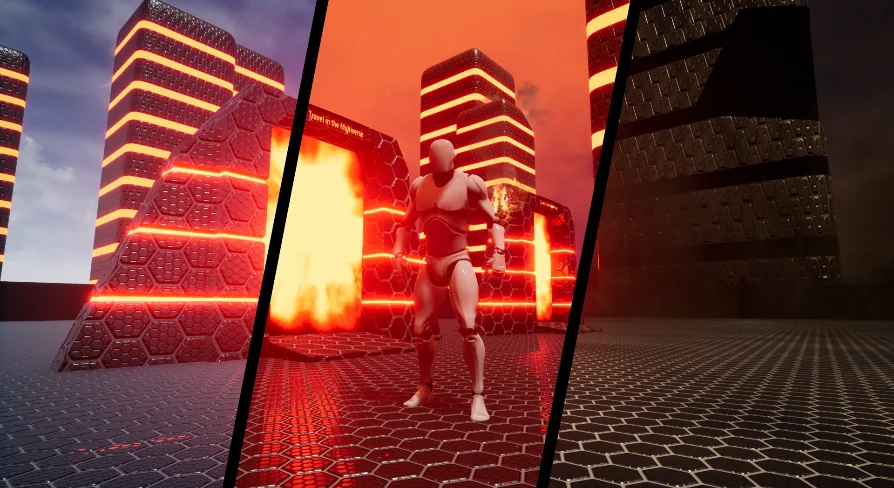
Moving a character between separate dimensions in a multiplayer environment typically forces players to wait through level streams, world transitions, or dedicated loading screens. Multiverse bypasses these barriers by maintaining completely parallel universes at runtime. Instead of unloading one environment to instantiate another, the system preserves both states simultaneously so players can cross between realities instantly.
Replication is central to this architecture. In standard level layouts, players sharing an instance are bound to the same physical simulation. Multiverse splits this paradigm while keeping the network layer fully informed. Both the dedicated server and connected clients remain completely aware of events taking place across every active universe. An action executed in one parallel space is tracked accurately by the server and acknowledged by clients, preserving networked state integrity regardless of which universe an individual player occupies.
Because the network system keeps track of all active spaces concurrently, transitions do not disrupt gameplay flow. Characters enter an alternate realm without losing synchronization with the game session, allowing different players to occupy separate dimensional layers inside the exact same match while still interacting through the centralized network authority.
Instantaneous Universe Travel and Portal Mechanics
Instant transitions change how levels and encounters are structured. Players can step across dimensional boundaries without freezing player movement, displaying loading screens, or dropping network connections. The experience remains continuous, keeping the player inside the action whether they are navigating isolated sub-zones or alternating between two versions of the same game space.
The system pairs these transitions with specialized portal actors, particle effects, and audio components. When a character approaches and crosses a threshold, visual particles and sound cues mark the crossing point, grounding the transition directly in the gameplay space. Because these elements function within the replicated framework, universe boundaries can serve as active multiplayer mechanics—allowing team members to scatter across distinct universes, scout parallel territories, or escape encounters by stepping through a portal.
The handling of universe portals ensures that characters carry their states, movement speeds, and network parameters across the threshold smoothly. This setup supports complex level designs where parallel tracks, mirrored maps, or alternate dimensional puzzles operate at the same time.
Plugin-Free Multiverse Blueprint Implementation
Many complex networking solutions for multi-level handling require third-party engine plugins, custom C++ builds, or external compiled modules. Multiverse avoids external binaries by relying strictly on advanced Blueprint scripting techniques. Operating natively within standard project files simplifies version tracking, reduces engine update conflicts, and removes compilation dependencies.
The system integrates smoothly alongside systems like the Internal Space Manager, utilizing established framework conventions to govern space allocation. Handling universe management through pure scripts ensures that technical designers can open the core graphs, trace replication routes, and adapt logic without writing C++ code.
The workflow has evolved across several iterations, including Update 1.1 and Update 1.2 milestones. Because the logic is held entirely inside Blueprint graphs and script components, projects that adopted early versions can review asset changes directly in the editor, ensuring that updates to parallel level handling or portal mechanics do not interfere with project-specific code.
Networked Replicated Systems and Actor Management
Running concurrent realities in a shared session introduces distinct challenges for actor management. When a character moves between universes, the server must properly route visibility, collisions, and gameplay updates. Multiverse manages this by distinguishing between an actor's presence on the server and their representation to other clients.
Sound cues, particle emitters, and replicated character blueprints are built to operate within these parallel bounds:
Replicated Characters: Player units synchronize their physical positions, universe tags, and states across the network without dropping replication channels.
Spatial Audio: Sound assets trigger according to spatial presence, ensuring audio events play in the appropriate universe without bleeding erroneously into others.
Particle Systems: Dimensional portals and transition thresholds use visual effects to denote active gateways across worlds.
Script Logic: Advanced Blueprint scripts govern entry checks, server authorization, and universe tracking to keep every client instance aligned with the server.
This balance keeps network usage predictable while ensuring that universe-specific actions remain contained to their intended targets.
Implementation Support via Documentation, Tooltips, and In-Graph Comments
Setting up networked level logic can become difficult without proper guidance. Multiverse addresses onboarding by integrating guidance directly into the assets. Nodes, functions, and critical variables within the Blueprint networks feature descriptive tooltips and inline comments, clarifying how universe registration, player shifts, and replication steps execute.
In addition to inline guidance, complete documentation covers the architectural flow of the system, walking developers through core configuration steps. Frequently asked questions address common setup considerations, and dedicated tutorial materials demonstrate how to deploy parallel universes, configure portals, and set up replicated characters from scratch.
By pairing fully native Blueprint structures with detailed documentation, Multiverse allows development teams to build multiplayer titles featuring real-time parallel realities without the overhead of external plugins or custom network code.
 Gameplay Features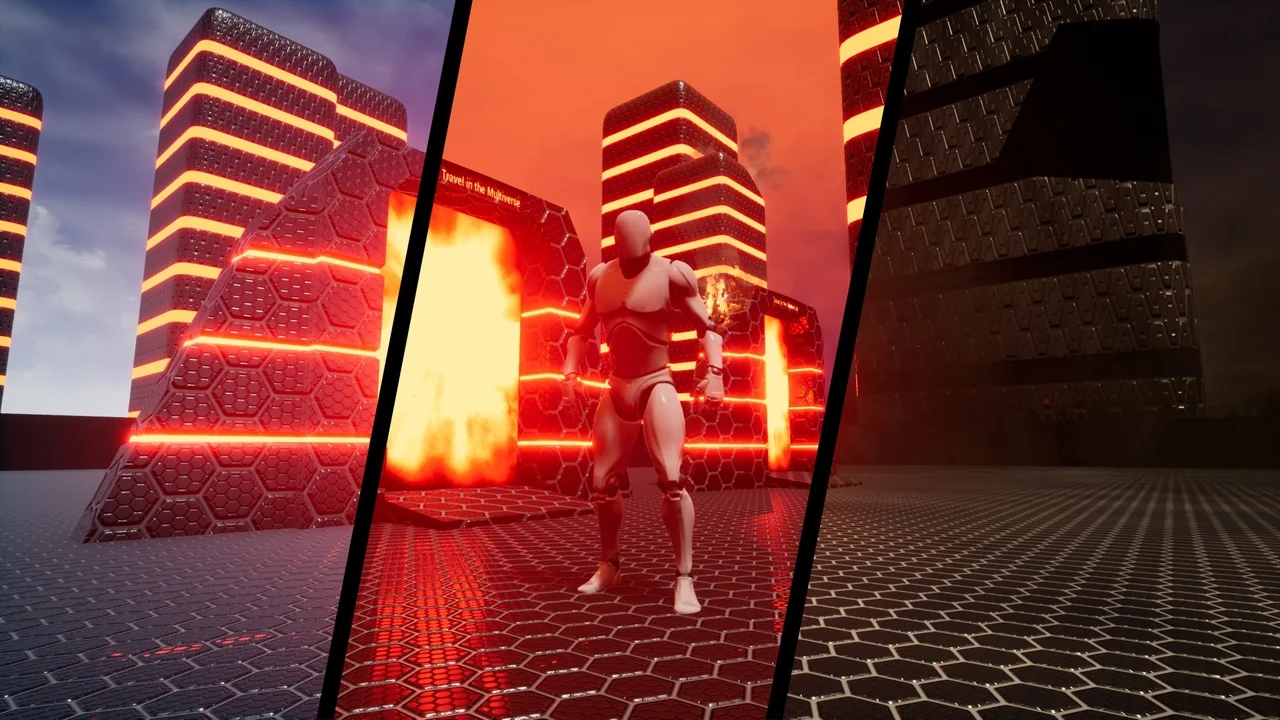
 Gameplay Features
 Gameplay Features
 Gameplay Features