"4481da9c895ef786"{"id":"1001302","slug":"inventory-system","title":"Inventory System","category":"Gameplay Features","engine":"5.2+","assetVersion":"","engineVersion":"Engine Version: 5.2+","tag":"Gameplay Features","accent":"blue","visual":"mech","summary":"Examine the Inventory System featuring single-player and multiplayer support, crafting, typewriter saves, dynamic weapon blueprints, and shop modules.","platform":"Unreal Engine","publishedAt":"2026-10-02T06:05:08.067Z","updatedAt":"2026-10-02T06:05:08.067Z","sourceNotes":[],"fileContents":[],"compatibility":["Unreal Engine","Engine Version: 5.2+"],"featuredImage":{"alt":"Inventory System","src":"/wp-content/uploads/published/2026/10/3bb3f4c53928-ce3f6f81-1040-479c-90a1-7486c3e9f958-2f64db60f3.webp"},"hasDownloadLink":true,"downloads":0,"terms":[{"taxonomy":"category","slug":"gameplay-features","name":"Gameplay Features"}],"galleryImages":[{"src":"/wp-content/uploads/published/2026/10/e313b7cefcfe-c9210cd4-1651-42b0-bc17-31def1c943d9-f4229f318f.webp","alt":"Inventory System"},{"src":"/wp-content/uploads/published/2026/10/ac51d7522798-9faf4699-5308-491b-b905-5effac04e0f0-1841df7ba1.webp","alt":"Inventory System"},{"src":"/wp-content/uploads/published/2026/10/31d77c9f85c3-0fb78c42-6120-4a03-9ac0-c0268e426244-7f613ae52f.webp","alt":"Inventory System"},{"src":"/wp-content/uploads/published/2026/10/edf93522db9d-741abc3e-9f39-4be5-9a87-4c5976d0a89d-732e23811f.webp","alt":"Inventory System"},{"src":"/wp-content/uploads/published/2026/10/6b43528b1e93-d32d4ed0-bf9b-4c94-ad39-d8d1f7a27d6c-1009b540cc.webp","alt":"Inventory System"},{"src":"/wp-content/uploads/published/2026/10/21e9136ebdf6-39e4520a-9d15-4491-bc78-aecae0ac6c2a-b6f4a6a2a9.webp","alt":"Inventory System"},{"src":"/wp-content/uploads/published/2026/10/7d7677deb9a3-2a661103-36b2-4758-b23f-7adc6297dec0-5b36b0b2d6.webp","alt":"Inventory System"},{"src":"/wp-content/uploads/published/2026/10/c7b42c33edd0-ea393d7a-52b0-4cef-93bf-c3a8891c2eb8-c9ac797895.webp","alt":"Inventory System"},{"src":"/wp-content/uploads/published/2026/10/6e033b011bba-0c979685-fee7-47a6-8d3b-5535ea25bad3-e8af7d6b5f.webp","alt":"Inventory System"},{"src":"/wp-content/uploads/published/2026/10/f6662427184f-109b3457-a37e-4996-9250-bc6a77341eeb-587f67c027.webp","alt":"Inventory System"}],"accessPanel":{"kind":"resource","title":"Download this resource","eyebrow":"Free Download","message":"Log in or create a free account to start your download.","fileName":"InteractiveInventory.7z","safetyNote":"Resources are manually reviewed before listing to improve quality and reduce obvious risks.","actionLabel":"Download Free","resourceType":"Resource archive"},"contentHtml":"\u003ch2\u003eCore Inventory Mechanics and Slot Configuration\u003c/h2\u003e\u003cp\u003eThe system supplies a flexible item management grid that can attach to any actor. Inventory grids scale between 8 and 24 slots, with the baseline layout configured so that the maximum default slot count fits neatly onto a single visual screen. Pickup logic automatically gathers objects into the active container, stacking matching items together up to defined stack limits, or routing each item into an isolated individual slot when stacking is turned off.\u003c/p\u003e\u003cp\u003eCapacity expands dynamically through gameplay pickups. Placing backpack items throughout a level gives players a direct path to upgrade their carrying threshold over time. For immediate access during gameplay, four dedicated tactical shortcut slots sit directly within the inventory interface. Switching between panels and inventory tabs is handled via standard keyboard shortcuts, set to Q and E by default, alongside integrated console controller bindings configured to function across platforms immediately.\u003c/p\u003e\u003cp\u003eItems support distinct behavioral pathways based on their class and purpose. Players can inspect, use, drop, equip, unequip, and combine individual elements. Combining pairs together functional items, such as fusing discrete healing herbs or equipping protective body armor pieces directly to the character.\u003c/p\u003e\u003ch2\u003eTypewriter Save Systems and Multiplayer Synchronization\u003c/h2\u003e\u003cp\u003eItem synchronization and menu operations operate across both standalone offline play and dedicated online sessions. The network architecture optimizes bandwidth by adapting operational behaviors according to the match environment. In offline single-player sessions, bringing up the interface permits standard pause menu execution, whereas active networked gameplay restricts background pausing to preserve real-time multiplayer consistency.\u003c/p\u003e\u003cp\u003eGame progress relies on dedicated physical save points modeled after classic Typewriters. Interacting with these save areas records a comprehensive profile of player progression, including active character info, cumulative save counts, the active game mode, current objective markers, geographical area data, and precise save date and time stamps. Developers can duplicate, relocate, or remove these typewriter nodes freely across levels. Client-side interaction updates ensure that player actors locally disappear from visual obstruction when opening shops, accessing typewriters, or searching localized storage boxes.\u003c/p\u003e\u003ch2\u003eWeapon Blueprint Features and Dynamic Combat Tuning\u003c/h2\u003e\u003cp\u003eCombat integration links inventory states directly to dynamic weapon handling routines. The weapon framework segregates firearms into categorized templates, including handguns, rifles, and dedicated shotguns. Weapon logic tracks variables such as bullet spread radius and specific shotgun pellet counts, pairing them with individual per-bullet shell reload sequences and bolt-action firing steps. Projectiles spawn into the world with physics calculations and apply variable damage on physical surface impact.\u003c/p\u003e\u003cp\u003eWeapon feedback utilizes custom editable curves to govern handling physics. Developers can tune weapon sway values and mechanical gun kick rates across individual curves rather than relying on rigid static animations. Accuracy is visualized through an adaptive dynamic crosshair that expands or contracts; larger scales directly signify increased bullet spread, while an integrated focus mechanic tightens shot groups. Automatic reloading triggers the moment ammunition counts hit zero, while weapon swapping logic prevents client-side equip spamming and eliminates weapon lock states during reload transitions.\u003c/p\u003e\u003ch2\u003eMarketplace Economy, Crafting Combinations, and Storage Boxes\u003c/h2\u003e\u003cp\u003eThe marketplace module creates designated trading posts where players buy, sell, and upgrade gear against an active currency tally. Store listings automatically sort wares into distinct classifications: handguns, long rifles, body armor, healing provisions, and miscellaneous items. Every category can be added, deleted, or retitled within the interface. Price figures and upgrade scaling can be configured per item, backed by dedicated server support that keeps upgrade transactions synchronized across online participants.\u003c/p\u003e\u003cp\u003eItem fabrication operates alongside trade. A flexible crafting system pairs existing components into higher-tier resources or medical blends according to adjustable crafting recipes. For surplus logistics, universal storage boxes can be scattered throughout a map. Items stored in one unit can be retrieved across other connected containers, with custom positional placement and adjustable storage capacities defined on the actor.\u003c/p\u003e\u003cp\u003eWhen detailed review is required, a full 3D inspection mode gives players absolute visual control over target assets. The inspection interface permits complete multi-axis rotation, flipping, and magnification zooming of the object model, displayed beside context-sensitive lore headers and localized descriptions.\u003c/p\u003e\u003ch2\u003eDocument Management, Animated HUDs, and Material-Based Maps\u003c/h2\u003e\u003cp\u003eThe integrated document reader facilitates environmental narrative through collected notes, files, and physical paperwork. Hovering the cursor over an acquired document opens preview headers alongside specific discovery metadata, documenting the exact physical area where the page was retrieved.\u003c/p\u003e\u003cp\u003eNavigation relies on an in-menu floor map showing landmarks, navigation markers, and points of interest. Rather than using performance-heavy real-time scene capture actors, the map rendering runs entirely on a lightweight UI material to minimize performance overhead. The interface is supplemented by a series of animated UI widgets with distinct visual entry, exit, and hover states. Contextual popups communicate inventory overflow states, equipment changes, purchase confirmations, and crafting notifications, while a persistent HUD actively monitors equipped armaments, real-time ammunition reserves, protective armor integrity, and current player health values.\u003c/p\u003e\n\n\u003ch2\u003eMore From The Same Workflow\u003c/h2\u003e\n\u003cul\u003e\n\u003cli\u003e\u003ca href=\"https://3dcghub.com/the-flashlight-toolkit/\" title=\"The Flashlight Toolkit\"\u003eThe Flashlight Toolkit\u003c/a\u003e\u003c/li\u003e\n\u003cli\u003e\u003ca href=\"https://3dcghub.com/advanced-grid-inventory-system/\" title=\"Advanced Grid Inventory System\"\u003eAdvanced Grid Inventory System\u003c/a\u003e\u003c/li\u003e\n\u003cli\u003e\u003ca href=\"https://3dcghub.com/inventory-system-pro/\" title=\"Inventory System Pro\"\u003eInventory System Pro\u003c/a\u003e\u003c/li\u003e\n\u003cli\u003e\u003ca href=\"https://3dcghub.com/gasp-basic-template-for-fps-with-spatial-inventory/\" title=\"GASP: Basic Template for FPS with Spatial Inventory\"\u003eGASP: Basic Template for FPS with Spatial Inventory\u003c/a\u003e\u003c/li\u003e\n\u003cli\u003e\u003ca href=\"https://3dcghub.com/modular-gameplay-blueprint-systems/\" title=\"Modular Gameplay Blueprint Systems\"\u003eModular Gameplay Blueprint Systems\u003c/a\u003e\u003c/li\u003e\n\u003c/ul\u003e","contentTextLength":6160,"navigation":{"current":35,"total":3269,"previous":{"id":"1001304","slug":"newtonian-falling-and-momentum-damage-system","title":"Newtonian Falling and Momentum Damage System","category":"Gameplay Features","platform":"Unreal Engine","updatedAt":"2026-10-02T06:19:02.535Z"},"next":{"id":"1001300","slug":"hyper-attribute-manager-v4","title":"Hyper Attribute Manager v4","category":"Gameplay Features","platform":"Unreal Engine","updatedAt":"2026-10-02T06:02:21.105Z"}},"relatedResources":[{"id":"11162","slug":"the-flashlight-toolkit","title":"The Flashlight Toolkit","category":"Gameplay Features","engine":"5.2+","assetVersion":"Engine version: 5.2+","engineVersion":"4.27","tag":"Gameplay Features","accent":"blue","visual":"mech","summary":"Add professional lighting mechanics to your project in minutes with this beginner-friendly system. It features net replication, an inventory manager, and full blueprint support.","platform":"Unreal Engine","publishedAt":"2026-03-03T17:02:40.000Z","updatedAt":"2026-04-19T15:48:15.000Z","sourceNotes":[],"fileContents":[],"compatibility":["Unreal Engine","Engine version: 5.2+"],"featuredImage":{"alt":"The Flashlight Toolkit","src":"https://3dcghub.com/wp-content/uploads/2026/03/2118b25e-a01e-49b5-b831-66eb5803d44a.webp"},"hasDownloadLink":true,"downloads":0},{"id":"1001297","slug":"advanced-grid-inventory-system","title":"Advanced Grid Inventory System","category":"Gameplay Features","engine":"5.3+","assetVersion":"","engineVersion":"Engine Version: 5.3+","tag":"Gameplay Features","accent":"blue","visual":"mech","summary":"Explore the Advanced Grid Inventory System, featuring replicated online Blueprint architecture, AGIS_Concepts documentation, and thumbnail generator support.","platform":"Unreal Engine","publishedAt":"2026-10-02T05:59:13.116Z","updatedAt":"2026-10-02T05:59:13.116Z","sourceNotes":[],"fileContents":[],"compatibility":["Unreal Engine","Engine Version: 5.3+"],"featuredImage":{"alt":"Advanced Grid Inventory System","src":"/wp-content/uploads/published/2026/10/bcf827f64dee-dfe1d14a-861c-486b-b4dd-df1ea83de3a7-865c48df7f.webp"},"hasDownloadLink":true,"downloads":0},{"id":"1000843","slug":"inventory-system-pro","title":"Inventory System Pro","category":"Gameplay Features","engine":"5.3+","assetVersion":"","engineVersion":"Engine Version: 5.3+","tag":"Gameplay Features","accent":"blue","visual":"mech","summary":"Blueprint-based inventory system with containers, items, currency, password locks, pickups, placement, attributes, save and load, debug, and full gamepad suppor","platform":"Unreal Engine","publishedAt":"2026-08-04T07:04:21.447Z","updatedAt":"2026-08-04T07:04:21.447Z","sourceNotes":[],"fileContents":[],"compatibility":["Unreal Engine","Engine Version: 5.3+"],"featuredImage":{"alt":"Inventory System Pro","src":"/wp-content/uploads/published/2026/08/0272982d06f7-73374eb4-ee1a-45be-8136-70fe8fcd8780-540b7cdf52.webp"},"hasDownloadLink":true,"downloads":1}]}
Gameplay Features
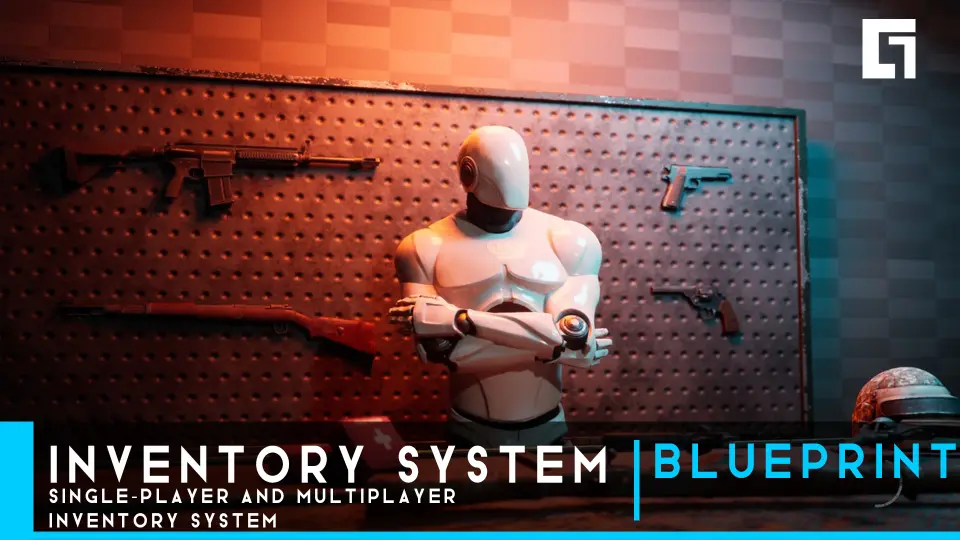
Inventory System
Examine the Inventory System featuring single-player and multiplayer support, crafting, typewriter saves, dynamic weapon blueprints, and shop modules.
The system supplies a flexible item management grid that can attach to any actor. Inventory grids scale between 8 and 24 slots, with the baseline layout configured so that the maximum default slot count fits neatly onto a single visual screen. Pickup logic automatically gathers objects into the active container, stacking matching items together up to defined stack limits, or routing each item into an isolated individual slot when stacking is turned off.
Capacity expands dynamically through gameplay pickups. Placing backpack items throughout a level gives players a direct path to upgrade their carrying threshold over time. For immediate access during gameplay, four dedicated tactical shortcut slots sit directly within the inventory interface. Switching between panels and inventory tabs is handled via standard keyboard shortcuts, set to Q and E by default, alongside integrated console controller bindings configured to function across platforms immediately.
Items support distinct behavioral pathways based on their class and purpose. Players can inspect, use, drop, equip, unequip, and combine individual elements. Combining pairs together functional items, such as fusing discrete healing herbs or equipping protective body armor pieces directly to the character.
Typewriter Save Systems and Multiplayer Synchronization
Item synchronization and menu operations operate across both standalone offline play and dedicated online sessions. The network architecture optimizes bandwidth by adapting operational behaviors according to the match environment. In offline single-player sessions, bringing up the interface permits standard pause menu execution, whereas active networked gameplay restricts background pausing to preserve real-time multiplayer consistency.
Game progress relies on dedicated physical save points modeled after classic Typewriters. Interacting with these save areas records a comprehensive profile of player progression, including active character info, cumulative save counts, the active game mode, current objective markers, geographical area data, and precise save date and time stamps. Developers can duplicate, relocate, or remove these typewriter nodes freely across levels. Client-side interaction updates ensure that player actors locally disappear from visual obstruction when opening shops, accessing typewriters, or searching localized storage boxes.
Weapon Blueprint Features and Dynamic Combat Tuning
Combat integration links inventory states directly to dynamic weapon handling routines. The weapon framework segregates firearms into categorized templates, including handguns, rifles, and dedicated shotguns. Weapon logic tracks variables such as bullet spread radius and specific shotgun pellet counts, pairing them with individual per-bullet shell reload sequences and bolt-action firing steps. Projectiles spawn into the world with physics calculations and apply variable damage on physical surface impact.
Weapon feedback utilizes custom editable curves to govern handling physics. Developers can tune weapon sway values and mechanical gun kick rates across individual curves rather than relying on rigid static animations. Accuracy is visualized through an adaptive dynamic crosshair that expands or contracts; larger scales directly signify increased bullet spread, while an integrated focus mechanic tightens shot groups. Automatic reloading triggers the moment ammunition counts hit zero, while weapon swapping logic prevents client-side equip spamming and eliminates weapon lock states during reload transitions.
Marketplace Economy, Crafting Combinations, and Storage Boxes
The marketplace module creates designated trading posts where players buy, sell, and upgrade gear against an active currency tally. Store listings automatically sort wares into distinct classifications: handguns, long rifles, body armor, healing provisions, and miscellaneous items. Every category can be added, deleted, or retitled within the interface. Price figures and upgrade scaling can be configured per item, backed by dedicated server support that keeps upgrade transactions synchronized across online participants.
Item fabrication operates alongside trade. A flexible crafting system pairs existing components into higher-tier resources or medical blends according to adjustable crafting recipes. For surplus logistics, universal storage boxes can be scattered throughout a map. Items stored in one unit can be retrieved across other connected containers, with custom positional placement and adjustable storage capacities defined on the actor.
When detailed review is required, a full 3D inspection mode gives players absolute visual control over target assets. The inspection interface permits complete multi-axis rotation, flipping, and magnification zooming of the object model, displayed beside context-sensitive lore headers and localized descriptions.
Document Management, Animated HUDs, and Material-Based Maps
The integrated document reader facilitates environmental narrative through collected notes, files, and physical paperwork. Hovering the cursor over an acquired document opens preview headers alongside specific discovery metadata, documenting the exact physical area where the page was retrieved.
Navigation relies on an in-menu floor map showing landmarks, navigation markers, and points of interest. Rather than using performance-heavy real-time scene capture actors, the map rendering runs entirely on a lightweight UI material to minimize performance overhead. The interface is supplemented by a series of animated UI widgets with distinct visual entry, exit, and hover states. Contextual popups communicate inventory overflow states, equipment changes, purchase confirmations, and crafting notifications, while a persistent HUD actively monitors equipped armaments, real-time ammunition reserves, protective armor integrity, and current player health values.
 Gameplay Features
 Gameplay Features
 Gameplay Features
 Gameplay Features