"0341a2901a4ae9aa"{"id":"11162","slug":"the-flashlight-toolkit","title":"The Flashlight Toolkit","category":"Gameplay Features","engine":"5.2+","assetVersion":"Engine version: 5.2+","engineVersion":"4.27","tag":"Gameplay Features","accent":"blue","visual":"mech","summary":"Add professional lighting mechanics to your project in minutes with this beginner-friendly system. It features net replication, an inventory manager, and full blueprint support.","platform":"Unreal Engine","publishedAt":"2026-03-03T17:02:40.000Z","updatedAt":"2026-04-19T15:48:15.000Z","sourceNotes":[],"fileContents":[],"compatibility":["Unreal Engine","Engine version: 5.2+"],"featuredImage":{"alt":"The Flashlight Toolkit","src":"https://3dcghub.com/wp-content/uploads/2026/03/2118b25e-a01e-49b5-b831-66eb5803d44a.webp"},"hasDownloadLink":true,"downloads":0,"terms":[{"taxonomy":"category","slug":"gameplay-features","name":"Gameplay Features"},{"taxonomy":"post_tag","slug":"als-compatibility","name":"ALS Compatibility"},{"taxonomy":"post_tag","slug":"blueprint-toolkit","name":"Blueprint Toolkit"},{"taxonomy":"post_tag","slug":"metahuman-lighting","name":"Metahuman Lighting"},{"taxonomy":"post_tag","slug":"multiplayer-flashlight","name":"Multiplayer Flashlight"},{"taxonomy":"post_tag","slug":"the-flashlight-toolkit","name":"The Flashlight Toolkit"}],"galleryImages":[{"src":"https://3dcghub.com/wp-content/uploads/2026/03/5ad90320c5d0_0e723323-62fe-4c69-8cea-2194b09c548a-1.webp","alt":"The Flashlight Toolkit"},{"src":"https://3dcghub.com/wp-content/uploads/2026/03/c835373b9a48_c755ad14-ee71-4995-ba80-84519e79f9c5-1.webp","alt":"The Flashlight Toolkit"},{"src":"https://3dcghub.com/wp-content/uploads/2026/03/2657d7a45f9c_50944955-f350-42cc-a79f-ba450b648039-1.webp","alt":"The Flashlight Toolkit"},{"src":"https://3dcghub.com/wp-content/uploads/2026/03/596931280e3d_aba9fd43-2688-4d37-adcc-824f923e2163-1.webp","alt":"The Flashlight Toolkit"},{"src":"https://3dcghub.com/wp-content/uploads/2026/03/8a9aaf859644_40cf33d5-9082-4605-9daf-15e0fc1858a0-1.webp","alt":"The Flashlight Toolkit"},{"src":"https://3dcghub.com/wp-content/uploads/2026/03/8577d41f01a0_46bc91d6-33c1-4526-9cc4-88c546ae6b21-1.webp","alt":"The Flashlight Toolkit"},{"src":"https://3dcghub.com/wp-content/uploads/2026/03/4f672ebcdb59_b5dcd2bf-63dc-48ca-aa08-881ef2073db5-1.webp","alt":"The Flashlight Toolkit"},{"src":"https://3dcghub.com/wp-content/uploads/2026/03/26ff7705e6d9_d2273152-2d26-4044-82e8-acd2333b572d-1.webp","alt":"The Flashlight Toolkit"},{"src":"https://3dcghub.com/wp-content/uploads/2026/03/d714d979b4db_f2b42e3f-864b-4994-a3c2-6eb9237ff83d-1.webp","alt":"The Flashlight Toolkit"}],"accessPanel":{"kind":"resource","title":"Access this resource","eyebrow":"Free Download","message":"Log in or create a free account to start your download.","fileName":"Content.7z","safetyNote":"All resources are 100% manually reviewed to eliminate all risks.","actionLabel":"Download Free","resourceType":"Resource archive"},"contentHtml":"\u003ch2\u003eIntroduction to The Flashlight Toolkit\u003c/h2\u003e\n\u003cp\u003eThe Flashlight Toolkit offers a streamlined solution for developers looking to add lighting mechanics to their projects. This system is specifically designed to be beginner-friendly. Consequently, users can integrate it into their characters and blueprints in under five minutes. Because it is entirely made in blueprints, it offers a visual approach to logic. Furthermore, the toolkit is fully documented to ensure a smooth setup process for all users.\u003c/p\u003e\n\n\u003ch2\u003eSeamless Integration and Customization\u003c/h2\u003e\n\u003cp\u003eOne of the primary benefits of this system is its ease of use. You can give any blueprint actor the ability to use a flashlight or a lantern. Moreover, the toolkit is designed so you can customize it to fit your unique game style. Consequently, it is an adaptable choice for various genres. In addition, the system is highly efficient for those who need to set up lighting quickly.\u003c/p\u003e\n\n\u003cp\u003eThe developer has focused on making the toolkit versatile for different visual needs. Whether your project requires a modern flashlight or a classic lantern, the system can handle it. Therefore, you have the creative freedom to adjust the lighting to match your environment. Specifically, you can modify the settings to ensure the light fits the mood of your game perfectly.\u003c/p\u003e\n\n\u003ch2\u003eAdvanced Features and Multiplayer Support\u003c/h2\u003e\n\u003cp\u003eThe Flashlight Toolkit has received significant updates to improve its functionality. For instance, Update 1.1 introduced Net Replication to the system. This feature is essential for developers creating multiplayer experiences where lighting must be synchronized. Additionally, Update 2.0 added a Flashlight Manager Inventory System. This allows for better organization and control over lighting assets during gameplay.\u003c/p\u003e\n\n\u003cp\u003eJust as importantly, Update 2.0 makes it easier to expand your lighting options. You can now add new custom flashlights with just a few clicks. This streamlined process saves time during the development cycle. Consequently, you can focus more on gameplay and less on technical setup. The toolkit remains a powerful solution for those needing a reliable lighting framework.\u003c/p\u003e\n\n\u003ch2\u003eCompatibility with High-End Frameworks\u003c/h2\u003e\n\u003cp\u003eCompatibility is a major highlight of this toolkit. It is designed to work seamlessly with ALS, Metahuman, and Echo. Therefore, it is suitable for projects using advanced character systems. In addition, the developer has ensured that the toolkit remains stable across these different frameworks. This makes it a flexible choice for modern character-driven games.\u003c/p\u003e\n\n\u003cp\u003eThe integration with Metahuman and Echo shows the toolkit's readiness for high-fidelity assets. However, it still maintains its beginner-friendly nature throughout. This balance between advanced compatibility and simplicity is a key advantage. As a result, both novice and experienced developers can benefit from using this system.\u003c/p\u003e\n\n\u003ch2\u003eBest Fit\u003c/h2\u003e\n\u003cp\u003eThe clearest takeaway is that The Flashlight Toolkit provides an all-in-one solution for blueprint-based lighting. It offers quick integration, multiplayer support, and extensive customization options. Because it is fully documented and compatible with systems like ALS and Metahuman, it is a versatile asset. Therefore, it is an excellent choice for any developer looking to enhance their project's lighting mechanics efficiently.\u003c/p\u003e\n\n\u003ch2\u003eRelated Resources Worth Checking\u003c/h2\u003e\n\u003cul\u003e\n\u003cli\u003e\u003ca href=\"https://3dcghub.com/path-tracer-toolkit/\" title=\"Path Tracer Toolkit\"\u003ePath Tracer Toolkit\u003c/a\u003e\u003c/li\u003e\n\u003cli\u003e\u003ca href=\"https://3dcghub.com/modular-gameplay-blueprint-systems/\" title=\"Modular Gameplay Blueprint Systems\"\u003eModular Gameplay Blueprint Systems\u003c/a\u003e\u003c/li\u003e\n\u003cli\u003e\u003ca href=\"https://3dcghub.com/medieval-rpg-toolkit-foley-fx/\" title=\"Medieval RPG Toolkit – Foley FX\"\u003eMedieval RPG Toolkit – Foley FX\u003c/a\u003e\u003c/li\u003e\n\u003cli\u003e\u003ca href=\"https://3dcghub.com/smart-cable-connector/\" title=\"Smart Cable Connector\"\u003eSmart Cable Connector\u003c/a\u003e\u003c/li\u003e\n\u003cli\u003e\u003ca href=\"https://3dcghub.com/sci-fi-screen-constructor/\" title=\"Sci-Fi Screen Constructor\"\u003eSci-Fi Screen Constructor\u003c/a\u003e\u003c/li\u003e\n\u003c/ul\u003e","contentTextLength":3502,"navigation":{"current":3199,"total":4017,"previous":{"id":"11169","slug":"traffic-control-system","title":"Traffic Control System","category":"Gameplay Features","platform":"Unreal Engine","updatedAt":"2026-04-19T15:48:15.000Z"},"next":{"id":"11138","slug":"story-framework-5-2-interactive-template","title":"Story Framework 5.2 - Interactive Template","category":"Gameplay Features","platform":"Unreal Engine","updatedAt":"2026-04-19T15:48:15.000Z"}},"relatedResources":[{"id":"1000980","slug":"basic-locomotion-system-replicated","title":"Basic Locomotion System (REPLICATED)","category":"Gameplay Features","engine":"5.0+","assetVersion":"","engineVersion":"Engine Version: 5.0+","tag":"Gameplay Features","accent":"blue","visual":"animation","summary":"A ground-up locomotion system for the UE5 Skeleton using Lyra animations, built as a simple third-person template with MetaHuman integration and multiplayer inv","platform":"Unreal Engine","publishedAt":"2026-08-18T05:57:51.717Z","updatedAt":"2026-08-18T05:57:51.717Z","sourceNotes":[],"fileContents":[],"compatibility":["Unreal Engine","Engine Version: 5.0+"],"featuredImage":{"alt":"Basic Locomotion System (REPLICATED)","src":"/wp-content/uploads/published/2026/08/497370037da8-24315aeb-c8a9-4077-aa37-d1119fdcf17d-0970e54182.webp"},"hasDownloadLink":true,"downloads":4},{"id":"1000238","slug":"mgt-multiplayer-gravity-template","title":"MGT Multiplayer Gravity Template","category":"Gameplay Features","engine":"5.3+","assetVersion":"","engineVersion":"Engine Version: 5.3+","tag":"Gameplay Features","accent":"blue","visual":"mech","summary":"A dynamic gravity system for Unreal Engine utilizing the native character movement component to support full multiplayer replication for players, objects, and A","platform":"Unreal Engine","publishedAt":"2026-06-30T18:11:03.499Z","updatedAt":"2026-06-30T18:11:03.499Z","sourceNotes":[],"fileContents":[],"compatibility":["Unreal Engine","Engine Version: 5.3+"],"featuredImage":{"alt":"MGT Multiplayer Gravity Template","src":"/wp-content/uploads/published/2026/06/3e9b12a8f9cc-951e39e8-6c7b-4772-975c-e63141c701c5-5cf67fa1da.webp"},"hasDownloadLink":true,"downloads":0},{"id":"27803","slug":"true-fighting-game-engine","title":"TRUE Fighting Game Engine","category":"Gameplay Features","engine":"5.5+","assetVersion":"Engine version: 5.5+","engineVersion":"Asset Version:1.6.2","tag":"Gameplay Features","accent":"blue","visual":"animation","summary":"TRUE Fighting Game Engine focuses on getting a fighting game scene moving quickly, from character selection to attacks, hit reactions, and multiplayer play. Its feature set covers both setup work and the moment-to-moment feel of combat, with support for 2.5...","platform":"Unreal Engine","publishedAt":"2026-04-29T06:07:36.000Z","updatedAt":"2026-04-29T06:07:37.000Z","sourceNotes":[],"fileContents":[],"compatibility":["Unreal Engine","Engine version: 5.5+","Asset Version: 1.6.2"],"featuredImage":{"alt":"TRUE Fighting Game Engine","src":"https://3dcghub.com/wp-content/uploads/2026/04/bd8f97d07537_6587df2c-727a-45b1-892a-3f3ed68e341b.webp"},"hasDownloadLink":true,"downloads":2}]}
Gameplay Features
The Flashlight Toolkit
Add professional lighting mechanics to your project in minutes with this beginner-friendly system. It features net replication, an inventory manager, and full blueprint support.
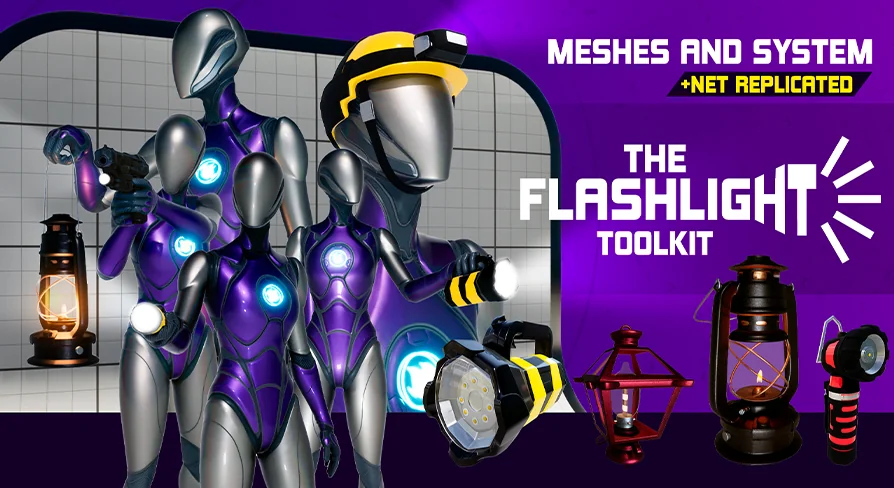
The Flashlight Toolkit offers a streamlined solution for developers looking to add lighting mechanics to their projects. This system is specifically designed to be beginner-friendly. Consequently, users can integrate it into their characters and blueprints in under five minutes. Because it is entirely made in blueprints, it offers a visual approach to logic. Furthermore, the toolkit is fully documented to ensure a smooth setup process for all users.
Seamless Integration and Customization
One of the primary benefits of this system is its ease of use. You can give any blueprint actor the ability to use a flashlight or a lantern. Moreover, the toolkit is designed so you can customize it to fit your unique game style. Consequently, it is an adaptable choice for various genres. In addition, the system is highly efficient for those who need to set up lighting quickly.
The developer has focused on making the toolkit versatile for different visual needs. Whether your project requires a modern flashlight or a classic lantern, the system can handle it. Therefore, you have the creative freedom to adjust the lighting to match your environment. Specifically, you can modify the settings to ensure the light fits the mood of your game perfectly.
Advanced Features and Multiplayer Support
The Flashlight Toolkit has received significant updates to improve its functionality. For instance, Update 1.1 introduced Net Replication to the system. This feature is essential for developers creating multiplayer experiences where lighting must be synchronized. Additionally, Update 2.0 added a Flashlight Manager Inventory System. This allows for better organization and control over lighting assets during gameplay.
Just as importantly, Update 2.0 makes it easier to expand your lighting options. You can now add new custom flashlights with just a few clicks. This streamlined process saves time during the development cycle. Consequently, you can focus more on gameplay and less on technical setup. The toolkit remains a powerful solution for those needing a reliable lighting framework.
Compatibility with High-End Frameworks
Compatibility is a major highlight of this toolkit. It is designed to work seamlessly with ALS, Metahuman, and Echo. Therefore, it is suitable for projects using advanced character systems. In addition, the developer has ensured that the toolkit remains stable across these different frameworks. This makes it a flexible choice for modern character-driven games.
The integration with Metahuman and Echo shows the toolkit's readiness for high-fidelity assets. However, it still maintains its beginner-friendly nature throughout. This balance between advanced compatibility and simplicity is a key advantage. As a result, both novice and experienced developers can benefit from using this system.
Best Fit
The clearest takeaway is that The Flashlight Toolkit provides an all-in-one solution for blueprint-based lighting. It offers quick integration, multiplayer support, and extensive customization options. Because it is fully documented and compatible with systems like ALS and Metahuman, it is a versatile asset. Therefore, it is an excellent choice for any developer looking to enhance their project's lighting mechanics efficiently.
 Gameplay Features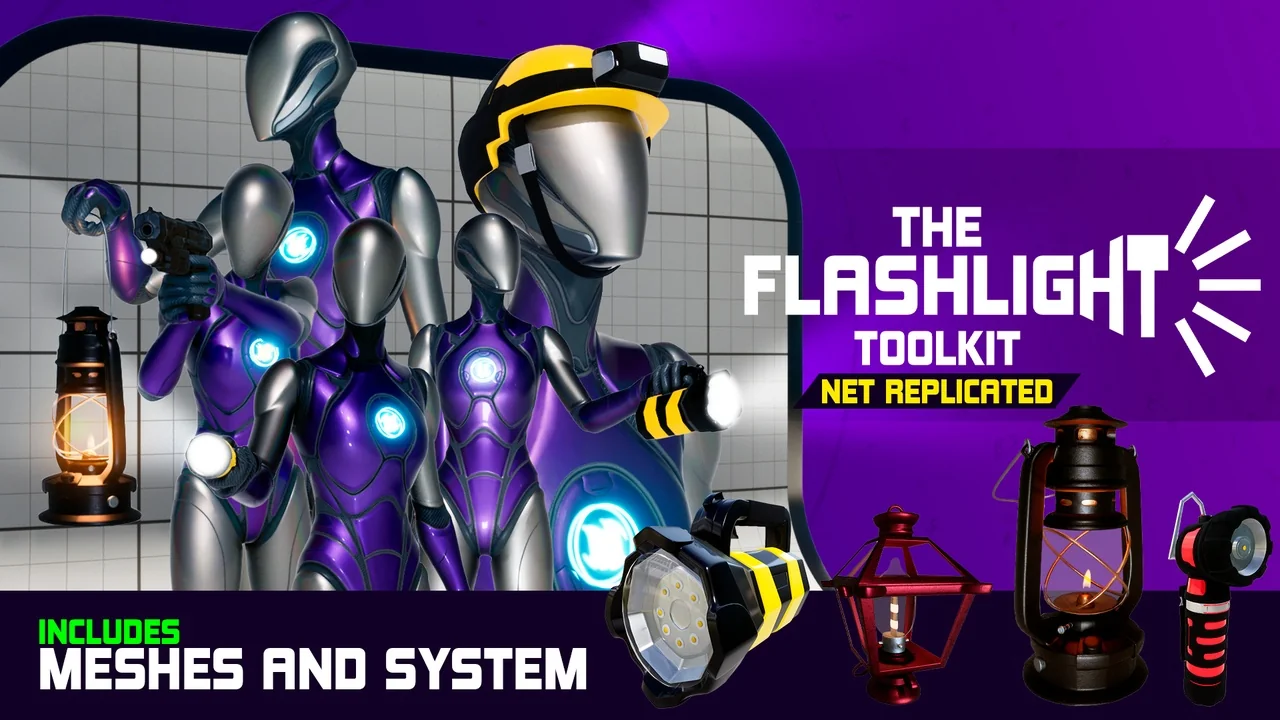
 Gameplay Features
 Gameplay Features
 Gameplay Features