"6f9bd6df1f44a86f"{"id":"1000843","slug":"inventory-system-pro","title":"Inventory System Pro","category":"Gameplay Features","engine":"5.3+","assetVersion":"","engineVersion":"Engine Version: 5.3+","tag":"Gameplay Features","accent":"blue","visual":"mech","summary":"Blueprint-based inventory system with containers, items, currency, password locks, pickups, placement, attributes, save and load, debug, and full gamepad suppor","platform":"Unreal Engine","indexPolicy":"index","publishedAt":"2026-08-04T07:04:21.447Z","updatedAt":"2026-08-04T07:04:21.447Z","sourceNotes":[],"fileContents":[],"compatibility":["Unreal Engine","Engine Version: 5.3+"],"featuredImage":{"alt":"Inventory System Pro","src":"/wp-content/uploads/published/2026/08/0272982d06f7-73374eb4-ee1a-45be-8136-70fe8fcd8780-540b7cdf52.webp"},"hasDownloadLink":true,"downloads":1,"terms":[{"taxonomy":"category","slug":"gameplay-features","name":"Gameplay Features"}],"galleryImages":[{"src":"/wp-content/uploads/published/2026/08/7a0c6936b47d-a52e9b14-a5a2-4c5c-a543-0ffff3f4b9cc-32fd7dec85.webp","alt":"Inventory System Pro"},{"src":"/wp-content/uploads/published/2026/08/aa5048355e71-aa99ffa5-1854-4de7-b883-bc59da099f07-51c75c50fe.webp","alt":"Inventory System Pro"},{"src":"/wp-content/uploads/published/2026/08/927dfb5cfb89-c63708e6-a5a1-4768-a172-9eae0b983651-36726d60e9.webp","alt":"Inventory System Pro"},{"src":"/wp-content/uploads/published/2026/08/51ba61059752-39235d76-d209-4d31-b04c-b8dad527994b-82e9cdcda7.webp","alt":"Inventory System Pro"},{"src":"/wp-content/uploads/published/2026/08/930bb9157ff4-811a6a14-3043-4965-bfc2-c55e0feca88d-aa95f85534.webp","alt":"Inventory System Pro"},{"src":"/wp-content/uploads/published/2026/08/9558a22ea9c9-5d379973-087a-45f8-8eeb-bc6982cc5767-d0437991af.webp","alt":"Inventory System Pro"},{"src":"/wp-content/uploads/published/2026/08/49e49759826a-ce779e98-c9d7-4490-ba28-af7cc57044e0-97bab3b1e1.webp","alt":"Inventory System Pro"},{"src":"/wp-content/uploads/published/2026/08/3d1c4987eadb-791c4317-7645-437e-a4d2-7e8caee3e425-9358725a87.webp","alt":"Inventory System Pro"}],"accessPanel":{"kind":"resource","title":"Download this resource","eyebrow":"Free Download","message":"Log in or create a free account to start your download.","fileName":"InventorySystemPro.7z","safetyNote":"Resources are manually reviewed before listing to improve quality and reduce obvious risks.","actionLabel":"Download Free","resourceType":"Resource archive"},"contentHtml":"\u003ch2\u003eCore Inventory and Container Modules\u003c/h2\u003e\n\n\u003cp\u003e\u003cem\u003eInventory System Pro\u003c/em\u003e assembles a set of fundamental gameplay modules into 1 cohesive package. The center of the framework holds inventories and containers, supported by items, currency, a Password Lock mechanism, Pickups, Widgets, a Placement System, an Attribute System, a Save and Load System, and a Debug System. Each of these modules works against the others, so building gameplay around stored items, transferable currency, and locked access points can be done within the same structure.\u003c/p\u003e\n\n\u003cp\u003eEvery part of the system was done with Blueprints. Those Blueprints have been commented and properly arranged, which keeps the logic legible when teams need to read through how an action is wired or when individual developers want to follow the flow from input to outcome. Because Blueprint logic sits at the center, extending behavior or adjusting feedback remains a visual task inside the editor rather than one requiring custom code compilation.\u003c/p\u003e\n\n\u003ch2\u003eItem Operations a Player Can Perform\u003c/h2\u003e\n\n\u003cp\u003eThe system exposes a wide action set for handling items and currency. A player can \u003ccode\u003ePick\u003c/code\u003e, \u003ccode\u003eAdd\u003c/code\u003e, \u003ccode\u003eInsert\u003c/code\u003e, \u003ccode\u003eTake\u003c/code\u003e, \u003ccode\u003eDeposit\u003c/code\u003e, \u003ccode\u003eSplit\u003c/code\u003e, \u003ccode\u003eCollect\u003c/code\u003e, \u003ccode\u003eMove\u003c/code\u003e, \u003ccode\u003eDrag-and-Drop\u003c/code\u003e, \u003ccode\u003eStack\u003c/code\u003e, \u003ccode\u003eFill\u003c/code\u003e, \u003ccode\u003eRestock\u003c/code\u003e, \u003ccode\u003eSort\u003c/code\u003e, \u003ccode\u003eRemove\u003c/code\u003e, \u003ccode\u003eDrop\u003c/code\u003e, and \u003ccode\u003eRandomize\u003c/code\u003e items or coins.\u003c/p\u003e\n\n\u003cp\u003eThat spread of operations covers both immediate field behavior and behind-the-scenes inventory management. Splitting and stacking allow quantity control inside slots. Fill and restock push items toward capacity limits. Sort brings order to cluttered storage. Drag-and-drop supports direct player interaction with the User Interface (UI), while take, deposit, collect, and remove handle transfers between containers and other Actors. Random options also exist, which opens up scenarios where loot or rewards need variability built into the flow.\u003c/p\u003e\n\n\u003cp\u003eCoins are handled on the same footing as physical items. A player can drop coins, collect them, or deposit them depending on the container or context in play.\u003c/p\u003e\n\n\u003ch2\u003eWidget Layout, Animations, and Input Hints\u003c/h2\u003e\n\n\u003cp\u003eThe Widget layer is structured to remain clear and expressive. The interface layout has been organized so that each element has a defined place, and the Widgets carry animations that communicate state changes, feedback, and transitions.\u003c/p\u003e\n\n\u003cp\u003eAn Input Hints System runs alongside the interface. It contains Widgets for input keys and refreshes dynamically. When the available actions change, the displayed hints update so the visible prompts match what the player can actually do at that moment in the flow.\u003c/p\u003e\n\n\u003ch2\u003ePlacement System for Rotating and Placing Items\u003c/h2\u003e\n\n\u003cp\u003eBeyond storage management, the framework includes a Placement System. It allows players to rotate and place items in the world, turning the inventory into an active tool for building or arranging rather than a passive communing screen.\u003c/p\u003e\n\n\u003cp\u003eThat placement logic ties into the wider item data the framework already tracks. An item held in a container can be taken out and positioned in the environment, with rotation control giving the player command over orientation before committing to a placement.\u003c/p\u003e\n\n\u003ch2\u003ePassword Lock and Attribute System\u003c/h2\u003e\n\n\u003cp\u003eA Password Lock module is included in the system. This introduces gated access to containers or inventory points, requiring entry of a password before the contents become available.\u003c/p\u003e\n\n\u003cp\u003eAlongside gating, an Attribute System is part of the package. Combined with the inventory and item data already in place, attributes can attach values to items or players, giving the framework a way to represent characteristics that sit outside simple quantity and type.\u003c/p\u003e\n\n\u003ch2\u003eSave and Load Coverage\u003c/h2\u003e\n\n\u003cp\u003ePersistence is handled by the Save and Load System. It covers inventories, containers, Pickups, and the player. That range means the framework can rebuild the state of stored items, the contents of containers, items waiting to be picked up, and relevant player data across sessions.\u003c/p\u003e\n\n\u003cp\u003eSave data ties together the item operations and placement features above. If a player has picked up an item, sorted a container, split a stack, or placed an object in the world, the Save and Load structure accounts for those elements when the game is stopped and restarted.\u003c/p\u003e\n\n\u003ch2\u003eDebug Feedback and Gamepad Input\u003c/h2\u003e\n\n\u003cp\u003eA Debug System is built into the framework, and it provides tons of data in real-time. Live feedback of that scope is useful during development, when tracking down why a certain action fails, how a transfer happens between 2 containers, or what data an item carries at a given moment.\u003c/p\u003e\n\n\u003cp\u003eFull Gamepad support is present, so navigation of the Widget set, the drag-and-drop operations, the placement actions, and the input hints all function with a Gamepad rather than requiring keyboard and mouse interaction.\u003c/p\u003e\n\n\u003ch2\u003eProject Fit and Integration Scope\u003c/h2\u003e\n\n\u003cp\u003eThe package can be integrated into a game project, and its functions are described as fundamental to making games with inventories. The inventory, container, and item logic provides the storage backbone, while Pickups, placement, and password locks add interactive surface behavior to the world itself.\u003c/p\u003e\n\n\u003cp\u003eCompatibility is noted with \u003cem\u003eAdvanced Interaction System\u003c/em\u003e, which slots the framework into a broader interaction workflow. The action set, Widget feedback, and save coverage make it a centralized point for item flow, from pickup in the field to sorting within a container, placing in the environment, and restoring everything on the next launch.\u003c/p\u003e\n\n\u003ch2\u003eExplore Similar Assets\u003c/h2\u003e\n\u003cul\u003e\n\u003cli\u003e\u003ca href=\"https://3dcghub.com/gasp-basic-template-for-fps-with-spatial-inventory/\" rel=\"noopener noreferrer\"\u003eGASP: Basic Template for FPS with Spatial Inventory\u003c/a\u003e\u003c/li\u003e\n\u003cli\u003e\u003ca href=\"https://3dcghub.com/modular-gameplay-blueprint-systems/\" rel=\"noopener noreferrer\"\u003eModular Gameplay Blueprint Systems\u003c/a\u003e\u003c/li\u003e\n\u003cli\u003e\u003ca href=\"https://3dcghub.com/the-flashlight-toolkit/\" rel=\"noopener noreferrer\"\u003eThe Flashlight Toolkit\u003c/a\u003e\u003c/li\u003e\n\u003cli\u003e\u003ca href=\"https://3dcghub.com/advanced-jigsaw-inventory-system/\" rel=\"noopener noreferrer\"\u003eAdvanced Jigsaw Inventory system\u003c/a\u003e\u003c/li\u003e\n\u003cli\u003e\u003ca href=\"https://3dcghub.com/usk-inventory-and-weapon/\" rel=\"noopener noreferrer\"\u003eUSK: Inventory And Weapon\u003c/a\u003e\u003c/li\u003e\n\u003c/ul\u003e","contentTextLength":5529,"navigation":{"current":1520,"total":4218,"previous":{"id":"1000844","slug":"liquid-materials-vfx-pack","title":"LIQUID MATERIALS : VFX Pack","category":"Shaders","platform":"Unreal Engine","updatedAt":"2026-08-04T07:08:15.893Z"},"next":{"id":"1000842","slug":"interactive-garage","title":"Interactive Garage","category":"Gameplay Features","platform":"Unreal Engine","updatedAt":"2026-08-04T06:53:55.607Z"}},"relatedResources":[{"id":"1002065","slug":"inventory-and-stat-system","title":"Inventory and Stat System","category":"Gameplay Features","engine":"5.0+","assetVersion":"","engineVersion":"Engine Version: 5.0+","tag":"Gameplay Features","accent":"blue","visual":"mech","summary":"Examine the Inventory and Stat System, featuring data table storage, DRS stat effects, simple crafting, multi-currency shops, and server-side replication.","platform":"Unreal Engine","indexPolicy":"index","publishedAt":"2026-10-26T15:23:17.162Z","updatedAt":"2026-10-26T15:23:17.162Z","sourceNotes":[],"fileContents":[],"compatibility":["Unreal Engine","Engine Version: 5.0+"],"featuredImage":{"alt":"Inventory and Stat System","src":"/wp-content/uploads/published/2026/10/52b372526cbb-99321cab-8384-4288-92dd-778a616e1b11-4417077d12.webp"},"hasDownloadLink":true,"downloads":1},{"id":"1001617","slug":"inventory-system-pro-by-moonville","title":"Inventory System Pro by Moonville","category":"Gameplay Features","engine":"5.4+","assetVersion":"","engineVersion":"Engine Version: 5.4+","tag":"Gameplay Features","accent":"blue","visual":"mech","summary":"Inventory System Pro delivers a Blueprint-only toolkit featuring uniform and jigsaw grids, survival mechanics, and combat equipment for Unreal Engine.","platform":"Unreal Engine","indexPolicy":"index","publishedAt":"2026-10-11T01:45:57.813Z","updatedAt":"2026-10-11T01:45:57.813Z","sourceNotes":[],"fileContents":[],"compatibility":["Unreal Engine","Engine Version: 5.4+"],"featuredImage":{"alt":"Inventory System Pro by Moonville","src":"/wp-content/uploads/published/2026/10/cff3dc4ff029-f198679a-e82f-4dd8-b6af-a92f2cff2487-78f73d85b7.webp"},"hasDownloadLink":true,"downloads":1},{"id":"1001305","slug":"pawnshop-system","title":"Pawnshop System","category":"Gameplay Features","engine":"5.0+","assetVersion":"","engineVersion":"Engine Version: 5.0+","tag":"Gameplay Features","accent":"blue","visual":"mech","summary":"Explore the Pawnshop System mechanics, covering interactive shopkeeper trading, scrollable inventory, physical cash loops, and ATM banking.","platform":"Unreal Engine","indexPolicy":"index","publishedAt":"2026-10-02T06:19:35.935Z","updatedAt":"2026-10-02T06:19:35.935Z","sourceNotes":[],"fileContents":[],"compatibility":["Unreal Engine","Engine Version: 5.0+"],"featuredImage":{"alt":"Pawnshop System","src":"/wp-content/uploads/published/2026/10/e352621da4aa-7a59cc2b-4082-4c34-b972-400682a443f4-bd5c698f69.webp"},"hasDownloadLink":true,"downloads":0}]}
Gameplay Features
Inventory System Pro
Blueprint-based inventory system with containers, items, currency, password locks, pickups, placement, attributes, save and load, debug, and full gamepad suppor
Inventory System Pro assembles a set of fundamental gameplay modules into 1 cohesive package. The center of the framework holds inventories and containers, supported by items, currency, a Password Lock mechanism, Pickups, Widgets, a Placement System, an Attribute System, a Save and Load System, and a Debug System. Each of these modules works against the others, so building gameplay around stored items, transferable currency, and locked access points can be done within the same structure.
Every part of the system was done with Blueprints. Those Blueprints have been commented and properly arranged, which keeps the logic legible when teams need to read through how an action is wired or when individual developers want to follow the flow from input to outcome. Because Blueprint logic sits at the center, extending behavior or adjusting feedback remains a visual task inside the editor rather than one requiring custom code compilation.
Item Operations a Player Can Perform
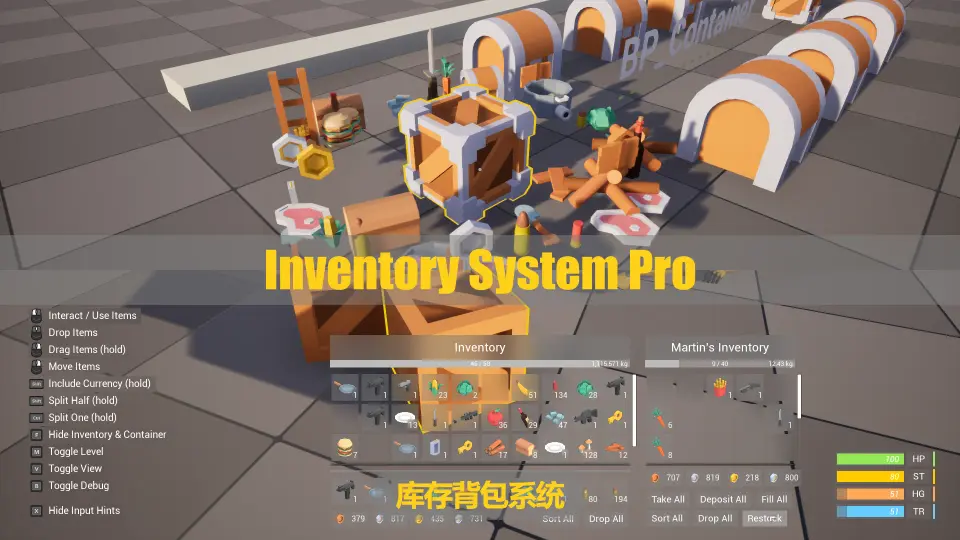
The system exposes a wide action set for handling items and currency. A player can Pick, Add, Insert, Take, Deposit, Split, Collect, Move, Drag-and-Drop, Stack, Fill, Restock, Sort, Remove, Drop, and Randomize items or coins.
That spread of operations covers both immediate field behavior and behind-the-scenes inventory management. Splitting and stacking allow quantity control inside slots. Fill and restock push items toward capacity limits. Sort brings order to cluttered storage. Drag-and-drop supports direct player interaction with the User Interface (UI), while take, deposit, collect, and remove handle transfers between containers and other Actors. Random options also exist, which opens up scenarios where loot or rewards need variability built into the flow.
Coins are handled on the same footing as physical items. A player can drop coins, collect them, or deposit them depending on the container or context in play.
Widget Layout, Animations, and Input Hints
The Widget layer is structured to remain clear and expressive. The interface layout has been organized so that each element has a defined place, and the Widgets carry animations that communicate state changes, feedback, and transitions.
An Input Hints System runs alongside the interface. It contains Widgets for input keys and refreshes dynamically. When the available actions change, the displayed hints update so the visible prompts match what the player can actually do at that moment in the flow.
Placement System for Rotating and Placing Items
Beyond storage management, the framework includes a Placement System. It allows players to rotate and place items in the world, turning the inventory into an active tool for building or arranging rather than a passive communing screen.
That placement logic ties into the wider item data the framework already tracks. An item held in a container can be taken out and positioned in the environment, with rotation control giving the player command over orientation before committing to a placement.
Password Lock and Attribute System
A Password Lock module is included in the system. This introduces gated access to containers or inventory points, requiring entry of a password before the contents become available.
Alongside gating, an Attribute System is part of the package. Combined with the inventory and item data already in place, attributes can attach values to items or players, giving the framework a way to represent characteristics that sit outside simple quantity and type.
Save and Load Coverage
Persistence is handled by the Save and Load System. It covers inventories, containers, Pickups, and the player. That range means the framework can rebuild the state of stored items, the contents of containers, items waiting to be picked up, and relevant player data across sessions.
Save data ties together the item operations and placement features above. If a player has picked up an item, sorted a container, split a stack, or placed an object in the world, the Save and Load structure accounts for those elements when the game is stopped and restarted.
Debug Feedback and Gamepad Input
A Debug System is built into the framework, and it provides tons of data in real-time. Live feedback of that scope is useful during development, when tracking down why a certain action fails, how a transfer happens between 2 containers, or what data an item carries at a given moment.
Full Gamepad support is present, so navigation of the Widget set, the drag-and-drop operations, the placement actions, and the input hints all function with a Gamepad rather than requiring keyboard and mouse interaction.
Project Fit and Integration Scope
The package can be integrated into a game project, and its functions are described as fundamental to making games with inventories. The inventory, container, and item logic provides the storage backbone, while Pickups, placement, and password locks add interactive surface behavior to the world itself.
Compatibility is noted with Advanced Interaction System, which slots the framework into a broader interaction workflow. The action set, Widget feedback, and save coverage make it a centralized point for item flow, from pickup in the field to sorting within a container, placing in the environment, and restoring everything on the next launch.
 Gameplay Features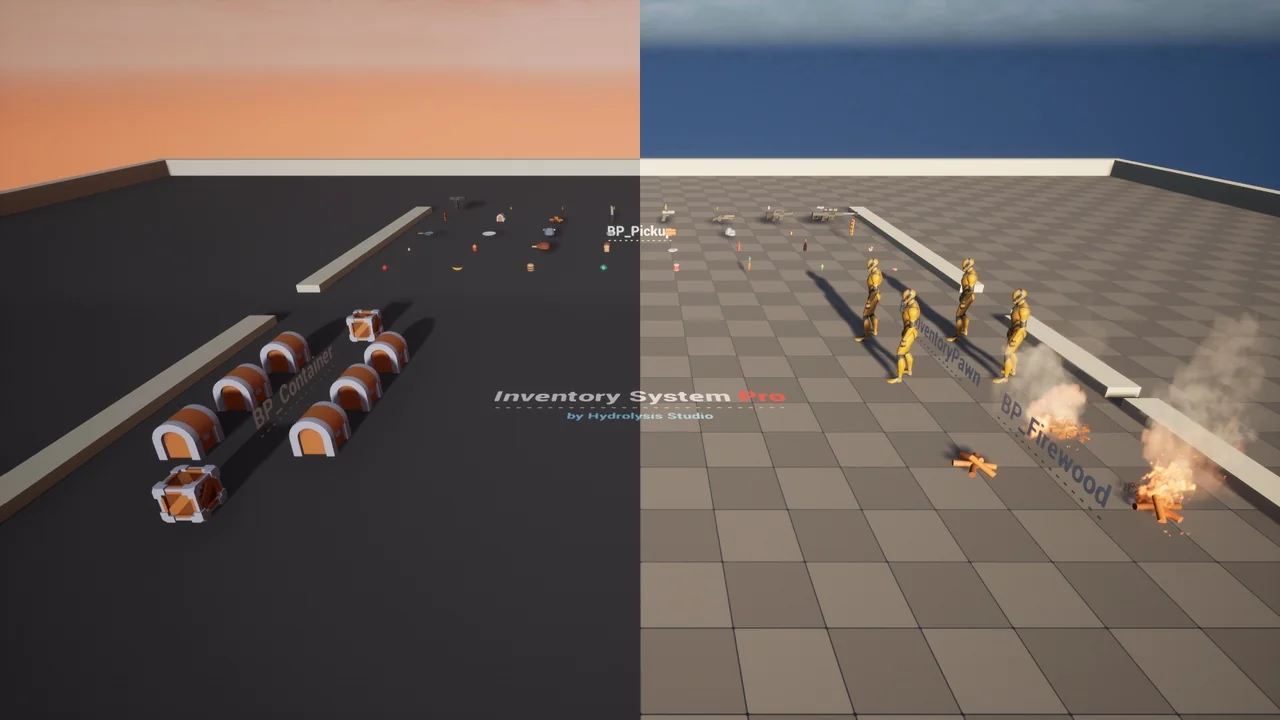
 Gameplay Features
 Gameplay Features
 Gameplay Features