"6f9bd6df1f44a86f"{"id":"1000842","slug":"interactive-garage","title":"Interactive Garage","category":"Gameplay Features","engine":"5.5+","assetVersion":"","engineVersion":"Engine Version: 5.5+","tag":"Gameplay Features","accent":"blue","visual":"mech","summary":"An Unreal Engine 5 interactive garage scene featuring a configurable motorcycle with real-time color, lighting, and rotation controls. Built with Blueprints for","platform":"Unreal Engine","indexPolicy":"index","publishedAt":"2026-08-04T06:53:55.607Z","updatedAt":"2026-08-04T06:53:55.607Z","sourceNotes":[],"fileContents":[],"compatibility":["Unreal Engine","Engine Version: 5.5+"],"featuredImage":{"alt":"Interactive Garage","src":"/wp-content/uploads/published/2026/08/54060f8fc1e5-1d8ad0b9-29a3-4f39-88c2-70ec84407fe4-0d097bd1b3.webp"},"hasDownloadLink":true,"downloads":0,"terms":[{"taxonomy":"category","slug":"gameplay-features","name":"Gameplay Features"}],"galleryImages":[{"src":"/wp-content/uploads/published/2026/08/363e5ece09bb-005939a2-6cb6-40af-93ca-928d3cb58726-31b4721c73.webp","alt":"Interactive Garage"},{"src":"/wp-content/uploads/published/2026/08/f96ee5132718-e2b1e2ae-11fc-43d3-8b22-3b6541c58b6e-d832b6d18d.webp","alt":"Interactive Garage"},{"src":"/wp-content/uploads/published/2026/08/e73d2d92e040-79971a87-4c9e-43fe-835f-e49ba67f93fe-094ba9dc53.webp","alt":"Interactive Garage"},{"src":"/wp-content/uploads/published/2026/08/eefb3ea6a7f1-d409399c-b645-4e10-a408-dbf7ead6302f-b92bf94f64.webp","alt":"Interactive Garage"},{"src":"/wp-content/uploads/published/2026/08/0db42e6ae356-11ba2b46-f833-4d13-a4ed-8db40d9acdde-64bc5ad44f.webp","alt":"Interactive Garage"},{"src":"/wp-content/uploads/published/2026/08/6567b80f6319-fdce2a43-8232-4747-b2d3-71cc5faece6d-86041d37f4.webp","alt":"Interactive Garage"}],"accessPanel":{"kind":"resource","title":"Download this resource","eyebrow":"Free Download","message":"Log in or create a free account to start your download.","fileName":"InteractiveGarage.7z","safetyNote":"Resources are manually reviewed before listing to improve quality and reduce obvious risks.","actionLabel":"Download Free","resourceType":"Resource archive"},"contentHtml":"\u003ch2\u003e\u003cem\u003eInteractive Garage\u003c/em\u003e: A Motorcycle Configuration Scene\u003c/h2\u003e\n\n\u003cp\u003e\u003cem\u003eInteractive Garage\u003c/em\u003e is built as a real-time Unreal Engine 5 (UE5) scene focused on a single vehicle: a motorcycle sitting inside a garage environment. Rather than presenting a static prop or a pre-rendered turntable, the project is structured as a configurable showcase where the viewer drives the presentation. The motorcycle acts as the interactive centerpiece, and the surrounding garage setting provides the visual context for examining it.\u003c/p\u003e\n\n\u003cp\u003eThe scene's identity comes from treating vehicle inspection as a hands-on activity rather than a passive camera pan. Since the motorcycle is the core subject, every adjustable element in the scene exists to serve how that vehicle is seen and presented to the viewer.\u003c/p\u003e\n\n\u003ch2\u003eReal-Time Motorcycle Color and View Adjustments\u003c/h2\u003e\n\n\u003cp\u003eOnce the scene is running, the viewer can change the motorcycle's color live. This feature positions \u003cem\u003eInteractive Garage\u003c/em\u003e as a configuration tool, similar to how automotive showrooms let customers cycle through paint options before making a selection. The color adjustment operates in real time, meaning the change is visible instantly without reloading the scene or triggering a separate menu state.\u003c/p\u003e\n\n\u003cp\u003eBeyond the vehicle itself, the overall view carries its own adjustable properties. The viewer can tune the brightness of the scene and shift its tone. This function lets the user control the mood of the presentation—pushing the garage toward a brighter, more clinical look for detailed inspection, or adjusting the tone for a stylized appearance. These view-level adjustments happen alongside the motorcycle color changes, giving the viewer control over both the subject and the environment framing it without needing to edit the project files.\u003c/p\u003e\n\n\u003ch3\u003eRouting the Presentation Movement\u003c/h3\u003e\n\n\u003cp\u003eThe scene includes an automatic rotation toggle for the motorcycle. When enabled, the vehicle rotates on its own, functioning as a self-running display piece where the camera can remain fixed while every angle of the bike is revealed over time. This rotation can be switched on or off in real time, giving the viewer the choice between a guided, automated showcase and a static framing for manual examination.\u003c/p\u003e\n\n\u003cp\u003eAn operation mode switch is also available. The scene does not lock the user into a single interaction style; instead, the viewer can transition between different operation modes while the scene runs. This makes the garage suitable for more than one type of presentation flow, whether the goal is a hands-on configurator experience or a playback-style demonstration.\u003c/p\u003e\n\n\u003ch2\u003eUE5 PostProcessVolume Settings: Lumen, Global Illumination, and Reflection Method\u003c/h2\u003e\n\n\u003cp\u003e\u003cem\u003eInteractive Garage\u003c/em\u003e runs in Unreal Engine 5, which introduces a specific technical requirement regarding how Global Illumination and Reflections are handled. In UE5, the \u003ccode\u003ePostProcessVolume\u003c/code\u003e defaults to using Lumen for both Global Illumination (GI) and Reflections. If these default settings are left in place, the scene's visual quality drops significantly and the display effect suffers.\u003c/p\u003e\n\n\u003cp\u003eTo achieve the intended visual result, specific changes must be made to the \u003ccode\u003ePostProcessVolume\u003c/code\u003e settings. The Global Illumination Method must be set to \u003ccode\u003eNone\u003c/code\u003e, accessed via \u003ccode\u003ePostProcessVolume\u003c/code\u003e \u003e \u003ccode\u003eGlobal Illumination\u003c/code\u003e \u003e \u003ccode\u003eMethod\u003c/code\u003e \u003e \u003ccode\u003eNone\u003c/code\u003e. The Reflection Method must be set to \u003ccode\u003eScreen Space\u003c/code\u003e, accessed via \u003ccode\u003ePostProcessVolume\u003c/code\u003e \u003e \u003ccode\u003eReflections\u003c/code\u003e \u003e \u003ccode\u003eMethod\u003c/code\u003e \u003e \u003ccode\u003eScreen Space\u003c/code\u003e. Adjusting these 2 settings away from the UE5 Lumen defaults is a required step for the garage to render correctly.\u003c/p\u003e\n\n\u003ch2\u003eBlueprint Construction and Runtime Coord Axes\u003c/h2\u003e\n\n\u003cp\u003eThe scene is assembled using Blueprints, Unreal Engine's visual scripting system. This construction choice underpins the real-time interactivity throughout the garage. The live color adjustments, view brightness controls, tone shifts, auto-rotation toggle, and operation mode switching all run at runtime through Blueprint logic rather than relying on pre-baked states or external editors.\u003c/p\u003e\n\n\u003cp\u003eThe package is noted to be compatible with \u003ccode\u003eRuntime Coord Axis\u003c/code\u003e setups. This factor influences how the motorcycle and its interactive elements track movement, rotation, and positional orientation during live use. Because the scene relies on real-time adjustment and axis-driven rotation, the runtime coordinate behavior becomes part of how the automatic rotation and operation mode switches function together seamlessly.\u003c/p\u003e\n\n\u003ch2\u003eWhat the Garage Package Handles at Runtime\u003c/h2\u003e\n\n\u003cp\u003e\u003cem\u003eInteractive Garage\u003c/em\u003e sets up a self-contained runtime experience for vehicle configuration within Unreal Engine 5. The scene manages the motorcycle's visual presentation, the environmental lighting tone, and the viewer's interaction method simultaneously. The Blueprint structure couples these elements so that changes to the vehicle color, view brightness, tone, and movement occur without interrupting the scene's playback.\u003c/p\u003e\n\n\u003cp\u003eThe core purpose is giving a developer or artist a ready-made interactive showcase where a viewer can inspect and alter a vehicle's appearance on the fly. Whether the motorcycle is left to rotate automatically or examined from a fixed angle under a custom tone, the garage provides a space for presenting the vehicle with live controls. The required \u003ccode\u003ePostProcessVolume\u003c/code\u003e adjustments ensure the visual output meets the standard the scene was designed to deliver, keeping the focus on the configurable bike rather than rendering artifacts from default engine settings.\u003c/p\u003e\n\n\u003ch2\u003eMore From The Same Workflow\u003c/h2\u003e\n\u003cul\u003e\n\u003cli\u003e\u003ca href=\"https://3dcghub.com/story-framework-5-2-interactive-template/\" rel=\"noopener noreferrer\"\u003eStory Framework 5.2 - Interactive Template\u003c/a\u003e\u003c/li\u003e\n\u003cli\u003e\u003ca href=\"https://3dcghub.com/interactive-water-ocean-and-swim-systems/\" rel=\"noopener noreferrer\"\u003eInteractive Water, Ocean and Swim Systems\u003c/a\u003e\u003c/li\u003e\n\u003cli\u003e\u003ca href=\"https://3dcghub.com/alchemist-starbase-rover/\" rel=\"noopener noreferrer\"\u003eAlchemist Starbase: Rover\u003c/a\u003e\u003c/li\u003e\n\u003cli\u003e\u003ca href=\"https://3dcghub.com/power-plugs-and-sockets-system/\" rel=\"noopener noreferrer\"\u003ePower Plugs And Sockets System\u003c/a\u003e\u003c/li\u003e\n\u003cli\u003e\u003ca href=\"https://3dcghub.com/quick-time-event-with-climbing/\" rel=\"noopener noreferrer\"\u003eQuick Time Event With Climbing\u003c/a\u003e\u003c/li\u003e\n\u003c/ul\u003e","contentTextLength":5588,"navigation":{"current":1521,"total":4218,"previous":{"id":"1000843","slug":"inventory-system-pro","title":"Inventory System Pro","category":"Gameplay Features","platform":"Unreal Engine","updatedAt":"2026-08-04T07:04:21.447Z"},"next":{"id":"1000841","slug":"instance-tool","title":"Instance Tool","category":"Engine Tools","platform":"Unreal Engine","updatedAt":"2026-08-04T06:48:36.240Z"}},"relatedResources":[{"id":"1001995","slug":"daforma-vertex-shader-based-3d-deformation-effectors","title":"daforma - Vertex Shader based 3D Deformation Effectors","category":"Gameplay Features","engine":"5.0+","assetVersion":"","engineVersion":"Engine Version: 5.0+","tag":"Gameplay Features","accent":"blue","visual":"mech","summary":"Explore daforma, an interactive vertex shader deformation toolkit using Advanced BP Effect actors and HISM grids for real-time ripple, warp, and Lumen effects.","platform":"Unreal Engine","indexPolicy":"index","publishedAt":"2026-10-26T12:14:03.022Z","updatedAt":"2026-10-26T12:14:03.022Z","sourceNotes":[],"fileContents":[],"compatibility":["Unreal Engine","Engine Version: 5.0+"],"featuredImage":{"alt":"daforma - Vertex Shader based 3D Deformation Effectors","src":"/wp-content/uploads/published/2026/10/a22ce2a73410-5d0fe4d5-eb06-4722-a1ae-0083113c6806-3acb7f20fe.webp"},"hasDownloadLink":true,"downloads":0},{"id":"1001581","slug":"interactive-cutscene","title":"Interactive Cutscene","category":"Gameplay Features","engine":"5.3+","assetVersion":"","engineVersion":"Engine Version: 5.3+","tag":"Gameplay Features","accent":"blue","visual":"mech","summary":"Build responsive Quick Time Events in Unreal Engine with Interactive Cutscene, featuring Sequencer sync, volume triggers, and multiplatform input.","platform":"Unreal Engine","indexPolicy":"index","publishedAt":"2026-10-10T08:53:30.443Z","updatedAt":"2026-10-10T08:53:30.443Z","sourceNotes":[],"fileContents":[],"compatibility":["Unreal Engine","Engine Version: 5.3+"],"featuredImage":{"alt":"Interactive Cutscene","src":"/wp-content/uploads/published/2026/10/b63507fb7743-cbc39278-253e-45ae-994b-c44935c36728-335d8b52f3.webp"},"hasDownloadLink":true,"downloads":0},{"id":"1001305","slug":"pawnshop-system","title":"Pawnshop System","category":"Gameplay Features","engine":"5.0+","assetVersion":"","engineVersion":"Engine Version: 5.0+","tag":"Gameplay Features","accent":"blue","visual":"mech","summary":"Explore the Pawnshop System mechanics, covering interactive shopkeeper trading, scrollable inventory, physical cash loops, and ATM banking.","platform":"Unreal Engine","indexPolicy":"index","publishedAt":"2026-10-02T06:19:35.935Z","updatedAt":"2026-10-02T06:19:35.935Z","sourceNotes":[],"fileContents":[],"compatibility":["Unreal Engine","Engine Version: 5.0+"],"featuredImage":{"alt":"Pawnshop System","src":"/wp-content/uploads/published/2026/10/e352621da4aa-7a59cc2b-4082-4c34-b972-400682a443f4-bd5c698f69.webp"},"hasDownloadLink":true,"downloads":0}]}
Gameplay Features
Interactive Garage
An Unreal Engine 5 interactive garage scene featuring a configurable motorcycle with real-time color, lighting, and rotation controls. Built with Blueprints for
Interactive Garage: A Motorcycle Configuration Scene
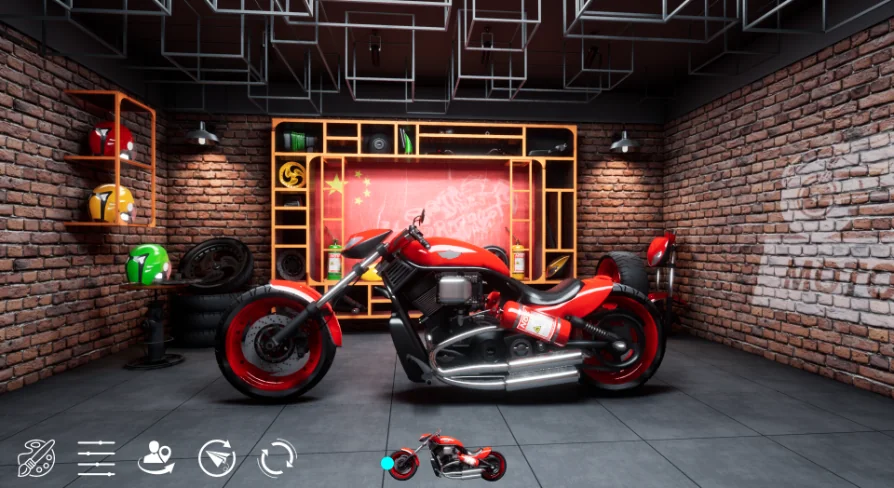
Interactive Garage is built as a real-time Unreal Engine 5 (UE5) scene focused on a single vehicle: a motorcycle sitting inside a garage environment. Rather than presenting a static prop or a pre-rendered turntable, the project is structured as a configurable showcase where the viewer drives the presentation. The motorcycle acts as the interactive centerpiece, and the surrounding garage setting provides the visual context for examining it.
The scene's identity comes from treating vehicle inspection as a hands-on activity rather than a passive camera pan. Since the motorcycle is the core subject, every adjustable element in the scene exists to serve how that vehicle is seen and presented to the viewer.
Real-Time Motorcycle Color and View Adjustments
Once the scene is running, the viewer can change the motorcycle's color live. This feature positions Interactive Garage as a configuration tool, similar to how automotive showrooms let customers cycle through paint options before making a selection. The color adjustment operates in real time, meaning the change is visible instantly without reloading the scene or triggering a separate menu state.
Beyond the vehicle itself, the overall view carries its own adjustable properties. The viewer can tune the brightness of the scene and shift its tone. This function lets the user control the mood of the presentation—pushing the garage toward a brighter, more clinical look for detailed inspection, or adjusting the tone for a stylized appearance. These view-level adjustments happen alongside the motorcycle color changes, giving the viewer control over both the subject and the environment framing it without needing to edit the project files.
Routing the Presentation Movement
The scene includes an automatic rotation toggle for the motorcycle. When enabled, the vehicle rotates on its own, functioning as a self-running display piece where the camera can remain fixed while every angle of the bike is revealed over time. This rotation can be switched on or off in real time, giving the viewer the choice between a guided, automated showcase and a static framing for manual examination.
An operation mode switch is also available. The scene does not lock the user into a single interaction style; instead, the viewer can transition between different operation modes while the scene runs. This makes the garage suitable for more than one type of presentation flow, whether the goal is a hands-on configurator experience or a playback-style demonstration.
UE5 PostProcessVolume Settings: Lumen, Global Illumination, and Reflection Method
Interactive Garage runs in Unreal Engine 5, which introduces a specific technical requirement regarding how Global Illumination and Reflections are handled. In UE5, the PostProcessVolume defaults to using Lumen for both Global Illumination (GI) and Reflections. If these default settings are left in place, the scene's visual quality drops significantly and the display effect suffers.
To achieve the intended visual result, specific changes must be made to the PostProcessVolume settings. The Global Illumination Method must be set to None, accessed via PostProcessVolume > Global Illumination > Method > None. The Reflection Method must be set to Screen Space, accessed via PostProcessVolume > Reflections > Method > Screen Space. Adjusting these 2 settings away from the UE5 Lumen defaults is a required step for the garage to render correctly.
Blueprint Construction and Runtime Coord Axes
The scene is assembled using Blueprints, Unreal Engine's visual scripting system. This construction choice underpins the real-time interactivity throughout the garage. The live color adjustments, view brightness controls, tone shifts, auto-rotation toggle, and operation mode switching all run at runtime through Blueprint logic rather than relying on pre-baked states or external editors.
The package is noted to be compatible with Runtime Coord Axis setups. This factor influences how the motorcycle and its interactive elements track movement, rotation, and positional orientation during live use. Because the scene relies on real-time adjustment and axis-driven rotation, the runtime coordinate behavior becomes part of how the automatic rotation and operation mode switches function together seamlessly.
What the Garage Package Handles at Runtime
Interactive Garage sets up a self-contained runtime experience for vehicle configuration within Unreal Engine 5. The scene manages the motorcycle's visual presentation, the environmental lighting tone, and the viewer's interaction method simultaneously. The Blueprint structure couples these elements so that changes to the vehicle color, view brightness, tone, and movement occur without interrupting the scene's playback.
The core purpose is giving a developer or artist a ready-made interactive showcase where a viewer can inspect and alter a vehicle's appearance on the fly. Whether the motorcycle is left to rotate automatically or examined from a fixed angle under a custom tone, the garage provides a space for presenting the vehicle with live controls. The required PostProcessVolume adjustments ensure the visual output meets the standard the scene was designed to deliver, keeping the focus on the configurable bike rather than rendering artifacts from default engine settings.
 Gameplay Features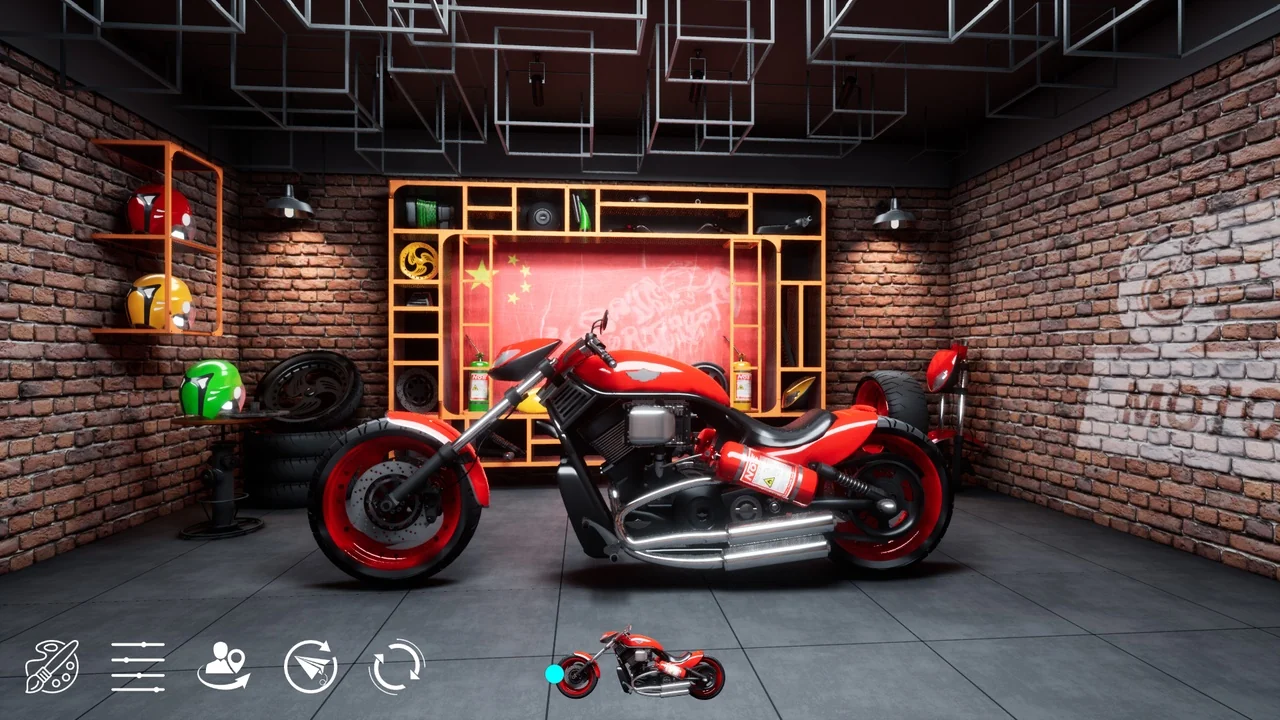
 Gameplay Features
 Gameplay Features
 Gameplay Features