"6f9bd6df1f44a86f"{"id":"1000841","slug":"instance-tool","title":"Instance Tool","category":"Engine Tools","engine":"5.7","assetVersion":"Asset Version: 1.2.9.8","engineVersion":"Engine Version: 5.7","tag":"Engine Tools","accent":"blue","visual":"mech","summary":"Instance Tool is an Unreal Engine editor plugin for selecting, editing, and converting Instanced Static Meshes, with aligning, snapping, and distribution functi","platform":"Unreal Engine","indexPolicy":"index","publishedAt":"2026-08-04T06:48:36.240Z","updatedAt":"2026-08-04T06:48:36.240Z","sourceNotes":[],"fileContents":[],"compatibility":["Unreal Engine","Asset Version: 1.2.9.8","Engine Version: 5.7"],"featuredImage":{"alt":"Instance Tool","src":"/wp-content/uploads/published/2026/08/13dc6e2f840e-c9e37db9-a1eb-42ff-9b23-bf5e8b770cfa-d89c190081.webp"},"hasDownloadLink":true,"downloads":0,"terms":[{"taxonomy":"category","slug":"engine-tools-tools-and-plugins","name":"Engine Tools"}],"galleryImages":[{"src":"/wp-content/uploads/published/2026/08/be788ce9b2ce-ad39d0fe-0846-4685-8093-bc3a20f6fda0-611a66c354.webp","alt":"Instance Tool"},{"src":"/wp-content/uploads/published/2026/08/7f16d6bc5111-7cf8b88b-3108-4bce-9c11-7d16427179e5-4339c5f4db.webp","alt":"Instance Tool"},{"src":"/wp-content/uploads/published/2026/08/077ad5224c17-1b3545d6-3406-40bf-ac90-44e4c2f39fc6-e6c00ac0ed.webp","alt":"Instance Tool"},{"src":"/wp-content/uploads/published/2026/08/dd3c706ba701-fc1f49bd-bb5e-4a0a-b293-8276f52f328c-801d38d4d2.webp","alt":"Instance Tool"},{"src":"/wp-content/uploads/published/2026/08/917be91da198-1969ece8-832b-497d-b872-2bdffd413065-60324018af.webp","alt":"Instance Tool"},{"src":"/wp-content/uploads/published/2026/08/f287c8ed188d-1e02e076-b9d6-4228-85b4-96a698f9238b-3a0f44bddc.webp","alt":"Instance Tool"},{"src":"/wp-content/uploads/published/2026/08/af68715f448b-9bd6bf7c-f988-4f6d-a3a5-219ee57182a3-1662ccc33d.webp","alt":"Instance Tool"}],"accessPanel":{"kind":"resource","title":"Download this resource","eyebrow":"Free Download","message":"Log in or create a free account to start your download.","fileName":"5.7.7z","safetyNote":"Resources are manually reviewed before listing to improve quality and reduce obvious risks.","actionLabel":"Download Free","resourceType":"Resource archive"},"contentHtml":"\u003cp\u003eLevels filled with repeated props—crates in a warehouse, trees along a ridge, debris across a battlefield—are exactly where Instanced Static Meshes (ISM) earn their keep. The problem arrives when those instances need to be wrangled inside Unreal Engine's Editor Viewport. Moving, rotating, or scaling individual instances through default workflows can be slow and imprecise. \u003cem\u003eInstance Tool\u003c/em\u003e steps in as an Editor Mode Plugin built to close that gap, giving developers direct, viewport-level control over Instanced Static Meshes alongside a suite of alignment and snapping functions aimed at Level Editing.\u003c/p\u003e\n\n\u003cp\u003eThe plugin's central workflow is the ability to handle instances as editable objects rather than locked-in static geometry. You can select, move, rotate, and scale instances directly inside the Editor Viewport, treating them with a degree of manipulation closer to standard Actors. This directly serves environment artists and Level Designers who need to populate a scene visually rather than through parameter panels alone.\u003c/p\u003e\n\n\u003ch2\u003eConverting Between Static Mesh and Instanced Static Mesh\u003c/h2\u003e\n\u003cp\u003eAt the most basic level, the plugin provides 1-click conversion between Static Meshes and Instanced Static Meshes. This means a designer can lay out a section of a level using standard Static Mesh placement and then commit those objects into an instanced form, or break instances back down into individually editable meshes when specific adjustments are required.\u003c/p\u003e\n\n\u003cp\u003eIt is worth noting that the engine's automatic instancing feature, introduced in Unreal Engine 4.22 and onward, handles some of this conversion behavior depending on how the level is set up. In those engine versions, automatic instancing may make manual conversion redundant for certain scenarios. Still, having an immediate, 1-click path to swap between the 2 formats remains a practical operation for designers who need to force a specific structure or break apart auto-instanced groups for granular editing.\u003c/p\u003e\n\n\u003ch2\u003eViewport Selection and Instance Creation\u003c/h2\u003e\n\u003cp\u003eCreating instances inside a scene is handled through quick shortcuts. The plugin supports creating instances using \u003ccode\u003eAlt + Drag\u003c/code\u003e, or the standard duplicate hotkey, letting a designer populate an area rapidly without navigating through menus. Once a scene is populated, the plugin’s selection options become the primary way to manage groups of instances.\u003c/p\u003e\n\n\u003cp\u003eSelection mechanics include \u003ccode\u003eMarquee Select\u003c/code\u003e for dragging a box over a cluster of instances, \u003ccode\u003eSelect by Axis\u003c/code\u003e for grabbing objects along a specific directional line, and a \u003ccode\u003eLock/Unlock Selection\u003c/code\u003e toggle. \u003ccode\u003eLock Selection\u003c/code\u003e is particularly useful when performing operations that might otherwise deselect the instances, allowing a designer to hold onto a specific group while applying transforms or adjustments.\u003c/p\u003e\n\n\u003ch2\u003eAlignment, Snapping, and Distribution\u003c/h2\u003e\n\u003cp\u003eBeyond basic placement, \u003cem\u003eInstance Tool\u003c/em\u003e integrates extra Level Editing functions focused on organization and spacing. Aligning instances can be done by location or rotation, or snapped directly to a grid. This brings precision to the placement of repeated elements, ensuring things like pillars, pipe segments, or floor tiles line up exactly as required rather than relying on visual approximation.\u003c/p\u003e\n\n\u003cp\u003eSnapping instances by axis gives the designer control over how instances move in relation to one another and the World Geometry. For broader scene population, the plugin includes \u003ccode\u003eDistribute\u003c/code\u003e and \u003ccode\u003eLine-Up\u003c/code\u003e functions. These tools help space instances evenly across a selection or arrange them into a straight formation, removing the tedious manual adjustment that comes with placing dozens or hundreds of similar objects by hand.\u003c/p\u003e\n\n\u003cp\u003eThe plugin also provides a way to apply Delta Transforms to the Instances Panel. This allows for incremental transformations to a selection, pushing objects by a set distance or rotation step. A duplicate option is bundled with this Delta Transform feature, meaning a designer can offset the duplicated instances by a specific measurement immediately upon creation.\u003c/p\u003e\n\n\u003ch3\u003eTransform Widget Control and Focus\u003c/h3\u003e\n\u003cp\u003eNavigating complex scenes with many instances can cause viewport clutter. The plugin includes hotkeys to hide and unhide the Transform Widget, clearing the visual noise on screen when trying to inspect the level layout. There is also a hotkey to focus the Editor Viewport onto the currently selected instances. When working inside a large environment, quickly snapping the camera attention to a targeted set of objects saves time and prevents the designer from losing track of their selection in a dense scene.\u003c/p\u003e\n\n\u003ch2\u003eBlueprint Editing and Operation Safety\u003c/h2\u003e\n\u003cp\u003eExpanding beyond standard Static Mesh handling, the plugin introduces experimental support for \u003ccode\u003eBlueprint Instance Editing\u003c/code\u003e. This brings the plugin's viewport manipulation capabilities into the realm of Blueprint objects, opening up editing possibilities for logic-driven props that exist within the scene.\u003c/p\u003e\n\n\u003cp\u003eThe plugin supports multi-editing, allowing several instances to be adjusted simultaneously rather than 1 at a time. To ensure developers can experiment freely, full undo support is built into all instance editing operations. Every transform, conversion, alignment, and creation step can be reverted. This safety net is critical when making broad changes to a level's instance population, as a single wrong distribution or grid alignment could otherwise require extensive manual correction.\u003c/p\u003e\n\n\u003cp\u003eFor environment artists and Level Designers working on Unreal Engine projects that rely heavily on instanced geometry, the plugin positions itself as a direct workflow accelerator. The tools provided address the friction points of manipulating instances inside the Editor Viewport, offering precise controls over creation, alignment, and distribution while maintaining the flexibility to revert any action.\u003c/p\u003e\n\n\u003ch2\u003eMore From The Same Workflow\u003c/h2\u003e\n\u003cul\u003e\n\u003cli\u003e\u003ca href=\"https://3dcghub.com/advanced-interact-foliage-replace-instances-with-interactive-actors-and-effects/\" rel=\"noopener noreferrer\"\u003eAdvanced Interact Foliage – Replace Instances with Interactive Actors \u0026amp; Effects\u003c/a\u003e\u003c/li\u003e\n\u003cli\u003e\u003ca href=\"https://3dcghub.com/instance-damage-system/\" rel=\"noopener noreferrer\"\u003eInstance Damage System\u003c/a\u003e\u003c/li\u003e\n\u003cli\u003e\u003ca href=\"https://3dcghub.com/unreal-mcp-server-370-ai-tools-for-ue5-editor-automation-via-mcp/\" rel=\"noopener noreferrer\"\u003eUnreal MCP Server — 370+ AI Tools for UE5 Editor Automation via MCP\u003c/a\u003e\u003c/li\u003e\n\u003cli\u003e\u003ca href=\"https://3dcghub.com/object-distribution-tool-objectt-distributed-tooll-objecting-distributing/\" rel=\"noopener noreferrer\"\u003eObject Distribution Tool (Objectt Distributed Tooll Objecting Distributing)\u003c/a\u003e\u003c/li\u003e\n\u003cli\u003e\u003ca href=\"https://3dcghub.com/blutility-plus-material-and-instance-options/\" rel=\"noopener noreferrer\"\u003eBlutility Plus - Material and Instance Options\u003c/a\u003e\u003c/li\u003e\n\u003c/ul\u003e","contentTextLength":6094,"navigation":{"current":1522,"total":4218,"previous":{"id":"1000842","slug":"interactive-garage","title":"Interactive Garage","category":"Gameplay Features","platform":"Unreal Engine","updatedAt":"2026-08-04T06:53:55.607Z"},"next":{"id":"1000840","slug":"injured-animation-pack","title":"Injured Animation Pack","category":"Locomotion / Gaits","platform":"Unreal Engine","updatedAt":"2026-08-03T19:02:20.995Z"}},"relatedResources":[{"id":"1001115","slug":"multiworld","title":"MultiWorld","category":"Engine Tools","engine":"5.6 - 5.8","assetVersion":"Asset Version: 1.11.1","engineVersion":"Engine Version: 5.6 - 5.8","tag":"Engine Tools","accent":"blue","visual":"mech","summary":"MultiWorld is a UE5 runtime plugin for managing independent UWorld instances in parallel, with isolated actors and components, player travel between worlds, and","platform":"Unreal Engine","indexPolicy":"index","publishedAt":"2026-09-07T12:23:26.726Z","updatedAt":"2026-09-07T12:23:26.726Z","sourceNotes":[],"fileContents":[],"compatibility":["Unreal Engine","Asset Version: 1.11.1","Engine Version: 5.6 - 5.8"],"featuredImage":{"alt":"MultiWorld","src":"/wp-content/uploads/published/2026/09/29ee6d8b472d-d8de6242-0467-45c1-a0b6-fb66295c257c-1713fac46d.webp"},"hasDownloadLink":true,"downloads":0},{"id":"1000788","slug":"advanced-interact-foliage-replace-instances-with-interactive-actors-and-effects","title":"Advanced Interact Foliage – Replace Instances with Interactive Actors \u0026 Effects","category":"Gameplay Features","engine":"5.7","assetVersion":"Asset Version: 1.0.5","engineVersion":"Engine Version: 5.7","tag":"Gameplay Features","accent":"blue","visual":"mech","summary":"An Unreal Engine plugin that dynamically replaces foliage instances with interactive actors for harvesting, effects, and gameplay, then restores them seamlessly","platform":"Unreal Engine","indexPolicy":"index","publishedAt":"2026-07-30T12:27:45.556Z","updatedAt":"2026-07-30T12:27:45.556Z","sourceNotes":[],"fileContents":[],"compatibility":["Unreal Engine","Asset Version: 1.0.5","Engine Version: 5.7"],"featuredImage":{"alt":"Advanced Interact Foliage – Replace Instances with Interactive Actors \u0026 Effects","src":"/wp-content/uploads/published/2026/07/b6df20de3a69-821432a7-35ec-4e42-9126-fe5274ddde78-c0e9dc10c5.webp"},"hasDownloadLink":true,"downloads":0},{"id":"15027","slug":"instance-damage-system","title":"Instance Damage System","category":"Gameplay Features","engine":"5.3","assetVersion":"Engine version: 5.3","engineVersion":"5.1","tag":"Gameplay Features","accent":"blue","visual":"luts","summary":"The Instance Damage System provides a powerful solution for managing and destroying instanced static meshes in large environments. It features advanced networking, object pooling, and seamless World Partition support.","platform":"Unreal Engine","indexPolicy":"index","publishedAt":"2026-03-12T07:31:44.000Z","updatedAt":"2026-04-19T15:45:36.000Z","sourceNotes":[],"fileContents":[],"compatibility":["Unreal Engine","Engine version: 5.3"],"featuredImage":{"alt":"Instance Damage System","src":"https://3dcghub.com/wp-content/uploads/2026/03/8f410e85-6ba6-4752-ac1e-be0e965d9564.webp"},"hasDownloadLink":true,"downloads":0}]}
Engine Tools
Instance Tool
Instance Tool is an Unreal Engine editor plugin for selecting, editing, and converting Instanced Static Meshes, with aligning, snapping, and distribution functi
Levels filled with repeated props—crates in a warehouse, trees along a ridge, debris across a battlefield—are exactly where Instanced Static Meshes (ISM) earn their keep. The problem arrives when those instances need to be wrangled inside Unreal Engine's Editor Viewport. Moving, rotating, or scaling individual instances through default workflows can be slow and imprecise. Instance Tool steps in as an Editor Mode Plugin built to close that gap, giving developers direct, viewport-level control over Instanced Static Meshes alongside a suite of alignment and snapping functions aimed at Level Editing.
The plugin's central workflow is the ability to handle instances as editable objects rather than locked-in static geometry. You can select, move, rotate, and scale instances directly inside the Editor Viewport, treating them with a degree of manipulation closer to standard Actors. This directly serves environment artists and Level Designers who need to populate a scene visually rather than through parameter panels alone.
Converting Between Static Mesh and Instanced Static Mesh
At the most basic level, the plugin provides 1-click conversion between Static Meshes and Instanced Static Meshes. This means a designer can lay out a section of a level using standard Static Mesh placement and then commit those objects into an instanced form, or break instances back down into individually editable meshes when specific adjustments are required.
It is worth noting that the engine's automatic instancing feature, introduced in Unreal Engine 4.22 and onward, handles some of this conversion behavior depending on how the level is set up. In those engine versions, automatic instancing may make manual conversion redundant for certain scenarios. Still, having an immediate, 1-click path to swap between the 2 formats remains a practical operation for designers who need to force a specific structure or break apart auto-instanced groups for granular editing.
Viewport Selection and Instance Creation
Creating instances inside a scene is handled through quick shortcuts. The plugin supports creating instances using Alt + Drag, or the standard duplicate hotkey, letting a designer populate an area rapidly without navigating through menus. Once a scene is populated, the plugin’s selection options become the primary way to manage groups of instances.
Selection mechanics include Marquee Select for dragging a box over a cluster of instances, Select by Axis for grabbing objects along a specific directional line, and a Lock/Unlock Selection toggle. Lock Selection is particularly useful when performing operations that might otherwise deselect the instances, allowing a designer to hold onto a specific group while applying transforms or adjustments.
Alignment, Snapping, and Distribution
Beyond basic placement, Instance Tool integrates extra Level Editing functions focused on organization and spacing. Aligning instances can be done by location or rotation, or snapped directly to a grid. This brings precision to the placement of repeated elements, ensuring things like pillars, pipe segments, or floor tiles line up exactly as required rather than relying on visual approximation.
Snapping instances by axis gives the designer control over how instances move in relation to one another and the World Geometry. For broader scene population, the plugin includes Distribute and Line-Up functions. These tools help space instances evenly across a selection or arrange them into a straight formation, removing the tedious manual adjustment that comes with placing dozens or hundreds of similar objects by hand.
The plugin also provides a way to apply Delta Transforms to the Instances Panel. This allows for incremental transformations to a selection, pushing objects by a set distance or rotation step. A duplicate option is bundled with this Delta Transform feature, meaning a designer can offset the duplicated instances by a specific measurement immediately upon creation.
Transform Widget Control and Focus
Navigating complex scenes with many instances can cause viewport clutter. The plugin includes hotkeys to hide and unhide the Transform Widget, clearing the visual noise on screen when trying to inspect the level layout. There is also a hotkey to focus the Editor Viewport onto the currently selected instances. When working inside a large environment, quickly snapping the camera attention to a targeted set of objects saves time and prevents the designer from losing track of their selection in a dense scene.
Blueprint Editing and Operation Safety
Expanding beyond standard Static Mesh handling, the plugin introduces experimental support for Blueprint Instance Editing. This brings the plugin's viewport manipulation capabilities into the realm of Blueprint objects, opening up editing possibilities for logic-driven props that exist within the scene.
The plugin supports multi-editing, allowing several instances to be adjusted simultaneously rather than 1 at a time. To ensure developers can experiment freely, full undo support is built into all instance editing operations. Every transform, conversion, alignment, and creation step can be reverted. This safety net is critical when making broad changes to a level's instance population, as a single wrong distribution or grid alignment could otherwise require extensive manual correction.
For environment artists and Level Designers working on Unreal Engine projects that rely heavily on instanced geometry, the plugin positions itself as a direct workflow accelerator. The tools provided address the friction points of manipulating instances inside the Editor Viewport, offering precise controls over creation, alignment, and distribution while maintaining the flexibility to revert any action.
 Engine Tools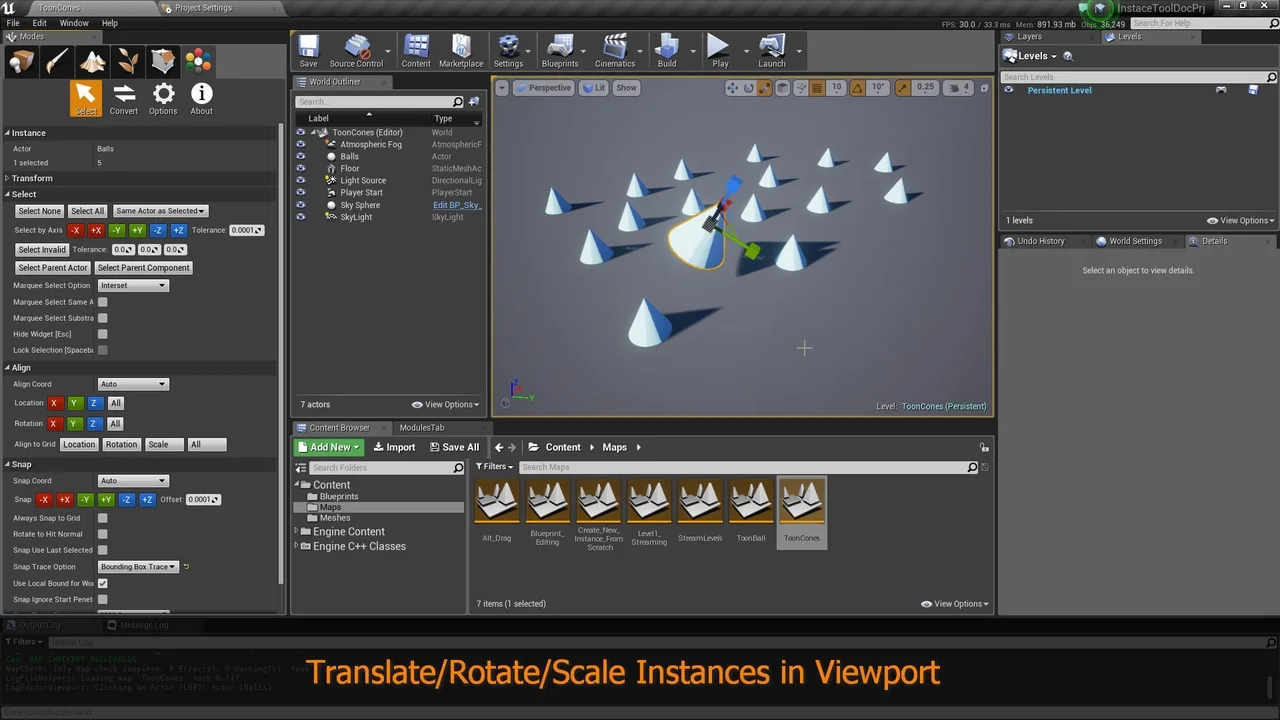
 Engine Tools
 Gameplay Features
 Gameplay Features