"c68a05d5e51405b3"{"id":"1001115","slug":"multiworld","title":"MultiWorld","category":"Engine Tools","engine":"5.6 - 5.8","assetVersion":"Asset Version: 1.11.1","engineVersion":"Engine Version: 5.6 - 5.8","tag":"Engine Tools","accent":"blue","visual":"mech","summary":"MultiWorld is a UE5 runtime plugin for managing independent UWorld instances in parallel, with isolated actors and components, player travel between worlds, and","platform":"Unreal Engine","publishedAt":"2026-09-07T12:23:26.726Z","updatedAt":"2026-09-07T12:23:26.726Z","sourceNotes":[],"fileContents":[],"compatibility":["Unreal Engine","Asset Version: 1.11.1","Engine Version: 5.6 - 5.8"],"featuredImage":{"alt":"MultiWorld","src":"/wp-content/uploads/published/2026/09/29ee6d8b472d-d8de6242-0467-45c1-a0b6-fb66295c257c-1713fac46d.webp"},"hasDownloadLink":true,"downloads":0,"terms":[{"taxonomy":"category","slug":"engine-tools-tools-and-plugins","name":"Engine Tools"}],"galleryImages":[{"src":"/wp-content/uploads/published/2026/09/64ffac310402-af8b7927-674a-4a4f-ba02-712b5d08067f-aecf55616d.webp","alt":"MultiWorld"},{"src":"/wp-content/uploads/published/2026/09/95690585e38f-991bc152-38a9-4ba3-8ad0-c6721ad1f368-e1c398fb76.webp","alt":"MultiWorld"},{"src":"/wp-content/uploads/published/2026/09/a4b7faf09567-deae82d4-dcd7-400c-929d-7e0aced90684-3b76a9e4c9.webp","alt":"MultiWorld"},{"src":"/wp-content/uploads/published/2026/09/285561b12348-9dbe2f83-f97f-4c1d-9fe5-1cba3a8638bd-fddee8b66e.webp","alt":"MultiWorld"},{"src":"/wp-content/uploads/published/2026/09/6dc1fd2473d2-405147b3-fc34-47b2-805b-6956d451f8b8-73d2c0cbb3.webp","alt":"MultiWorld"},{"src":"/wp-content/uploads/published/2026/09/214a39212385-de10cfa1-31f9-42e2-a867-a698d813af91-51794d92d5.webp","alt":"MultiWorld"},{"src":"/wp-content/uploads/published/2026/09/5897a1a28632-ccac1141-6f75-4f87-a82d-752cca5ad8a7-d9c5d2f87f.webp","alt":"MultiWorld"}],"accessPanel":{"kind":"resource","title":"Download this resource","eyebrow":"Free Download","message":"Log in or create a free account to start your download.","fileName":"MultiWorld.7z","safetyNote":"Resources are manually reviewed before listing to improve quality and reduce obvious risks.","actionLabel":"Download Free","resourceType":"Resource archive"},"contentHtml":"\u003cp\u003eRunning several complete UWorlds in parallel is something most Unreal projects never attempt, because a single world already carries so much state through its actors, components, physics, audio, and UI. MultiWorld removes that “one world per session” assumption at runtime. It builds a project where each environment is a separate UWorld instance, and each instance stays completely isolated from the others. Graphics, audio, physics, collisions, and UI all belong to their own world, so a change in one map does not reach the others. At the same time, the plugin preserves a way to move the local player and other actors across worlds, which turns parallel execution into a travel system rather than a set of sealed-off simulation containers.\u003c/p\u003e\u003cp\u003eThe isolation between worlds is not a visual trick or a rendering-layer overlay. Each Secondary World owns its actors and components outright. If one world stops its physics simulation or hides its UI, the other worlds continue with their own independent settings. That split is the foundation for game structures where a player can leave a space and yet still feel that space is alive, waiting backstage with its own timing, collisions, and audio.\u003c/p\u003e\u003ch2\u003eStock UE5 Levels as Mirrored Worlds\u003c/h2\u003e\u003cp\u003eMultiWorld uses any standard UE5 Level or UMAP as-is. This is the launch point for production because there is no map-conversion workflow. A level already crafted in the Unreal Editor, with all its lighting, Blueprint actors, and gameplay logic, can be loaded as a Secondary World inside the active runtime. The level does not need to be prefixed, renamed, exported, or restructured into a special side format.\u003c/p\u003e\u003cp\u003eThe plugin also removes practical caps for smaller productions: the number of independent Secondary Worlds is stated as unlimited. That means the bottleneck is the engine and hardware budget, not a plugin-side cap. A project that wants dozens of lobby rooms, mission spaces, or alternate dimensions can load as many maps as it can manage while they continue to tick in parallel, each with no shared actor or component state leaking into the others.\u003c/p\u003e\u003cp\u003eBecause the maps are ordinary UE5 levels, worlds can be authored by the same team and with the same tools used for the main world. There is no separate pipeline for the “extra” worlds, no additional map type to maintain, and no conversion step that might strip out a feature that works in the editor but breaks at runtime. The level that a designer opens, sets, and saves is exactly the level that can be lifted into a Secondary World later.\u003c/p\u003e\u003ch2\u003ePlayer Travel and Actor Transfer Between Worlds\u003c/h2\u003e\u003cp\u003eThe presence of multiple simultaneous worlds can shape gameplay at the player-controller level, since the plugin can transfer the local player between those worlds. If a game contains doors that lead to pocket dimensions or a passageway that carries the camera into a new environment while the previous one remains live, that transition needs the player object to remain part of the game while being accepted into the destination UWorld. MultiWorld handles that move directly.\u003c/p\u003e\u003cp\u003eActor transfer is part of the same toolkit. The player is not the only entity that can cross the boundary; other actors can be moved between worlds as well. That supports mechanics where an object gained in one area needs to appear with the player in another, or where a companion, a vehicle, or a moving prop should follow the player into a different world rather than being recreated at the destination. Transferring the actor keeps its state, so a gameplay object does not need to be serialized out and rebuilt in the next map.\u003c/p\u003e\u003cp\u003eThese crossings can also use customizable visual transition effects. Instead of relying on a bare render swap or a hard camera cut, the plugin gives the project room to define how the world change looks. The effect might be matched to a loading-screen style, a portal flash, or any other motion the team wants to build. The transition effect is a visual wrapper around a mechanic that already preserves the player’s presence through the switch.\u003c/p\u003e\u003ch2\u003eReplication Boundaries: Main World Only\u003c/h2\u003e\u003cp\u003eMultiplayer projects have to decide which world is authoritative for UE5’s networked replication. MultiWorld keeps replication on the Main World. Secondary Worlds are not replicated, which means any gameplay running on them is not broadcast across the network session. This split creates a clear architectural rule: bring synchronized multiplayer content to the Main World, and place per-user or non-shared content in Secondary Worlds.\u003c/p\u003e\u003cp\u003eFor an online game, this keeps the standard UE5 network model intact. The Main World can hold characters, teams, game state, and everything that every client needs to see with replicated authority. Secondary Worlds can then be used for separate, localized executions that should not burden the network or that need to remain isolated per player. A player entering a private challenge map, an instanced puzzle, or a local-only staging zone can do so inside a Secondary World without changing the replicated state of the Main World.\u003c/p\u003e\u003cp\u003eThis is also a practical constraint worth respecting during design. Because Secondary Worlds operate outside the replication flow, they are best used for gameplay that does not depend on cross-client synchronization. Planning the division early means the network system and the parallel-world system are not fighting each other.\u003c/p\u003e\u003ch2\u003eWorlds That Tick Offscreen and Load Without Blocking\u003c/h2\u003e\u003cp\u003eMultiWorld allows worlds to tick independently, even when they are not shown in the viewport. A hidden world can keep running its timers, physics, animations, and logic while the player looks elsewhere. That makes it possible to keep a far-away environment warm and ready for the moment the player arrives, rather than freezing it into a static state until it is brought on screen.\u003c/p\u003e\u003cp\u003eIndependent ticking is useful for background simulations or for level states that must advance even while the player is not there to see them. A world could continue a timed event, move its AI through a patrol pattern, or let a physics scene settle before the player enters. Because the tick rate and execution belong to the Secondary World itself, the rest of the session is not forced to keep pace.\u003c/p\u003e\u003cp\u003eThe plugin also provides asynchronous loading of Level/UMAP files. World files can be read off disk in the background, so the runtime is not blocked while a new environment is prepared. That makes it possible to stage large maps while the player is still interacting with the current one. When the transfer finally happens, the destination world is already loaded and waiting, and the customizable transition effect can cover the actual moment of swap.\u003c/p\u003e\u003ch2\u003eBlueprint and C++ Access, With Platform Reach\u003c/h2\u003e\u003cp\u003eEvery major feature in MultiWorld is available from both Blueprints and C++. A designer can set up a world transfer in a Blueprint graph during iterative work, while a C++ programmer can build the same logic into compiled gameplay classes. This dual access means the plugin does not force the team to put world-management code in one place. It can sit next to the controller logic, inside a custom actor, or behind a Blueprint event as the project demands.\u003c/p\u003e\u003cp\u003eThe plugin is also compatible with all the major platforms, so the target-device list does not need to be shrunk before the parallel-world feature is tested. It is worth testing early against a specific project and its own architectural constraints, because MultiWorld does come with some technical limitations. With that caveat in mind, the set of capabilities maps well to projects that need multiple live environments at once: games with portals or multiverse travel, levels that keep running after the player leaves, networked matches that want non-replicated instanced areas, and any production that wants to load its next map asynchronously while the current world stays fully interactive.\u003c/p\u003e\n\n\u003ch2\u003eExplore Similar Assets\u003c/h2\u003e\n\u003cul\u003e\n\u003cli\u003eModular Snap System\u003c/li\u003e\n\u003cli\u003e\u003ca href=\"https://3dcghub.com/combo-graph/\" title=\"Combo Graph\"\u003eCombo Graph\u003c/a\u003e\u003c/li\u003e\n\u003cli\u003e\u003ca href=\"https://3dcghub.com/gravity-scatter-tool/\" title=\"Gravity Scatter Tool\"\u003eGravity Scatter Tool\u003c/a\u003e\u003c/li\u003e\n\u003cli\u003e\u003ca href=\"https://3dcghub.com/rooibos-save-system/\" title=\"Rooibos Save System\"\u003eRooibos Save System\u003c/a\u003e\u003c/li\u003e\n\u003cli\u003e\u003ca href=\"https://3dcghub.com/ultimate-difficulty-scaling-uds/\" title=\"Ultimate Difficulty Scaling (UDS)\"\u003eUltimate Difficulty Scaling (UDS)\u003c/a\u003e\u003c/li\u003e\n\u003c/ul\u003e","contentTextLength":7985,"navigation":{"current":860,"total":3860,"previous":{"id":"1001116","slug":"natural-movement-ai-smoothing-system","title":"Natural Movement - AI Smoothing System","category":"Gameplay Features","platform":"Unreal Engine","updatedAt":"2026-09-07T12:42:25.716Z"},"next":{"id":"1001114","slug":"multi-color-masking","title":"Multi Color Masking","category":"Variety","platform":"Unreal Engine","updatedAt":"2026-09-07T12:03:13.869Z"}},"relatedResources":[{"id":"14610","slug":"simple-tree-generator","title":"Simple Tree Generator","category":"Engine Tools","engine":"5.6 - 5.8","assetVersion":"Asset Version: 1.1","engineVersion":"Engine version: 5.6 - 5.8","tag":"Engine Tools","accent":"blue","visual":"audio","summary":"Simple Tree Generator is a powerful tool designed specifically for Unreal Engine 5. It enables developers to procedurally create diverse trees and bushes with just a few clicks.","platform":"Unreal Engine","publishedAt":"2026-03-11T18:36:43.000Z","updatedAt":"2026-09-17T02:13:52.813Z","sourceNotes":[],"fileContents":[],"compatibility":["Unreal Engine","Asset Version: 1.1","Engine version: 5.6 - 5.8"],"featuredImage":{"alt":"Simple Tree Generator","src":"https://3dcghub.com/wp-content/uploads/2026/03/4e3b784d-7198-46b5-a343-a73957e40875.webp"},"hasDownloadLink":true,"downloads":0},{"id":"13982","slug":"externaltextureplugin","title":"ExternalTexturePlugin","category":"Engine Tools","engine":"5.0 - 5.8","assetVersion":"Asset Version:1.0.1 - 1.0.2","engineVersion":"Engine version: 5.0 - 5.8","tag":"Engine Tools","accent":"blue","visual":"luts","summary":"The ExternalTexturePlugin provides a seamless way to integrate local and network-based images into your project at runtime using Blueprints. It supports standard formats like JPG, PNG, TGA, and BMP.","platform":"Unreal Engine","publishedAt":"2026-03-11T10:54:44.000Z","updatedAt":"2026-09-29T09:03:01.541Z","sourceNotes":[],"fileContents":[],"compatibility":["Unreal Engine","Asset Version:1.0.1 - 1.0.2","Engine version: 5.0 - 5.8"],"featuredImage":{"alt":"ExternalTexturePlugin","src":"https://3dcghub.com/wp-content/uploads/2026/03/cf5764e9-fff8-49cf-b24b-274e326c864f.webp"},"hasDownloadLink":true,"downloads":1},{"id":"13883","slug":"dynamic-real-water","title":"Dynamic Real Water","category":"Engine Tools","engine":"5.8","assetVersion":"Asset Version: 2.0","engineVersion":"Engine Version: 5.8","tag":"Engine Tools","accent":"blue","visual":"mech","summary":"Enhance your Unreal Engine 5 environments with Dynamic Real Water, a high-performance FFT simulation plugin. It offers realistic wave dynamics, advanced buoyancy physics, and seamless replication for multiplayer projects.","platform":"Unreal Engine","publishedAt":"2026-03-11T10:30:53.000Z","updatedAt":"2026-10-07T10:02:19.555Z","sourceNotes":[],"fileContents":[],"compatibility":["Unreal Engine","Asset Version: 2.0","Engine Version: 5.8"],"featuredImage":{"alt":"Dynamic Real Water","src":"https://3dcghub.com/wp-content/uploads/2026/03/8532c421-bf8f-4903-bbfc-9e94a063892e.webp"},"hasDownloadLink":true,"downloads":4}]}
Engine Tools
MultiWorld
MultiWorld is a UE5 runtime plugin for managing independent UWorld instances in parallel, with isolated actors and components, player travel between worlds, and
Running several complete UWorlds in parallel is something most Unreal projects never attempt, because a single world already carries so much state through its actors, components, physics, audio, and UI. MultiWorld removes that “one world per session” assumption at runtime. It builds a project where each environment is a separate UWorld instance, and each instance stays completely isolated from the others. Graphics, audio, physics, collisions, and UI all belong to their own world, so a change in one map does not reach the others. At the same time, the plugin preserves a way to move the local player and other actors across worlds, which turns parallel execution into a travel system rather than a set of sealed-off simulation containers.
The isolation between worlds is not a visual trick or a rendering-layer overlay. Each Secondary World owns its actors and components outright. If one world stops its physics simulation or hides its UI, the other worlds continue with their own independent settings. That split is the foundation for game structures where a player can leave a space and yet still feel that space is alive, waiting backstage with its own timing, collisions, and audio.
Stock UE5 Levels as Mirrored Worlds
MultiWorld uses any standard UE5 Level or UMAP as-is. This is the launch point for production because there is no map-conversion workflow. A level already crafted in the Unreal Editor, with all its lighting, Blueprint actors, and gameplay logic, can be loaded as a Secondary World inside the active runtime. The level does not need to be prefixed, renamed, exported, or restructured into a special side format.
The plugin also removes practical caps for smaller productions: the number of independent Secondary Worlds is stated as unlimited. That means the bottleneck is the engine and hardware budget, not a plugin-side cap. A project that wants dozens of lobby rooms, mission spaces, or alternate dimensions can load as many maps as it can manage while they continue to tick in parallel, each with no shared actor or component state leaking into the others.
Because the maps are ordinary UE5 levels, worlds can be authored by the same team and with the same tools used for the main world. There is no separate pipeline for the “extra” worlds, no additional map type to maintain, and no conversion step that might strip out a feature that works in the editor but breaks at runtime. The level that a designer opens, sets, and saves is exactly the level that can be lifted into a Secondary World later.
Player Travel and Actor Transfer Between Worlds
The presence of multiple simultaneous worlds can shape gameplay at the player-controller level, since the plugin can transfer the local player between those worlds. If a game contains doors that lead to pocket dimensions or a passageway that carries the camera into a new environment while the previous one remains live, that transition needs the player object to remain part of the game while being accepted into the destination UWorld. MultiWorld handles that move directly.
Actor transfer is part of the same toolkit. The player is not the only entity that can cross the boundary; other actors can be moved between worlds as well. That supports mechanics where an object gained in one area needs to appear with the player in another, or where a companion, a vehicle, or a moving prop should follow the player into a different world rather than being recreated at the destination. Transferring the actor keeps its state, so a gameplay object does not need to be serialized out and rebuilt in the next map.
These crossings can also use customizable visual transition effects. Instead of relying on a bare render swap or a hard camera cut, the plugin gives the project room to define how the world change looks. The effect might be matched to a loading-screen style, a portal flash, or any other motion the team wants to build. The transition effect is a visual wrapper around a mechanic that already preserves the player’s presence through the switch.
Replication Boundaries: Main World Only
Multiplayer projects have to decide which world is authoritative for UE5’s networked replication. MultiWorld keeps replication on the Main World. Secondary Worlds are not replicated, which means any gameplay running on them is not broadcast across the network session. This split creates a clear architectural rule: bring synchronized multiplayer content to the Main World, and place per-user or non-shared content in Secondary Worlds.
For an online game, this keeps the standard UE5 network model intact. The Main World can hold characters, teams, game state, and everything that every client needs to see with replicated authority. Secondary Worlds can then be used for separate, localized executions that should not burden the network or that need to remain isolated per player. A player entering a private challenge map, an instanced puzzle, or a local-only staging zone can do so inside a Secondary World without changing the replicated state of the Main World.
This is also a practical constraint worth respecting during design. Because Secondary Worlds operate outside the replication flow, they are best used for gameplay that does not depend on cross-client synchronization. Planning the division early means the network system and the parallel-world system are not fighting each other.
Worlds That Tick Offscreen and Load Without Blocking
MultiWorld allows worlds to tick independently, even when they are not shown in the viewport. A hidden world can keep running its timers, physics, animations, and logic while the player looks elsewhere. That makes it possible to keep a far-away environment warm and ready for the moment the player arrives, rather than freezing it into a static state until it is brought on screen.
Independent ticking is useful for background simulations or for level states that must advance even while the player is not there to see them. A world could continue a timed event, move its AI through a patrol pattern, or let a physics scene settle before the player enters. Because the tick rate and execution belong to the Secondary World itself, the rest of the session is not forced to keep pace.
The plugin also provides asynchronous loading of Level/UMAP files. World files can be read off disk in the background, so the runtime is not blocked while a new environment is prepared. That makes it possible to stage large maps while the player is still interacting with the current one. When the transfer finally happens, the destination world is already loaded and waiting, and the customizable transition effect can cover the actual moment of swap.
Blueprint and C++ Access, With Platform Reach
Every major feature in MultiWorld is available from both Blueprints and C++. A designer can set up a world transfer in a Blueprint graph during iterative work, while a C++ programmer can build the same logic into compiled gameplay classes. This dual access means the plugin does not force the team to put world-management code in one place. It can sit next to the controller logic, inside a custom actor, or behind a Blueprint event as the project demands.
The plugin is also compatible with all the major platforms, so the target-device list does not need to be shrunk before the parallel-world feature is tested. It is worth testing early against a specific project and its own architectural constraints, because MultiWorld does come with some technical limitations. With that caveat in mind, the set of capabilities maps well to projects that need multiple live environments at once: games with portals or multiverse travel, levels that keep running after the player leaves, networked matches that want non-replicated instanced areas, and any production that wants to load its next map asynchronously while the current world stays fully interactive.
 Engine Tools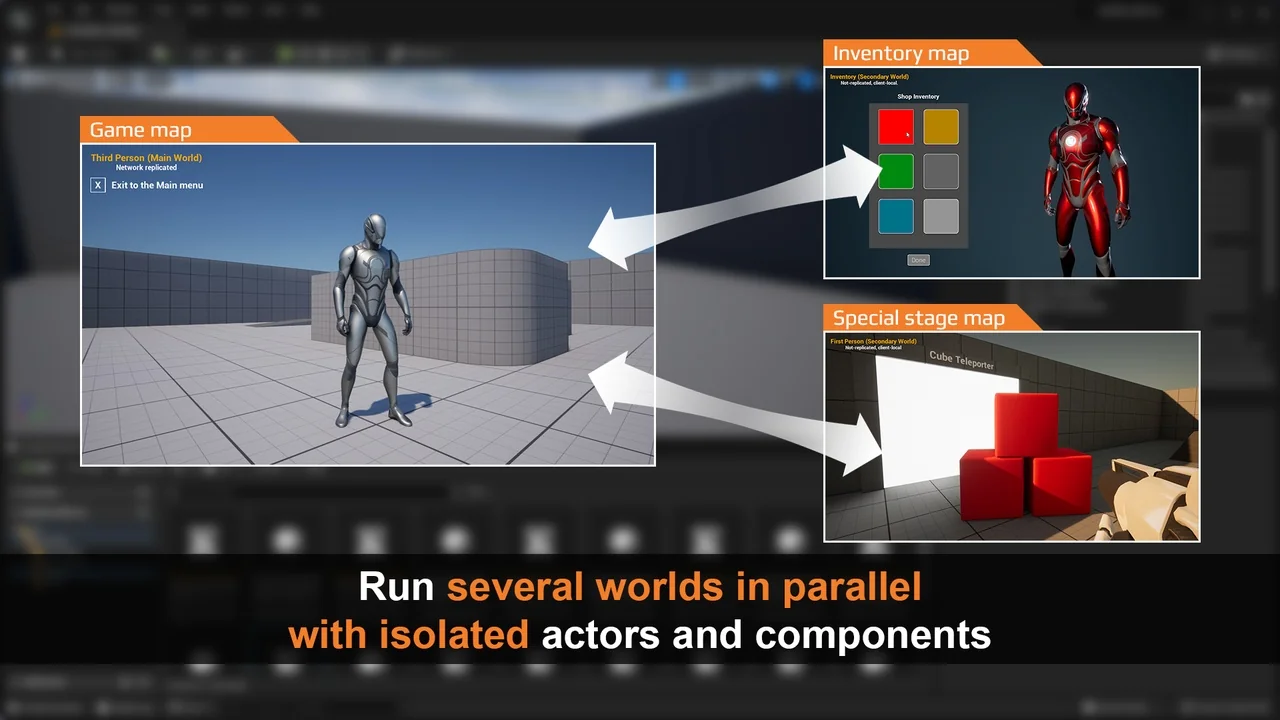
 Engine Tools
 Engine Tools
 Engine Tools