"fa182e0cd0a6ea73"{"id":"1001096","slug":"gravity-scatter-tool","title":"Gravity Scatter Tool","category":"Engine Tools","engine":"5.3 - 5.8","assetVersion":"Asset Version: 1.0.0","engineVersion":"Engine Version: 5.3 - 5.8","tag":"Engine Tools","accent":"blue","visual":"mech","summary":"Gravity Scatter Tool is a UE5 physics-based scattering plugin with five Chaos-driven spawn modes, HISM conversion, culling, a brush system, and mesh library con","platform":"Unreal Engine","publishedAt":"2026-09-06T01:58:48.457Z","updatedAt":"2026-09-06T01:58:48.457Z","sourceNotes":[],"fileContents":[],"compatibility":["Unreal Engine","Asset Version: 1.0.0","Engine Version: 5.3 - 5.8"],"featuredImage":{"alt":"Gravity Scatter Tool","src":"/wp-content/uploads/published/2026/09/8fe8b336514b-6e9b81a9-eead-4197-8a63-67a08121ec2e-48db181646.webp"},"hasDownloadLink":true,"downloads":0,"terms":[{"taxonomy":"category","slug":"engine-tools-tools-and-plugins","name":"Engine Tools"}],"galleryImages":[{"src":"/wp-content/uploads/published/2026/09/83189bbc2fd7-36336667-5f85-41e8-8d48-072bea6153ef-ce82b2a821.webp","alt":"Gravity Scatter Tool"},{"src":"/wp-content/uploads/published/2026/09/62b841e5597c-272e0baf-2de9-423e-8657-792992bd6276-39feb532c3.webp","alt":"Gravity Scatter Tool"},{"src":"/wp-content/uploads/published/2026/09/9616f5604920-82a91135-aeb8-4bef-936f-94e694358a0e-b43a901ecb.webp","alt":"Gravity Scatter Tool"},{"src":"/wp-content/uploads/published/2026/09/1de43a2e2ec9-ae1d1c54-c8da-4af7-a943-e003fc323e94-2552126661.webp","alt":"Gravity Scatter Tool"},{"src":"/wp-content/uploads/published/2026/09/d50511789eec-30f82e09-afe8-4500-bbc3-77536b72fa08-8968022ae3.webp","alt":"Gravity Scatter Tool"},{"src":"/wp-content/uploads/published/2026/09/be4453b0b801-37ae0fcb-c36d-4825-9784-71843bfe6eba-5709c342a1.webp","alt":"Gravity Scatter Tool"},{"src":"/wp-content/uploads/published/2026/09/2f841b8edaf4-8e8f5b2b-1988-45e3-bad3-bf363cf97a38-b11cd6914e.webp","alt":"Gravity Scatter Tool"}],"accessPanel":{"kind":"resource","title":"Download this resource","eyebrow":"Free Download","message":"Log in or create a free account to start your download.","fileName":"Gravity Scatter Tool.7z","safetyNote":"Resources are manually reviewed before listing to improve quality and reduce obvious risks.","actionLabel":"Download Free","resourceType":"Resource archive"},"contentHtml":"\u003cp\u003eGravity Scatter Tool is a physics-based scatter plugin for Unreal Engine 5. Where conventional scatter tools drop props in preset patterns, this one lets the engine's Chaos physics system decide how objects land. Props are pushed, thrown, or dropped into the level, allowed to bounce and roll until they rest, and only then are they turned into optimized Hierarchical Instanced Static Meshes (HISM). This gives a placement workflow that reads as natural even when the scene is packed with small objects.\u003c/p\u003e\u003ch2\u003eFive Physics-Based Spawn Modes\u003c/h2\u003e\u003cp\u003eThe full range of placements is covered by five spawn modes, each pushing objects into the world with a different kind of force:\u003c/p\u003e\u003cul\u003e\u003cli\u003e\u003cstrong\u003eDrop Mode\u003c/strong\u003e Releases objects from a configurable height and lets gravity do the rest.\u003c/li\u003e\u003cli\u003e\u003cstrong\u003eGun Mode\u003c/strong\u003e Fires objects like projectiles toward a target point in the scene.\u003c/li\u003e\u003cli\u003e\u003cstrong\u003eSpray Mode\u003c/strong\u003e Sprays objects upward from the surface with adjustable force.\u003c/li\u003e\u003cli\u003e\u003cstrong\u003eRain Mode\u003c/strong\u003e Drops objects across large rectangular areas of up to 65,000 units.\u003c/li\u003e\u003cli\u003e\u003cstrong\u003eExplosion Mode\u003c/strong\u003e Spawns objects with a radial force, flinging them outward from a central point.\u003c/li\u003e\u003c/ul\u003e\u003cp\u003eThese modes cover radically different scatter jobs. Rain Mode is useful for covering wide ground with leaves or pebbles, while Gun Mode and Explosion Mode fit props that need direction or impact. Because all of the motion happens inside a real-time physics simulation, the objects interact with what is already in the level instead of floating into place.\u003c/p\u003e\u003ch2\u003eChaos Simulation, Rest Detection, and Natural Settling\u003c/h2\u003e\u003cp\u003eThe tool draws directly on Unreal Engine 5's Chaos physics system. Gravity, velocity, and damping values can all be adjusted, which changes how materials fall, how high they travel, and how quickly they lose momentum. The important detail is that objects do not simply stop the moment they are spawned. They settle naturally on whatever surface they touch, tumbling down slopes or stacking against walls in ways that match the physics of the moment.\u003c/p\u003e\u003cp\u003eTo keep the simulation from running forever, Gravity Scatter Tool uses automatic rest detection. When the scattered objects stop moving, the simulation ends, and the scene is ready for the next step. That step is converting the paused simulation into HISM, which is where the plugin's performance story begins.\u003c/p\u003e\u003ch2\u003eHISM Conversion, Grouped Instances, and Cull Distance\u003c/h2\u003e\u003cp\u003eOnce the objects have settled, confirming the scatter operation turns them into Hierarchical Instanced Static Meshes. The conversion is automatic, and the resulting instances are grouped by mesh type. That keeps draw calls low even when the operation has produced thousands of separate objects.\u003c/p\u003e\u003cp\u003eThe plugin also includes a configurable Cull Distance system, which can be enabled or disabled depending on the needs of the shot. Start Cull Distance controls where instances begin to fade out, and End Cull Distance is the point at which they fully disappear. For large-scale scattering that covers distant terrain, this distance-based fading prevents wasted rendering work on props that are too far away to be seen clearly.\u003c/p\u003e\u003ch2\u003eBrush Workflow and Mesh Library Control\u003c/h2\u003e\u003cp\u003eBefore anything is dropped, the brush gives a clear idea of where the action will happen. A visual brush preview uses mode-specific visualization, so painting with Drop Mode reads differently from painting with Explosion Mode. Brush size can be adjusted with Shift+Scroll, and a falloff setting controls how naturally density fades toward the edges of the brush. The brush also remains visible and usable at any distance, which keeps the workflow reliable when working from far above a level.\u003c/p\u003e\u003cp\u003eMeshes are pulled directly from the Content Browser with drag-and-drop. Once loaded into the mesh library, each mesh has its own spawn weight, which controls the probability of it appearing compared to the others. Individual meshes can be enabled or disabled on the fly, so changing a scatter mix does not require clearing the entire brush. Random scale and rotation can also be applied per mesh type, which avoids the repetitive straight-up orientation that often marks auto-scattered props.\u003c/p\u003e\u003ch2\u003eControls, Shortcuts, and a Clean UI\u003c/h2\u003e\u003cp\u003eThe plugin is structured through a professional interface that matches the look of Unreal's native tools. Mode selection is icon-based and compact, each parameter has a reset button, and full tooltip documentation appears on every control. That makes the plugin approachable even before opening external documentation.\u003c/p\u003e\u003cp\u003eKeyboard shortcuts keep the workflow fast:\u003c/p\u003e\u003cul\u003e\u003cli\u003e\u003cstrong\u003eLeft Click\u003c/strong\u003e Paints or spawns objects within the brush area.\u003c/li\u003e\u003cli\u003e\u003cstrong\u003eShift + Left Click\u003c/strong\u003e Erases objects inside the brush radius.\u003c/li\u003e\u003cli\u003e\u003cstrong\u003eShift + Scroll\u003c/strong\u003e Adjusts the brush size.\u003c/li\u003e\u003cli\u003e\u003cstrong\u003eEnter\u003c/strong\u003e Confirms the result and converts the scattered objects into HISM.\u003c/li\u003e\u003cli\u003e\u003cstrong\u003eEscape\u003c/strong\u003e Cancels the operation and removes the objects that were just scattered.\u003c/li\u003e\u003c/ul\u003e\u003cp\u003eThe confirmation and cancel steps are important because they make the process non-destructive until the scatter is committed. Until Enter is pressed, the objects are still part of the physics simulation; Escape clears them away without leaving stray instances behind.\u003c/p\u003e\u003ch2\u003eOrganic Scatter in Real Production Work\u003c/h2\u003e\u003cp\u003eGravity Scatter Tool is well matched to scenes where objects have to look like they ended up where they are. Scattering fallen leaves, debris, clutter, and rock fields is the obvious application, and the use of physics means those objects land naturally on uneven terrain rather than uniformly on top of it. Pebbles and rocks can be placed on slopes, forest debris piles in low points, and prop distributions follow the actual contours of the level.\u003c/p\u003e\u003cp\u003eThe explosion and projectile modes also open up destruction aftermath shots. Debris can be thrown outward by an explosion, settle, and then be converted into HISM in a single operation. For scenarios that require organic object placement in any form, the plugin provides a controlled physics pipeline that skips the usual snap-to-ground pain of manual placement.\u003c/p\u003e\u003cp\u003eGravity Scatter Tool is available for Unreal Engine 5.3, 5.4, 5.5, 5.6, and 5.7. With its five spawn modes, Chaos-based settling, HISM optimization, and distance culling, it stands as a practical option for level artists who need dirt, debris, rocks, and props to behave as if they were really there.\u003c/p\u003e\n\n\u003ch2\u003eRelated Resources Worth Checking\u003c/h2\u003e\n\u003cul\u003e\n\u003cli\u003e\u003ca href=\"https://3dcghub.com/zero-gravity-animations/\" title=\"Zero Gravity Animations\"\u003eZero Gravity Animations\u003c/a\u003e\u003c/li\u003e\n\u003cli\u003e\u003ca href=\"https://3dcghub.com/mgt-multiplayer-gravity-template/\" title=\"MGT Multiplayer Gravity Template\"\u003eMGT Multiplayer Gravity Template\u003c/a\u003e\u003c/li\u003e\n\u003cli\u003e\u003ca href=\"https://3dcghub.com/volcano-land-environment-w-terrain-scatter-tool-exterior-natural-vfx/\" title=\"Volcano Land Environment w/ Terrain Scatter Tool (Exterior, Natural, VFX)\"\u003eVolcano Land Environment w/ Terrain Scatter Tool (Exterior, Natural, VFX)\u003c/a\u003e\u003c/li\u003e\n\u003cli\u003e\u003ca href=\"https://3dcghub.com/hierarchical-scatter-tool/\" title=\"Hierarchical Scatter Tool\"\u003eHierarchical Scatter Tool\u003c/a\u003e\u003c/li\u003e\n\u003cli\u003e\u003ca href=\"https://3dcghub.com/vehicles-gravity-template-vgt/\" title=\"Vehicles Gravity Template - VGT\"\u003eVehicles Gravity Template - VGT\u003c/a\u003e\u003c/li\u003e\n\u003c/ul\u003e","contentTextLength":6392,"navigation":{"current":808,"total":3789,"previous":{"id":"1001097","slug":"zombie-shooter-kit-v2-12-unreal-engine-5-starter-pack","title":"Zombie Shooter Kit v2.12 - UNREAL ENGINE 5 Starter Pack","category":"Shooter","platform":"Unreal Engine","updatedAt":"2026-09-06T02:45:34.766Z"},"next":{"id":"1001095","slug":"grappling-hook-system-with-physics","title":"Grappling Hook System (with Physics)","category":"Gameplay Features","platform":"Unreal Engine","updatedAt":"2026-09-06T01:52:41.055Z"}},"relatedResources":[{"id":"1000907","slug":"zero-gravity-animations","title":"Zero Gravity Animations","category":"Variety","engine":"5.3+","assetVersion":"","engineVersion":"Engine Version: 5.3+","tag":"Variety","accent":"blue","visual":"animation","summary":"28 motion-captured zero-G animations for sci-fi characters: fighting, shooting, hovering, soaring, working, and more. Compatible with Tavern Animations.","platform":"Unreal Engine","publishedAt":"2026-08-06T05:25:00.999Z","updatedAt":"2026-08-06T05:25:00.999Z","sourceNotes":[],"fileContents":[],"compatibility":["Unreal Engine","Engine Version: 5.3+"],"featuredImage":{"alt":"Zero Gravity Animations","src":"/wp-content/uploads/published/2026/08/df277c0e198b-b683c338-9b23-4987-b83d-bbdc43bf42e5-3aaf7e5e5b.webp"},"hasDownloadLink":true,"downloads":0},{"id":"1000238","slug":"mgt-multiplayer-gravity-template","title":"MGT Multiplayer Gravity Template","category":"Gameplay Features","engine":"5.3+","assetVersion":"","engineVersion":"Engine Version: 5.3+","tag":"Gameplay Features","accent":"blue","visual":"mech","summary":"A dynamic gravity system for Unreal Engine utilizing the native character movement component to support full multiplayer replication for players, objects, and A","platform":"Unreal Engine","publishedAt":"2026-06-30T18:11:03.499Z","updatedAt":"2026-06-30T18:11:03.499Z","sourceNotes":[],"fileContents":[],"compatibility":["Unreal Engine","Engine Version: 5.3+"],"featuredImage":{"alt":"MGT Multiplayer Gravity Template","src":"/wp-content/uploads/published/2026/06/3e9b12a8f9cc-951e39e8-6c7b-4772-975c-e63141c701c5-5cf67fa1da.webp"},"hasDownloadLink":true,"downloads":0},{"id":"25185","slug":"volcano-land-environment-w-terrain-scatter-tool-exterior-natural-vfx","title":"Volcano Land Environment w/ Terrain Scatter Tool (Exterior, Natural, VFX)","category":"Mountain","engine":"5.3+","assetVersion":"Engine version: 5.3+","engineVersion":"","tag":"Mountain","accent":"blue","visual":"city","summary":"This volcanic environment pack focuses on fast scene building and strong atmosphere, combining terrain scattering, lava rivers, and dense smoke with realistic materials. It is built for projects that need a harsh exterior landscape with clear support for Lu...","platform":"Unreal Engine","publishedAt":"2026-04-19T12:59:02.000Z","updatedAt":"2026-04-20T06:12:31.000Z","sourceNotes":[],"fileContents":[],"compatibility":["Unreal Engine","Engine version: 5.3+"],"featuredImage":{"alt":"Volcano Land Environment w/ Terrain Scatter Tool (Exterior, Natural, VFX)","src":"https://3dcghub.com/wp-content/uploads/2026/04/6e347a926c55_43b6bb69-18bf-4c1b-b68a-51da7bf08d0f.webp"},"hasDownloadLink":true,"downloads":0}]}
Engine Tools
Gravity Scatter Tool
Gravity Scatter Tool is a UE5 physics-based scattering plugin with five Chaos-driven spawn modes, HISM conversion, culling, a brush system, and mesh library con
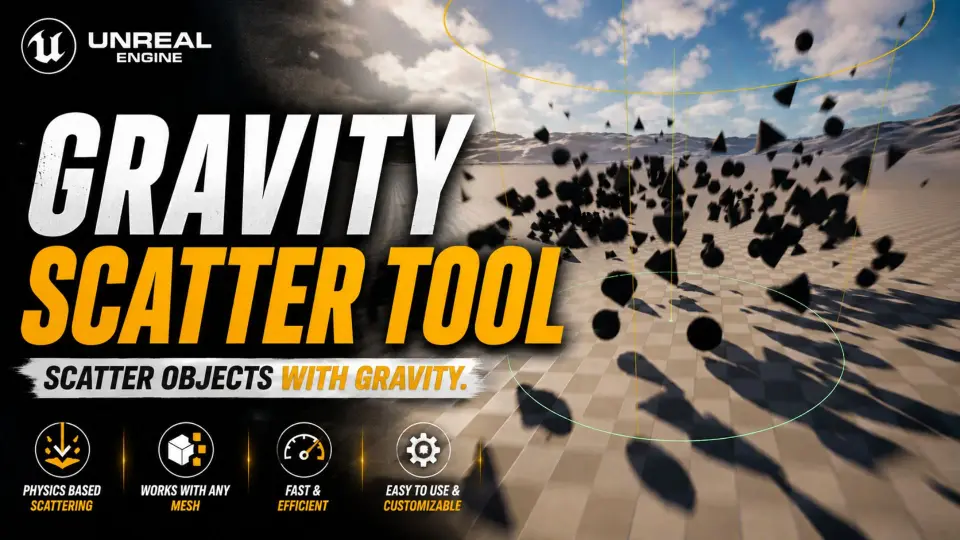
Gravity Scatter Tool is a physics-based scatter plugin for Unreal Engine 5. Where conventional scatter tools drop props in preset patterns, this one lets the engine's Chaos physics system decide how objects land. Props are pushed, thrown, or dropped into the level, allowed to bounce and roll until they rest, and only then are they turned into optimized Hierarchical Instanced Static Meshes (HISM). This gives a placement workflow that reads as natural even when the scene is packed with small objects.
Five Physics-Based Spawn Modes
The full range of placements is covered by five spawn modes, each pushing objects into the world with a different kind of force:
Drop Mode Releases objects from a configurable height and lets gravity do the rest.
Gun Mode Fires objects like projectiles toward a target point in the scene.
Spray Mode Sprays objects upward from the surface with adjustable force.
Rain Mode Drops objects across large rectangular areas of up to 65,000 units.
Explosion Mode Spawns objects with a radial force, flinging them outward from a central point.
These modes cover radically different scatter jobs. Rain Mode is useful for covering wide ground with leaves or pebbles, while Gun Mode and Explosion Mode fit props that need direction or impact. Because all of the motion happens inside a real-time physics simulation, the objects interact with what is already in the level instead of floating into place.
Chaos Simulation, Rest Detection, and Natural Settling
The tool draws directly on Unreal Engine 5's Chaos physics system. Gravity, velocity, and damping values can all be adjusted, which changes how materials fall, how high they travel, and how quickly they lose momentum. The important detail is that objects do not simply stop the moment they are spawned. They settle naturally on whatever surface they touch, tumbling down slopes or stacking against walls in ways that match the physics of the moment.
To keep the simulation from running forever, Gravity Scatter Tool uses automatic rest detection. When the scattered objects stop moving, the simulation ends, and the scene is ready for the next step. That step is converting the paused simulation into HISM, which is where the plugin's performance story begins.
HISM Conversion, Grouped Instances, and Cull Distance
Once the objects have settled, confirming the scatter operation turns them into Hierarchical Instanced Static Meshes. The conversion is automatic, and the resulting instances are grouped by mesh type. That keeps draw calls low even when the operation has produced thousands of separate objects.
The plugin also includes a configurable Cull Distance system, which can be enabled or disabled depending on the needs of the shot. Start Cull Distance controls where instances begin to fade out, and End Cull Distance is the point at which they fully disappear. For large-scale scattering that covers distant terrain, this distance-based fading prevents wasted rendering work on props that are too far away to be seen clearly.
Brush Workflow and Mesh Library Control
Before anything is dropped, the brush gives a clear idea of where the action will happen. A visual brush preview uses mode-specific visualization, so painting with Drop Mode reads differently from painting with Explosion Mode. Brush size can be adjusted with Shift+Scroll, and a falloff setting controls how naturally density fades toward the edges of the brush. The brush also remains visible and usable at any distance, which keeps the workflow reliable when working from far above a level.
Meshes are pulled directly from the Content Browser with drag-and-drop. Once loaded into the mesh library, each mesh has its own spawn weight, which controls the probability of it appearing compared to the others. Individual meshes can be enabled or disabled on the fly, so changing a scatter mix does not require clearing the entire brush. Random scale and rotation can also be applied per mesh type, which avoids the repetitive straight-up orientation that often marks auto-scattered props.
Controls, Shortcuts, and a Clean UI
The plugin is structured through a professional interface that matches the look of Unreal's native tools. Mode selection is icon-based and compact, each parameter has a reset button, and full tooltip documentation appears on every control. That makes the plugin approachable even before opening external documentation.
Keyboard shortcuts keep the workflow fast:
Left Click Paints or spawns objects within the brush area.
Shift + Left Click Erases objects inside the brush radius.
Shift + Scroll Adjusts the brush size.
Enter Confirms the result and converts the scattered objects into HISM.
Escape Cancels the operation and removes the objects that were just scattered.
The confirmation and cancel steps are important because they make the process non-destructive until the scatter is committed. Until Enter is pressed, the objects are still part of the physics simulation; Escape clears them away without leaving stray instances behind.
Organic Scatter in Real Production Work
Gravity Scatter Tool is well matched to scenes where objects have to look like they ended up where they are. Scattering fallen leaves, debris, clutter, and rock fields is the obvious application, and the use of physics means those objects land naturally on uneven terrain rather than uniformly on top of it. Pebbles and rocks can be placed on slopes, forest debris piles in low points, and prop distributions follow the actual contours of the level.
The explosion and projectile modes also open up destruction aftermath shots. Debris can be thrown outward by an explosion, settle, and then be converted into HISM in a single operation. For scenarios that require organic object placement in any form, the plugin provides a controlled physics pipeline that skips the usual snap-to-ground pain of manual placement.
Gravity Scatter Tool is available for Unreal Engine 5.3, 5.4, 5.5, 5.6, and 5.7. With its five spawn modes, Chaos-based settling, HISM optimization, and distance culling, it stands as a practical option for level artists who need dirt, debris, rocks, and props to behave as if they were really there.
 Engine Tools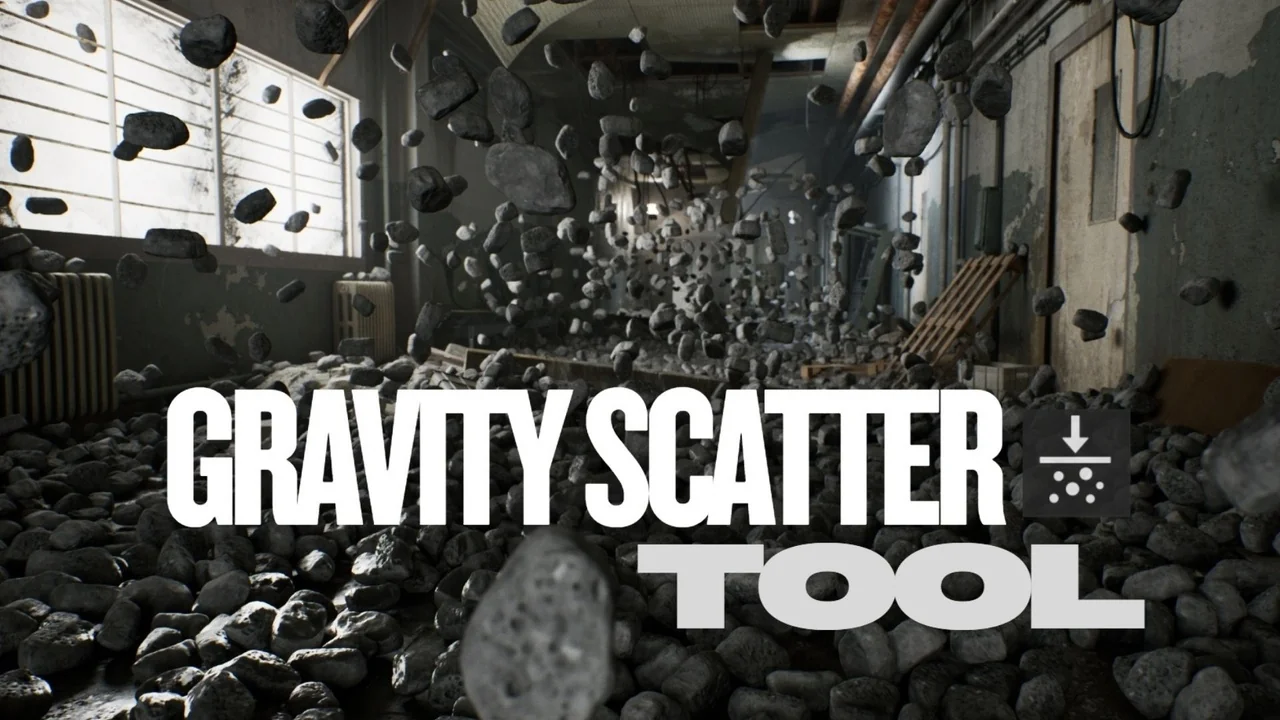
 Variety
 Gameplay Features
 Mountain