"c68a05d5e51405b3"{"id":"1001116","slug":"natural-movement-ai-smoothing-system","title":"Natural Movement - AI Smoothing System","category":"Gameplay Features","engine":"5.4+","assetVersion":"","engineVersion":"Engine Version: 5.4+","tag":"Gameplay Features","accent":"blue","visual":"mech","summary":"Blueprint-only AI smoothing system that keeps pathfinding routes intact, adds natural pace with context steering, and supports integration into other movement s","platform":"Unreal Engine","publishedAt":"2026-09-07T12:42:25.716Z","updatedAt":"2026-09-07T12:42:25.716Z","sourceNotes":[],"fileContents":[],"compatibility":["Unreal Engine","Engine Version: 5.4+"],"featuredImage":{"alt":"Natural Movement - AI Smoothing System","src":"/wp-content/uploads/published/2026/09/9891761589ed-ab3e2950-9c24-43b4-a483-136199d78147-547b954e11.webp"},"hasDownloadLink":true,"downloads":1,"terms":[{"taxonomy":"category","slug":"gameplay-features","name":"Gameplay Features"}],"galleryImages":[{"src":"/wp-content/uploads/published/2026/09/2d5ec0eb8275-425d83d5-0ec2-4bf2-a0d1-4387d5d164dd-beb90cfa9a.webp","alt":"Natural Movement - AI Smoothing System"},{"src":"/wp-content/uploads/published/2026/09/1d9848db2611-dd52ef6b-6c6e-4676-ba9e-f15f34bef926-19d2b75488.webp","alt":"Natural Movement - AI Smoothing System"},{"src":"/wp-content/uploads/published/2026/09/188d2c94a950-67388a85-5d68-48ba-aafe-53f2790839b9-d354712989.webp","alt":"Natural Movement - AI Smoothing System"},{"src":"/wp-content/uploads/published/2026/09/0949f844aa58-8f369f7a-116c-4b51-b9e4-27a159d84084-969a877878.webp","alt":"Natural Movement - AI Smoothing System"},{"src":"/wp-content/uploads/published/2026/09/ae8f71122868-55f21d61-b18c-4bd4-a6bb-9328900dc370-0bade1d204.webp","alt":"Natural Movement - AI Smoothing System"}],"accessPanel":{"kind":"resource","title":"Download this resource","eyebrow":"Free Download","message":"Log in or create a free account to start your download.","fileName":"Content.7z","safetyNote":"Resources are manually reviewed before listing to improve quality and reduce obvious risks.","actionLabel":"Download Free","resourceType":"Resource archive"},"contentHtml":"\u003cp\u003eA straight line is often the quickest route from one point to another. For an NPC that is supposed to feel alive, that same straight line is frequently the problem. \u003cstrong\u003eNatural Movement - AI Smoothing System\u003c/strong\u003e Is shaped by the opposite assumption: the shortest path is not always the best path when an agent needs to move at a believable pace. It is the first asset in the Natural Series and it exists entirely as a Blueprint component.\u003c/p\u003e\u003cp\u003eThe component is plug-and-play and can work on top of the default Move To node or any other pathfinding system. Pathfinding still decides where the agent needs to go. Natural Movement decides how the movement should feel along the way. No code is required.\u003c/p\u003e\u003ch2\u003eAn Additive Blueprint Layer Over Move To and Any Pathfinding\u003c/h2\u003e\u003cp\u003eMost movement assets ask the developer to replace navigation logic. Natural Movement does the opposite. The system is additive, which means it preserves whatever pathfinding already drives the agent and changes the shape of the motion rather than the route.\u003c/p\u003e\u003cp\u003eActor Agent support arrived with v1.3, so the component is not locked to a specific character class. Any actor that needs smoother navigation can use the component. Because the logic is fully Blueprint, developers can open it, understand how the settings are wired, and adjust them without moving to C++ or a separate behavior graph system.\u003c/p\u003e\u003ch2\u003eNatural Movement Adds a Pace Layer That Reads the Angle Between Current and Desired Direction\u003c/h2\u003e\u003cp\u003eThe core smoothing behavior is not a uniform speed multiplier. It is tied to the relationship between where the agent is heading now and where it should be heading. This is expressed in two v1.1 features that work together.\u003c/p\u003e\u003cp\u003eDynamic Direction Interpolation uses the difference between the current direction and the desired direction. When that angle is higher, interpolation is faster, which makes the agent turn with purpose instead of easing into a turn at the same rate no matter how sharp it is. Dynamic Throttle uses the same angle in the opposite way. Higher angle means lower throttle, so the agent naturally slows down for larger directional changes. A huge turn no longer happens at full speed.\u003c/p\u003e\u003cp\u003eThe component also includes Context Steering for obstacles. Alongside the interpolation and throttle logic, this feature gives the movement a context-aware way to handle the environment rather than tracking a single direct path.\u003c/p\u003e\u003ch2\u003eDemo Toggles Put Default NPC and Steering Movement Side by Side\u003c/h2\u003e\u003cp\u003eThe component comes with debugging and comparison tools that are useful during setup. Nav Path Visualization draws the navigation path, and a Show|Hide Control Panel toggle brings the settings into view when needed. The demo also includes an Aerial View and an Attached Cam toggle, so a developer can observe the movement from above or from a camera mounted on the agent.\u003c/p\u003e\u003cp\u003eFor side-by-side work, the Default NPC Vs Steering Movement NPC toggle switches between the default movement and the steering movement produced by the component. Putting one next to the other makes the smoothing effect obvious and easier to tune. NPC Max Speed and Yaw Rotation Rate controls adjust how quickly the agent moves and how fast it can rotate toward its goal.\u003c/p\u003e\u003cp\u003eDebug context arrows are part of the system as well. In v1.3 they were updated to match trace length, so the arrow that represents the steering context now lines up with the actual distance being traced.\u003c/p\u003e\u003ch2\u003eFeeding Natural Movement's Smoothing Into Directional Movement Systems\u003c/h2\u003e\u003cp\u003eNot every movement controller uses the same input. V1.2 introduced an advanced Custom Direction Input mode. This mode allows Natural Movement to integrate with a movement system that is based on directional inputs instead of a pathfinding goal. That makes the smoothing behavior useful in projects where movement is already handled by a custom controller.\u003c/p\u003e\u003cp\u003eAn Auto Manage Feed option controls who owns the output. When it is enabled, Natural Movement manages the feed itself. When it is disabled, the natural smoothing behavior can be sent to another movement system. Developers who want to reuse the smoothing logic as an input layer rather than a final mover can turn off auto management and route the behavior where it is needed.\u003c/p\u003e\u003cp\u003eCustom Mode also contains a Custom Goal or Direction setting and a Custom Acceptance Radius. The component can accept either a goal point or a direction in this mode, and the acceptance radius defines how close the agent needs to be before the goal is considered reached. There is also a Custom Throttle Toggle Function to enable or disable throttle while running inside Custom Mode.\u003c/p\u003e\u003ch2\u003eTimer-Driven Updates, Component Volumes and Custom Goal Settings\u003c/h2\u003e\u003cp\u003eThe v1.3 pass restructured the update loop. The Tick Event was removed from the component and replaced by an Internal Timer. This change avoids Project Settings and gives the component a more contained update pattern. The agent no longer has to depend on the global tick settings of the project to receive the right update behavior.\u003c/p\u003e\u003cp\u003eAnother addition is the Toggle Component Volume. When the agent enters the volume, NaturalMovement is automatically disabled. This is useful for defining zones where the smoothing should pause without removing the component from the actor. The component can stay on the agent, but an area can temporarily turn it off.\u003c/p\u003e\u003cp\u003eActors that use Custom Mode also benefit from the Custom Goal or Direction and Custom Acceptance Radius options, which extend the component beyond a standard navigation path. With the v1.3 timer update, component volume, and debug arrow trace change, the system remains configurable without becoming dependent on project-wide tick settings.\u003c/p\u003e\u003cp\u003eThe end result is an AI movement layer for projects that want pathfinding without the robotic motion that often comes with it. Because it is additive and supports Actor Agents, developers can apply it to the agents they already have and keep the original navigation logic in place.\u003c/p\u003e\n\n\u003ch2\u003eMore From The Same Workflow\u003c/h2\u003e\n\u003cul\u003e\n\u003cli\u003e\u003ca href=\"https://3dcghub.com/city-traffic-pro/\" title=\"City Traffic Pro\"\u003eCity Traffic Pro\u003c/a\u003e\u003c/li\u003e\n\u003cli\u003e\u003ca href=\"https://3dcghub.com/advanced-tactical-based-system/\" title=\"Advanced Tactical-based System\"\u003eAdvanced Tactical-based System\u003c/a\u003e\u003c/li\u003e\n\u003cli\u003e\u003ca href=\"https://3dcghub.com/flexpath-smooth-navigation/\" title=\"FlexPath – Smooth Navigation\"\u003eFlexPath – Smooth Navigation\u003c/a\u003e\u003c/li\u003e\n\u003cli\u003e\u003ca href=\"https://3dcghub.com/action-adventure-movement-system/\" title=\"Action-Adventure Movement System\"\u003eAction-Adventure Movement System\u003c/a\u003e\u003c/li\u003e\n\u003cli\u003e\u003ca href=\"https://3dcghub.com/general-ai-framework/\" title=\"General AI Framework\"\u003eGeneral AI Framework\u003c/a\u003e\u003c/li\u003e\n\u003c/ul\u003e","contentTextLength":6069,"navigation":{"current":859,"total":3860,"previous":{"id":"1001117","slug":"open-world-locomotion-system","title":"Open World Locomotion System","category":"Gameplay Features","platform":"Unreal Engine","updatedAt":"2026-09-07T12:46:04.945Z"},"next":{"id":"1001115","slug":"multiworld","title":"MultiWorld","category":"Engine Tools","platform":"Unreal Engine","updatedAt":"2026-09-07T12:23:26.726Z"}},"relatedResources":[{"id":"10667","slug":"city-traffic-pro","title":"City Traffic Pro","category":"Gameplay Features","engine":"5.6+","assetVersion":"Engine version: 5.6+","engineVersion":"5.2","tag":"Gameplay Features","accent":"blue","visual":"city","summary":"City Traffic Pro is a complete, flexible, and performance-optimized traffic AI system designed for Unreal Engine 5. It enables developers to simulate realistic vehicle movement, complex intersections, and dynamic traffic flow for open-world projects.","platform":"Unreal Engine","publishedAt":"2026-03-03T15:55:56.000Z","updatedAt":"2026-04-19T15:49:57.000Z","sourceNotes":[],"fileContents":[],"compatibility":["Unreal Engine","Engine version: 5.6+"],"featuredImage":{"alt":"City Traffic Pro","src":"https://3dcghub.com/wp-content/uploads/2026/03/22b9385f-dac3-476f-9d6b-1d02dd1b4a6c.webp"},"hasDownloadLink":true,"downloads":4},{"id":"10564","slug":"advanced-tactical-based-system","title":"Advanced Tactical-based System","category":"Gameplay Features","engine":"4.26+,5.0+","assetVersion":"Engine version: 4.26+,5.0+","engineVersion":"4.26","tag":"Gameplay Features","accent":"blue","visual":"mech","summary":"Build professional turn-based strategy games with the Advanced Tactical-based System. This resource includes dynamic cover, grid-based movement, and advanced AI behavior for developers.","platform":"Unreal Engine","publishedAt":"2026-03-03T15:40:42.000Z","updatedAt":"2026-04-19T15:49:59.000Z","sourceNotes":[],"fileContents":[],"compatibility":["Unreal Engine","Engine version: 4.26+,5.0+"],"featuredImage":{"alt":"Advanced Tactical-based System","src":"https://3dcghub.com/wp-content/uploads/2026/03/5696fc64-1997-4079-bac3-49b1e7de5b99.webp"},"hasDownloadLink":true,"downloads":3},{"id":"1000292","slug":"flexpath-smooth-navigation","title":"FlexPath – Smooth Navigation","category":"Gameplay Features","engine":"5.5 - 5.7","assetVersion":"Asset Version: 1.4","engineVersion":"Engine Version: 5.5 - 5.7","tag":"Gameplay Features","accent":"blue","visual":"mech","summary":"Enhance Unreal Engine AI movement with FlexPath. Implement corridor-aware path smoothing, dynamic look-ahead rotation, and stable path following via Blueprint a","platform":"Unreal Engine","publishedAt":"2026-07-03T17:29:22.212Z","updatedAt":"2026-07-03T17:29:22.212Z","sourceNotes":[],"fileContents":[],"compatibility":["Unreal Engine","Asset Version: 1.4","Engine Version: 5.5 - 5.7"],"featuredImage":{"alt":"FlexPath – Smooth Navigation","src":"/wp-content/uploads/published/2026/07/7a1e8c39629e-c2db16de-e4d3-4301-b7d0-376bc8b73da5-5b5ffba9f2.webp"},"hasDownloadLink":true,"downloads":1}]}
Gameplay Features
Natural Movement - AI Smoothing System
Blueprint-only AI smoothing system that keeps pathfinding routes intact, adds natural pace with context steering, and supports integration into other movement s
A straight line is often the quickest route from one point to another. For an NPC that is supposed to feel alive, that same straight line is frequently the problem. Natural Movement - AI Smoothing System Is shaped by the opposite assumption: the shortest path is not always the best path when an agent needs to move at a believable pace. It is the first asset in the Natural Series and it exists entirely as a Blueprint component.
The component is plug-and-play and can work on top of the default Move To node or any other pathfinding system. Pathfinding still decides where the agent needs to go. Natural Movement decides how the movement should feel along the way. No code is required.
An Additive Blueprint Layer Over Move To and Any Pathfinding
Most movement assets ask the developer to replace navigation logic. Natural Movement does the opposite. The system is additive, which means it preserves whatever pathfinding already drives the agent and changes the shape of the motion rather than the route.
Actor Agent support arrived with v1.3, so the component is not locked to a specific character class. Any actor that needs smoother navigation can use the component. Because the logic is fully Blueprint, developers can open it, understand how the settings are wired, and adjust them without moving to C++ or a separate behavior graph system.
Natural Movement Adds a Pace Layer That Reads the Angle Between Current and Desired Direction
The core smoothing behavior is not a uniform speed multiplier. It is tied to the relationship between where the agent is heading now and where it should be heading. This is expressed in two v1.1 features that work together.
Dynamic Direction Interpolation uses the difference between the current direction and the desired direction. When that angle is higher, interpolation is faster, which makes the agent turn with purpose instead of easing into a turn at the same rate no matter how sharp it is. Dynamic Throttle uses the same angle in the opposite way. Higher angle means lower throttle, so the agent naturally slows down for larger directional changes. A huge turn no longer happens at full speed.
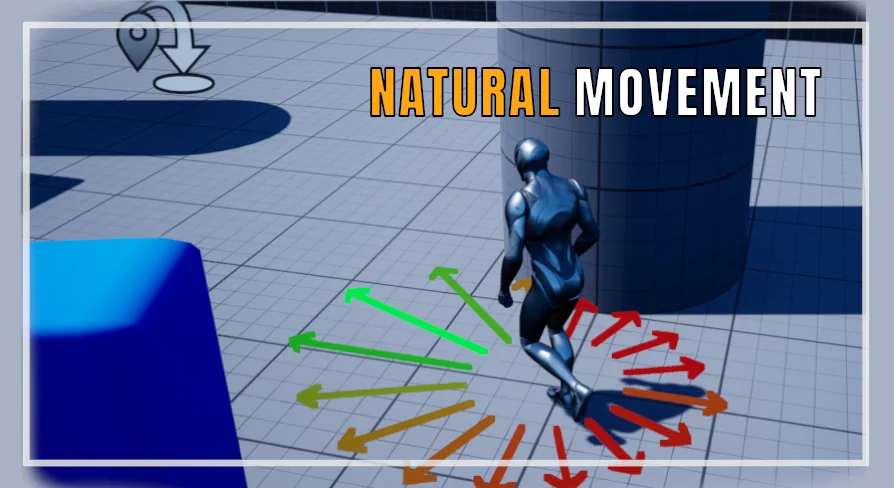
The component also includes Context Steering for obstacles. Alongside the interpolation and throttle logic, this feature gives the movement a context-aware way to handle the environment rather than tracking a single direct path.
Demo Toggles Put Default NPC and Steering Movement Side by Side
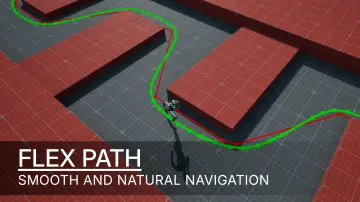
The component comes with debugging and comparison tools that are useful during setup. Nav Path Visualization draws the navigation path, and a Show|Hide Control Panel toggle brings the settings into view when needed. The demo also includes an Aerial View and an Attached Cam toggle, so a developer can observe the movement from above or from a camera mounted on the agent.
For side-by-side work, the Default NPC Vs Steering Movement NPC toggle switches between the default movement and the steering movement produced by the component. Putting one next to the other makes the smoothing effect obvious and easier to tune. NPC Max Speed and Yaw Rotation Rate controls adjust how quickly the agent moves and how fast it can rotate toward its goal.
Debug context arrows are part of the system as well. In v1.3 they were updated to match trace length, so the arrow that represents the steering context now lines up with the actual distance being traced.
Feeding Natural Movement's Smoothing Into Directional Movement Systems
Not every movement controller uses the same input. V1.2 introduced an advanced Custom Direction Input mode. This mode allows Natural Movement to integrate with a movement system that is based on directional inputs instead of a pathfinding goal. That makes the smoothing behavior useful in projects where movement is already handled by a custom controller.
An Auto Manage Feed option controls who owns the output. When it is enabled, Natural Movement manages the feed itself. When it is disabled, the natural smoothing behavior can be sent to another movement system. Developers who want to reuse the smoothing logic as an input layer rather than a final mover can turn off auto management and route the behavior where it is needed.
Custom Mode also contains a Custom Goal or Direction setting and a Custom Acceptance Radius. The component can accept either a goal point or a direction in this mode, and the acceptance radius defines how close the agent needs to be before the goal is considered reached. There is also a Custom Throttle Toggle Function to enable or disable throttle while running inside Custom Mode.
Timer-Driven Updates, Component Volumes and Custom Goal Settings
The v1.3 pass restructured the update loop. The Tick Event was removed from the component and replaced by an Internal Timer. This change avoids Project Settings and gives the component a more contained update pattern. The agent no longer has to depend on the global tick settings of the project to receive the right update behavior.
Another addition is the Toggle Component Volume. When the agent enters the volume, NaturalMovement is automatically disabled. This is useful for defining zones where the smoothing should pause without removing the component from the actor. The component can stay on the agent, but an area can temporarily turn it off.
Actors that use Custom Mode also benefit from the Custom Goal or Direction and Custom Acceptance Radius options, which extend the component beyond a standard navigation path. With the v1.3 timer update, component volume, and debug arrow trace change, the system remains configurable without becoming dependent on project-wide tick settings.
The end result is an AI movement layer for projects that want pathfinding without the robotic motion that often comes with it. Because it is additive and supports Actor Agents, developers can apply it to the agents they already have and keep the original navigation logic in place.
 Gameplay Features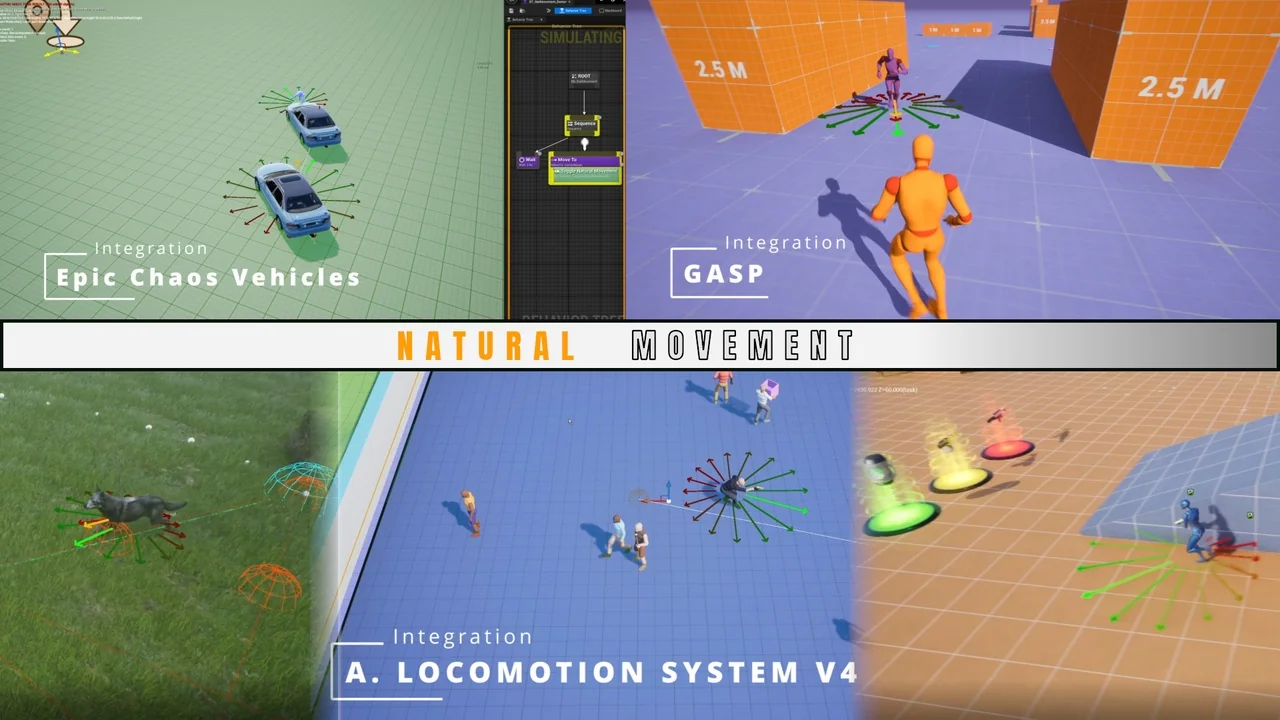
 Gameplay Features
 Gameplay Features
 Gameplay Features