"4481da9c895ef786"{"id":"1000292","slug":"flexpath-smooth-navigation","title":"FlexPath – Smooth Navigation","category":"Gameplay Features","engine":"5.5 - 5.7","assetVersion":"Asset Version: 1.4","engineVersion":"Engine Version: 5.5 - 5.7","tag":"Gameplay Features","accent":"blue","visual":"mech","summary":"Enhance Unreal Engine AI movement with FlexPath. Implement corridor-aware path smoothing, dynamic look-ahead rotation, and stable path following via Blueprint a","platform":"Unreal Engine","publishedAt":"2026-07-03T17:29:22.212Z","updatedAt":"2026-07-03T17:29:22.212Z","sourceNotes":[],"fileContents":[],"compatibility":["Unreal Engine","Asset Version: 1.4","Engine Version: 5.5 - 5.7"],"featuredImage":{"alt":"FlexPath – Smooth Navigation","src":"/wp-content/uploads/published/2026/07/7a1e8c39629e-c2db16de-e4d3-4301-b7d0-376bc8b73da5-5b5ffba9f2.webp"},"hasDownloadLink":true,"downloads":1,"terms":[{"taxonomy":"category","slug":"gameplay-features-tools-and-plugins","name":"Gameplay Features"}],"galleryImages":[{"src":"/wp-content/uploads/published/2026/07/2b8ea67e1977-dfbca20a-d388-4f47-bace-980d4217fac3-5078306ebc.webp","alt":"FlexPath – Smooth Navigation"},{"src":"/wp-content/uploads/published/2026/07/6004dc834eef-744f071f-56e0-4c32-9422-50b62fc12156-3a81c37173.webp","alt":"FlexPath – Smooth Navigation"},{"src":"/wp-content/uploads/published/2026/07/2cc2a103c4a0-1a0170a5-38a8-44bb-96e6-1039ba516a28-911fca90df.webp","alt":"FlexPath – Smooth Navigation"}],"accessPanel":{"kind":"resource","title":"Download this resource","eyebrow":"Free Download","message":"Log in or create a free account to start your download.","fileName":"FlexPath – Smooth Navigation.7z","safetyNote":"Resources are manually reviewed before listing to improve quality and reduce obvious risks.","actionLabel":"Download Free","resourceType":"Resource archive"},"contentHtml":"\u003ch2\u003eIntegrating FlexPath with Native Navigation\u003c/h2\u003e\n\u003cp\u003eImplementing fluid AI movement in Unreal Engine often requires extensive custom logic to overcome the rigid, point-to-point nature of standard pathfinding. FlexPath – Smooth Navigation addresses this by converting standard NavMesh paths into smoother, more natural movement trajectories. Rather than replacing the engine's built-in pathfinding logic, it works directly with Unreal’s existing navigation system. Projects can maintain their current NavMesh generation and AI logic while injecting curve-based traversal into the pipeline. The setup process relies on an included FlexPath AI controller and a custom path following component. By utilizing these elements, AI characters begin calculating fluid trajectories based on the underlying native navigation data immediately.\u003c/p\u003e \u003ch2\u003eUNavigationPath Workflow and Corridor-Aware Path Smoothing\u003c/h2\u003e\n\u003cp\u003eThe system's architecture relies on a robust Navigation Path Workflow that supports \u003ccode\u003eUNavigationPath\u003c/code\u003e Smoothing through both Blueprint and C++. This approach is technically distinct from smoothing a raw array of vector points. By processing the \u003ccode\u003eUNavigationPath\u003c/code\u003e Directly, the system preserves richer path data, ensuring that the generated curves remain contextually aware of the environment. Developers access this functionality through a suite of Blueprint-callable functions and exposed settings structs, making the toolset adaptable to both code-heavy and visually scripted projects.\u003c/p\u003e\n\u003cp\u003eA common issue with path smoothing is the tendency for generated curves to clip through walls or push characters outside the navigable bounds. To prevent this, the smoothing process relies on corridor-aware path smoothing. As the system smooths native navigation paths, it continuously validates the trajectory, keeping all generated points strictly inside valid NavMesh corridor space. This guarantees that the AI benefits from organic, sweeping turns without risking collision errors or getting stuck on static geometry bordering the generated path.\u003c/p\u003e \u003ch2\u003eAdaptive Curve Generation\u003c/h2\u003e\n\u003cp\u003eGenerating a natural movement path requires granular control over how the curves are calculated. The framework utilizes Adaptive Curve Generation to shape the AI's physical trajectory. This system responds to a combination of configurable curve sharpness, corner offsets, and strategically placed support points. By adjusting these parameters, developers fine-tune how aggressively an AI cuts a corner or how wide its turning radius becomes. The curve generation process also incorporates resampling and simplification techniques to optimize the point data, producing cleaner movement paths that eliminate unnecessary micro-adjustments during traversal.\u003c/p\u003e \u003ch2\u003eNavLink-Aware Processing and Stable Path Following\u003c/h2\u003e\n\u003cp\u003eEnvironments with verticality or special traversal mechanics rely heavily on NavLinks, which act as critical anchors for AI behavior. Aggressively smoothing a path through a NavLink can disrupt the character's ability to trigger a jump, climb, or drop. To maintain structural integrity, the system features NavLink-aware processing. When a path intersects with a NavLink, the processing logic automatically splits the path sections and protects the surrounding area. This careful handling preserves the intended traversal behavior and ensures the AI properly registers important navigation anchors before resuming its smoothed trajectory.\u003c/p\u003e\n\u003cp\u003eExecuting the movement along these newly generated curves is managed by the stable path following logic. The custom path following component uses the smoothed points as intermediate targets during the bulk of the journey, allowing for fluid motion across open terrain. However, as the character approaches critical areas, the system shifts its behavior. It enforces stricter reach handling near the final path endpoints and protected NavLinks, guaranteeing that the AI successfully arrives at its exact destination without overshooting or drifting off course.\u003c/p\u003e \u003ch2\u003eDynamic Look-Ahead Rotation and Focus Control\u003c/h2\u003e\n\u003cp\u003eNatural movement requires rotation that matches the fluidity of the physical path. To handle character facing, the system implements Dynamic Look-Ahead Rotation. Instead of rigidly snapping the character's rotation toward the immediate next path node, the internal logic calculates a speed-based forward target. By rotating the character toward this dynamic look-ahead point, the AI achieves smoother facing transitions and significantly reduced visual jitter, particularly when navigating complex sequences of waypoints.\u003c/p\u003e\n\u003cp\u003eThis rotation logic also yields to custom AI behaviors through Focus-Aware Rotation Control. If an AI character's gameplay focus is active—such as tracking a player during combat or aiming at a specific target—the FlexPath rotation steps back. This ensures the smooth navigation system coexists flawlessly with existing AI targeting and interaction behaviors.\u003c/p\u003e \u003ch2\u003eSettings Configuration and Debug Visualization\u003c/h2\u003e\n\u003cp\u003eProject configuration is highly flexible, supporting both global and localized management. Baseline smoothing rules can be established by configuring defaults directly within the Project Settings. For environments featuring diverse NPC types, these global settings can be overridden on a per-controller basis, applying distinct smoothing and following behaviors to specific AI agents. The toolset also supports runtime enable and disable functionality. Depending on the gameplay context, developers can toggle FlexPath during live gameplay, allowing the AI to restore and follow the original Unreal path when the situation demands a return to standard native navigation.\u003c/p\u003e\n\u003cp\u003eTo assist in refining these navigation parameters, the package includes comprehensive debug visualization capabilities. During development, teams can visually draw the smoothed paths, the original native paths, and the dynamic steering targets directly in the viewport. The debug tools also render the navigation corridor data, providing clear visual feedback on how the adaptive curves interact with the bounds of the NavMesh. For practical reference, the provided Demo Project v1.0 isolates the core features and functionality for testing, while the Example Project v1.0 demonstrates a full practical implementation of the smoothing system within a real-world use case.\u003c/p\u003e\n\n\u003ch2\u003eMore From The Same Workflow\u003c/h2\u003e\n\u003cul\u003e\n\u003cli\u003e\u003ca href=\"https://3dcghub.com/ultimate-gameplay-camera/\" title=\"Ultimate Gameplay Camera\"\u003eUltimate Gameplay Camera\u003c/a\u003e\u003c/li\u003e\n\u003cli\u003e\u003ca href=\"https://3dcghub.com/map-system-worldmap-minimap/\" title=\"Map System – WorldMap \u0026amp; Minimap\"\u003eMap System – WorldMap \u0026amp; Minimap\u003c/a\u003e\u003c/li\u003e\n\u003cli\u003e\u003ca href=\"https://3dcghub.com/weapon-shooting-system-pro/\" title=\"Weapon Shooting System Pro\"\u003eWeapon Shooting System Pro\u003c/a\u003e\u003c/li\u003e\n\u003cli\u003e\u003ca href=\"https://3dcghub.com/advanced-third-person-camera/\" title=\"Advanced Third Person Camera\"\u003eAdvanced Third Person Camera\u003c/a\u003e\u003c/li\u003e\n\u003cli\u003e\u003ca href=\"https://3dcghub.com/fire-chat-pro-groups-pms-proximity-and-world-chat-with-adjustable-range/\" title=\"Fire Chat PRO – Groups, PMs, Proximity and World Chat with adjustable range\"\u003eFire Chat PRO – Groups, PMs, Proximity and World Chat with adjustable range\u003c/a\u003e\u003c/li\u003e\n\u003c/ul\u003e","contentTextLength":6485,"navigation":{"current":1113,"total":3269,"previous":{"id":"1000294","slug":"fps-weapon-ak47-modular-customizable","title":"FPS Weapon AK47 (Modular, Customizable)","category":"Weapons \u0026 Combat","platform":"Unreal Engine","updatedAt":"2026-07-03T17:46:34.318Z"},"next":{"id":"1000291","slug":"elderwood-shaman","title":"Elderwood Shaman","category":"Characters \u0026 Creatures","platform":"Unreal Engine","updatedAt":"2026-07-03T17:27:03.950Z"}},"relatedResources":[{"id":"15108","slug":"ultimate-gameplay-camera","title":"Ultimate Gameplay Camera","category":"Gameplay Features","engine":"5.3 - 5.5","assetVersion":"Engine version: 5.3 - 5.5","engineVersion":"Asset Version:1.3","tag":"Gameplay Features","accent":"blue","visual":"audio","summary":"The Ultimate Gameplay Camera provides a professional-grade, dynamic third-person camera system for Unreal Engine. It features smooth movement, multiplayer replication, and extensive customization options without requiring C++ knowledge.","platform":"Unreal Engine","publishedAt":"2026-03-12T07:52:43.000Z","updatedAt":"2026-04-19T15:45:35.000Z","sourceNotes":[],"fileContents":[],"compatibility":["Unreal Engine","Engine version: 5.3 - 5.5","Asset Version: 1.3"],"featuredImage":{"alt":"Ultimate Gameplay Camera","src":"https://3dcghub.com/wp-content/uploads/2026/03/89e2406f-10ab-4f8a-97aa-fa74ad5bc513.webp"},"hasDownloadLink":true,"downloads":0},{"id":"15061","slug":"map-system-worldmap-minimap","title":"Map System – WorldMap \u0026 Minimap","category":"Gameplay Features","engine":"Engine Version: 1.3","assetVersion":"Engine version: 5.2 - 5.6","engineVersion":"Engine Version: 1.3","tag":"Gameplay Features","accent":"blue","visual":"mech","summary":"Enhance your project with a fully customizable Map System – WorldMap \u0026 Minimap. This tool offers essential navigation features like pathfinding, indoor navigation, and fog of war for any game genre.","platform":"Unreal Engine","publishedAt":"2026-03-12T07:37:44.000Z","updatedAt":"2026-06-05T13:14:26.831Z","sourceNotes":[],"fileContents":[],"compatibility":["Unreal Engine","Engine version: 5.2 - 5.6","Engine Version: 1.3"],"featuredImage":{"alt":"Map System – WorldMap \u0026 Minimap","src":"https://3dcghub.com/wp-content/uploads/2026/03/d64f7518-f352-4858-bfdf-74f3aab05c49.webp"},"hasDownloadLink":true,"downloads":3},{"id":"14999","slug":"customizable-interaction-plugin","title":"Customizable Interaction Plugin","category":"Gameplay Features","engine":"5.2 - 5.7","assetVersion":"Asset Version:1.0.1 - 2.0.4","engineVersion":"Engine version: 5.2 - 5.7","tag":"Gameplay Features","accent":"blue","visual":"character","summary":"The Customizable Interaction Plugin is a high-performance C++ tool designed for easy implementation. It features various interaction modes, detection settings, and full network replication.","platform":"Unreal Engine","publishedAt":"2026-03-12T07:22:15.000Z","updatedAt":"2026-09-30T04:21:56.258Z","sourceNotes":[],"fileContents":[],"compatibility":["Unreal Engine","Asset Version:1.0.1 - 2.0.4","Engine version: 5.2 - 5.7"],"featuredImage":{"alt":"Customizable Interaction Plugin","src":"https://3dcghub.com/wp-content/uploads/2026/03/61633308-c75d-4c5d-99bd-54efe2e0d535.webp"},"hasDownloadLink":true,"downloads":3}]}
Gameplay Features
FlexPath – Smooth Navigation
Enhance Unreal Engine AI movement with FlexPath. Implement corridor-aware path smoothing, dynamic look-ahead rotation, and stable path following via Blueprint a
Implementing fluid AI movement in Unreal Engine often requires extensive custom logic to overcome the rigid, point-to-point nature of standard pathfinding. FlexPath – Smooth Navigation addresses this by converting standard NavMesh paths into smoother, more natural movement trajectories. Rather than replacing the engine's built-in pathfinding logic, it works directly with Unreal’s existing navigation system. Projects can maintain their current NavMesh generation and AI logic while injecting curve-based traversal into the pipeline. The setup process relies on an included FlexPath AI controller and a custom path following component. By utilizing these elements, AI characters begin calculating fluid trajectories based on the underlying native navigation data immediately.
UNavigationPath Workflow and Corridor-Aware Path Smoothing
The system's architecture relies on a robust Navigation Path Workflow that supports UNavigationPath Smoothing through both Blueprint and C++. This approach is technically distinct from smoothing a raw array of vector points. By processing the UNavigationPath Directly, the system preserves richer path data, ensuring that the generated curves remain contextually aware of the environment. Developers access this functionality through a suite of Blueprint-callable functions and exposed settings structs, making the toolset adaptable to both code-heavy and visually scripted projects.
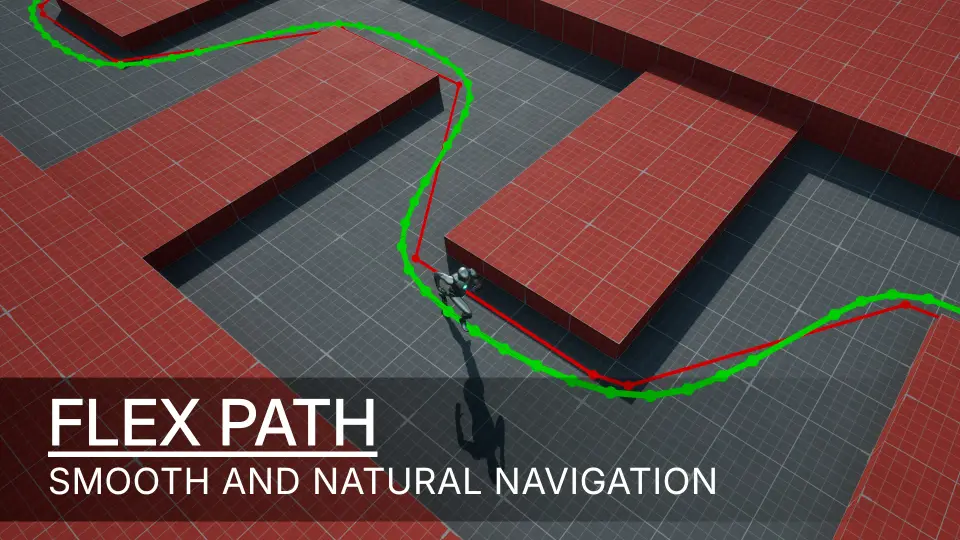
A common issue with path smoothing is the tendency for generated curves to clip through walls or push characters outside the navigable bounds. To prevent this, the smoothing process relies on corridor-aware path smoothing. As the system smooths native navigation paths, it continuously validates the trajectory, keeping all generated points strictly inside valid NavMesh corridor space. This guarantees that the AI benefits from organic, sweeping turns without risking collision errors or getting stuck on static geometry bordering the generated path.
Adaptive Curve Generation
Generating a natural movement path requires granular control over how the curves are calculated. The framework utilizes Adaptive Curve Generation to shape the AI's physical trajectory. This system responds to a combination of configurable curve sharpness, corner offsets, and strategically placed support points. By adjusting these parameters, developers fine-tune how aggressively an AI cuts a corner or how wide its turning radius becomes. The curve generation process also incorporates resampling and simplification techniques to optimize the point data, producing cleaner movement paths that eliminate unnecessary micro-adjustments during traversal.
NavLink-Aware Processing and Stable Path Following
Environments with verticality or special traversal mechanics rely heavily on NavLinks, which act as critical anchors for AI behavior. Aggressively smoothing a path through a NavLink can disrupt the character's ability to trigger a jump, climb, or drop. To maintain structural integrity, the system features NavLink-aware processing. When a path intersects with a NavLink, the processing logic automatically splits the path sections and protects the surrounding area. This careful handling preserves the intended traversal behavior and ensures the AI properly registers important navigation anchors before resuming its smoothed trajectory.
Executing the movement along these newly generated curves is managed by the stable path following logic. The custom path following component uses the smoothed points as intermediate targets during the bulk of the journey, allowing for fluid motion across open terrain. However, as the character approaches critical areas, the system shifts its behavior. It enforces stricter reach handling near the final path endpoints and protected NavLinks, guaranteeing that the AI successfully arrives at its exact destination without overshooting or drifting off course.
Dynamic Look-Ahead Rotation and Focus Control
Natural movement requires rotation that matches the fluidity of the physical path. To handle character facing, the system implements Dynamic Look-Ahead Rotation. Instead of rigidly snapping the character's rotation toward the immediate next path node, the internal logic calculates a speed-based forward target. By rotating the character toward this dynamic look-ahead point, the AI achieves smoother facing transitions and significantly reduced visual jitter, particularly when navigating complex sequences of waypoints.
This rotation logic also yields to custom AI behaviors through Focus-Aware Rotation Control. If an AI character's gameplay focus is active—such as tracking a player during combat or aiming at a specific target—the FlexPath rotation steps back. This ensures the smooth navigation system coexists flawlessly with existing AI targeting and interaction behaviors.
Settings Configuration and Debug Visualization
Project configuration is highly flexible, supporting both global and localized management. Baseline smoothing rules can be established by configuring defaults directly within the Project Settings. For environments featuring diverse NPC types, these global settings can be overridden on a per-controller basis, applying distinct smoothing and following behaviors to specific AI agents. The toolset also supports runtime enable and disable functionality. Depending on the gameplay context, developers can toggle FlexPath during live gameplay, allowing the AI to restore and follow the original Unreal path when the situation demands a return to standard native navigation.
To assist in refining these navigation parameters, the package includes comprehensive debug visualization capabilities. During development, teams can visually draw the smoothed paths, the original native paths, and the dynamic steering targets directly in the viewport. The debug tools also render the navigation corridor data, providing clear visual feedback on how the adaptive curves interact with the bounds of the NavMesh. For practical reference, the provided Demo Project v1.0 isolates the core features and functionality for testing, while the Example Project v1.0 demonstrates a full practical implementation of the smoothing system within a real-world use case.
 Gameplay Features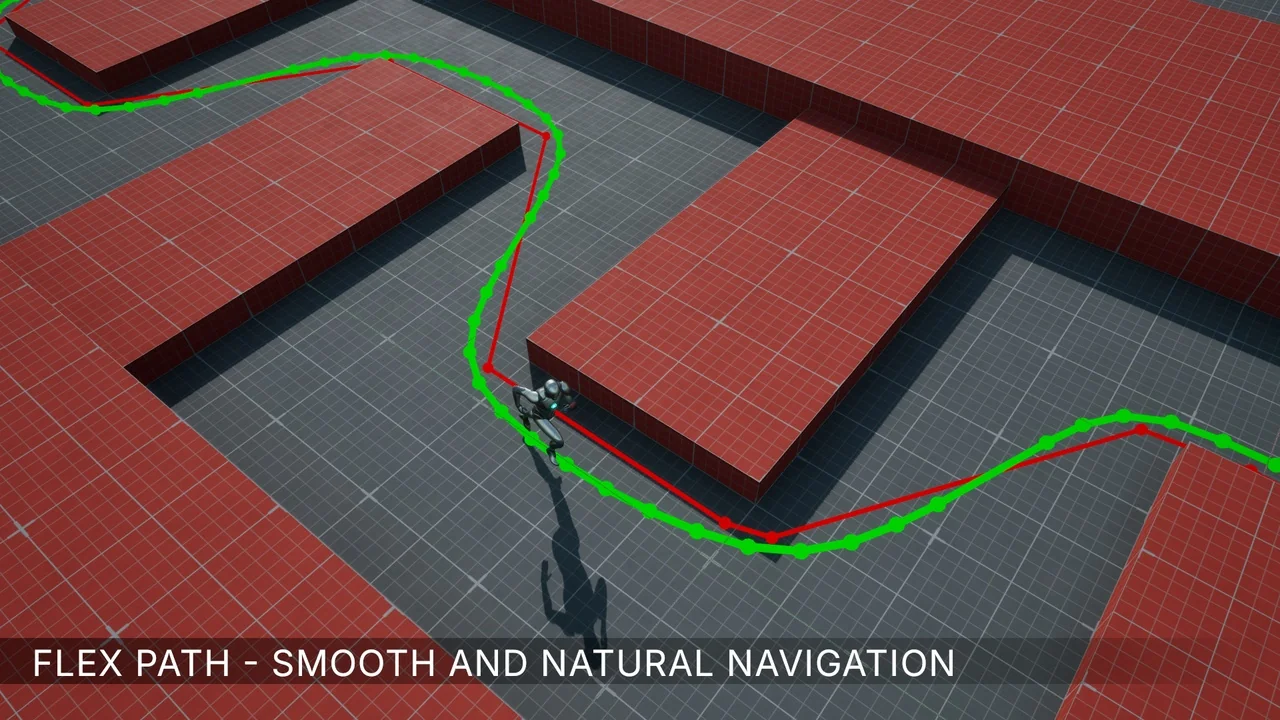
 Gameplay Features
 Gameplay Features
 Gameplay Features