"031373f479d9561a"{"id":"28457","slug":"advanced-third-person-camera","title":"Advanced Third Person Camera","category":"Gameplay Features","engine":"5.3 - 5.4","assetVersion":"Engine version: 5.3 - 5.4","engineVersion":"Asset Version:1.2.10 - 1.2.11","tag":"Gameplay Features","accent":"blue","visual":"mech","summary":"Third-person gameplay often breaks down when the camera cannot keep up with terrain, tight interiors, or fast character movement. Advanced Third Person Camera focuses on that problem with configurable camera modes, trigger-based switching, collision handlin...","platform":"Unreal Engine","publishedAt":"2026-05-15T16:49:49.000Z","updatedAt":"2026-05-15T16:49:52.000Z","sourceNotes":[],"fileContents":[],"compatibility":["Unreal Engine","Engine version: 5.3 - 5.4","Asset Version: 1.2.10 - 1.2.11"],"featuredImage":{"alt":"Advanced Third Person Camera","src":"https://3dcghub.com/wp-content/uploads/2026/05/8bd06e0f2f37_1e3ea3e5-774b-47e8-a130-b698a8cfa596.webp"},"hasDownloadLink":true,"downloads":0,"terms":[{"taxonomy":"category","slug":"gameplay-features-tools-and-plugins","name":"Gameplay Features"},{"taxonomy":"post_tag","slug":"characters","name":"Characters"},{"taxonomy":"post_tag","slug":"environment","name":"Environment"},{"taxonomy":"post_tag","slug":"unreal-engine-5","name":"Unreal Engine 5"}],"galleryImages":[{"src":"https://3dcghub.com/wp-content/uploads/2026/05/f3cb90b19c21_03c791e4-d3f0-4dce-952b-689201498a29.webp","alt":"Advanced Third Person Camera"},{"src":"https://3dcghub.com/wp-content/uploads/2026/05/a8de85d75575_3d357e17-319c-468c-b7cf-da0d0c57f717.webp","alt":"Advanced Third Person Camera"},{"src":"https://3dcghub.com/wp-content/uploads/2026/05/b426d211e22a_17965b05-c18c-40cb-981e-f40463989aa0.webp","alt":"Advanced Third Person Camera"},{"src":"https://3dcghub.com/wp-content/uploads/2026/05/82a6aeb248ae_0f7acee6-dec8-46a5-a47c-b60becff9124.webp","alt":"Advanced Third Person Camera"},{"src":"https://3dcghub.com/wp-content/uploads/2026/05/4e9ce50ad55b_a84b967f-369e-4605-b759-0f9606d38700.webp","alt":"Advanced Third Person Camera"},{"src":"https://3dcghub.com/wp-content/uploads/2026/05/51cf343dc068_b5448d4d-aef6-430d-a927-2dc67e6f877b.webp","alt":"Advanced Third Person Camera"},{"src":"https://3dcghub.com/wp-content/uploads/2026/05/2ed25505e703_84022dc3-d2e3-4fb1-8014-cf8b1e5f67be.webp","alt":"Advanced Third Person Camera"}],"accessPanel":{"kind":"resource","title":"Access this resource","eyebrow":"Free Download","message":"Log in or create a free account to start your download.","fileName":"Advanced Third Person Camera.7z","safetyNote":"All resources are 100% manually reviewed to eliminate all risks.","actionLabel":"Download Free","resourceType":"Resource archive"},"contentHtml":"\u003cp\u003eThird-person gameplay lives or dies by how well the camera reacts to space, movement, and visibility. A rigid setup can feel fine in an open area, then immediately struggle when the player walks indoors, passes beneath overhead geometry, or enters a narrow corridor. Advanced Third Person Camera approaches that problem as a scalable system beyond one fixed view, giving developers a way to create and manage multiple camera modes with their own behavior and parameters.\u003c/p\u003e\n\u003cp\u003eIts identity is rooted in flexibility. Instead of treating the camera as one universal preset, it supports various modes that can be configured separately or extended with custom scripts containing logic for each mode. That opens up creative room for projects that shift between exterior exploration, interior navigation, and more focused moments such as combat or interaction scenes. That leaves not just a camera that follows a character, but a camera framework that can be shaped around different parts of a game.\u003c/p\u003e \u003ch2\u003eAdvanced Third Person Camera as a mode-based workflow\u003c/h2\u003e\n\u003cp\u003eThe central idea is convenience in creating and managing different camera modes. Each mode can have unique behavior and a wide range of parameters, which makes the system useful for teams that want distinct camera responses without rebuilding the setup every time a scene changes.\u003c/p\u003e\n\u003cp\u003eThat can support a broad range of gameplay presentation. A wider camera might suit traversal through an outdoor space, while a tighter angle can better fit interior movement or moments that need stronger focus on character performance. Since the system is flexible, powerful, and scalable, it lends itself to projects where camera behavior needs to grow over time rather than stay locked to one early decision. The inclusion of custom scripts for each camera mode also matters creatively: developers are not restricted to preset behavior alone, and can attach specific logic to the mode that best matches a given gameplay situation.\u003c/p\u003e \u003ch2\u003eSwitch camera views with triggers in exterior and interior scenes\u003c/h2\u003e\n\u003cp\u003eOne of the most practical parts of the system is automatic camera-mode switching through special triggers placed in certain locations. This shifts camera management away from constant manual handling and toward scene-aware transitions.\u003c/p\u003e\n\u003cp\u003eIn production terms, that means the camera can react to where the character is or what they are doing. A trigger can mark a change in spatial conditions, such as moving from a broad exterior into a tighter interior, or entering an area where a different camera behavior helps maintain clarity. The same logic can also support activity-based changes, letting the view adapt when the player reaches a specific gameplay beat. This \"set and forget\" structure is especially useful when a project needs camera variation without asking the player or designer to micromanage every transition. It turns level space into part of the camera system itself, which makes placement and scene design more expressive.\u003c/p\u003e\n\u003cp\u003eBecause the tags connected to the resource include third-person, dynamic, RPG, exterior, and interior, the trigger-based approach feels particularly well suited to games that move between different spatial rhythms. A large outdoor path, a compact room, and a combat encounter do not need to share exactly the same framing rules, and this setup allows those shifts to happen automatically.\u003c/p\u003e \u003ch2\u003eFull control over position, angle, and field of view\u003c/h2\u003e\n\u003cp\u003eCamera feel often comes down to small adjustments. Advanced Third Person Camera emphasizes direct control over camera positions and angles, along with zooming, smooth panning, and field-of-view changes.\u003c/p\u003e\n\u003cp\u003eThose controls shape how a scene is read. Position affects how much environment the player can see around the character. Angle changes can alter mood, spatial awareness, and the sense of speed. Field of view can subtly change how open or compressed a space feels. Smooth panning helps preserve readability during movement instead of making the camera feel abrupt or detached. None of these options are unusual by themselves, but bringing them together inside a unified system matters when developers want to tune camera behavior mode by mode. It gives artists and designers room to compose movement through space rather than simply follow the player with a default chase camera.\u003c/p\u003e\n\u003cp\u003eThe practical value is easy to imagine in a project where camera framing must serve different goals from one sequence to the next. Exploration may benefit from a calmer, wider read of the environment. A more intimate interaction might call for a tighter setup. A faster gameplay passage may need a camera angle that keeps upcoming space visible. Since these controls are framed as easy to adjust, the system appears built to encourage iteration instead of fighting it.\u003c/p\u003e \u003ch2\u003eSmart collision handling and Keep It Clear in tight spaces\u003c/h2\u003e\n\u003cp\u003eThird-person cameras frequently fail when level geometry interrupts the view. Trees, poles, walls, and overhead objects can all interfere with player readability. Advanced Third Person Camera addresses that directly through smart collision handling and visibility management.\u003c/p\u003e\n\u003cp\u003eThe collision behavior is aimed at keeping gameplay views clear by recognizing what should be preserved in view and what should not be allowed to obstruct it. The camera also adapts to terrain and character actions, which is especially important in uneven spaces or transitional environments. When overhead obstacles appear, the camera can tilt to improve visibility instead of staying rigid. That kind of adjustment helps maintain a readable relationship between player, environment, and movement path.\u003c/p\u003e\n\u003cp\u003eThe system also includes a \"Keep It Clear\" behavior that automatically hides objects located between the camera and the character. In very tight situations, it can even hide the character if they move too close to the camera. That is a specific but useful detail. It suggests a camera setup intended not just for ideal open-space movement, but for cramped areas where the usual third-person view can break apart. For developers building interiors, dense environmental dressing, or traversal routes with a lot of overhead interference, that can make the difference between a camera that feels dependable and one that constantly needs manual exceptions.\u003c/p\u003e \u003ch2\u003eLock On Target and adaptive moves for action-focused scenes\u003c/h2\u003e\n\u003cp\u003eNot every camera moment is about free roaming. Some scenes need the view to support direct attention, especially in combat or interaction-heavy sequences. The lock-on feature is meant to keep focus on the action and highlight specific interactions.\u003c/p\u003e\n\u003cp\u003eThat makes the system usable beyond simple follow-camera duties. A lock-on view can help center the relationship between the player and a chosen target, which is valuable when readability matters more than broad environmental coverage. The description points to combat scenes as a natural fit, but the same principle can extend to any moment where the camera should emphasize a single subject or exchange.\u003c/p\u003e\n\u003cp\u003eAlongside that, the adaptive movement behavior keeps the camera responsive to what the character is doing and to the terrain being navigated. This responsiveness is part of what gives the system its dynamic identity. Rather than treating the environment as neutral background, the camera reacts to it. Rather than treating character motion as identical in every context, the system shifts to match it. Used well, that can help scenes feel intentional instead of mechanically followed, especially in projects where movement between spaces is a major part of the experience.\u003c/p\u003e \u003ch2\u003eUnreal Engine interface access instead of C++ dependency\u003c/h2\u003e\n\u003cp\u003eThe plugin is noted as being built on C++, but the key practical point is accessibility: everything is adjustable through the Unreal Engine interface. That changes who can work with it and how quickly it can be folded into a production pipeline.\u003c/p\u003e\n\u003cp\u003eFor teams that want robust underlying systems without making every camera tweak a programming task, this matters a lot. Designers and artists can focus on framing, transitions, and gameplay readability through the engine interface rather than treating the setup as code-first. The presence of easy-to-use scripts also reinforces that balance between technical depth and day-to-day usability. A project can lean on the underlying C++ strength while still keeping common adjustments approachable.\u003c/p\u003e\n\u003cp\u003eThere are also supporting materials tied to the plugin, including a demo, a quick setup tutorial, documentation, an example project, and a changelist. Taken together, those elements suggest a resource meant to be implemented, tested, and iterated on in real project conditions rather than treated as a black box.\u003c/p\u003e\n\u003cp\u003eFor developers shaping third-person gameplay across interiors, exteriors, exploration, and combat, Advanced Third Person Camera fits best as a camera control layer that stays responsive to scene demands. Its strongest role in a production is not just following a character, but helping each space and gameplay beat carry the camera behavior that suits it.\u003c/p\u003e\n\n\u003ch2\u003eContinue Browsing Similar Packs\u003c/h2\u003e\n\u003cul\u003e\n\u003cli\u003e\u003ca href=\"https://3dcghub.com/1950s-characters-bundle-1950s-characters-bundle-1950-character-gangster-3d/\" title=\"1950s Characters Bundle ( 1950s Characters Bundle 1950 Character Gangster 3D )\"\u003e1950s Characters Bundle ( 1950s Characters Bundle 1950 Character Gangster 3D )\u003c/a\u003e\u003c/li\u003e\n\u003cli\u003e\u003ca href=\"https://3dcghub.com/character-rigged-npc-character-rigged-npc-rig-characters-animated-3d/\" title=\"Character / Rigged / NPC ( Character Rigged NPC Rig Characters Animated 3D )\"\u003eCharacter / Rigged / NPC ( Character Rigged NPC Rig Characters Animated 3D )\u003c/a\u003e\u003c/li\u003e\n\u003c/ul\u003e","contentTextLength":9221,"navigation":{"current":1372,"total":3223,"previous":{"id":"28447","slug":"abandoned-mansion-_-fully-modular-asset-pack","title":"Abandoned Mansion _ Fully Modular Asset Pack","category":"Abandoned","platform":"Unreal Engine","updatedAt":"2026-05-15T16:50:24.000Z"},"next":{"id":"9369","slug":"brushify-volcano-pack","title":"Brushify Volcano Pack","category":"Mountain","platform":"Unreal Engine","updatedAt":"2026-05-15T09:57:00.000Z"}},"relatedResources":[{"id":"15108","slug":"ultimate-gameplay-camera","title":"Ultimate Gameplay Camera","category":"Gameplay Features","engine":"5.3 - 5.5","assetVersion":"Engine version: 5.3 - 5.5","engineVersion":"Asset Version:1.3","tag":"Gameplay Features","accent":"blue","visual":"audio","summary":"The Ultimate Gameplay Camera provides a professional-grade, dynamic third-person camera system for Unreal Engine. It features smooth movement, multiplayer replication, and extensive customization options without requiring C++ knowledge.","platform":"Unreal Engine","publishedAt":"2026-03-12T07:52:43.000Z","updatedAt":"2026-04-19T15:45:35.000Z","sourceNotes":[],"fileContents":[],"compatibility":["Unreal Engine","Engine version: 5.3 - 5.5","Asset Version: 1.3"],"featuredImage":{"alt":"Ultimate Gameplay Camera","src":"https://3dcghub.com/wp-content/uploads/2026/03/89e2406f-10ab-4f8a-97aa-fa74ad5bc513.webp"},"hasDownloadLink":true,"downloads":0},{"id":"15075","slug":"real-action-camera-pro-record-and-view-gameplay-moments","title":"Real Action Camera PRO – Record and View Gameplay Moments","category":"Gameplay Features","engine":"5.6 - 5.7","assetVersion":"Engine version: 5.6 - 5.7","engineVersion":"Asset Version:1.0","tag":"Gameplay Features","accent":"blue","visual":"city","summary":"Real Action Camera PRO – Record and View Gameplay Moments is a powerful Unreal Engine plugin that enables players to capture and save gameplay footage directly within the game environment.","platform":"Unreal Engine","publishedAt":"2026-03-12T07:42:38.000Z","updatedAt":"2026-04-19T15:45:35.000Z","sourceNotes":[],"fileContents":[],"compatibility":["Unreal Engine","Engine version: 5.6 - 5.7","Asset Version: 1.0"],"featuredImage":{"alt":"Real Action Camera PRO – Record and View Gameplay Moments","src":"https://3dcghub.com/wp-content/uploads/2026/03/17520f5b-db0a-4a72-9f2f-53cca4b97855.webp"},"hasDownloadLink":true,"downloads":0},{"id":"25145","slug":"shootlikeme-unreal-engine-third-person-shooter-template","title":"ShootLikeMe - Unreal Engine Third Person Shooter Template","category":"Shooter","engine":"5.5+","assetVersion":"Engine version: 5.5+","engineVersion":"","tag":"Shooter","accent":"blue","visual":"audio","summary":"This third-person shooter template brings together working firearms, grenades, enemy AI, and battlefield systems in one Unreal Engine project. It is shaped for projects that need more than a basic character setup and already includes the pieces for faction-...","platform":"Unreal Engine","publishedAt":"2026-04-19T11:43:36.000Z","updatedAt":"2026-04-20T06:12:32.000Z","sourceNotes":[],"fileContents":[],"compatibility":["Unreal Engine","Engine version: 5.5+"],"featuredImage":{"alt":"ShootLikeMe - Unreal Engine Third Person Shooter Template","src":"https://3dcghub.com/wp-content/uploads/2026/04/b068b2952629_1.webp"},"hasDownloadLink":true,"downloads":8}]}
Gameplay Features
Advanced Third Person Camera
Third-person gameplay often breaks down when the camera cannot keep up with terrain, tight interiors, or fast character movement. Advanced Third Person Camera focuses on that problem with configurable camera modes, trigger-based switching, collision handlin...
Third-person gameplay lives or dies by how well the camera reacts to space, movement, and visibility. A rigid setup can feel fine in an open area, then immediately struggle when the player walks indoors, passes beneath overhead geometry, or enters a narrow corridor. Advanced Third Person Camera approaches that problem as a scalable system beyond one fixed view, giving developers a way to create and manage multiple camera modes with their own behavior and parameters.
Its identity is rooted in flexibility. Instead of treating the camera as one universal preset, it supports various modes that can be configured separately or extended with custom scripts containing logic for each mode. That opens up creative room for projects that shift between exterior exploration, interior navigation, and more focused moments such as combat or interaction scenes. That leaves not just a camera that follows a character, but a camera framework that can be shaped around different parts of a game.
Advanced Third Person Camera as a mode-based workflow
The central idea is convenience in creating and managing different camera modes. Each mode can have unique behavior and a wide range of parameters, which makes the system useful for teams that want distinct camera responses without rebuilding the setup every time a scene changes.
That can support a broad range of gameplay presentation. A wider camera might suit traversal through an outdoor space, while a tighter angle can better fit interior movement or moments that need stronger focus on character performance. Since the system is flexible, powerful, and scalable, it lends itself to projects where camera behavior needs to grow over time rather than stay locked to one early decision. The inclusion of custom scripts for each camera mode also matters creatively: developers are not restricted to preset behavior alone, and can attach specific logic to the mode that best matches a given gameplay situation.
Switch camera views with triggers in exterior and interior scenes
One of the most practical parts of the system is automatic camera-mode switching through special triggers placed in certain locations. This shifts camera management away from constant manual handling and toward scene-aware transitions.
In production terms, that means the camera can react to where the character is or what they are doing. A trigger can mark a change in spatial conditions, such as moving from a broad exterior into a tighter interior, or entering an area where a different camera behavior helps maintain clarity. The same logic can also support activity-based changes, letting the view adapt when the player reaches a specific gameplay beat. This "set and forget" structure is especially useful when a project needs camera variation without asking the player or designer to micromanage every transition. It turns level space into part of the camera system itself, which makes placement and scene design more expressive.
Because the tags connected to the resource include third-person, dynamic, RPG, exterior, and interior, the trigger-based approach feels particularly well suited to games that move between different spatial rhythms. A large outdoor path, a compact room, and a combat encounter do not need to share exactly the same framing rules, and this setup allows those shifts to happen automatically.
Full control over position, angle, and field of view
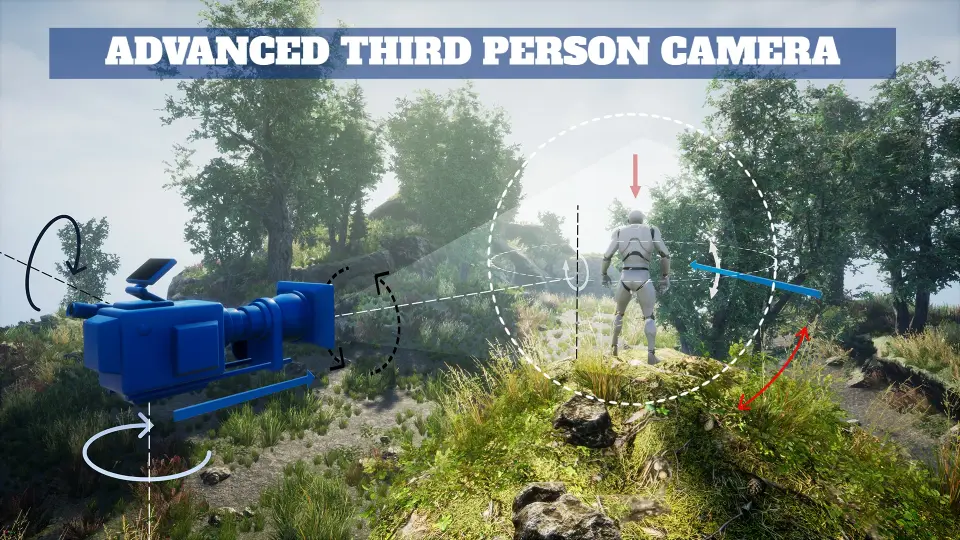
Camera feel often comes down to small adjustments. Advanced Third Person Camera emphasizes direct control over camera positions and angles, along with zooming, smooth panning, and field-of-view changes.
Those controls shape how a scene is read. Position affects how much environment the player can see around the character. Angle changes can alter mood, spatial awareness, and the sense of speed. Field of view can subtly change how open or compressed a space feels. Smooth panning helps preserve readability during movement instead of making the camera feel abrupt or detached. None of these options are unusual by themselves, but bringing them together inside a unified system matters when developers want to tune camera behavior mode by mode. It gives artists and designers room to compose movement through space rather than simply follow the player with a default chase camera.
The practical value is easy to imagine in a project where camera framing must serve different goals from one sequence to the next. Exploration may benefit from a calmer, wider read of the environment. A more intimate interaction might call for a tighter setup. A faster gameplay passage may need a camera angle that keeps upcoming space visible. Since these controls are framed as easy to adjust, the system appears built to encourage iteration instead of fighting it.
Smart collision handling and Keep It Clear in tight spaces
Third-person cameras frequently fail when level geometry interrupts the view. Trees, poles, walls, and overhead objects can all interfere with player readability. Advanced Third Person Camera addresses that directly through smart collision handling and visibility management.
The collision behavior is aimed at keeping gameplay views clear by recognizing what should be preserved in view and what should not be allowed to obstruct it. The camera also adapts to terrain and character actions, which is especially important in uneven spaces or transitional environments. When overhead obstacles appear, the camera can tilt to improve visibility instead of staying rigid. That kind of adjustment helps maintain a readable relationship between player, environment, and movement path.
The system also includes a "Keep It Clear" behavior that automatically hides objects located between the camera and the character. In very tight situations, it can even hide the character if they move too close to the camera. That is a specific but useful detail. It suggests a camera setup intended not just for ideal open-space movement, but for cramped areas where the usual third-person view can break apart. For developers building interiors, dense environmental dressing, or traversal routes with a lot of overhead interference, that can make the difference between a camera that feels dependable and one that constantly needs manual exceptions.
Lock On Target and adaptive moves for action-focused scenes
Not every camera moment is about free roaming. Some scenes need the view to support direct attention, especially in combat or interaction-heavy sequences. The lock-on feature is meant to keep focus on the action and highlight specific interactions.
That makes the system usable beyond simple follow-camera duties. A lock-on view can help center the relationship between the player and a chosen target, which is valuable when readability matters more than broad environmental coverage. The description points to combat scenes as a natural fit, but the same principle can extend to any moment where the camera should emphasize a single subject or exchange.
Alongside that, the adaptive movement behavior keeps the camera responsive to what the character is doing and to the terrain being navigated. This responsiveness is part of what gives the system its dynamic identity. Rather than treating the environment as neutral background, the camera reacts to it. Rather than treating character motion as identical in every context, the system shifts to match it. Used well, that can help scenes feel intentional instead of mechanically followed, especially in projects where movement between spaces is a major part of the experience.
Unreal Engine interface access instead of C++ dependency
The plugin is noted as being built on C++, but the key practical point is accessibility: everything is adjustable through the Unreal Engine interface. That changes who can work with it and how quickly it can be folded into a production pipeline.
For teams that want robust underlying systems without making every camera tweak a programming task, this matters a lot. Designers and artists can focus on framing, transitions, and gameplay readability through the engine interface rather than treating the setup as code-first. The presence of easy-to-use scripts also reinforces that balance between technical depth and day-to-day usability. A project can lean on the underlying C++ strength while still keeping common adjustments approachable.
There are also supporting materials tied to the plugin, including a demo, a quick setup tutorial, documentation, an example project, and a changelist. Taken together, those elements suggest a resource meant to be implemented, tested, and iterated on in real project conditions rather than treated as a black box.
For developers shaping third-person gameplay across interiors, exteriors, exploration, and combat, Advanced Third Person Camera fits best as a camera control layer that stays responsive to scene demands. Its strongest role in a production is not just following a character, but helping each space and gameplay beat carry the camera behavior that suits it.
 Gameplay Features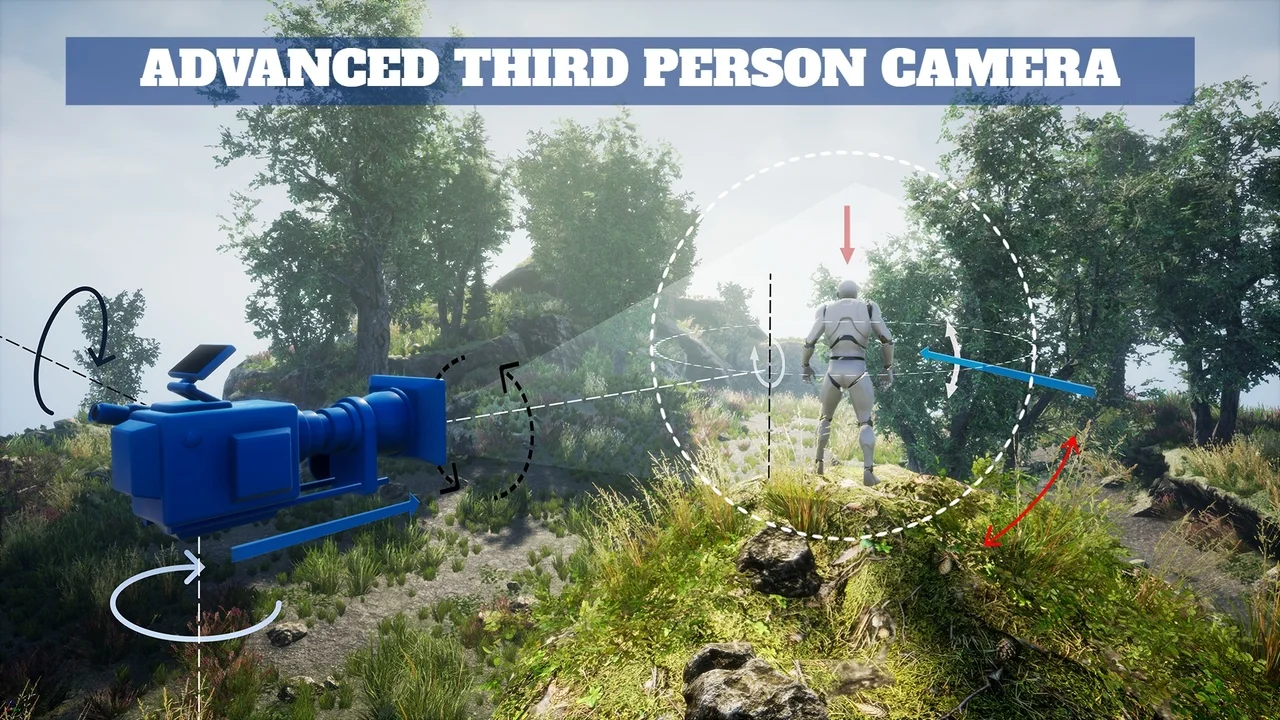
 Gameplay Features
 Gameplay Features
 Shooter