"6f9bd6df1f44a86f"{"id":"1000877","slug":"rooibos-save-system","title":"Rooibos Save System","category":"Engine Tools","engine":"5.6","assetVersion":"Asset Version: 1.8","engineVersion":"Engine Version: 5.6","tag":"Engine Tools","accent":"blue","visual":"mech","summary":"Rooibos Save System saves any actor with the save interface, tracks progress across maps, handles streaming, world partitions, works from C++ or Blueprints.","platform":"Unreal Engine","indexPolicy":"index","publishedAt":"2026-08-05T15:14:05.930Z","updatedAt":"2026-08-05T15:14:05.930Z","sourceNotes":[],"fileContents":[],"compatibility":["Unreal Engine","Asset Version: 1.8","Engine Version: 5.6"],"featuredImage":{"alt":"Rooibos Save System","src":"/wp-content/uploads/published/2026/08/f1c2c0dabc35-2d9b7336-d800-478f-975d-f1acf7bb2af6-e9dcb5e6e6.webp"},"hasDownloadLink":true,"downloads":0,"terms":[{"taxonomy":"category","slug":"engine-tools-tools-and-plugins","name":"Engine Tools"}],"galleryImages":[{"src":"/wp-content/uploads/published/2026/08/1e94921c1577-abf621ac-25f6-4143-b8c0-13d8f113ffd7-5fa83fa7dc.webp","alt":"Rooibos Save System"},{"src":"/wp-content/uploads/published/2026/08/883e83aed9e8-a782dff3-b214-4475-9ab9-4621ca728b77-3a815fe20e.webp","alt":"Rooibos Save System"},{"src":"/wp-content/uploads/published/2026/08/5d86e9d8aede-ca070396-998a-4f02-8f4c-dea7f4da08bb-b550a12bbc.webp","alt":"Rooibos Save System"},{"src":"/wp-content/uploads/published/2026/08/5d3352e62363-92c56a20-6502-4b0b-9de1-3d43bb772a98-c4e5365fea.webp","alt":"Rooibos Save System"}],"accessPanel":{"kind":"resource","title":"Download this resource","eyebrow":"Free Download","message":"Log in or create a free account to start your download.","fileName":"5.6.7z","safetyNote":"Resources are manually reviewed before listing to improve quality and reduce obvious risks.","actionLabel":"Download Free","resourceType":"Resource archive"},"contentHtml":"\u003cp\u003eMost Unreal Engine projects eventually reach a point where they need to remember something about the player's journey. The \u003cem\u003eRooibos Save System\u003c/em\u003e approaches that need with a simple rule: any \u003ccode\u003eActor\u003c/code\u003e that implements the save interface gets saved. The rest of the plugin is structured through giving that rule enough room to work in small games and large pipelines alike. A showcase video walks through the features, and the developer runs a Discord server for documentation, support, and updates.\u003c/p\u003e\n\n\u003ch2\u003eProgress That Travels Across Maps\u003c/h2\u003e\n\n\u003cp\u003eFor games with more than 1 Level, the save system has to understand that a player's progress is not tied to a single map. The \u003cem\u003eRooibos Save System\u003c/em\u003e tracks progress across different maps, so a slot saved in 1 Level can load in the next without losing world state. It also includes support for Level Streaming and World Partition, where the game world is broken up into chunks that load and unload as the player moves. In those setups, not every \u003ccode\u003eActor\u003c/code\u003e exists at the same time, so the save logic has to account for what is currently in memory. The plugin does that by saving the \u003ccode\u003eActors\u003c/code\u003e that implement its interface, rather than requiring a central list of every object in the project.\u003c/p\u003e\n\n\u003cp\u003eLoading before \u003ccode\u003eBeginPlay\u003c/code\u003e is another piece of that puzzle. When a Level starts, the plugin can have the saved data ready before the initial \u003ccode\u003eBeginPlay\u003c/code\u003e calls go out. That gives \u003ccode\u003eActors\u003c/code\u003e access to their restored state at the earliest point in the Level lifecycle, which is often where you need it to avoid 1-frame corrections or reinitialized variables. This becomes especially relevant in streamed worlds, where \u003ccode\u003eActors\u003c/code\u003e may be spawned dynamically and need their saved state before gameplay logic starts referencing them.\u003c/p\u003e\n\n\u003ch2\u003eAny Actor That Implements the Interface\u003c/h2\u003e\n\n\u003cp\u003eThe \u003ccode\u003eActor\u003c/code\u003e list is intentionally open-ended. The plugin saves any \u003ccode\u003eActor\u003c/code\u003e you wish, including:\u003c/p\u003e\n\n\u003cul\u003e\n \u003cli\u003e\u003ccode\u003eGameMode\u003c/code\u003e\u003c/li\u003e\n \u003cli\u003e\u003ccode\u003ePlayerController\u003c/code\u003e\u003c/li\u003e\n \u003cli\u003e\u003ccode\u003ePawns\u003c/code\u003e\u003c/li\u003e\n \u003cli\u003e\u003ccode\u003eGameInstance\u003c/code\u003e\u003c/li\u003e\n \u003cli\u003e\u003ccode\u003eLevel Blueprint\u003c/code\u003e\u003c/li\u003e\n\u003c/ul\u003e\n\n\u003cp\u003eThat covers the \u003ccode\u003eActors\u003c/code\u003e that hold most of a game's runtime state. The \u003ccode\u003eGameMode\u003c/code\u003e knows the rules of the current match, the \u003ccode\u003ePlayerController\u003c/code\u003e holds input and camera state, \u003ccode\u003ePawns\u003c/code\u003e carry movement and health, and the \u003ccode\u003eGameInstance\u003c/code\u003e exists across Level loads. \u003ccode\u003eLevel Blueprints\u003c/code\u003e get included too, which is a common place for Level-specific variables that are easy to forget when you only save player data.\u003c/p\u003e\n\n\u003cp\u003eBecause the system is proven in existing projects, the interface-based approach has already been used beyond that handful of categories. Custom gameplay \u003ccode\u003eActors\u003c/code\u003e can implement the interface and appear in a save without the framework needing to know about them ahead of time. This keeps the save pipeline open for things like AI directors, spawn managers, or any other \u003ccode\u003eActor\u003c/code\u003e that lives outside the default Level setup.\u003c/p\u003e\n\n\u003ch2\u003eMinimal Setup, with Room for an Existing Pipeline\u003c/h2\u003e\n\n\u003cp\u003eThe plugin is designed to be an out-of-the-box time saver for new projects, but it does not force a single way of working. The setup is minimal, and the customizability stretches in several directions. You can use the default \u003ccode\u003eSaveGame\u003c/code\u003e class or supply your own, which matters when a project already has a save format or a save manager in place. The Application Programming Interface (API) is accessible from C++ and Blueprints, so programmers and designers can interact with the same system without duplicating logic.\u003c/p\u003e\n\n\u003cp\u003eSave and load operations happen asynchronously, so the game does not stall while data is written to disk or pulled back. Callbacks are included for User Interface (UI), which lets a loading screen or save menu react when an operation completes. Those callbacks also make it possible to show save indicators or error messages without polling the state manually. The plugin also has an option for automatically saving and loading when exiting or entering \u003ccode\u003ePIE\u003c/code\u003e (Play In Editor). That is a practical Editor shortcut: instead of manually starting from a cleared state every time you run the Level, you can pick up where the last play session left off.\u003c/p\u003e\n\n\u003cp\u003eThe flexibility extends to the broader pipeline. Teams that already have a save pipeline can slot the plugin in as the low-level save/load handler while keeping their own \u003ccode\u003eSaveGame\u003c/code\u003e class. Teams that are starting fresh can use the default path and add their own rules later without reworking the core.\u003c/p\u003e\n\n\u003ch2\u003eVersioning, Thumbnails, and Detailed Logs\u003c/h2\u003e\n\n\u003cp\u003eA save file needs to survive updates to the game itself. The \u003cem\u003eRooibos Save System\u003c/em\u003e stores metadata alongside saves, and it includes versioning so a save from an older build can be recognized when the game has been updated. Thumbnails are supported as well, which is useful for load screens that show a picture of the slot. Combined, these features turn a save file into something players can identify at a glance while the plugin still handles the internal differences between versions.\u003c/p\u003e\n\n\u003cp\u003eFor debugging, the plugin provides detailed logging. When a save or load does not behave as expected, the logs can show which \u003ccode\u003eActors\u003c/code\u003e were processed and what data was written. That kind of visibility makes it easier to track down issues inside the save pipeline. The developer also offers support through the Discord server, so there is a place to ask questions while integrating the system. The showcase video serves as a visual overview of the feature set, which helps when you want to see how everything fits together before opening the Editor.\u003c/p\u003e\n\n\u003ch2\u003eThe Practical Fit of the Rooibos Save System\u003c/h2\u003e\n\n\u003cp\u003eThe \u003cem\u003eRooibos Save System\u003c/em\u003e earns its place in 2 kinds of projects: the new project that wants save/load working quickly without building a framework from scratch, and the established project that needs to fold saving into an existing pipeline. The minimal setup covers the 1st case. The option to use your own \u003ccode\u003eSaveGame\u003c/code\u003e class, the C++ and Blueprint access, and the asynchronous callbacks cover the 2nd.\u003c/p\u003e\n\n\u003cp\u003eProjects structured through Level Streaming or World Partition are the most natural audience, because those architecture points are explicitly part of the feature set. The same holds for projects where progress spans multiple maps. Any \u003ccode\u003eActor\u003c/code\u003e that implements the save interface gets saved, so the plugin is more than a data serializer; it is a way to keep the whole Level's state consistent across load and save cycles. Loading before \u003ccode\u003eBeginPlay\u003c/code\u003e, versioning, and detailed logging round out a package that is both approachable for solo developers and deep enough for a larger team.\u003c/p\u003e\n\n\u003cp\u003eIf you are working on an Unreal Engine project that needs to remember where the player was, what the world looked like, and which \u003ccode\u003eActors\u003c/code\u003e were alive, the \u003cem\u003eRooibos Save System\u003c/em\u003e gives you a framework that is both quick to start with and flexible enough to grow into. The plugin's focus on the actor-level save interface means you spend less time wiring up a save manager and more time designing the game around the moments that should persist.\u003c/p\u003e\n\n\u003ch2\u003eRelated Resources Worth Checking\u003c/h2\u003e\n\u003cul\u003e\n\u003cli\u003e\u003ca href=\"https://3dcghub.com/easy-multi-save/\" rel=\"noopener noreferrer\"\u003eEasy Multi Save\u003c/a\u003e\u003c/li\u003e\n\u003cli\u003e\u003ca href=\"https://3dcghub.com/rooibos-outlines/\" rel=\"noopener noreferrer\"\u003eRooibos Outlines\u003c/a\u003e\u003c/li\u003e\n\u003cli\u003e\u003ca href=\"https://3dcghub.com/chunk-downloader-nodes/\" rel=\"noopener noreferrer\"\u003eChunk Downloader Nodes\u003c/a\u003e\u003c/li\u003e\n\u003cli\u003e\u003ca href=\"https://3dcghub.com/auto-settings/\" rel=\"noopener noreferrer\"\u003eAuto Settings\u003c/a\u003e\u003c/li\u003e\n\u003cli\u003e\u003ca href=\"https://3dcghub.com/shadersource-landscape-material-tool/\" rel=\"noopener noreferrer\"\u003eSHADERSOURCE - Landscape Material Tool\u003c/a\u003e\u003c/li\u003e\n\u003c/ul\u003e","contentTextLength":6912,"navigation":{"current":1487,"total":4218,"previous":{"id":"1000878","slug":"rooibos-walking-sim","title":"Rooibos Walking Sim","category":"Engine Tools","platform":"Unreal Engine","updatedAt":"2026-08-05T15:20:19.122Z"},"next":{"id":"1000876","slug":"rooibos-outlines","title":"Rooibos Outlines","category":"Engine Tools","platform":"Unreal Engine","updatedAt":"2026-08-05T15:10:30.175Z"}},"relatedResources":[{"id":"13913","slug":"easy-multi-save","title":"Easy Multi Save","category":"Engine Tools","engine":"1.10 - 1.74","assetVersion":"Engine version: 4.25 - 5.7","engineVersion":"Asset Version:1.10 - 1.74","tag":"Engine Tools","accent":"blue","visual":"mech","summary":"Easy Multi Save provides a robust, streamlined solution for managing game data in Unreal Engine, supporting everything from simple variables to complex World Partition levels.","platform":"Unreal Engine","indexPolicy":"index","publishedAt":"2026-03-11T10:40:22.000Z","updatedAt":"2026-07-18T09:48:15.051Z","sourceNotes":[],"fileContents":[],"compatibility":["Unreal Engine","Engine version: 4.25 - 5.7","Asset Version:1.10 - 1.74"],"featuredImage":{"alt":"Easy Multi Save","src":"https://3dcghub.com/wp-content/uploads/2026/03/fab7f07b-78c6-4508-a4df-9cb7d78f90e0.webp"},"hasDownloadLink":true,"downloads":2},{"id":"1000878","slug":"rooibos-walking-sim","title":"Rooibos Walking Sim","category":"Engine Tools","engine":"5.6","assetVersion":"Asset Version: 1.2","engineVersion":"Engine Version: 5.6","tag":"Engine Tools","accent":"blue","visual":"mech","summary":"Rooibos Walking Sim adds object interaction, inspection, and audio feedback for first-person adventure games in Unreal Engine, with full example content for beg","platform":"Unreal Engine","indexPolicy":"index","publishedAt":"2026-08-05T15:16:28.091Z","updatedAt":"2026-08-05T15:20:19.122Z","sourceNotes":[],"fileContents":[],"compatibility":["Unreal Engine","Asset Version: 1.2","Engine Version: 5.6"],"featuredImage":{"alt":"Rooibos Walking Sim","src":"/wp-content/uploads/published/2026/08/5b541d33ea0f-a15b6211-becd-4aee-9261-43ea30aca1c7-fe7b50c5d2.webp"},"hasDownloadLink":true,"downloads":0},{"id":"1000876","slug":"rooibos-outlines","title":"Rooibos Outlines","category":"Engine Tools","engine":"5.6","assetVersion":"Asset Version: 1.1","engineVersion":"Engine Version: 5.6","tag":"Engine Tools","accent":"blue","visual":"mech","summary":"Highlight any actor in Unreal Engine with one function call. Built for walking sims and interactive scenes, it adds outlines, focus, and night vision effects.","platform":"Unreal Engine","indexPolicy":"index","publishedAt":"2026-08-05T15:10:30.175Z","updatedAt":"2026-08-05T15:10:30.175Z","sourceNotes":[],"fileContents":[],"compatibility":["Unreal Engine","Asset Version: 1.1","Engine Version: 5.6"],"featuredImage":{"alt":"Rooibos Outlines","src":"/wp-content/uploads/published/2026/08/b4192266aa54-cb98543d-ccfe-4e06-ac82-9a5acc11be84-d7157b6ce5.webp"},"hasDownloadLink":true,"downloads":0}]}
Engine Tools
Rooibos Save System
Rooibos Save System saves any actor with the save interface, tracks progress across maps, handles streaming, world partitions, works from C++ or Blueprints.
Most Unreal Engine projects eventually reach a point where they need to remember something about the player's journey. The Rooibos Save System approaches that need with a simple rule: any Actor that implements the save interface gets saved. The rest of the plugin is structured through giving that rule enough room to work in small games and large pipelines alike. A showcase video walks through the features, and the developer runs a Discord server for documentation, support, and updates.
Progress That Travels Across Maps
For games with more than 1 Level, the save system has to understand that a player's progress is not tied to a single map. The Rooibos Save System tracks progress across different maps, so a slot saved in 1 Level can load in the next without losing world state. It also includes support for Level Streaming and World Partition, where the game world is broken up into chunks that load and unload as the player moves. In those setups, not every Actor exists at the same time, so the save logic has to account for what is currently in memory. The plugin does that by saving the Actors that implement its interface, rather than requiring a central list of every object in the project.
Loading before BeginPlay is another piece of that puzzle. When a Level starts, the plugin can have the saved data ready before the initial BeginPlay calls go out. That gives Actors access to their restored state at the earliest point in the Level lifecycle, which is often where you need it to avoid 1-frame corrections or reinitialized variables. This becomes especially relevant in streamed worlds, where Actors may be spawned dynamically and need their saved state before gameplay logic starts referencing them.
Any Actor That Implements the Interface
The Actor list is intentionally open-ended. The plugin saves any Actor you wish, including:
GameMode
PlayerController
Pawns
GameInstance
Level Blueprint
That covers the Actors that hold most of a game's runtime state. The GameMode knows the rules of the current match, the PlayerController holds input and camera state, Pawns carry movement and health, and the GameInstance exists across Level loads. Level Blueprints get included too, which is a common place for Level-specific variables that are easy to forget when you only save player data.
Because the system is proven in existing projects, the interface-based approach has already been used beyond that handful of categories. Custom gameplay Actors can implement the interface and appear in a save without the framework needing to know about them ahead of time. This keeps the save pipeline open for things like AI directors, spawn managers, or any other Actor that lives outside the default Level setup.
Minimal Setup, with Room for an Existing Pipeline
The plugin is designed to be an out-of-the-box time saver for new projects, but it does not force a single way of working. The setup is minimal, and the customizability stretches in several directions. You can use the default SaveGame class or supply your own, which matters when a project already has a save format or a save manager in place. The Application Programming Interface (API) is accessible from C++ and Blueprints, so programmers and designers can interact with the same system without duplicating logic.
Save and load operations happen asynchronously, so the game does not stall while data is written to disk or pulled back. Callbacks are included for User Interface (UI), which lets a loading screen or save menu react when an operation completes. Those callbacks also make it possible to show save indicators or error messages without polling the state manually. The plugin also has an option for automatically saving and loading when exiting or entering PIE (Play In Editor). That is a practical Editor shortcut: instead of manually starting from a cleared state every time you run the Level, you can pick up where the last play session left off.
The flexibility extends to the broader pipeline. Teams that already have a save pipeline can slot the plugin in as the low-level save/load handler while keeping their own SaveGame class. Teams that are starting fresh can use the default path and add their own rules later without reworking the core.
Versioning, Thumbnails, and Detailed Logs
A save file needs to survive updates to the game itself. The Rooibos Save System stores metadata alongside saves, and it includes versioning so a save from an older build can be recognized when the game has been updated. Thumbnails are supported as well, which is useful for load screens that show a picture of the slot. Combined, these features turn a save file into something players can identify at a glance while the plugin still handles the internal differences between versions.
For debugging, the plugin provides detailed logging. When a save or load does not behave as expected, the logs can show which Actors were processed and what data was written. That kind of visibility makes it easier to track down issues inside the save pipeline. The developer also offers support through the Discord server, so there is a place to ask questions while integrating the system. The showcase video serves as a visual overview of the feature set, which helps when you want to see how everything fits together before opening the Editor.
The Practical Fit of the Rooibos Save System
The Rooibos Save System earns its place in 2 kinds of projects: the new project that wants save/load working quickly without building a framework from scratch, and the established project that needs to fold saving into an existing pipeline. The minimal setup covers the 1st case. The option to use your own SaveGame class, the C++ and Blueprint access, and the asynchronous callbacks cover the 2nd.
Projects structured through Level Streaming or World Partition are the most natural audience, because those architecture points are explicitly part of the feature set. The same holds for projects where progress spans multiple maps. Any Actor that implements the save interface gets saved, so the plugin is more than a data serializer; it is a way to keep the whole Level's state consistent across load and save cycles. Loading before BeginPlay, versioning, and detailed logging round out a package that is both approachable for solo developers and deep enough for a larger team.
If you are working on an Unreal Engine project that needs to remember where the player was, what the world looked like, and which Actors were alive, the Rooibos Save System gives you a framework that is both quick to start with and flexible enough to grow into. The plugin's focus on the actor-level save interface means you spend less time wiring up a save manager and more time designing the game around the moments that should persist.
 Engine Tools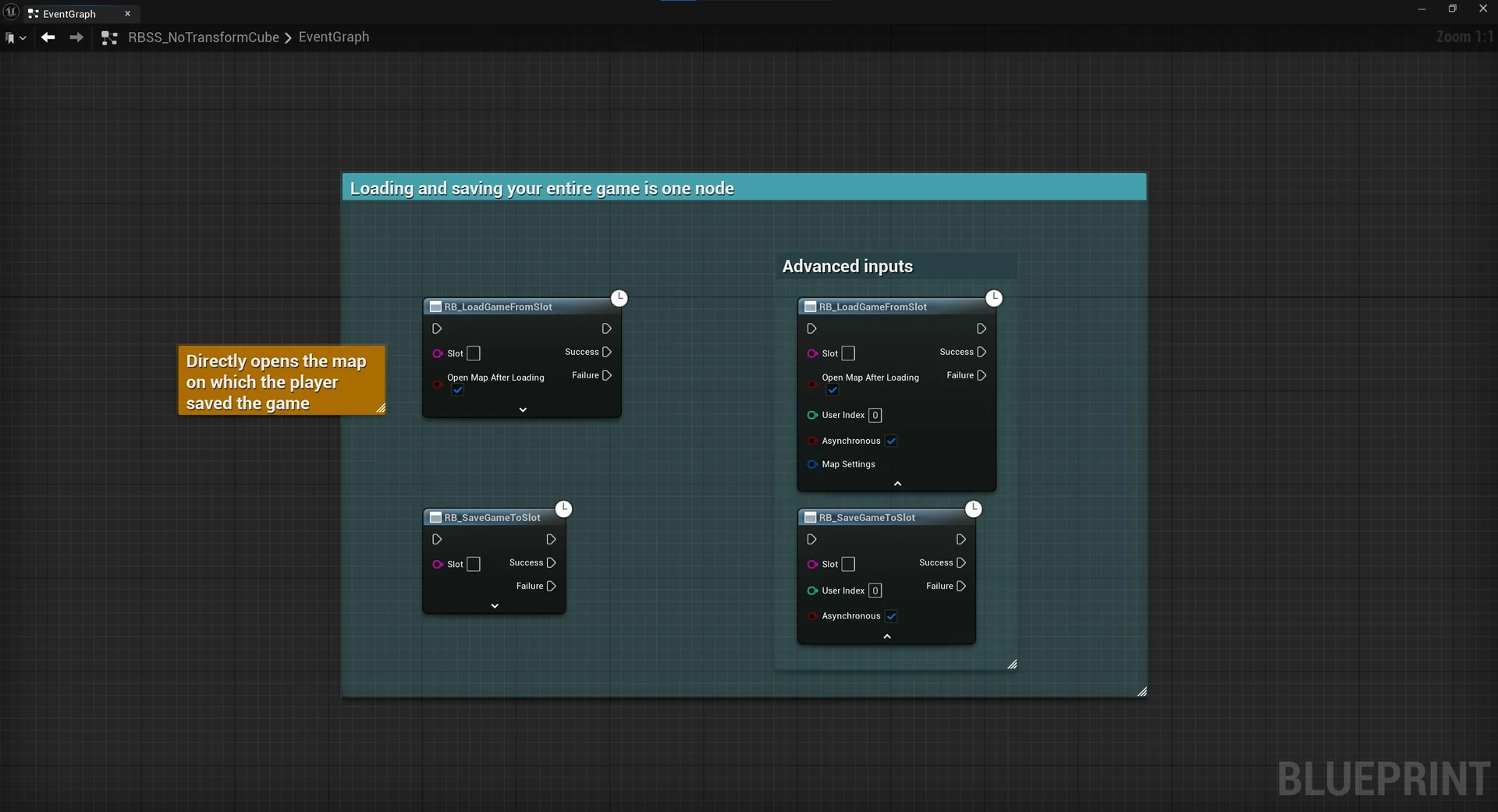
 Engine Tools
 Engine Tools
 Engine Tools