"c68a05d5e51405b3"{"id":"1000676","slug":"shadersource-landscape-material-tool","title":"SHADERSOURCE - Landscape Material Tool","category":"Engine Tools","engine":"5.6","assetVersion":"Asset Version: 2.0","engineVersion":"Engine Version: 5.6","tag":"Engine Tools","accent":"blue","visual":"luts","summary":"SHADERSOURCE - Landscape Material Tool provides a full Editor Mode for creating and editing landscape layers and materials, with direct UI parameter control for","platform":"Unreal Engine","publishedAt":"2026-07-22T14:16:25.264Z","updatedAt":"2026-07-22T14:16:25.264Z","sourceNotes":[],"fileContents":[],"compatibility":["Unreal Engine","Asset Version: 2.0","Engine Version: 5.6"],"featuredImage":{"alt":"SHADERSOURCE - Landscape Material Tool","src":"/wp-content/uploads/published/2026/07/1cb0b8429d2e-e7cc05fc-804a-4317-b02a-85b0e6f220c9-3023837ac7.webp"},"hasDownloadLink":true,"downloads":0,"terms":[{"taxonomy":"category","slug":"engine-tools-tools-and-plugins","name":"Engine Tools"}],"galleryImages":[{"src":"/wp-content/uploads/published/2026/07/10e94fd5574a-c13fc1c9-0963-497d-8f18-bcd3b7ca8d37-5f2a508477.webp","alt":"SHADERSOURCE - Landscape Material Tool"},{"src":"/wp-content/uploads/published/2026/07/3100cdaef518-506c3983-cfb6-4f4f-bee0-1375ae20ddc4-9f423eb47a.webp","alt":"SHADERSOURCE - Landscape Material Tool"},{"src":"/wp-content/uploads/published/2026/07/758e4099a5db-3e108b9a-80cd-400d-bea2-b55199f9b02e-febb93ec08.webp","alt":"SHADERSOURCE - Landscape Material Tool"},{"src":"/wp-content/uploads/published/2026/07/51bdc9700ae0-9ad3a9c8-c0d5-46f2-88e8-d858c20d20ba-e691c53695.webp","alt":"SHADERSOURCE - Landscape Material Tool"},{"src":"/wp-content/uploads/published/2026/07/0d32e98c6162-93f0edc6-20c7-493b-ad82-2f33d1608712-fb15a4e0ef.webp","alt":"SHADERSOURCE - Landscape Material Tool"},{"src":"/wp-content/uploads/published/2026/07/5cbf9461cbff-611f9cf0-c08e-455a-ad20-f586be55d159-6718663830.webp","alt":"SHADERSOURCE - Landscape Material Tool"},{"src":"/wp-content/uploads/published/2026/07/23bb3894df81-ad88c671-ca03-418c-a067-e5de7a96b703-7dfb80abd9.webp","alt":"SHADERSOURCE - Landscape Material Tool"},{"src":"/wp-content/uploads/published/2026/07/7b36bfb18c01-b0e876ce-8b71-44bd-aafc-7308b07ce86a-9e598f64fe.webp","alt":"SHADERSOURCE - Landscape Material Tool"},{"src":"/wp-content/uploads/published/2026/07/8b25813f83c0-e960740b-a3cc-43e7-a03d-a8264a64e652-e9e7af9986.webp","alt":"SHADERSOURCE - Landscape Material Tool"},{"src":"/wp-content/uploads/published/2026/07/4ee4b807c1d2-85d19114-0a3f-4aa1-a614-6e0f7d5f070d-31a26d8c36.webp","alt":"SHADERSOURCE - Landscape Material Tool"}],"accessPanel":{"kind":"resource","title":"Download this resource","eyebrow":"Free Download","message":"Log in or create a free account to start your download.","fileName":"5.6.7z","safetyNote":"Resources are manually reviewed before listing to improve quality and reduce obvious risks.","actionLabel":"Download Free","resourceType":"Resource archive"},"contentHtml":"\u003cp\u003eBuilding landscape materials in Unreal Engine often requires jumping between multiple material instances, function graphs, and layer blend nodes just to adjust a single parameter. The SHADERSOURCE - Landscape Material Tool addresses this fragmented setup by introducing a dedicated Editor Mode directly within the Unreal Engine editor. Instead of navigating complex node hierarchies in the standard material editor, users can handle the creation and editing of landscape layers and materials through a unified interface. This approach consolidates the implementation path, allowing parameters and settings to be modified directly from the tool's UI without the need to constantly switch contexts.\u003c/p\u003e\n\n\u003ch2\u003eSHADERSOURCE Editor Mode and UI Integration\u003c/h2\u003e\n\u003cp\u003eThe core of the tool is its full Editor Mode, built specifically for managing the complexities of landscape rendering workflows. Upon entering this mode, users are presented with a suite of controls tailored to landscape construction. The workflow begins with the ability to create universal landscape layers, establishing the foundation for how textures and properties interact across the terrain surface.\u003c/p\u003e\n\u003cp\u003eOnce the layers are established, the tool facilitates the creation of master landscape materials. This centralizes the material logic into a manageable structure. The distinct advantage of this implementation is the elimination of repetitive manual graph work. By handling the layer and material generation within the Editor Mode, the tool standardizes what is typically a highly customized and error-prone process. Parameters that would normally require opening a specific material instance or function to tweak are exposed directly in the UI, streamlining the iteration process during scene setup.\u003c/p\u003e\n\n\u003ch2\u003eUniversal Layer Creation and Grass Type Masking\u003c/h2\u003e\n\u003cp\u003eA major component of the tool's functionality is the capacity to generate universal layers and master materials systematically. This standardized generation ensures that the resulting landscape materials behave predictably across different terrains. Beyond static texture blending, the tool supports Custom Grass Type implementation. This allows for the precise distribution of foliage or grass instances based on the specific needs of the environment.\u003c/p\u003e\n\u003cp\u003eThe setup offers flexibility in how these grass types are distributed across the terrain layers. Users can modulate Custom Grass Types using noise masks. This functionality provides a method to break up uniform foliage distribution, creating more organic and natural-looking ground cover. By blending grass type placement with noise-driven masks directly from the tool's interface, developers can achieve complex terrain clutter without manually wiring noise nodes in a material graph.\u003c/p\u003e\n\n\u003ch2\u003eRuntime Virtual Texturing and Virtual Heightfield Mesh Compatibility\u003c/h2\u003e\n\u003cp\u003eLarge-scale terrain rendering requires specific technical considerations to maintain performance. The SHADERSOURCE - Landscape Material Tool is fully functional with Runtime Virtual Texturing (RVT). This compatibility is crucial for landscapes that need to render high-resolution surface details over vast distances without overwhelming the rendering pipeline. The implementation ensures that the universal layers and master materials generated by the tool interact correctly with RVT setups.\u003c/p\u003e\n\u003cp\u003eAlongside RVT, the tool works seamlessly with Virtual Heightfield Mesh (VHM). VHM is used to render distant terrain geometry efficiently by streaming height data. The tool's ability to function with both RVT and VHM means the materials created through its Editor Mode are suitable for large, open-world environments where memory management and draw call optimization are primary concerns. The generated materials are equipped to handle the data streaming and texture fetching required by these virtualized rendering systems.\u003c/p\u003e\n\n\u003ch2\u003ePhysical Material Inputs and Tessellation Limitations\u003c/h2\u003e\n\u003cp\u003eThe tool provides custom Physical Material inputs, allowing developers to define how the landscape interacts with the physics simulation in the engine. This includes setting up footstep sounds, impact effects, and physics material properties at the layer level. By exposing these inputs within the tool, creators can ensure that the terrain's visual appearance matches its physical behavior without needing to dig into separate material functions.\u003c/p\u003e\n\u003cp\u003eRegarding rendering features, the tool supports tessellation, but this support comes with a specific engine version limitation. Tessellation functionality is available exclusively for Unreal Engine 4. Because hardware tessellation was deprecated in Unreal Engine 5, developers utilizing the tool in UE5 environments will rely on the engine's native displacement methods or virtualized geometry (Nanite) for surface detail.\u003c/p\u003e\n\n\u003ch2\u003eNavigating Update 2.0 and the Plugin Content Folder\u003c/h2\u003e\n\u003cp\u003eThe release of Update 2.0 marks a significant step in the tool's development, specifically targeting Unreal Engine version 5.4 and newer. This update brings an entire UI overhaul, refining the implementation experience established in previous iterations. The updated interface is paired with added features aimed at expanding the tool's capabilities within the landscape creation workflow. To support the transition to the 2.0 version, the update includes all new example content, allowing users to see how the tool configures layers and materials in practice.\u003c/p\u003e\n\u003cp\u003eFor immediate implementation, the plugin provides a full example map, complete with functional materials and pre-configured layers. These assets are located within the Plugin Content folder. This inclusion allows developers to deconstruct a working landscape setup generated by the tool, serving as a reference for how master materials, grass type applications, and noise masks interact in a live environment. The provided examples offer a grounded starting point for adapting the tool's universal layer and master material generation to custom terrain projects.\u003c/p\u003e\n\n\u003ch2\u003eIntegration with SHADERSOURCE Waterfall Tool 2\u003c/h2\u003e\n\u003cp\u003eWhen incorporating the SHADERSOURCE - Landscape Material Tool into a broader environment pipeline, its compatibility extends to the SHADERSOURCE - Waterfall Tool 2. This compatibility allows developers to align their landscape generation workflow with waterfall creation within the same ecosystem. By supporting interaction between these specific tools, the landscape layers generated by the material tool can be structured to accommodate the rendering and placement requirements of adjacent water features, ensuring a cohesive implementation path for scenic environment construction.\u003c/p\u003e\n\n\u003ch2\u003eRelated Resources Worth Checking\u003c/h2\u003e\n\u003cul\u003e\n\u003cli\u003e\u003ca href=\"https://3dcghub.com/shadersource-waterfall-tool-2/\" title=\"SHADERSOURCE - Waterfall Tool 2\"\u003eSHADERSOURCE - Waterfall Tool 2\u003c/a\u003e\u003c/li\u003e\n\u003cli\u003e\u003ca href=\"https://3dcghub.com/shader-world-plugin-procedural-terrain-oceans-foliage-gpu-accelerated/\" title=\"Shader World Plugin : Procedural Terrain, Oceans, Foliage, GPU-accelerated\"\u003eShader World Plugin : Procedural Terrain, Oceans, Foliage, GPU-accelerated\u003c/a\u003e\u003c/li\u003e\n\u003cli\u003e\u003ca href=\"https://3dcghub.com/meshblend-next-generation-mesh-blending-without-rvt/\" title=\"MeshBlend - Next generation mesh blending without RVT\"\u003eMeshBlend - Next generation mesh blending without RVT\u003c/a\u003e\u003c/li\u003e\n\u003cli\u003e\u003ca href=\"https://3dcghub.com/blueprint-generator-ai-kibibyte-labs-engine-assistant/\" title=\"AI Engine Assistant - Kibibyte Labs (Blueprint Generator \u0026amp; More!)\"\u003eAI Engine Assistant - Kibibyte Labs (Blueprint Generator \u0026amp; More!)\u003c/a\u003e\u003c/li\u003e\n\u003cli\u003e\u003ca href=\"https://3dcghub.com/blend-file-importer/\" title=\"Blend File Importer\"\u003eBlend File Importer\u003c/a\u003e\u003c/li\u003e\n\u003c/ul\u003e","contentTextLength":6838,"navigation":{"current":1329,"total":3860,"previous":{"id":"1000677","slug":"ultimate-unreal-engine-5-7-environment-pve-and-pcg-masterclass","title":"Ultimate Unreal Engine 5.7 Environment PVE \u0026 PCG Masterclass","category":"Unreal Engine","platform":"Unreal Engine","updatedAt":"2026-07-22T14:40:33.456Z"},"next":{"id":"1000675","slug":"selection-manager","title":"Selection Manager","category":"Engine Tools","platform":"Unreal Engine","updatedAt":"2026-07-22T14:11:11.358Z"}},"relatedResources":[{"id":"14592","slug":"shadersource-waterfall-tool-2","title":"SHADERSOURCE - Waterfall Tool 2","category":"Engine Tools","engine":"5.2 - 5.7","assetVersion":"Asset Version: 1.0a - 1.0d","engineVersion":"Engine Version: 5.2 - 5.7","tag":"Engine Tools","accent":"blue","visual":"animation","summary":"The SHADERSOURCE - Waterfall Tool 2 introduces a specialized Editor Mode for generating realistic waterfalls through dynamic meshes and spline paths. This tool offers both Simple and Advanced modes to provide full control over fluid paths and VFX generation.","platform":"Unreal Engine","publishedAt":"2026-03-11T18:36:22.000Z","updatedAt":"2026-10-04T08:27:42.401Z","sourceNotes":[],"fileContents":[],"compatibility":["Unreal Engine","Asset Version: 1.0a - 1.0d","Engine Version: 5.2 - 5.7"],"featuredImage":{"alt":"SHADERSOURCE - Waterfall Tool 2","src":"https://3dcghub.com/wp-content/uploads/2026/03/79d82bd8-c7cf-4877-9519-16f36c4a03c4.webp"},"hasDownloadLink":true,"downloads":1},{"id":"14579","slug":"shader-world-plugin-procedural-terrain-oceans-foliage-gpu-accelerated","title":"Shader World Plugin : Procedural Terrain, Oceans, Foliage, GPU-accelerated","category":"Engine Tools","engine":"4.27,5.0 - 5.4","assetVersion":"Engine version: 4.27,5.0 - 5.4","engineVersion":"4.26","tag":"Engine Tools","accent":"blue","visual":"character","summary":"Shader World Plugin offers a high-performance alternative to native Unreal Engine landscapes, utilizing GPU acceleration for real-time world generation. It supports massive scales and is fully editable within packaged games.","platform":"Unreal Engine","publishedAt":"2026-03-11T18:34:57.000Z","updatedAt":"2026-04-19T15:45:44.000Z","sourceNotes":[],"fileContents":[],"compatibility":["Unreal Engine","Engine version: 4.27,5.0 - 5.4"],"featuredImage":{"alt":"Shader World Plugin : Procedural Terrain, Oceans, Foliage, GPU-accelerated","src":"https://3dcghub.com/wp-content/uploads/2026/03/0922900f-bc2e-416c-a177-0cef84bcdbc8.webp"},"hasDownloadLink":true,"downloads":0},{"id":"14185","slug":"meshblend-next-generation-mesh-blending-without-rvt","title":"MeshBlend - Next generation mesh blending without RVT","category":"Engine Tools","engine":"5.5 - 5.7","assetVersion":"Engine version: 5.5 - 5.7","engineVersion":"Asset Version:2.1","tag":"Engine Tools","accent":"blue","visual":"mech","summary":"MeshBlend provides a powerful alternative to RVT for blending meshes and landscapes in Unreal Engine. This battle-tested tool supports Nanite, skeletal meshes, and high-performance workflows for indie and AAA projects alike.","platform":"Unreal Engine","publishedAt":"2026-03-11T16:07:49.000Z","updatedAt":"2026-04-19T15:45:51.000Z","sourceNotes":[],"fileContents":[],"compatibility":["Unreal Engine","Engine version: 5.5 - 5.7","Asset Version: 2.1"],"featuredImage":{"alt":"MeshBlend - Next generation mesh blending without RVT","src":"https://3dcghub.com/wp-content/uploads/2026/03/27abd930-9ae5-4b08-b6d7-1482b1ebf68a.webp"},"hasDownloadLink":true,"downloads":1}]}
Engine Tools
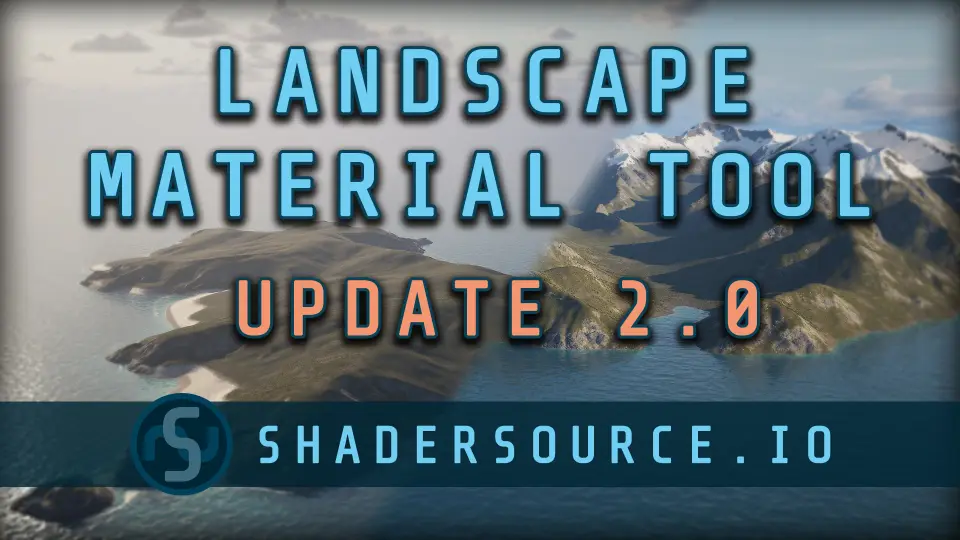
SHADERSOURCE - Landscape Material Tool
SHADERSOURCE - Landscape Material Tool provides a full Editor Mode for creating and editing landscape layers and materials, with direct UI parameter control for
Building landscape materials in Unreal Engine often requires jumping between multiple material instances, function graphs, and layer blend nodes just to adjust a single parameter. The SHADERSOURCE - Landscape Material Tool addresses this fragmented setup by introducing a dedicated Editor Mode directly within the Unreal Engine editor. Instead of navigating complex node hierarchies in the standard material editor, users can handle the creation and editing of landscape layers and materials through a unified interface. This approach consolidates the implementation path, allowing parameters and settings to be modified directly from the tool's UI without the need to constantly switch contexts.
SHADERSOURCE Editor Mode and UI Integration
The core of the tool is its full Editor Mode, built specifically for managing the complexities of landscape rendering workflows. Upon entering this mode, users are presented with a suite of controls tailored to landscape construction. The workflow begins with the ability to create universal landscape layers, establishing the foundation for how textures and properties interact across the terrain surface.
Once the layers are established, the tool facilitates the creation of master landscape materials. This centralizes the material logic into a manageable structure. The distinct advantage of this implementation is the elimination of repetitive manual graph work. By handling the layer and material generation within the Editor Mode, the tool standardizes what is typically a highly customized and error-prone process. Parameters that would normally require opening a specific material instance or function to tweak are exposed directly in the UI, streamlining the iteration process during scene setup.
Universal Layer Creation and Grass Type Masking
A major component of the tool's functionality is the capacity to generate universal layers and master materials systematically. This standardized generation ensures that the resulting landscape materials behave predictably across different terrains. Beyond static texture blending, the tool supports Custom Grass Type implementation. This allows for the precise distribution of foliage or grass instances based on the specific needs of the environment.
The setup offers flexibility in how these grass types are distributed across the terrain layers. Users can modulate Custom Grass Types using noise masks. This functionality provides a method to break up uniform foliage distribution, creating more organic and natural-looking ground cover. By blending grass type placement with noise-driven masks directly from the tool's interface, developers can achieve complex terrain clutter without manually wiring noise nodes in a material graph.
Runtime Virtual Texturing and Virtual Heightfield Mesh Compatibility
Large-scale terrain rendering requires specific technical considerations to maintain performance. The SHADERSOURCE - Landscape Material Tool is fully functional with Runtime Virtual Texturing (RVT). This compatibility is crucial for landscapes that need to render high-resolution surface details over vast distances without overwhelming the rendering pipeline. The implementation ensures that the universal layers and master materials generated by the tool interact correctly with RVT setups.
Alongside RVT, the tool works seamlessly with Virtual Heightfield Mesh (VHM). VHM is used to render distant terrain geometry efficiently by streaming height data. The tool's ability to function with both RVT and VHM means the materials created through its Editor Mode are suitable for large, open-world environments where memory management and draw call optimization are primary concerns. The generated materials are equipped to handle the data streaming and texture fetching required by these virtualized rendering systems.
Physical Material Inputs and Tessellation Limitations
The tool provides custom Physical Material inputs, allowing developers to define how the landscape interacts with the physics simulation in the engine. This includes setting up footstep sounds, impact effects, and physics material properties at the layer level. By exposing these inputs within the tool, creators can ensure that the terrain's visual appearance matches its physical behavior without needing to dig into separate material functions.
Regarding rendering features, the tool supports tessellation, but this support comes with a specific engine version limitation. Tessellation functionality is available exclusively for Unreal Engine 4. Because hardware tessellation was deprecated in Unreal Engine 5, developers utilizing the tool in UE5 environments will rely on the engine's native displacement methods or virtualized geometry (Nanite) for surface detail.
Navigating Update 2.0 and the Plugin Content Folder
The release of Update 2.0 marks a significant step in the tool's development, specifically targeting Unreal Engine version 5.4 and newer. This update brings an entire UI overhaul, refining the implementation experience established in previous iterations. The updated interface is paired with added features aimed at expanding the tool's capabilities within the landscape creation workflow. To support the transition to the 2.0 version, the update includes all new example content, allowing users to see how the tool configures layers and materials in practice.
For immediate implementation, the plugin provides a full example map, complete with functional materials and pre-configured layers. These assets are located within the Plugin Content folder. This inclusion allows developers to deconstruct a working landscape setup generated by the tool, serving as a reference for how master materials, grass type applications, and noise masks interact in a live environment. The provided examples offer a grounded starting point for adapting the tool's universal layer and master material generation to custom terrain projects.
Integration with SHADERSOURCE Waterfall Tool 2
When incorporating the SHADERSOURCE - Landscape Material Tool into a broader environment pipeline, its compatibility extends to the SHADERSOURCE - Waterfall Tool 2. This compatibility allows developers to align their landscape generation workflow with waterfall creation within the same ecosystem. By supporting interaction between these specific tools, the landscape layers generated by the material tool can be structured to accommodate the rendering and placement requirements of adjacent water features, ensuring a cohesive implementation path for scenic environment construction.
 Engine Tools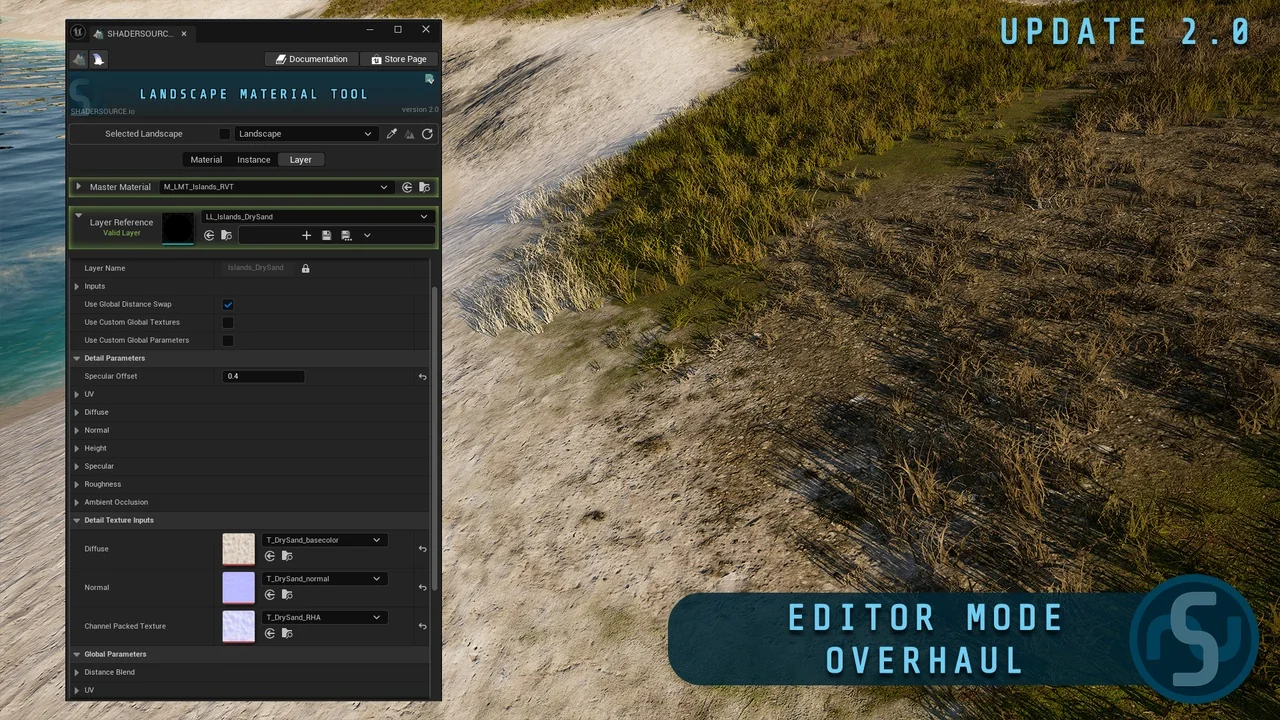
 Engine Tools
 Engine Tools
 Engine Tools