"c68a05d5e51405b3"{"id":"1000675","slug":"selection-manager","title":"Selection Manager","category":"Engine Tools","engine":"5.7","assetVersion":"Asset Version: 1.1","engineVersion":"Engine Version: 5.7","tag":"Engine Tools","accent":"blue","visual":"mech","summary":"Selection Manager is a Blueprint-first Unreal Engine plugin for mouse and rectangle selection, supporting Actors, Pawns, and orthographic cameras for RTS games.","platform":"Unreal Engine","publishedAt":"2026-07-22T14:11:11.358Z","updatedAt":"2026-07-22T14:11:11.358Z","sourceNotes":[],"fileContents":[],"compatibility":["Unreal Engine","Asset Version: 1.1","Engine Version: 5.7"],"featuredImage":{"alt":"Selection Manager","src":"/wp-content/uploads/published/2026/07/2343b1e964af-69b90a72-c2d0-4548-9711-95e2278e8d94-1934e0aecb.webp"},"hasDownloadLink":true,"downloads":0,"terms":[{"taxonomy":"category","slug":"engine-tools-tools-and-plugins","name":"Engine Tools"}],"galleryImages":[{"src":"/wp-content/uploads/published/2026/07/f59a440563ac-cafb4165-067f-4a86-9e09-42df1606a7c9-1d4276122c.webp","alt":"Selection Manager"},{"src":"/wp-content/uploads/published/2026/07/81f8ec3d08da-daa192c4-c339-47b4-a2a9-adeb773ed296-7298a16935.webp","alt":"Selection Manager"},{"src":"/wp-content/uploads/published/2026/07/a32903624411-96cf8e23-22b9-485c-aadb-391ae59c226d-57c23481e5.webp","alt":"Selection Manager"},{"src":"/wp-content/uploads/published/2026/07/14d98d134bf4-18bc0ee0-53bc-478f-aa5b-b1591a76b9c6-1d1f39c42f.webp","alt":"Selection Manager"},{"src":"/wp-content/uploads/published/2026/07/8d2be8106607-218b2437-d9be-4520-bd98-880d18da7ab7-cdb3114cdb.webp","alt":"Selection Manager"},{"src":"/wp-content/uploads/published/2026/07/f19d929cbbc6-9af5c11c-8da3-4294-b142-a46fad4df211-3e1e794230.webp","alt":"Selection Manager"}],"accessPanel":{"kind":"resource","title":"Download this resource","eyebrow":"Free Download","message":"Log in or create a free account to start your download.","fileName":"5.7.7z","safetyNote":"Resources are manually reviewed before listing to improve quality and reduce obvious risks.","actionLabel":"Download Free","resourceType":"Resource archive"},"contentHtml":"\u003cp\u003eReal-time strategy projects, top-down RPGs, and turn-based tactics games rely heavily on giving the player precise control over dozens of distinct entities. Whether commanding military units across a battlefield, managing a settlement of buildings, or interacting with mixed props, the fundamental interaction loop begins with selecting the right objects. Selection Manager addresses this core mechanic for Unreal Engine developers, providing a system to capture objects via mouse cursor clicks and rectangle drag selection, while allowing the result to be customized for each specific object class.\u003c/p\u003e \n\n\u003ch2\u003eBlueprint-First Workflow Across Actors and Components\u003c/h2\u003e\n\u003cp\u003eThe system is built to function without requiring developers to write custom C++ code. It operates Blueprint-first, meaning the integration and logic can be handled entirely within Unreal Engine's visual scripting environment. Despite being Blueprint-accessible, the underlying architecture is built using C++ to ensure high performance during operations like drag selection.\u003c/p\u003e\n\u003cp\u003eThe plugin is agnostic to the specific types of entities present in the scene. It can select any object that inherits from Actor or Scene Component classes. This covers standard Pawns, Characters, general Actors, and individual Scene Components. Because of this broad compatibility, a project can mix units, buildings, and standard environmental props together under the same selection framework. This allows complex, heterogeneous scenes to be managed without needing separate selection logic for different entity hierarchies.\u003c/p\u003e \n\n\u003ch2\u003eRectangle, Additive, and Formation Selection Modes\u003c/h2\u003e\n\u003cp\u003eBeyond a single mouse click, the tool provides a standard rectangle drag selection mechanic. Developers can implement several distinct selection behaviors based on standard strategy game needs:\u003c/p\u003e\n\u003cul\u003e\n\u003cli\u003e\u003cstrong\u003eAdditive selection:\u003c/strong\u003e Allows players to add newly boxed or clicked units to their existing selection pool.\u003c/li\u003e\n\u003cli\u003e\u003cstrong\u003eSubtractive selection:\u003c/strong\u003e Enables players to remove specific entities from an active selection by interacting with them again.\u003c/li\u003e\n\u003cli\u003e\u003cstrong\u003eFormation selection:\u003c/strong\u003e Supports pulling in objects based on their arrangement or grouping.\u003c/li\u003e\n\u003c/ul\u003e\n\u003cp\u003eThe system also includes a set of functions designed to select objects by group or index. This programmatic access means selection does not have to rely purely on direct mouse input. For example, a developer can hook the selection functions into other UI sources, allowing a player to select a specific unit by clicking its portrait icon in a HUD.\u003c/p\u003e \n\n\u003ch2\u003eCamera Compatibility: Variable FOV and Orthographic Views\u003c/h2\u003e\n\u003cp\u003eSelection systems can break if the camera perspective shifts, but Selection Manager accounts for different view types. It fully supports variable camera field of view (FOV). If a game features a dynamic camera zoom that alters the FOV, the selection logic remains accurate.\u003c/p\u003e\n\u003cp\u003eThe plugin also functions with orthographic cameras. This makes it viable for 2D games or top-down projects that rely on orthographic projection instead of standard perspective views. The math handling the cursor translation and drag rectangle accurately maps to the scene regardless of whether the view is perspective or orthographic.\u003c/p\u003e \n\n\u003ch3\u003eDynamic Highlighting and Starting Points\u003c/h3\u003e\n\u003cp\u003eVisual feedback during the selection process is handled through a set of optional features. The plugin can dynamically highlight objects as they fall inside the active selection rectangle, giving players immediate visual confirmation of what they are about to capture. Developers can also enable an option to highlight the specific object currently resting under the cursor.\u003c/p\u003e\n\u003cp\u003eBy default, a rectangle selection might expand from a fixed point, but the plugin includes an optional ability to set the selection start point precisely where the player clicked. This allows for more organic, cursor-pivot-based selection behavior.\u003c/p\u003e \n\n\u003ch2\u003eCustomizing the Selection Frame and Collision\u003c/h2\u003e\n\u003cp\u003eThe visual component of the drag selection—the rectangle frame widget—is constructed entirely using Blueprints. Developers are not locked into a single visual style. The plugin provides a set of textures and materials for the frame, but the widget can be swapped out entirely for a custom UI widget.\u003c/p\u003e\n\u003cp\u003eUnder the hood, selecting complex dynamic objects requires accurate collision tracing. The plugin allows developers to precisely configure the collision used for selection. To assist with this setup, the plugin includes a collision viewer for visual configuration of the selection collision. Once the game is running, a runtime debugger is available for collision debugging. This combination allows developers to test and fine-tune how selection traces interact with intricate or moving objects in the editor and during live gameplay.\u003c/p\u003e \n\n\u003ch2\u003eVersion Integration and Included Demo Level\u003c/h2\u003e\n\u003cp\u003eUpdate 1.3 of Selection Manager is available for Unreal Engine 5.7 and newer. This update simplifies the general workflow and the initial plugin integration. New documentation accompanies this version to guide developers through the updated process.\u003c/p\u003e\n\u003cp\u003eTo assist with implementation, a demo level is now included directly inside the plugin folder. Developers can open this demo level to inspect how the selection system is configured in a live environment. The demo level also acts as a resource library; developers can directly copy the required Blueprints and assets from the demo into their own active projects. All source files for the plugin are included in this folder as well.\u003c/p\u003e\n\u003cp\u003eFor developers working on older projects, previous documentation covering Unreal Engine versions 4.27 through 5.6 is also available, which includes download links for an older Example Project.\u003c/p\u003e \n\n\u003ch2\u003ePractical Fit for Top-Down and Strategy Projects\u003c/h2\u003e\n\u003cp\u003eSelection Manager fits directly into workflows involving RTS, top-down RPGs, and turn-based strategy games. Its ability to handle mixed entity types—like grouping infantry units, command buildings, and interactive props under one drag box—reduces the need for bespoke selection code. Because the function calls can be triggered from places other than the viewport, it also bridges the gap between 3D space interaction and 2D UI elements like portraits and minimap clicks. Developers building systems where camera perspective might shift dynamically, or those relying on orthographic projections for 2D-style gameplay, can implement the selection logic without worrying about perspective-based trace failures.\u003c/p\u003e\n\n\u003ch2\u003eContinue Browsing Similar Packs\u003c/h2\u003e\n\u003cul\u003e\n\u003cli\u003e\u003ca href=\"https://3dcghub.com/black-eye-camera-powerful-procedural-camera-system-for-gameplay-and-cinematics/\" title=\"Black Eye Camera - Powerful Procedural Camera System for Gameplay and Cinematics\"\u003eBlack Eye Camera - Powerful Procedural Camera System for Gameplay and Cinematics\u003c/a\u003e\u003c/li\u003e\n\u003cli\u003e\u003ca href=\"https://3dcghub.com/vertex-animation-manager/\" title=\"Vertex Animation Manager\"\u003eVertex Animation Manager\u003c/a\u003e\u003c/li\u003e\n\u003cli\u003e\u003ca href=\"https://3dcghub.com/30-selections-kawaii-animations-100-mini/\" title=\"30 selections KAWAII ANIMATIONS 100 MINI\"\u003e30 selections KAWAII ANIMATIONS 100 MINI\u003c/a\u003e\u003c/li\u003e\n\u003cli\u003e\u003ca href=\"https://3dcghub.com/manager-office/\" title=\"Manager Office\"\u003eManager Office\u003c/a\u003e\u003c/li\u003e\n\u003cli\u003e\u003ca href=\"https://3dcghub.com/master-console-commands/\" title=\"Master Console Commands\"\u003eMaster Console Commands\u003c/a\u003e\u003c/li\u003e\n\u003c/ul\u003e","contentTextLength":6576,"navigation":{"current":1330,"total":3860,"previous":{"id":"1000676","slug":"shadersource-landscape-material-tool","title":"SHADERSOURCE - Landscape Material Tool","category":"Engine Tools","platform":"Unreal Engine","updatedAt":"2026-07-22T14:16:25.264Z"},"next":{"id":"1000674","slug":"sci-fi-modular-station","title":"Sci-Fi Modular Station","category":"Sci-Fi","platform":"Unreal Engine","updatedAt":"2026-07-22T14:05:34.102Z"}},"relatedResources":[{"id":"1001264","slug":"blueprint-cheat-manager-pro","title":"Blueprint Cheat Manager Pro","category":"Engine Tools","engine":"5.0 - 5.5","assetVersion":"Asset Version: 1.0 - 1.0.3","engineVersion":"Engine Version: 5.0 - 5.5","tag":"Engine Tools","accent":"blue","visual":"mech","summary":"Blueprint Cheat Manager Pro replaces C++ requirements with direct Blueprint console commands in Unreal Engine 4.25 through 4.27 for faster testing.","platform":"Unreal Engine","publishedAt":"2026-09-30T05:42:15.265Z","updatedAt":"2026-09-30T05:42:15.265Z","sourceNotes":[],"fileContents":[],"compatibility":["Unreal Engine","Asset Version: 1.0 - 1.0.3","Engine Version: 5.0 - 5.5"],"featuredImage":{"alt":"Blueprint Cheat Manager Pro","src":"/wp-content/uploads/published/2026/09/e652aae19521-9278f853-a3a3-4859-8fcf-b3df15837fdb-4de192570c.webp"},"hasDownloadLink":true,"downloads":0},{"id":"1000282","slug":"black-eye-camera-powerful-procedural-camera-system-for-gameplay-and-cinematics","title":"Black Eye Camera - Powerful Procedural Camera System for Gameplay and Cinematics","category":"Engine Tools","engine":"5.6 - 5.7","assetVersion":"Asset Version: 1.1.10.3 - 2.0.2","engineVersion":"Engine Version: 5.6 - 5.7","tag":"Engine Tools","accent":"blue","visual":"mech","summary":"Black Eye 2.0 provides Unreal Engine developers with a procedural camera system featuring an Orbit camera, Camera Manager, and live switcher modules.","platform":"Unreal Engine","publishedAt":"2026-07-03T06:00:09.775Z","updatedAt":"2026-08-23T13:48:16.467Z","sourceNotes":[],"fileContents":[],"compatibility":["Unreal Engine","Asset Version: 1.1.10.3 - 2.0.2","Engine Version: 5.6 - 5.7"],"featuredImage":{"alt":"Black Eye Camera - Powerful Procedural Camera System for Gameplay and Cinematics","src":"/wp-content/uploads/published/2026/07/115d5d34216a-56fcc4ef-b57f-4e0e-988a-8532cad0d543-5024b1eb83.webp"},"hasDownloadLink":true,"downloads":3},{"id":"1001268","slug":"mazen-level-tool","title":"Mazen Level Tool","category":"Engine Tools","engine":"5.1 - 5.4","assetVersion":"Asset Version: 1.0","engineVersion":"Engine Version: 5.1 - 5.4","tag":"Engine Tools","accent":"blue","visual":"mech","summary":"Streamline level outliner workflows with Mazen Level Tool by saving and loading named actor selection sets alongside screenshots and camera transform data.","platform":"Unreal Engine","publishedAt":"2026-09-30T05:52:49.722Z","updatedAt":"2026-09-30T05:52:49.722Z","sourceNotes":[],"fileContents":[],"compatibility":["Unreal Engine","Asset Version: 1.0","Engine Version: 5.1 - 5.4"],"featuredImage":{"alt":"Mazen Level Tool","src":"/wp-content/uploads/published/2026/09/1ac477737423-3b95d9fd-0dc4-4360-87b9-930c7e6d2b6b-549e2b7037.webp"},"hasDownloadLink":true,"downloads":0}]}
Engine Tools
Selection Manager
Selection Manager is a Blueprint-first Unreal Engine plugin for mouse and rectangle selection, supporting Actors, Pawns, and orthographic cameras for RTS games.
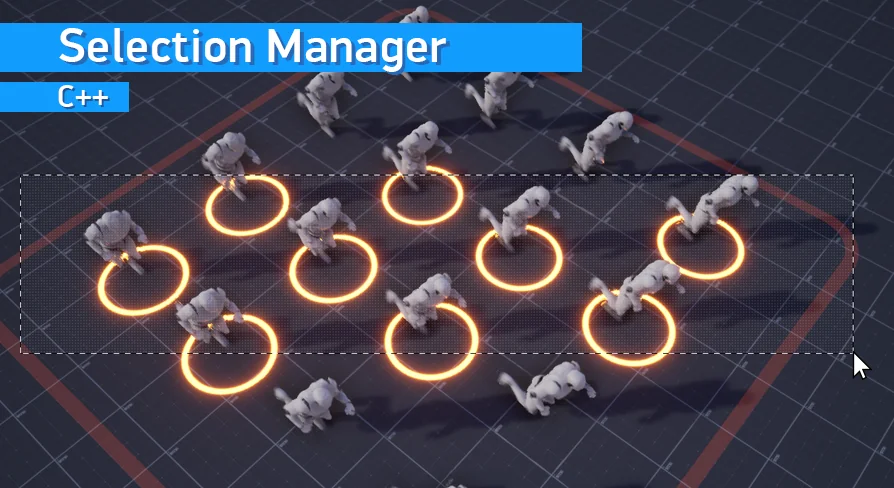
Real-time strategy projects, top-down RPGs, and turn-based tactics games rely heavily on giving the player precise control over dozens of distinct entities. Whether commanding military units across a battlefield, managing a settlement of buildings, or interacting with mixed props, the fundamental interaction loop begins with selecting the right objects. Selection Manager addresses this core mechanic for Unreal Engine developers, providing a system to capture objects via mouse cursor clicks and rectangle drag selection, while allowing the result to be customized for each specific object class.
Blueprint-First Workflow Across Actors and Components
The system is built to function without requiring developers to write custom C++ code. It operates Blueprint-first, meaning the integration and logic can be handled entirely within Unreal Engine's visual scripting environment. Despite being Blueprint-accessible, the underlying architecture is built using C++ to ensure high performance during operations like drag selection.
The plugin is agnostic to the specific types of entities present in the scene. It can select any object that inherits from Actor or Scene Component classes. This covers standard Pawns, Characters, general Actors, and individual Scene Components. Because of this broad compatibility, a project can mix units, buildings, and standard environmental props together under the same selection framework. This allows complex, heterogeneous scenes to be managed without needing separate selection logic for different entity hierarchies.
Rectangle, Additive, and Formation Selection Modes
Beyond a single mouse click, the tool provides a standard rectangle drag selection mechanic. Developers can implement several distinct selection behaviors based on standard strategy game needs:
Additive selection: Allows players to add newly boxed or clicked units to their existing selection pool.
Subtractive selection: Enables players to remove specific entities from an active selection by interacting with them again.
Formation selection: Supports pulling in objects based on their arrangement or grouping.
The system also includes a set of functions designed to select objects by group or index. This programmatic access means selection does not have to rely purely on direct mouse input. For example, a developer can hook the selection functions into other UI sources, allowing a player to select a specific unit by clicking its portrait icon in a HUD.
Camera Compatibility: Variable FOV and Orthographic Views
Selection systems can break if the camera perspective shifts, but Selection Manager accounts for different view types. It fully supports variable camera field of view (FOV). If a game features a dynamic camera zoom that alters the FOV, the selection logic remains accurate.
The plugin also functions with orthographic cameras. This makes it viable for 2D games or top-down projects that rely on orthographic projection instead of standard perspective views. The math handling the cursor translation and drag rectangle accurately maps to the scene regardless of whether the view is perspective or orthographic.
Dynamic Highlighting and Starting Points
Visual feedback during the selection process is handled through a set of optional features. The plugin can dynamically highlight objects as they fall inside the active selection rectangle, giving players immediate visual confirmation of what they are about to capture. Developers can also enable an option to highlight the specific object currently resting under the cursor.
By default, a rectangle selection might expand from a fixed point, but the plugin includes an optional ability to set the selection start point precisely where the player clicked. This allows for more organic, cursor-pivot-based selection behavior.
Customizing the Selection Frame and Collision
The visual component of the drag selection—the rectangle frame widget—is constructed entirely using Blueprints. Developers are not locked into a single visual style. The plugin provides a set of textures and materials for the frame, but the widget can be swapped out entirely for a custom UI widget.
Under the hood, selecting complex dynamic objects requires accurate collision tracing. The plugin allows developers to precisely configure the collision used for selection. To assist with this setup, the plugin includes a collision viewer for visual configuration of the selection collision. Once the game is running, a runtime debugger is available for collision debugging. This combination allows developers to test and fine-tune how selection traces interact with intricate or moving objects in the editor and during live gameplay.
Version Integration and Included Demo Level
Update 1.3 of Selection Manager is available for Unreal Engine 5.7 and newer. This update simplifies the general workflow and the initial plugin integration. New documentation accompanies this version to guide developers through the updated process.
To assist with implementation, a demo level is now included directly inside the plugin folder. Developers can open this demo level to inspect how the selection system is configured in a live environment. The demo level also acts as a resource library; developers can directly copy the required Blueprints and assets from the demo into their own active projects. All source files for the plugin are included in this folder as well.
For developers working on older projects, previous documentation covering Unreal Engine versions 4.27 through 5.6 is also available, which includes download links for an older Example Project.
Practical Fit for Top-Down and Strategy Projects
Selection Manager fits directly into workflows involving RTS, top-down RPGs, and turn-based strategy games. Its ability to handle mixed entity types—like grouping infantry units, command buildings, and interactive props under one drag box—reduces the need for bespoke selection code. Because the function calls can be triggered from places other than the viewport, it also bridges the gap between 3D space interaction and 2D UI elements like portraits and minimap clicks. Developers building systems where camera perspective might shift dynamically, or those relying on orthographic projections for 2D-style gameplay, can implement the selection logic without worrying about perspective-based trace failures.
 Engine Tools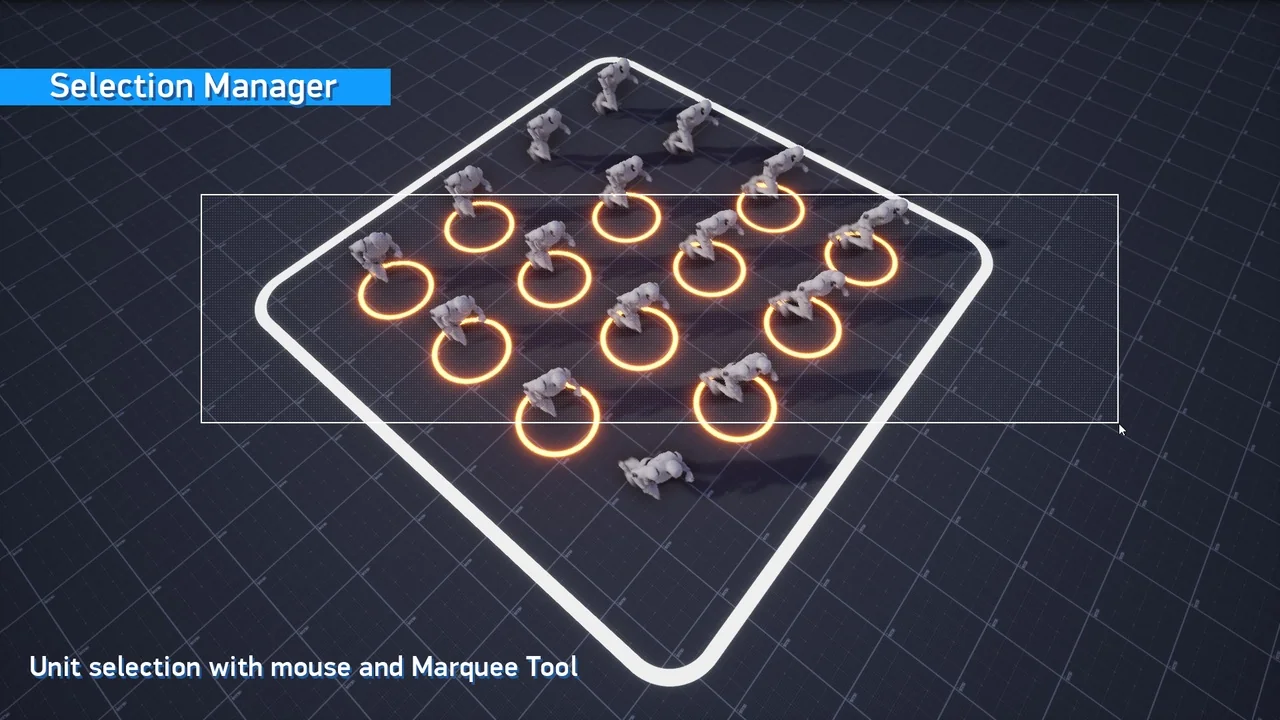
 Engine Tools
 Engine Tools
 Engine Tools