"4481da9c895ef786"{"id":"1000282","slug":"black-eye-camera-powerful-procedural-camera-system-for-gameplay-and-cinematics","title":"Black Eye Camera - Powerful Procedural Camera System for Gameplay and Cinematics","category":"Engine Tools","engine":"5.6 - 5.7","assetVersion":"Asset Version: 1.1.10.3 - 2.0.2","engineVersion":"Engine Version: 5.6 - 5.7","tag":"Engine Tools","accent":"blue","visual":"mech","summary":"Black Eye 2.0 provides Unreal Engine developers with a procedural camera system featuring an Orbit camera, Camera Manager, and live switcher modules.","platform":"Unreal Engine","publishedAt":"2026-07-03T06:00:09.775Z","updatedAt":"2026-08-23T13:48:16.467Z","sourceNotes":[],"fileContents":[],"compatibility":["Unreal Engine","Asset Version: 1.1.10.3 - 2.0.2","Engine Version: 5.6 - 5.7"],"featuredImage":{"alt":"Black Eye Camera - Powerful Procedural Camera System for Gameplay and Cinematics","src":"/wp-content/uploads/published/2026/07/115d5d34216a-56fcc4ef-b57f-4e0e-988a-8532cad0d543-5024b1eb83.webp"},"hasDownloadLink":true,"downloads":1,"terms":[{"taxonomy":"category","slug":"engine-tools-tools-and-plugins","name":"Engine Tools"}],"galleryImages":[{"src":"/wp-content/uploads/published/2026/07/43ef129aefa5-916f43c7-cbe5-4d15-9ba4-2d0d141270b3-0fafaf2f84.webp","alt":"Black Eye Camera - Powerful Procedural Camera System for Gameplay and Cinematics"},{"src":"/wp-content/uploads/published/2026/07/c3c20ed9921e-800295a3-8993-48d7-aef4-2836be6fcdb2-3ca81f51c4.webp","alt":"Black Eye Camera - Powerful Procedural Camera System for Gameplay and Cinematics"},{"src":"/wp-content/uploads/published/2026/07/26e48906d6ca-2666572d-2e33-441c-8160-e4e5cf8d3897-363f2c5cd9.webp","alt":"Black Eye Camera - Powerful Procedural Camera System for Gameplay and Cinematics"},{"src":"/wp-content/uploads/published/2026/07/c708799ea379-b8e40fbb-94c5-4638-a550-c59dbfefb92a-7921dcd470.webp","alt":"Black Eye Camera - Powerful Procedural Camera System for Gameplay and Cinematics"},{"src":"/wp-content/uploads/published/2026/07/7151ca6362c2-48277213-a776-411a-a487-8fd7aa222b08-513e5b60ae.webp","alt":"Black Eye Camera - Powerful Procedural Camera System for Gameplay and Cinematics"},{"src":"/wp-content/uploads/published/2026/07/91c1a175fad3-5b3b5d7d-acb7-4e31-991c-4b6dc8dcc252-35400f9008.webp","alt":"Black Eye Camera - Powerful Procedural Camera System for Gameplay and Cinematics"},{"src":"/wp-content/uploads/published/2026/07/ce599a6c68a0-f85d52e1-1cfb-4daa-aaeb-952ccdd9c326-7b256fcc89.webp","alt":"Black Eye Camera - Powerful Procedural Camera System for Gameplay and Cinematics"},{"src":"/wp-content/uploads/published/2026/07/fdf5739cd7ca-3c297520-75c9-44b2-b600-e8c394bf97b1-f4ba02515e.webp","alt":"Black Eye Camera - Powerful Procedural Camera System for Gameplay and Cinematics"},{"src":"/wp-content/uploads/published/2026/07/b01bb459179d-e1085f87-98d0-4fd7-9720-70eaed462fd3-65c5647ffb.webp","alt":"Black Eye Camera - Powerful Procedural Camera System for Gameplay and Cinematics"},{"src":"/wp-content/uploads/published/2026/07/898c69076616-f972c41c-af7c-4014-9ccd-6bd8fbe9fc07-8b710c4724.webp","alt":"Black Eye Camera - Powerful Procedural Camera System for Gameplay and Cinematics"}],"accessPanel":{"kind":"resource","title":"Download this resource","eyebrow":"Free Download","message":"Log in or create a free account to start your download.","fileName":"Black Eye Camera - Powerful Procedural Camera System for Gameplay and Cinematics.7z","safetyNote":"Resources are manually reviewed before listing to improve quality and reduce obvious risks.","actionLabel":"Download Free","resourceType":"Resource archive"},"contentHtml":"\u003ch2\u003eBuilding Directable Systems with the Camera Manager\u003c/h2\u003e\n\u003cp\u003eBlack Eye 2.0 structures its procedural workflow around a high-level Camera Manager designed to oversee and control the viewpoint logic across an entire project. Rather than treating cameras as static transforms, this framework treats them as active, dynamic operators that respond directly to the action on screen. The Camera Manager automatically handles the complex tasks of prioritizing, blending, and switching between different camera setups. By utilizing trigger-driven camera changes, developers can program the system to adapt seamlessly based on gameplay states, specific animations, or environmental triggers.\u003c/p\u003e\n\u003cp\u003eThis high-level blending ensures that transitions between interactive gameplay segments, scripted cinematics, and other specialized camera types remain smooth and unobtrusive. The system allows creators to establish a hierarchy of priorities so that the camera knows exactly when to shift focus from a wide environmental view to a tight gameplay angle. Because every property within the ecosystem is fully exposed to Blueprint, developers can script real-time, event-driven behaviors that tailor the camera's response to the unique demands of their project.\u003c/p\u003e\n\u003ch2\u003eOrbit Camera and Cinematic Movement Modules\u003c/h2\u003e\n\u003cp\u003eFor gameplay designers building third-person mechanics, the package includes a dedicated Orbit Camera module. This framework provides the essential building blocks for character-driven viewpoints, incorporating heading, pitch, and recentering parameters. To maintain a polished feel during movement, the Orbit Camera integrates collision detection and damping, ensuring the viewpoint navigates complex environments without clipping through geometry or reacting jarringly to sudden directional changes. These tools are highly adaptable, supporting genres ranging from third-person action and driving games to real-time strategy (RTS) and first-person shooters (FPS).\u003c/p\u003e\n\u003cp\u003eWhen the focus shifts to more cinematic framing, the primary Black Eye Camera module introduces a suite of advanced movement controls. It utilizes damping and deadzones to soften the camera's reaction to minor character movements, creating a smoother, more deliberate visual style. Screen-space framing and dynamic field-of-view (FOV) adjustments allow the camera to automatically scale its composition based on the action. Additionally, velocity-based look-ahead mechanics enable the camera to anticipate character movement, leading the subject naturally rather than rigidly locking onto their center point. For developers actively iterating on these mechanics, the streamlined UI allows properties to be tweaked directly in play mode and saved instantly.\u003c/p\u003e\n\u003ch2\u003eMulti-Subject Tracking and the Cross Camera\u003c/h2\u003e\n\u003cp\u003eManaging the frame when multiple characters are on screen requires specialized composition tools. The Cross Camera module is specifically built as a two-subject camera, designed to handle the framing complexities of dialogue sequences, close-quarters combat, and face-to-face interactions. It dynamically adjusts its positioning to keep both subjects composed properly, adapting smoothly even when the spatial relationship and positions of the subjects vary drastically during the interaction.\u003c/p\u003e\n\u003cp\u003eFor scenarios involving larger groups or complex points of interest, the multi-subject tracking system takes over. This feature frames and follows multiple targets simultaneously. To ensure the composition remains precise and intentional, the system utilizes per-subject weighting. This allows a cutscene artist or gameplay designer to dictate which character or object should command the most attention within the frame, ensuring the camera prioritizes the primary action while still keeping secondary targets in view.\u003c/p\u003e\n\u003ch2\u003ePrevis Workflows and Sequencer Integration\u003c/h2\u003e\n\u003cp\u003eThe procedural nature of Black Eye 2.0 extends deeply into pre-visualization and cinematic layout workflows. Previs artists can utilize the system to create an entire bank of specialized Black Eye shots, ranging from sweeping drone angles and wide establishing shots to tight close-ups and cowboy framing. Once created, these shots can be assembled directly as clips on the Unreal Engine Sequencer.\u003c/p\u003e\n\u003cp\u003eBecause the cameras act as dynamic systems rather than baked animations, artists can rearrange and retime these clips on the timeline without the need to reanimate the camera paths. Each shot dynamically adapts to changes in character scale, movement speed, and layout tweaks. If a character's animation is updated or the set dressing is shifted, the procedural camera automatically compensates to maintain the intended framing. This flexibility ensures that the edit remains highly adaptable, allowing cutscene artists to design a shot sequence once and deploy it across variable scenarios.\u003c/p\u003e\n\u003ch2\u003eCamera Switcher for Mocap and Live Events\u003c/h2\u003e\n\u003cp\u003eFor environments that demand immediate, on-the-fly editorial decisions, Black Eye includes a powerful Camera Switcher module. This tool provides real-time, director-level control over the virtual cameras, making it an essential component for live mocap stages, esports broadcasts, and dynamic multiplayer games. Operators can dynamically cut between any number of virtual camera setups, transitioning from an overhead tactical view to an intimate character follow-cam in real time.\u003c/p\u003e\n\u003cp\u003eThe entire Black Eye 2.0 procedural camera system is built for Unreal Engine 5.4 and beyond, ensuring compatibility across all supported platforms. To help developers and artists implement these tools immediately, the package includes a detailed demo scene filled with ready-to-use setups that demonstrate the core workflows of the Camera Manager, Orbit Camera, and cinematic tracking systems.\u003c/p\u003e\n\n\u003ch2\u003eMore From The Same Workflow\u003c/h2\u003e\n\u003cul\u003e\n\u003cli\u003e\u003ca href=\"https://3dcghub.com/cinematographer-pro-a-cinematic-photorealistic-camera-system/\" title=\"Cinematographer PRO - A Cinematic Photorealistic Camera System\"\u003eCinematographer PRO - A Cinematic Photorealistic Camera System\u003c/a\u003e\u003c/li\u003e\n\u003cli\u003e\u003ca href=\"https://3dcghub.com/cinematic-car-rig-ccr/\" title=\"Cinematic Car Rig (CCR)\"\u003eCinematic Car Rig (CCR)\u003c/a\u003e\u003c/li\u003e\n\u003cli\u003e\u003ca href=\"https://3dcghub.com/hyper-basic-pcg-forest-v2/\" title=\"Hyper Basic PCG Forest v2\"\u003eHyper Basic PCG Forest v2\u003c/a\u003e\u003c/li\u003e\n\u003cli\u003e\u003ca href=\"https://3dcghub.com/lightgrid/\" title=\"LIGHTGRID\"\u003eLIGHTGRID\u003c/a\u003e\u003c/li\u003e\n\u003cli\u003e\u003ca href=\"https://3dcghub.com/flex-partition-optimization-system/\" title=\"Flex Partition - Optimization System\"\u003eFlex Partition - Optimization System\u003c/a\u003e\u003c/li\u003e\n\u003c/ul\u003e","contentTextLength":5895,"navigation":{"current":345,"total":3269,"previous":{"id":"1001032","slug":"action-adventure-movement-system","title":"Action-Adventure Movement System","category":"Gameplay Features","platform":"Unreal Engine","updatedAt":"2026-08-23T13:56:31.671Z"},"next":{"id":"1000184","slug":"infinite-characters-collection-over-230-characters-extra-stigma-studios","title":"Infinite Characters Collection – Over 230 Characters + Extra | STIGMA STUDIOS","category":"Characters \u0026 Creatures","platform":"Unreal Engine","updatedAt":"2026-08-23T13:14:17.209Z"}},"relatedResources":[{"id":"13799","slug":"cinematographer-pro-a-cinematic-photorealistic-camera-system","title":"Cinematographer PRO - A Cinematic Photorealistic Camera System","category":"Engine Tools","engine":"5.1 - 5.7","assetVersion":"1.03 - 1.2","engineVersion":"5.1 - 5.7","tag":"Engine Tools","accent":"blue","visual":"character","summary":"Enhance your Unreal Engine workflow with Cinematographer PRO. This system offers realistic camera gear and streamlined settings to achieve instant photorealistic results for any project.","platform":"Unreal Engine","publishedAt":"2026-03-11T10:06:56.000Z","updatedAt":"2026-07-26T15:56:12.234Z","sourceNotes":[],"fileContents":[],"compatibility":["Unreal Engine","Asset Version: 1.03 - 1.2","Engine version: 5.1 - 5.7"],"featuredImage":{"alt":"Cinematographer PRO - A Cinematic Photorealistic Camera System","src":"https://3dcghub.com/wp-content/uploads/2026/03/45c81bf9-4e58-4b53-b6f6-e8802264d091.webp"},"hasDownloadLink":true,"downloads":2},{"id":"14610","slug":"simple-tree-generator","title":"Simple Tree Generator","category":"Engine Tools","engine":"5.6 - 5.8","assetVersion":"Asset Version: 1.1","engineVersion":"Engine version: 5.6 - 5.8","tag":"Engine Tools","accent":"blue","visual":"audio","summary":"Simple Tree Generator is a powerful tool designed specifically for Unreal Engine 5. It enables developers to procedurally create diverse trees and bushes with just a few clicks.","platform":"Unreal Engine","publishedAt":"2026-03-11T18:36:43.000Z","updatedAt":"2026-09-17T02:13:52.813Z","sourceNotes":[],"fileContents":[],"compatibility":["Unreal Engine","Asset Version: 1.1","Engine version: 5.6 - 5.8"],"featuredImage":{"alt":"Simple Tree Generator","src":"https://3dcghub.com/wp-content/uploads/2026/03/4e3b784d-7198-46b5-a343-a73957e40875.webp"},"hasDownloadLink":true,"downloads":0},{"id":"1000938","slug":"anamorphic-depth-of-field-for-cinematics","title":"Anamorphic Depth of Field for Cinematics","category":"Gameplay Features","engine":"5.1+","assetVersion":"Asset Version: 7.1","engineVersion":"Engine Version: 5.1+","tag":"Gameplay Features","accent":"blue","visual":"mech","summary":"A look at the Anamorphic Depth of Field for Cinematics Blueprint for Unreal Engine — HLSL-based physically accurate DOF, bokeh customization, and pipeline-focus","platform":"Unreal Engine","publishedAt":"2026-08-10T02:56:09.529Z","updatedAt":"2026-08-10T02:56:09.529Z","sourceNotes":[],"fileContents":[],"compatibility":["Unreal Engine","Asset Version: 7.1","Engine Version: 5.1+"],"featuredImage":{"alt":"Anamorphic Depth of Field for Cinematics","src":"/wp-content/uploads/published/2026/08/c46032f1d058-b5c2873e-6de5-4d9a-ad22-0ae9916b359d-1d708d4ed1.webp"},"hasDownloadLink":true,"downloads":0}]}
Engine Tools
Black Eye Camera - Powerful Procedural Camera System for Gameplay and Cinematics
Black Eye 2.0 provides Unreal Engine developers with a procedural camera system featuring an Orbit camera, Camera Manager, and live switcher modules.
Building Directable Systems with the Camera Manager
Black Eye 2.0 structures its procedural workflow around a high-level Camera Manager designed to oversee and control the viewpoint logic across an entire project. Rather than treating cameras as static transforms, this framework treats them as active, dynamic operators that respond directly to the action on screen. The Camera Manager automatically handles the complex tasks of prioritizing, blending, and switching between different camera setups. By utilizing trigger-driven camera changes, developers can program the system to adapt seamlessly based on gameplay states, specific animations, or environmental triggers.
This high-level blending ensures that transitions between interactive gameplay segments, scripted cinematics, and other specialized camera types remain smooth and unobtrusive. The system allows creators to establish a hierarchy of priorities so that the camera knows exactly when to shift focus from a wide environmental view to a tight gameplay angle. Because every property within the ecosystem is fully exposed to Blueprint, developers can script real-time, event-driven behaviors that tailor the camera's response to the unique demands of their project.
Orbit Camera and Cinematic Movement Modules
For gameplay designers building third-person mechanics, the package includes a dedicated Orbit Camera module. This framework provides the essential building blocks for character-driven viewpoints, incorporating heading, pitch, and recentering parameters. To maintain a polished feel during movement, the Orbit Camera integrates collision detection and damping, ensuring the viewpoint navigates complex environments without clipping through geometry or reacting jarringly to sudden directional changes. These tools are highly adaptable, supporting genres ranging from third-person action and driving games to real-time strategy (RTS) and first-person shooters (FPS).
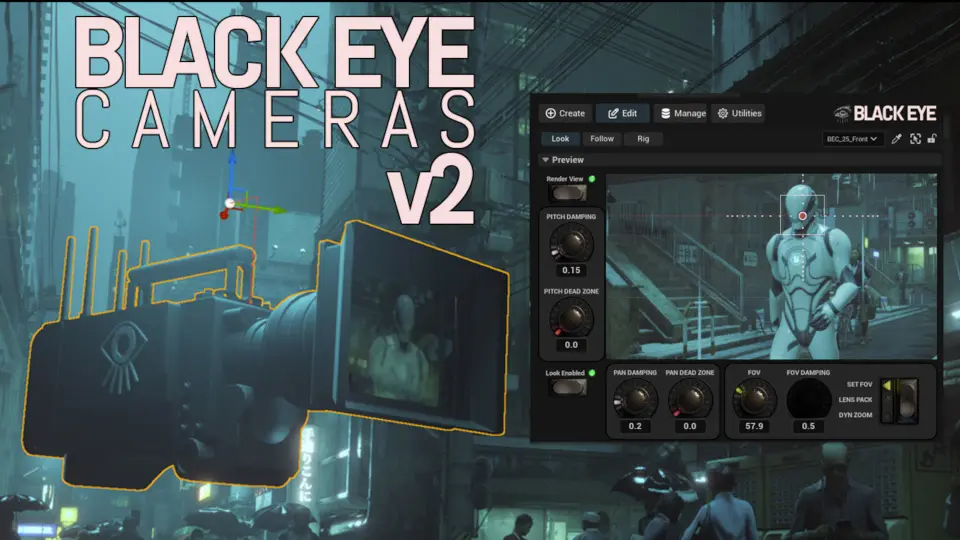
When the focus shifts to more cinematic framing, the primary Black Eye Camera module introduces a suite of advanced movement controls. It utilizes damping and deadzones to soften the camera's reaction to minor character movements, creating a smoother, more deliberate visual style. Screen-space framing and dynamic field-of-view (FOV) adjustments allow the camera to automatically scale its composition based on the action. Additionally, velocity-based look-ahead mechanics enable the camera to anticipate character movement, leading the subject naturally rather than rigidly locking onto their center point. For developers actively iterating on these mechanics, the streamlined UI allows properties to be tweaked directly in play mode and saved instantly.
Multi-Subject Tracking and the Cross Camera
Managing the frame when multiple characters are on screen requires specialized composition tools. The Cross Camera module is specifically built as a two-subject camera, designed to handle the framing complexities of dialogue sequences, close-quarters combat, and face-to-face interactions. It dynamically adjusts its positioning to keep both subjects composed properly, adapting smoothly even when the spatial relationship and positions of the subjects vary drastically during the interaction.
For scenarios involving larger groups or complex points of interest, the multi-subject tracking system takes over. This feature frames and follows multiple targets simultaneously. To ensure the composition remains precise and intentional, the system utilizes per-subject weighting. This allows a cutscene artist or gameplay designer to dictate which character or object should command the most attention within the frame, ensuring the camera prioritizes the primary action while still keeping secondary targets in view.
Previs Workflows and Sequencer Integration
The procedural nature of Black Eye 2.0 extends deeply into pre-visualization and cinematic layout workflows. Previs artists can utilize the system to create an entire bank of specialized Black Eye shots, ranging from sweeping drone angles and wide establishing shots to tight close-ups and cowboy framing. Once created, these shots can be assembled directly as clips on the Unreal Engine Sequencer.
Because the cameras act as dynamic systems rather than baked animations, artists can rearrange and retime these clips on the timeline without the need to reanimate the camera paths. Each shot dynamically adapts to changes in character scale, movement speed, and layout tweaks. If a character's animation is updated or the set dressing is shifted, the procedural camera automatically compensates to maintain the intended framing. This flexibility ensures that the edit remains highly adaptable, allowing cutscene artists to design a shot sequence once and deploy it across variable scenarios.
Camera Switcher for Mocap and Live Events
For environments that demand immediate, on-the-fly editorial decisions, Black Eye includes a powerful Camera Switcher module. This tool provides real-time, director-level control over the virtual cameras, making it an essential component for live mocap stages, esports broadcasts, and dynamic multiplayer games. Operators can dynamically cut between any number of virtual camera setups, transitioning from an overhead tactical view to an intimate character follow-cam in real time.
The entire Black Eye 2.0 procedural camera system is built for Unreal Engine 5.4 and beyond, ensuring compatibility across all supported platforms. To help developers and artists implement these tools immediately, the package includes a detailed demo scene filled with ready-to-use setups that demonstrate the core workflows of the Camera Manager, Orbit Camera, and cinematic tracking systems.
 Engine Tools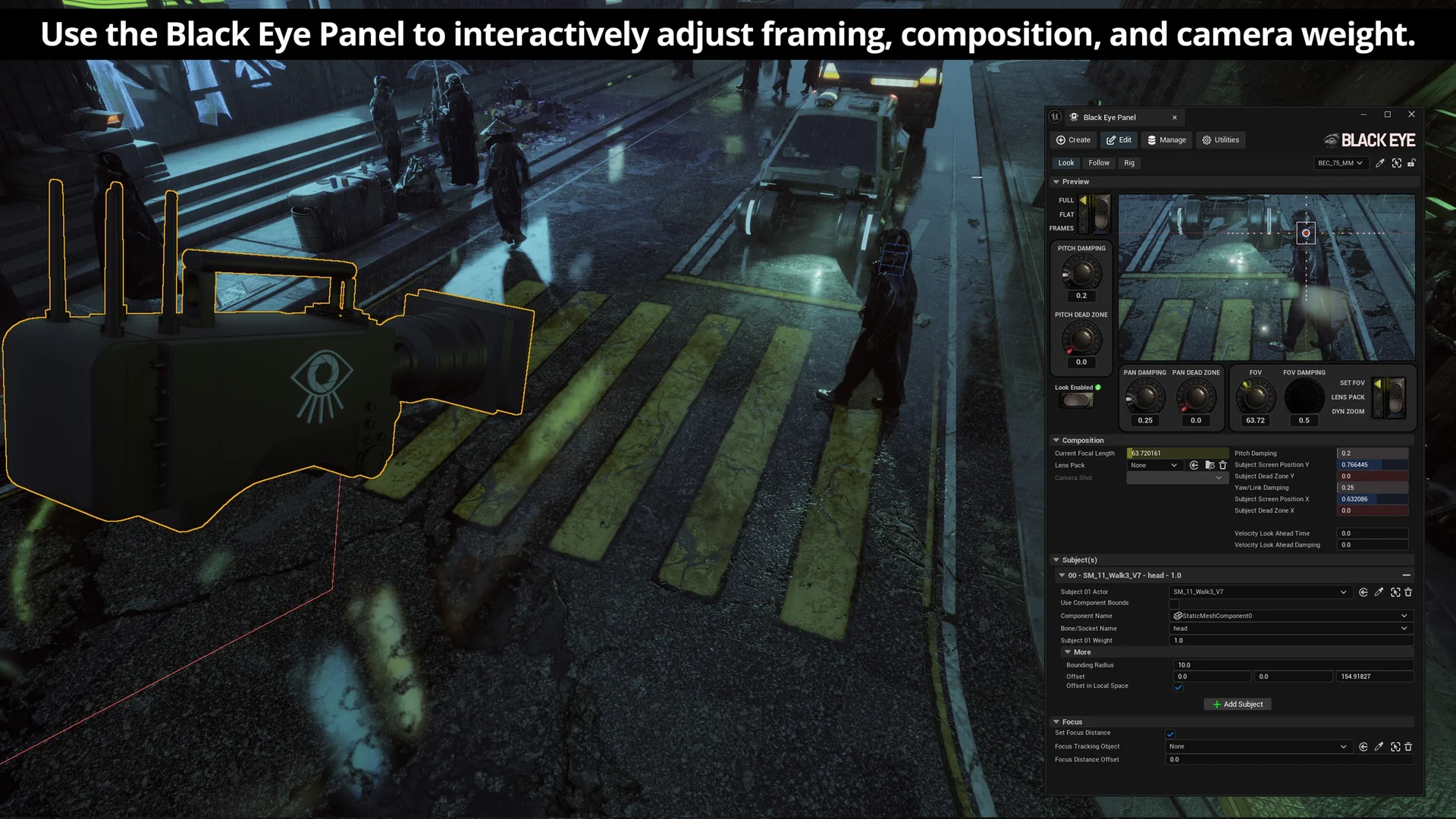
 Engine Tools
 Engine Tools
 Gameplay Features