"0341a2901a4ae9aa"{"id":"1000767","slug":"decal-forge-v1-1-procedural-decal-generator","title":"Decal Forge v1.1 - Procedural Decal Generator","category":"Gameplay Features","engine":"5.3+","assetVersion":"","engineVersion":"Engine Version: 5.3+","tag":"Gameplay Features","accent":"blue","visual":"mech","summary":"Decal Forge v1.1 brings blueprint-driven procedural decal authoring to Unreal Engine with Parallax Occlusion Mapping, triplanar projection, and angle-masking.","platform":"Unreal Engine","publishedAt":"2026-07-28T17:10:32.912Z","updatedAt":"2026-07-28T17:10:32.912Z","sourceNotes":[],"fileContents":[],"compatibility":["Unreal Engine","Engine Version: 5.3+"],"featuredImage":{"alt":"Decal Forge v1.1 - Procedural Decal Generator","src":"/wp-content/uploads/published/2026/07/48b6778b325d-e1514445-c8b5-4488-a099-c5900a600ae6-538f30b42c.webp"},"hasDownloadLink":true,"downloads":0,"terms":[{"taxonomy":"category","slug":"gameplay-features","name":"Gameplay Features"}],"galleryImages":[{"src":"/wp-content/uploads/published/2026/07/79acb590a943-0710eff0-1d9f-4dfe-be21-009b4dd31757-115775bb8c.webp","alt":"Decal Forge v1.1 - Procedural Decal Generator"},{"src":"/wp-content/uploads/published/2026/07/11b5eb73e63d-87f0d0a2-f88e-404a-813c-9f0797d88322-1dd4b24ea9.webp","alt":"Decal Forge v1.1 - Procedural Decal Generator"},{"src":"/wp-content/uploads/published/2026/07/66112151be11-3ae9050e-1681-458e-89eb-b9c6078428c2-5397b5802f.webp","alt":"Decal Forge v1.1 - Procedural Decal Generator"},{"src":"/wp-content/uploads/published/2026/07/41ec22b10a70-2fed02fc-cdf6-4c01-b067-d3d6d8d2de45-b756ef025c.webp","alt":"Decal Forge v1.1 - Procedural Decal Generator"},{"src":"/wp-content/uploads/published/2026/07/8698abaa8430-b5f6e565-2bd4-44f5-a98f-d20b82faf709-42dbc46617.webp","alt":"Decal Forge v1.1 - Procedural Decal Generator"},{"src":"/wp-content/uploads/published/2026/07/d667bfd2eb34-79a945de-65e5-4177-a64a-b79bbca8b75b-032c77d8a9.webp","alt":"Decal Forge v1.1 - Procedural Decal Generator"},{"src":"/wp-content/uploads/published/2026/07/be03c3896dfa-4dc644b6-08fe-4134-bd0c-78bb8530ba5f-4ff36bb29d.webp","alt":"Decal Forge v1.1 - Procedural Decal Generator"},{"src":"/wp-content/uploads/published/2026/07/5783967ed6c3-f26b409c-352c-436d-9a0e-257d5f74f47d-1b1afc1bd0.webp","alt":"Decal Forge v1.1 - Procedural Decal Generator"},{"src":"/wp-content/uploads/published/2026/07/e62d70534ffe-d4191496-07b7-4439-90f8-bef278ca277e-39c84ed944.webp","alt":"Decal Forge v1.1 - Procedural Decal Generator"},{"src":"/wp-content/uploads/published/2026/07/8c6b97a9c601-b977deb3-40b2-4a1b-aa26-3e12787062d4-f56d272e11.webp","alt":"Decal Forge v1.1 - Procedural Decal Generator"}],"accessPanel":{"kind":"resource","title":"Download this resource","eyebrow":"Free Download","message":"Log in or create a free account to start your download.","fileName":"Decal_Forge.7z","safetyNote":"Resources are manually reviewed before listing to improve quality and reduce obvious risks.","actionLabel":"Download Free","resourceType":"Resource archive"},"contentHtml":"\u003cp\u003eWhen building photorealistic environments or cinematic scenes in Unreal Engine, adding convincing surface detail often requires extensive manual texturing. \u003cem\u003eDecal Forge v1.1\u003c/em\u003e approaches this problem through a fully Blueprint-driven procedural system, allowing artists to author and place surface details dynamically. Rather than relying solely on static texture maps, the system intelligently adapts to the underlying geometry, making it suitable for architectural visualization, environmental storytelling, and high-fidelity material work.\u003c/p\u003e\n\n\u003ch2\u003eBuilding Architecture and Surface Detail with Decal Forge\u003c/h2\u003e\n\u003cp\u003eThe system is specifically geared toward generating intricate surface layers across a variety of practical use cases. Artists can use \u003cem\u003eDecal Forge\u003c/em\u003e to project architectural elements directly onto surfaces, including windows, doors, and vents. Beyond structural components, the generator supports surface effects such as wall markings, numbers, letters, and general ground clutter.\u003c/p\u003e\n\n\u003cp\u003eThis functionality allows for the rapid addition of realism to environments. A flat wall can be transformed with parametrically controlled rust, paint, or brick details, while ground surfaces can receive layered clutter effects without the need to author unique textures for every surface variation. The inclusion of support for numbers, letters, and other symbols further enables narrative elements to be embedded directly into the scene geometry.\u003c/p\u003e\n\n\u003ch2\u003eSurface Adaptation and Alignment Tools\u003c/h2\u003e\n\u003cp\u003eA core challenge in decal placement is managing how projections conform to different geometric forms. \u003cem\u003eDecal Forge\u003c/em\u003e addresses this with an \u003ccode\u003eAuto-Align\u003c/code\u003e feature designed to automatically adapt decals to any surface, whether flat, curved, or complex. This ensures accurate projection across varied topographies without requiring manual tweaking for every unique mesh shape.\u003c/p\u003e\n\n\u003cp\u003eFor terrain and uneven surfaces, the system includes \u003ccode\u003eAngle-Masking\u003c/code\u003e for slope and angle control. This allows artists to restrict where decals appear based on the geometric angles of the environment, preventing textures from stretching unnaturally over steep drops or irregular inclines.\u003c/p\u003e\n\n\u003ch2\u003eParallax Occlusion Mapping and Depth Controls\u003c/h2\u003e\n\u003cp\u003eTo achieve convincing depth and light interaction, \u003cem\u003eDecal Forge\u003c/em\u003e utilizes Parallax Occlusion Mapping (\u003ccode\u003ePOM\u003c/code\u003e). The system features multi-layer \u003ccode\u003ePOM\u003c/code\u003e alongside \u003ccode\u003ePOM\u003c/code\u003e shadows, allowing flat geometry to simulate the depth of physical relief. Dynamic shadow projection further enhances this illusion, making painted or rusted details appear as though they physically extrude from or indent into the surface.\u003c/p\u003e\n\n\u003cp\u003eLighting integration extends into specific shadow controls. Users can manage shadow casting directly, as well as utilize Fake Ambient Occlusion controls to simulate localized contact shadows. This level of control is particularly useful in cinematic production where light interaction defines the readability of a material.\u003c/p\u003e\n\n\u003ch2\u003eTriplanar Projection and Texture Independence\u003c/h2\u003e\n\u003cp\u003eWith the release of version 1.1, \u003cem\u003eDecal Forge\u003c/em\u003e introduced Triplanar Projection. This feature allows decals to be projected across three axes simultaneously, eliminating visible stretching on complex surfaces that lack proper UV mapping. It is important to note that while Triplanar support is available, it does not function simultaneously with Parallax Occlusion Mapping.\u003c/p\u003e\n\n\u003cp\u003eThe v1.1 update also streamlined the transformation workflow. Texture rotation is now independent of the decal transform, giving artists the ability to rotate the texture map itself without affecting the physical placement, scale, or orientation of the Decal Actor in the scene. The update also introduced \u003ccode\u003eTriplanar Angle Fade\u003c/code\u003e and delivered a 10% performance improvement over the initial release.\u003c/p\u003e\n\n\u003ch2\u003eMasking, Custom Shapes, and the Forge Ecosystem\u003c/h2\u003e\n\u003cp\u003eCustomization is handled through a robust masking system. The package includes over 50 built-in masks, allowing developers to alter the appearance and behavior of their decals parametrically. If the built-in shapes and masks are not sufficient for a specific scene, the system supports masking for custom decal shapes, enabling creators to import their own custom maps for endless variation.\u003c/p\u003e\n\n\u003cp\u003e\u003cem\u003eDecal Forge\u003c/em\u003e is built to integrate with the broader Forge ecosystem. It is designed to work seamlessly alongside \u003cem\u003eSurface Forge\u003c/em\u003e for surface painting, \u003cem\u003eWorld Forge\u003c/em\u003e for landscape Auto-Materials, and \u003cem\u003eCloud Forge\u003c/em\u003e for ultra-realistic local VDB clouds. This connectivity allows developers to build dynamic materials in conjunction with other Forge systems, unifying the environmental texturing pipeline.\u003c/p\u003e\n\n\u003ch2\u003eTechnical Considerations for Production\u003c/h2\u003e\n\u003cp\u003e\u003cem\u003eDecal Forge\u003c/em\u003e is crafted for cinematic precision and real-time efficiency, but the developer notes specific recommendations for implementation. The primary recommendation is to use the system for cinematic or high-quality visual production. If the tool is intended for real-time applications, such as interactive gameplay, optimization and responsible decal placement are advised to maintain performance.\u003c/p\u003e\n\n\u003cp\u003eThere is a specific hardware requirement regarding NVIDIA GPUs. If the system is running on an NVIDIA GPU, the Unreal Engine \u003ccode\u003enDisplay\u003c/code\u003e plugin must be enabled. The plugin is enabled by default in the engine, but users should be aware of this dependency when deploying the system in custom projects.\u003c/p\u003e\n\n\u003ch2\u003eWho Benefits from This Procedural Workflow\u003c/h2\u003e\n\u003cp\u003e\u003cem\u003eDecal Forge v1.1\u003c/em\u003e is highly suited for environment artists, technical artists, and visualization specialists working within Unreal Engine who need to layer complex surface details without manually baking unique textures for every asset. Its reliance on a Blueprint-driven workflow, combined with intelligent auto-alignment and extensive masking options, makes it a practical choice for teams looking to speed up the authoring of architectural details, surface markings, and structural wear.\u003c/p\u003e\n\n\u003ch2\u003eContinue Browsing Similar Packs\u003c/h2\u003e\n\u003cul\u003e\n\u003cli\u003e\u003ca href=\"https://3dcghub.com/book-generator/\" title=\"Book Generator\"\u003eBook Generator\u003c/a\u003e\u003c/li\u003e\n\u003cli\u003eHyper Basic PCG Forest v2\u003c/li\u003e\n\u003cli\u003e\u003ca href=\"https://3dcghub.com/powerline-generator/\" title=\"Powerline Generator\"\u003ePowerline Generator\u003c/a\u003e\u003c/li\u003e\n\u003cli\u003e\u003ca href=\"https://3dcghub.com/cloud-forge-vdb-cloud-pack-volume-2/\" title=\"Cloud Forge - VDB Cloud Pack Volume 2\"\u003eCloud Forge - VDB Cloud Pack Volume 2\u003c/a\u003e\u003c/li\u003e\n\u003cli\u003e\u003ca href=\"https://3dcghub.com/crazy-ivy-realistic-ivy-generator-vine-plugin-grow-procedural-plants-in-editor/\" title=\"Crazy Ivy Realistic Ivy Generator Vine Plugin - Grow Procedural Plants in Editor\"\u003eCrazy Ivy Realistic Ivy Generator Vine Plugin - Grow Procedural Plants in Editor\u003c/a\u003e\u003c/li\u003e\n\u003c/ul\u003e","contentTextLength":6018,"navigation":{"current":1397,"total":4017,"previous":{"id":"1000768","slug":"easy-waterscape-realtime-ocean-and-water-system","title":"Easy Waterscape - Realtime Ocean \u0026 Water System","category":"Engine Tools","platform":"Unreal Engine","updatedAt":"2026-07-28T17:23:14.846Z"},"next":{"id":"1000766","slug":"coffee-machines-set-personal-and-industrial-size","title":"Coffee Machines set ( Personal and Industrial size )","category":"Commercial Buildings","platform":"Unreal Engine","updatedAt":"2026-07-28T16:54:43.604Z"}},"relatedResources":[{"id":"10628","slug":"book-generator","title":"Book Generator","category":"Gameplay Features","engine":"4.26+,5.0+","assetVersion":"Engine version: 4.26+,5.0+","engineVersion":"4.24","tag":"Gameplay Features","accent":"blue","visual":"character","summary":"Speed up your level design with the Book Generator, a versatile blueprint tool for creating realistic book arrangements. Customize colors, scale, and placement modes to build detailed libraries and interiors with ease.","platform":"Unreal Engine","publishedAt":"2026-03-03T15:50:23.000Z","updatedAt":"2026-04-19T15:49:58.000Z","sourceNotes":[],"fileContents":[],"compatibility":["Unreal Engine","Engine version: 4.26+,5.0+"],"featuredImage":{"alt":"Book Generator","src":"https://3dcghub.com/wp-content/uploads/2026/03/c771ab39-5a63-44a9-89f1-92d651b3e8f6.webp"},"hasDownloadLink":true,"downloads":0},{"id":"1001751","slug":"procedural-climbing-with-control-rig","title":"Procedural Climbing with Control Rig","category":"Gameplay Features","engine":"5.4+","assetVersion":"","engineVersion":"Engine Version: 5.4+","tag":"Gameplay Features","accent":"blue","visual":"mech","summary":"Explore Procedural Climbing with Control Rig, an animation-free climbing system built entirely in Blueprints using Full Body IK in Unreal Engine.","platform":"Unreal Engine","publishedAt":"2026-10-20T02:56:44.210Z","updatedAt":"2026-10-20T02:56:44.210Z","sourceNotes":[],"fileContents":[],"compatibility":["Unreal Engine","Engine Version: 5.4+"],"featuredImage":{"alt":"Procedural Climbing with Control Rig","src":"/wp-content/uploads/published/2026/10/cd95fe573438-221256f7-22ff-4c02-8995-df4bcf97c4c0-e2111d1953.webp"},"hasDownloadLink":true,"downloads":0},{"id":"1001297","slug":"advanced-grid-inventory-system","title":"Advanced Grid Inventory System","category":"Gameplay Features","engine":"5.3+","assetVersion":"","engineVersion":"Engine Version: 5.3+","tag":"Gameplay Features","accent":"blue","visual":"mech","summary":"Explore the Advanced Grid Inventory System, featuring replicated online Blueprint architecture, AGIS_Concepts documentation, and thumbnail generator support.","platform":"Unreal Engine","publishedAt":"2026-10-02T05:59:13.116Z","updatedAt":"2026-10-02T05:59:13.116Z","sourceNotes":[],"fileContents":[],"compatibility":["Unreal Engine","Engine Version: 5.3+"],"featuredImage":{"alt":"Advanced Grid Inventory System","src":"/wp-content/uploads/published/2026/10/bcf827f64dee-dfe1d14a-861c-486b-b4dd-df1ea83de3a7-865c48df7f.webp"},"hasDownloadLink":true,"downloads":0}]}
Gameplay Features
Decal Forge v1.1 - Procedural Decal Generator
Decal Forge v1.1 brings blueprint-driven procedural decal authoring to Unreal Engine with Parallax Occlusion Mapping, triplanar projection, and angle-masking.
When building photorealistic environments or cinematic scenes in Unreal Engine, adding convincing surface detail often requires extensive manual texturing. Decal Forge v1.1 approaches this problem through a fully Blueprint-driven procedural system, allowing artists to author and place surface details dynamically. Rather than relying solely on static texture maps, the system intelligently adapts to the underlying geometry, making it suitable for architectural visualization, environmental storytelling, and high-fidelity material work.
Building Architecture and Surface Detail with Decal Forge
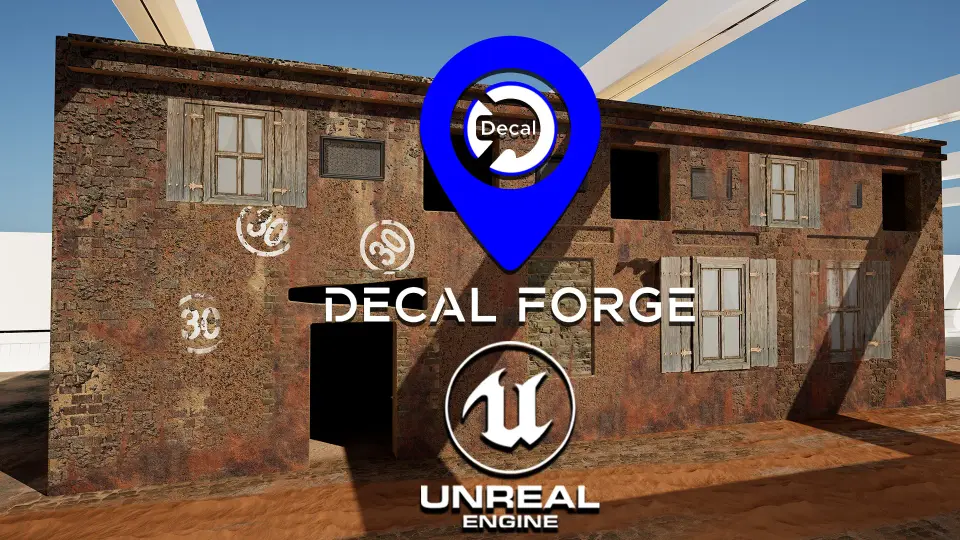
The system is specifically geared toward generating intricate surface layers across a variety of practical use cases. Artists can use Decal Forge to project architectural elements directly onto surfaces, including windows, doors, and vents. Beyond structural components, the generator supports surface effects such as wall markings, numbers, letters, and general ground clutter.
This functionality allows for the rapid addition of realism to environments. A flat wall can be transformed with parametrically controlled rust, paint, or brick details, while ground surfaces can receive layered clutter effects without the need to author unique textures for every surface variation. The inclusion of support for numbers, letters, and other symbols further enables narrative elements to be embedded directly into the scene geometry.
Surface Adaptation and Alignment Tools
A core challenge in decal placement is managing how projections conform to different geometric forms. Decal Forge addresses this with an Auto-Align feature designed to automatically adapt decals to any surface, whether flat, curved, or complex. This ensures accurate projection across varied topographies without requiring manual tweaking for every unique mesh shape.
For terrain and uneven surfaces, the system includes Angle-Masking for slope and angle control. This allows artists to restrict where decals appear based on the geometric angles of the environment, preventing textures from stretching unnaturally over steep drops or irregular inclines.
Parallax Occlusion Mapping and Depth Controls
To achieve convincing depth and light interaction, Decal Forge utilizes Parallax Occlusion Mapping (POM). The system features multi-layer POM alongside POM shadows, allowing flat geometry to simulate the depth of physical relief. Dynamic shadow projection further enhances this illusion, making painted or rusted details appear as though they physically extrude from or indent into the surface.
Lighting integration extends into specific shadow controls. Users can manage shadow casting directly, as well as utilize Fake Ambient Occlusion controls to simulate localized contact shadows. This level of control is particularly useful in cinematic production where light interaction defines the readability of a material.
Triplanar Projection and Texture Independence
With the release of version 1.1, Decal Forge introduced Triplanar Projection. This feature allows decals to be projected across three axes simultaneously, eliminating visible stretching on complex surfaces that lack proper UV mapping. It is important to note that while Triplanar support is available, it does not function simultaneously with Parallax Occlusion Mapping.
The v1.1 update also streamlined the transformation workflow. Texture rotation is now independent of the decal transform, giving artists the ability to rotate the texture map itself without affecting the physical placement, scale, or orientation of the Decal Actor in the scene. The update also introduced Triplanar Angle Fade and delivered a 10% performance improvement over the initial release.
Masking, Custom Shapes, and the Forge Ecosystem
Customization is handled through a robust masking system. The package includes over 50 built-in masks, allowing developers to alter the appearance and behavior of their decals parametrically. If the built-in shapes and masks are not sufficient for a specific scene, the system supports masking for custom decal shapes, enabling creators to import their own custom maps for endless variation.
Decal Forge is built to integrate with the broader Forge ecosystem. It is designed to work seamlessly alongside Surface Forge for surface painting, World Forge for landscape Auto-Materials, and Cloud Forge for ultra-realistic local VDB clouds. This connectivity allows developers to build dynamic materials in conjunction with other Forge systems, unifying the environmental texturing pipeline.
Technical Considerations for Production
Decal Forge is crafted for cinematic precision and real-time efficiency, but the developer notes specific recommendations for implementation. The primary recommendation is to use the system for cinematic or high-quality visual production. If the tool is intended for real-time applications, such as interactive gameplay, optimization and responsible decal placement are advised to maintain performance.
There is a specific hardware requirement regarding NVIDIA GPUs. If the system is running on an NVIDIA GPU, the Unreal Engine nDisplay plugin must be enabled. The plugin is enabled by default in the engine, but users should be aware of this dependency when deploying the system in custom projects.
Who Benefits from This Procedural Workflow
Decal Forge v1.1 is highly suited for environment artists, technical artists, and visualization specialists working within Unreal Engine who need to layer complex surface details without manually baking unique textures for every asset. Its reliance on a Blueprint-driven workflow, combined with intelligent auto-alignment and extensive masking options, makes it a practical choice for teams looking to speed up the authoring of architectural details, surface markings, and structural wear.
 Gameplay Features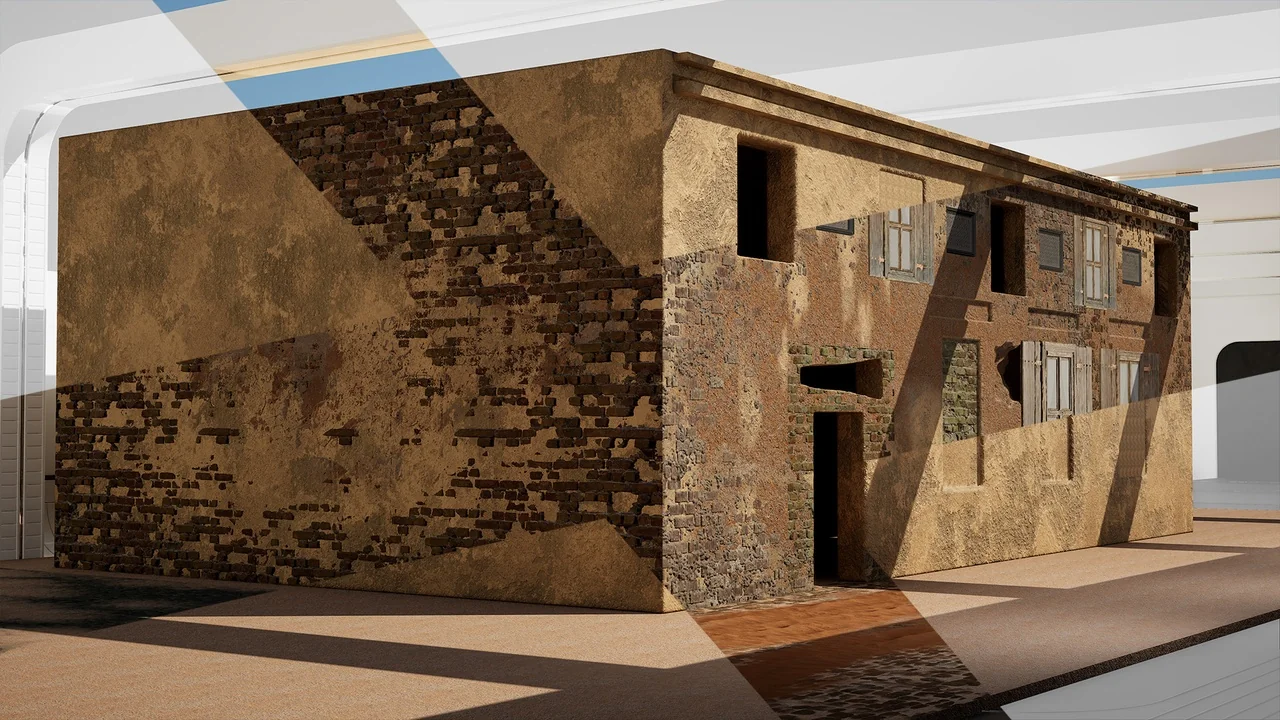
 Gameplay Features
 Gameplay Features
 Gameplay Features