"0341a2901a4ae9aa"{"id":"1000768","slug":"easy-waterscape-realtime-ocean-and-water-system","title":"Easy Waterscape - Realtime Ocean \u0026 Water System","category":"Engine Tools","engine":"5.7+","assetVersion":"","engineVersion":"Engine Version: 5.7+","tag":"Engine Tools","accent":"blue","visual":"mech","summary":"Realtime FFT ocean simulation for Unreal Engine 5.7+. Drop-in Blueprint actor with Tessendorf waves, dynamic foam, buoyancy, and one-click coastlines.","platform":"Unreal Engine","publishedAt":"2026-07-28T17:20:25.391Z","updatedAt":"2026-07-28T17:23:14.846Z","sourceNotes":[],"fileContents":[],"compatibility":["Unreal Engine","Engine Version: 5.7+"],"featuredImage":{"alt":"Easy Waterscape - Realtime Ocean \u0026 Water System","src":"/wp-content/uploads/published/2026/07/d797b32e1cc0-1b72c960-d366-480e-89b3-2397a4e066bd-788359d934.webp"},"hasDownloadLink":true,"downloads":8,"terms":[{"taxonomy":"category","slug":"engine-tools","name":"Engine Tools"}],"galleryImages":[{"src":"/wp-content/uploads/published/2026/07/2af8fb10cd14-8f33c239-b093-4f8f-abd3-ae83faff1643-3d7bd8d3c3.webp","alt":"Easy Waterscape - Realtime Ocean \u0026 Water System"},{"src":"/wp-content/uploads/published/2026/07/756c16bbc47f-16227034-4750-4e2d-aace-56db5f216f0f-0f3713c998.webp","alt":"Easy Waterscape - Realtime Ocean \u0026 Water System"},{"src":"/wp-content/uploads/published/2026/07/7db2f09c9434-0a48969e-f4e1-4b8f-966c-e3de51f77a39-afe41bdb83.webp","alt":"Easy Waterscape - Realtime Ocean \u0026 Water System"},{"src":"/wp-content/uploads/published/2026/07/9cd11399d4d6-ebc18efe-80c1-40c8-84a3-14531d84a316-25810d2ab4.webp","alt":"Easy Waterscape - Realtime Ocean \u0026 Water System"},{"src":"/wp-content/uploads/published/2026/07/9a022fb51b91-48261fba-0cda-48f6-b799-64cf779a8aab-67740c0d86.webp","alt":"Easy Waterscape - Realtime Ocean \u0026 Water System"},{"src":"/wp-content/uploads/published/2026/07/f7db7c140ed9-f2d15f23-3c44-4cfa-9bbc-e35a9bb50925-3e86e897ac.webp","alt":"Easy Waterscape - Realtime Ocean \u0026 Water System"},{"src":"/wp-content/uploads/published/2026/07/925bb0a7066e-d646b1ba-967b-4f17-bcda-9b526c54cbec-07820f4a67.webp","alt":"Easy Waterscape - Realtime Ocean \u0026 Water System"}],"accessPanel":{"kind":"resource","title":"Download this resource","eyebrow":"Free Download","message":"Log in or create a free account to start your download.","fileName":"Content.7z","safetyNote":"Resources are manually reviewed before listing to improve quality and reduce obvious risks.","actionLabel":"Download Free","resourceType":"Resource archive"},"contentHtml":"\u003cp\u003eBuilding a convincing open-ocean scene or a contained lakeside environment in Unreal Engine often demands a deep dive into complex shader math and simulation logic. \u003cem\u003eEasy Waterscape - Realtime Ocean \u0026 Water System\u003c/em\u003e aims to collapse that workflow into a single, drop-in Blueprint Actor. Created for Unreal Engine 5.7 and above, it targets artists who need immediate, high-quality water without manually parsing through endless settings or relying on external plugins.\u003c/p\u003e\n\n\u003ch2\u003eReal-Time Tessendorf FFT Simulation in a Single Actor\u003c/h2\u003e\n\u003cp\u003eAt the core of the system is a true Tessendorf FFT ocean simulation. Instead of relying on looping noise textures or animated normal maps, the tool uses the Tessendorf and JONSWAP spectra to drive the surface. This is the same approach widely used in AAA water rendering.\u003c/p\u003e\n\n\u003cp\u003eThe simulation layers three distinct wave scales: large swell, mid waves, and fine chop. Because these layers move and interact based on a physical spectrum rather than simple tiled noise, the resulting water behaves more like a real-world ocean. The waves do not visibly repeat, maintaining visual integrity from the area immediately around the player's feet all the way out to the horizon.\u003c/p\u003e\n\n\u003cp\u003eThe entire simulation operates in real-time and is handled by a single Blueprint Actor. Users drop the actor into a level, select a preset, and the water is ready in seconds. Every variable and slider within the Blueprint is clearly labeled with tooltips, ensuring that artists can tune the system visually without needing to read through extensive documentation to understand what each control does.\u003c/p\u003e\n\n\u003ch2\u003eTiling-Free Surfaces and Camera-Following Boundaries\u003c/h2\u003e\n\u003cp\u003eA persistent challenge with digital water is the visible repetition of wave patterns. \u003cem\u003eEasy Waterscape\u003c/em\u003e includes tiling-free tools that allow users to adjust the surface to naturally break up repeating patterns. The system leverages real-world phenomena to disrupt the regularity that typically gives away synthetic ocean rendering.\u003c/p\u003e\n\n\u003cp\u003eThe tool also provides flexibility in the scale of the body of water. Users can switch between a boundless ocean or a smaller, contained lake or pond. To maintain the illusion of an infinite body of water, the surface follows the camera. This allows for continuous sailing or flying without ever running out of water surface or hitting an invisible edge.\u003c/p\u003e\n\n\u003ch3\u003eOne-Click Presets and Custom DataAssets\u003c/h3\u003e\n\u003cp\u003eTo accelerate scene assembly, the system includes three one-click presets: \u003cem\u003eCalm Lake\u003c/em\u003e, \u003cem\u003eRough Sea\u003c/em\u003e, and \u003cem\u003eStormy Ocean\u003c/em\u003e. These are selectable directly from a simple dropdown menu. The preset framework is \u003ccode\u003eDataAsset\u003c/code\u003e-driven, which means artists are not locked into the shipped options. Custom presets can be created and saved, allowing specific water configurations to be shared across a project or reused in future scenes.\u003c/p\u003e\n\n\u003ch2\u003eDynamic Foam, Coastlines, and Buoyancy Integration\u003c/h2\u003e\n\u003cp\u003eWave simulation is only part of a convincing water render. \u003cem\u003eEasy Waterscape\u003c/em\u003e includes physically derived dynamic foam that forms where the water surface naturally folds. Using a Jacobian-based approach, the foam builds up and fades in a natural manner. Crashing foam can also be generated along coastlines to add an extra layer of realism where the water meets land.\u003c/p\u003e\n\n\u003cp\u003eSpeaking of coastlines, the integrated \u003ccode\u003eCoastMaker\u003c/code\u003e tool handles the transition from water to land automatically. With one click, \u003ccode\u003eCoastMaker\u003c/code\u003e adds foam, wave run-up, and breaking surf along the edges of the existing land geometry. This removes the manual placement of shoreline effects.\u003c/p\u003e\n\n\u003cp\u003eFor objects interacting with the water, three distinct buoyancy types are provided: a Blueprint Component, a Niagara System Blueprint, and a Material Function. These systems sample live wave height anywhere on the surface, allowing boats, floating debris, or characters to rest and move convincingly on the actual simulated waves rather than a static plane.\u003c/p\u003e\n\n\u003ch2\u003eWorkflow Fit: Games, Cinematics, and Current Limitations\u003c/h2\u003e\n\u003cp\u003e\u003cem\u003eEasy Waterscape\u003c/em\u003e is optimized for interactive game usage while remaining stable under cinematic rendering conditions. It holds up when used within Sequencer, the Movie Render Queue, and the Material Graph toolset, making it suitable for both real-time projects and offline cinematic renders.\u003c/p\u003e\n\n\u003cp\u003eThe tool is 100% Blueprint-based. There is no C++ involved, and no external plugins are required. Because the logic is entirely contained within readable Blueprints, it can be fully extended or modified by users who want to push the system further.\u003c/p\u003e\n\n\u003cp\u003eThere are specific technical considerations to keep in mind regarding anti-aliasing. When Temporal Super Resolution (TSR) is active and the Screen Percentage drops below 100%—specifically when upscaling between 50% and 100%—the water surface can appear blurry, smeary, or pixelated. This is a limitation tied to TSR itself. To mitigate this, using a Screen Percentage of 100% or higher is recommended. Alternative anti-aliasing methods reportedly yield superior results in these scenarios.\u003c/p\u003e\n\n\u003cp\u003eThe developers explicitly state that \u003cem\u003eEasy Waterscape\u003c/em\u003e is not intended to be a complete, end-to-end game system. It functions as a stepping stone, providing a solid foundation that creators can build their specific gameplay and visual logic upon.\u003c/p\u003e\n\n\u003ch3\u003eBeta Features: Underwater Rendering and Lake Efficiency\u003c/h3\u003e\n\u003cp\u003eTwo features are currently in Beta. The first is an underwater rendering system, which functions as a built-in underwater Post-Process effect with a clean surface-crossing transition. It is fully controllable and works as intended in its current state, though future updates will focus on enhancing the visual quality and adding new capabilities.\u003c/p\u003e\n\n\u003cp\u003eThe second Beta feature is \u003ccode\u003eLake Mode\u003c/code\u003e. Currently, it works as intended for creating bounded bodies of water, but future development will focus on optimizing the system to make it more computationally efficient. Users adopting the tool now should be aware that efficiency improvements for \u003ccode\u003eLake Mode\u003c/code\u003e are on the roadmap.\u003c/p\u003e\n\n\u003ch2\u003ePractical Takeaway for Scene Assembly\u003c/h2\u003e\n\u003cp\u003eFor projects running on Unreal Engine 5.7 that require a ready-to-rock water simulation—from large-scale ocean voyages to contained cinematic ponds—\u003cem\u003eEasy Waterscape\u003c/em\u003e provides a robust foundation. By handling the heavy lifting of FFT wave generation, dynamic foam, and shoreline interaction within a fully exposed Blueprint, it allows teams to bypass the technical setup of water rendering and focus entirely on the visual and interactive elements of their scenes. As long as the TSR Screen Percentage limitation is managed, it serves as a strong starting point for both real-time games and cinematic sequences.\u003c/p\u003e\n\n\u003ch2\u003eExplore Similar Assets\u003c/h2\u003e\n\u003cul\u003e\n\u003cli\u003e\u003ca href=\"https://3dcghub.com/interactive-water-ocean-and-swim-systems/\" title=\"Interactive Water, Ocean and Swim Systems\"\u003eInteractive Water, Ocean and Swim Systems\u003c/a\u003e\u003c/li\u003e\n\u003cli\u003e\u003ca href=\"https://3dcghub.com/realistic-water-vfx/\" title=\"Realistic Water VFX\"\u003eRealistic Water VFX\u003c/a\u003e\u003c/li\u003e\n\u003cli\u003e\u003ca href=\"https://3dcghub.com/water-stylized-custom/\" title=\"Water Stylized Custom\"\u003eWater Stylized Custom\u003c/a\u003e\u003c/li\u003e\n\u003cli\u003e\u003ca href=\"https://3dcghub.com/dynamic-real-water/\" title=\"Dynamic Real Water\"\u003eDynamic Real Water\u003c/a\u003e\u003c/li\u003e\n\u003cli\u003e\u003ca href=\"https://3dcghub.com/firebase-goodies/\" title=\"Firebase Goodies\"\u003eFirebase Goodies\u003c/a\u003e\u003c/li\u003e\n\u003c/ul\u003e","contentTextLength":6683,"navigation":{"current":1396,"total":4017,"previous":{"id":"1000769","slug":"the-lords-mansion","title":"The Lords' Mansion","category":"Victorian","platform":"Unreal Engine","updatedAt":"2026-07-28T17:40:56.032Z"},"next":{"id":"1000767","slug":"decal-forge-v1-1-procedural-decal-generator","title":"Decal Forge v1.1 - Procedural Decal Generator","category":"Gameplay Features","platform":"Unreal Engine","updatedAt":"2026-07-28T17:10:32.912Z"}},"relatedResources":[{"id":"1001615","slug":"ocean-ology-nextgen-ocean-water-fluid-fft-simulation-rendering","title":"Ocean ology NextGen ( Ocean Water Fluid FFT Simulation Rendering )","category":"Engine Tools","engine":"5.5","assetVersion":"Asset Version: 1.1.0","engineVersion":"Engine Version: 5.5","tag":"Engine Tools","accent":"blue","visual":"mech","summary":"Explore Oceanology NextGen, featuring C++ FFT spectral waves, mathematical surf simulations, and high-end coastal physics for Unreal Engine.","platform":"Unreal Engine","publishedAt":"2026-10-11T01:44:11.199Z","updatedAt":"2026-10-11T01:44:11.199Z","sourceNotes":[],"fileContents":[],"compatibility":["Unreal Engine","Asset Version: 1.1.0","Engine Version: 5.5"],"featuredImage":{"alt":"Ocean ology NextGen ( Ocean Water Fluid FFT Simulation Rendering )","src":"/wp-content/uploads/published/2026/10/03e1b6d66284-f145cb8e-9d88-494a-a740-6fa443e94a4b-fafec814f9.webp"},"hasDownloadLink":true,"downloads":0},{"id":"10993","slug":"interactive-water-ocean-and-swim-systems","title":"Interactive Water, Ocean and Swim Systems","category":"Gameplay Features","engine":"5.4+","assetVersion":"Engine version: 5.4+","engineVersion":"5.3","tag":"Gameplay Features","accent":"blue","visual":"animation","summary":"Discover a robust 3-in-1 solution for creating interactive aquatic environments. This system features advanced shaders, realistic buoyancy, and complete multiplayer support for swimming above and below the surface.","platform":"Unreal Engine","publishedAt":"2026-03-03T16:40:07.000Z","updatedAt":"2026-04-19T15:49:53.000Z","sourceNotes":[],"fileContents":[],"compatibility":["Unreal Engine","Engine version: 5.4+"],"featuredImage":{"alt":"Interactive Water, Ocean and Swim Systems","src":"https://3dcghub.com/wp-content/uploads/2026/03/5bc7b9ab-1622-4a70-a72e-efdf2f38bc9a.webp"},"hasDownloadLink":true,"downloads":3},{"id":"1001150","slug":"waterline-pro-6","title":"Waterline PRO 6","category":"Engine Tools","engine":"4.27+,5.4+","assetVersion":"","engineVersion":"Engine Version: 4.27+,5.4+","tag":"Engine Tools","accent":"blue","visual":"mech","summary":"Waterline PRO 6 delivers FFT spectra, baked ocean simulations, dynamic wakes, and multi-layered water surfaces across games, films, and virtual sets.","platform":"Unreal Engine","publishedAt":"2026-09-10T13:07:23.062Z","updatedAt":"2026-09-10T13:07:23.062Z","sourceNotes":[],"fileContents":[],"compatibility":["Unreal Engine","Engine Version: 4.27+,5.4+"],"featuredImage":{"alt":"Waterline PRO 6","src":"/wp-content/uploads/published/2026/09/8612287b2b8d-e62960e9-fc5c-4a85-851c-3bc204c2b07b-d5c59a5cbe.webp"},"hasDownloadLink":true,"downloads":3}]}
Engine Tools
Easy Waterscape - Realtime Ocean & Water System
Realtime FFT ocean simulation for Unreal Engine 5.7+. Drop-in Blueprint actor with Tessendorf waves, dynamic foam, buoyancy, and one-click coastlines.
Building a convincing open-ocean scene or a contained lakeside environment in Unreal Engine often demands a deep dive into complex shader math and simulation logic. Easy Waterscape - Realtime Ocean & Water System aims to collapse that workflow into a single, drop-in Blueprint Actor. Created for Unreal Engine 5.7 and above, it targets artists who need immediate, high-quality water without manually parsing through endless settings or relying on external plugins.
Real-Time Tessendorf FFT Simulation in a Single Actor
At the core of the system is a true Tessendorf FFT ocean simulation. Instead of relying on looping noise textures or animated normal maps, the tool uses the Tessendorf and JONSWAP spectra to drive the surface. This is the same approach widely used in AAA water rendering.
The simulation layers three distinct wave scales: large swell, mid waves, and fine chop. Because these layers move and interact based on a physical spectrum rather than simple tiled noise, the resulting water behaves more like a real-world ocean. The waves do not visibly repeat, maintaining visual integrity from the area immediately around the player's feet all the way out to the horizon.
The entire simulation operates in real-time and is handled by a single Blueprint Actor. Users drop the actor into a level, select a preset, and the water is ready in seconds. Every variable and slider within the Blueprint is clearly labeled with tooltips, ensuring that artists can tune the system visually without needing to read through extensive documentation to understand what each control does.
Tiling-Free Surfaces and Camera-Following Boundaries
A persistent challenge with digital water is the visible repetition of wave patterns. Easy Waterscape includes tiling-free tools that allow users to adjust the surface to naturally break up repeating patterns. The system leverages real-world phenomena to disrupt the regularity that typically gives away synthetic ocean rendering.
The tool also provides flexibility in the scale of the body of water. Users can switch between a boundless ocean or a smaller, contained lake or pond. To maintain the illusion of an infinite body of water, the surface follows the camera. This allows for continuous sailing or flying without ever running out of water surface or hitting an invisible edge.
One-Click Presets and Custom DataAssets
To accelerate scene assembly, the system includes three one-click presets: Calm Lake, Rough Sea, and Stormy Ocean. These are selectable directly from a simple dropdown menu. The preset framework is DataAsset-driven, which means artists are not locked into the shipped options. Custom presets can be created and saved, allowing specific water configurations to be shared across a project or reused in future scenes.
Dynamic Foam, Coastlines, and Buoyancy Integration
Wave simulation is only part of a convincing water render. Easy Waterscape includes physically derived dynamic foam that forms where the water surface naturally folds. Using a Jacobian-based approach, the foam builds up and fades in a natural manner. Crashing foam can also be generated along coastlines to add an extra layer of realism where the water meets land.
Speaking of coastlines, the integrated CoastMaker tool handles the transition from water to land automatically. With one click, CoastMaker adds foam, wave run-up, and breaking surf along the edges of the existing land geometry. This removes the manual placement of shoreline effects.
For objects interacting with the water, three distinct buoyancy types are provided: a Blueprint Component, a Niagara System Blueprint, and a Material Function. These systems sample live wave height anywhere on the surface, allowing boats, floating debris, or characters to rest and move convincingly on the actual simulated waves rather than a static plane.
Workflow Fit: Games, Cinematics, and Current Limitations
Easy Waterscape is optimized for interactive game usage while remaining stable under cinematic rendering conditions. It holds up when used within Sequencer, the Movie Render Queue, and the Material Graph toolset, making it suitable for both real-time projects and offline cinematic renders.
The tool is 100% Blueprint-based. There is no C++ involved, and no external plugins are required. Because the logic is entirely contained within readable Blueprints, it can be fully extended or modified by users who want to push the system further.
There are specific technical considerations to keep in mind regarding anti-aliasing. When Temporal Super Resolution (TSR) is active and the Screen Percentage drops below 100%—specifically when upscaling between 50% and 100%—the water surface can appear blurry, smeary, or pixelated. This is a limitation tied to TSR itself. To mitigate this, using a Screen Percentage of 100% or higher is recommended. Alternative anti-aliasing methods reportedly yield superior results in these scenarios.
The developers explicitly state that Easy Waterscape is not intended to be a complete, end-to-end game system. It functions as a stepping stone, providing a solid foundation that creators can build their specific gameplay and visual logic upon.
Beta Features: Underwater Rendering and Lake Efficiency
Two features are currently in Beta. The first is an underwater rendering system, which functions as a built-in underwater Post-Process effect with a clean surface-crossing transition. It is fully controllable and works as intended in its current state, though future updates will focus on enhancing the visual quality and adding new capabilities.
The second Beta feature is Lake Mode. Currently, it works as intended for creating bounded bodies of water, but future development will focus on optimizing the system to make it more computationally efficient. Users adopting the tool now should be aware that efficiency improvements for Lake Mode are on the roadmap.
Practical Takeaway for Scene Assembly
For projects running on Unreal Engine 5.7 that require a ready-to-rock water simulation—from large-scale ocean voyages to contained cinematic ponds—Easy Waterscape provides a robust foundation. By handling the heavy lifting of FFT wave generation, dynamic foam, and shoreline interaction within a fully exposed Blueprint, it allows teams to bypass the technical setup of water rendering and focus entirely on the visual and interactive elements of their scenes. As long as the TSR Screen Percentage limitation is managed, it serves as a strong starting point for both real-time games and cinematic sequences.
 Engine Tools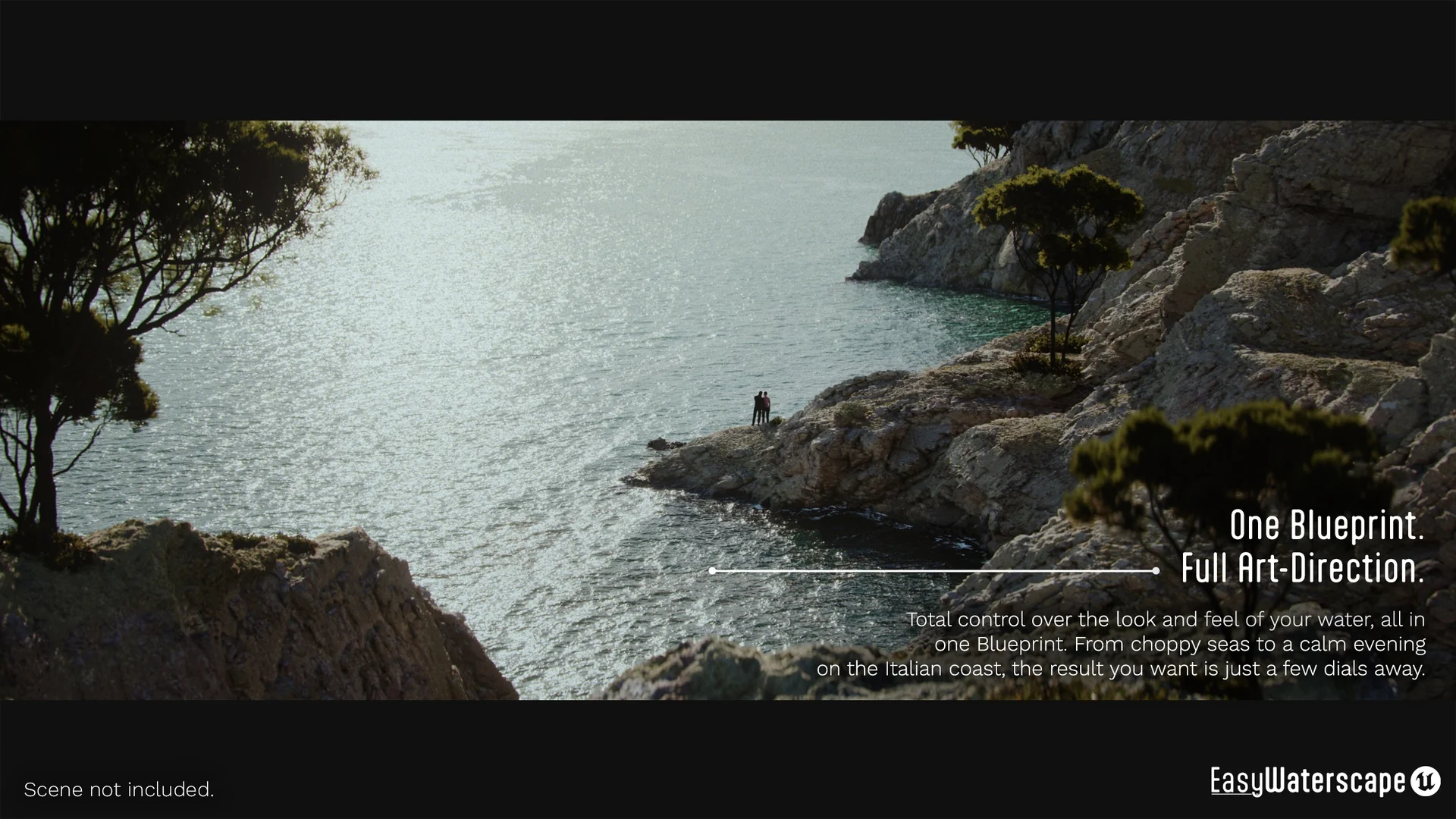
 Engine Tools
 Gameplay Features
 Engine Tools