"1f00f67f9253451b"{"id":"1001268","slug":"mazen-level-tool","title":"Mazen Level Tool","category":"Engine Tools","engine":"5.1 - 5.4","assetVersion":"Asset Version: 1.0","engineVersion":"Engine Version: 5.1 - 5.4","tag":"Engine Tools","accent":"blue","visual":"mech","summary":"Streamline level outliner workflows with Mazen Level Tool by saving and loading named actor selection sets alongside screenshots and camera transform data.","platform":"Unreal Engine","publishedAt":"2026-09-30T05:52:49.722Z","updatedAt":"2026-09-30T05:52:49.722Z","sourceNotes":[],"fileContents":[],"compatibility":["Unreal Engine","Asset Version: 1.0","Engine Version: 5.1 - 5.4"],"featuredImage":{"alt":"Mazen Level Tool","src":"/wp-content/uploads/published/2026/09/1ac477737423-3b95d9fd-0dc4-4360-87b9-930c7e6d2b6b-549e2b7037.webp"},"hasDownloadLink":true,"downloads":0,"terms":[{"taxonomy":"category","slug":"engine-tools-tools-and-plugins","name":"Engine Tools"}],"galleryImages":[{"src":"/wp-content/uploads/published/2026/09/2e2f58f37df0-248b803b-b4eb-46f1-ad66-487301d46ee6-2a7ababfd8.webp","alt":"Mazen Level Tool"},{"src":"/wp-content/uploads/published/2026/09/f3978bbbcc40-41397918-67b2-4e43-9136-c321e1ba8dfa-28d37cd50d.webp","alt":"Mazen Level Tool"},{"src":"/wp-content/uploads/published/2026/09/72248eb73d7d-1e91d2fb-b602-4ef2-8386-2f2871fc24a7-860fe3a6bc.webp","alt":"Mazen Level Tool"},{"src":"/wp-content/uploads/published/2026/09/60a062135534-0c0de6b9-e154-4a76-9da3-c4cb623017d0-4497323620.webp","alt":"Mazen Level Tool"},{"src":"/wp-content/uploads/published/2026/09/56a6470bfcf0-64c0334f-9fcb-4408-9073-2c4892f09616-db8dc10b8e.webp","alt":"Mazen Level Tool"},{"src":"/wp-content/uploads/published/2026/09/aa1795f6227d-0c2d0583-86b0-4653-b543-d4bba7472d7e-2340bd737a.webp","alt":"Mazen Level Tool"}],"accessPanel":{"kind":"resource","title":"Download this resource","eyebrow":"Free Download","message":"Log in or create a free account to start your download.","fileName":"Mazen Level Tool.7z","safetyNote":"Resources are manually reviewed before listing to improve quality and reduce obvious risks.","actionLabel":"Download Free","resourceType":"Resource archive"},"contentHtml":"\u003ch2\u003eMitigating Level Outliner Friction During Development\u003c/h2\u003e\n\u003cp\u003eNavigating dense scene hierarchies often becomes one of the most repetitive micro-tasks encountered during level construction. In any working environment where dozens or hundreds of items populate a scene, tracking down specific objects requires constant scrolling, filtering, and manual picking within the level outliner. When development tasks require adjusting the same cluster of items across multiple work sessions, repeatedly locating each individual actor wastes valuable production time. Mazen Level Tool targets this specific procedural bottleneck by giving developers a structured method to capture, store, and recall actor selections directly within their project workspace.\u003c/p\u003e\n\u003cp\u003eWorking through continuous scene changes usually means jumping between lighting adjustments, structural layout modifications, and prop placement. When an editor user isolates a group of meshes or utility actors to check alignment or lighting response, that selection is typically lost the moment a single click occurs elsewhere in the viewport. Mazen Level Tool bypasses the need to rebuild identical selections manually by providing a dedicated utility framework focused entirely on outliner workflow retention.\u003c/p\u003e \u003ch2\u003eSave and Load Actors Selection Set by Name\u003c/h2\u003e\n\u003cp\u003eAt the center of Mazen Level Tool is the ability to save and load an actors selection set by name. Rather than relying on temporary multi-selections that vanish upon clicking into empty viewport space, users can designate a meaningful name for whatever group of actors is currently highlighted. This user-defined naming convention allows sets to reflect distinct functional groups, such as specific room assemblies, lighting rigs, interactive items, or modular wall kits.\u003c/p\u003e\n\u003cp\u003eRecalling those grouped entities later is handled through a straightforward load action tied to the saved identifier. Selecting the chosen name from the tool immediately restores the full selection state across the level outliner, instantly re-highlighting all associated actors without requiring individual searches or manual hierarchy expansion. Managing selections by distinct names keeps scene organization coherent, particularly during complex iterative passes where different team members or solo developers revisit the same groupings repeatedly over days or weeks of production.\u003c/p\u003e \u003ch2\u003ePairing Screenshots with Camera Location and Rotation\u003c/h2\u003e\n\u003cp\u003eNamed lists solve the problem of object grouping, but raw text names do not always convey spatial orientation or visual context. Mazen Level Tool expands on basic selection persistence by generating a screenshot alongside the exact camera location and camera rotation active at the moment the set is saved. This visual and geometric pairing links the saved outliner items directly to the perspective from which they were selected or evaluated.\u003c/p\u003e\n\u003cp\u003eStoring the camera location and rotation coordinates provides crucial spatial continuity. Viewport navigation can easily drift far away from a target asset group during detailed scene building. Because the tool preserves the exact camera transform along with a visual preview image, developers gain immediate visual confirmation of the scene setup. Seeing the screenshot confirms what the selection encompasses before loading it, while having the camera transform parameters stored alongside the set retains the exact viewpoint used during that stage of the development process.\u003c/p\u003e \u003ch2\u003eMazen Level Tool as a Practical Editor Utility\u003c/h2\u003e\n\u003cp\u003eClassified under editor utilities, Mazen Level Tool focuses entirely on augmenting editor-side productivity rather than introducing runtime overhead. Editor utilities of this nature operate strictly within the authoring pipeline, providing quality-of-life enhancements that smooth out interface navigation without modifying the underlying game logic or altering scene packaging.\u003c/p\u003e\n\u003cp\u003eThe functionality demonstrated in the accompanying demo video emphasizes swift retrieval and clear visual cues. Instead of browsing through layers of nested folders or wrestling with lengthy search queries in the outliner interface, the tool establishes a clean bridge between viewport viewing angles and scene item lists. By recording the viewport perspective through both an image snapshot and numerical transform data, the utility eliminates the ambiguity that often accompanies purely text-based outliner selection sets.\u003c/p\u003e \u003ch2\u003eWorkflow Advantages for Iterative Scene Assembly\u003c/h2\u003e\n\u003cp\u003eMaintaining fast iteration loops is essential when building polished virtual environments. When an editor user repeatedly returns to a complex collection of actors—such as fine-tuning a hero focal point, auditing collision boundaries, or adjusting scattered dressing elements—the cumulative time spent re-selecting objects in the outliner mounts rapidly. Mazen Level Tool addresses this pain point by transforming temporary viewport interactions into retrievable, documented spatial sets.\u003c/p\u003e\n\u003cp\u003eThe combination of named sets, reference screenshots, and preserved camera vectors offers a dependable way to keep scene editing organized. Teams and individual creators working through dense level layouts can rely on Mazen Level Tool to cut down repetitive navigation tasks, keeping the focus squarely on scene composition and environment refinement.\u003c/p\u003e\n\n\u003ch2\u003eRelated Resources Worth Checking\u003c/h2\u003e\n\u003cul\u003e\n\u003cli\u003e\u003ca href=\"https://3dcghub.com/ultimate-level-art-tool-ulat-tools-plugin-plugins/\" title=\"Ultimate Level Art Tool - ULAT ( Tools / Plugin / Plugins )\"\u003eUltimate Level Art Tool - ULAT ( Tools / Plugin / Plugins )\u003c/a\u003e\u003c/li\u003e\n\u003cli\u003e\u003ca href=\"https://3dcghub.com/object-distribution-tool-objectt-distributed-tooll-objecting-distributing/\" title=\"Object Distribution Tool (Objectt Distributed Tooll Objecting Distributing)\"\u003eObject Distribution Tool (Objectt Distributed Tooll Objecting Distributing)\u003c/a\u003e\u003c/li\u003e\n\u003cli\u003e\u003ca href=\"https://3dcghub.com/common-loading-screen/\" title=\"Common Loading Screen\"\u003eCommon Loading Screen\u003c/a\u003e\u003c/li\u003e\n\u003cli\u003e\u003ca href=\"https://3dcghub.com/snapping-helper/\" title=\"Snapping Helper\"\u003eSnapping Helper\u003c/a\u003e\u003c/li\u003e\n\u003cli\u003e\u003ca href=\"https://3dcghub.com/simple-instanced-spline-mesh/\" title=\"Simple Instanced Spline Mesh\"\u003eSimple Instanced Spline Mesh\u003c/a\u003e\u003c/li\u003e\n\u003c/ul\u003e","contentTextLength":5507,"navigation":{"current":13,"total":3222,"previous":{"id":"1001269","slug":"objectdeliverer-tcp-udp-websocket-shared-memory-etc","title":"ObjectDeliverer(TCP/UDP/WebSocket/Shared Memory/etc.)","category":"Engine Tools","platform":"Unreal Engine","updatedAt":"2026-09-30T05:54:14.568Z"},"next":{"id":"1001267","slug":"insta-deform-component","title":"Insta Deform Component","category":"Engine Tools","platform":"Unreal Engine","updatedAt":"2026-09-30T05:49:51.218Z"}},"relatedResources":[{"id":"14738","slug":"ultimate-level-art-tool-ulat-tools-plugin-plugins","title":"Ultimate Level Art Tool - ULAT ( Tools / Plugin / Plugins )","category":"Engine Tools","engine":"5.0 - 5.7","assetVersion":"Engine version: 5.0 - 5.7","engineVersion":"Asset Version:1.3 - 1.3.1","tag":"Engine Tools","accent":"blue","visual":"character","summary":"Optimize your environment design workflow with the Ultimate Level Art Tool. This Unreal Engine plugin offers modular building features, one-click automation, and advanced mesh management.","platform":"Unreal Engine","publishedAt":"2026-03-11T19:16:44.000Z","updatedAt":"2026-05-31T13:00:16.112Z","sourceNotes":[],"fileContents":[],"compatibility":["Unreal Engine","Engine version: 5.0 - 5.7","Asset Version: 1.3 - 1.3.1"],"featuredImage":{"alt":"Ultimate Level Art Tool - ULAT ( Tools / Plugin / Plugins )","src":"https://3dcghub.com/wp-content/uploads/2026/03/06dfb4ec-9574-4b27-8363-21090a467eb4.webp"},"hasDownloadLink":true,"downloads":1},{"id":"14305","slug":"object-distribution-tool-objectt-distributed-tooll-objecting-distributing","title":"Object Distribution Tool (Objectt Distributed Tooll Objecting Distributing)","category":"Engine Tools","engine":"5.0 - 5.7","assetVersion":"Engine version: 5.0 - 5.7","engineVersion":"Asset Version:1.3","tag":"Engine Tools","accent":"blue","visual":"animation","summary":"Enhance your level design workflow with the Object Distribution Tool. This Unreal Engine plugin offers automated organization, new distribution types like Tunnel and Disk, and advanced density controls.","platform":"Unreal Engine","publishedAt":"2026-03-11T17:32:21.000Z","updatedAt":"2026-04-26T06:48:51.000Z","sourceNotes":[],"fileContents":[],"compatibility":["Unreal Engine","Engine version: 5.0 - 5.7","Asset Version: 1.3"],"featuredImage":{"alt":"Object Distribution Tool (Objectt Distributed Tooll Objecting Distributing)","src":"https://3dcghub.com/wp-content/uploads/2026/03/a694e9f4-aab2-412f-a1ff-0aad1f95ee00.webp"},"hasDownloadLink":true,"downloads":0},{"id":"1000806","slug":"common-loading-screen","title":"Common Loading Screen","category":"Engine Tools","engine":"5.7","assetVersion":"Asset Version: 1.1.4","engineVersion":"Engine Version: 5.7","tag":"Engine Tools","accent":"blue","visual":"mech","summary":"A modular Unreal Engine loading screen plugin built on Common UI, supporting splash screens, level transitions, and on-demand displays for UE5 and earlier versi","platform":"Unreal Engine","publishedAt":"2026-07-31T05:13:55.000Z","updatedAt":"2026-07-31T05:13:55.000Z","sourceNotes":[],"fileContents":[],"compatibility":["Unreal Engine","Asset Version: 1.1.4","Engine Version: 5.7"],"featuredImage":{"alt":"Common Loading Screen","src":"/wp-content/uploads/published/2026/07/768a3663b69c-b2dc683c-a518-4dde-a74d-1e454dc6deed-5f71985104.webp"},"hasDownloadLink":true,"downloads":0}]}
Engine Tools
Mazen Level Tool
Streamline level outliner workflows with Mazen Level Tool by saving and loading named actor selection sets alongside screenshots and camera transform data.
Mitigating Level Outliner Friction During Development
Navigating dense scene hierarchies often becomes one of the most repetitive micro-tasks encountered during level construction. In any working environment where dozens or hundreds of items populate a scene, tracking down specific objects requires constant scrolling, filtering, and manual picking within the level outliner. When development tasks require adjusting the same cluster of items across multiple work sessions, repeatedly locating each individual actor wastes valuable production time. Mazen Level Tool targets this specific procedural bottleneck by giving developers a structured method to capture, store, and recall actor selections directly within their project workspace.
Working through continuous scene changes usually means jumping between lighting adjustments, structural layout modifications, and prop placement. When an editor user isolates a group of meshes or utility actors to check alignment or lighting response, that selection is typically lost the moment a single click occurs elsewhere in the viewport. Mazen Level Tool bypasses the need to rebuild identical selections manually by providing a dedicated utility framework focused entirely on outliner workflow retention.
Save and Load Actors Selection Set by Name
At the center of Mazen Level Tool is the ability to save and load an actors selection set by name. Rather than relying on temporary multi-selections that vanish upon clicking into empty viewport space, users can designate a meaningful name for whatever group of actors is currently highlighted. This user-defined naming convention allows sets to reflect distinct functional groups, such as specific room assemblies, lighting rigs, interactive items, or modular wall kits.
Recalling those grouped entities later is handled through a straightforward load action tied to the saved identifier. Selecting the chosen name from the tool immediately restores the full selection state across the level outliner, instantly re-highlighting all associated actors without requiring individual searches or manual hierarchy expansion. Managing selections by distinct names keeps scene organization coherent, particularly during complex iterative passes where different team members or solo developers revisit the same groupings repeatedly over days or weeks of production.
Pairing Screenshots with Camera Location and Rotation
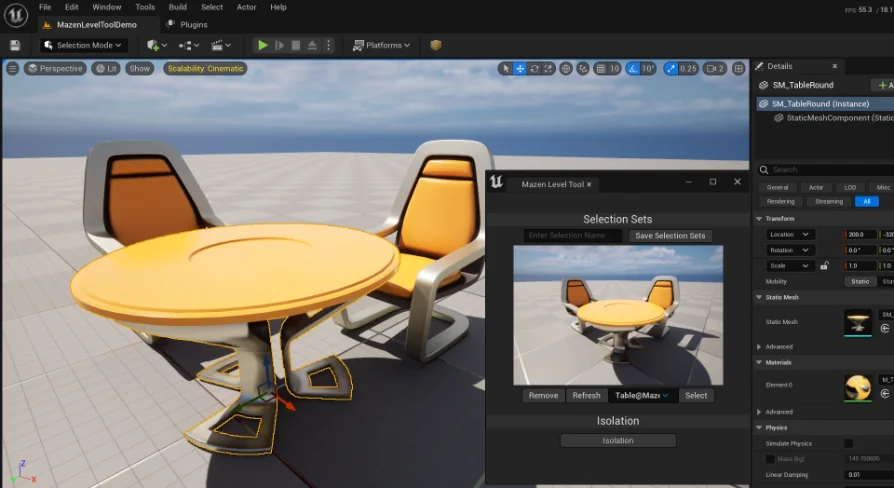
Named lists solve the problem of object grouping, but raw text names do not always convey spatial orientation or visual context. Mazen Level Tool expands on basic selection persistence by generating a screenshot alongside the exact camera location and camera rotation active at the moment the set is saved. This visual and geometric pairing links the saved outliner items directly to the perspective from which they were selected or evaluated.
Storing the camera location and rotation coordinates provides crucial spatial continuity. Viewport navigation can easily drift far away from a target asset group during detailed scene building. Because the tool preserves the exact camera transform along with a visual preview image, developers gain immediate visual confirmation of the scene setup. Seeing the screenshot confirms what the selection encompasses before loading it, while having the camera transform parameters stored alongside the set retains the exact viewpoint used during that stage of the development process.
Mazen Level Tool as a Practical Editor Utility
Classified under editor utilities, Mazen Level Tool focuses entirely on augmenting editor-side productivity rather than introducing runtime overhead. Editor utilities of this nature operate strictly within the authoring pipeline, providing quality-of-life enhancements that smooth out interface navigation without modifying the underlying game logic or altering scene packaging.
The functionality demonstrated in the accompanying demo video emphasizes swift retrieval and clear visual cues. Instead of browsing through layers of nested folders or wrestling with lengthy search queries in the outliner interface, the tool establishes a clean bridge between viewport viewing angles and scene item lists. By recording the viewport perspective through both an image snapshot and numerical transform data, the utility eliminates the ambiguity that often accompanies purely text-based outliner selection sets.
Workflow Advantages for Iterative Scene Assembly
Maintaining fast iteration loops is essential when building polished virtual environments. When an editor user repeatedly returns to a complex collection of actors—such as fine-tuning a hero focal point, auditing collision boundaries, or adjusting scattered dressing elements—the cumulative time spent re-selecting objects in the outliner mounts rapidly. Mazen Level Tool addresses this pain point by transforming temporary viewport interactions into retrievable, documented spatial sets.
The combination of named sets, reference screenshots, and preserved camera vectors offers a dependable way to keep scene editing organized. Teams and individual creators working through dense level layouts can rely on Mazen Level Tool to cut down repetitive navigation tasks, keeping the focus squarely on scene composition and environment refinement.
 Engine Tools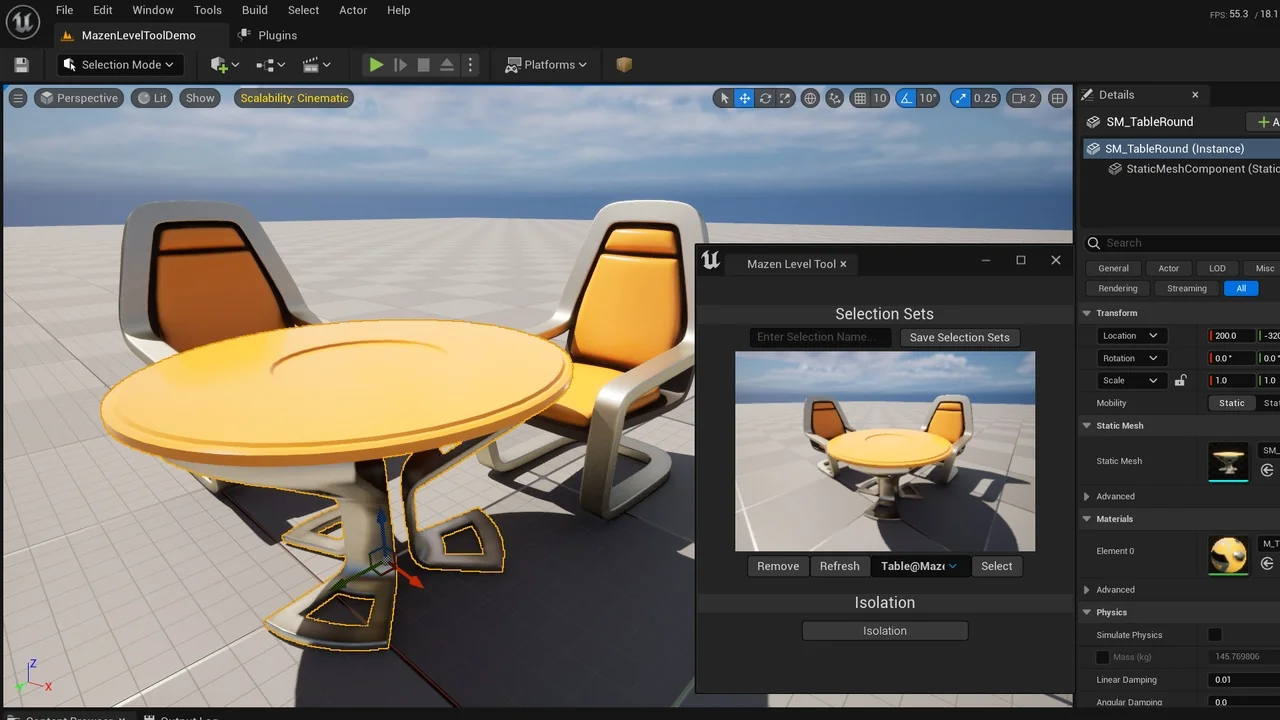
 Engine Tools
 Engine Tools
 Engine Tools