"0341a2901a4ae9aa"{"id":"14645","slug":"snapping-helper","title":"Snapping Helper","category":"Engine Tools","engine":"5.5,5.7","assetVersion":"Engine version: 5.5,5.7","engineVersion":"Asset Version:1.41 - 1.44","tag":"Engine Tools","accent":"blue","visual":"luts","summary":"Improve your Unreal Engine environment creation with the Snapping Helper plugin. This tool simplifies pivot adjustments and vertex snapping to speed up modular level design.","platform":"Unreal Engine","publishedAt":"2026-03-11T18:49:05.000Z","updatedAt":"2026-04-19T15:45:43.000Z","sourceNotes":[],"fileContents":[],"compatibility":["Unreal Engine","Engine version: 5.5,5.7","Asset Version: 1.41 - 1.44"],"featuredImage":{"alt":"Snapping Helper","src":"https://3dcghub.com/wp-content/uploads/2026/03/f3795d13-07ce-4b31-932b-895c39179ad8.webp"},"hasDownloadLink":true,"downloads":1,"terms":[{"taxonomy":"category","slug":"engine-tools-tools-and-plugins","name":"Engine Tools"},{"taxonomy":"post_tag","slug":"archviz","name":"ArchViz"},{"taxonomy":"post_tag","slug":"environment","name":"Environment"},{"taxonomy":"post_tag","slug":"modular","name":"Modular"},{"taxonomy":"post_tag","slug":"plugins","name":"Plugins"},{"taxonomy":"post_tag","slug":"tools","name":"Tools"},{"taxonomy":"post_tag","slug":"unreal-engine-5","name":"Unreal Engine 5"}],"galleryImages":[{"src":"https://3dcghub.com/wp-content/uploads/2026/03/9d0650ba31f5_4e98f416-463b-4203-9802-85b482b8f8fa.webp","alt":"Snapping Helper"},{"src":"https://3dcghub.com/wp-content/uploads/2026/03/9f3f324e1d77_de1f33f7-905a-4e4f-8847-46b6467d5739.webp","alt":"Snapping Helper"},{"src":"https://3dcghub.com/wp-content/uploads/2026/03/be8df28076dd_f88be3c0-18a2-49c1-882d-0ea284d11b8e.webp","alt":"Snapping Helper"},{"src":"https://3dcghub.com/wp-content/uploads/2026/03/0952897e0457_7736b2be-e6d8-464e-993b-9b92d05efcad.webp","alt":"Snapping Helper"}],"accessPanel":{"kind":"resource","title":"Access this resource","eyebrow":"Free Download","message":"Log in or create a free account to start your download.","fileName":"Snapping Helper 5.5,5.7,v1.41 - 1.44.7z","safetyNote":"All resources are 100% manually reviewed to eliminate all risks.","actionLabel":"Download Free","resourceType":"Resource archive"},"contentHtml":"\u003ch2\u003eEnhance Your Workflow with Snapping Helper\u003c/h2\u003e\n\u003cp\u003eSnapping Helper is a specialized plugin designed to enhance your Unreal Engine workflow by simplifying complex placement tasks. This tool allows users to quickly adjust the pivot point of selected actors while utilizing all types of transformations. Consequently, level designers can maintain high precision without slowing down their creative process.\u003c/p\u003e\n\u003cp\u003eThe plugin focuses on speed and accuracy during the environment building phase. By providing a more efficient way to manage actor placement, it removes common bottlenecks in the editor. Moreover, it provides a seamless experience for those working on detailed scenes.\u003c/p\u003e\n\n\u003ch3\u003eEfficient Pivot and Transformation Management\u003c/h3\u003e\n\u003cp\u003eOne of the core strengths of this tool is its ability to modify actor pivot points swiftly. This feature is essential for facilitating precise transformations within the engine. Therefore, users can align objects exactly where they need to be without manual calculations.\u003c/p\u003e\n\u003cp\u003eIn addition, the Snapping Helper supports a comprehensive range of transformation types. This flexibility ensures that you can achieve your desired configurations regardless of the project's complexity. It empowers the creator to focus on the design rather than the technical hurdles of object alignment.\u003c/p\u003e\n\n\u003ch3\u003eIntuitive Vertex Highlighting and Snapping\u003c/h3\u003e\n\u003cp\u003eThe plugin introduces intuitive vertex highlighting that appears directly around the mouse cursor. These visual cues simplify the process of vertex selection and snapping significantly. As a result, users can effortlessly snap actors together with minimal effort.\u003c/p\u003e\n\u003cp\u003eAlso, the tool includes a one-click snapping and duplication feature. This allows you to perform the following actions:\u003c/p\u003e\n\u003cul\u003e\n \u003cli\u003eSeamlessly snap actors to specific points.\u003c/li\u003e\n \u003cli\u003eCreate duplicates instantly with a single click.\u003c/li\u003e\n \u003cli\u003eEnhance overall level design efficiency.\u003c/li\u003e\n\u003c/ul\u003e\n\n\u003ch3\u003eOptimized for Modular Design\u003c/h3\u003e\n\u003cp\u003eThis resource is particularly ideal for modular design workflows. It is perfect for creating modular levels and complex architectural structures with ease. Because the tool streamlines the repetition of snapping and moving parts, it is highly effective for industrial or architectural projects.\u003c/p\u003e\n\u003cp\u003eThe clearest takeaway is that the Snapping Helper plugin provides a robust set of features for Unreal Engine developers. By combining pivot adjustments with visual vertex cues, it significantly improves the speed of level building. Consequently, it remains a valuable asset for anyone focused on efficiency and precision in their design workflow.\u003c/p\u003e\n\n\u003ch2\u003eExplore Similar Assets\u003c/h2\u003e\n\u003cul\u003e\n\u003cli\u003e\u003ca href=\"https://3dcghub.com/extile-plus-ultimate-non-tiling-material-toolkit-for-unreal-engine-environments/\" title=\"EXTILE PLUS -Ultimate Non-Tiling Material Toolkit for Unreal Engine Environments\"\u003eEXTILE PLUS -Ultimate Non-Tiling Material Toolkit for Unreal Engine Environments\u003c/a\u003e\u003c/li\u003e\n\u003cli\u003e\u003ca href=\"https://3dcghub.com/ultimate-template-unrealengine-2d-dialogue-inventory-system-save/\" title=\"ULTIMATE Template UnrealEngine || 2D + Dialogue + Inventory system + Save | |\"\u003eULTIMATE Template UnrealEngine || 2D + Dialogue + Inventory system + Save | |\u003c/a\u003e\u003c/li\u003e\n\u003cli\u003e\u003ca href=\"https://3dcghub.com/daz-to-unreal/\" title=\"Daz To Unreal\"\u003eDaz To Unreal\u003c/a\u003e\u003c/li\u003e\n\u003cli\u003e\u003ca href=\"https://3dcghub.com/blueprint-generator-ai-kibibyte-labs-engine-assistant/\" title=\"Blueprint Generator Ai – Kibibyte Labs (Engine Assistant)\"\u003eBlueprint Generator Ai – Kibibyte Labs (Engine Assistant)\u003c/a\u003e\u003c/li\u003e\n\u003cli\u003e\u003ca href=\"https://3dcghub.com/sci-fi-environment-engine-room/\" title=\"Sci-fi Environment Engine Room\"\u003eSci-fi Environment Engine Room\u003c/a\u003e\u003c/li\u003e\n\u003c/ul\u003e","contentTextLength":2836,"navigation":{"current":3400,"total":4017,"previous":{"id":"14545","slug":"runtime-vertex-paint-detection-plugin","title":"Runtime Vertex Paint \u0026 Detection Plugin","category":"Engine Tools","platform":"Unreal Engine","updatedAt":"2026-04-19T15:45:44.000Z"},"next":{"id":"14638","slug":"sky-creator","title":"Sky Creator","category":"Engine Tools","platform":"Unreal Engine","updatedAt":"2026-04-19T15:45:43.000Z"}},"relatedResources":[{"id":"14450","slug":"rdsplinetools-rd-tools-pro","title":"rdSplineTools (rd Tools Pro)","category":"Engine Tools","engine":"5.5","assetVersion":"Engine version: 5.5","engineVersion":"Asset Version:1.2","tag":"Engine Tools","accent":"blue","visual":"city","summary":"rdSplineTools (rd Tools Pro) enhances the Unreal Engine editor by streamlining spline creation and management. This plugin offers advanced snapping, subdivision, and conversion tools for professional game development.","platform":"Unreal Engine","publishedAt":"2026-03-11T18:05:03.000Z","updatedAt":"2026-04-19T15:45:46.000Z","sourceNotes":[],"fileContents":[],"compatibility":["Unreal Engine","Engine version: 5.5","Asset Version: 1.2"],"featuredImage":{"alt":"rdSplineTools (rd Tools Pro)","src":"https://3dcghub.com/wp-content/uploads/2026/03/97c7dc16-acd1-4eb3-8b36-aa984f24c5a3.webp"},"hasDownloadLink":true,"downloads":0},{"id":"14076","slug":"hyperloop","title":"HyperLoop","category":"Engine Tools","engine":"5.4 - 5.5","assetVersion":"Engine version: 5.4 - 5.5","engineVersion":"5.0","tag":"Engine Tools","accent":"blue","visual":"animation","summary":"HyperLoop is a powerful optimization suite designed to streamline Unreal Engine development by reducing node counts and enhancing execution speed through C++ architecture.","platform":"Unreal Engine","publishedAt":"2026-03-11T15:41:00.000Z","updatedAt":"2026-04-19T15:45:54.000Z","sourceNotes":[],"fileContents":[],"compatibility":["Unreal Engine","Engine version: 5.4 - 5.5"],"featuredImage":{"alt":"HyperLoop","src":"https://3dcghub.com/wp-content/uploads/2026/03/92908017-4f82-4f29-88d2-f3d74c3053c5.webp"},"hasDownloadLink":true,"downloads":0},{"id":"14215","slug":"modular-snap-system","title":"Modular Snap System","category":"Engine Tools","engine":"4.26 - 5.8","assetVersion":"Asset Version: 1.5.1 - 1.5.3","engineVersion":"Engine version: 4.26 - 5.8","tag":"Engine Tools","accent":"blue","visual":"animation","summary":"Simplify your level design workflow with the Modular Snap System. This Editor Plugin uses a socket-to-socket concept to align meshes, splines, and actors instantly without manual grid adjustments.","platform":"Unreal Engine","publishedAt":"2026-03-11T16:17:51.000Z","updatedAt":"2026-10-21T17:02:25.901Z","sourceNotes":[],"fileContents":[],"compatibility":["Unreal Engine","Asset Version: 1.5.1 - 1.5.3","Engine version: 4.26 - 5.8"],"featuredImage":{"alt":"Modular Snap System","src":"https://3dcghub.com/wp-content/uploads/2026/03/70a3c32f-f27e-4e90-93ea-0cadd2355ae2.webp"},"hasDownloadLink":true,"downloads":1}]}
Engine Tools
Snapping Helper
Improve your Unreal Engine environment creation with the Snapping Helper plugin. This tool simplifies pivot adjustments and vertex snapping to speed up modular level design.
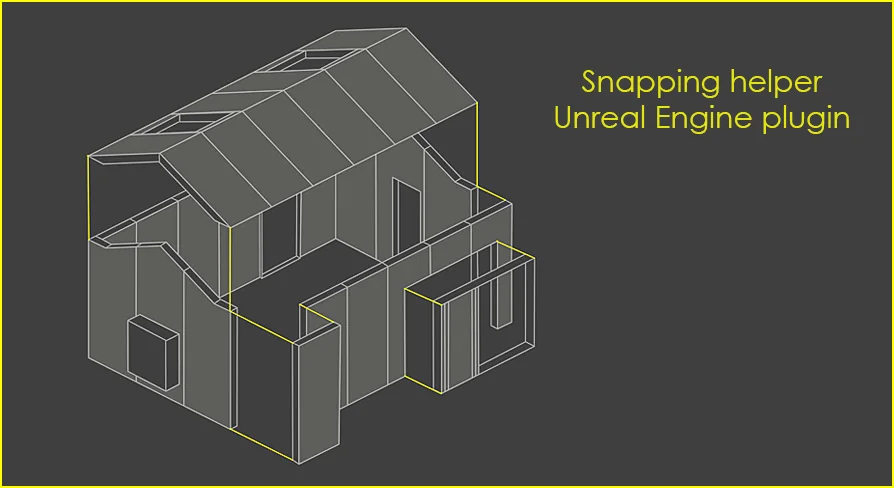
Snapping Helper is a specialized plugin designed to enhance your Unreal Engine workflow by simplifying complex placement tasks. This tool allows users to quickly adjust the pivot point of selected actors while utilizing all types of transformations. Consequently, level designers can maintain high precision without slowing down their creative process.
The plugin focuses on speed and accuracy during the environment building phase. By providing a more efficient way to manage actor placement, it removes common bottlenecks in the editor. Moreover, it provides a seamless experience for those working on detailed scenes.
Efficient Pivot and Transformation Management
One of the core strengths of this tool is its ability to modify actor pivot points swiftly. This feature is essential for facilitating precise transformations within the engine. Therefore, users can align objects exactly where they need to be without manual calculations.
In addition, the Snapping Helper supports a comprehensive range of transformation types. This flexibility ensures that you can achieve your desired configurations regardless of the project's complexity. It empowers the creator to focus on the design rather than the technical hurdles of object alignment.
Intuitive Vertex Highlighting and Snapping
The plugin introduces intuitive vertex highlighting that appears directly around the mouse cursor. These visual cues simplify the process of vertex selection and snapping significantly. As a result, users can effortlessly snap actors together with minimal effort.
Also, the tool includes a one-click snapping and duplication feature. This allows you to perform the following actions:
Seamlessly snap actors to specific points.
Create duplicates instantly with a single click.
Enhance overall level design efficiency.
Optimized for Modular Design
This resource is particularly ideal for modular design workflows. It is perfect for creating modular levels and complex architectural structures with ease. Because the tool streamlines the repetition of snapping and moving parts, it is highly effective for industrial or architectural projects.
The clearest takeaway is that the Snapping Helper plugin provides a robust set of features for Unreal Engine developers. By combining pivot adjustments with visual vertex cues, it significantly improves the speed of level building. Consequently, it remains a valuable asset for anyone focused on efficiency and precision in their design workflow.
 Engine Tools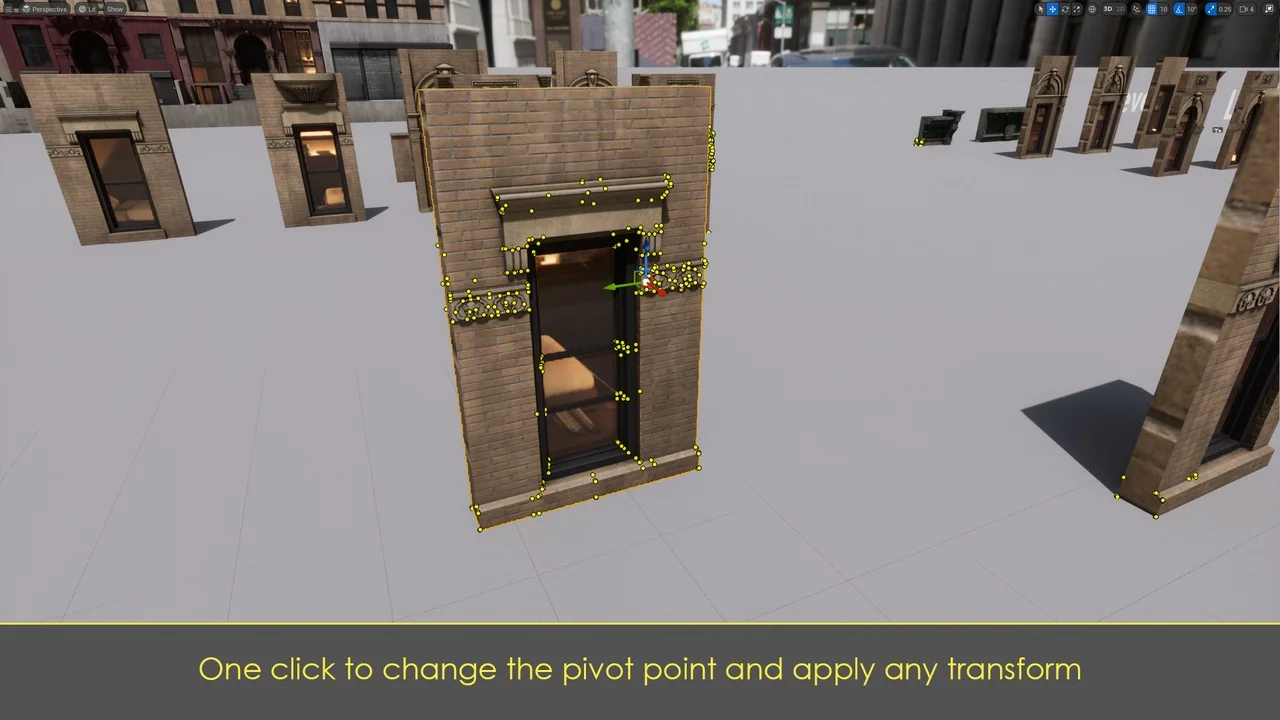
 Engine Tools
 Engine Tools
 Engine Tools