"0341a2901a4ae9aa"{"id":"14215","slug":"modular-snap-system","title":"Modular Snap System","category":"Engine Tools","engine":"4.26 - 5.8","assetVersion":"Asset Version: 1.5.1 - 1.5.3","engineVersion":"Engine version: 4.26 - 5.8","tag":"Engine Tools","accent":"blue","visual":"animation","summary":"Simplify your level design workflow with the Modular Snap System. This Editor Plugin uses a socket-to-socket concept to align meshes, splines, and actors instantly without manual grid adjustments.","platform":"Unreal Engine","publishedAt":"2026-03-11T16:17:51.000Z","updatedAt":"2026-10-21T17:02:25.901Z","sourceNotes":[],"fileContents":[],"compatibility":["Unreal Engine","Asset Version: 1.5.1 - 1.5.3","Engine version: 4.26 - 5.8"],"featuredImage":{"alt":"Modular Snap System","src":"https://3dcghub.com/wp-content/uploads/2026/03/70a3c32f-f27e-4e90-93ea-0cadd2355ae2.webp"},"hasDownloadLink":true,"downloads":1,"terms":[{"taxonomy":"category","slug":"engine-tools-tools-and-plugins","name":"Engine Tools"},{"taxonomy":"post_tag","slug":"environment","name":"Environment"},{"taxonomy":"post_tag","slug":"game-systems","name":"Game Systems"},{"taxonomy":"post_tag","slug":"modular","name":"Modular"},{"taxonomy":"post_tag","slug":"plugins","name":"Plugins"},{"taxonomy":"post_tag","slug":"tools","name":"Tools"},{"taxonomy":"post_tag","slug":"unreal-engine-5","name":"Unreal Engine 5"}],"galleryImages":[{"src":"https://3dcghub.com/wp-content/uploads/2026/03/722b53007b6d_58926831-33cb-494a-9eed-a7392f6b0760.webp","alt":"Modular Snap System"},{"src":"https://3dcghub.com/wp-content/uploads/2026/03/2cbb7298c1c1_037df533-ab85-4f87-a165-cea918babc45.webp","alt":"Modular Snap System"},{"src":"https://3dcghub.com/wp-content/uploads/2026/03/e3bacc763d93_336b4c5d-a32d-4506-aaf9-615da830a845.webp","alt":"Modular Snap System"},{"src":"https://3dcghub.com/wp-content/uploads/2026/03/91b7057165d8_af0ac1da-0d74-4cad-8bfa-94dc23deff0e.webp","alt":"Modular Snap System"},{"src":"https://3dcghub.com/wp-content/uploads/2026/03/33e9e32ef2a7_0940fa11-6134-4dfa-919a-ed4db10bd821.webp","alt":"Modular Snap System"},{"src":"https://3dcghub.com/wp-content/uploads/2026/03/2661a5cc50a3_7a6e1742-89cb-49f8-b91b-1f22805216b0.webp","alt":"Modular Snap System"},{"src":"https://3dcghub.com/wp-content/uploads/2026/03/e866e32b2034_dba8c6a3-b13a-49f2-a4bc-c827d8f280df.webp","alt":"Modular Snap System"},{"src":"https://3dcghub.com/wp-content/uploads/2026/03/ffa263f0a493_5e4f7ed9-d7e9-456e-8f5f-fb1543e30eb1.webp","alt":"Modular Snap System"},{"src":"https://3dcghub.com/wp-content/uploads/2026/03/7d86e2cfb784_3e50d690-16eb-41ca-b0b1-65b79ff1cea6.webp","alt":"Modular Snap System"},{"src":"https://3dcghub.com/wp-content/uploads/2026/03/49d48975d091_790056b7-b05b-4caa-aee1-afa96b93c0c0.webp","alt":"Modular Snap System"}],"accessPanel":{"kind":"resource","title":"Download this resource","eyebrow":"Free Download","message":"Log in or create a free account to start your download.","fileName":"Modular Snap System.7z","safetyNote":"Resources are manually reviewed before listing to improve quality and reduce obvious risks.","actionLabel":"Download Free","resourceType":"Resource archive"},"contentHtml":"\u003ch2\u003eEfficient Scene Assembly with Modular Snap System\u003c/h2\u003e\n\u003cp\u003eThe \u003cstrong\u003eModular Snap System\u003c/strong\u003e is an Editor Plugin designed to simplify the alignment of Actors within your scene. By moving objects close to one another, you can achieve precise snapping without the frustration of manual grid adjustments. This tool is specifically built for creators working with modular assets. Consequently, it removes the constant need to worry about pivots and alignment issues during the building process.\u003c/p\u003e\n\n\u003ch2\u003eCore Functionality and Compatibility\u003c/h2\u003e\n\u003cp\u003eThe core functionality of the system relies on a \"snap socket to socket\" concept. Because it uses sockets, you can easily prepare existing meshes for the system. This process requires no coding or Blueprint modification. Therefore, you can integrate the \u003cstrong\u003eModular Snap System\u003c/strong\u003e into your project quickly by simply adding sockets to your components.\u003c/p\u003e\n\u003cp\u003eThe plugin is highly versatile. It works with any Actor class or Blueprint that contains sockets. Furthermore, it supports Static Meshes, Skeletal Meshes, and Spline Components. This flexibility ensures that your entire library of modular assets can benefit from the tool. The developer has ensured it is ready to use with specific packs like the Modular Japanese Town House and Modular Scaffold.\u003c/p\u003e\n\n\u003ch2\u003eAdvanced Grouping and Customization\u003c/h2\u003e\n\u003cp\u003eManaging large scenes is easier with support for multiple selections and groups. When you select several actors, the system snaps them all as a single unit. However, the plugin also functions at the component level for more granular control. By default, it aligns actors, but you can also choose to attach them to the snap target component. Another useful feature is the ability to move the selection pivot directly to the snap point.\u003c/p\u003e\n\u003cp\u003eCustomization is another key benefit of the \u003cstrong\u003eModular Snap System\u003c/strong\u003e. You can modify settings like minimal snap distance, angle, and rotation snap within the editor preferences. Additionally, a dedicated viewport button near the grid snap settings allows for quick adjustments. This button makes it easy to enable or disable the plugin or change the snap distance on the fly.\u003c/p\u003e\n\n\u003ch2\u003eBest Fit\u003c/h2\u003e\n\u003cp\u003eIn practice, the \u003cstrong\u003eModular Snap System\u003c/strong\u003e provides a streamlined workflow for modular environment design. It automates the alignment process through a reliable socket-based approach. As a result, developers can focus more on creativity and less on technical alignment hurdles. This editor-only tool is a powerful addition for anyone building complex scenes from modular parts.\u003c/p\u003e\n\n\u003ch2\u003eContinue Browsing Similar Packs\u003c/h2\u003e\n\u003cul\u003e\n\u003cli\u003e\u003ca href=\"https://3dcghub.com/modular-movement/\" title=\"Modular Movement\"\u003eModular Movement\u003c/a\u003e\u003c/li\u003e\n\u003cli\u003e\u003ca href=\"https://3dcghub.com/make-modular-skeletal-mesh/\" title=\"Make Modular Skeletal Mesh\"\u003eMake Modular Skeletal Mesh\u003c/a\u003e\u003c/li\u003e\n\u003cli\u003e\u003ca href=\"https://3dcghub.com/modular-gameplay-blueprint-systems/\" title=\"Modular Gameplay Blueprint Systems\"\u003eModular Gameplay Blueprint Systems\u003c/a\u003e\u003c/li\u003e\n\u003cli\u003e\u003ca href=\"https://3dcghub.com/witch-village-environment-witch-village-village-village-house-house-modular/\" title=\"Witch Village Environment ( Witch Village Village Village House House Modular )\"\u003eWitch Village Environment ( Witch Village Village Village House House Modular )\u003c/a\u003e\u003c/li\u003e\n\u003cli\u003e\u003ca href=\"https://3dcghub.com/mountain-village-environment-village-modular-village-houses-village-props/\" title=\"Mountain Village Environment (Village, Modular Village Houses, Village Props)\"\u003eMountain Village Environment (Village, Modular Village Houses, Village Props)\u003c/a\u003e\u003c/li\u003e\n\u003c/ul\u003e\n\n\u003ch2\u003eAsset Gallery\u003c/h2\u003e","contentTextLength":2776,"navigation":{"current":240,"total":4017,"previous":{"id":"1001854","slug":"09-cloth-materials","title":"09 Cloth Materials","category":"Variety","platform":"Unreal Engine","updatedAt":"2026-10-22T10:34:49.927Z"},"next":{"id":"1001853","slug":"sliding-movement-component","title":"Sliding Movement Component","category":"Game Mechanics","platform":"Unreal Engine","updatedAt":"2026-10-21T11:56:53.859Z"}},"relatedResources":[{"id":"13806","slug":"clouds-lighting-system","title":"Clouds Lighting System","category":"Engine Tools","engine":"4.26 - 5.8","assetVersion":"Asset Version: 0.3.3.1","engineVersion":"Engine version: 4.26 - 5.8","tag":"Engine Tools","accent":"blue","visual":"animation","summary":"The Clouds Lighting System is a specialized tool designed to add realistic illumination to 2D clouds, volumetric clouds, and various particle systems like smoke and fog.","platform":"Unreal Engine","publishedAt":"2026-03-11T10:07:32.000Z","updatedAt":"2026-09-29T08:34:46.190Z","sourceNotes":[],"fileContents":[],"compatibility":["Unreal Engine","Asset Version: 0.3.3.1","Engine version: 4.26 - 5.8"],"featuredImage":{"alt":"Clouds Lighting System","src":"https://3dcghub.com/wp-content/uploads/2026/03/5915be78-e14d-4e90-8a8e-9eff04991bc6.webp"},"hasDownloadLink":true,"downloads":1},{"id":"14084","slug":"journeymans-minimap","title":"Journeyman's Minimap","category":"Engine Tools","engine":"4.15 - 5.8","assetVersion":"Asset Version: 1.2","engineVersion":"Engine version: 4.15 - 5.8","tag":"Engine Tools","accent":"blue","visual":"luts","summary":"Journeyman's Minimap offers a robust and flexible solution for creating professional navigation systems in Unreal Engine. It features deep icon customization, dynamic background rendering, and a versatile Fog of War system.","platform":"Unreal Engine","publishedAt":"2026-03-11T15:41:11.000Z","updatedAt":"2026-09-29T09:16:18.015Z","sourceNotes":[],"fileContents":[],"compatibility":["Unreal Engine","Asset Version: 1.2","Engine version: 4.15 - 5.8"],"featuredImage":{"alt":"Journeyman's Minimap","src":"https://3dcghub.com/wp-content/uploads/2026/03/15004687-fa86-47a7-8b1e-a6b4374fbeec.webp"},"hasDownloadLink":true,"downloads":2},{"id":"13913","slug":"easy-multi-save","title":"Easy Multi Save","category":"Engine Tools","engine":"1.10 - 1.74","assetVersion":"Engine version: 4.25 - 5.7","engineVersion":"Asset Version:1.10 - 1.74","tag":"Engine Tools","accent":"blue","visual":"mech","summary":"Easy Multi Save provides a robust, streamlined solution for managing game data in Unreal Engine, supporting everything from simple variables to complex World Partition levels.","platform":"Unreal Engine","publishedAt":"2026-03-11T10:40:22.000Z","updatedAt":"2026-07-18T09:48:15.051Z","sourceNotes":[],"fileContents":[],"compatibility":["Unreal Engine","Engine version: 4.25 - 5.7","Asset Version:1.10 - 1.74"],"featuredImage":{"alt":"Easy Multi Save","src":"https://3dcghub.com/wp-content/uploads/2026/03/fab7f07b-78c6-4508-a4df-9cb7d78f90e0.webp"},"hasDownloadLink":true,"downloads":2}]}
Engine Tools
Modular Snap System
Simplify your level design workflow with the Modular Snap System. This Editor Plugin uses a socket-to-socket concept to align meshes, splines, and actors instantly without manual grid adjustments.
Category:Unreal Engine,Engine ToolsPlatform: Unreal EngineAsset Version: 1.5.1 - 1.5.3Engine version: 4.26 - 5.8Published: Mar 11, 2026Updated: Oct 21, 2026
Engine Tools
Resource overview
Efficient Scene Assembly with Modular Snap System
The Modular Snap System is an Editor Plugin designed to simplify the alignment of Actors within your scene. By moving objects close to one another, you can achieve precise snapping without the frustration of manual grid adjustments. This tool is specifically built for creators working with modular assets. Consequently, it removes the constant need to worry about pivots and alignment issues during the building process.
Core Functionality and Compatibility
The core functionality of the system relies on a "snap socket to socket" concept. Because it uses sockets, you can easily prepare existing meshes for the system. This process requires no coding or Blueprint modification. Therefore, you can integrate the Modular Snap System into your project quickly by simply adding sockets to your components.
The plugin is highly versatile. It works with any Actor class or Blueprint that contains sockets. Furthermore, it supports Static Meshes, Skeletal Meshes, and Spline Components. This flexibility ensures that your entire library of modular assets can benefit from the tool. The developer has ensured it is ready to use with specific packs like the Modular Japanese Town House and Modular Scaffold.
Advanced Grouping and Customization
Managing large scenes is easier with support for multiple selections and groups. When you select several actors, the system snaps them all as a single unit. However, the plugin also functions at the component level for more granular control. By default, it aligns actors, but you can also choose to attach them to the snap target component. Another useful feature is the ability to move the selection pivot directly to the snap point.
Customization is another key benefit of the Modular Snap System. You can modify settings like minimal snap distance, angle, and rotation snap within the editor preferences. Additionally, a dedicated viewport button near the grid snap settings allows for quick adjustments. This button makes it easy to enable or disable the plugin or change the snap distance on the fly.
Best Fit
In practice, the Modular Snap System provides a streamlined workflow for modular environment design. It automates the alignment process through a reliable socket-based approach. As a result, developers can focus more on creativity and less on technical alignment hurdles. This editor-only tool is a powerful addition for anyone building complex scenes from modular parts.
 Engine Tools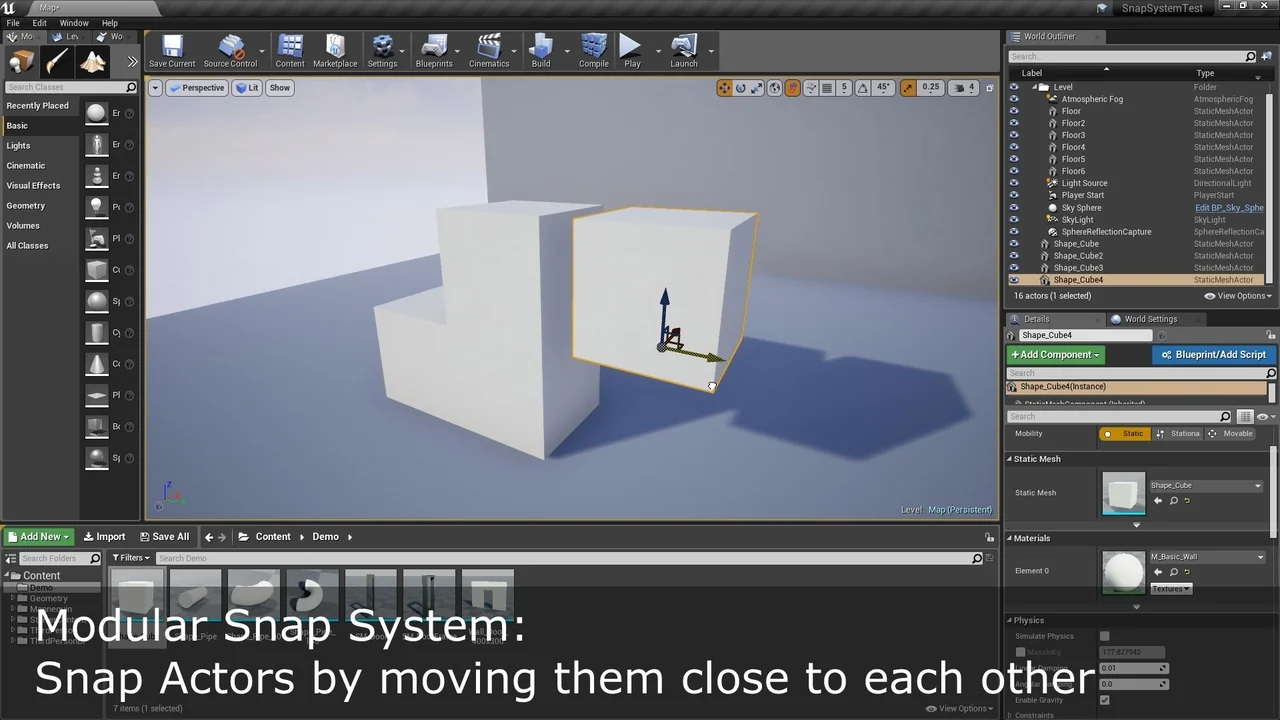
 Engine Tools
 Engine Tools
 Engine Tools