"fa182e0cd0a6ea73"{"id":"1001853","slug":"sliding-movement-component","title":"Sliding Movement Component","category":"Game Mechanics","engine":"5.7+","assetVersion":"","engineVersion":"Engine Version: 5.7+","tag":"Game Mechanics","accent":"blue","visual":"mech","summary":"Examine the Sliding Movement Component for Unreal Engine, featuring slope dynamics, auto-sliding, FullBodyIK Control Rig hand placement, and Anim BP leaning.","platform":"Unreal Engine","publishedAt":"2026-10-21T11:56:53.859Z","updatedAt":"2026-10-21T11:56:53.859Z","sourceNotes":[],"fileContents":[],"compatibility":["Unreal Engine","Engine Version: 5.7+"],"featuredImage":{"alt":"Sliding Movement Component","src":"/wp-content/uploads/published/2026/10/d35e5e6aeb19-cd5814cc-3a13-4398-b9f7-cf2d1cad169f-a4a001cb67.webp"},"hasDownloadLink":true,"downloads":0,"terms":[{"taxonomy":"category","slug":"game-mechanics","name":"Game Mechanics"}],"galleryImages":[{"src":"/wp-content/uploads/published/2026/10/21d07e904eac-e3d493b2-3a6a-4ce1-840b-f373b93168a9-3974c0f973.webp","alt":"Sliding Movement Component"},{"src":"/wp-content/uploads/published/2026/10/291eece385bc-192fc776-9afe-4b63-81f0-dfce21d2426a-1756f66e9d.webp","alt":"Sliding Movement Component"},{"src":"/wp-content/uploads/published/2026/10/d83a4818d700-7a5c8a7a-21a2-4cd9-85bf-290ea42dc710-524e52a5c1.webp","alt":"Sliding Movement Component"},{"src":"/wp-content/uploads/published/2026/10/5cb2119d1829-d79f16fc-e926-494f-a8db-62576829b08f-f9adf997b8.webp","alt":"Sliding Movement Component"},{"src":"/wp-content/uploads/published/2026/10/40681f09834e-8d1071d7-a3dd-4e0e-81ff-20924626f85d-69e872fcf5.webp","alt":"Sliding Movement Component"},{"src":"/wp-content/uploads/published/2026/10/3c65b182dad6-1301f3c2-9f42-41c5-82be-e63994421449-a8441e0528.webp","alt":"Sliding Movement Component"},{"src":"/wp-content/uploads/published/2026/10/fb87b23f1724-55148746-0edc-4504-817e-5524923327d4-f4d5a95db1.webp","alt":"Sliding Movement Component"},{"src":"/wp-content/uploads/published/2026/10/b4d67a6c8ddb-b1cbe132-fd91-4857-96c9-7459653cda5d-0480c5f304.webp","alt":"Sliding Movement Component"},{"src":"/wp-content/uploads/published/2026/10/f788a5768441-3d9b65f9-555c-452f-9ea1-672319058c27-6916d64741.webp","alt":"Sliding Movement Component"},{"src":"/wp-content/uploads/published/2026/10/766e7aadd1cf-e550acd9-87d9-4631-b525-ff4a6e44b6e7-33aac18fa3.webp","alt":"Sliding Movement Component"}],"accessPanel":{"kind":"resource","title":"Download this resource","eyebrow":"Free Download","message":"Log in or create a free account to start your download.","fileName":"Content.7z","safetyNote":"Resources are manually reviewed before listing to improve quality and reduce obvious risks.","actionLabel":"Download Free","resourceType":"Resource archive"},"contentHtml":"\u003ch2\u003eHigh-Speed Descents and Tactical Traversal\u003c/h2\u003e\u003cp\u003eSteep mountain slopes, rugged rocky inclines, and tight interior corridors make vastly different demands on a character movement setup. Delivering believable downhill momentum requires continuous acceleration driven by slope grade, while rapid combat maneuvers require quick, responsive bursts into low cover. Sliding Movement Component handles both distinct traversal styles within a unified Blueprint Component, allowing developers to implement either short tactical slides or extended mountain sliding without building custom friction and velocity solvers from scratch.\u003c/p\u003e\u003cp\u003eBy managing surface contact states, gravity influences, and orientation mechanics independently from default character walking logic, the system bridges the gap between basic crouch-sliding and full-scale downhill terrain navigation. Characters can transition from a flat sprint directly into a low slide, carve through winding downhill slopes, or recover naturally when space becomes too tight to stand.\u003c/p\u003e\u003ch2\u003eConfiguring the Sliding Movement Component Dynamics\u003c/h2\u003e\u003cp\u003eSliding physics rely on a set of core mathematical variables that dictate how momentum builds, caps, and dissipates across varying geometry. Sliding Movement Component exposes these parameters directly within the Blueprint settings, giving designers precise control over the feel of the slide.\u003c/p\u003e\u003cul\u003e\u003cli\u003e\u003cstrong\u003eMax Speed During Slide:\u003c/strong\u003e Governs the absolute velocity threshold a character can achieve, preventing excessive acceleration from breaking collision detection or animation playback on extreme downhills.\u003c/li\u003e\u003cli\u003e\u003cstrong\u003eMax Acceleration During Slide:\u003c/strong\u003e Dictates the rate at which the character ramps up to maximum slide velocity once movement begins.\u003c/li\u003e\u003cli\u003e\u003cstrong\u003eBoost:\u003c/strong\u003e Applies an instantaneous force impulse when a slide is initiated by player input, delivering an immediate burst of speed for tactical maneuvers on level ground.\u003c/li\u003e\u003cli\u003e\u003cstrong\u003eSlope Force:\u003c/strong\u003e Scales additional downward force based on the exact steepness of the terrain, pulling the character faster down steep inclines and tapering off as the gradient flattens.\u003c/li\u003e\u003cli\u003e\u003cstrong\u003eSlidable Surface Angle:\u003c/strong\u003e Sets the specific incline range that permits sliding, establishing clear boundaries between walkable grades, slidable drops, and impassable cliffs.\u003c/li\u003e\u003c/ul\u003e\u003ch2\u003eHandling Unwalkable Slopes, Auto-Slide Triggers, and Obstacle Clearance\u003c/h2\u003e\u003cp\u003eStandard movement components often encounter visual glitches or jittering when a character steps onto steep mesh geometry flagged as unwalkable. Sliding Movement Component accounts for these edge cases by incorporating automatic sliding on unwalkable surfaces. When a character walks off an edge or lands from a jump onto an unwalkable incline, the component automatically triggers a slide rather than letting the character snag on the collision mesh or float awkwardly along the ledge.\u003c/p\u003e\u003cp\u003eSurface transition logic handles deceleration organically. On flat and walkable surfaces, braking forces take over to bleed off speed until the character comes to a natural stop or resumes a walk. If a slide carries a player beneath a low pipe, beam, or piece of environmental debris, the system checks overhead clearance when the slide reaches its end. If an obstacle blocks the character from standing upright, it automatically keeps the character in a crouch stance, preventing collision clipping or sudden camera snapping inside confined crawlspaces.\u003c/p\u003e\u003ch2\u003eSteering Mechanics and Rotational Control\u003c/h2\u003e\u003cp\u003eUncontrolled slides quickly reduce gameplay quality if players cannot correct their trajectory. The component includes advanced steering control settings that govern how directional input alters the character path while in motion. Designers can set a maximum turn angle to determine the furthest variance a player can steer away from their current slide vector, preventing abrupt 180-degree pivots during high-speed movement.\u003c/p\u003e\u003cp\u003eCoupled with the maximum turn angle is the maximum turn rate, which defines how quickly the character can execute directional shifts while sliding. Restricting turn rate while preserving turn angle creates a feeling of heavy physical momentum, suitable for icy slopes or muddy hillside runs. Raising both values tightens the responsiveness, supporting quick evasive dodges around cover objects in fast-paced arena environments.\u003c/p\u003e\u003ch2\u003eAnim BP Alignment and FullBodyIK Control Rig Integration\u003c/h2\u003e\u003cp\u003eBelievable sliding depends on visual contact with the ground. Rigid skeletal meshes floating flat across an angled slope break visual cohesion immediately. Sliding Movement Component addresses skeletal adaptation through dedicated Animation Blueprint logic and Control Rig implementations.\u003c/p\u003e\u003cp\u003eInside the Animation Blueprint, procedural lean calculations tilt the character torso and hips into corners as the player steers through turns. Ground alignment logic samples the underlying surface normal, rotating the character body to conform directly to the incline angle rather than remaining locked to an upright world axis.\u003c/p\u003e\u003cp\u003eVisual fidelity is further reinforced through a Control Rig implementation using FullBodyIK. This setup actively detects ground contact and aligns the character hand to the terrain surface during the slide. Whether skimming over uneven terrain or navigating banked curves, the character planted hand tracks the contour of the geometry dynamically, grounding the slide animation without requiring dozens of hand-keyed surface variations.\u003c/p\u003e\u003ch2\u003eWorkflow Integration and Combat System Pairing\u003c/h2\u003e\u003cp\u003eBecause the tool is packaged entirely as a Blueprint Component, integrating it into an existing character requires adding the component, linking player input actions, and wiring the corresponding animation variables into the Anim BP. The component functions alongside existing combat frameworks, with verified compatibility for Third Person Weapon/Combat System V2. This allows developers working on third-person shooters to integrate combat slides, evasive rolls, and continuous slope descents without rebuilding their underlying weapon handling or aim-offset setups.\u003c/p\u003e\u003cp\u003eFor games requiring high-mobility locomotion, from tactical shooters to open-world mountain exploration, the component supplies the physical rules, rotation constraints, and skeletal IK needed to make character slides feel cohesive and responsive across complex level geometry.\u003c/p\u003e\n\n\u003ch2\u003eExplore Similar Assets\u003c/h2\u003e\n\u003cul\u003e\n\u003cli\u003e\u003ca href=\"https://3dcghub.com/mini-game-pack-sliding-puzzle/\" title=\"Mini-Game Pack - Sliding Puzzle\"\u003eMini-Game Pack - Sliding Puzzle\u003c/a\u003e\u003c/li\u003e\n\u003cli\u003e\u003ca href=\"https://3dcghub.com/uaim-advanced-lock-on-targeting-and-prediction-system/\" title=\"uAim - Advanced Lock-On Targeting and Prediction System\"\u003euAim - Advanced Lock-On Targeting and Prediction System\u003c/a\u003e\u003c/li\u003e\n\u003cli\u003e\u003ca href=\"https://3dcghub.com/fight-component/\" title=\"Fight Component\"\u003eFight Component\u003c/a\u003e\u003c/li\u003e\n\u003cli\u003e\u003ca href=\"https://3dcghub.com/counter-attack-system/\" title=\"Counter Attack System\"\u003eCounter Attack System\u003c/a\u003e\u003c/li\u003e\n\u003cli\u003e\u003ca href=\"https://3dcghub.com/basic-melee-combat-system/\" title=\"Basic Melee Combat System\"\u003eBasic Melee Combat System\u003c/a\u003e\u003c/li\u003e\n\u003c/ul\u003e","contentTextLength":6412,"navigation":{"current":2,"total":3789,"previous":{"id":"14215","slug":"modular-snap-system","title":"Modular Snap System","category":"Engine Tools","platform":"Unreal Engine","updatedAt":"2026-10-21T17:02:25.901Z"},"next":{"id":"1001852","slug":"resident-horror-v2","title":"Resident Horror V2","category":"Shooter","platform":"Unreal Engine","updatedAt":"2026-10-21T11:55:39.658Z"}},"relatedResources":[{"id":"1000850","slug":"mini-game-pack-sliding-puzzle","title":"Mini-Game Pack - Sliding Puzzle","category":"Game Mechanics","engine":"4.26+,5.0+","assetVersion":"","engineVersion":"Engine Version: 4.26+,5.0+","tag":"Game Mechanics","accent":"blue","visual":"mech","summary":"Blueprint-based sliding puzzle mini-game with smooth block animation, touchscreen support, and adjustable size, sound, speed, image, and feedback.","platform":"Unreal Engine","publishedAt":"2026-08-04T16:34:39.726Z","updatedAt":"2026-08-04T16:34:39.726Z","sourceNotes":[],"fileContents":[],"compatibility":["Unreal Engine","Engine Version: 4.26+,5.0+"],"featuredImage":{"alt":"Mini-Game Pack - Sliding Puzzle","src":"/wp-content/uploads/published/2026/08/b3463e6ed062-eb69d649-2e0d-4ab6-8753-bb9349cd4e2e-7864a6114d.webp"},"hasDownloadLink":true,"downloads":0},{"id":"1000445","slug":"uaim-advanced-lock-on-targeting-and-prediction-system","title":"uAim - Advanced Lock-On Targeting and Prediction System","category":"Game Mechanics","engine":"5.7","assetVersion":"Asset Version: 1.0","engineVersion":"Engine Version: 5.7","tag":"Game Mechanics","accent":"blue","visual":"mech","summary":"uAim is a C++ lock-on targeting and movement prediction system for Unreal Engine, covering character camera lock-on, turrets, homing projectiles, and procedural","platform":"Unreal Engine","publishedAt":"2026-07-11T00:18:00.368Z","updatedAt":"2026-07-11T00:18:00.368Z","sourceNotes":[],"fileContents":[],"compatibility":["Unreal Engine","Asset Version: 1.0","Engine Version: 5.7"],"featuredImage":{"alt":"uAim - Advanced Lock-On Targeting and Prediction System","src":"/wp-content/uploads/published/2026/07/207da5fa5aa8-68d32af6-9231-4022-8483-b4902303679b-9fcd15de94.webp"},"hasDownloadLink":true,"downloads":0},{"id":"2392","slug":"fight-component","title":"Fight Component","category":"Game Mechanics","engine":"4.26+,5.0+","assetVersion":"Engine version: 4.26+,5.0+","engineVersion":"4.16","tag":"Game Mechanics","accent":"blue","visual":"character","summary":"Boost your game development with the Fight Component for Unreal Engine. A flexible, blueprint-based fistfight system designed for quick project integration.","platform":"Unreal Engine","publishedAt":"2026-02-07T09:35:46.000Z","updatedAt":"2026-04-19T15:58:02.000Z","sourceNotes":[],"fileContents":[],"compatibility":["Unreal Engine"],"featuredImage":{"alt":"Fight Component","src":"https://3dcghub.com/wp-content/uploads/2026/02/bfa50d6c-2f5e-42ea-9c48-1ec7bd4d5844.webp"},"hasDownloadLink":true,"downloads":1}]}
Game Mechanics
Sliding Movement Component
Examine the Sliding Movement Component for Unreal Engine, featuring slope dynamics, auto-sliding, FullBodyIK Control Rig hand placement, and Anim BP leaning.
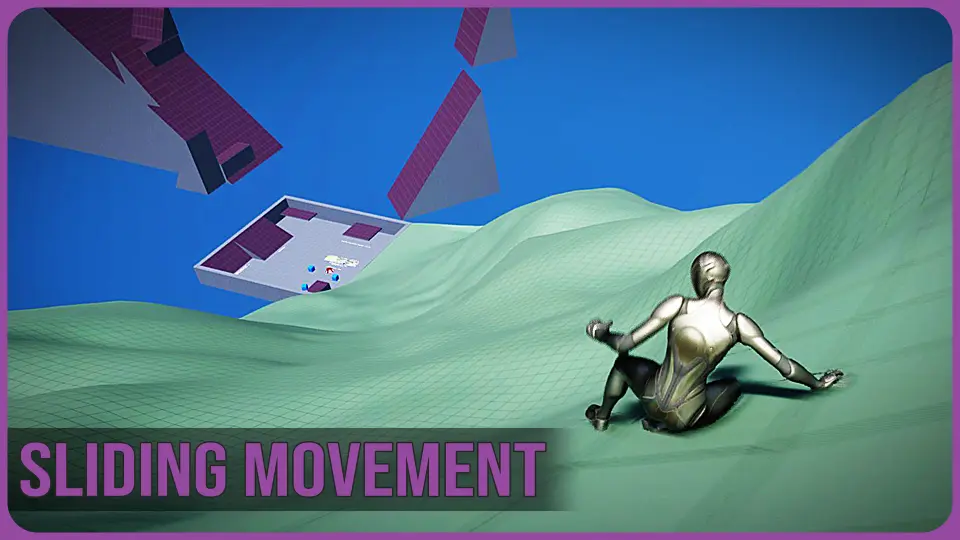
Steep mountain slopes, rugged rocky inclines, and tight interior corridors make vastly different demands on a character movement setup. Delivering believable downhill momentum requires continuous acceleration driven by slope grade, while rapid combat maneuvers require quick, responsive bursts into low cover. Sliding Movement Component handles both distinct traversal styles within a unified Blueprint Component, allowing developers to implement either short tactical slides or extended mountain sliding without building custom friction and velocity solvers from scratch.
By managing surface contact states, gravity influences, and orientation mechanics independently from default character walking logic, the system bridges the gap between basic crouch-sliding and full-scale downhill terrain navigation. Characters can transition from a flat sprint directly into a low slide, carve through winding downhill slopes, or recover naturally when space becomes too tight to stand.
Configuring the Sliding Movement Component Dynamics
Sliding physics rely on a set of core mathematical variables that dictate how momentum builds, caps, and dissipates across varying geometry. Sliding Movement Component exposes these parameters directly within the Blueprint settings, giving designers precise control over the feel of the slide.
Max Speed During Slide: Governs the absolute velocity threshold a character can achieve, preventing excessive acceleration from breaking collision detection or animation playback on extreme downhills.
Max Acceleration During Slide: Dictates the rate at which the character ramps up to maximum slide velocity once movement begins.
Boost: Applies an instantaneous force impulse when a slide is initiated by player input, delivering an immediate burst of speed for tactical maneuvers on level ground.
Slope Force: Scales additional downward force based on the exact steepness of the terrain, pulling the character faster down steep inclines and tapering off as the gradient flattens.
Slidable Surface Angle: Sets the specific incline range that permits sliding, establishing clear boundaries between walkable grades, slidable drops, and impassable cliffs.
Handling Unwalkable Slopes, Auto-Slide Triggers, and Obstacle Clearance
Standard movement components often encounter visual glitches or jittering when a character steps onto steep mesh geometry flagged as unwalkable. Sliding Movement Component accounts for these edge cases by incorporating automatic sliding on unwalkable surfaces. When a character walks off an edge or lands from a jump onto an unwalkable incline, the component automatically triggers a slide rather than letting the character snag on the collision mesh or float awkwardly along the ledge.
Surface transition logic handles deceleration organically. On flat and walkable surfaces, braking forces take over to bleed off speed until the character comes to a natural stop or resumes a walk. If a slide carries a player beneath a low pipe, beam, or piece of environmental debris, the system checks overhead clearance when the slide reaches its end. If an obstacle blocks the character from standing upright, it automatically keeps the character in a crouch stance, preventing collision clipping or sudden camera snapping inside confined crawlspaces.
Steering Mechanics and Rotational Control
Uncontrolled slides quickly reduce gameplay quality if players cannot correct their trajectory. The component includes advanced steering control settings that govern how directional input alters the character path while in motion. Designers can set a maximum turn angle to determine the furthest variance a player can steer away from their current slide vector, preventing abrupt 180-degree pivots during high-speed movement.
Coupled with the maximum turn angle is the maximum turn rate, which defines how quickly the character can execute directional shifts while sliding. Restricting turn rate while preserving turn angle creates a feeling of heavy physical momentum, suitable for icy slopes or muddy hillside runs. Raising both values tightens the responsiveness, supporting quick evasive dodges around cover objects in fast-paced arena environments.
Anim BP Alignment and FullBodyIK Control Rig Integration
Believable sliding depends on visual contact with the ground. Rigid skeletal meshes floating flat across an angled slope break visual cohesion immediately. Sliding Movement Component addresses skeletal adaptation through dedicated Animation Blueprint logic and Control Rig implementations.
Inside the Animation Blueprint, procedural lean calculations tilt the character torso and hips into corners as the player steers through turns. Ground alignment logic samples the underlying surface normal, rotating the character body to conform directly to the incline angle rather than remaining locked to an upright world axis.
Visual fidelity is further reinforced through a Control Rig implementation using FullBodyIK. This setup actively detects ground contact and aligns the character hand to the terrain surface during the slide. Whether skimming over uneven terrain or navigating banked curves, the character planted hand tracks the contour of the geometry dynamically, grounding the slide animation without requiring dozens of hand-keyed surface variations.
Workflow Integration and Combat System Pairing
Because the tool is packaged entirely as a Blueprint Component, integrating it into an existing character requires adding the component, linking player input actions, and wiring the corresponding animation variables into the Anim BP. The component functions alongside existing combat frameworks, with verified compatibility for Third Person Weapon/Combat System V2. This allows developers working on third-person shooters to integrate combat slides, evasive rolls, and continuous slope descents without rebuilding their underlying weapon handling or aim-offset setups.
For games requiring high-mobility locomotion, from tactical shooters to open-world mountain exploration, the component supplies the physical rules, rotation constraints, and skeletal IK needed to make character slides feel cohesive and responsive across complex level geometry.
 Game Mechanics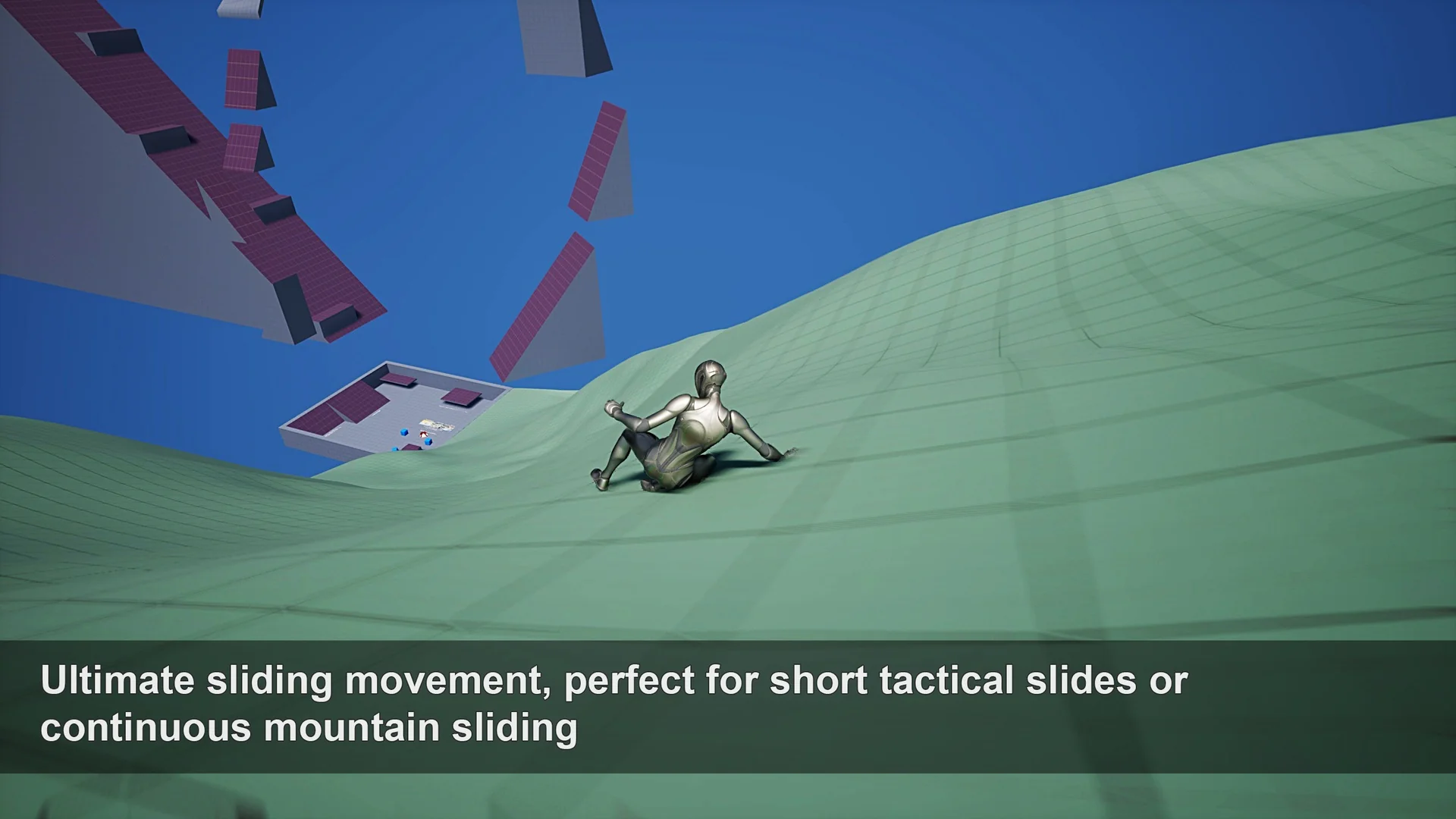
 Game Mechanics
 Game Mechanics
 Game Mechanics