"a19e0535960bd083"{"id":"2392","slug":"fight-component","title":"Fight Component","category":"Game Mechanics","engine":"4.26+,5.0+","assetVersion":"Engine version: 4.26+,5.0+","engineVersion":"4.16","tag":"Game Mechanics","accent":"blue","visual":"character","summary":"Boost your game development with the Fight Component for Unreal Engine. A flexible, blueprint-based fistfight system designed for quick project integration.","platform":"Unreal Engine","publishedAt":"2026-02-07T09:35:46.000Z","updatedAt":"2026-04-19T15:58:02.000Z","sourceNotes":[],"fileContents":[],"compatibility":["Unreal Engine"],"featuredImage":{"alt":"Fight Component","src":"https://3dcghub.com/wp-content/uploads/2026/02/bfa50d6c-2f5e-42ea-9c48-1ec7bd4d5844.webp"},"hasDownloadLink":true,"downloads":1,"terms":[{"taxonomy":"category","slug":"game-mechanics","name":"Game Mechanics"},{"taxonomy":"post_tag","slug":"blueprint-fight-system","name":"Blueprint fight system"},{"taxonomy":"post_tag","slug":"fistfight-component","name":"fistfight component"},{"taxonomy":"post_tag","slug":"ue-melee-mechanics","name":"UE melee mechanics"},{"taxonomy":"post_tag","slug":"unreal-engine-combat","name":"Unreal Engine combat"}],"galleryImages":[{"src":"https://3dcghub.com/wp-content/uploads/2026/02/4ec82a332263_3748c976-44c9-48f8-a63c-8a79d44382ad.webp","alt":"Fight Component"},{"src":"https://3dcghub.com/wp-content/uploads/2026/02/5f882a881271_9d1e85ae-887d-4545-90a4-bdc643cd044e.webp","alt":"Fight Component"},{"src":"https://3dcghub.com/wp-content/uploads/2026/02/32f71a9d7fc3_35d92148-be5a-4b57-9fa4-00a6773a9da7.webp","alt":"Fight Component"},{"src":"https://3dcghub.com/wp-content/uploads/2026/02/9458d1f56f91_e8772e6a-90d9-48fd-88ed-ade38fc0806d.webp","alt":"Fight Component"},{"src":"https://3dcghub.com/wp-content/uploads/2026/02/d450de58c73f_3c218daf-a601-4fff-afd5-52ef132fcc01.webp","alt":"Fight Component"},{"src":"https://3dcghub.com/wp-content/uploads/2026/02/18bc577a4b20_ab16db54-841c-49fd-83c5-e90ff2e4925a.webp","alt":"Fight Component"},{"src":"https://3dcghub.com/wp-content/uploads/2026/02/fb88bfba014e_02ef7463-9e2c-4896-8752-8986cfa55a8a.webp","alt":"Fight Component"},{"src":"https://3dcghub.com/wp-content/uploads/2026/02/83e4ab43003e_fee186b9-9200-450f-bab2-b504fb63f0a9.webp","alt":"Fight Component"},{"src":"https://3dcghub.com/wp-content/uploads/2026/02/72aa59bf4354_91f1b08f-17c3-414d-a7ca-19e6c9cde90e.webp","alt":"Fight Component"}],"accessPanel":{"kind":"resource","title":"Access this resource","eyebrow":"Free Download","message":"Log in or create a free account to start your download.","fileName":"Fight Component.zip","safetyNote":"All resources are 100% manually reviewed to eliminate all risks.","actionLabel":"Download Free","resourceType":"Resource archive"},"contentHtml":"\u003ch2\u003eEnhance Your Game with Professional Melee Combat\u003c/h2\u003e\u003cp\u003eCreating a realistic melee combat system can be a difficult task for many developers. However, the Fight Component makes this process much easier for your project. This tool provides a professional foundation for fistfighting in Unreal Engine. Therefore, you can save time and focus on your game's unique features. It is designed to be both simple and flexible for any character type.\u003c/p\u003e\u003ch2\u003eSeamless Integration and Flexibility\u003c/h2\u003e\u003cp\u003eThe developer created this system for the most convenient transfer possible. In addition, it connects easily to your existing character blueprints. Meanwhile, the flexible architecture ensures it works with various game genres. Consequently, you can implement combat mechanics in just a few steps. This makes it an ideal choice for prototypes and full productions alike.\u003c/p\u003e\u003ch3\u003eModular Blueprint Logic\u003c/h3\u003e\u003cp\u003eThe core of this product is a powerful blueprint component. This component manages all the essential logic for fisticuffs. Furthermore, it keeps your project organized by separating combat code from other systems. Because of this, you can easily modify or extend the logic to fit your needs. It handles the heavy lifting so you don't have to.\u003c/p\u003e\u003ch3\u003eComprehensive Auxiliary Assets\u003c/h3\u003e\u003cp\u003eTo provide a complete experience, the system includes several auxiliary blueprints. Specifically, it uses AnimNotifies to trigger events during animations. Moreover, the inclusion of Interfaces and Enumerations helps maintain clean code. These structures are required for the correct operation of the main component. Finally, they ensure that your character responds accurately to every player input.\u003c/p\u003e\u003ch2\u003eKey Features and Benefits\u003c/h2\u003e\u003cul\u003e\u003cli\u003e\u003cstrong\u003eEasy Setup:\u003c/strong\u003e Connect the component to your character and start fighting immediately.\u003c/li\u003e\u003cli\u003e\u003cstrong\u003eFlexible Logic:\u003c/strong\u003e Adjust the fistfight mechanics to match your game's pace.\u003c/li\u003e\u003cli\u003e\u003cstrong\u003eAdvanced Notifications:\u003c/strong\u003e Use AnimNotifies for precise timing of sounds and effects.\u003c/li\u003e\u003cli\u003e\u003cstrong\u003eClean Architecture:\u003c/strong\u003e Built with organized structures and enumerations for better performance.\u003c/li\u003e\u003cli\u003e\u003cstrong\u003eVisual Polish:\u003c/strong\u003e Includes support for footsteps and combat-related sounds.\u003c/li\u003e\u003c/ul\u003e\u003ch2\u003eTechnical Specifications for Developers\u003c/h2\u003e\u003cp\u003eThis resource is built entirely using Blueprints. As a result, you do not need deep C++ knowledge to use it. However, the logic is robust enough for professional applications. It includes specialized Animation Blueprints for smooth transitions. Additionally, the system supports custom sound effects and visual feedback. This ensures that every punch feels impactful and responsive for the player.\u003c/p\u003e\u003ch2\u003eFinal Take\u003c/h2\u003e\u003cp\u003eThe Fight Component is a must-have for developers looking to add melee mechanics. It offers a balance between ease of use and deep customization. Moreover, the clean setup prevents common integration headaches. By using this system, you provide your players with a polished combat experience. Start building your next action game today with this reliable blueprint solution.\u003c/p\u003e\n\n\u003ch2\u003eRelated Resources\u003c/h2\u003e\n\u003cul\u003e\n\u003cli\u003e\u003ca href=\"https://3dcghub.com/cyborg/\"\u003eCyborg\u003c/a\u003e\u003c/li\u003e\n\u003cli\u003e\u003ca href=\"https://3dcghub.com/a-c-s-u-mantis/\"\u003eA.C.S.U. “MANTIS”\u003c/a\u003e\u003c/li\u003e\n\u003cli\u003e\u003ca href=\"https://3dcghub.com/military-props-pack-high-quality-3d-assets-for-game-dev/\"\u003eMilitary Props Pack\u003c/a\u003e\u003c/li\u003e\n\u003cli\u003e\u003ca href=\"https://3dcghub.com/mutant-monster-10/\"\u003eMutant Monster 10\u003c/a\u003e\u003c/li\u003e\n\u003cli\u003e\u003ca href=\"https://3dcghub.com/demon-10/\"\u003eDemon 10\u003c/a\u003e\u003c/li\u003e\n\u003c/ul\u003e\n\n\u003ch2\u003eAsset Gallery\u003c/h2\u003e","contentTextLength":3020,"navigation":{"current":2491,"total":4026,"previous":{"id":"2401","slug":"first-person-base-arms-vol-1-skinny-male","title":"First Person Base Arms Vol. 1 - Skinny Male","category":"Characters \u0026 Creatures","platform":"Unreal Engine","updatedAt":"2026-04-19T15:58:02.000Z"},"next":{"id":"2380","slug":"female-military-officer","title":"Female Military Officer","category":"Characters \u0026 Creatures","platform":"Unreal Engine","updatedAt":"2026-04-19T15:58:02.000Z"}},"relatedResources":[{"id":"1001853","slug":"sliding-movement-component","title":"Sliding Movement Component","category":"Game Mechanics","engine":"5.7+","assetVersion":"","engineVersion":"Engine Version: 5.7+","tag":"Game Mechanics","accent":"blue","visual":"mech","summary":"Examine the Sliding Movement Component for Unreal Engine, featuring slope dynamics, auto-sliding, FullBodyIK Control Rig hand placement, and Anim BP leaning.","platform":"Unreal Engine","publishedAt":"2026-10-21T11:56:53.859Z","updatedAt":"2026-10-21T11:56:53.859Z","sourceNotes":[],"fileContents":[],"compatibility":["Unreal Engine","Engine Version: 5.7+"],"featuredImage":{"alt":"Sliding Movement Component","src":"/wp-content/uploads/published/2026/10/d35e5e6aeb19-cd5814cc-3a13-4398-b9f7-cf2d1cad169f-a4a001cb67.webp"},"hasDownloadLink":true,"downloads":0},{"id":"16379","slug":"improve-fights-stylized-vfx-pack","title":"Improve fights : Stylized VFX Pack","category":"Spells \u0026 Combat","engine":"4.26+,5.0+","assetVersion":"Engine version: 4.26+,5.0+","engineVersion":"4.25","tag":"Spells \u0026 Combat","accent":"blue","visual":"luts","summary":"Enhance your game's combat with the Improve fights : Stylized VFX Pack. This collection features 110 customizable Niagara effects, including spell levels and VR-ready components.","platform":"Unreal Engine","publishedAt":"2026-03-12T16:59:18.000Z","updatedAt":"2026-04-19T15:44:34.000Z","sourceNotes":[],"fileContents":[],"compatibility":["Unreal Engine","Engine version: 4.26+,5.0+"],"featuredImage":{"alt":"Improve fights : Stylized VFX Pack","src":"https://3dcghub.com/wp-content/uploads/2026/03/0f2f78cd-2f64-442a-bea0-f2873a070aac.webp"},"hasDownloadLink":true,"downloads":6},{"id":"1000580","slug":"counter-attack-system","title":"Counter Attack System","category":"Game Mechanics","engine":"5.1+","assetVersion":"","engineVersion":"Engine Version: 5.1+","tag":"Game Mechanics","accent":"blue","visual":"mech","summary":"A Blueprint-based Unreal Engine combat component with multiplayer support, multi-direction counter detection, enemy AI, and DataTable-driven animation setup.","platform":"Unreal Engine","publishedAt":"2026-07-16T23:34:45.444Z","updatedAt":"2026-07-16T23:34:45.444Z","sourceNotes":[],"fileContents":[],"compatibility":["Unreal Engine","Engine Version: 5.1+"],"featuredImage":{"alt":"Counter Attack System","src":"/wp-content/uploads/published/2026/07/eda57b398f3d-e4e9c4ec-de74-4ea3-bdb1-12a7df58fdcf-97cc90c1d6.webp"},"hasDownloadLink":true,"downloads":0}]}
Game Mechanics
Fight Component
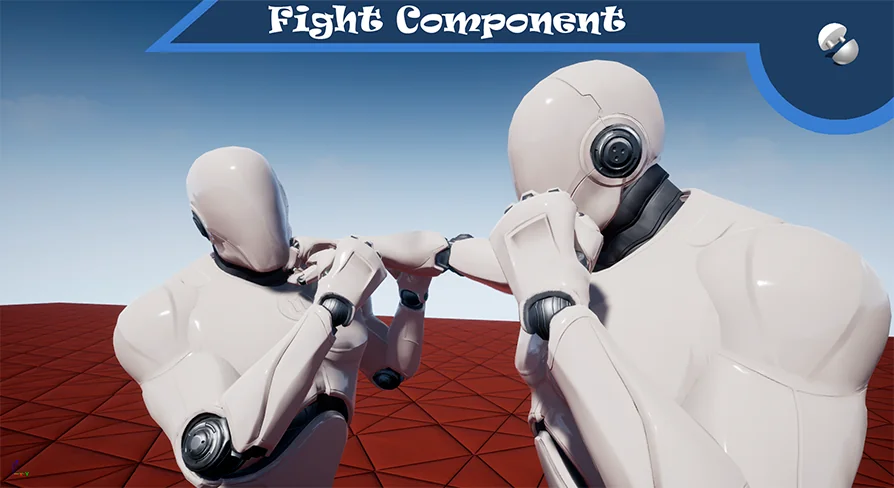
Boost your game development with the Fight Component for Unreal Engine. A flexible, blueprint-based fistfight system designed for quick project integration.
Creating a realistic melee combat system can be a difficult task for many developers. However, the Fight Component makes this process much easier for your project. This tool provides a professional foundation for fistfighting in Unreal Engine. Therefore, you can save time and focus on your game's unique features. It is designed to be both simple and flexible for any character type.
Seamless Integration and Flexibility
The developer created this system for the most convenient transfer possible. In addition, it connects easily to your existing character blueprints. Meanwhile, the flexible architecture ensures it works with various game genres. Consequently, you can implement combat mechanics in just a few steps. This makes it an ideal choice for prototypes and full productions alike.
Modular Blueprint Logic
The core of this product is a powerful blueprint component. This component manages all the essential logic for fisticuffs. Furthermore, it keeps your project organized by separating combat code from other systems. Because of this, you can easily modify or extend the logic to fit your needs. It handles the heavy lifting so you don't have to.
Comprehensive Auxiliary Assets
To provide a complete experience, the system includes several auxiliary blueprints. Specifically, it uses AnimNotifies to trigger events during animations. Moreover, the inclusion of Interfaces and Enumerations helps maintain clean code. These structures are required for the correct operation of the main component. Finally, they ensure that your character responds accurately to every player input.
Key Features and Benefits
Easy Setup: Connect the component to your character and start fighting immediately.
Flexible Logic: Adjust the fistfight mechanics to match your game's pace.
Advanced Notifications: Use AnimNotifies for precise timing of sounds and effects.
Clean Architecture: Built with organized structures and enumerations for better performance.
Visual Polish: Includes support for footsteps and combat-related sounds.
Technical Specifications for Developers
This resource is built entirely using Blueprints. As a result, you do not need deep C++ knowledge to use it. However, the logic is robust enough for professional applications. It includes specialized Animation Blueprints for smooth transitions. Additionally, the system supports custom sound effects and visual feedback. This ensures that every punch feels impactful and responsive for the player.
Final Take
The Fight Component is a must-have for developers looking to add melee mechanics. It offers a balance between ease of use and deep customization. Moreover, the clean setup prevents common integration headaches. By using this system, you provide your players with a polished combat experience. Start building your next action game today with this reliable blueprint solution.
 Game Mechanics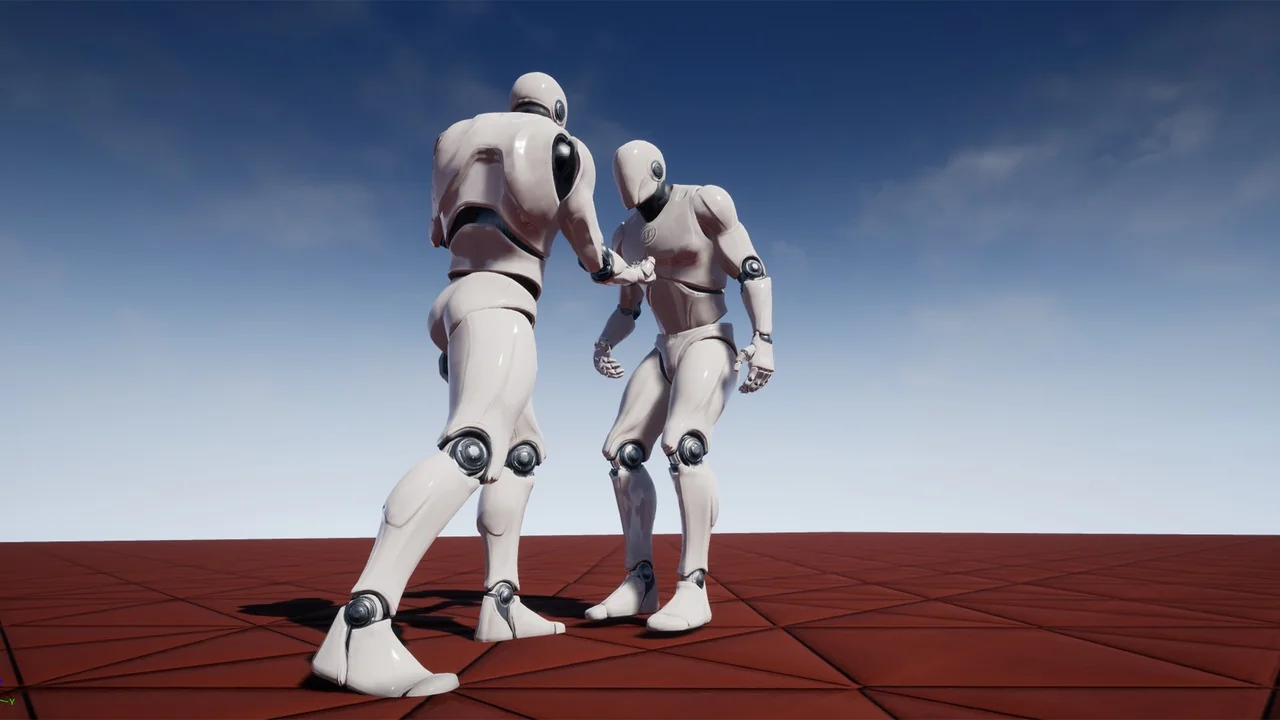
 Game Mechanics
 Spells & Combat
 Game Mechanics