"fa182e0cd0a6ea73"{"id":"1000580","slug":"counter-attack-system","title":"Counter Attack System","category":"Game Mechanics","engine":"5.1+","assetVersion":"","engineVersion":"Engine Version: 5.1+","tag":"Game Mechanics","accent":"blue","visual":"mech","summary":"A Blueprint-based Unreal Engine combat component with multiplayer support, multi-direction counter detection, enemy AI, and DataTable-driven animation setup.","platform":"Unreal Engine","publishedAt":"2026-07-16T23:34:45.444Z","updatedAt":"2026-07-16T23:34:45.444Z","sourceNotes":[],"fileContents":[],"compatibility":["Unreal Engine","Engine Version: 5.1+"],"featuredImage":{"alt":"Counter Attack System","src":"/wp-content/uploads/published/2026/07/eda57b398f3d-e4e9c4ec-de74-4ea3-bdb1-12a7df58fdcf-97cc90c1d6.webp"},"hasDownloadLink":true,"downloads":0,"terms":[{"taxonomy":"category","slug":"game-mechanics","name":"Game Mechanics"}],"galleryImages":[{"src":"/wp-content/uploads/published/2026/07/72127cb81220-2263d3bc-efe0-4ffd-99c6-cfd593285828-68a551f3dd.webp","alt":"Counter Attack System"},{"src":"/wp-content/uploads/published/2026/07/a620947dd093-a5b3a4fb-1eb4-47de-9209-fd6e7fcd2ecf-48b8e0adbe.webp","alt":"Counter Attack System"},{"src":"/wp-content/uploads/published/2026/07/04dd10f2efa4-f70c912d-ddf5-45da-ad00-688a7dcd826d-6e9f47be0b.webp","alt":"Counter Attack System"},{"src":"/wp-content/uploads/published/2026/07/9dcea0777e73-079247d4-b405-4c1e-8251-5b71c340b4fe-94e54ff9a5.webp","alt":"Counter Attack System"},{"src":"/wp-content/uploads/published/2026/07/17cd3934a24c-944b9eda-a0f3-43bd-aff6-9e45a08f730d-4859be9ab3.webp","alt":"Counter Attack System"},{"src":"/wp-content/uploads/published/2026/07/6161495c192e-ea92fd28-7422-4a57-ba71-96afd30064b1-6e241cdb36.webp","alt":"Counter Attack System"}],"accessPanel":{"kind":"resource","title":"Download this resource","eyebrow":"Free Download","message":"Log in or create a free account to start your download.","fileName":"Content.7z","safetyNote":"Resources are manually reviewed before listing to improve quality and reduce obvious risks.","actionLabel":"Download Free","resourceType":"Resource archive"},"contentHtml":"\u003cp\u003eWhen a combat scene requires precise reaction timing against incoming AI attacks, managing the logic for directional detection, rotation synchronization, and animation playback can quickly become a tangled web. The Counter Attack System approaches this by collapsing the entire workflow into a single Blueprint component. Instead of building custom state machines and detection logic from scratch, developers drop the component into a project and drive the behavior through a DataTable, letting the system handle the runtime execution while the creator focuses on animation assets and timing.\u003c/p\u003e \u003ch2\u003eSingle-Component Architecture and DataTable Setup\u003c/h2\u003e \u003cp\u003eThe core of the system is the Counter Attack System Component. Because it is a single component, it can be integrated into existing projects without requiring a massive refactor of character blueprints. The system operates entirely on Blueprints, meaning developers do not need to touch C++ to access the functionality. This makes the setup process accessible for teams that rely on visual scripting.\u003c/p\u003e \u003cp\u003eConfiguration is centralized in one DataTable. Developers populate this DataTable with their chosen counter animations, assigning them based on the direction of the incoming attack—front, back, left, or right. The system supports adding as many counter animations as desired for each direction. This allows for varied visual responses instead of repeating a single animation every time a counter triggers. Beyond directional differentiation, the counter animation can also vary based on the specific type of attack, which is determined through the Counter time notification. This two-layered approach to animation selection—direction and attack type—gives creators granular control over how combat looks and feels.\u003c/p\u003e \u003ch2\u003eMulti-Direction Detection and Player Synchronization\u003c/h2\u003e \u003cp\u003eCounter Direction Detection evaluates incoming attacks across four distinct quadrants: front, back, left, and right. When a counter is triggered, the system does not simply play an animation in place. It syncs player rotation and distance to the victim. This synchronization ensures that the counter animation aligns correctly with the enemy's position, preventing visual disconnects where a player appears to counter in the wrong direction or at the wrong distance.\u003c/p\u003e \u003cp\u003eThe system includes a Cinematic Camera feature, which activates during counter sequences. Combined with Hit Sound and Camera Shake effects, the camera and audio feedback create a more impactful moment when a counter successfully lands. These elements are built into the system rather than requiring separate implementation.\u003c/p\u003e \u003ch2\u003eEnemy AI Behavior and Counter Notifications\u003c/h2\u003e \u003cp\u003eThe asset provides a complete AI framework based on an AI Behavior Tree. The enemy AI is capable of chasing the player and executing attacks. During an attack, the AI auto-rotates to face the player, maintaining proper alignment for combat interactions. An AI Spawn Manager is included to handle the spawning of enemies within the scene.\u003c/p\u003e \u003cp\u003eCrucially, every AI attack has a notification widget timing for the player counter. This manifests as a Counter Timing Notif Widget, which presents the player with a timing window to execute a counter. The interaction between the AI attack and the notification widget is what makes the counter system playable. The AI attacks, the widget signals the opportunity, and the player acts within the timing window.\u003c/p\u003e \u003ch3\u003eRagdoll and Multiplayer Replication\u003c/h3\u003e \u003cp\u003eWhen an enemy is defeated through a counter, a Dead Ragdoll System takes over. The enemy transitions into a ragdoll state, providing a physical reaction to the final blow. The system is 100% Blueprint and supports multiplayer. Replication tags indicate that the counter logic, AI behavior, and synchronized animations are built to function in networked environments, allowing multiple players to engage with the same combat systems.\u003c/p\u003e \u003ch2\u003eIncluded Animation Assets and Expansion\u003c/h2\u003e \u003cp\u003eThe animations shown in the trailer are included with the system. This means developers can test the component immediately without sourcing custom animation sets first. For projects that require a larger library of combat animations, additional counter and finisher animations are available separately.\u003c/p\u003e \u003cp\u003eThe goal of the product is to enable the creation of counter attacks against AI quickly and simply. Developers set up their counter animations in the DataTable based on the chosen direction, and the system manages the detection, synchronization, and playback. The inclusion of AI behaviors, spawn management, and multiplayer support means the package covers both sides of the combat equation.\u003c/p\u003e\n\n\u003ch2\u003eRelated Resources Worth Checking\u003c/h2\u003e\n\u003cul\u003e\n\u003cli\u003e\u003ca href=\"https://3dcghub.com/counter-and-finisher-animations/\" title=\"Counter \u0026amp; Finisher Animations\"\u003eCounter \u0026amp; Finisher Animations\u003c/a\u003e\u003c/li\u003e\n\u003cli\u003e\u003ca href=\"https://3dcghub.com/replicated-modular-vehicle-v2/\" title=\"Replicated Modular Vehicle V2\"\u003eReplicated Modular Vehicle V2\u003c/a\u003e\u003c/li\u003e\n\u003cli\u003e\u003ca href=\"https://3dcghub.com/trail-hunter-pro-footprints-and-tracks-with-multiplayer-and-worldpartition/\" title=\"Trail Hunter PRO - Footprints and Tracks with Multiplayer \u0026amp; WorldPartition\"\u003eTrail Hunter PRO - Footprints and Tracks with Multiplayer \u0026amp; WorldPartition\u003c/a\u003e\u003c/li\u003e\n\u003cli\u003e\u003ca href=\"https://3dcghub.com/basic-melee-combat-system/\" title=\"Basic Melee Combat System\"\u003eBasic Melee Combat System\u003c/a\u003e\u003c/li\u003e\n\u003cli\u003e\u003ca href=\"https://3dcghub.com/race-system/\" title=\"Race System\"\u003eRace System\u003c/a\u003e\u003c/li\u003e\n\u003c/ul\u003e","contentTextLength":4812,"navigation":{"current":1355,"total":3789,"previous":{"id":"1000581","slug":"creepy-doll","title":"Creepy Doll","category":"Locomotion / Gaits","platform":"Unreal Engine","updatedAt":"2026-07-16T23:37:53.996Z"},"next":{"id":"1000579","slug":"contemporary-restaurant","title":"Contemporary Restaurant","category":"Interior","platform":"Unreal Engine","updatedAt":"2026-07-16T23:31:08.674Z"}},"relatedResources":[{"id":"1001298","slug":"advanced-phone-system-v3-replicated","title":"Advanced Phone System V3 Replicated","category":"Game Mechanics","engine":"5.1+","assetVersion":"","engineVersion":"Engine Version: 5.1+","tag":"Game Mechanics","accent":"blue","visual":"mech","summary":"Explore the Advanced Phone System V3 Replicated for Unreal Engine, featuring 15 Blueprints, multiplayer sync, NPC dialogue, and in-game smartphone apps.","platform":"Unreal Engine","publishedAt":"2026-10-02T06:00:01.725Z","updatedAt":"2026-10-02T06:00:01.725Z","sourceNotes":[],"fileContents":[],"compatibility":["Unreal Engine","Engine Version: 5.1+"],"featuredImage":{"alt":"Advanced Phone System V3 Replicated","src":"/wp-content/uploads/published/2026/10/085245bcd14e-a13d28d0-643a-4a32-bc84-d79f901d6112-a65bc3e443.webp"},"hasDownloadLink":true,"downloads":0},{"id":"1001776","slug":"counter-attack","title":"Counter Attack","category":"Combat","engine":"4.22+,5.0+","assetVersion":"","engineVersion":"Engine Version: 4.22+,5.0+","tag":"Combat","accent":"blue","visual":"mech","summary":"A close-combat animation library featuring 36 fist-to-fist attacks, synchronized counter attacks, and reactive hits designed for free flow fighting systems.","platform":"Unreal Engine","publishedAt":"2026-10-20T03:24:17.652Z","updatedAt":"2026-10-20T03:24:17.652Z","sourceNotes":[],"fileContents":[],"compatibility":["Unreal Engine","Engine Version: 4.22+,5.0+"],"featuredImage":{"alt":"Counter Attack","src":"/wp-content/uploads/published/2026/10/06fe4fc83fc8-eaf14938-eb66-412f-8bc5-1cdd9a77b045-15492b5637.webp"},"hasDownloadLink":true,"downloads":0},{"id":"1000614","slug":"generic-combat-system-advanced-gas-based-multiplayer-combat-framework","title":"Generic Combat System - Advanced GAS based Multiplayer combat framework.","category":"Game Mechanics","engine":"5.6","assetVersion":"Asset Version: 1.4","engineVersion":"Engine Version: 5.6","tag":"Game Mechanics","accent":"blue","visual":"mech","summary":"Advanced multiplayer combat framework built on GAS with blueprint-friendly C++ architecture, Souls-like combat reference, and modular integration for Unreal Eng","platform":"Unreal Engine","publishedAt":"2026-07-20T20:41:12.096Z","updatedAt":"2026-07-20T20:41:12.096Z","sourceNotes":[],"fileContents":[],"compatibility":["Unreal Engine","Asset Version: 1.4","Engine Version: 5.6"],"featuredImage":{"alt":"Generic Combat System - Advanced GAS based Multiplayer combat framework.","src":"/wp-content/uploads/published/2026/07/b66bcc866bd3-eade1298-40b5-4a64-a0a7-797c3d973d00-b9b68723ec.webp"},"hasDownloadLink":true,"downloads":2}]}
Game Mechanics
Counter Attack System
A Blueprint-based Unreal Engine combat component with multiplayer support, multi-direction counter detection, enemy AI, and DataTable-driven animation setup.
When a combat scene requires precise reaction timing against incoming AI attacks, managing the logic for directional detection, rotation synchronization, and animation playback can quickly become a tangled web. The Counter Attack System approaches this by collapsing the entire workflow into a single Blueprint component. Instead of building custom state machines and detection logic from scratch, developers drop the component into a project and drive the behavior through a DataTable, letting the system handle the runtime execution while the creator focuses on animation assets and timing.
Single-Component Architecture and DataTable Setup
The core of the system is the Counter Attack System Component. Because it is a single component, it can be integrated into existing projects without requiring a massive refactor of character blueprints. The system operates entirely on Blueprints, meaning developers do not need to touch C++ to access the functionality. This makes the setup process accessible for teams that rely on visual scripting.
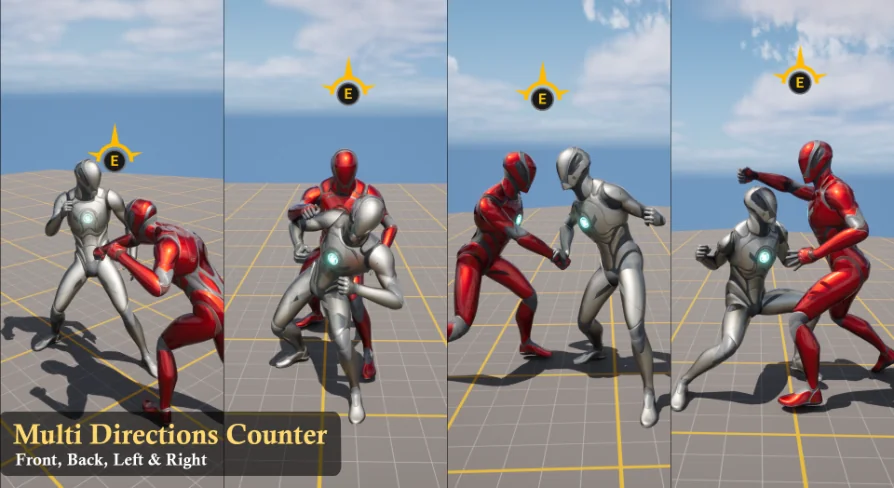
Configuration is centralized in one DataTable. Developers populate this DataTable with their chosen counter animations, assigning them based on the direction of the incoming attack—front, back, left, or right. The system supports adding as many counter animations as desired for each direction. This allows for varied visual responses instead of repeating a single animation every time a counter triggers. Beyond directional differentiation, the counter animation can also vary based on the specific type of attack, which is determined through the Counter time notification. This two-layered approach to animation selection—direction and attack type—gives creators granular control over how combat looks and feels.
Multi-Direction Detection and Player Synchronization
Counter Direction Detection evaluates incoming attacks across four distinct quadrants: front, back, left, and right. When a counter is triggered, the system does not simply play an animation in place. It syncs player rotation and distance to the victim. This synchronization ensures that the counter animation aligns correctly with the enemy's position, preventing visual disconnects where a player appears to counter in the wrong direction or at the wrong distance.
The system includes a Cinematic Camera feature, which activates during counter sequences. Combined with Hit Sound and Camera Shake effects, the camera and audio feedback create a more impactful moment when a counter successfully lands. These elements are built into the system rather than requiring separate implementation.
Enemy AI Behavior and Counter Notifications
The asset provides a complete AI framework based on an AI Behavior Tree. The enemy AI is capable of chasing the player and executing attacks. During an attack, the AI auto-rotates to face the player, maintaining proper alignment for combat interactions. An AI Spawn Manager is included to handle the spawning of enemies within the scene.
Crucially, every AI attack has a notification widget timing for the player counter. This manifests as a Counter Timing Notif Widget, which presents the player with a timing window to execute a counter. The interaction between the AI attack and the notification widget is what makes the counter system playable. The AI attacks, the widget signals the opportunity, and the player acts within the timing window.
Ragdoll and Multiplayer Replication
When an enemy is defeated through a counter, a Dead Ragdoll System takes over. The enemy transitions into a ragdoll state, providing a physical reaction to the final blow. The system is 100% Blueprint and supports multiplayer. Replication tags indicate that the counter logic, AI behavior, and synchronized animations are built to function in networked environments, allowing multiple players to engage with the same combat systems.
Included Animation Assets and Expansion
The animations shown in the trailer are included with the system. This means developers can test the component immediately without sourcing custom animation sets first. For projects that require a larger library of combat animations, additional counter and finisher animations are available separately.
The goal of the product is to enable the creation of counter attacks against AI quickly and simply. Developers set up their counter animations in the DataTable based on the chosen direction, and the system manages the detection, synchronization, and playback. The inclusion of AI behaviors, spawn management, and multiplayer support means the package covers both sides of the combat equation.
 Game Mechanics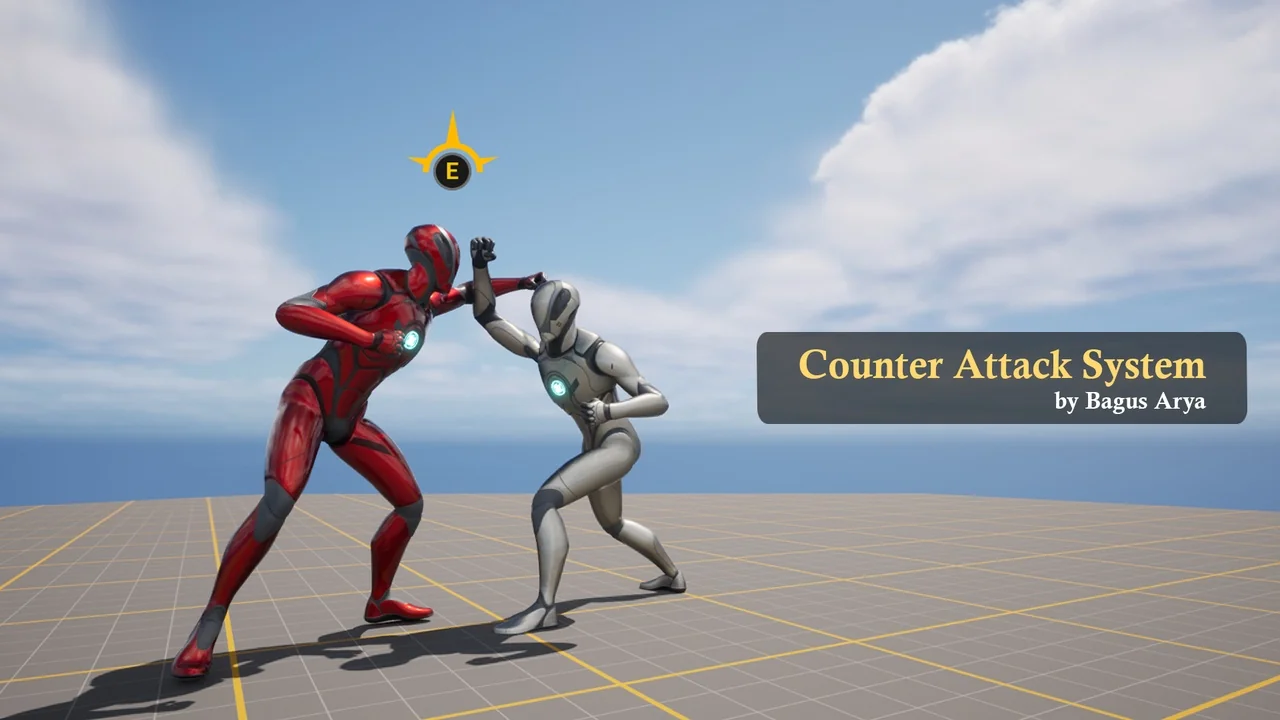
 Game Mechanics
 Combat
 Game Mechanics