"fa182e0cd0a6ea73"{"id":"1000579","slug":"contemporary-restaurant","title":"Contemporary Restaurant","category":"Interior","engine":"5.0+","assetVersion":"","engineVersion":"Engine Version: 5.0+","tag":"Interior","accent":"blue","visual":"mech","summary":"Modern restaurant interior scene for Unreal Engine with UV-unwrapped furniture, gamepad control support, and Lumen compatibility for UE 5.0+ projects.","platform":"Unreal Engine","publishedAt":"2026-07-16T23:31:08.674Z","updatedAt":"2026-07-16T23:31:08.674Z","sourceNotes":[],"fileContents":[],"compatibility":["Unreal Engine","Engine Version: 5.0+"],"featuredImage":{"alt":"Contemporary Restaurant","src":"/wp-content/uploads/published/2026/07/151020456d69-d21114dc-2bbf-468a-945d-1b5e31df791a-75a9579df8.webp"},"hasDownloadLink":true,"downloads":1,"terms":[{"taxonomy":"category","slug":"interior","name":"Interior"}],"galleryImages":[{"src":"/wp-content/uploads/published/2026/07/b0bc36b4b4a7-8743a13d-c5bf-4172-864b-f96ad20a3ed8-3b9c468e3d.webp","alt":"Contemporary Restaurant"},{"src":"/wp-content/uploads/published/2026/07/4518bfa99ea4-26a0a3e3-de28-46ac-ba0f-0d05cce545da-10f6e3db90.webp","alt":"Contemporary Restaurant"},{"src":"/wp-content/uploads/published/2026/07/797aa04a407a-17a8942a-38d1-4c14-ac37-7adb5110238b-f75e9a1d63.webp","alt":"Contemporary Restaurant"},{"src":"/wp-content/uploads/published/2026/07/51e7511369a7-91d76f0b-8a24-47a9-a330-34538655367d-111853e72f.webp","alt":"Contemporary Restaurant"},{"src":"/wp-content/uploads/published/2026/07/4712947c3c45-349834f2-1bba-4691-96dc-ca1277b9239c-fd599666ea.webp","alt":"Contemporary Restaurant"},{"src":"/wp-content/uploads/published/2026/07/99b0ea586ac4-0c24633f-a7b5-4ab1-9fc3-f1546d6a267c-75b5a1b45c.webp","alt":"Contemporary Restaurant"},{"src":"/wp-content/uploads/published/2026/07/f168447a7438-e5d7cde6-47b5-4029-b0e8-0ff24030ca73-c4695fee95.webp","alt":"Contemporary Restaurant"},{"src":"/wp-content/uploads/published/2026/07/3ce245c7b61f-0425cc23-1f9f-4da3-b423-eeee277b0352-ed683025c4.webp","alt":"Contemporary Restaurant"},{"src":"/wp-content/uploads/published/2026/07/0a54b660b5c5-667cbaae-2827-423f-aced-0fc847ff6afa-14d7081dbb.webp","alt":"Contemporary Restaurant"},{"src":"/wp-content/uploads/published/2026/07/5945dea81fbf-3e56d568-04a2-4e58-a0af-7240dfaf1154-d93e665ac9.webp","alt":"Contemporary Restaurant"}],"accessPanel":{"kind":"resource","title":"Download this resource","eyebrow":"Free Download","message":"Log in or create a free account to start your download.","fileName":"ContemporaryRestaurant.7z","safetyNote":"Resources are manually reviewed before listing to improve quality and reduce obvious risks.","actionLabel":"Download Free","resourceType":"Resource archive"},"contentHtml":"\u003cp\u003eOpening a project with a fully built restaurant interior means the heavy lifting of scene assembly is already done. Contemporary Restaurant drops a modern dining space into Unreal Engine with furniture placed and props prepped for material work. The scene functions as both a finished environment you can walk through and a library of individual pieces you can repurpose in other interior projects.\u003c/p\u003e \u003ch2\u003eWhat the Modern Restaurant Interior Contains\u003c/h2\u003e \u003cp\u003eThe asset is an interior space designed as a modern restaurant. It comes populated with furniture arranged within the scene, and every furniture piece is ready to use in a separate restaurant project if needed. That distinction matters for teams who want to pull individual chairs, tables, or fixtures into their own layouts rather than working with the scene as a locked unit.\u003c/p\u003e \u003cp\u003eAll props in the package have been carefully UV unwrapped. When a prop arrives with clean UVs, texture work becomes straightforward — you can assign materials, swap textures, or bake lighting without first fixing overlapping islands or distorted mapping. For a restaurant interior where surfaces like tabletops, bar counters, and seating upholstery often carry distinct materials, this preparation saves setup time that would otherwise go into unwrapping geometry before any texturing can begin.\u003c/p\u003e \u003ch2\u003eGamepad Control and How the Scene Behaves at Runtime\u003c/h2\u003e \u003cp\u003eBeyond being a static environment, the project can be controlled with a gamepad. This means the scene is wired for direct interaction — someone can pick up a controller, move through the restaurant space, and navigate the interior in real time. For visualization workflows where a client or stakeholder needs to walk through a space rather than view it from fixed camera angles, that built-in control scheme removes a step from the production pipeline. No additional input setup is required to get the scene responding to gamepad navigation.\u003c/p\u003e \u003cp\u003eThe inclusion of gamepad control also positions this asset for interactive archviz presentations. A restaurant interior that can be toured at runtime works differently from a rendered flythrough. The viewer chooses where to look, when to move, and which areas of the space to examine closely. This aligns with how visualization clients increasingly expect to engage with interior scenes — not as passive viewers of a predetermined camera path but as active participants moving through the space.\u003c/p\u003e \u003ch3\u003eLumen Support for UE 5.0+ and What It Means for Lighting\u003c/h3\u003e \u003cp\u003eThe product supports Lumen for Unreal Engine 5.0 and above. Lumen is the dynamic global illumination and reflection system introduced in UE5, and its presence here means the restaurant interior can take advantage of real-time light bounce, soft shadows, and reflective surfaces without baked lightmaps. In a restaurant setting, where lighting often defines the mood — warm pendant lights over tables, ambient glow from a bar area, light spilling through windows — Lumen allows those lighting conditions to respond dynamically rather than being locked into a precomputed solution.\u003c/p\u003e \u003cp\u003eEnabling Lumen in a project requires specific settings in the Unreal Engine project configuration. The asset points to the official Unreal Engine documentation covering Lumen global illumination and reflections, which walks through the steps to activate the feature. For teams already working in UE 5.0 or later, this is a configuration step rather than a development hurdle. For those on earlier engine versions, the scene remains usable but Lumen's dynamic lighting benefits will not be available.\u003c/p\u003e \u003ch2\u003eWhere This Fits in a Production Workflow\u003c/h2\u003e \u003cp\u003eContemporary Restaurant sits at the intersection of architectural visualization and interactive scene design. The tag set associated with the asset tells a clear story about intended use: Design, Furniture, Scene, Restaurant, Lumen, Bar, Modern, Residential, Interior, Retail, Industrial, Archviz, Architecture, Blueprint, Commercial. Those tags group into several practical categories.\u003c/p\u003e \u003cp\u003eOn the visualization side, tags like Archviz, Architecture, Interior, and Design point to architectural rendering and interior design presentation workflows. The scene can serve as a presentation environment for a restaurant concept, a portfolio piece for an interior designer, or a visualization deliverable for a client review.\u003c/p\u003e \u003cp\u003eOn the commercial and retail side, tags like Restaurant, Bar, Commercial, and Retail indicate that the asset fits into broader commercial space design. A modern restaurant interior with a bar area can be used to prototype hospitality spaces, plan seating layouts, or demonstrate how a dining establishment might feel before construction begins.\u003c/p\u003e \u003cp\u003eThe Blueprint tag signals that elements within the scene use Unreal Engine's Blueprint system. Blueprints in UE are visual scripting assets that can encapsulate functionality — potentially doors, lights, interactive elements, or other components within the restaurant that go beyond static mesh placement. Combined with the gamepad control support, this suggests the scene has been built with interactive behavior in mind, not just geometric assembly.\u003c/p\u003e \u003cp\u003eTags like Modern, Industrial, and Residential suggest the aesthetic direction. The modern descriptor aligns with contemporary restaurant design sensibilities — clean lines, current material choices, and a layout that reflects present-day dining spaces. The Industrial tag may point toward specific material or stylistic elements common in restaurant design, such as exposed structures or utilitarian surface treatments. The Residential tag, while initially unexpected for a restaurant asset, may reflect furniture pieces or design elements that crossover between hospitality and residential interior contexts.\u003c/p\u003e \u003ch3\u003eEngine Compatibility Across UE Versions\u003c/h3\u003e \u003cp\u003eThe asset supports a broad range of Unreal Engine versions, from 4.20 through 4.27 and continuing into the 5.0 through 5.6 range. This cross-version compatibility means teams working on older UE4 projects can integrate the restaurant interior without first migrating their project to UE5. It also means the same asset can move with a team as they upgrade their engine version, providing continuity across a production pipeline that may be in transition between UE4 and UE5.\u003c/p\u003e \u003cp\u003eFor teams currently on UE4, the scene will function but the Lumen lighting system will not be available — Lumen is a UE5 feature. The UV-unwrapped props, furniture pieces, and gamepad control will carry over, but the dynamic global illumination that makes the lighting feel natural in UE5 will require the project to be running on UE 5.0 or above.\u003c/p\u003e \u003cp\u003eThe combination of pre-built scene geometry, UV-clean props, gamepad navigation, and Lumen-ready lighting places this asset in a specific production niche. It works as a starting point for a restaurant visualization, a source of furniture for custom interiors, or an interactive walkthrough environment for client presentations. Teams evaluating the asset for a hospitality visualization project or a commercial interior design workflow get a scene that is assembled, textured, lit, and navigable from the point of import.\u003c/p\u003e\n\n\u003ch2\u003eContinue Browsing Similar Packs\u003c/h2\u003e\n\u003cul\u003e\n\u003cli\u003e\u003ca href=\"https://3dcghub.com/luxury-restaurant-pack/\" title=\"Luxury Restaurant Pack\"\u003eLuxury Restaurant Pack\u003c/a\u003e\u003c/li\u003e\n\u003cli\u003e\u003ca href=\"https://3dcghub.com/drcg-contemporary-art-virtual-gallery-1-0/\" title=\"DrCG Contemporary Art Virtual Gallery 1.0\"\u003eDrCG Contemporary Art Virtual Gallery 1.0\u003c/a\u003e\u003c/li\u003e\n\u003cli\u003e\u003ca href=\"https://3dcghub.com/fast-food-restaurant/\" title=\"Fast Food Restaurant\"\u003eFast Food Restaurant\u003c/a\u003e\u003c/li\u003e\n\u003cli\u003e\u003ca href=\"https://3dcghub.com/ramen-restaurant-environment-ramen-restaurant-ramen-inter-or-exterior-cafe/\" title=\"Ramen Restaurant Environment ( Ramen Restaurant Ramen Interıor Exterior Cafe )\"\u003eRamen Restaurant Environment ( Ramen Restaurant Ramen Interıor Exterior Cafe )\u003c/a\u003e\u003c/li\u003e\n\u003cli\u003e\u003ca href=\"https://3dcghub.com/restaurant-vol-1-food-prep-nanite-and-low-poly/\" title=\"Restaurant VOL.1 - Food Prep (Nanite and Low Poly)\"\u003eRestaurant VOL.1 - Food Prep (Nanite and Low Poly)\u003c/a\u003e\u003c/li\u003e\n\u003c/ul\u003e","contentTextLength":7343,"navigation":{"current":1356,"total":3789,"previous":{"id":"1000580","slug":"counter-attack-system","title":"Counter Attack System","category":"Game Mechanics","platform":"Unreal Engine","updatedAt":"2026-07-16T23:34:45.444Z"},"next":{"id":"1000578","slug":"conference-meeting-room-environment-conference-meeting-room","title":"Conference / Meeting Room Environment ( Conference Meeting Room )","category":"Interior","platform":"Unreal Engine","updatedAt":"2026-07-16T23:22:16.459Z"}},"relatedResources":[{"id":"1001388","slug":"restaurant-american-restaurant-cafe-diner-retro-diner-kitchen-restaurant","title":"Restaurant (American Restaurant, Cafe, Diner, Retro Diner, Kitchen, Restaurant)","category":"Interior","engine":"5.0+","assetVersion":"","engineVersion":"Engine Version: 5.0+","tag":"Interior","accent":"blue","visual":"mech","summary":"Examine the 139 modular diner and kitchen assets, customizable materials, and Niagara atmospheric systems in this retro American restaurant environment.","platform":"Unreal Engine","publishedAt":"2026-10-04T15:27:34.804Z","updatedAt":"2026-10-04T15:27:34.804Z","sourceNotes":[],"fileContents":[],"compatibility":["Unreal Engine","Engine Version: 5.0+"],"featuredImage":{"alt":"Restaurant (American Restaurant, Cafe, Diner, Retro Diner, Kitchen, Restaurant)","src":"/wp-content/uploads/published/2026/10/01dbceef50da-b1f8c625-4b74-4f5b-a525-e9ca90425212-5e3e7e2d75.webp"},"hasDownloadLink":true,"downloads":0},{"id":"1001376","slug":"contemporary-art-gallery","title":"Contemporary Art Gallery","category":"Interior","engine":"5.1+","assetVersion":"","engineVersion":"Engine Version: 5.1+","tag":"Interior","accent":"blue","visual":"mech","summary":"Explore the spatial layout, modern architectural elements, vaulted ceilings, and curated props within the Contemporary Art Gallery interior environment.","platform":"Unreal Engine","publishedAt":"2026-10-04T12:08:01.551Z","updatedAt":"2026-10-04T12:08:01.551Z","sourceNotes":[],"fileContents":[],"compatibility":["Unreal Engine","Engine Version: 5.1+"],"featuredImage":{"alt":"Contemporary Art Gallery","src":"/wp-content/uploads/published/2026/10/2853c0588c78-b8139cfe-d64c-421e-bf7e-d4eb5586246d-e34f5edc90.webp"},"hasDownloadLink":true,"downloads":0},{"id":"8900","slug":"luxury-restaurant-pack","title":"Luxury Restaurant Pack","category":"Interior","engine":"5.0+","assetVersion":"Engine version: 5.0+","engineVersion":"5.0","tag":"Interior","accent":"blue","visual":"city","summary":"Elevate your game environments with the Luxury Restaurant Pack. This comprehensive collection features modular components and high-fidelity 4K textures for stunning interior realism.","platform":"Unreal Engine","publishedAt":"2026-02-25T17:55:42.000Z","updatedAt":"2026-04-19T15:51:19.000Z","sourceNotes":[],"fileContents":[],"compatibility":["Unreal Engine","Engine version: 5.0+"],"featuredImage":{"alt":"Luxury Restaurant Pack","src":"https://3dcghub.com/wp-content/uploads/2026/02/39b2e6ae-bdf2-4bc4-99d5-cb68ff352438.webp"},"hasDownloadLink":true,"downloads":2}]}
Interior
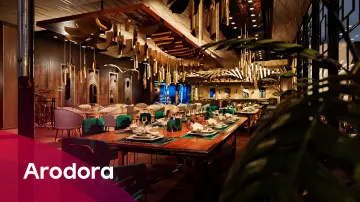
Contemporary Restaurant
Modern restaurant interior scene for Unreal Engine with UV-unwrapped furniture, gamepad control support, and Lumen compatibility for UE 5.0+ projects.
Opening a project with a fully built restaurant interior means the heavy lifting of scene assembly is already done. Contemporary Restaurant drops a modern dining space into Unreal Engine with furniture placed and props prepped for material work. The scene functions as both a finished environment you can walk through and a library of individual pieces you can repurpose in other interior projects.
What the Modern Restaurant Interior Contains
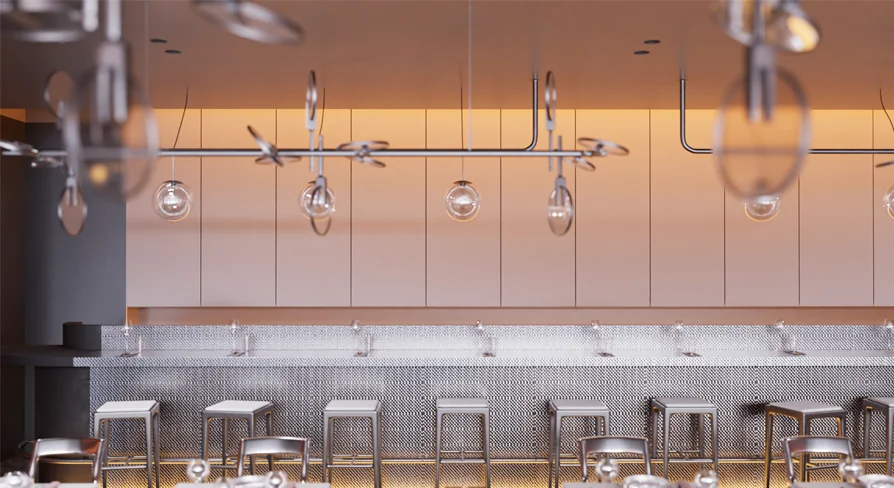
The asset is an interior space designed as a modern restaurant. It comes populated with furniture arranged within the scene, and every furniture piece is ready to use in a separate restaurant project if needed. That distinction matters for teams who want to pull individual chairs, tables, or fixtures into their own layouts rather than working with the scene as a locked unit.
All props in the package have been carefully UV unwrapped. When a prop arrives with clean UVs, texture work becomes straightforward — you can assign materials, swap textures, or bake lighting without first fixing overlapping islands or distorted mapping. For a restaurant interior where surfaces like tabletops, bar counters, and seating upholstery often carry distinct materials, this preparation saves setup time that would otherwise go into unwrapping geometry before any texturing can begin.
Gamepad Control and How the Scene Behaves at Runtime
Beyond being a static environment, the project can be controlled with a gamepad. This means the scene is wired for direct interaction — someone can pick up a controller, move through the restaurant space, and navigate the interior in real time. For visualization workflows where a client or stakeholder needs to walk through a space rather than view it from fixed camera angles, that built-in control scheme removes a step from the production pipeline. No additional input setup is required to get the scene responding to gamepad navigation.
The inclusion of gamepad control also positions this asset for interactive archviz presentations. A restaurant interior that can be toured at runtime works differently from a rendered flythrough. The viewer chooses where to look, when to move, and which areas of the space to examine closely. This aligns with how visualization clients increasingly expect to engage with interior scenes — not as passive viewers of a predetermined camera path but as active participants moving through the space.
Lumen Support for UE 5.0+ and What It Means for Lighting
The product supports Lumen for Unreal Engine 5.0 and above. Lumen is the dynamic global illumination and reflection system introduced in UE5, and its presence here means the restaurant interior can take advantage of real-time light bounce, soft shadows, and reflective surfaces without baked lightmaps. In a restaurant setting, where lighting often defines the mood — warm pendant lights over tables, ambient glow from a bar area, light spilling through windows — Lumen allows those lighting conditions to respond dynamically rather than being locked into a precomputed solution.
Enabling Lumen in a project requires specific settings in the Unreal Engine project configuration. The asset points to the official Unreal Engine documentation covering Lumen global illumination and reflections, which walks through the steps to activate the feature. For teams already working in UE 5.0 or later, this is a configuration step rather than a development hurdle. For those on earlier engine versions, the scene remains usable but Lumen's dynamic lighting benefits will not be available.
Where This Fits in a Production Workflow
Contemporary Restaurant sits at the intersection of architectural visualization and interactive scene design. The tag set associated with the asset tells a clear story about intended use: Design, Furniture, Scene, Restaurant, Lumen, Bar, Modern, Residential, Interior, Retail, Industrial, Archviz, Architecture, Blueprint, Commercial. Those tags group into several practical categories.
On the visualization side, tags like Archviz, Architecture, Interior, and Design point to architectural rendering and interior design presentation workflows. The scene can serve as a presentation environment for a restaurant concept, a portfolio piece for an interior designer, or a visualization deliverable for a client review.
On the commercial and retail side, tags like Restaurant, Bar, Commercial, and Retail indicate that the asset fits into broader commercial space design. A modern restaurant interior with a bar area can be used to prototype hospitality spaces, plan seating layouts, or demonstrate how a dining establishment might feel before construction begins.
The Blueprint tag signals that elements within the scene use Unreal Engine's Blueprint system. Blueprints in UE are visual scripting assets that can encapsulate functionality — potentially doors, lights, interactive elements, or other components within the restaurant that go beyond static mesh placement. Combined with the gamepad control support, this suggests the scene has been built with interactive behavior in mind, not just geometric assembly.
Tags like Modern, Industrial, and Residential suggest the aesthetic direction. The modern descriptor aligns with contemporary restaurant design sensibilities — clean lines, current material choices, and a layout that reflects present-day dining spaces. The Industrial tag may point toward specific material or stylistic elements common in restaurant design, such as exposed structures or utilitarian surface treatments. The Residential tag, while initially unexpected for a restaurant asset, may reflect furniture pieces or design elements that crossover between hospitality and residential interior contexts.
Engine Compatibility Across UE Versions
The asset supports a broad range of Unreal Engine versions, from 4.20 through 4.27 and continuing into the 5.0 through 5.6 range. This cross-version compatibility means teams working on older UE4 projects can integrate the restaurant interior without first migrating their project to UE5. It also means the same asset can move with a team as they upgrade their engine version, providing continuity across a production pipeline that may be in transition between UE4 and UE5.
For teams currently on UE4, the scene will function but the Lumen lighting system will not be available — Lumen is a UE5 feature. The UV-unwrapped props, furniture pieces, and gamepad control will carry over, but the dynamic global illumination that makes the lighting feel natural in UE5 will require the project to be running on UE 5.0 or above.
The combination of pre-built scene geometry, UV-clean props, gamepad navigation, and Lumen-ready lighting places this asset in a specific production niche. It works as a starting point for a restaurant visualization, a source of furniture for custom interiors, or an interactive walkthrough environment for client presentations. Teams evaluating the asset for a hospitality visualization project or a commercial interior design workflow get a scene that is assembled, textured, lit, and navigable from the point of import.
 Interior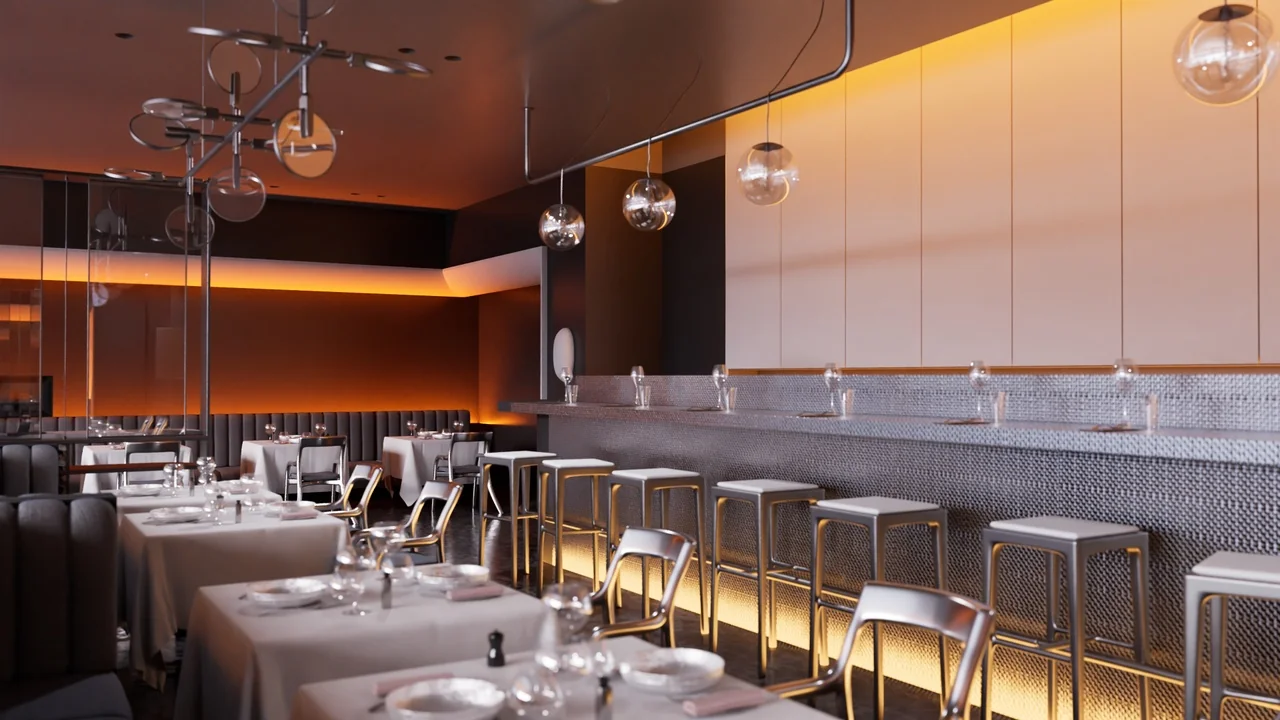
 Interior
 Interior
 Interior