"6f9bd6df1f44a86f"{"id":"1000850","slug":"mini-game-pack-sliding-puzzle","title":"Mini-Game Pack - Sliding Puzzle","category":"Game Mechanics","engine":"4.26+,5.0+","assetVersion":"","engineVersion":"Engine Version: 4.26+,5.0+","tag":"Game Mechanics","accent":"blue","visual":"mech","summary":"Blueprint-based sliding puzzle mini-game with smooth block animation, touchscreen support, and adjustable size, sound, speed, image, and feedback.","platform":"Unreal Engine","indexPolicy":"index","publishedAt":"2026-08-04T16:34:39.726Z","updatedAt":"2026-08-04T16:34:39.726Z","sourceNotes":[],"fileContents":[],"compatibility":["Unreal Engine","Engine Version: 4.26+,5.0+"],"featuredImage":{"alt":"Mini-Game Pack - Sliding Puzzle","src":"/wp-content/uploads/published/2026/08/b3463e6ed062-eb69d649-2e0d-4ab6-8753-bb9349cd4e2e-7864a6114d.webp"},"hasDownloadLink":true,"downloads":0,"terms":[{"taxonomy":"category","slug":"game-mechanics","name":"Game Mechanics"}],"galleryImages":[{"src":"/wp-content/uploads/published/2026/08/bd7163d29ac9-af99f259-6d69-44d1-ae88-8a352628161b-9707211ff3.webp","alt":"Mini-Game Pack - Sliding Puzzle"},{"src":"/wp-content/uploads/published/2026/08/b303b7d083e6-b9a52db5-e19f-467c-aa25-0ead56fb7a9d-53ddee5cff.webp","alt":"Mini-Game Pack - Sliding Puzzle"},{"src":"/wp-content/uploads/published/2026/08/7f985f4ae076-cf723e53-9ff8-4a84-ba66-ddffd2b9dc2a-1867fd5c0b.webp","alt":"Mini-Game Pack - Sliding Puzzle"},{"src":"/wp-content/uploads/published/2026/08/66edea044d5e-4c0dcfda-618a-4ee1-8e1e-9c81e88d4fe1-7b87391717.webp","alt":"Mini-Game Pack - Sliding Puzzle"}],"accessPanel":{"kind":"resource","title":"Download this resource","eyebrow":"Free Download","message":"Log in or create a free account to start your download.","fileName":"Content.7z","safetyNote":"Resources are manually reviewed before listing to improve quality and reduce obvious risks.","actionLabel":"Download Free","resourceType":"Resource archive"},"contentHtml":"\u003ch2\u003eA Blueprint Sliding Puzzle, Ready to Adjust\u003c/h2\u003e\n\n\u003cp\u003eSliding puzzles show up in games in many forms: a challenge inside a larger Level, a quick activity between missions, or a standalone mobile game. The task is consistent—rearrange the blocks until the picture lines up—but each project needs the interaction to feel right for its own context. \u003cem\u003eMini-Game Pack - Sliding Puzzle\u003c/em\u003e delivers the mechanic as a Blueprint Template, with smooth block movement and a set of customization parameters that keep the puzzle adaptable.\u003c/p\u003e\n\n\u003cp\u003eThe asset is tagged as \u003cem\u003eMinigame\u003c/em\u003e, \u003cem\u003eTemplate\u003c/em\u003e, and \u003cem\u003eStarter\u003c/em\u003e, which describes its role in a project fairly well. It is not a full game shell or a finished Level; it is the puzzle system itself. The blocks, the movement, the input handling, and the completion event are all there, arranged so a team can build around them rather than start from an empty Blueprint Graph.\u003c/p\u003e\n\n\u003ch2\u003eSetup: Commented Graphs and Quick Integration\u003c/h2\u003e\n\n\u003cp\u003eAll of the pack's logic is done with Blueprints. The graphs are commented and arranged with readability in mind, so anyone opening them can follow how the puzzle works. That organization matters for a template, because the arrangement of the nodes doubles as an explanation of the system.\u003c/p\u003e\n\n\u003cp\u003eSetup is described as quick and easy. With parameters available for the key adjustments and the Blueprint structure laid out clearly, most of the configuration can happen without rewriting logic. The pack is meant to be used, and the smaller the integration effort, the sooner the puzzle can be tested inside a real project.\u003c/p\u003e\n\n\u003ch2\u003eControls: Click, Press, and Touchscreen Movement\u003c/h2\u003e\n\n\u003cp\u003eInput runs straight through the puzzle blocks. Players click or press a block to move it, and the block responds with a smooth animation rather than an instant jump. That movement effect sits at the center of the pack—it is the first thing a player sees as the puzzle starts to come together.\u003c/p\u003e\n\n\u003cp\u003eMobile devices are covered through touchscreen support. Tapping a block on a touch display performs the same action as clicking it with a mouse. Because 1 interaction style covers both input methods, a project can ship the same puzzle to desktop and mobile without layering separate input handling on top.\u003c/p\u003e\n\n\u003ch2\u003eTuning Block Size, Sound, Speed, Image, and Feedback\u003c/h2\u003e\n\n\u003cp\u003eThe customization options sit behind parameters, and the list covers the parts of the puzzle that projects typically want to adjust:\u003c/p\u003e\n\n\u003cul\u003e\n \u003cli\u003e\u003cstrong\u003e\u003ccode\u003eBlock Size\u003c/code\u003e:\u003c/strong\u003e Changes the dimensions of the tiles on the board.\u003c/li\u003e\n \u003cli\u003e\u003cstrong\u003e\u003ccode\u003eSlide Speed\u003c/code\u003e:\u003c/strong\u003e Sets how quickly blocks animate into their new positions.\u003c/li\u003e\n \u003cli\u003e\u003cstrong\u003e\u003ccode\u003eClick Sound\u003c/code\u003e:\u003c/strong\u003e Picks the audio that plays when a block is pressed.\u003c/li\u003e\n \u003cli\u003e\u003cstrong\u003e\u003ccode\u003ePuzzle Image\u003c/code\u003e:\u003c/strong\u003e Supplies the artwork the solved board reveals.\u003c/li\u003e\n \u003cli\u003e\u003cstrong\u003e\u003ccode\u003eFeedback\u003c/code\u003e:\u003c/strong\u003e Controls how the puzzle responds to the player's input.\u003c/li\u003e\n\u003c/ul\u003e\n\n\u003cp\u003eThese parameters change the experience without touching the underlying logic. A project with a compact User Interface (UI) can shrink the blocks. A faster game can increase the slide speed. A studio with its own art direction can drop in a custom image. The click sound and feedback options let the puzzle's presentation match the rest of the project's style.\u003c/p\u003e\n\n\u003ch2\u003eThe Callback Event When the Puzzle Is Finished\u003c/h2\u003e\n\n\u003cp\u003eThe pack includes a Custom Callback Event that fires when the puzzle is finished. That event is the connection between the mini-game and the rest of the game flow. Once a player solves the puzzle, the event can be used to trigger whatever the project needs to happen next.\u003c/p\u003e\n\n\u003cp\u003eKeeping that follow-up outside the puzzle logic is what makes the pack reusable. The puzzle does not need to know what happens after the final slide; it reports the moment through the callback, and the project decides how to act on it. Different projects can interpret the completion differently without touching the puzzle itself.\u003c/p\u003e\n\n\u003ch2\u003eDemos, Documentation, and Support at V1.2\u003c/h2\u003e\n\n\u003cp\u003eV1.2 comes with reference materials that match the release, including video demos and a Windows demo that lets you feel the movement effect before integrating the pack. Documentation is provided as a PDF with tutorials and release notes, covering both how to use the pack and what changed in the version.\u003c/p\u003e\n\n\u003cp\u003eSupport is handled directly by the developer, and the order ID is requested when contacting them so that each request can be matched to the right purchase. For a template that will be dropped into real production, having a direct line to the creator is a practical benefit, particularly when the puzzle needs to be adapted to a specific project structure.\u003c/p\u003e\n\n\u003ch2\u003eRelated Resources Worth Checking\u003c/h2\u003e\n\u003cul\u003e\n\u003cli\u003e\u003ca href=\"https://3dcghub.com/compassy-mini-big-maps-compass-navigation-system/\" rel=\"noopener noreferrer\"\u003eCompassy (Mini \u0026amp; Big Maps + Compass Navigation System)\u003c/a\u003e\u003c/li\u003e\n\u003cli\u003e\u003ca href=\"https://3dcghub.com/push-push-puzzle-2d-kit/\" rel=\"noopener noreferrer\"\u003ePush Push Puzzle 2D Kit\u003c/a\u003e\u003c/li\u003e\n\u003cli\u003e\u003ca href=\"https://3dcghub.com/weapons-series-japan-weapons-mini-pack/\" rel=\"noopener noreferrer\"\u003eWeapons Series - Japan Weapons - Mini Pack\u003c/a\u003e\u003c/li\u003e\n\u003cli\u003e\u003ca href=\"https://3dcghub.com/sliding-puzzle-game-template/\" rel=\"noopener noreferrer\"\u003eSliding Puzzle Game Template\u003c/a\u003e\u003c/li\u003e\n\u003cli\u003e\u003ca href=\"https://3dcghub.com/modular-drone-system-replicated/\" rel=\"noopener noreferrer\"\u003eModular Drone System (Replicated)\u003c/a\u003e\u003c/li\u003e\n\u003c/ul\u003e","contentTextLength":4639,"navigation":{"current":1513,"total":4218,"previous":{"id":"1000851","slug":"mining-animation","title":"Mining Animation","category":"Variety","platform":"Unreal Engine","updatedAt":"2026-08-04T16:39:26.490Z"},"next":{"id":"1000849","slug":"mimic-book","title":"Mimic book","category":"Characters \u0026 Creatures","platform":"Unreal Engine","updatedAt":"2026-08-04T16:30:33.303Z"}},"relatedResources":[{"id":"1001853","slug":"sliding-movement-component","title":"Sliding Movement Component","category":"Game Mechanics","engine":"5.7+","assetVersion":"","engineVersion":"Engine Version: 5.7+","tag":"Game Mechanics","accent":"blue","visual":"mech","summary":"Examine the Sliding Movement Component for Unreal Engine, featuring slope dynamics, auto-sliding, FullBodyIK Control Rig hand placement, and Anim BP leaning.","platform":"Unreal Engine","indexPolicy":"index","publishedAt":"2026-10-21T11:56:53.859Z","updatedAt":"2026-10-21T11:56:53.859Z","sourceNotes":[],"fileContents":[],"compatibility":["Unreal Engine","Engine Version: 5.7+"],"featuredImage":{"alt":"Sliding Movement Component","src":"/wp-content/uploads/published/2026/10/d35e5e6aeb19-cd5814cc-3a13-4398-b9f7-cf2d1cad169f-a4a001cb67.webp"},"hasDownloadLink":true,"downloads":0},{"id":"1002070","slug":"keys-mini-pack","title":"Keys Mini Pack","category":"Tools, Objects \u0026 Decor","engine":"4.26+,5.0+","assetVersion":"","engineVersion":"Engine Version: 4.26+,5.0+","tag":"Tools","accent":"blue","visual":"mech","summary":"Explore the Keys Mini Pack, featuring everyday and fancy key models with matching HUD sprites for adventure game locks, chests, and panels.","platform":"Unreal Engine","indexPolicy":"index","publishedAt":"2026-10-26T15:32:19.903Z","updatedAt":"2026-10-26T15:32:19.903Z","sourceNotes":[],"fileContents":[],"compatibility":["Unreal Engine","Engine Version: 4.26+,5.0+"],"featuredImage":{"alt":"Keys Mini Pack","src":"/wp-content/uploads/published/2026/10/10a848d1f104-4f9d47f2-6f3f-4647-b9e4-fbfb818c599b-28dc6834fe.webp"},"hasDownloadLink":true,"downloads":0},{"id":"1001867","slug":"buttons-levers-knobs-a-customizable-puzzles-asset-pack","title":"Buttons, Levers, Knobs - A customizable puzzles asset-pack","category":"Tools, Objects \u0026 Decor","engine":"4.19+,5.0+","assetVersion":"","engineVersion":"Engine Version: 4.19+,5.0+","tag":"Tools","accent":"blue","visual":"mech","summary":"Examine the technical layout, 1u grid snapping, dial UV overlays, dynamic paint masks, and blueprint logic in this customizable puzzle asset collection.","platform":"Unreal Engine","indexPolicy":"index","publishedAt":"2026-10-22T11:10:36.562Z","updatedAt":"2026-10-22T11:10:36.562Z","sourceNotes":[],"fileContents":[],"compatibility":["Unreal Engine","Engine Version: 4.19+,5.0+"],"featuredImage":{"alt":"Buttons, Levers, Knobs - A customizable puzzles asset-pack","src":"/wp-content/uploads/published/2026/10/90ab85e3c92a-e92271ee-771a-4fd9-9620-37f2a1ba47c2-2f40fb6739.webp"},"hasDownloadLink":true,"downloads":0}]}
Game Mechanics
Mini-Game Pack - Sliding Puzzle
Blueprint-based sliding puzzle mini-game with smooth block animation, touchscreen support, and adjustable size, sound, speed, image, and feedback.
Category:Unreal Engine,Game MechanicsPlatform: Unreal EngineEngine Version: 4.26+,5.0+Published: Aug 4, 2026
Game Mechanics
Resource overview
A Blueprint Sliding Puzzle, Ready to Adjust
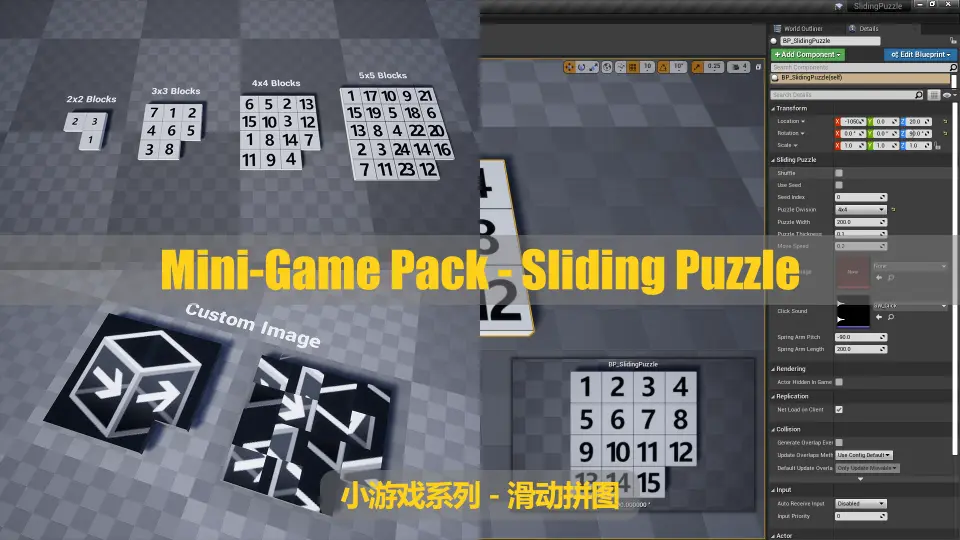
Sliding puzzles show up in games in many forms: a challenge inside a larger Level, a quick activity between missions, or a standalone mobile game. The task is consistent—rearrange the blocks until the picture lines up—but each project needs the interaction to feel right for its own context. Mini-Game Pack - Sliding Puzzle delivers the mechanic as a Blueprint Template, with smooth block movement and a set of customization parameters that keep the puzzle adaptable.
The asset is tagged as Minigame, Template, and Starter, which describes its role in a project fairly well. It is not a full game shell or a finished Level; it is the puzzle system itself. The blocks, the movement, the input handling, and the completion event are all there, arranged so a team can build around them rather than start from an empty Blueprint Graph.
Setup: Commented Graphs and Quick Integration
All of the pack's logic is done with Blueprints. The graphs are commented and arranged with readability in mind, so anyone opening them can follow how the puzzle works. That organization matters for a template, because the arrangement of the nodes doubles as an explanation of the system.
Setup is described as quick and easy. With parameters available for the key adjustments and the Blueprint structure laid out clearly, most of the configuration can happen without rewriting logic. The pack is meant to be used, and the smaller the integration effort, the sooner the puzzle can be tested inside a real project.
Controls: Click, Press, and Touchscreen Movement
Input runs straight through the puzzle blocks. Players click or press a block to move it, and the block responds with a smooth animation rather than an instant jump. That movement effect sits at the center of the pack—it is the first thing a player sees as the puzzle starts to come together.
Mobile devices are covered through touchscreen support. Tapping a block on a touch display performs the same action as clicking it with a mouse. Because 1 interaction style covers both input methods, a project can ship the same puzzle to desktop and mobile without layering separate input handling on top.
Tuning Block Size, Sound, Speed, Image, and Feedback
The customization options sit behind parameters, and the list covers the parts of the puzzle that projects typically want to adjust:
Block Size: Changes the dimensions of the tiles on the board.
Slide Speed: Sets how quickly blocks animate into their new positions.
Click Sound: Picks the audio that plays when a block is pressed.
Puzzle Image: Supplies the artwork the solved board reveals.
Feedback: Controls how the puzzle responds to the player's input.
These parameters change the experience without touching the underlying logic. A project with a compact User Interface (UI) can shrink the blocks. A faster game can increase the slide speed. A studio with its own art direction can drop in a custom image. The click sound and feedback options let the puzzle's presentation match the rest of the project's style.
The Callback Event When the Puzzle Is Finished
The pack includes a Custom Callback Event that fires when the puzzle is finished. That event is the connection between the mini-game and the rest of the game flow. Once a player solves the puzzle, the event can be used to trigger whatever the project needs to happen next.
Keeping that follow-up outside the puzzle logic is what makes the pack reusable. The puzzle does not need to know what happens after the final slide; it reports the moment through the callback, and the project decides how to act on it. Different projects can interpret the completion differently without touching the puzzle itself.
Demos, Documentation, and Support at V1.2
V1.2 comes with reference materials that match the release, including video demos and a Windows demo that lets you feel the movement effect before integrating the pack. Documentation is provided as a PDF with tutorials and release notes, covering both how to use the pack and what changed in the version.
Support is handled directly by the developer, and the order ID is requested when contacting them so that each request can be matched to the right purchase. For a template that will be dropped into real production, having a direct line to the creator is a practical benefit, particularly when the puzzle needs to be adapted to a specific project structure.
 Game Mechanics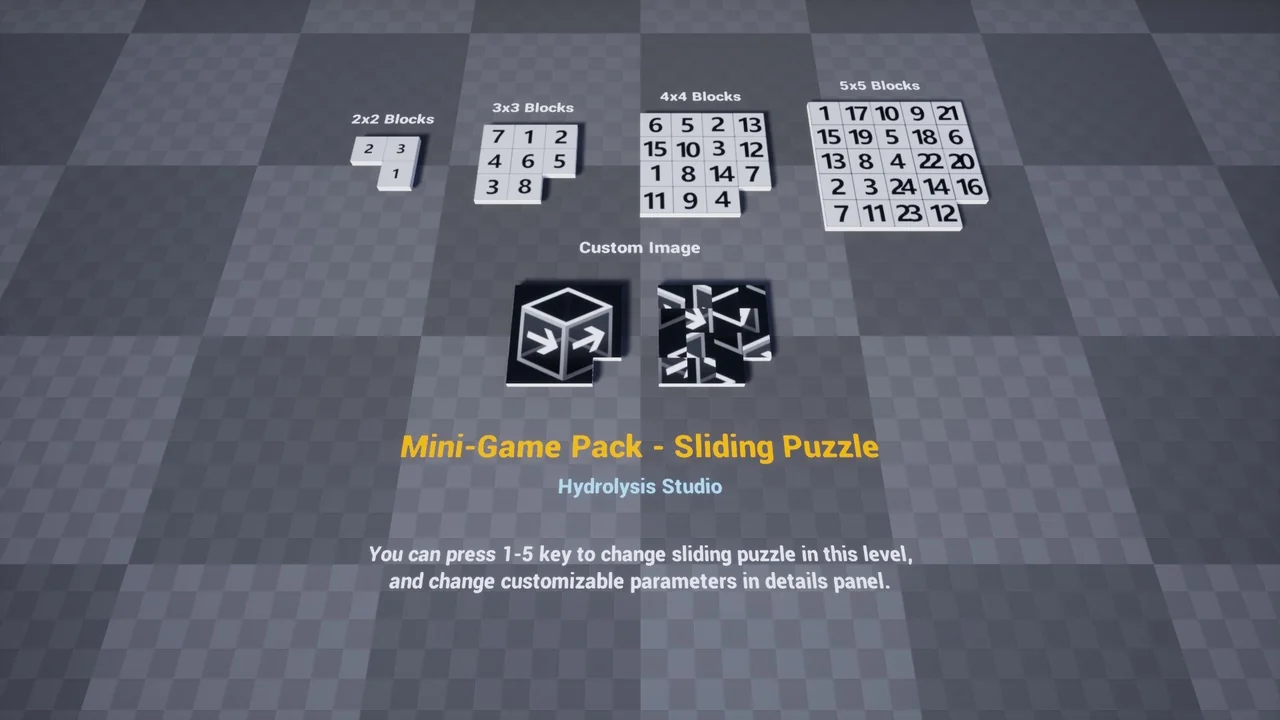
 Game Mechanics
 Tools
Tools Tools
Tools