"a19e0535960bd083"{"id":"1002070","slug":"keys-mini-pack","title":"Keys Mini Pack","category":"Tools, Objects \u0026 Decor","engine":"4.26+,5.0+","assetVersion":"","engineVersion":"Engine Version: 4.26+,5.0+","tag":"Tools","accent":"blue","visual":"mech","summary":"Explore the Keys Mini Pack, featuring everyday and fancy key models with matching HUD sprites for adventure game locks, chests, and panels.","platform":"Unreal Engine","publishedAt":"2026-10-26T15:32:19.903Z","updatedAt":"2026-10-26T15:32:19.903Z","sourceNotes":[],"fileContents":[],"compatibility":["Unreal Engine","Engine Version: 4.26+,5.0+"],"featuredImage":{"alt":"Keys Mini Pack","src":"/wp-content/uploads/published/2026/10/10a848d1f104-4f9d47f2-6f3f-4647-b9e4-fbfb818c599b-28dc6834fe.webp"},"hasDownloadLink":true,"downloads":0,"terms":[{"taxonomy":"category","slug":"tools-objects-and-decor","name":"Tools, Objects \u0026 Decor"}],"galleryImages":[{"src":"/wp-content/uploads/published/2026/10/c24399bc3bef-cd1ae228-1428-4e1e-b65c-770479ccdda6-ec9e9bc64f.webp","alt":"Keys Mini Pack"},{"src":"/wp-content/uploads/published/2026/10/9d25a4e611e4-a0ec1d89-b5aa-4b72-a9ae-0711d382d24b-b7fad01e17.webp","alt":"Keys Mini Pack"},{"src":"/wp-content/uploads/published/2026/10/9c5e24e89dec-2e36c3e7-4e7e-496c-996a-2e205385dcfc-81f582c88c.webp","alt":"Keys Mini Pack"},{"src":"/wp-content/uploads/published/2026/10/87e743e475ea-25045c4f-f748-45c7-8498-63d43e8184f3-017eedebf9.webp","alt":"Keys Mini Pack"},{"src":"/wp-content/uploads/published/2026/10/275b683eecbe-6d4d084c-d350-4f01-8827-1324936e2115-95a4dbed7c.webp","alt":"Keys Mini Pack"},{"src":"/wp-content/uploads/published/2026/10/14c1579740d8-92670fbf-7eb6-4ad8-94e0-24b02a7c795e-2f963714b7.webp","alt":"Keys Mini Pack"}],"accessPanel":{"kind":"resource","title":"Download this resource","eyebrow":"Free Download","message":"Log in or create a free account to start your download.","fileName":"Keys Mini Pack.7z","safetyNote":"Resources are manually reviewed before listing to improve quality and reduce obvious risks.","actionLabel":"Download Free","resourceType":"Resource archive"},"contentHtml":"\u003cp\u003eAdventure settings frequently rely on locked thresholds to structure progression, reward exploration, and pace narrative discoveries. Whether players confront heavy iron doors, hidden strongboxes, or electrical panels, locked objects form the backbone of exploratory level design. The Keys Mini Pack addresses this specific design requirement by offering a curated assortment of keys that range from ordinary, everyday implements to distinctive, fancy designs. Alongside the primary models, each piece includes pre-rendered sprite assets, allowing developers to represent items within game interfaces without requiring secondary rendering passes.\u003c/p\u003e \u003ch2\u003eEveryday Keys to Fancy Keys: Equipping Doors, Chests, and Panels\u003c/h2\u003e\n\u003cp\u003eLock mechanics in games serve diverse storytelling and functional purposes, requiring visual variation to communicate their role to the player. A battered utility panel tucked into a maintenance corridor demands a very different visual language than an antique chest sitting at the heart of an ancient vault. The Keys Mini Pack accounts for this contrast by supplying both everyday keys and ornate, fancy alternatives, keeping visual styles grounded in realistic detail.\u003c/p\u003e\n\u003cp\u003eEveryday designs fit naturally into modern, industrial, or grounded domestic environments. These standard shapes suit padlocks, office desks, service panels, and simple wooden doorways, communicating immediate utility without drawing unnecessary narrative weight. In contrast, the special, fancy keys carry decorative flourishes suitable for major milestones, restricted sanctuary gates, high-tier loot chests, or secret compartments. Having both styles readily available allows developers to establish an intuitive hierarchy of access within a single game space, guiding players through visual cues before they even read an item description.\u003c/p\u003e \u003ch2\u003eRendered Sprites for HUD and Inventory Systems\u003c/h2\u003e\n\u003cp\u003eOne common friction point when assembling small interactive items is bridging the gap between the 3D game world and the user interface. While a 3D model functions on tables, floors, or key hooks, games almost always require an equivalent 2D asset to represent the item once collected. Setting up an isolated rendering scene, configuring studio lighting, and exporting consistent transparent icons for an interface can easily consume hours of art time for an item as small as a key.\u003c/p\u003e\n\u003cp\u003eEvery key in the Keys Mini Pack is rendered out directly as a sprite. This built-in dual presentation streamlines integration into heads-up displays (HUDs) and inventory systems. When a character pockets a brass key from a tabletop, the corresponding sprite can immediately populate the active item slot, an inspection screen, or a grid-based inventory bag. Because the sprites derive directly from the assets themselves, players experience absolute visual continuity between the physical item resting in the environment and the graphic displayed in their menus.\u003c/p\u003e \u003ch2\u003eThe Mini Pack Concept in Scene Construction\u003c/h2\u003e\n\u003cp\u003eSmall props often pose a persistent challenge in game development pipelines. While tiny details are mandatory for making environments feel authentic and interactive, having senior artists model, unwrap, and texture minor props from the ground up diverts focus away from landmark elements. The Mini Pack concept exists specifically to solve this imbalance, functioning as a focused, small collection of professionally crafted assets that handle routine environmental tasks efficiently.\u003c/p\u003e\n\u003cp\u003eBy relying on ready-made keys, art leads can direct their team’s attention toward iconic vistas, hero props, central architectural set pieces, and character assets that define the game's identity. Small props rarely serve as the visual centerpiece of a frame, yet neglecting them leaves scenes feeling barren or unfinished. Utilizing an established mini pack eliminates the labor overhead of mundane object creation while maintaining the realistic fidelity expected across the wider environment.\u003c/p\u003e \u003ch2\u003eCustomization Baselines and Lockpick Mini Pack Compatibility\u003c/h2\u003e\n\u003cp\u003eProduction demands rarely match stock configurations completely, which makes adaptability an essential consideration. Even when the provided keys do not match a project's exact aesthetic direction out of the box, they serve as advanced production baselines. Artists can take the existing structures and tweak silhouettes, alter material surfaces, or adjust bit patterns to match specific mechanical puzzles without having to start from empty scene files. This tweak-friendly baseline gives teams a working head start on custom key variants.\u003c/p\u003e\n\u003cp\u003eFor projects emphasizing interactive security systems, puzzles, or stealth mechanics, the pack pairs naturally with the Lockpick Mini Pack. Combining dedicated key assets with specialized lockpicking tools provides a unified visual language for bypass mechanics. Players can discover alternative routes by scavenging physical keys for panels and doors or manipulating those same mechanisms using lockpicks, establishing cohesive interaction rules across an entire project.\u003c/p\u003e \u003ch2\u003ePractical Implementation Across Project Types\u003c/h2\u003e\n\u003cp\u003eThe Keys Mini Pack fits cleanly into traditional adventure games, survival horror environments, puzzle titles, and narrative-driven exploration projects where gated progression forms the core gameplay loop. Whether managing an extensive inventory of keys across a sprawling mansion or simply using single-use keys to pop open security panels, the presence of both 3D props and ready-to-use 2D UI sprites removes routine technical hurdles, letting developers focus directly on designing engaging room layouts and access puzzles.\u003c/p\u003e\n\n\u003ch2\u003eExplore Similar Assets\u003c/h2\u003e\n\u003cul\u003e\n\u003cli\u003e\u003ca href=\"https://3dcghub.com/carcasses/\" title=\"Carcasses\"\u003eCarcasses\u003c/a\u003e\u003c/li\u003e\n\u003cli\u003e\u003ca href=\"https://3dcghub.com/american-bar/\" title=\"American Bar\"\u003eAmerican Bar\u003c/a\u003e\u003c/li\u003e\n\u003cli\u003e\u003ca href=\"https://3dcghub.com/deco-statue-collection/\" title=\"Deco Statue Collection\"\u003eDeco Statue Collection\u003c/a\u003e\u003c/li\u003e\n\u003cli\u003e\u003ca href=\"https://3dcghub.com/casino-props/\" title=\"Casino Props\"\u003eCasino Props\u003c/a\u003e\u003c/li\u003e\n\u003cli\u003e\u003ca href=\"https://3dcghub.com/kitchen-accessories-pack/\" title=\"Kitchen Accessories Pack\"\u003eKitchen Accessories Pack\u003c/a\u003e\u003c/li\u003e\n\u003c/ul\u003e","contentTextLength":5698,"navigation":{"current":21,"total":4026,"previous":{"id":"1002071","slug":"knife-mocapanimpack-1-3","title":"Knife MocapAnimPack 1.3","category":"Variety","platform":"Unreal Engine","updatedAt":"2026-10-26T15:32:58.910Z"},"next":{"id":"1002069","slug":"just-whoosh-4-1st-strike","title":"Just Whoosh 4 - 1st Strike","category":"Sound Effects","platform":"Unreal Engine","updatedAt":"2026-10-26T15:30:50.401Z"}},"relatedResources":[{"id":"1001973","slug":"carcasses","title":"Carcasses","category":"Tools, Objects \u0026 Decor","engine":"4.20+,5.0+","assetVersion":"","engineVersion":"Engine Version: 4.20+,5.0+","tag":"Tools","accent":"blue","visual":"mech","summary":"Realistic low-poly 3D carcass models featuring beef, pork, ram cuts, and suspension hooks for slaughterhouse, horror, and medieval environment design.","platform":"Unreal Engine","publishedAt":"2026-10-24T14:02:45.788Z","updatedAt":"2026-10-24T14:02:45.788Z","sourceNotes":[],"fileContents":[],"compatibility":["Unreal Engine","Engine Version: 4.20+,5.0+"],"featuredImage":{"alt":"Carcasses","src":"/wp-content/uploads/published/2026/10/31f55fca9195-b717c398-6494-4752-b78e-b232aab5f415-01aca83964.webp"},"hasDownloadLink":true,"downloads":1},{"id":"1001946","slug":"american-bar","title":"American Bar","category":"Tools, Objects \u0026 Decor","engine":"4.26+,5.0+","assetVersion":"","engineVersion":"Engine Version: 4.26+,5.0+","tag":"Tools","accent":"blue","visual":"mech","summary":"Configure the American Bar game props kit with custom materials on static mesh surfaces and manage surface adjustments through object properties.","platform":"Unreal Engine","publishedAt":"2026-10-24T11:20:17.570Z","updatedAt":"2026-10-24T11:20:17.570Z","sourceNotes":[],"fileContents":[],"compatibility":["Unreal Engine","Engine Version: 4.26+,5.0+"],"featuredImage":{"alt":"American Bar","src":"/wp-content/uploads/published/2026/10/5568197c90f3-e1a448bb-84b8-4700-ae13-10824c578603-ca43e406ad.webp"},"hasDownloadLink":true,"downloads":1},{"id":"1002084","slug":"crystals","title":"Crystals","category":"Tools, Objects \u0026 Decor","engine":"4.22+,5.0+","assetVersion":"","engineVersion":"Engine Version: 4.22+,5.0+","tag":"Tools","accent":"blue","visual":"mech","summary":"A close look at Crystals, featuring ten dynamic crystal materials with integrated visual shader effects, character appearance use, and dissolve behaviors.","platform":"Unreal Engine","publishedAt":"2026-10-26T15:53:48.524Z","updatedAt":"2026-10-26T15:53:48.524Z","sourceNotes":[],"fileContents":[],"compatibility":["Unreal Engine","Engine Version: 4.22+,5.0+"],"featuredImage":{"alt":"Crystals","src":"/wp-content/uploads/published/2026/10/3d3f811432f4-9db3a354-b1c7-4c83-a6d9-ed03c8d2dd66-15ba8596de.webp"},"hasDownloadLink":true,"downloads":0}]}
Tools
Keys Mini Pack
Explore the Keys Mini Pack, featuring everyday and fancy key models with matching HUD sprites for adventure game locks, chests, and panels.
Adventure settings frequently rely on locked thresholds to structure progression, reward exploration, and pace narrative discoveries. Whether players confront heavy iron doors, hidden strongboxes, or electrical panels, locked objects form the backbone of exploratory level design. The Keys Mini Pack addresses this specific design requirement by offering a curated assortment of keys that range from ordinary, everyday implements to distinctive, fancy designs. Alongside the primary models, each piece includes pre-rendered sprite assets, allowing developers to represent items within game interfaces without requiring secondary rendering passes.
Everyday Keys to Fancy Keys: Equipping Doors, Chests, and Panels
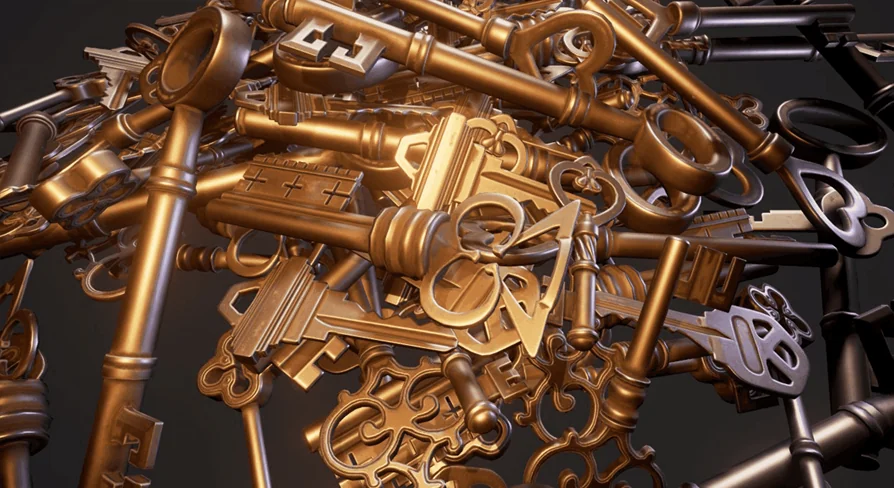
Lock mechanics in games serve diverse storytelling and functional purposes, requiring visual variation to communicate their role to the player. A battered utility panel tucked into a maintenance corridor demands a very different visual language than an antique chest sitting at the heart of an ancient vault. The Keys Mini Pack accounts for this contrast by supplying both everyday keys and ornate, fancy alternatives, keeping visual styles grounded in realistic detail.
Everyday designs fit naturally into modern, industrial, or grounded domestic environments. These standard shapes suit padlocks, office desks, service panels, and simple wooden doorways, communicating immediate utility without drawing unnecessary narrative weight. In contrast, the special, fancy keys carry decorative flourishes suitable for major milestones, restricted sanctuary gates, high-tier loot chests, or secret compartments. Having both styles readily available allows developers to establish an intuitive hierarchy of access within a single game space, guiding players through visual cues before they even read an item description.
Rendered Sprites for HUD and Inventory Systems
One common friction point when assembling small interactive items is bridging the gap between the 3D game world and the user interface. While a 3D model functions on tables, floors, or key hooks, games almost always require an equivalent 2D asset to represent the item once collected. Setting up an isolated rendering scene, configuring studio lighting, and exporting consistent transparent icons for an interface can easily consume hours of art time for an item as small as a key.
Every key in the Keys Mini Pack is rendered out directly as a sprite. This built-in dual presentation streamlines integration into heads-up displays (HUDs) and inventory systems. When a character pockets a brass key from a tabletop, the corresponding sprite can immediately populate the active item slot, an inspection screen, or a grid-based inventory bag. Because the sprites derive directly from the assets themselves, players experience absolute visual continuity between the physical item resting in the environment and the graphic displayed in their menus.
The Mini Pack Concept in Scene Construction
Small props often pose a persistent challenge in game development pipelines. While tiny details are mandatory for making environments feel authentic and interactive, having senior artists model, unwrap, and texture minor props from the ground up diverts focus away from landmark elements. The Mini Pack concept exists specifically to solve this imbalance, functioning as a focused, small collection of professionally crafted assets that handle routine environmental tasks efficiently.
By relying on ready-made keys, art leads can direct their team’s attention toward iconic vistas, hero props, central architectural set pieces, and character assets that define the game's identity. Small props rarely serve as the visual centerpiece of a frame, yet neglecting them leaves scenes feeling barren or unfinished. Utilizing an established mini pack eliminates the labor overhead of mundane object creation while maintaining the realistic fidelity expected across the wider environment.
Customization Baselines and Lockpick Mini Pack Compatibility
Production demands rarely match stock configurations completely, which makes adaptability an essential consideration. Even when the provided keys do not match a project's exact aesthetic direction out of the box, they serve as advanced production baselines. Artists can take the existing structures and tweak silhouettes, alter material surfaces, or adjust bit patterns to match specific mechanical puzzles without having to start from empty scene files. This tweak-friendly baseline gives teams a working head start on custom key variants.
For projects emphasizing interactive security systems, puzzles, or stealth mechanics, the pack pairs naturally with the Lockpick Mini Pack. Combining dedicated key assets with specialized lockpicking tools provides a unified visual language for bypass mechanics. Players can discover alternative routes by scavenging physical keys for panels and doors or manipulating those same mechanisms using lockpicks, establishing cohesive interaction rules across an entire project.
Practical Implementation Across Project Types
The Keys Mini Pack fits cleanly into traditional adventure games, survival horror environments, puzzle titles, and narrative-driven exploration projects where gated progression forms the core gameplay loop. Whether managing an extensive inventory of keys across a sprawling mansion or simply using single-use keys to pop open security panels, the presence of both 3D props and ready-to-use 2D UI sprites removes routine technical hurdles, letting developers focus directly on designing engaging room layouts and access puzzles.
 Tools
Tools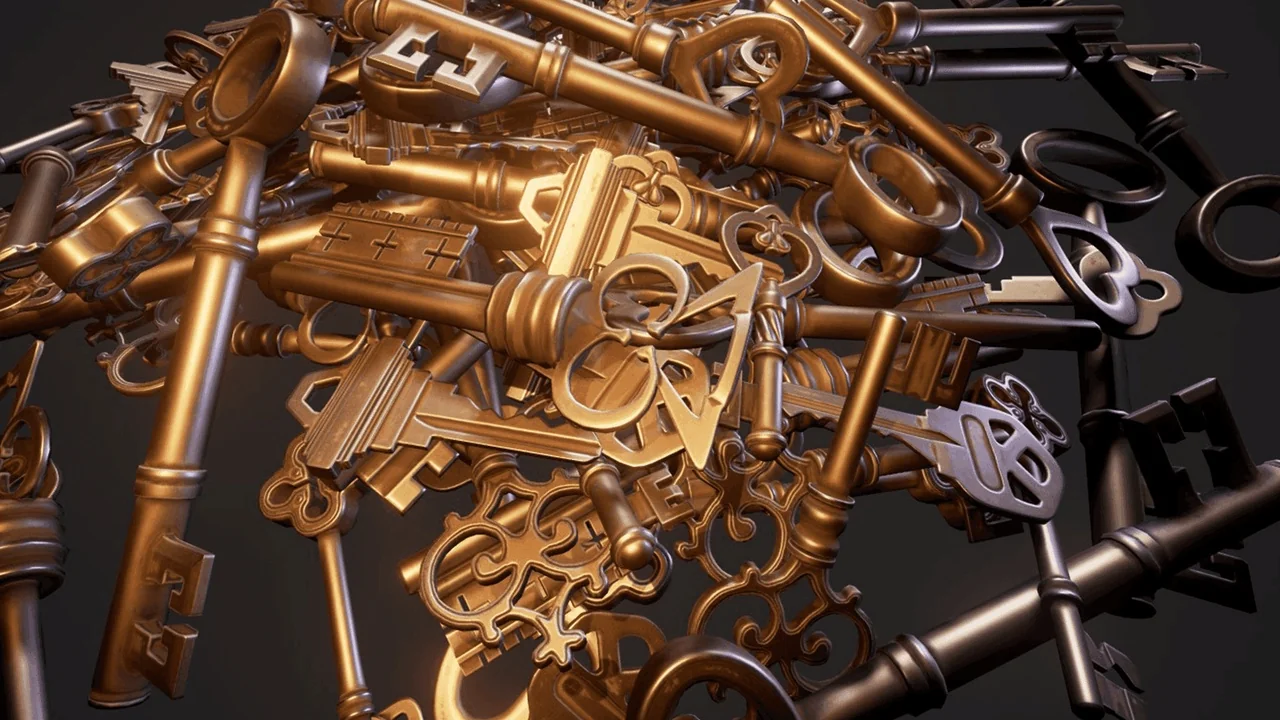
 Tools
Tools Tools
Tools Tools
Tools