"7aa4acc705f0d80b"{"id":"1001946","slug":"american-bar","title":"American Bar","category":"Tools, Objects \u0026 Decor","engine":"4.26+,5.0+","assetVersion":"","engineVersion":"Engine Version: 4.26+,5.0+","tag":"Tools","accent":"blue","visual":"mech","summary":"Configure the American Bar game props kit with custom materials on static mesh surfaces and manage surface adjustments through object properties.","platform":"Unreal Engine","publishedAt":"2026-10-24T11:20:17.570Z","updatedAt":"2026-10-24T11:20:17.570Z","sourceNotes":[],"fileContents":[],"compatibility":["Unreal Engine","Engine Version: 4.26+,5.0+"],"featuredImage":{"alt":"American Bar","src":"/wp-content/uploads/published/2026/10/5568197c90f3-e1a448bb-84b8-4700-ae13-10824c578603-ca43e406ad.webp"},"hasDownloadLink":true,"downloads":0,"terms":[{"taxonomy":"category","slug":"tools-objects-and-decor","name":"Tools, Objects \u0026 Decor"}],"galleryImages":[{"src":"/wp-content/uploads/published/2026/10/9bb2f60c0180-d8646891-c407-4138-81aa-5f3f83222f82-0890f20ee7.webp","alt":"American Bar"},{"src":"/wp-content/uploads/published/2026/10/7bdbbe48550c-ec0574ba-8859-4527-9ee4-0799d6432761-3e7cf23f96.webp","alt":"American Bar"},{"src":"/wp-content/uploads/published/2026/10/8cc3ff84c709-47762709-c4e3-4e4c-80e8-094cc95033a1-515df16b24.webp","alt":"American Bar"},{"src":"/wp-content/uploads/published/2026/10/ceabd3316943-5f99a11e-762e-4bfb-94d4-8a95ffa10063-2ede52603a.webp","alt":"American Bar"},{"src":"/wp-content/uploads/published/2026/10/9186fbd08d90-d37e92d7-6078-49b0-8054-f5804ad4d332-e80dc6ae68.webp","alt":"American Bar"},{"src":"/wp-content/uploads/published/2026/10/7c7f6e603df2-eec17da1-a88d-4109-9d40-006baaf658ed-6d9b007367.webp","alt":"American Bar"},{"src":"/wp-content/uploads/published/2026/10/88eedc3cc7ab-d0acaef7-539c-4441-afb7-2707c334cbe4-dd10e91697.webp","alt":"American Bar"},{"src":"/wp-content/uploads/published/2026/10/17be0bc11f91-2ac9ce36-8225-4354-9e4d-ed619da5be41-441b515f76.webp","alt":"American Bar"},{"src":"/wp-content/uploads/published/2026/10/06224757bbc2-ee2e3a86-be8e-4701-ae2f-eda6c94bbca6-cc2f0cd00c.webp","alt":"American Bar"},{"src":"/wp-content/uploads/published/2026/10/86c640fb11b2-16f53475-0431-4c4e-9bd1-c239c19ad0a8-ddea9418f9.webp","alt":"American Bar"}],"accessPanel":{"kind":"resource","title":"Download this resource","eyebrow":"Free Download","message":"Log in or create a free account to start your download.","fileName":"Content.7z","safetyNote":"Resources are manually reviewed before listing to improve quality and reduce obvious risks.","actionLabel":"Download Free","resourceType":"Resource archive"},"contentHtml":"\u003ch2\u003eConfiguring Static Mesh Elements in an American Bar Scene\u003c/h2\u003e\u003cp\u003eIntegrating environment assets into an interactive project begins with placing base geometry and defining how each component occupies 3D space. The American Bar asset package functions as a game props kit, supplying static mesh items intended to populate specialized architectural scenes. When deploying these components into a level, the initial layout stage centers on staging the static mesh elements to establish spatial proportions, spatial flow, and layout boundaries suitable for interactive exploration.\u003c/p\u003e\u003cp\u003eBecause the collection is categorized as a game props kit, users work directly with static mesh actors that can be dropped into the scene viewport or arranged systematically within the world outliner. Static meshes provide the structural foundation for the scene, holding geometric form while leaving surface treatment open to project-specific requirements. Working with static mesh data in this manner keeps scene assembly straightforward: placement, rotation, and scale can be locked in early while the visual surface definitions remain entirely customizable throughout production.\u003c/p\u003e\u003ch2\u003eMaterial Assignment on Surfaces and Static Mesh Components\u003c/h2\u003e\u003cp\u003eA core operational characteristic of the American Bar assets is the complete freedom granted to surface styling. Users are free to use any materials on surface objects and static meshes within the kit. Rather than constraining the geometry to a single locked appearance, the assets accept any valid material setup an artist chooses to assign.\u003c/p\u003e\u003cp\u003eThis level of material flexibility changes how the props interact with scene aesthetics. In typical prop pipelines, changing the narrative context or regional theme of a space often demands entirely new geometry. With the freedom to assign custom materials to surface objects, a counter, cabinet, or trim element can shift from modern, polished lacquers to weathered, historic finishes simply by changing the material applied to the surfaces. Because any material can be introduced to these static mesh objects, technical artists can link custom surface shaders, procedural tileable textures, or stylized shading networks directly to the meshes without restructuring the underlying asset.\u003c/p\u003e\u003ch2\u003eModifying Materials within the Object's Properties\u003c/h2\u003e\u003cp\u003eApplying custom surfaces does not require external asset modification or destructive model editing. You can change the material in the object's properties directly inside the level editor. This workflow relies on standard property inspection, making surface iteration instantaneous during layout and scene-dressing passes.\u003c/p\u003e\u003cp\u003eTo alter the surface appearance of a placed prop, select the static mesh actor in the level viewport and navigate to the details or properties panel for that specific object. Within the object's properties, the material assignment slots reveal the active material applied to each surface section of the mesh. Substituting a material is handled by picking a new material asset from the project directory or dragging a replacement directly into the designated property field. The change updates immediately in the viewport, allowing real-time evaluation of surface response under the project's existing lighting setup.\u003c/p\u003e\u003cp\u003eHandling material changes within the object's properties brings substantial advantages to level design passes:\u003c/p\u003e\u003cul\u003e\u003cli\u003eIndividual mesh instances placed throughout a level can host distinct materials, preventing duplicate visual patterns across identical static mesh shapes.\u003c/li\u003e\u003cli\u003eMaterial assignments can be tested, swapped, and reverted directly in the editor viewport without reimporting the source geometry.\u003c/li\u003e\u003cli\u003eMaster materials, material instances, or custom shader graphs created within the project can be linked to the object's surface properties without friction.\u003c/li\u003e\u003cli\u003eProp surfaces can be aligned with existing project-wide art guidelines by selecting shared surface materials already configured in the content browser.\u003c/li\u003e\u003c/ul\u003e\u003ch2\u003eManaging Surface Customization Across Game Props Kit Assets\u003c/h2\u003e\u003cp\u003eWorking with a game props kit involves balancing visual consistency across multiple individual static meshes. When populating an American Bar environment, numerous separate props—ranging from focal furniture pieces to minor structural details—must feel cohesive. Because the meshes allow any material on their surfaces, maintaining this visual harmony depends on disciplined management of the materials assigned across object properties.\u003c/p\u003e\u003cp\u003eWhen dressing an expansive scene, establishing a coherent library of surface materials ensures that distinct static mesh objects read as belonging to the same space. An artist can configure a core palette of materials—such as specific wood grains, metallic finishes, or stone surfaces—and assign those consistent materials across the object properties of multiple static meshes. If a scene requires a clean, upscale aesthetic, high-gloss surface materials can be assigned across the board; if the setting calls for an aged, rustic atmosphere, matte and worn materials can be assigned to the exact same static mesh geometry.\u003c/p\u003e\u003ch2\u003eWorkflow Considerations for Scene Staging and Prop Customization\u003c/h2\u003e\u003cp\u003eBecause adjustments occur directly within the object's properties, scene maintenance remains non-destructive throughout production. When static meshes share identical geometry, altering the material on one specific placed instance leaves other instances untouched, unless changes are applied at the base mesh level. This distinction allows environment artists to introduce subtle surface variations across a room, assigning one material to a high-wear area and another to a pristine surface without generating multiple unique 3D files.\u003c/p\u003e\u003cp\u003eManaging props through object properties also streamlines collaboration across teams. Level designers can focus on blocking out spaces using the raw static mesh components, while surfacing artists can step in later to inspect object properties and assign final, approved materials to each surface. This separation of mesh placement and material definition ensures the American Bar kit adapts efficiently to diverse artistic pipelines, technical specifications, and stylistic goals.\u003c/p\u003e\n\n\u003ch2\u003eContinue Browsing Similar Packs\u003c/h2\u003e\n\u003cul\u003e\n\u003cli\u003e\u003ca href=\"https://3dcghub.com/kitchen-accessories-pack/\" title=\"Kitchen Accessories Pack\"\u003eKitchen Accessories Pack\u003c/a\u003e\u003c/li\u003e\n\u003cli\u003e\u003ca href=\"https://3dcghub.com/steampunk-parts-machines-gear-industry/\" title=\"STEAMPUNK-PARTS-MACHINES-GEAR-INDUSTRY\"\u003eSTEAMPUNK-PARTS-MACHINES-GEAR-INDUSTRY\u003c/a\u003e\u003c/li\u003e\n\u003cli\u003e\u003ca href=\"https://3dcghub.com/tribal-totem/\" title=\"Tribal totem\"\u003eTribal totem\u003c/a\u003e\u003c/li\u003e\n\u003cli\u003e\u003ca href=\"https://3dcghub.com/ruins-treasure-prop-pack/\" title=\"Ruins Treasure Prop Pack\"\u003eRuins Treasure Prop Pack\u003c/a\u003e\u003c/li\u003e\n\u003cli\u003e\u003ca href=\"https://3dcghub.com/medieval-vol-6-food-and-feast/\" title=\"Medieval - VOL 6 - Food and Feast\"\u003eMedieval - VOL 6 - Food and Feast\u003c/a\u003e\u003c/li\u003e\n\u003c/ul\u003e","contentTextLength":6313,"navigation":{"current":44,"total":3925,"previous":{"id":"1001947","slug":"ancient-cemetery-props","title":"Ancient Cemetery Props","category":"Environments","platform":"Unreal Engine","updatedAt":"2026-10-24T11:20:42.864Z"},"next":{"id":"1001945","slug":"ambient-video-game-music-science-fiction-4","title":"Ambient Video Game Music - Science Fiction 4","category":"Music","platform":"Unreal Engine","updatedAt":"2026-10-24T11:19:29.462Z"}},"relatedResources":[{"id":"1001889","slug":"kitchen-accessories-pack","title":"Kitchen Accessories Pack","category":"Tools, Objects \u0026 Decor","engine":"4.26+,5.0+","assetVersion":"","engineVersion":"Engine Version: 4.26+,5.0+","tag":"Tools","accent":"blue","visual":"mech","summary":"Explore the Kitchen Accessories Pack, featuring 15 retro UK static meshes, 24 model iterations, shared UV mapping, and packed PBR textures.","platform":"Unreal Engine","publishedAt":"2026-10-22T11:29:29.726Z","updatedAt":"2026-10-22T11:29:29.726Z","sourceNotes":[],"fileContents":[],"compatibility":["Unreal Engine","Engine Version: 4.26+,5.0+"],"featuredImage":{"alt":"Kitchen Accessories Pack","src":"/wp-content/uploads/published/2026/10/1efbd1ef4b39-f2571efa-fade-4d0c-8f74-d7b863450ec2-2fa2b3163d.webp"},"hasDownloadLink":true,"downloads":0},{"id":"1001840","slug":"steampunk-parts-machines-gear-industry","title":"STEAMPUNK-PARTS-MACHINES-GEAR-INDUSTRY","category":"Tools, Objects \u0026 Decor","engine":"4.26+,5.0+","assetVersion":"","engineVersion":"Engine Version: 4.26+,5.0+","tag":"Tools","accent":"blue","visual":"mech","summary":"A close look at STEAMPUNK-PARTS-MACHINES-GEAR-INDUSTRY, featuring 30 gears, 40 materials, 11 blueprint classes, and demo scene integration.","platform":"Unreal Engine","publishedAt":"2026-10-21T08:31:18.965Z","updatedAt":"2026-10-21T08:31:18.965Z","sourceNotes":[],"fileContents":[],"compatibility":["Unreal Engine","Engine Version: 4.26+,5.0+"],"featuredImage":{"alt":"STEAMPUNK-PARTS-MACHINES-GEAR-INDUSTRY","src":"/wp-content/uploads/published/2026/10/4fb3649ab935-2109188b-ef59-41c1-9461-e65ed5d4c5bd-6abb72ff60.webp"},"hasDownloadLink":true,"downloads":0},{"id":"1001671","slug":"tribal-totem","title":"Tribal totem","category":"Tools, Objects \u0026 Decor","engine":"4.23+,5.0+","assetVersion":"","engineVersion":"Engine Version: 4.23+,5.0+","tag":"Tools","accent":"blue","visual":"mech","summary":"Explore the Tribal totem asset kit featuring modular constructor elements, 15 pregathered meshes, 4096x4096 textures, and geometry from 2,260 to 17,000 polygons","platform":"Unreal Engine","publishedAt":"2026-10-13T15:15:53.151Z","updatedAt":"2026-10-13T15:15:53.151Z","sourceNotes":[],"fileContents":[],"compatibility":["Unreal Engine","Engine Version: 4.23+,5.0+"],"featuredImage":{"alt":"Tribal totem","src":"/wp-content/uploads/published/2026/10/33414e010952-2f028e47-7c43-49bb-88c8-44482fd3620a-c1888740c9.webp"},"hasDownloadLink":true,"downloads":0}]}
Tools
American Bar
Configure the American Bar game props kit with custom materials on static mesh surfaces and manage surface adjustments through object properties.
Configuring Static Mesh Elements in an American Bar Scene
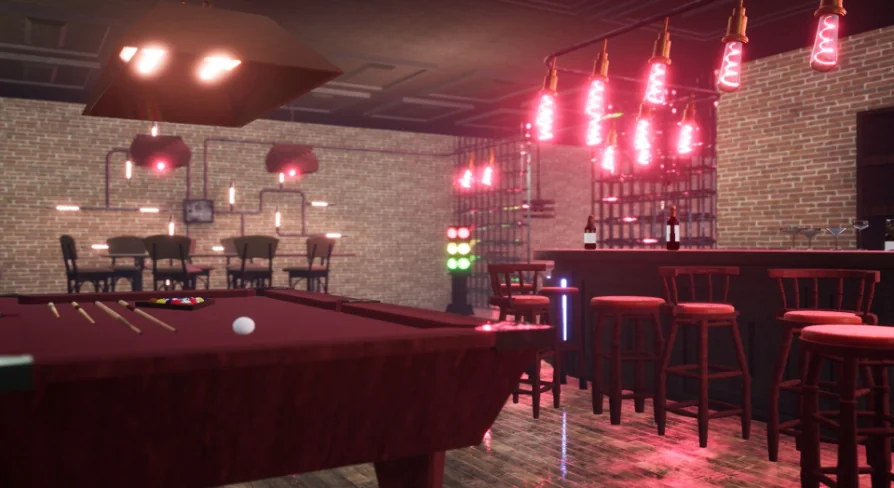
Integrating environment assets into an interactive project begins with placing base geometry and defining how each component occupies 3D space. The American Bar asset package functions as a game props kit, supplying static mesh items intended to populate specialized architectural scenes. When deploying these components into a level, the initial layout stage centers on staging the static mesh elements to establish spatial proportions, spatial flow, and layout boundaries suitable for interactive exploration.
Because the collection is categorized as a game props kit, users work directly with static mesh actors that can be dropped into the scene viewport or arranged systematically within the world outliner. Static meshes provide the structural foundation for the scene, holding geometric form while leaving surface treatment open to project-specific requirements. Working with static mesh data in this manner keeps scene assembly straightforward: placement, rotation, and scale can be locked in early while the visual surface definitions remain entirely customizable throughout production.
Material Assignment on Surfaces and Static Mesh Components
A core operational characteristic of the American Bar assets is the complete freedom granted to surface styling. Users are free to use any materials on surface objects and static meshes within the kit. Rather than constraining the geometry to a single locked appearance, the assets accept any valid material setup an artist chooses to assign.
This level of material flexibility changes how the props interact with scene aesthetics. In typical prop pipelines, changing the narrative context or regional theme of a space often demands entirely new geometry. With the freedom to assign custom materials to surface objects, a counter, cabinet, or trim element can shift from modern, polished lacquers to weathered, historic finishes simply by changing the material applied to the surfaces. Because any material can be introduced to these static mesh objects, technical artists can link custom surface shaders, procedural tileable textures, or stylized shading networks directly to the meshes without restructuring the underlying asset.
Modifying Materials within the Object's Properties
Applying custom surfaces does not require external asset modification or destructive model editing. You can change the material in the object's properties directly inside the level editor. This workflow relies on standard property inspection, making surface iteration instantaneous during layout and scene-dressing passes.
To alter the surface appearance of a placed prop, select the static mesh actor in the level viewport and navigate to the details or properties panel for that specific object. Within the object's properties, the material assignment slots reveal the active material applied to each surface section of the mesh. Substituting a material is handled by picking a new material asset from the project directory or dragging a replacement directly into the designated property field. The change updates immediately in the viewport, allowing real-time evaluation of surface response under the project's existing lighting setup.
Handling material changes within the object's properties brings substantial advantages to level design passes:
Individual mesh instances placed throughout a level can host distinct materials, preventing duplicate visual patterns across identical static mesh shapes.
Material assignments can be tested, swapped, and reverted directly in the editor viewport without reimporting the source geometry.
Master materials, material instances, or custom shader graphs created within the project can be linked to the object's surface properties without friction.
Prop surfaces can be aligned with existing project-wide art guidelines by selecting shared surface materials already configured in the content browser.
Managing Surface Customization Across Game Props Kit Assets
Working with a game props kit involves balancing visual consistency across multiple individual static meshes. When populating an American Bar environment, numerous separate props—ranging from focal furniture pieces to minor structural details—must feel cohesive. Because the meshes allow any material on their surfaces, maintaining this visual harmony depends on disciplined management of the materials assigned across object properties.
When dressing an expansive scene, establishing a coherent library of surface materials ensures that distinct static mesh objects read as belonging to the same space. An artist can configure a core palette of materials—such as specific wood grains, metallic finishes, or stone surfaces—and assign those consistent materials across the object properties of multiple static meshes. If a scene requires a clean, upscale aesthetic, high-gloss surface materials can be assigned across the board; if the setting calls for an aged, rustic atmosphere, matte and worn materials can be assigned to the exact same static mesh geometry.
Workflow Considerations for Scene Staging and Prop Customization
Because adjustments occur directly within the object's properties, scene maintenance remains non-destructive throughout production. When static meshes share identical geometry, altering the material on one specific placed instance leaves other instances untouched, unless changes are applied at the base mesh level. This distinction allows environment artists to introduce subtle surface variations across a room, assigning one material to a high-wear area and another to a pristine surface without generating multiple unique 3D files.
Managing props through object properties also streamlines collaboration across teams. Level designers can focus on blocking out spaces using the raw static mesh components, while surfacing artists can step in later to inspect object properties and assign final, approved materials to each surface. This separation of mesh placement and material definition ensures the American Bar kit adapts efficiently to diverse artistic pipelines, technical specifications, and stylistic goals.
 Tools
Tools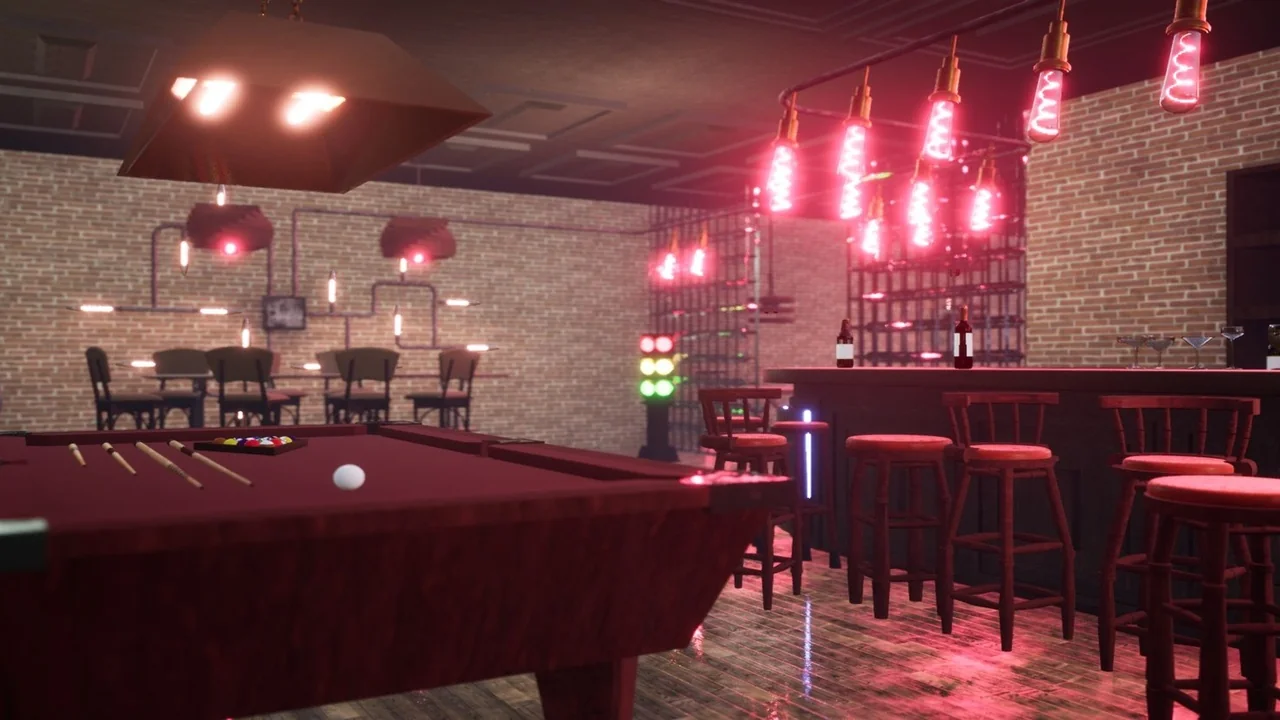
 Tools
Tools Tools
Tools Tools
Tools