"c68a05d5e51405b3"{"id":"1001867","slug":"buttons-levers-knobs-a-customizable-puzzles-asset-pack","title":"Buttons, Levers, Knobs - A customizable puzzles asset-pack","category":"Tools, Objects \u0026 Decor","engine":"4.19+,5.0+","assetVersion":"","engineVersion":"Engine Version: 4.19+,5.0+","tag":"Tools","accent":"blue","visual":"mech","summary":"Examine the technical layout, 1u grid snapping, dial UV overlays, dynamic paint masks, and blueprint logic in this customizable puzzle asset collection.","platform":"Unreal Engine","publishedAt":"2026-10-22T11:10:36.562Z","updatedAt":"2026-10-22T11:10:36.562Z","sourceNotes":[],"fileContents":[],"compatibility":["Unreal Engine","Engine Version: 4.19+,5.0+"],"featuredImage":{"alt":"Buttons, Levers, Knobs - A customizable puzzles asset-pack","src":"/wp-content/uploads/published/2026/10/90ab85e3c92a-e92271ee-771a-4fd9-9620-37f2a1ba47c2-2f40fb6739.webp"},"hasDownloadLink":true,"downloads":0,"terms":[{"taxonomy":"category","slug":"tools-objects-and-decor","name":"Tools, Objects \u0026 Decor"}],"galleryImages":[{"src":"/wp-content/uploads/published/2026/10/d751645dd692-d8c77c63-5e7a-43ab-9e98-86847d4676f0-1bebe6b499.webp","alt":"Buttons, Levers, Knobs - A customizable puzzles asset-pack"},{"src":"/wp-content/uploads/published/2026/10/e858ad8147eb-d71603f8-e157-4b71-aeea-692e376111a1-3222b14c67.webp","alt":"Buttons, Levers, Knobs - A customizable puzzles asset-pack"},{"src":"/wp-content/uploads/published/2026/10/555d2f9f01cd-89a02fac-bdce-4038-9f15-fc2d6d2b0971-835952043b.webp","alt":"Buttons, Levers, Knobs - A customizable puzzles asset-pack"},{"src":"/wp-content/uploads/published/2026/10/c97d313d5e44-156265ca-f6b1-4260-87e1-5217b6be308d-296d80ea3b.webp","alt":"Buttons, Levers, Knobs - A customizable puzzles asset-pack"},{"src":"/wp-content/uploads/published/2026/10/19fdca831177-d471f08f-cf71-4837-8562-07459b4acac9-d034d2d2f1.webp","alt":"Buttons, Levers, Knobs - A customizable puzzles asset-pack"},{"src":"/wp-content/uploads/published/2026/10/a58ff881abf6-8748ab56-9600-4c91-a0e1-c5913b296dac-f99faa77ae.webp","alt":"Buttons, Levers, Knobs - A customizable puzzles asset-pack"},{"src":"/wp-content/uploads/published/2026/10/d8099cdcd63b-02a2428a-5f16-4f23-a13d-bc64485dc5f3-f410603c09.webp","alt":"Buttons, Levers, Knobs - A customizable puzzles asset-pack"},{"src":"/wp-content/uploads/published/2026/10/903f238283fb-400df8a3-66ee-4e16-98b9-a779cc46c22e-e86e76c80f.webp","alt":"Buttons, Levers, Knobs - A customizable puzzles asset-pack"},{"src":"/wp-content/uploads/published/2026/10/5ea61c660cf6-102e4a4e-1880-4769-ab7e-fb17a496e82e-ff168966e8.webp","alt":"Buttons, Levers, Knobs - A customizable puzzles asset-pack"},{"src":"/wp-content/uploads/published/2026/10/fe163ea26da0-f0704623-02a7-4445-a640-507edfb1b8ab-f5d56015da.webp","alt":"Buttons, Levers, Knobs - A customizable puzzles asset-pack"}],"accessPanel":{"kind":"resource","title":"Download this resource","eyebrow":"Free Download","message":"Log in or create a free account to start your download.","fileName":"Content.7z","safetyNote":"Resources are manually reviewed before listing to improve quality and reduce obvious risks.","actionLabel":"Download Free","resourceType":"Resource archive"},"contentHtml":"\u003ch2\u003eGrid Snapping and Origin Placement for Buttons, Levers, and Knobs\u003c/h2\u003e\n\u003cp\u003eConstructing reliable mechanical puzzles in an interactive environment depends heavily on precise spatial alignment. When modular control elements do not adhere to predictable unit increments, assembling complex panels, switchboards, or puzzle boxes introduces minor coordinate misalignments that accumulate across an interface. In this collection, the meshes are set to snap directly to a 1u grid, establishing a strict coordinate standard for every component.\u003c/p\u003e\n\u003cp\u003ePlacing mesh origins at prime locations serves two distinct operational functions: world positioning and transform animation. When snapping pieces together, an origin positioned at the mechanical mounting base ensures that buttons, levers, and knobs seat flush against control panels or surrounding housings without requiring manual sub-unit nudges. This eliminates clipping issues and prevents floating components during level assembly.\u003c/p\u003e\n\u003cp\u003eFor moving parts, origin placement defines the operational axis of rotation or translation. Levers require pivot points placed precisely along the mechanical hinge pin rather than at the geometric center of the combined mesh bounding box. Knobs and rotating dials depend on axial origins centered directly through their cylindrical shafts, enabling clean radial rotation without orbital wobble. Buttons require origins aligned to their depression stroke axis, allowing straightforward linear translation when pressed. By locking these origins to functional mechanical focal points while maintaining 1u grid alignment, the assets streamline both spatial placement and mechanical motion.\u003c/p\u003e \u003ch2\u003eBlueprint Examples for Assembling Puzzle Interactables\u003c/h2\u003e\n\u003cp\u003eTranslating static mechanical meshes into functional game mechanics requires an underlying logic framework. The included blueprint examples demonstrate how to take individual buttons, levers, and knobs and combine them into complete, interactive puzzle assemblies. These examples provide a direct look at component hierarchy, demonstrating how individual static or movable elements can be parented, constrained, and animated within a single functional actor.\u003c/p\u003e\n\u003cp\u003eA central challenge in puzzle design is managing user input and translating player touch or interaction into mechanical feedback. The blueprint samples illustrate how to bridge player interaction with physical mesh response. When a player triggers an action, the blueprint coordinates the physical travel of the button surface, the swing arc of a lever handle, or the stepped detents of a rotating knob. Because the component origins are aligned specifically for these mechanical transformations, the logic needed to drive the animations remains direct and math-efficient.\u003c/p\u003e\n\u003cp\u003eBeyond isolated movements, the blueprint setups show methods for grouping pieces into multi-part puzzle contraptions. A puzzle might require throwing multiple levers in a set sequence, setting dials to specific indicator values, or pressing a sequence of recessed buttons. The blueprints demonstrate how to coordinate states between these distinct component types, providing a structural template for building custom interactive puzzles tailored to specific gameplay requirements.\u003c/p\u003e \u003ch2\u003eDial Layouts and the Dynamic Paint-Mask System\u003c/h2\u003e\n\u003cp\u003eVisual versatility in mechanical props relies on how surface information is mapped and modified. The pack incorporates five full material maps along with a dynamic paint-mask to control surface finishes, wear patterns, and color variations. Using a dynamic paint-mask gives developers the ability to alter the appearance of surfaces without generating entirely new texture sets for each control element.\u003c/p\u003e\n\u003cp\u003eTo support detailed labeling and mechanical readouts, dials feature an extra set of UVs. Secondary UV sets on dials allow for custom overlays, separating the high-resolution base material from specific indicator markings. A dial base can maintain a consistent underlying surface texture from the primary UV channel, while the second channel projects custom numbering, iconography, tick marks, or specialized runic symbols. This separation keeps texture memory efficient while expanding the variety of legible readouts available for puzzle locks and calibration panels.\u003c/p\u003e\n\u003cp\u003eA sample material demonstrates how to configure the five material maps, the dynamic paint-mask, and the secondary UV layout within a working shader graph. Several included material instances show how to leverage these parameters across different visual styles. By adjusting values within these instances, individual components can be altered to look pristine, heavily weathered, coated in colored enamel, or stripped down to basic structural surfaces.\u003c/p\u003e \u003ch2\u003eAdapting Between Realistic and Surreal Themes in Candy Town\u003c/h2\u003e\n\u003cp\u003eMechanical puzzles appear across vastly different aesthetic genres, from grounded industrial installations to abstract game worlds. The included tags identify support for both realistic and surreal styles. The balance between these styles is managed through the combination of geometry silhouette and the adjustable material system.\u003c/p\u003e\n\u003cp\u003eIn realistic puzzle settings, the five material maps handle the subtle roughness variations, surface detailing, and material separation needed to ground the hardware in tangible physical space. The secondary UVs display conventional scientific, maritime, or electrical markings, while the dynamic paint-mask can introduce localized wear around frequently touched levers and push buttons.\u003c/p\u003e\n\u003cp\u003eFor surreal projects, the same physical forms can be pushed toward unconventional color palettes and stylized finishes using the material instances. Compatibility with Candy Town highlights this adaptability. When integrated into whimsical or stylized puzzle environments like Candy Town, the dynamic paint-mask allows for bright, unconventional hues and playful surface treatments that break away from industrial conventions while keeping the underlying mechanical interactions intact.\u003c/p\u003e \u003ch2\u003ePractical Implementation and Assembly Workflow\u003c/h2\u003e\n\u003cp\u003eBuilding a puzzle interface with these components starts by selecting the functional mesh pieces needed for the gameplay interaction. Because every piece conforms to the 1u grid, panel frames, housing slots, and interactive controls snap together cleanly in the viewport. Aligning multiple dials or creating rows of sequential toggle switches requires minimal manual adjustment.\u003c/p\u003e\n\u003cp\u003eAfter placing the static housings, interactive elements can be assembled using the provided blueprint structures as reference templates. Assigning motion logic is simplified by the predefined origin points, ensuring rotations and translations behave predictably along their local axes. Once the mechanical layout and movement bounds are established, developers can apply the sample material or its varied instances, tuning the dynamic paint-mask and overlay channels to align with the visual standards of the target scene.\u003c/p\u003e\n\n\u003ch2\u003eMore From The Same Workflow\u003c/h2\u003e\n\u003cul\u003e\n\u003cli\u003e\u003ca href=\"https://3dcghub.com/garden-environment/\" title=\"Garden Environment\"\u003eGarden Environment\u003c/a\u003e\u003c/li\u003e\n\u003cli\u003e\u003ca href=\"https://3dcghub.com/mega-candles-pack/\" title=\"Mega Candles Pack\"\u003eMega Candles Pack\u003c/a\u003e\u003c/li\u003e\n\u003cli\u003e\u003ca href=\"https://3dcghub.com/dynamic-clocks/\" title=\"Dynamic Clocks\"\u003eDynamic Clocks\u003c/a\u003e\u003c/li\u003e\n\u003cli\u003e\u003ca href=\"https://3dcghub.com/steampunk-parts-machines-gear-industry/\" title=\"STEAMPUNK-PARTS-MACHINES-GEAR-INDUSTRY\"\u003eSTEAMPUNK-PARTS-MACHINES-GEAR-INDUSTRY\u003c/a\u003e\u003c/li\u003e\n\u003cli\u003e\u003ca href=\"https://3dcghub.com/tribal-totem/\" title=\"Tribal totem\"\u003eTribal totem\u003c/a\u003e\u003c/li\u003e\n\u003c/ul\u003e","contentTextLength":7040,"navigation":{"current":58,"total":3860,"previous":{"id":"1001868","slug":"character-wound-system","title":"Character Wound System","category":"Game Mechanics","platform":"Unreal Engine","updatedAt":"2026-10-22T11:11:46.217Z"},"next":{"id":"1001866","slug":"butterfly-particles","title":"Butterfly Particles","category":"Variety","platform":"Unreal Engine","updatedAt":"2026-10-22T11:09:50.685Z"}},"relatedResources":[{"id":"4592","slug":"garden-environment","title":"Garden Environment","category":"Tools, Objects \u0026 Decor","engine":"4.26+,5.0+","assetVersion":"Engine version: 4.26+,5.0+","engineVersion":"4.15","tag":"Tools","accent":"blue","visual":"city","summary":"Enhance your projects with the Garden Environment pack for Unreal Engine. Featuring 84 HQ meshes, customizable blueprints, and 19-layer landscape materials.","platform":"Unreal Engine","publishedAt":"2026-02-13T08:53:25.000Z","updatedAt":"2026-04-19T15:57:06.000Z","sourceNotes":[],"fileContents":[],"compatibility":["Unreal Engine","Engine version: 4.26+,5.0+"],"featuredImage":{"alt":"Garden Environment","src":"https://3dcghub.com/wp-content/uploads/2026/02/86c7f303-8be7-4fa1-90dd-f2843ca9f727.webp"},"hasDownloadLink":true,"downloads":0},{"id":"1000469","slug":"mega-candles-pack","title":"Mega Candles Pack","category":"Tools, Objects \u0026 Decor","engine":"5.3+","assetVersion":"","engineVersion":"Engine Version: 5.3+","tag":"Tools","accent":"blue","visual":"mech","summary":"A pack of 1000 high-quality candle models with customizable wax SSS, adjustable wick materials, Niagara fire and smoke systems, and random flickering light blue","platform":"Unreal Engine","publishedAt":"2026-07-11T18:01:12.561Z","updatedAt":"2026-07-11T18:01:12.561Z","sourceNotes":[],"fileContents":[],"compatibility":["Unreal Engine","Engine Version: 5.3+"],"featuredImage":{"alt":"Mega Candles Pack","src":"/wp-content/uploads/published/2026/07/92fd50dd7f9a-2fd2ad42-1f91-4c0a-9689-2971805231d8-8ae1947082.webp"},"hasDownloadLink":true,"downloads":1},{"id":"4568","slug":"dynamic-clocks","title":"Dynamic Clocks","category":"Tools, Objects \u0026 Decor","engine":"4.26+,5.0+","assetVersion":"Engine version: 4.26+,5.0+","engineVersion":"4.10","tag":"Tools","accent":"blue","visual":"city","summary":"Enhance your game with Dynamic Clocks for Unreal Engine. Easily create functional, customizable timepieces with real-time sync, alarms, and custom 3D meshes.","platform":"Unreal Engine","publishedAt":"2026-02-13T08:50:19.000Z","updatedAt":"2026-04-19T15:57:07.000Z","sourceNotes":[],"fileContents":[],"compatibility":["Unreal Engine"],"featuredImage":{"alt":"Dynamic Clocks","src":"https://3dcghub.com/wp-content/uploads/2026/02/0aa4f252-cfa9-4388-9945-6a00b7ecd16a.webp"},"hasDownloadLink":true,"downloads":0}]}
Tools
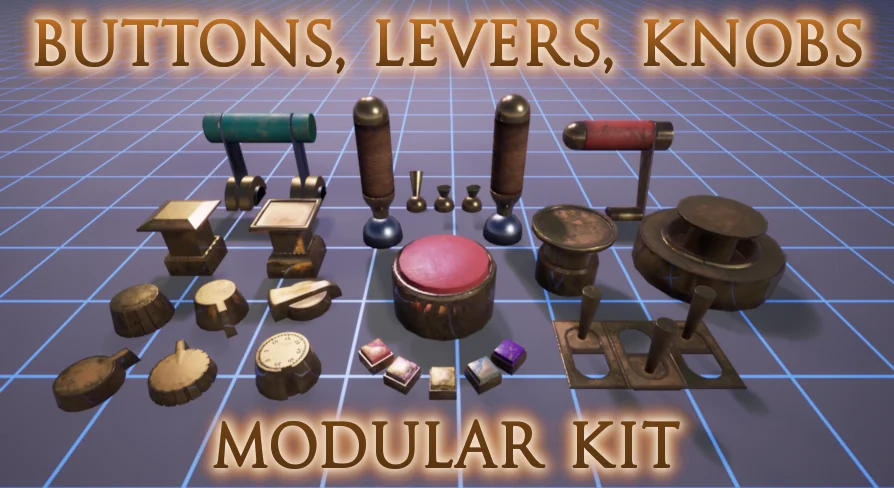
Buttons, Levers, Knobs - A customizable puzzles asset-pack
Examine the technical layout, 1u grid snapping, dial UV overlays, dynamic paint masks, and blueprint logic in this customizable puzzle asset collection.
Grid Snapping and Origin Placement for Buttons, Levers, and Knobs
Constructing reliable mechanical puzzles in an interactive environment depends heavily on precise spatial alignment. When modular control elements do not adhere to predictable unit increments, assembling complex panels, switchboards, or puzzle boxes introduces minor coordinate misalignments that accumulate across an interface. In this collection, the meshes are set to snap directly to a 1u grid, establishing a strict coordinate standard for every component.
Placing mesh origins at prime locations serves two distinct operational functions: world positioning and transform animation. When snapping pieces together, an origin positioned at the mechanical mounting base ensures that buttons, levers, and knobs seat flush against control panels or surrounding housings without requiring manual sub-unit nudges. This eliminates clipping issues and prevents floating components during level assembly.
For moving parts, origin placement defines the operational axis of rotation or translation. Levers require pivot points placed precisely along the mechanical hinge pin rather than at the geometric center of the combined mesh bounding box. Knobs and rotating dials depend on axial origins centered directly through their cylindrical shafts, enabling clean radial rotation without orbital wobble. Buttons require origins aligned to their depression stroke axis, allowing straightforward linear translation when pressed. By locking these origins to functional mechanical focal points while maintaining 1u grid alignment, the assets streamline both spatial placement and mechanical motion.
Blueprint Examples for Assembling Puzzle Interactables
Translating static mechanical meshes into functional game mechanics requires an underlying logic framework. The included blueprint examples demonstrate how to take individual buttons, levers, and knobs and combine them into complete, interactive puzzle assemblies. These examples provide a direct look at component hierarchy, demonstrating how individual static or movable elements can be parented, constrained, and animated within a single functional actor.
A central challenge in puzzle design is managing user input and translating player touch or interaction into mechanical feedback. The blueprint samples illustrate how to bridge player interaction with physical mesh response. When a player triggers an action, the blueprint coordinates the physical travel of the button surface, the swing arc of a lever handle, or the stepped detents of a rotating knob. Because the component origins are aligned specifically for these mechanical transformations, the logic needed to drive the animations remains direct and math-efficient.
Beyond isolated movements, the blueprint setups show methods for grouping pieces into multi-part puzzle contraptions. A puzzle might require throwing multiple levers in a set sequence, setting dials to specific indicator values, or pressing a sequence of recessed buttons. The blueprints demonstrate how to coordinate states between these distinct component types, providing a structural template for building custom interactive puzzles tailored to specific gameplay requirements.
Dial Layouts and the Dynamic Paint-Mask System
Visual versatility in mechanical props relies on how surface information is mapped and modified. The pack incorporates five full material maps along with a dynamic paint-mask to control surface finishes, wear patterns, and color variations. Using a dynamic paint-mask gives developers the ability to alter the appearance of surfaces without generating entirely new texture sets for each control element.
To support detailed labeling and mechanical readouts, dials feature an extra set of UVs. Secondary UV sets on dials allow for custom overlays, separating the high-resolution base material from specific indicator markings. A dial base can maintain a consistent underlying surface texture from the primary UV channel, while the second channel projects custom numbering, iconography, tick marks, or specialized runic symbols. This separation keeps texture memory efficient while expanding the variety of legible readouts available for puzzle locks and calibration panels.
A sample material demonstrates how to configure the five material maps, the dynamic paint-mask, and the secondary UV layout within a working shader graph. Several included material instances show how to leverage these parameters across different visual styles. By adjusting values within these instances, individual components can be altered to look pristine, heavily weathered, coated in colored enamel, or stripped down to basic structural surfaces.
Adapting Between Realistic and Surreal Themes in Candy Town
Mechanical puzzles appear across vastly different aesthetic genres, from grounded industrial installations to abstract game worlds. The included tags identify support for both realistic and surreal styles. The balance between these styles is managed through the combination of geometry silhouette and the adjustable material system.
In realistic puzzle settings, the five material maps handle the subtle roughness variations, surface detailing, and material separation needed to ground the hardware in tangible physical space. The secondary UVs display conventional scientific, maritime, or electrical markings, while the dynamic paint-mask can introduce localized wear around frequently touched levers and push buttons.
For surreal projects, the same physical forms can be pushed toward unconventional color palettes and stylized finishes using the material instances. Compatibility with Candy Town highlights this adaptability. When integrated into whimsical or stylized puzzle environments like Candy Town, the dynamic paint-mask allows for bright, unconventional hues and playful surface treatments that break away from industrial conventions while keeping the underlying mechanical interactions intact.
Practical Implementation and Assembly Workflow
Building a puzzle interface with these components starts by selecting the functional mesh pieces needed for the gameplay interaction. Because every piece conforms to the 1u grid, panel frames, housing slots, and interactive controls snap together cleanly in the viewport. Aligning multiple dials or creating rows of sequential toggle switches requires minimal manual adjustment.
After placing the static housings, interactive elements can be assembled using the provided blueprint structures as reference templates. Assigning motion logic is simplified by the predefined origin points, ensuring rotations and translations behave predictably along their local axes. Once the mechanical layout and movement bounds are established, developers can apply the sample material or its varied instances, tuning the dynamic paint-mask and overlay channels to align with the visual standards of the target scene.
 Tools
Tools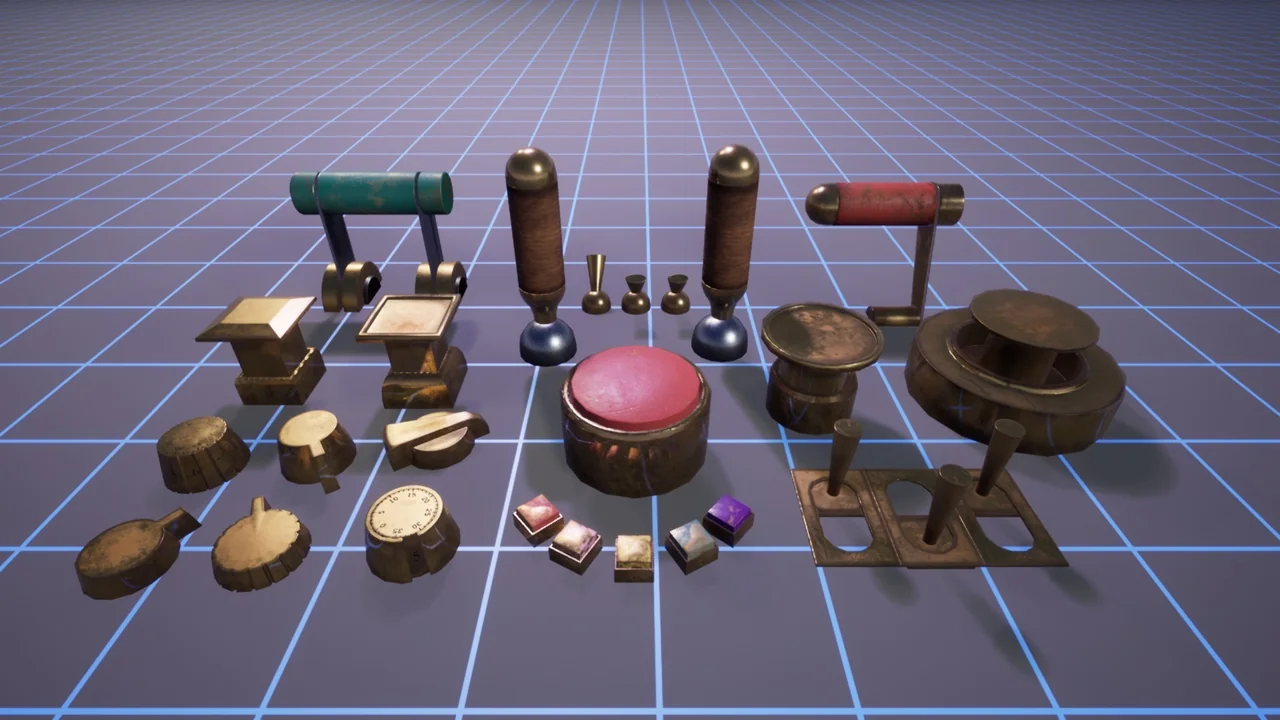
 Tools
Tools Tools
Tools Tools
Tools