"0341a2901a4ae9aa"{"id":"4568","slug":"dynamic-clocks","title":"Dynamic Clocks","category":"Tools, Objects \u0026 Decor","engine":"4.26+,5.0+","assetVersion":"Engine version: 4.26+,5.0+","engineVersion":"4.10","tag":"Tools","accent":"blue","visual":"city","summary":"Enhance your game with Dynamic Clocks for Unreal Engine. Easily create functional, customizable timepieces with real-time sync, alarms, and custom 3D meshes.","platform":"Unreal Engine","publishedAt":"2026-02-13T08:50:19.000Z","updatedAt":"2026-04-19T15:57:07.000Z","sourceNotes":[],"fileContents":[],"compatibility":["Unreal Engine"],"featuredImage":{"alt":"Dynamic Clocks","src":"https://3dcghub.com/wp-content/uploads/2026/02/0aa4f252-cfa9-4388-9945-6a00b7ecd16a.webp"},"hasDownloadLink":true,"downloads":0,"terms":[{"taxonomy":"category","slug":"tools-objects-and-decor","name":"Tools, Objects \u0026 Decor"},{"taxonomy":"post_tag","slug":"3d-props","name":"3D Props"},{"taxonomy":"post_tag","slug":"clock-blueprint","name":"Clock Blueprint"},{"taxonomy":"post_tag","slug":"real-time-time","name":"Real-Time Time"}],"galleryImages":[{"src":"https://3dcghub.com/wp-content/uploads/2026/02/f09cedff8a1b_4a4b1768-d214-402a-9013-4299b16b43c8.webp","alt":"Dynamic Clocks"},{"src":"https://3dcghub.com/wp-content/uploads/2026/02/83fcdb01fed5_3a3d544b-5e58-4007-8466-2688cb44d15a.webp","alt":"Dynamic Clocks"}],"accessPanel":{"kind":"resource","title":"Access this resource","eyebrow":"Free Download","message":"Log in or create a free account to start your download.","fileName":"Dynamic Clocks.zip","safetyNote":"All resources are 100% manually reviewed to eliminate all risks.","actionLabel":"Download Free","resourceType":"Resource archive"},"contentHtml":"\u003ch2\u003eEnhance Your Game Environments with Dynamic Clocks\u003c/h2\u003e\n\u003cp\u003eSmall details often define the atmosphere of a digital world. One such detail is a functional, ticking clock. Dynamic Clocks provides a robust solution for Unreal Engine developers. This tool allows you to create interactive timepieces with ease. Consequently, your environments will feel more alive and immersive.\u003c/p\u003e\n\n\u003cp\u003eThe system is designed for maximum flexibility and ease of use. You can bring your own artistic vision to life without complex coding. Therefore, it is perfect for both beginners and experienced technical artists. Whether you are building a cozy home or a busy station, these clocks fit perfectly.\u003c/p\u003e\n\n\u003ch2\u003eSeamless Integration and Customization\u003c/h2\u003e\n\u003cp\u003eThe workflow for this resource is remarkably straightforward. First, you model your clock and its hands in your preferred 3D software. Next, you import these assets into the Unreal Editor. Finally, you assign them to the provided blueprint. The system handles the rotation and logic automatically.\u003c/p\u003e\n\n\u003cp\u003eIn addition to custom meshes, you have full control over the time settings. You can enable a real-time feature. This allows the clock to mirror the current time on the user's system. Alternatively, you can manually adjust the time to fit a specific gameplay scenario. This flexibility is vital for narrative-driven projects.\u003c/p\u003e\n\n\u003ch3\u003eKey Features of the System\u003c/h3\u003e\n\u003cul\u003e\n \u003cli\u003e\u003cstrong\u003eReal-Time Sync:\u003c/strong\u003e Match the clock to the player's actual system time.\u003c/li\u003e\n \u003cli\u003e\u003cstrong\u003eAdjustable Time:\u003c/strong\u003e Set specific times for puzzles or environmental storytelling.\u003c/li\u003e\n \u003cli\u003e\u003cstrong\u003eAudio Integration:\u003c/strong\u003e Assign custom ticking sounds for extra realism.\u003c/li\u003e\n \u003cli\u003e\u003cstrong\u003eFrequency Control:\u003c/strong\u003e Change how often the clock ticks to match the design.\u003c/li\u003e\n \u003cli\u003e\u003cstrong\u003eReady-to-Use Assets:\u003c/strong\u003e Includes six pre-configured clocks to jumpstart your project.\u003c/li\u003e\n\u003c/ul\u003e\n\n\u003ch2\u003eAdvanced Functionality in Version 1.1\u003c/h2\u003e\n\u003cp\u003eThe developer has recently updated the system to version 1.1. This update introduces several powerful features. Specifically, the code has been refactored for better performance and usability. You can now control the clocks programmatically through events. For instance, you can call the StartClock and StopClock functions during gameplay.\u003c/p\u003e\n\n\u003cp\u003eBeyond that, the update introduces alarm clock functionality. This is a game-changer for interactive interior design. The package now includes an example alarm clock mesh and sound. You can set exactly when the alarm triggers. Furthermore, you can define the duration of the sound effect.\u003c/p\u003e\n\n\u003cp\u003eUsing the ToggleAlarm event, players can interact with the clock directly. This mimics the behavior of a real-life alarm. Consequently, this adds a new layer of interactivity to your game world. It is an excellent tool for horror games or life simulators.\u003c/p\u003e\n\n\u003ch3\u003ePractical Use Cases\u003c/h3\u003e\n\u003cp\u003eDynamic Clocks is not just a decorative asset. It can be a core part of your gameplay loop. For example, a ticking clock can build tension in a thriller. Similarly, an alarm clock could trigger a specific quest event. Because the system is blueprint-based, it integrates easily with other game systems.\u003c/p\u003e\n\n\u003cp\u003eIf you want to see the system in action, you can view the official video tutorial here: \u003ca\u003eWatch Tutorial\u003c/a\u003e. This guide covers the basic setup and advanced features.\u003c/p\u003e\n\n\u003ch2\u003eClosing Notes\u003c/h2\u003e\n\u003cp\u003eDynamic Clocks is a versatile and user-friendly tool for any Unreal Engine creator. It bridges the gap between static props and interactive gameplay elements. By offering real-time synchronization and alarm features, it provides immense value. Start building more believable worlds today with this powerful blueprint system.\u003c/p\u003e\n\n\u003ch2\u003eRelated Resources\u003c/h2\u003e\n\u003cul\u003e\n\u003cli\u003e\u003ca href=\"https://3dcghub.com/ancient-ruins-vol-1-nanite/\"\u003eAncient Ruins – VOL.1 (Nanite)\u003c/a\u003e\u003c/li\u003e\n\u003cli\u003e\u003ca href=\"https://3dcghub.com/enterable-medieval-houses-and-cottages-v1/\"\u003eEnterable Medieval Houses and Cottages – v1\u003c/a\u003e\u003c/li\u003e\n\u003cli\u003e\u003ca href=\"https://3dcghub.com/modern-apartment-archinteriors-vol-9-scene-5/\"\u003eModern Apartment – Archinteriors Vol 9 Scene 5\u003c/a\u003e\u003c/li\u003e\n\u003cli\u003e\u003ca href=\"https://3dcghub.com/foliage-vol-13-southern-oak-trees-nanite-and-low-poly/\"\u003eFoliage VOL.13 – Southern Oak Trees (Nanite and Low Poly)\u003c/a\u003e\u003c/li\u003e\n\u003cli\u003e\u003ca href=\"https://3dcghub.com/foliage-vol-9-coyote-bushes-nanite-and-low-poly/\"\u003eFoliage VOL.9 – Coyote Bushes (Nanite and Low Poly)\u003c/a\u003e\u003c/li\u003e\n\u003c/ul\u003e","contentTextLength":3753,"navigation":{"current":2637,"total":4017,"previous":{"id":"4446","slug":"modular-stylized-medieval-town-medieval-town-medieval-medieval-stylised-town","title":"Modular Stylized Medieval Town ( Medieval Town Medieval Medieval Stylised Town )","category":"Towns \u0026 Villages","platform":"Unreal Engine","updatedAt":"2026-04-19T15:57:08.000Z"},"next":{"id":"4563","slug":"death-male-body-parts-collection-vol-vii","title":"Death Male Body Parts Collection VOL.VII","category":"Tools, Objects \u0026 Decor","platform":"Unreal Engine","updatedAt":"2026-04-19T15:57:07.000Z"}},"relatedResources":[{"id":"1002084","slug":"crystals","title":"Crystals","category":"Tools, Objects \u0026 Decor","engine":"4.22+,5.0+","assetVersion":"","engineVersion":"Engine Version: 4.22+,5.0+","tag":"Tools","accent":"blue","visual":"mech","summary":"A close look at Crystals, featuring ten dynamic crystal materials with integrated visual shader effects, character appearance use, and dissolve behaviors.","platform":"Unreal Engine","publishedAt":"2026-10-26T15:53:48.524Z","updatedAt":"2026-10-26T15:53:48.524Z","sourceNotes":[],"fileContents":[],"compatibility":["Unreal Engine","Engine Version: 4.22+,5.0+"],"featuredImage":{"alt":"Crystals","src":"/wp-content/uploads/published/2026/10/3d3f811432f4-9db3a354-b1c7-4c83-a6d9-ed03c8d2dd66-15ba8596de.webp"},"hasDownloadLink":true,"downloads":1},{"id":"1001867","slug":"buttons-levers-knobs-a-customizable-puzzles-asset-pack","title":"Buttons, Levers, Knobs - A customizable puzzles asset-pack","category":"Tools, Objects \u0026 Decor","engine":"4.19+,5.0+","assetVersion":"","engineVersion":"Engine Version: 4.19+,5.0+","tag":"Tools","accent":"blue","visual":"mech","summary":"Examine the technical layout, 1u grid snapping, dial UV overlays, dynamic paint masks, and blueprint logic in this customizable puzzle asset collection.","platform":"Unreal Engine","publishedAt":"2026-10-22T11:10:36.562Z","updatedAt":"2026-10-22T11:10:36.562Z","sourceNotes":[],"fileContents":[],"compatibility":["Unreal Engine","Engine Version: 4.19+,5.0+"],"featuredImage":{"alt":"Buttons, Levers, Knobs - A customizable puzzles asset-pack","src":"/wp-content/uploads/published/2026/10/90ab85e3c92a-e92271ee-771a-4fd9-9620-37f2a1ba47c2-2f40fb6739.webp"},"hasDownloadLink":true,"downloads":0},{"id":"1000953","slug":"medieval-vol-6-food-and-feast","title":"Medieval - VOL 6 - Food and Feast","category":"Tools, Objects \u0026 Decor","engine":"4.26+,5.0+","assetVersion":"","engineVersion":"Engine Version: 4.26+,5.0+","tag":"Tools","accent":"blue","visual":"mech","summary":"46 Unreal Engine meshes with 2k PBR textures, master materials, and a dynamic lighting scene for building medieval dining scenes. AAA quality, game-ready.","platform":"Unreal Engine","publishedAt":"2026-08-14T05:33:17.779Z","updatedAt":"2026-08-14T05:33:17.779Z","sourceNotes":[],"fileContents":[],"compatibility":["Unreal Engine","Engine Version: 4.26+,5.0+"],"featuredImage":{"alt":"Medieval - VOL 6 - Food and Feast","src":"/wp-content/uploads/published/2026/08/fed9f0a5b8fc-c53e33a2-08f8-4641-8dc7-8ee1f59daeee-ce6811f998.webp"},"hasDownloadLink":true,"downloads":0}]}
Tools
Dynamic Clocks
Enhance your game with Dynamic Clocks for Unreal Engine. Easily create functional, customizable timepieces with real-time sync, alarms, and custom 3D meshes.
Enhance Your Game Environments with Dynamic Clocks
Small details often define the atmosphere of a digital world. One such detail is a functional, ticking clock. Dynamic Clocks provides a robust solution for Unreal Engine developers. This tool allows you to create interactive timepieces with ease. Consequently, your environments will feel more alive and immersive.
The system is designed for maximum flexibility and ease of use. You can bring your own artistic vision to life without complex coding. Therefore, it is perfect for both beginners and experienced technical artists. Whether you are building a cozy home or a busy station, these clocks fit perfectly.
Seamless Integration and Customization
The workflow for this resource is remarkably straightforward. First, you model your clock and its hands in your preferred 3D software. Next, you import these assets into the Unreal Editor. Finally, you assign them to the provided blueprint. The system handles the rotation and logic automatically.
In addition to custom meshes, you have full control over the time settings. You can enable a real-time feature. This allows the clock to mirror the current time on the user's system. Alternatively, you can manually adjust the time to fit a specific gameplay scenario. This flexibility is vital for narrative-driven projects.
Key Features of the System
Real-Time Sync: Match the clock to the player's actual system time.
Adjustable Time: Set specific times for puzzles or environmental storytelling.
Audio Integration: Assign custom ticking sounds for extra realism.
Frequency Control: Change how often the clock ticks to match the design.
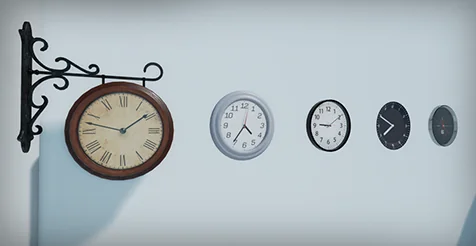
Ready-to-Use Assets: Includes six pre-configured clocks to jumpstart your project.
Advanced Functionality in Version 1.1
The developer has recently updated the system to version 1.1. This update introduces several powerful features. Specifically, the code has been refactored for better performance and usability. You can now control the clocks programmatically through events. For instance, you can call the StartClock and StopClock functions during gameplay.
Beyond that, the update introduces alarm clock functionality. This is a game-changer for interactive interior design. The package now includes an example alarm clock mesh and sound. You can set exactly when the alarm triggers. Furthermore, you can define the duration of the sound effect.
Using the ToggleAlarm event, players can interact with the clock directly. This mimics the behavior of a real-life alarm. Consequently, this adds a new layer of interactivity to your game world. It is an excellent tool for horror games or life simulators.
Practical Use Cases
Dynamic Clocks is not just a decorative asset. It can be a core part of your gameplay loop. For example, a ticking clock can build tension in a thriller. Similarly, an alarm clock could trigger a specific quest event. Because the system is blueprint-based, it integrates easily with other game systems.
If you want to see the system in action, you can view the official video tutorial here: Watch Tutorial. This guide covers the basic setup and advanced features.
Closing Notes
Dynamic Clocks is a versatile and user-friendly tool for any Unreal Engine creator. It bridges the gap between static props and interactive gameplay elements. By offering real-time synchronization and alarm features, it provides immense value. Start building more believable worlds today with this powerful blueprint system.
 Tools
Tools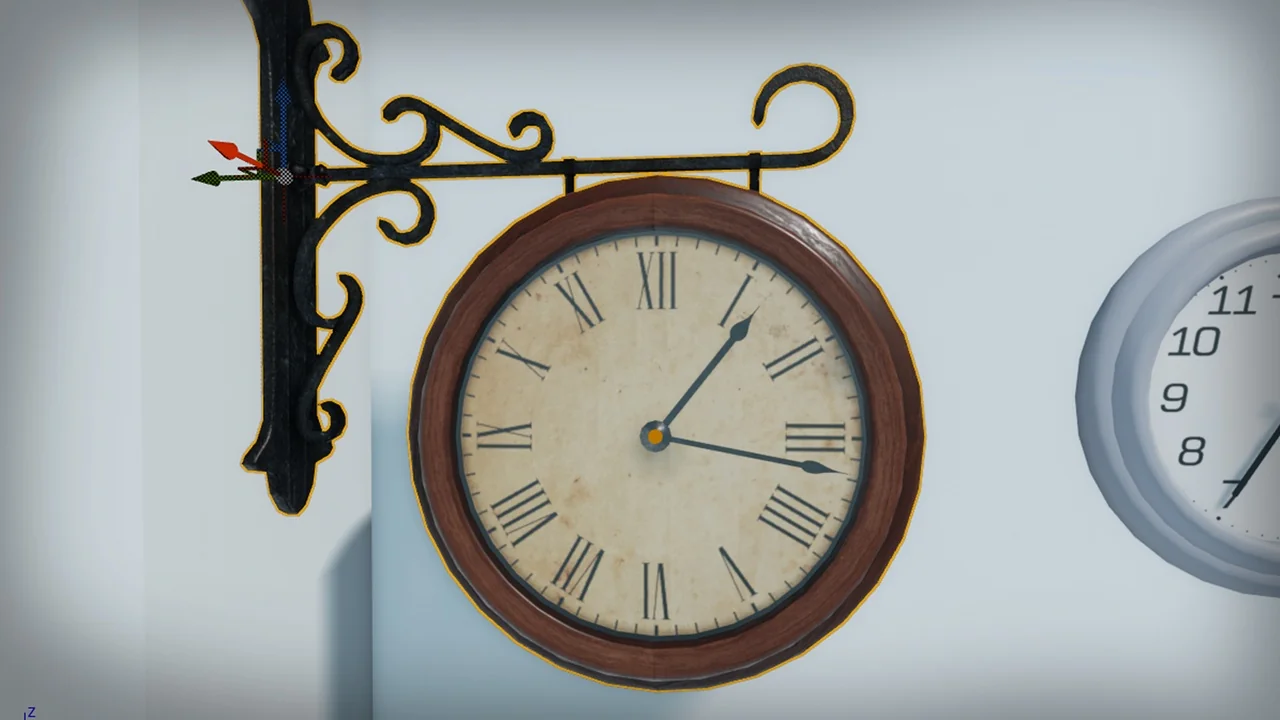
 Tools
Tools Tools
Tools Tools
Tools