"c68a05d5e51405b3"{"id":"1001854","slug":"09-cloth-materials","title":"09 Cloth Materials","category":"Variety","engine":"4.26+,5.0+","assetVersion":"","engineVersion":"Engine Version: 4.26+,5.0+","tag":"Variety","accent":"blue","visual":"luts","summary":"A focused pack of 09 ready-to-use cloth materials with instanced controls for diffuse color, roughness, specular, occlusion, UV tiling, and displacement.","platform":"Unreal Engine","publishedAt":"2026-10-22T10:34:49.927Z","updatedAt":"2026-10-22T10:34:49.927Z","sourceNotes":[],"fileContents":[],"compatibility":["Unreal Engine","Engine Version: 4.26+,5.0+"],"featuredImage":{"alt":"09 Cloth Materials","src":"/wp-content/uploads/published/2026/10/7b5e95f3f164-b93dcd3f-92ed-44e7-8b01-b34b2778087d-89c4520378.webp"},"hasDownloadLink":true,"downloads":0,"terms":[{"taxonomy":"category","slug":"variety","name":"Variety"}],"galleryImages":[{"src":"/wp-content/uploads/published/2026/10/c9a585379b86-d117609c-c4da-4ccf-9ba6-10b51c0670ad-41d5cbe7c4.webp","alt":"09 Cloth Materials"},{"src":"/wp-content/uploads/published/2026/10/8626701d4693-e16b43f6-d813-4ae8-9b2a-707b2fb1d3bf-4064cc0ae5.webp","alt":"09 Cloth Materials"},{"src":"/wp-content/uploads/published/2026/10/17b64573f559-542c0e48-fc0e-47b8-bfb9-3629d76da1c4-2466671941.webp","alt":"09 Cloth Materials"},{"src":"/wp-content/uploads/published/2026/10/7c3040b49f98-9801d178-efd0-4046-9a1e-81172ff12d78-2730a6cd55.webp","alt":"09 Cloth Materials"},{"src":"/wp-content/uploads/published/2026/10/c06dd20edc3f-116d89f4-5ab8-44b4-a55d-1ef34e00fc44-e3e0a0c14a.webp","alt":"09 Cloth Materials"},{"src":"/wp-content/uploads/published/2026/10/de87dbcb7a6b-7d6cc605-2893-4ebe-af90-8dbdcd9ece38-ca1001fa41.webp","alt":"09 Cloth Materials"},{"src":"/wp-content/uploads/published/2026/10/b62f5a541ec9-1bb04bac-52d0-4fc9-81c7-59b7ca0c1728-2a7e4af177.webp","alt":"09 Cloth Materials"}],"accessPanel":{"kind":"resource","title":"Download this resource","eyebrow":"Free Download","message":"Log in or create a free account to start your download.","fileName":"Content.7z","safetyNote":"Resources are manually reviewed before listing to improve quality and reduce obvious risks.","actionLabel":"Download Free","resourceType":"Resource archive"},"contentHtml":"\u003ch2\u003eNine Distinct Cloth Materials Ready to Deploy\u003c/h2\u003e\u003cp\u003eWorking with textile surfaces requires an immediate balance between tactile detail and practical integration. 09 Cloth Materials provides nine distinct fabric surfaces configured for direct use right out of the box. Rather than building cloth surface graphs from scratch, this pack presents nine ready-to-use cloth setups structured to serve immediate scene needs. Fabric surfaces in digital environments often demand subtle, believable texture responses to light, whether covering furniture, draping over environment props, or outfitting character garments.\u003c/p\u003e\u003cp\u003eBecause the pack delivers nine different options, creators have an immediate variety of starting points. Each material variation captures a distinct cloth structure, giving artists the ability to test different surface treatments rapidly across their meshes. Having multiple ready-to-use options side by side allows for practical comparisons, cutting down iteration time when deciding which textile character suits a specific asset or environment best.\u003c/p\u003e\u003ch2\u003eThe Practical Mechanics of Instanced Materials\u003c/h2\u003e\u003cp\u003eEvery surface in this collection comes accompanied by an instanced material. In real-time production workflows, working directly inside complex base material networks for every minor adjustment creates unnecessary friction and technical overhead. An instanced material acts as a lightweight control interface derived from a core master setup, exposing critical settings while bypassing the need to constantly recompile base shader graphs.\u003c/p\u003e\u003cp\u003eThis instancing architecture is essential when applying fabrics across multiple objects. A single base cloth configuration can branch out into various looks purely through exposed parameters. When dressing a scene, an artist might require one piece of fabric to appear worn, dusty, and low in contrast, while another object using the same base textile needs a sharp, saturated hue with pronounced thread detail. Instanced materials make these adjustments immediate, keeping project organization clean and performance stable across complex visual scenes.\u003c/p\u003e\u003ch2\u003eTuning Light Response: Diffuse Color, Roughness, Specular, and Occlusion\u003c/h2\u003e\u003cp\u003eTextiles absorb and reflect light in very specific ways depending on fiber tightness, finishing treatments, and natural material properties. To replicate this range of behavior, the instanced materials in 09 Cloth Materials expose core optical properties for real-time manipulation:\u003c/p\u003e\u003cul\u003e\u003cli\u003e\u003cstrong\u003eDiffuse Color:\u003c/strong\u003e Governs the base color of the fabric. Adjusting this parameter allows artists to tint or recolor the cloth completely, matching environmental color palettes or specific concept art requirements without opening external image editing programs.\u003c/li\u003e\u003cli\u003e\u003cstrong\u003eRoughness:\u003c/strong\u003e Dictates surface micro-geometry and how broadly light scatters across the cloth. Raising roughness produces the dry, matte appearance typical of natural fibers, while lowering it introduces a subtle sheen characteristic of smoother weaves.\u003c/li\u003e\u003cli\u003e\u003cstrong\u003eSpecular:\u003c/strong\u003e Controls non-metallic surface reflectivity. In tandem with roughness, fine-tuning the specular response helps balance how light glints off individual fibers, keeping the textile from appearing plastic or artificially glossy.\u003c/li\u003e\u003cli\u003e\u003cstrong\u003eOcclusion:\u003c/strong\u003e Defines micro-shadowing within the tiny crevices of the weave and natural folds. Modifying occlusion settings deepens contact shadows within the fabric structure, grounding the material and preventing the cloth from appearing flat under ambient illumination.\u003c/li\u003e\u003c/ul\u003e\u003cp\u003eAdjusting these four parameters in coordination lets artists pivot the material's perceived physical weight. A muted diffuse color paired with elevated roughness and emphasized occlusion establishes a heavier, coarser textile look, whereas refined specular and lowered roughness settings immediately shift the surface toward a more polished cloth finish.\u003c/p\u003e\u003ch2\u003eScaling and Density Control with UV Tiles\u003c/h2\u003e\u003cp\u003eA frequent challenge when applying textile materials to 3D meshes is scale discrepancy. What looks like an appropriate weave density on a small cushion might look stretched, disproportionately giant, or unnatural when applied to a large bedspread, a heavy drape, or a small piece of clothing. 09 Cloth Materials addresses this through exposed UV Tiles controls on each instance.\u003c/p\u003e\u003cp\u003eManipulating UV tiling parameters directly inside the material instance allows artists to match the density of the cloth weave to the real-world scale of the target geometry. When mapping large environment assets, increasing the UV tile values retains the fine detail of the thread pattern without requiring geometry re-unwrapping. Conversely, on smaller decorative items, dialing back the UV repetition keeps the weave clearly legible. This immediate scalability ensures that the nine material variations can be mapped across varied asset sizes while maintaining visual consistency throughout a project.\u003c/p\u003e\u003ch2\u003eSurface Relief via Normal Map and Displacement Parameters\u003c/h2\u003e\u003cp\u003eCloth relies heavily on visible surface depth to convey authenticity. Flat textiles look artificial without the physical cues created by threads interweaving, raised seams, or tactile surface variations. The instanced materials in this collection incorporate controls for Normal Map and Displacement data to deliver convincing depth.\u003c/p\u003e\u003cp\u003eThe normal map settings simulate how light interacts with microscopic thread patterns, directional fiber grain, and surface imperfections across the geometry without adding extra polygons. When an asset requires more pronounced dimensional relief—such as deep wrinkles, heavy knit structures, or tactile ribbing—the displacement controls provide direct influence over actual or simulated surface offset. Having access to both normal and displacement parameters within the instanced setup gives artists precise control over how aggressive or restrained the fabric's dimensional texture appears under direct and directional scene lighting.\u003c/p\u003e\u003ch2\u003eApplying the Materials Across Scene Workflows\u003c/h2\u003e\u003cp\u003eThe combination of nine prepared cloth surfaces and granular instance parameters makes 09 Cloth Materials adaptable across diverse rendering and real-time situations. In architectural visualization, interior designers can populate soft furnishings, curtains, and decorative throws, using diffuse color and UV tiling tweaks to test interior color schemes. In prop and environment production, artists can apply these materials to tarps, awnings, and worn fabrics, relying on occlusion, roughness, and normal map controls to integrate the textiles naturally into lived-in spaces.\u003c/p\u003e\u003cp\u003eBecause the pack avoids locked, static texture sets in favor of instanced controls, users can adapt a single material from the pack into multiple distinct looks. By centralizing adjustments around diffuse color, roughness, specular, occlusion, UV tiling, and displacement, the pack provides a balanced foundation designed to handle everyday cloth surfacing challenges efficiently.\u003c/p\u003e\n\n\u003ch2\u003eRelated Resources Worth Checking\u003c/h2\u003e\n\u003cul\u003e\n\u003cli\u003e\u003ca href=\"https://3dcghub.com/1000-mega-decal-package-ai-sources/\" title=\"1000+ Mega Decal Package / AI SOURCES\"\u003e1000+ Mega Decal Package / AI SOURCES\u003c/a\u003e\u003c/li\u003e\n\u003cli\u003e\u003ca href=\"https://3dcghub.com/baltic-vfx-material-functions-and-effects-library/\" title=\"Baltic VFX : Material functions and effects library\"\u003eBaltic VFX : Material functions and effects library\u003c/a\u003e\u003c/li\u003e\n\u003cli\u003e\u003ca href=\"https://3dcghub.com/stylized-250-materials-bundle/\" title=\"Stylized 250 Materials Bundle\"\u003eStylized 250 Materials Bundle\u003c/a\u003e\u003c/li\u003e\n\u003cli\u003e\u003ca href=\"https://3dcghub.com/customizable-grid/\" title=\"Customizable Grid\"\u003eCustomizable Grid\u003c/a\u003e\u003c/li\u003e\n\u003cli\u003e\u003ca href=\"https://3dcghub.com/ascii-post-process-material/\" title=\"ASCII Post Process Material\"\u003eASCII Post Process Material\u003c/a\u003e\u003c/li\u003e\n\u003c/ul\u003e","contentTextLength":7081,"navigation":{"current":71,"total":3860,"previous":{"id":"1001855","slug":"6-versions-apc-military-vehicle","title":"6 Versions APC Military Vehicle","category":"Guns","platform":"Unreal Engine","updatedAt":"2026-10-22T10:35:31.256Z"},"next":{"id":"14215","slug":"modular-snap-system","title":"Modular Snap System","category":"Engine Tools","platform":"Unreal Engine","updatedAt":"2026-10-21T17:02:25.901Z"}},"relatedResources":[{"id":"1000144","slug":"1000-mega-decal-package-ai-sources","title":"1000+ Mega Decal Package / AI SOURCES","category":"Variety","engine":"4.26+,5.0+","assetVersion":"","engineVersion":"Engine Version: 4.26+,5.0+","tag":"Variety","accent":"blue","visual":"mech","summary":"A high-quality customizable decal pack with texture-driven flexibility, combined or separate use, and access to main vector drawing files.","platform":"Unreal Engine","publishedAt":"2026-06-12T18:37:30.067Z","updatedAt":"2026-10-03T14:08:24.863Z","sourceNotes":[],"fileContents":[],"compatibility":["Unreal Engine","Engine Version: 4.26+,5.0+"],"featuredImage":{"alt":"1000+ Mega Decal Package / AI SOURCES","src":"/wp-content/uploads/published/2026/06/c65003b15164-8cfb9e15-1251-4bec-a5db-4031508b2f53-10a82d485f.webp"},"hasDownloadLink":true,"downloads":1},{"id":"1000260","slug":"baltic-vfx-material-functions-and-effects-library","title":"Baltic VFX : Material functions and effects library","category":"Variety","engine":"4.26+,5.0+","assetVersion":"","engineVersion":"Engine Version: 4.26+,5.0+","tag":"Variety","accent":"blue","visual":"luts","summary":"A comprehensive library of fully documented material functions designed to solve visual implementation issues, optimize assets, and speed up VFX workflows.","platform":"Unreal Engine","publishedAt":"2026-06-30T22:57:37.837Z","updatedAt":"2026-06-30T22:57:37.837Z","sourceNotes":[],"fileContents":[],"compatibility":["Unreal Engine","Engine Version: 4.26+,5.0+"],"featuredImage":{"alt":"Baltic VFX : Material functions and effects library","src":"/wp-content/uploads/published/2026/06/35a87b0cd8c8-4cdc9eda-72ab-4d03-a32e-d39f9455123f-d7d1d1988d.webp"},"hasDownloadLink":true,"downloads":0},{"id":"13258","slug":"stylized-250-materials-bundle","title":"Stylized 250 Materials Bundle","category":"Variety","engine":"4.26+,5.0+","assetVersion":"Engine version: 4.26+,5.0+","engineVersion":"4.18","tag":"Variety","accent":"blue","visual":"luts","summary":"Enhance your game environments with the Stylized 250 Materials Bundle, a massive collection of high-quality textures designed for immersive outdoor scenes across diverse biomes.","platform":"Unreal Engine","publishedAt":"2026-03-10T16:36:08.000Z","updatedAt":"2026-04-19T15:46:30.000Z","sourceNotes":[],"fileContents":[],"compatibility":["Unreal Engine","Engine version: 4.26+,5.0+"],"featuredImage":{"alt":"Stylized 250 Materials Bundle","src":"https://3dcghub.com/wp-content/uploads/2026/03/b418c587-33c6-4ba3-a5ee-e5638c261639.webp"},"hasDownloadLink":true,"downloads":6}]}
Variety
09 Cloth Materials
A focused pack of 09 ready-to-use cloth materials with instanced controls for diffuse color, roughness, specular, occlusion, UV tiling, and displacement.
Category:Unreal Engine,VarietyPlatform: Unreal EngineEngine Version: 4.26+,5.0+Published: Oct 22, 2026
Variety
Resource overview
Nine Distinct Cloth Materials Ready to Deploy
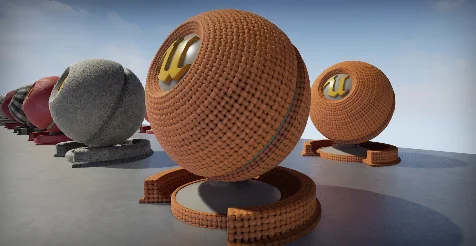
Working with textile surfaces requires an immediate balance between tactile detail and practical integration. 09 Cloth Materials provides nine distinct fabric surfaces configured for direct use right out of the box. Rather than building cloth surface graphs from scratch, this pack presents nine ready-to-use cloth setups structured to serve immediate scene needs. Fabric surfaces in digital environments often demand subtle, believable texture responses to light, whether covering furniture, draping over environment props, or outfitting character garments.
Because the pack delivers nine different options, creators have an immediate variety of starting points. Each material variation captures a distinct cloth structure, giving artists the ability to test different surface treatments rapidly across their meshes. Having multiple ready-to-use options side by side allows for practical comparisons, cutting down iteration time when deciding which textile character suits a specific asset or environment best.
The Practical Mechanics of Instanced Materials
Every surface in this collection comes accompanied by an instanced material. In real-time production workflows, working directly inside complex base material networks for every minor adjustment creates unnecessary friction and technical overhead. An instanced material acts as a lightweight control interface derived from a core master setup, exposing critical settings while bypassing the need to constantly recompile base shader graphs.
This instancing architecture is essential when applying fabrics across multiple objects. A single base cloth configuration can branch out into various looks purely through exposed parameters. When dressing a scene, an artist might require one piece of fabric to appear worn, dusty, and low in contrast, while another object using the same base textile needs a sharp, saturated hue with pronounced thread detail. Instanced materials make these adjustments immediate, keeping project organization clean and performance stable across complex visual scenes.
Tuning Light Response: Diffuse Color, Roughness, Specular, and Occlusion
Textiles absorb and reflect light in very specific ways depending on fiber tightness, finishing treatments, and natural material properties. To replicate this range of behavior, the instanced materials in 09 Cloth Materials expose core optical properties for real-time manipulation:
Diffuse Color: Governs the base color of the fabric. Adjusting this parameter allows artists to tint or recolor the cloth completely, matching environmental color palettes or specific concept art requirements without opening external image editing programs.
Roughness: Dictates surface micro-geometry and how broadly light scatters across the cloth. Raising roughness produces the dry, matte appearance typical of natural fibers, while lowering it introduces a subtle sheen characteristic of smoother weaves.
Specular: Controls non-metallic surface reflectivity. In tandem with roughness, fine-tuning the specular response helps balance how light glints off individual fibers, keeping the textile from appearing plastic or artificially glossy.
Occlusion: Defines micro-shadowing within the tiny crevices of the weave and natural folds. Modifying occlusion settings deepens contact shadows within the fabric structure, grounding the material and preventing the cloth from appearing flat under ambient illumination.
Adjusting these four parameters in coordination lets artists pivot the material's perceived physical weight. A muted diffuse color paired with elevated roughness and emphasized occlusion establishes a heavier, coarser textile look, whereas refined specular and lowered roughness settings immediately shift the surface toward a more polished cloth finish.
Scaling and Density Control with UV Tiles
A frequent challenge when applying textile materials to 3D meshes is scale discrepancy. What looks like an appropriate weave density on a small cushion might look stretched, disproportionately giant, or unnatural when applied to a large bedspread, a heavy drape, or a small piece of clothing. 09 Cloth Materials addresses this through exposed UV Tiles controls on each instance.
Manipulating UV tiling parameters directly inside the material instance allows artists to match the density of the cloth weave to the real-world scale of the target geometry. When mapping large environment assets, increasing the UV tile values retains the fine detail of the thread pattern without requiring geometry re-unwrapping. Conversely, on smaller decorative items, dialing back the UV repetition keeps the weave clearly legible. This immediate scalability ensures that the nine material variations can be mapped across varied asset sizes while maintaining visual consistency throughout a project.
Surface Relief via Normal Map and Displacement Parameters
Cloth relies heavily on visible surface depth to convey authenticity. Flat textiles look artificial without the physical cues created by threads interweaving, raised seams, or tactile surface variations. The instanced materials in this collection incorporate controls for Normal Map and Displacement data to deliver convincing depth.
The normal map settings simulate how light interacts with microscopic thread patterns, directional fiber grain, and surface imperfections across the geometry without adding extra polygons. When an asset requires more pronounced dimensional relief—such as deep wrinkles, heavy knit structures, or tactile ribbing—the displacement controls provide direct influence over actual or simulated surface offset. Having access to both normal and displacement parameters within the instanced setup gives artists precise control over how aggressive or restrained the fabric's dimensional texture appears under direct and directional scene lighting.
Applying the Materials Across Scene Workflows
The combination of nine prepared cloth surfaces and granular instance parameters makes 09 Cloth Materials adaptable across diverse rendering and real-time situations. In architectural visualization, interior designers can populate soft furnishings, curtains, and decorative throws, using diffuse color and UV tiling tweaks to test interior color schemes. In prop and environment production, artists can apply these materials to tarps, awnings, and worn fabrics, relying on occlusion, roughness, and normal map controls to integrate the textiles naturally into lived-in spaces.
Because the pack avoids locked, static texture sets in favor of instanced controls, users can adapt a single material from the pack into multiple distinct looks. By centralizing adjustments around diffuse color, roughness, specular, occlusion, UV tiling, and displacement, the pack provides a balanced foundation designed to handle everyday cloth surfacing challenges efficiently.
 Variety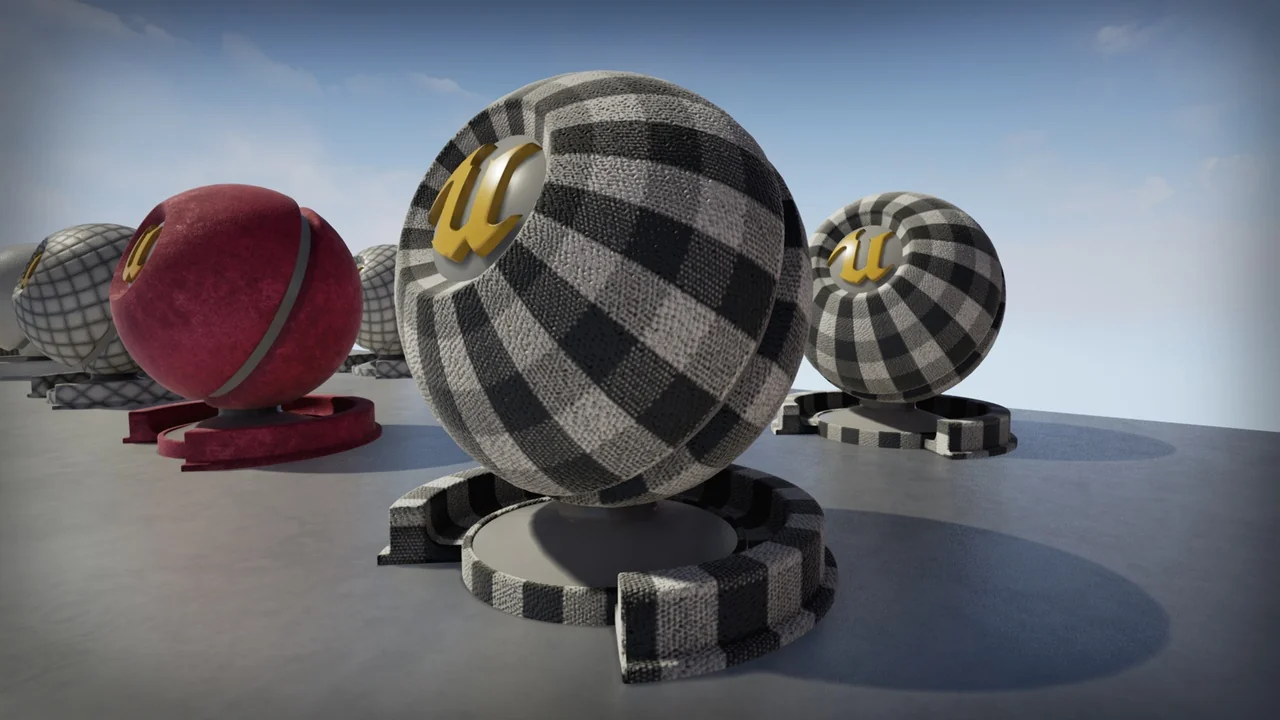
 Variety
 Variety
 Variety