"7066dd76da796369"{"id":"1000144","slug":"1000-mega-decal-package-ai-sources","title":"1000+ Mega Decal Package / AI SOURCES","category":"Variety","engine":"4.26+,5.0+","assetVersion":"","engineVersion":"Engine Version: 4.26+,5.0+","tag":"Variety","accent":"blue","visual":"mech","summary":"A high-quality customizable decal pack with texture-driven flexibility, combined or separate use, and access to main vector drawing files.","platform":"Unreal Engine","publishedAt":"2026-06-12T18:37:30.067Z","updatedAt":"2026-10-03T14:08:24.863Z","sourceNotes":[],"fileContents":[],"compatibility":["Unreal Engine","Engine Version: 4.26+,5.0+"],"featuredImage":{"alt":"1000+ Mega Decal Package / AI SOURCES","src":"/wp-content/uploads/published/2026/06/c65003b15164-8cfb9e15-1251-4bec-a5db-4031508b2f53-10a82d485f.webp"},"hasDownloadLink":true,"downloads":1,"terms":[{"taxonomy":"category","slug":"variety","name":"Variety"}],"galleryImages":[{"src":"/wp-content/uploads/published/2026/06/13c24c3bdd40-eef00764-5dd4-44dd-b6f0-1f9092a83a81-8446444886.webp","alt":"1000+ Mega Decal Package / AI SOURCES"},{"src":"/wp-content/uploads/published/2026/06/06c5a098377b-a862e1c3-1840-423b-ab73-5f947c9b8a04-6cad66a4f7.webp","alt":"1000+ Mega Decal Package / AI SOURCES"},{"src":"/wp-content/uploads/published/2026/06/7a98ded856c6-18c74c4f-acb0-4882-9871-f490a4a73eba-eff98f4a92.webp","alt":"1000+ Mega Decal Package / AI SOURCES"},{"src":"/wp-content/uploads/published/2026/06/b08454c0c500-7c6b1eae-dfc4-4f15-86cc-cae664defe2a-dc4f040518.webp","alt":"1000+ Mega Decal Package / AI SOURCES"},{"src":"/wp-content/uploads/published/2026/06/17a5f12ba8e0-b0e99cee-b420-46e1-8cbe-cbd7c68c602d-286cdb19f5.webp","alt":"1000+ Mega Decal Package / AI SOURCES"},{"src":"/wp-content/uploads/published/2026/06/fdd3b4df6077-e8099d5b-79d5-45b5-9f94-b59866896ff8-ab61da9618.webp","alt":"1000+ Mega Decal Package / AI SOURCES"},{"src":"/wp-content/uploads/published/2026/06/5a4bd112d99f-6d5b17e6-f269-439f-95a8-c1122836f9bf-62d1386dd5.webp","alt":"1000+ Mega Decal Package / AI SOURCES"},{"src":"/wp-content/uploads/published/2026/06/a3f7e9412203-7a45c202-6eb7-4704-a9ba-a26be61b2b6a-d31b680e9e.webp","alt":"1000+ Mega Decal Package / AI SOURCES"},{"src":"/wp-content/uploads/published/2026/06/0dacebddb5d4-d9fe0109-5adc-4c2e-9f0f-5eaf27acb917-1fc77c91e4.webp","alt":"1000+ Mega Decal Package / AI SOURCES"},{"src":"/wp-content/uploads/published/2026/06/ffa009cc3396-cfadbe6f-af07-40aa-bb49-78712c33ef13-a25ff8cb4e.webp","alt":"1000+ Mega Decal Package / AI SOURCES"}],"accessPanel":{"kind":"resource","title":"Download this resource","eyebrow":"Free Download","message":"Log in or create a free account to start your download.","fileName":"1000 Mega Decal Package AI SOURCES.7z","safetyNote":"Resources are manually reviewed before listing to improve quality and reduce obvious risks.","actionLabel":"Download Free","resourceType":"Resource archive"},"contentHtml":"\u003cp\u003eOne of the most common visual problems in environment work is repetition. A surface can be modeled well and shaded cleanly, yet still feel too plain once it appears across multiple shots or playable spaces. A decal pack changes that by giving artists another layer to work with, and 1000+ Mega Decal Package / AI SOURCES leans directly into that kind of flexibility.\u003c/p\u003e\u003cp\u003eThis is an advanced customizable decal pack with high-quality materials. The emphasis is not on a single locked look, but on giving room to design with textures as much as needed. That makes the pack useful when the goal is not simply to place decals, but to keep shaping a surface language until it feels right for the project.\u003c/p\u003e\u003ch2\u003eDesigning with textures in 1000+ Mega Decal Package / AI SOURCES\u003c/h2\u003e\u003cp\u003eThe strongest idea running through this package is freedom through textures. It is presented as a decal pack where you can design as much as you want with textures, which shifts the resource away from being a small set of fixed overlays and closer to a broader visual toolkit.\u003c/p\u003e\u003cp\u003eThat matters in practical art workflows because texture-driven decal work supports iteration. Instead of treating every decal as a final, unchangeable element, this package points toward a process where materials and textures remain active parts of the look-development stage. An artist can explore different directions, refine surfaces, and keep adjusting the visual balance between clean areas and more detailed ones. The pack is described as advanced and customizable, so its identity is tied to choice and variation rather than a narrow preset style.\u003c/p\u003e\u003cp\u003eFor teams or solo creators who prefer to build a scene’s personality in layers, that kind of structure is useful. A decal can be one small mark, one repeated theme, or part of a larger texture composition. Since the package is explicitly framed around designing with textures, it supports a workflow where decals are not merely decorative extras. They become part of how a scene is authored.\u003c/p\u003e\u003ch2\u003eUsing the decal pack together or separately\u003c/h2\u003e\u003cp\u003eAnother practical detail is that the package is designed both together and separately. That single point says a lot about how it can fit into different kinds of production work.\u003c/p\u003e\u003cp\u003eUsed together, the pack can function like a broad decal library that helps establish a more unified visual language across surfaces. This approach suits creators who want many decal elements to contribute to one larger look. When a pack is meant to work together, it becomes easier to think in combinations rather than isolated pieces. You are not limited to choosing one decal and moving on; you can layer or group materials in a way that makes the whole environment feel more intentional.\u003c/p\u003e\u003cp\u003eUsed separately, the same pack becomes much more selective. A creator can pull out only the pieces needed for a specific object, a single wall treatment, a hero prop surface, or a localized detail pass. That separate use is just as important as the combined approach because it keeps the resource from becoming visually heavy by default. Some productions need dense visual dressing, while others need restraint. A pack that supports both methods gives artists room to control how much decal information enters a shot or playable area.\u003c/p\u003e\u003cp\u003eThis dual structure also helps when a project is still finding its style. Early in production, it may be useful to try many pieces together to discover a visual direction. Later, once the look is clearer, the team can isolate only the parts that still serve the scene. The package’s ability to function in both modes gives it a wider creative range without needing to change what it is.\u003c/p\u003e\u003ch2\u003eHigh-quality materials as the base layer\u003c/h2\u003e\u003cp\u003eThe package is containing high-quality materials, and that point is central to its appeal. In decal work, quality at the material level affects whether extra detail feels integrated or distracting.\u003c/p\u003e\u003cp\u003eWhen a decal pack is treated as advanced and customizable, material quality becomes more than a surface-level claim. It is the foundation that allows repeated editing and recombination to stay visually coherent. If an artist is expected to design extensively with textures, then the underlying material quality has to support that process. The pack’s identity suggests that its materials are meant to hold up not just as standalone items, but as components in an ongoing design workflow.\u003c/p\u003e\u003cp\u003eThat is especially relevant when decals are doing more than adding a final pass of wear or variation. In a more creative workflow, decals can help define the rhythm of a surface, control visual density, and break up broad material areas that otherwise look too uniform. High-quality materials support that by making the decal layer feel like a deliberate part of the scene instead of an afterthought.\u003c/p\u003e\u003cp\u003eThere is also a difference between a pack that simply contains many items and one that invites continued use across different arrangements. The note about high quality suggests that the package is meant to stay useful beyond one quick placement pass. It is the kind of detail that supports revisiting a scene and still finding ways to refine it.\u003c/p\u003e\u003ch2\u003eCustomizable decal workflow with vector drawings\u003c/h2\u003e\u003cp\u003eOne of the more specific details attached to the package is the availability of the main file of vector drawings. This reinforces the customizable side of the resource in a direct way.\u003c/p\u003e\u003cp\u003eVector drawings matter because they point to editability at the design level, not only at the placement level. A decal pack can be customizable in the sense that you rearrange existing pieces, but access to the main vector drawing files suggests another layer of control. It opens the door to adjusting the original graphic foundations behind the decals rather than only working with finished outputs. For creators who like to tailor visual elements closely to a project’s style, that is a meaningful part of the package.\u003c/p\u003e\u003cp\u003eThe inclusion of vector-based available details also fits neatly with the description that you can design as much as you want with textures. Both details describe the same broader idea from different angles: this package is not limited to static use. It supports a process where the artist continues shaping the result.\u003c/p\u003e\u003cp\u003eAlongside that, video documentation is noted as part of the resource context. For a customizable pack, documentation has practical value because the more flexible a resource becomes, the more useful guided reference can be during setup and experimentation. In this case, the presence of documentation aligns with the package’s focus on customization rather than one-click use.\u003c/p\u003e\u003ch2\u003eWhere Mega Decal Package / AI SOURCES fits best\u003c/h2\u003e\u003cp\u003eThis package fits best where visual iteration is part of the job. It is not framed around a single narrow outcome. Its strength lies in offering high-quality decal materials that can be used broadly, combined into larger sets, or pulled apart for more focused placement.\u003c/p\u003e\u003cp\u003eThat makes it well suited to creators who want decals to participate in the design process instead of arriving only at the very end. The texture-focused approach supports experimentation. The ability to use elements together or separately supports different levels of visual density. The availability of the main vector drawing files extends the package beyond simple placement and into deeper customization. For artists and developers shaping the look of surfaces through layered detail, this is the kind of resource that fits naturally into production.\u003c/p\u003e\n\n\u003ch2\u003eMore From The Same Workflow\u003c/h2\u003e\n\u003cul\u003e\n\u003cli\u003e\u003ca href=\"https://3dcghub.com/advanced-screen-material-3-ai-sources/\" title=\"Advanced Screen Material 3 / AI SOURCES\"\u003eAdvanced Screen Material 3 / AI SOURCES\u003c/a\u003e\u003c/li\u003e\n\u003cli\u003e\u003ca href=\"https://3dcghub.com/edge-bevel-decals/\" title=\"Edge Bevel Decals\"\u003eEdge Bevel Decals\u003c/a\u003e\u003c/li\u003e\n\u003cli\u003e\u003ca href=\"https://3dcghub.com/ascii-post-process-material/\" title=\"ASCII Post Process Material\"\u003eASCII Post Process Material\u003c/a\u003e\u003c/li\u003e\n\u003cli\u003e\u003ca href=\"https://3dcghub.com/shiny-things/\" title=\"Shiny Things\"\u003eShiny Things\u003c/a\u003e\u003c/li\u003e\n\u003cli\u003e\u003ca href=\"https://3dcghub.com/particle-dynamic-magic-2-decal-spline-ai-particles-dynamics/\" title=\"Particle Dynamic Magic 2: Decal, Spline, AI Particles \u0026amp; dynamics\"\u003eParticle Dynamic Magic 2: Decal, Spline, AI Particles \u0026amp; dynamics\u003c/a\u003e\u003c/li\u003e\n\u003c/ul\u003e","contentTextLength":7616,"navigation":{"current":789,"total":4016,"previous":{"id":"1000070","slug":"infected-rage-unleashed","title":"INFECTED Rage Unleashed","category":"Characters \u0026 Creatures","platform":"Unreal Engine","updatedAt":"2026-10-03T14:08:27.227Z"},"next":{"id":"1001329","slug":"video-player-360-2d-180-360-stereo","title":"Video Player 360 (2D, 180, 360, Stereo)","category":"Engine Tools","platform":"Unreal Engine","updatedAt":"2026-10-03T04:19:57.661Z"}},"relatedResources":[{"id":"13073","slug":"advanced-screen-material-3-ai-sources","title":"Advanced Screen Material 3 / AI SOURCES","category":"Variety","engine":"4.26+,5.0+","assetVersion":"Engine version: 4.26+,5.0+","engineVersion":"4.23","tag":"Variety","accent":"blue","visual":"luts","summary":"Advanced Screen Material 3 / AI SOURCES provides a comprehensive set of customizable screen and hologram materials. This package includes both version 2 and version 3, offering expanded textures for creative flexibility.","platform":"Unreal Engine","publishedAt":"2026-03-10T15:43:25.000Z","updatedAt":"2026-04-19T15:46:32.000Z","sourceNotes":[],"fileContents":[],"compatibility":["Unreal Engine","Engine version: 4.26+,5.0+"],"featuredImage":{"alt":"Advanced Screen Material 3 / AI SOURCES","src":"https://3dcghub.com/wp-content/uploads/2026/03/7d2f55a0-5d36-4728-86ce-b58ac6f93f5f.webp"},"hasDownloadLink":true,"downloads":0},{"id":"1001930","slug":"400-noise-texture-mega-pack","title":"400 Noise Texture Mega Pack","category":"Building \u0026 Human-made","engine":"4.26+,5.0+","assetVersion":"","engineVersion":"Engine Version: 4.26+,5.0+","tag":"Building","accent":"blue","visual":"luts","summary":"Organize and deploy the 400 Noise Texture Mega Pack with TGA source files, natural and alien variations, and shader-driven VFX workflows.","platform":"Unreal Engine","publishedAt":"2026-10-24T11:09:34.236Z","updatedAt":"2026-10-24T11:09:34.236Z","sourceNotes":[],"fileContents":[],"compatibility":["Unreal Engine","Engine Version: 4.26+,5.0+"],"featuredImage":{"alt":"400 Noise Texture Mega Pack","src":"/wp-content/uploads/published/2026/10/457770538be1-91f87d19-64dc-47a4-ae07-d016c1b455e5-206f76e36e.webp"},"hasDownloadLink":true,"downloads":0},{"id":"1001647","slug":"mega-sci-fi-city-package","title":"Mega Sci-Fi City Package","category":"Sci-Fi","engine":"4.25+,5.0+","assetVersion":"","engineVersion":"Engine Version: 4.25+,5.0+","tag":"Sci-Fi","accent":"blue","visual":"city","summary":"Explore the Mega Sci-Fi City Package featuring 20 low-poly building meshes, 5 road tiles, 160 PBR textures, and customizable emissive color options.","platform":"Unreal Engine","publishedAt":"2026-10-13T08:23:28.893Z","updatedAt":"2026-10-13T08:23:28.893Z","sourceNotes":[],"fileContents":[],"compatibility":["Unreal Engine","Engine Version: 4.25+,5.0+"],"featuredImage":{"alt":"Mega Sci-Fi City Package","src":"/wp-content/uploads/published/2026/10/7c9f281ecb5a-5f26f034-9063-4f1f-88ef-0dffb8ec0a44-cef414291d.webp"},"hasDownloadLink":true,"downloads":0}]}
Variety
1000+ Mega Decal Package / AI SOURCES
A high-quality customizable decal pack with texture-driven flexibility, combined or separate use, and access to main vector drawing files.
Category:Unreal Engine,VarietyPlatform: Unreal EngineEngine Version: 4.26+,5.0+Published: Jun 12, 2026Updated: Oct 3, 2026
Variety
Resource overview
One of the most common visual problems in environment work is repetition. A surface can be modeled well and shaded cleanly, yet still feel too plain once it appears across multiple shots or playable spaces. A decal pack changes that by giving artists another layer to work with, and 1000+ Mega Decal Package / AI SOURCES leans directly into that kind of flexibility.
This is an advanced customizable decal pack with high-quality materials. The emphasis is not on a single locked look, but on giving room to design with textures as much as needed. That makes the pack useful when the goal is not simply to place decals, but to keep shaping a surface language until it feels right for the project.
Designing with textures in 1000+ Mega Decal Package / AI SOURCES
The strongest idea running through this package is freedom through textures. It is presented as a decal pack where you can design as much as you want with textures, which shifts the resource away from being a small set of fixed overlays and closer to a broader visual toolkit.
That matters in practical art workflows because texture-driven decal work supports iteration. Instead of treating every decal as a final, unchangeable element, this package points toward a process where materials and textures remain active parts of the look-development stage. An artist can explore different directions, refine surfaces, and keep adjusting the visual balance between clean areas and more detailed ones. The pack is described as advanced and customizable, so its identity is tied to choice and variation rather than a narrow preset style.
For teams or solo creators who prefer to build a scene’s personality in layers, that kind of structure is useful. A decal can be one small mark, one repeated theme, or part of a larger texture composition. Since the package is explicitly framed around designing with textures, it supports a workflow where decals are not merely decorative extras. They become part of how a scene is authored.
Using the decal pack together or separately
Another practical detail is that the package is designed both together and separately. That single point says a lot about how it can fit into different kinds of production work.
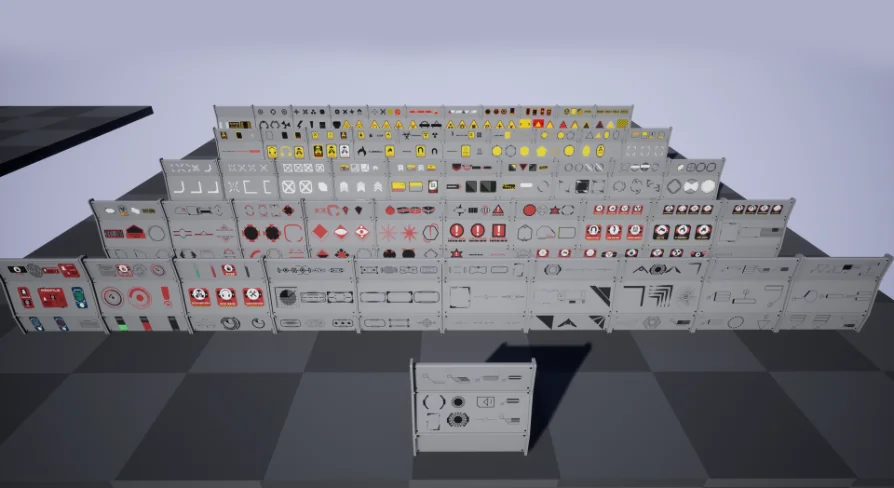
Used together, the pack can function like a broad decal library that helps establish a more unified visual language across surfaces. This approach suits creators who want many decal elements to contribute to one larger look. When a pack is meant to work together, it becomes easier to think in combinations rather than isolated pieces. You are not limited to choosing one decal and moving on; you can layer or group materials in a way that makes the whole environment feel more intentional.
Used separately, the same pack becomes much more selective. A creator can pull out only the pieces needed for a specific object, a single wall treatment, a hero prop surface, or a localized detail pass. That separate use is just as important as the combined approach because it keeps the resource from becoming visually heavy by default. Some productions need dense visual dressing, while others need restraint. A pack that supports both methods gives artists room to control how much decal information enters a shot or playable area.
This dual structure also helps when a project is still finding its style. Early in production, it may be useful to try many pieces together to discover a visual direction. Later, once the look is clearer, the team can isolate only the parts that still serve the scene. The package’s ability to function in both modes gives it a wider creative range without needing to change what it is.
High-quality materials as the base layer
The package is containing high-quality materials, and that point is central to its appeal. In decal work, quality at the material level affects whether extra detail feels integrated or distracting.
When a decal pack is treated as advanced and customizable, material quality becomes more than a surface-level claim. It is the foundation that allows repeated editing and recombination to stay visually coherent. If an artist is expected to design extensively with textures, then the underlying material quality has to support that process. The pack’s identity suggests that its materials are meant to hold up not just as standalone items, but as components in an ongoing design workflow.
That is especially relevant when decals are doing more than adding a final pass of wear or variation. In a more creative workflow, decals can help define the rhythm of a surface, control visual density, and break up broad material areas that otherwise look too uniform. High-quality materials support that by making the decal layer feel like a deliberate part of the scene instead of an afterthought.
There is also a difference between a pack that simply contains many items and one that invites continued use across different arrangements. The note about high quality suggests that the package is meant to stay useful beyond one quick placement pass. It is the kind of detail that supports revisiting a scene and still finding ways to refine it.
Customizable decal workflow with vector drawings
One of the more specific details attached to the package is the availability of the main file of vector drawings. This reinforces the customizable side of the resource in a direct way.
Vector drawings matter because they point to editability at the design level, not only at the placement level. A decal pack can be customizable in the sense that you rearrange existing pieces, but access to the main vector drawing files suggests another layer of control. It opens the door to adjusting the original graphic foundations behind the decals rather than only working with finished outputs. For creators who like to tailor visual elements closely to a project’s style, that is a meaningful part of the package.
The inclusion of vector-based available details also fits neatly with the description that you can design as much as you want with textures. Both details describe the same broader idea from different angles: this package is not limited to static use. It supports a process where the artist continues shaping the result.
Alongside that, video documentation is noted as part of the resource context. For a customizable pack, documentation has practical value because the more flexible a resource becomes, the more useful guided reference can be during setup and experimentation. In this case, the presence of documentation aligns with the package’s focus on customization rather than one-click use.
Where Mega Decal Package / AI SOURCES fits best
This package fits best where visual iteration is part of the job. It is not framed around a single narrow outcome. Its strength lies in offering high-quality decal materials that can be used broadly, combined into larger sets, or pulled apart for more focused placement.
That makes it well suited to creators who want decals to participate in the design process instead of arriving only at the very end. The texture-focused approach supports experimentation. The ability to use elements together or separately supports different levels of visual density. The availability of the main vector drawing files extends the package beyond simple placement and into deeper customization. For artists and developers shaping the look of surfaces through layered detail, this is the kind of resource that fits naturally into production.
 Variety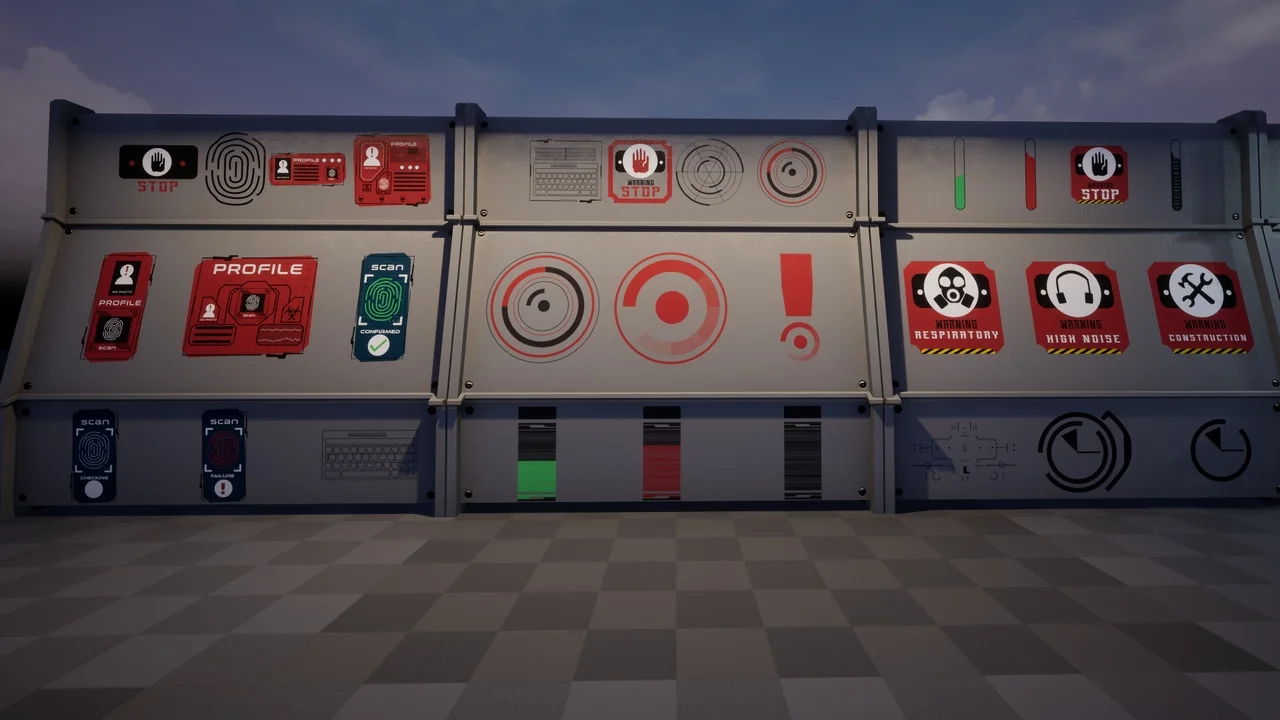
 Variety
 Building
 Sci-Fi