"7b46a695175d8694"{"id":"1001532","slug":"levelcontroller2-transform-levels-at-runtime-in-realtime","title":"LevelController2 (Transform Levels At Runtime In Realtime)","category":"Engine Tools","engine":"5.1 - 5.4","assetVersion":"Asset Version: 2.1.0","engineVersion":"Engine Version: 5.1 - 5.4","tag":"Engine Tools","accent":"blue","visual":"mech","summary":"Transform Unreal Engine levels and maps in real time using LevelController2 blueprint functions, dynamic origin points, and custom script actors.","platform":"Unreal Engine","publishedAt":"2026-10-09T17:25:41.854Z","updatedAt":"2026-10-09T17:25:41.854Z","sourceNotes":[],"fileContents":[],"compatibility":["Unreal Engine","Asset Version: 2.1.0","Engine Version: 5.1 - 5.4"],"featuredImage":{"alt":"LevelController2 (Transform Levels At Runtime In Realtime)","src":"/wp-content/uploads/published/2026/10/e55083799225-d316f296-9d30-494e-b533-f4e2dfddc51a-7437c66bae.webp"},"hasDownloadLink":true,"downloads":0,"terms":[{"taxonomy":"category","slug":"engine-tools-tools-and-plugins","name":"Engine Tools"}],"galleryImages":[{"src":"/wp-content/uploads/published/2026/10/59d8be45f149-13256d26-76a0-4a9d-9f81-1d42b55e3c38-8059591a12.webp","alt":"LevelController2 (Transform Levels At Runtime In Realtime)"},{"src":"/wp-content/uploads/published/2026/10/72e628681f78-2c085f8e-64b8-4fae-82a0-706f2a516d05-8513019174.webp","alt":"LevelController2 (Transform Levels At Runtime In Realtime)"},{"src":"/wp-content/uploads/published/2026/10/686533b3aadf-8ebe7bd3-254a-4d5b-93f8-c6dc7c35206d-bb38fa9475.webp","alt":"LevelController2 (Transform Levels At Runtime In Realtime)"},{"src":"/wp-content/uploads/published/2026/10/b9fe08d0f547-d6903819-78a0-4c4b-9467-0f2bfaa7f1a5-d8c9b2e628.webp","alt":"LevelController2 (Transform Levels At Runtime In Realtime)"},{"src":"/wp-content/uploads/published/2026/10/f6b66866d1f5-2dfc124e-3f8b-490a-8b24-a35c54eb389f-b8b5695bc4.webp","alt":"LevelController2 (Transform Levels At Runtime In Realtime)"}],"accessPanel":{"kind":"resource","title":"Download this resource","eyebrow":"Free Download","message":"Log in or create a free account to start your download.","fileName":"LevelController2 (Transform Levels At Runtime In Realtime).7z","safetyNote":"Resources are manually reviewed before listing to improve quality and reduce obvious risks.","actionLabel":"Download Free","resourceType":"Resource archive"},"contentHtml":"\u003ch2\u003eCalling Blueprint Functions for Realtime Map Transformation\u003c/h2\u003e\u003cp\u003eWorking with LevelController2 begins inside the Unreal Engine Blueprint editor, where level-wide spatial adjustments are driven directly by calling the plugin's dedicated Blueprint functions. Instead of moving individual scene components or managing complex hierarchies of attached parent actors, the tool operates at the map level, exposing controls to transform entire loaded levels simultaneously during live gameplay.\u003c/p\u003e\u003cp\u003eTriggering these functions within gameplay graphs allows projects to alter map orientation, position, and dynamic placement on the fly. The workflow bypasses manual iteration through every static mesh, light, or volume contained within a sub-level. By routing transform calls directly through runtime nodes, maps can shift dynamically in response to gameplay triggers, scripted sequences, or active simulation data.\u003c/p\u003e\u003cp\u003eBecause the logic is wrapped cleanly into Blueprint nodes, developers do not need to construct low-level C++ manipulation routines to reposition maps. The core functions accept standard transformation parameters, mapping location and rotation vectors straight to the loaded level structure while the engine continues rendering frames uninterrupted.\u003c/p\u003e\u003ch2\u003eCustom Origin Point Shifts and Tick Execution\u003c/h2\u003e\u003cp\u003eA primary mechanical expansion in this second iteration over the base LevelController1 build is the ability to transform levels using a custom origin point. When executing map-wide rotations or positional translations, picking an arbitrary center point defines how the entire geometry cluster orbits, pivots, or scales within world space.\u003c/p\u003e\u003cp\u003eThis origin point is fully dynamic. It can be modified every single tick at runtime, granting fine-grained mathematical control over complex motion paths. For instances where a level must rotate around a moving pawn, track an external vehicle, or pivot around shifting world coordinates, the origin updates smoothly on an per-frame basis without locking the transform to the default map zero vector.\u003c/p\u003e\u003cp\u003eRunning continuous level transformations per tick requires strict computational efficiency. The internal architecture of this package provides an execution rate measured at 165% of the performance of the free version. That optimization margin ensures that updating the custom origin and pushing new map transform matrices every tick does not introduce unacceptable frame-time spikes into the game loop.\u003c/p\u003e\u003ch2\u003eEditor and Runtime Ticking with AExActor and AExLevelScriptActor\u003c/h2\u003e\u003cp\u003eBeyond broad map movement, the plugin provides low-level execution hooks designed to control actor and level blueprint updates across both development and live play environments. This functionality is implemented through two specialized foundational classes:\u003c/p\u003e\u003cul\u003e\u003cli\u003e\u003cstrong\u003eAExActor:\u003c/strong\u003e A C++ base actor class that allows derived actors to execute tick logic either inside the Unreal Editor without running a PIE session, or actively during runtime play sessions.\u003c/li\u003e\u003cli\u003e\u003cstrong\u003eAExLevelScriptActor:\u003c/strong\u003e A specialized subclass intended to replace or serve as a custom LevelScriptActor, enabling the Level Blueprint itself to tick within the editor or throughout runtime execution.\u003c/li\u003e\u003c/ul\u003e\u003cp\u003eUnder default Unreal Engine behavior, Level Blueprints and standard scene actors operate under strict ticking constraints when working inside editor viewports. By inheriting from \u003ccode\u003eAExActor\u003c/code\u003e, custom game assets gain the ability to evaluate transform calculations, update internal states, or synchronize relative scene coordinates before launching the game.\u003c/p\u003e\u003cp\u003eApplying \u003ccode\u003eAExLevelScriptActor\u003c/code\u003e Directly to a level configuration opens up the same persistent ticking workflow for Level Blueprints. This setup enables map-specific scripts to continuously evaluate custom origin points, monitor target positions, and calculate dynamic transformations without relying exclusively on standalone external manager actors to trigger update ticks.\u003c/p\u003e\u003ch2\u003eModule Architecture and Target Platform Support\u003c/h2\u003e\u003cp\u003eUnder the hood, the plugin is organized as a streamlined runtime package. The asset footprint contains a concise technical payload consisting of:\u003c/p\u003e\u003cul\u003e\u003cli\u003e1 Blueprint asset.\u003c/li\u003e\u003cli\u003e4 compiled C++ classes providing the underlying transform and actor ticking logic.\u003c/li\u003e\u003cli\u003e1 runtime code module designated as LevelController.\u003c/li\u003e\u003c/ul\u003e\u003cp\u003eNetwork replication is not built into the system. Transformations, origin shifts, and actor ticking routines are handled locally on the client or standalone instance. Multiplayer projects requiring map shifts across multiple clients must govern synchronization and function triggering through external networked game state logic.\u003c/p\u003e\u003cp\u003eDevelopment is fully supported on Windows (x64) and Mac operating systems, making it straightforward to integrate into cross-platform team environments. Compatibility extends to full Blueprint graph viewing regardless of editor screen resolutions or monitor configurations, maintaining readable node networks across varied workstation setups.\u003c/p\u003e\u003cp\u003eWhen packaging projects, the plugin compiles across an exceptionally wide range of target build platforms. Supported build targets include:\u003c/p\u003e\u003cul\u003e\u003cli\u003eWindows desktop platforms (both x86 and x64 / x84 configurations).\u003c/li\u003e\u003cli\u003eMac workstations and standalone targets.\u003c/li\u003e\u003cli\u003eMobile operating systems across iOS and Android.\u003c/li\u003e\u003cli\u003eWeb deployments targeting HTML5.\u003c/li\u003e\u003c/ul\u003e\u003cp\u003eThis extensive platform coverage ensures that runtime level manipulation mechanics remain stable whether deployed to high-end desktop workstations, portable mobile games, or browser-based builds.\u003c/p\u003e\u003ch2\u003eProduction Setup and Verification\u003c/h2\u003e\u003cp\u003eIntegrating the plugin into existing project pipelines is reinforced by available documentation and public example project resources. These references outline the explicit steps needed to reparent target classes to \u003ccode\u003eAExActor\u003c/code\u003e, assign \u003ccode\u003eAExLevelScriptActor\u003c/code\u003e In world settings, and wire transform nodes into standard Blueprint execution paths.\u003c/p\u003e\u003cp\u003eBy verifying custom origin behavior and inspecting runtime tick rates inside the provided project files, teams can validate performance budgets before committing map-transform logic to main production branches. The isolated nature of the runtime module ensures that enabling or packaging the plugin introduces zero external framework bloat while providing robust, real-time map transformation tools.\u003c/p\u003e\n\n\u003ch2\u003eMore From The Same Workflow\u003c/h2\u003e\n\u003cul\u003e\n\u003cli\u003e\u003ca href=\"https://3dcghub.com/mazen-level-tool/\" title=\"Mazen Level Tool\"\u003eMazen Level Tool\u003c/a\u003e\u003c/li\u003e\n\u003cli\u003e\u003ca href=\"https://3dcghub.com/realtime-import-export-plugin/\" title=\"RealTime Import/Export Plugin\"\u003eRealTime Import/Export Plugin\u003c/a\u003e\u003c/li\u003e\n\u003cli\u003e\u003ca href=\"https://3dcghub.com/firebase-goodies/\" title=\"Firebase Goodies\"\u003eFirebase Goodies\u003c/a\u003e\u003c/li\u003e\n\u003cli\u003e\u003ca href=\"https://3dcghub.com/quiet-runtime-editor/\" title=\"Quiet Runtime Editor\"\u003eQuiet Runtime Editor\u003c/a\u003e\u003c/li\u003e\n\u003cli\u003e\u003ca href=\"https://3dcghub.com/runtime-speech-recognizer-real-time-offline-ai/\" title=\"Runtime Speech Recognizer (Real-Time, Offline, AI)\"\u003eRuntime Speech Recognizer (Real-Time, Offline, AI)\u003c/a\u003e\u003c/li\u003e\n\u003c/ul\u003e","contentTextLength":6355,"navigation":{"current":12,"total":3481,"previous":{"id":"1001533","slug":"medieval-stronghold-architecture","title":"Medieval Stronghold Architecture","category":"Fantasy","platform":"Unreal Engine","updatedAt":"2026-10-09T17:26:18.770Z"},"next":{"id":"1001531","slug":"launcher-animations","title":"Launcher Animations","category":"Combat","platform":"Unreal Engine","updatedAt":"2026-10-09T17:25:01.227Z"}},"relatedResources":[{"id":"1001268","slug":"mazen-level-tool","title":"Mazen Level Tool","category":"Engine Tools","engine":"5.1 - 5.4","assetVersion":"Asset Version: 1.0","engineVersion":"Engine Version: 5.1 - 5.4","tag":"Engine Tools","accent":"blue","visual":"mech","summary":"Streamline level outliner workflows with Mazen Level Tool by saving and loading named actor selection sets alongside screenshots and camera transform data.","platform":"Unreal Engine","publishedAt":"2026-09-30T05:52:49.722Z","updatedAt":"2026-09-30T05:52:49.722Z","sourceNotes":[],"fileContents":[],"compatibility":["Unreal Engine","Asset Version: 1.0","Engine Version: 5.1 - 5.4"],"featuredImage":{"alt":"Mazen Level Tool","src":"/wp-content/uploads/published/2026/09/1ac477737423-3b95d9fd-0dc4-4360-87b9-930c7e6d2b6b-549e2b7037.webp"},"hasDownloadLink":true,"downloads":0},{"id":"14476","slug":"realtime-import-export-plugin","title":"RealTime Import/Export Plugin","category":"Engine Tools","engine":"4.25 - 4.27,5.0 - 5.7","assetVersion":"Engine version: 4.25 - 4.27,5.0 - 5.7","engineVersion":"Asset Version:3.4 - 3.65","tag":"Engine Tools","accent":"blue","visual":"luts","summary":"Enhance your project with the RealTime Import/Export Plugin, a tool designed to handle assets during runtime. It supports various formats including FBX, OBJ, and WAV without requiring the Unreal Editor.","platform":"Unreal Engine","publishedAt":"2026-03-11T18:10:35.000Z","updatedAt":"2026-04-19T15:45:45.000Z","sourceNotes":[],"fileContents":[],"compatibility":["Unreal Engine","Engine version: 4.25 - 4.27,5.0 - 5.7","Asset Version: 3.4 - 3.65"],"featuredImage":{"alt":"RealTime Import/Export Plugin","src":"https://3dcghub.com/wp-content/uploads/2026/03/11b2685a-4966-4c69-9bbc-89d8f2fdc881.webp"},"hasDownloadLink":true,"downloads":0},{"id":"14001","slug":"firebase-goodies","title":"Firebase Goodies","category":"Engine Tools","engine":"5.3","assetVersion":"Engine version: 5.3","engineVersion":"Asset Version:2.0.2","tag":"Engine Tools","accent":"blue","visual":"city","summary":"Firebase Goodies is a comprehensive plugin that integrates Google’s powerful backend services directly into your development workflow. It offers support for essential features like Firestore, Cloud Storage, and Authentication across multiple platforms.","platform":"Unreal Engine","publishedAt":"2026-03-11T13:12:16.000Z","updatedAt":"2026-04-19T15:45:55.000Z","sourceNotes":[],"fileContents":[],"compatibility":["Unreal Engine","Engine version: 5.3","Asset Version: 2.0.2"],"featuredImage":{"alt":"Firebase Goodies","src":"https://3dcghub.com/wp-content/uploads/2026/03/0bb7212b-a42c-48b9-84c9-2e01181d39b8.webp"},"hasDownloadLink":true,"downloads":0}]}
Engine Tools
LevelController2 (Transform Levels At Runtime In Realtime)
Transform Unreal Engine levels and maps in real time using LevelController2 blueprint functions, dynamic origin points, and custom script actors.
Calling Blueprint Functions for Realtime Map Transformation
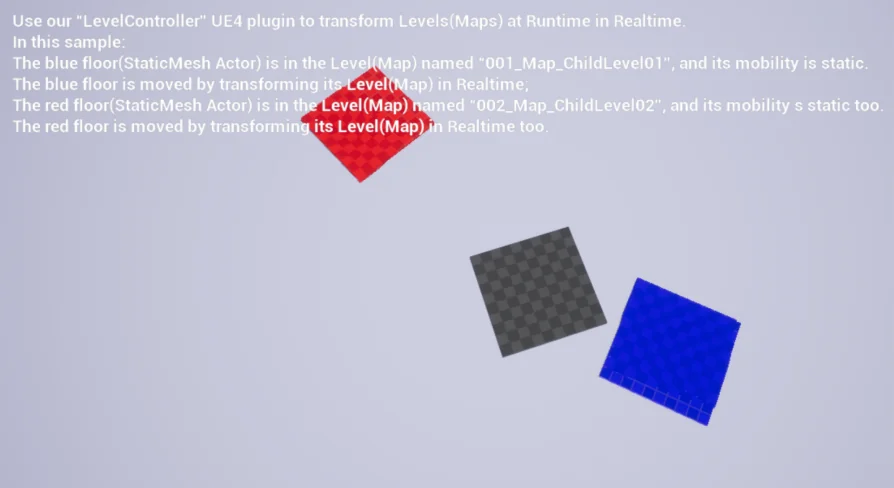
Working with LevelController2 begins inside the Unreal Engine Blueprint editor, where level-wide spatial adjustments are driven directly by calling the plugin's dedicated Blueprint functions. Instead of moving individual scene components or managing complex hierarchies of attached parent actors, the tool operates at the map level, exposing controls to transform entire loaded levels simultaneously during live gameplay.
Triggering these functions within gameplay graphs allows projects to alter map orientation, position, and dynamic placement on the fly. The workflow bypasses manual iteration through every static mesh, light, or volume contained within a sub-level. By routing transform calls directly through runtime nodes, maps can shift dynamically in response to gameplay triggers, scripted sequences, or active simulation data.
Because the logic is wrapped cleanly into Blueprint nodes, developers do not need to construct low-level C++ manipulation routines to reposition maps. The core functions accept standard transformation parameters, mapping location and rotation vectors straight to the loaded level structure while the engine continues rendering frames uninterrupted.
Custom Origin Point Shifts and Tick Execution
A primary mechanical expansion in this second iteration over the base LevelController1 build is the ability to transform levels using a custom origin point. When executing map-wide rotations or positional translations, picking an arbitrary center point defines how the entire geometry cluster orbits, pivots, or scales within world space.
This origin point is fully dynamic. It can be modified every single tick at runtime, granting fine-grained mathematical control over complex motion paths. For instances where a level must rotate around a moving pawn, track an external vehicle, or pivot around shifting world coordinates, the origin updates smoothly on an per-frame basis without locking the transform to the default map zero vector.
Running continuous level transformations per tick requires strict computational efficiency. The internal architecture of this package provides an execution rate measured at 165% of the performance of the free version. That optimization margin ensures that updating the custom origin and pushing new map transform matrices every tick does not introduce unacceptable frame-time spikes into the game loop.
Editor and Runtime Ticking with AExActor and AExLevelScriptActor
Beyond broad map movement, the plugin provides low-level execution hooks designed to control actor and level blueprint updates across both development and live play environments. This functionality is implemented through two specialized foundational classes:
AExActor: A C++ base actor class that allows derived actors to execute tick logic either inside the Unreal Editor without running a PIE session, or actively during runtime play sessions.
AExLevelScriptActor: A specialized subclass intended to replace or serve as a custom LevelScriptActor, enabling the Level Blueprint itself to tick within the editor or throughout runtime execution.
Under default Unreal Engine behavior, Level Blueprints and standard scene actors operate under strict ticking constraints when working inside editor viewports. By inheriting from AExActor, custom game assets gain the ability to evaluate transform calculations, update internal states, or synchronize relative scene coordinates before launching the game.
Applying AExLevelScriptActor Directly to a level configuration opens up the same persistent ticking workflow for Level Blueprints. This setup enables map-specific scripts to continuously evaluate custom origin points, monitor target positions, and calculate dynamic transformations without relying exclusively on standalone external manager actors to trigger update ticks.
Module Architecture and Target Platform Support
Under the hood, the plugin is organized as a streamlined runtime package. The asset footprint contains a concise technical payload consisting of:
1 Blueprint asset.
4 compiled C++ classes providing the underlying transform and actor ticking logic.
1 runtime code module designated as LevelController.
Network replication is not built into the system. Transformations, origin shifts, and actor ticking routines are handled locally on the client or standalone instance. Multiplayer projects requiring map shifts across multiple clients must govern synchronization and function triggering through external networked game state logic.
Development is fully supported on Windows (x64) and Mac operating systems, making it straightforward to integrate into cross-platform team environments. Compatibility extends to full Blueprint graph viewing regardless of editor screen resolutions or monitor configurations, maintaining readable node networks across varied workstation setups.
When packaging projects, the plugin compiles across an exceptionally wide range of target build platforms. Supported build targets include:
Windows desktop platforms (both x86 and x64 / x84 configurations).
Mac workstations and standalone targets.
Mobile operating systems across iOS and Android.
Web deployments targeting HTML5.
This extensive platform coverage ensures that runtime level manipulation mechanics remain stable whether deployed to high-end desktop workstations, portable mobile games, or browser-based builds.
Production Setup and Verification
Integrating the plugin into existing project pipelines is reinforced by available documentation and public example project resources. These references outline the explicit steps needed to reparent target classes to AExActor, assign AExLevelScriptActor In world settings, and wire transform nodes into standard Blueprint execution paths.
By verifying custom origin behavior and inspecting runtime tick rates inside the provided project files, teams can validate performance budgets before committing map-transform logic to main production branches. The isolated nature of the runtime module ensures that enabling or packaging the plugin introduces zero external framework bloat while providing robust, real-time map transformation tools.
 Engine Tools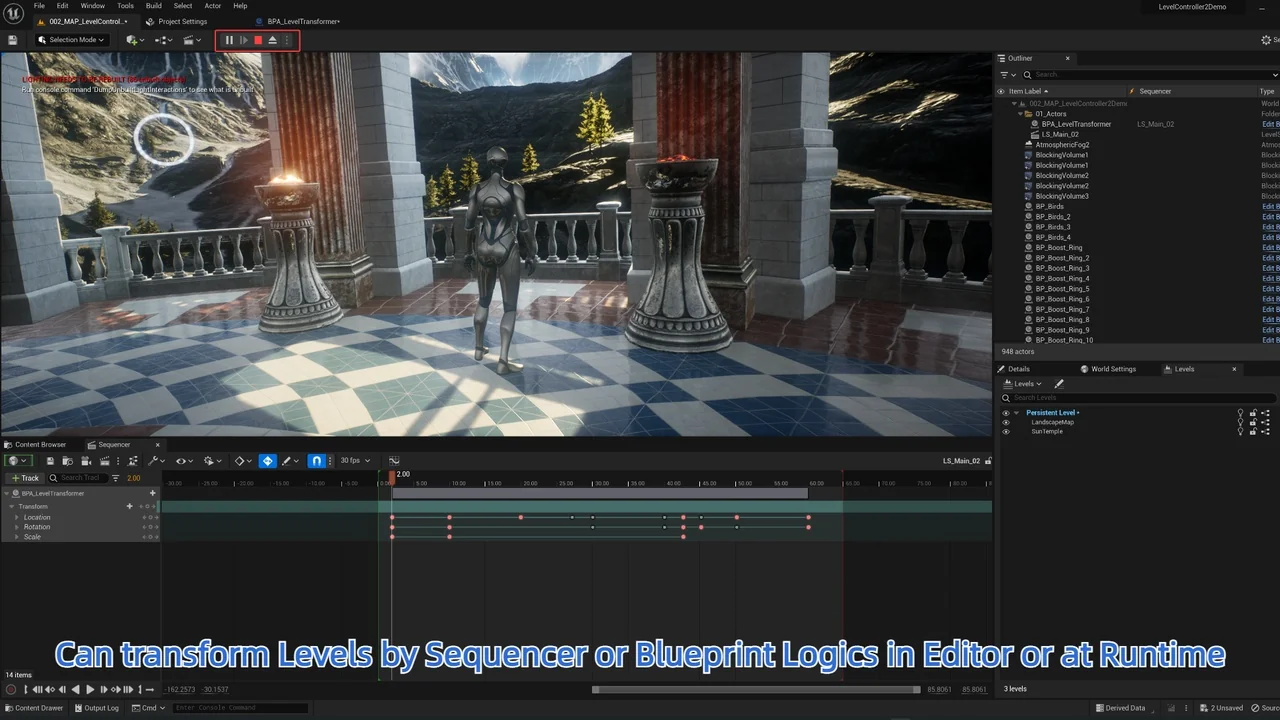
 Engine Tools
 Engine Tools
 Engine Tools