"148d1066ed74e216"{"id":"1002937","slug":"realtime-archviz-configurator-lite","title":"Realtime Archviz Configurator Lite","category":"Engine Tools","engine":"5.4 - 5.5","assetVersion":"Asset Version: 1.0","engineVersion":"Engine Version: 5.4 - 5.5","tag":"Engine Tools","accent":"blue","visual":"mech","summary":"Explore Realtime Archviz Configurator Lite, a customizable system for interactive interior visualization featuring actor spawning, UI, and material switching.","platform":"Unreal Engine","indexPolicy":"index","publishedAt":"2026-11-21T23:21:28.021Z","updatedAt":"2026-11-21T23:21:28.021Z","sourceNotes":[],"fileContents":[],"compatibility":["Unreal Engine","Asset Version: 1.0","Engine Version: 5.4 - 5.5"],"featuredImage":{"alt":"Realtime Archviz Configurator Lite","src":"/wp-content/uploads/published/2026/11/cc1fe4604807-1bae904c-149f-4725-a91e-b3b3b13c0cd4-d3ca7bb4b2.webp"},"fileSizeBytes":1007223,"hasDownloadLink":true,"downloads":0,"terms":[{"taxonomy":"category","slug":"engine-tools-tools-and-plugins","name":"Engine Tools"}],"galleryImages":[{"src":"/wp-content/uploads/published/2026/11/3d6babcf67da-7040b705-7260-4440-a7fd-260391b0d597-156f193217.webp","alt":"Realtime Archviz Configurator Lite"},{"src":"/wp-content/uploads/published/2026/11/68184a8cf83e-fa6929c4-3a9e-4099-a5dc-ea06f34e38d5-6608478bbe.webp","alt":"Realtime Archviz Configurator Lite"},{"src":"/wp-content/uploads/published/2026/11/86b8517b8ce7-b78345b8-926e-46c4-a812-16db40235c61-fbe692c8fb.webp","alt":"Realtime Archviz Configurator Lite"},{"src":"/wp-content/uploads/published/2026/11/f62b6eb8af30-acf5fe49-a5d3-4dcf-8499-dbd3a400e81c-847d91f029.webp","alt":"Realtime Archviz Configurator Lite"},{"src":"/wp-content/uploads/published/2026/11/17ca0601f794-767de3ca-0df9-49f6-8be7-aad991a4d3eb-a4192e14a4.webp","alt":"Realtime Archviz Configurator Lite"}],"accessPanel":{"kind":"resource","title":"Get this resource","safetyNote":"Resources are manually reviewed before listing to improve quality and reduce obvious risks.","fileName":"Realtime Archviz Configurator Lite.7z","resourceType":"Resource archive","versions":[]},"contentHtml":"\u003ch2\u003eInteractive Spaces and the Realtime Archviz Approach\u003c/h2\u003e\n\u003cp\u003eModern architectural visualization frequently extends beyond pre-rendered stills and passive walkthrough animations. Contemporary clients and designers often expect hands-on control over interior spaces, demanding environments where finishes, furnishings, and layouts can be evaluated in real time. Realtime Archviz Configurator Lite serves this specific operational demand by delivering an interactive framework tailored for interior exploration, space configuration, and architectural product showcases.\u003c/p\u003e\n\u003cp\u003eBy establishing a functional foundation for user-driven visualization, the package simplifies the technical hurdles that typically accompany real-time spatial interaction. Instead of engineering input handling, interface triggers, and item placement systems from the ground up, creators can concentrate on assembling realistic spaces. The system functions as both an interactive explorer and a structured template, giving users direct agency over how an architectural scene is experienced and customized.\u003c/p\u003e \u003ch2\u003eCore Mechanics of the Configurator System\u003c/h2\u003e\n\u003cp\u003eAt the center of any spatial customization tool is the ability to swap, arrange, and modify objects within a 3D environment. This framework handles those demands through a collection of dedicated interaction features built to be accessible and straightforward to deploy.\u003c/p\u003e\n\u003cp\u003eActor spawning forms a vital piece of this operational flow. Within an interactive interior, users often need to introduce new pieces of furniture, lighting fixtures, or decorative accents on demand. Dynamic actor spawning ensures that objects can be populated into the room programmatically, allowing a single scene to showcase numerous layout possibilities without requiring multiple distinct levels or cluttered geometry loaded all at once.\u003c/p\u003e\n\u003cp\u003eTo complement spawning, the system provides automated placement behaviors through auto attaching and auto rotation. Auto attaching allows secondary items, components, or swappable modules to snap into place against target points or parent actors reliably. This prevents alignment errors when users experiment with complex object arrangements. Meanwhile, auto rotation offers an active display mechanism, rotating selected models automatically so viewers can evaluate silhouettes, profiles, and proportions from every angle without cumbersome manual camera adjustments.\u003c/p\u003e\n\u003cp\u003eSurface customizability is integrated via a material changing system. Because materials define the visual character of architectural interiors—from floorboards and wall paint to textile upholstery and cabinetry finishes—the ability to swap materials in real time is indispensable. The configurator lets users cycle finishes instantly, presenting realistic color variations and tactile treatments across surfaces while preserving existing lighting and scene context.\u003c/p\u003e \u003ch2\u003eInterface Design and Viewing Perspectives\u003c/h2\u003e\n\u003cp\u003eA functional configuration tool requires an intuitive presentation layer so that clients, stakeholders, and presentation viewers can manipulate the environment without confusion. Realtime Archviz Configurator Lite addresses this with a modern UI designed specifically for clean interaction and unobstructed scene viewing.\u003c/p\u003e\n\u003cp\u003eThe modern user interface keeps controls accessible while minimizing screen clutter, ensuring that the visual focus remains on the interior architecture itself. Interactive menus allow users to trigger actor spawning, toggle material variations, and engage automated object behaviors through direct input. Because the entire framework is customizable, the interface structure can be tailored to match the branding, layout, or specific navigation needs of different visualization projects.\u003c/p\u003e\n\u003cp\u003eVisual engagement is further supported by two distinct view modes. Having two viewing perspectives enables users to shift between different methods of inspecting an environment, such as switching from a broader exploratory perspective to a focused evaluation angle. This dual-mode approach helps viewers inspect both overall room balance and localized design details, providing a balanced visual assessment of the architectural space.\u003c/p\u003e \u003ch2\u003eAsset Management in the Lite Framework Setup\u003c/h2\u003e\n\u003cp\u003eA critical detail regarding the project structure is the separation between the configurator logic and decorative scene assets. The 3D assets, furniture pieces, and interior fixtures displayed across demonstration previews and video showcases are not bundled directly inside this project file. Instead, the project is structured as an interactive logic and interface toolset.\u003c/p\u003e\n\u003cp\u003eCreators looking to reproduce the exact look of the preview presentations can source those complementary environment assets independently through the free ArchVizInterior pack. This architectural asset collection provides the interior geometries, furnishings, and props seen in visual materials, allowing developers to populate the configurator framework quickly.\u003c/p\u003e\n\u003cp\u003eThis deliberate separation between interactive framework and specific mesh content gives the system flexibility. Rather than being tied to one specific residential room or pre-baked arrangement, the tool can be integrated into any custom architectural scene, warehouse visualization, commercial office setup, or bespoke showroom environment without needing to untangle embedded geometry.\u003c/p\u003e \u003ch2\u003eImplementation Scenarios and Production Fit\u003c/h2\u003e\n\u003cp\u003eRealtime Archviz Configurator Lite is targeted at creators who require an easy-to-use, interactive mechanism for showcasing spaces and products without designing complex interaction blueprints from scratch. Architectural visualizers, interior designers, and visualization specialists looking to elevate standard 3D walk-throughs into interactive presentation tools can adopt the system as a reliable starting point.\u003c/p\u003e\n\u003cp\u003eThe combination of material swapping, actor spawning, automated rotation, dual view modes, and an adaptable user interface offers a comprehensive foundation for realistic configuration. Whether used to demonstrate modular furniture collections, test real-time material palettes, or build interactive client-facing presentation demos, the framework organizes essential configurator mechanics into a streamlined, customizable package.\u003c/p\u003e\n\n\u003ch2\u003eContinue Browsing Similar Packs\u003c/h2\u003e\n\u003cul\u003e\n\u003cli\u003e\u003ca href=\"https://3dcghub.com/archviz-template-lite/\" rel=\"noopener noreferrer\"\u003e| ArchViz Template Lite |\u003c/a\u003e\u003c/li\u003e\n\u003cli\u003e\u003ca href=\"https://3dcghub.com/realtime-import-export-plugin/\" rel=\"noopener noreferrer\"\u003eRealTime Import/Export Plugin\u003c/a\u003e\u003c/li\u003e\n\u003cli\u003e\u003ca href=\"https://3dcghub.com/levelcontroller2-transform-levels-at-runtime-in-realtime/\" rel=\"noopener noreferrer\"\u003eLevelController2 (Transform Levels At Runtime In Realtime)\u003c/a\u003e\u003c/li\u003e\n\u003cli\u003e\u003ca href=\"https://3dcghub.com/firebase-goodies/\" rel=\"noopener noreferrer\"\u003eFirebase Goodies\u003c/a\u003e\u003c/li\u003e\n\u003cli\u003e\u003ca href=\"https://3dcghub.com/hyperloop/\" rel=\"noopener noreferrer\"\u003eHyperLoop\u003c/a\u003e\u003c/li\u003e\n\u003c/ul\u003e","contentTextLength":6383,"navigation":{"current":35,"total":4890,"previous":{"id":"1002938","slug":"skills-tree-system","title":"Skills Tree System","category":"Engine Tools","platform":"Unreal Engine","updatedAt":"2026-11-21T23:22:07.225Z"},"next":{"id":"1002936","slug":"property-transfer-tool","title":"Property Transfer Tool","category":"Physics","platform":"Unreal Engine","updatedAt":"2026-11-21T23:20:52.607Z"}},"relatedResources":[{"id":"27377","slug":"archviz-template-lite","title":"| ArchViz Template Lite |","category":"Simulation","engine":"5.7+","assetVersion":"Engine version: 5.7+","engineVersion":"","tag":"Simulation","accent":"blue","visual":"character","summary":"ArchViz Template Lite gives Unreal Engine projects a fast starting point for client walkthroughs, portfolio scenes, and mobile-ready presentations. It combines navigation modes, material switching, and a clean blueprint setup without the interior scene.","platform":"Unreal Engine","indexPolicy":"index","publishedAt":"2026-04-24T08:28:53.000Z","updatedAt":"2026-04-24T08:28:55.000Z","sourceNotes":[],"fileContents":[],"compatibility":["Unreal Engine","Engine version: 5.7+"],"featuredImage":{"alt":"| ArchViz Template Lite |","src":"https://3dcghub.com/wp-content/uploads/2026/04/2227dd6af0fc_d27cbdf7-73a8-48d8-826b-dd42d0b64138.webp"},"fileSizeBytes":892702535,"hasDownloadLink":true,"downloads":1},{"id":"14476","slug":"realtime-import-export-plugin","title":"RealTime Import/Export Plugin","category":"Engine Tools","engine":"4.25 - 4.27,5.0 - 5.7","assetVersion":"Engine version: 4.25 - 4.27,5.0 - 5.7","engineVersion":"Asset Version:3.4 - 3.65","tag":"Engine Tools","accent":"blue","visual":"luts","summary":"Enhance your project with the RealTime Import/Export Plugin, a tool designed to handle assets during runtime. It supports various formats including FBX, OBJ, and WAV without requiring the Unreal Editor.","platform":"Unreal Engine","indexPolicy":"noindex","publishedAt":"2026-03-11T18:10:35.000Z","updatedAt":"2026-04-19T15:45:45.000Z","sourceNotes":[],"fileContents":[],"compatibility":["Unreal Engine","Engine version: 4.25 - 4.27,5.0 - 5.7","Asset Version: 3.4 - 3.65"],"featuredImage":{"alt":"RealTime Import/Export Plugin","src":"https://3dcghub.com/wp-content/uploads/2026/03/11b2685a-4966-4c69-9bbc-89d8f2fdc881.webp"},"fileSizeBytes":544062535,"hasDownloadLink":true,"downloads":0},{"id":"1001532","slug":"levelcontroller2-transform-levels-at-runtime-in-realtime","title":"LevelController2 (Transform Levels At Runtime In Realtime)","category":"Engine Tools","engine":"5.1 - 5.4","assetVersion":"Asset Version: 2.1.0","engineVersion":"Engine Version: 5.1 - 5.4","tag":"Engine Tools","accent":"blue","visual":"mech","summary":"Transform Unreal Engine levels and maps in real time using LevelController2 blueprint functions, dynamic origin points, and custom script actors.","platform":"Unreal Engine","indexPolicy":"index","publishedAt":"2026-10-09T17:25:41.854Z","updatedAt":"2026-10-09T17:25:41.854Z","sourceNotes":[],"fileContents":[],"compatibility":["Unreal Engine","Asset Version: 2.1.0","Engine Version: 5.1 - 5.4"],"featuredImage":{"alt":"LevelController2 (Transform Levels At Runtime In Realtime)","src":"/wp-content/uploads/published/2026/10/e55083799225-d316f296-9d30-494e-b533-f4e2dfddc51a-7437c66bae.webp"},"fileSizeBytes":43988480,"hasDownloadLink":true,"downloads":0}]}[{"id":4225,"sourceId":4225,"taxonomyId":4225,"taxonomy":"category","slug":"asset-library","name":"Asset Library","parentId":null,"count":4744,"hasChildren":true,"href":"/","seoTitle":"Free Game Assets Library | 3DCGHUB","seoDescription":"Browse free Unreal Engine, Unity, Blender assets and game development tutorials on 3DCGHUB with previews, compatibility notes, and secure downloads.","sitemapEnabled":true,"children":[{"id":4227,"sourceId":4227,"taxonomyId":4227,"taxonomy":"category","slug":"blender-add-ons-plugins","name":"Blender Add-ons \u0026 Plugins","parentId":4225,"count":10,"hasChildren":false,"href":"/category/blender-add-ons-plugins/","seoTitle":"Free Blender Add-ons \u0026 Plugins | 3DCGHUB","seoDescription":"Browse free Blender Add-ons \u0026 Plugins tools for Blender on 3DCGHUB: curated downloads with preview images, compatibility notes and secure download access.","sitemapEnabled":true},{"id":514,"sourceId":514,"taxonomyId":514,"taxonomy":"category","slug":"unity-2","name":"Unity","parentId":4225,"count":453,"hasChildren":true,"href":"/category/unity-2/","seoTitle":"Free Unity Assets | 3DCGHUB","seoDescription":"Browse free Unity resources on 3DCGHUB: curated downloads with preview images, compatibility notes and secure download access.","sitemapEnabled":true,"children":[{"id":523,"sourceId":523,"taxonomyId":523,"taxonomy":"category","slug":"2d","name":"2D","parentId":514,"count":1,"hasChildren":true,"href":"/category/2d/","seoTitle":"Free Unity 2D | 3DCGHUB","seoDescription":"Browse free 2D assets for Unity on 3DCGHUB: curated downloads with preview images, compatibility notes and secure download access.","sitemapEnabled":true},{"id":515,"sourceId":515,"taxonomyId":515,"taxonomy":"category","slug":"3d-unity-2","name":"3D","parentId":514,"count":162,"hasChildren":true,"href":"/category/3d-unity-2/","seoTitle":"Free Unity 3D Assets | 3DCGHUB","seoDescription":"Browse free 3D assets for Unity on 3DCGHUB: curated downloads with preview images, compatibility notes and secure download access.","sitemapEnabled":true},{"id":565,"sourceId":565,"taxonomyId":565,"taxonomy":"category","slug":"add-ons","name":"Add-Ons","parentId":514,"count":2,"hasChildren":false,"href":"/category/add-ons/","seoTitle":"Free Unity Add-Ons | 3DCGHUB","seoDescription":"Browse free Add-Ons assets for Unity on 3DCGHUB: curated downloads with preview images, compatibility notes and secure download access.","sitemapEnabled":true},{"id":529,"sourceId":529,"taxonomyId":529,"taxonomy":"category","slug":"audio-unity-2","name":"Audio","parentId":514,"count":1,"hasChildren":true,"href":"/category/audio-unity-2/","seoTitle":"Free Unity Audio | 3DCGHUB","seoDescription":"Browse free Audio for Unity on 3DCGHUB: curated downloads with preview images, compatibility notes and secure download access.","sitemapEnabled":true},{"id":557,"sourceId":557,"taxonomyId":557,"taxonomy":"category","slug":"templates","name":"Templates","parentId":514,"count":36,"hasChildren":true,"href":"/category/templates/","seoTitle":"Free Unity Templates | 3DCGHUB","seoDescription":"Browse free Unity project templates on 3DCGHUB. Starter kits with previews, compatibility notes, and secure download access.","sitemapEnabled":true},{"id":533,"sourceId":533,"taxonomyId":533,"taxonomy":"category","slug":"tools-unity-2","name":"Tools","parentId":514,"count":0,"hasChildren":true,"href":"/category/tools-unity-2/","sitemapEnabled":true},{"id":554,"sourceId":554,"taxonomyId":554,"taxonomy":"category","slug":"vfx-unity-2","name":"VFX","parentId":514,"count":4,"hasChildren":true,"href":"/category/vfx-unity-2/","seoTitle":"Free Unity VFX | 3DCGHUB","seoDescription":"Browse free VFX for Unity on 3DCGHUB: curated downloads with preview images, compatibility notes and secure download access.","sitemapEnabled":true}]},{"id":511,"sourceId":511,"taxonomyId":511,"taxonomy":"category","slug":"unreal-engine-2","name":"Unreal Engine","parentId":4225,"count":4282,"hasChildren":true,"href":"/category/unreal-engine-2/","seoTitle":"Free Unreal Engine Assets | 3DCGHUB","seoDescription":"Browse free Unreal Engine resources on 3DCGHUB: curated downloads with preview images, compatibility notes and secure download access.","sitemapEnabled":true,"children":[{"id":54,"sourceId":54,"taxonomyId":54,"taxonomy":"category","slug":"3d","name":"3D","parentId":511,"count":2428,"hasChildren":true,"href":"/category/3d/","seoTitle":"Free Unreal Engine 3D | 3DCGHUB","seoDescription":"Browse free 3D assets for Unreal Engine on 3DCGHUB: curated downloads with preview images, compatibility notes and secure download access.","sitemapEnabled":true},{"id":441,"sourceId":441,"taxonomyId":441,"taxonomy":"category","slug":"animations","name":"Animations","parentId":511,"count":245,"hasChildren":true,"href":"/category/animations/","seoTitle":"Free Unreal Engine Animations | 3DCGHUB","seoDescription":"Browse free Animations for Unreal Engine on 3DCGHUB: curated downloads with preview images, compatibility notes and secure download access.","sitemapEnabled":true},{"id":446,"sourceId":446,"taxonomyId":446,"taxonomy":"category","slug":"audio","name":"Audio","parentId":511,"count":63,"hasChildren":true,"href":"/category/audio/","seoTitle":"Free Unreal Engine Audio Resources | 3DCGHUB","seoDescription":"Browse free Unreal Engine audio resources including sound effects, voices, dialogue, and ambient sounds. Curated free downloads on 3DCGHUB.","sitemapEnabled":true},{"id":466,"sourceId":466,"taxonomyId":466,"taxonomy":"category","slug":"game-systems","name":"Game Systems","parentId":511,"count":356,"hasChildren":true,"href":"/category/game-systems/","seoTitle":"Free Unreal Engine Game Systems | 3DCGHUB","seoDescription":"Browse free Game Systems tools for Unreal Engine on 3DCGHUB: curated downloads with preview images, compatibility notes and secure download access.","sitemapEnabled":true},{"id":478,"sourceId":478,"taxonomyId":478,"taxonomy":"category","slug":"game-templates","name":"Game Templates","parentId":511,"count":150,"hasChildren":true,"href":"/category/game-templates/","seoTitle":"Free Unreal Engine Game Templates | 3DCGHUB","seoDescription":"Browse free Game Templates for Unreal Engine on 3DCGHUB: curated downloads with preview images, compatibility notes and secure download access.","sitemapEnabled":true},{"id":432,"sourceId":432,"taxonomyId":432,"taxonomy":"category","slug":"hdri","name":"HDRI","parentId":511,"count":6,"hasChildren":true,"href":"/category/hdri/","seoTitle":"Free Unreal Engine HDRI | 3DCGHUB","seoDescription":"Browse free Unreal Engine HDRI skies and lighting maps on 3DCGHUB. Environment lighting with previews and secure downloads.","sitemapEnabled":true},{"id":228,"sourceId":228,"taxonomyId":228,"taxonomy":"category","slug":"material-and-textures","name":"Material \u0026 Textures","parentId":511,"count":172,"hasChildren":true,"href":"/category/material-and-textures/","seoTitle":"Free Unreal Engine Material \u0026 Textures | 3DCGHUB","seoDescription":"Browse free Material \u0026 Textures for Unreal Engine on 3DCGHUB: curated downloads with preview images, compatibility notes and secure download access.","sitemapEnabled":true},{"id":298,"sourceId":298,"taxonomyId":298,"taxonomy":"category","slug":"sprites-and-flipbooks","name":"Sprites \u0026 Flipbooks","parentId":511,"count":17,"hasChildren":true,"href":"/category/sprites-and-flipbooks/","seoTitle":"Free Unreal Engine Sprites \u0026 Flipbooks | 3DCGHUB","seoDescription":"Browse free Sprites \u0026 Flipbooks assets for Unreal Engine on 3DCGHUB: curated downloads with preview images, compatibility notes and secure download access.","sitemapEnabled":true},{"id":489,"sourceId":489,"taxonomyId":489,"taxonomy":"category","slug":"tools-and-plugins","name":"Tools \u0026 Plugins","parentId":511,"count":390,"hasChildren":true,"href":"/category/tools-and-plugins/","seoTitle":"Free Unreal Engine Tools \u0026 Plugins | 3DCGHUB","seoDescription":"Browse free Tools \u0026 Plugins for Unreal Engine on 3DCGHUB: curated downloads with preview images, compatibility notes and secure download access.","sitemapEnabled":true},{"id":459,"sourceId":459,"taxonomyId":459,"taxonomy":"category","slug":"ui","name":"UI","parentId":511,"count":43,"hasChildren":true,"href":"/category/ui/","seoTitle":"Free Unreal Engine UI | 3DCGHUB","seoDescription":"Browse free UI for Unreal Engine on 3DCGHUB: curated downloads with preview images, compatibility notes and secure download access.","sitemapEnabled":true},{"id":450,"sourceId":450,"taxonomyId":450,"taxonomy":"category","slug":"vfx","name":"VFX","parentId":511,"count":412,"hasChildren":true,"href":"/category/vfx/","seoTitle":"Free Unreal Engine VFX | 3DCGHUB","seoDescription":"Browse free VFX for Unreal Engine on 3DCGHUB: curated downloads with preview images, compatibility notes and secure download access.","sitemapEnabled":true}]}]},{"id":4222,"sourceId":4222,"taxonomyId":4222,"taxonomy":"category","slug":"tutorial-library","name":"Tutorial Library","parentId":null,"count":117,"hasChildren":false,"href":"/tutorials/","seoTitle":"Free Game Development Tutorial Library | 3DCGHUB","seoDescription":"Browse free game development tutorials for Unreal Engine, Unity, Blender, and more on 3DCGHUB with practical workflows and secure downloads.","sitemapEnabled":true}]
Resource screenshots
1 / 5
Join our channel
Follow 3DCGHUB on Telegram for new resource drops, migration updates, and community notices.
Resources are manually reviewed before listing to improve quality and reduce obvious risks.
No account required
Engine Tools
Realtime Archviz Configurator Lite
Explore Realtime Archviz Configurator Lite, a customizable system for interactive interior visualization featuring actor spawning, UI, and material switching.
Interactive Spaces and the Realtime Archviz Approach
Modern architectural visualization frequently extends beyond pre-rendered stills and passive walkthrough animations. Contemporary clients and designers often expect hands-on control over interior spaces, demanding environments where finishes, furnishings, and layouts can be evaluated in real time. Realtime Archviz Configurator Lite serves this specific operational demand by delivering an interactive framework tailored for interior exploration, space configuration, and architectural product showcases.
By establishing a functional foundation for user-driven visualization, the package simplifies the technical hurdles that typically accompany real-time spatial interaction. Instead of engineering input handling, interface triggers, and item placement systems from the ground up, creators can concentrate on assembling realistic spaces. The system functions as both an interactive explorer and a structured template, giving users direct agency over how an architectural scene is experienced and customized.
Core Mechanics of the Configurator System
At the center of any spatial customization tool is the ability to swap, arrange, and modify objects within a 3D environment. This framework handles those demands through a collection of dedicated interaction features built to be accessible and straightforward to deploy.
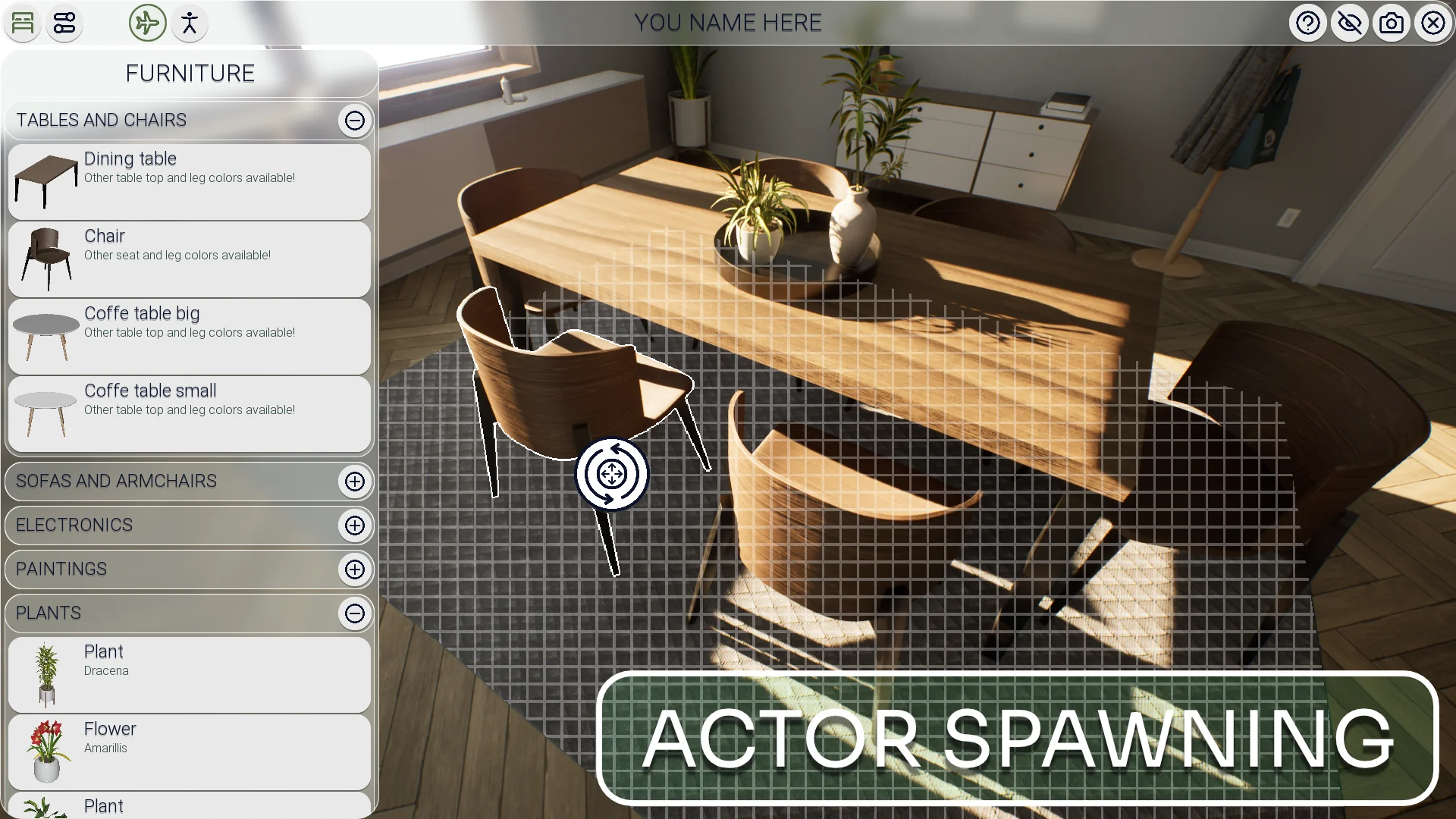
Actor spawning forms a vital piece of this operational flow. Within an interactive interior, users often need to introduce new pieces of furniture, lighting fixtures, or decorative accents on demand. Dynamic actor spawning ensures that objects can be populated into the room programmatically, allowing a single scene to showcase numerous layout possibilities without requiring multiple distinct levels or cluttered geometry loaded all at once.
To complement spawning, the system provides automated placement behaviors through auto attaching and auto rotation. Auto attaching allows secondary items, components, or swappable modules to snap into place against target points or parent actors reliably. This prevents alignment errors when users experiment with complex object arrangements. Meanwhile, auto rotation offers an active display mechanism, rotating selected models automatically so viewers can evaluate silhouettes, profiles, and proportions from every angle without cumbersome manual camera adjustments.
Surface customizability is integrated via a material changing system. Because materials define the visual character of architectural interiors—from floorboards and wall paint to textile upholstery and cabinetry finishes—the ability to swap materials in real time is indispensable. The configurator lets users cycle finishes instantly, presenting realistic color variations and tactile treatments across surfaces while preserving existing lighting and scene context.
Interface Design and Viewing Perspectives
A functional configuration tool requires an intuitive presentation layer so that clients, stakeholders, and presentation viewers can manipulate the environment without confusion. Realtime Archviz Configurator Lite addresses this with a modern UI designed specifically for clean interaction and unobstructed scene viewing.
The modern user interface keeps controls accessible while minimizing screen clutter, ensuring that the visual focus remains on the interior architecture itself. Interactive menus allow users to trigger actor spawning, toggle material variations, and engage automated object behaviors through direct input. Because the entire framework is customizable, the interface structure can be tailored to match the branding, layout, or specific navigation needs of different visualization projects.
Visual engagement is further supported by two distinct view modes. Having two viewing perspectives enables users to shift between different methods of inspecting an environment, such as switching from a broader exploratory perspective to a focused evaluation angle. This dual-mode approach helps viewers inspect both overall room balance and localized design details, providing a balanced visual assessment of the architectural space.
Asset Management in the Lite Framework Setup
A critical detail regarding the project structure is the separation between the configurator logic and decorative scene assets. The 3D assets, furniture pieces, and interior fixtures displayed across demonstration previews and video showcases are not bundled directly inside this project file. Instead, the project is structured as an interactive logic and interface toolset.
Creators looking to reproduce the exact look of the preview presentations can source those complementary environment assets independently through the free ArchVizInterior pack. This architectural asset collection provides the interior geometries, furnishings, and props seen in visual materials, allowing developers to populate the configurator framework quickly.
This deliberate separation between interactive framework and specific mesh content gives the system flexibility. Rather than being tied to one specific residential room or pre-baked arrangement, the tool can be integrated into any custom architectural scene, warehouse visualization, commercial office setup, or bespoke showroom environment without needing to untangle embedded geometry.
Implementation Scenarios and Production Fit
Realtime Archviz Configurator Lite is targeted at creators who require an easy-to-use, interactive mechanism for showcasing spaces and products without designing complex interaction blueprints from scratch. Architectural visualizers, interior designers, and visualization specialists looking to elevate standard 3D walk-throughs into interactive presentation tools can adopt the system as a reliable starting point.
The combination of material swapping, actor spawning, automated rotation, dual view modes, and an adaptable user interface offers a comprehensive foundation for realistic configuration. Whether used to demonstrate modular furniture collections, test real-time material palettes, or build interactive client-facing presentation demos, the framework organizes essential configurator mechanics into a streamlined, customizable package.
 Simulation
 Engine Tools
 Engine Tools