"148d1066ed74e216"{"id":"1002936","slug":"property-transfer-tool","title":"Property Transfer Tool","category":"Physics","engine":"4.26 - 5.6","assetVersion":"Asset Version: 1.2.3 - 1.2.5","engineVersion":"Engine Version: 4.26 - 5.6","tag":"Physics","accent":"blue","visual":"mech","summary":"Batch transfer Unreal Engine Blueprint properties, functions, and macros across multiple assets selected in the Asset Browser with this editor plugin.","platform":"Unreal Engine","indexPolicy":"index","publishedAt":"2026-11-21T23:20:52.607Z","updatedAt":"2026-11-21T23:20:52.607Z","sourceNotes":[],"fileContents":[],"compatibility":["Unreal Engine","Asset Version: 1.2.3 - 1.2.5","Engine Version: 4.26 - 5.6"],"featuredImage":{"alt":"Property Transfer Tool","src":"/wp-content/uploads/published/2026/11/17853b8c8fa8-c34d6bca-d173-49a2-8864-84265e2552ee-83469f33bd.webp"},"fileSizeBytes":3326380,"hasDownloadLink":true,"downloads":0,"terms":[{"taxonomy":"category","slug":"physics-tools-and-plugins","name":"Physics"}],"galleryImages":[{"src":"/wp-content/uploads/published/2026/11/0b3964d769e6-eeadc1cb-8eca-4554-96d2-4fef2fce309f-cb664ca8b7.webp","alt":"Property Transfer Tool"},{"src":"/wp-content/uploads/published/2026/11/6ab6b791adfe-96a0b3ab-49d2-4727-ace9-c7c8b23d8bb7-add6159779.webp","alt":"Property Transfer Tool"},{"src":"/wp-content/uploads/published/2026/11/15ca7a21629b-eaa6ee28-f937-40e1-a16c-e3f61413086e-dcdd9c6b34.webp","alt":"Property Transfer Tool"},{"src":"/wp-content/uploads/published/2026/11/8f446f927c25-1696e140-f2fa-4ffc-a490-82669e894707-aa4c29cd2a.webp","alt":"Property Transfer Tool"},{"src":"/wp-content/uploads/published/2026/11/c0f517e3f377-48d6055c-1f9e-4a8f-adac-4db91aef5c91-d31a947586.webp","alt":"Property Transfer Tool"}],"accessPanel":{"kind":"resource","title":"Get this resource","safetyNote":"Resources are manually reviewed before listing to improve quality and reduce obvious risks.","fileName":"Property Transfer Tool.7z","resourceType":"Resource archive","versions":[]},"contentHtml":"\u003ch2\u003eAsset Browser Selection and the Property Transfer Workflow\u003c/h2\u003e\n\u003cp\u003eManaging collections of visual scripting files in Unreal Engine often involves repetitive structural updates, particularly when logic or data structures must be mirrored across diverse assets. The Property Transfer Tool functions directly as an editor plugin to address this manual bottleneck. By operating at the editor environment level, the utility eliminates the need to open individual Blueprint graphs sequentially to recreate common elements. Instead, the workflow centers on selecting target assets within the content management hierarchy.\u003c/p\u003e\n\u003cp\u003eTargeting assets directly from the Asset Browser establishes a streamlined operational pipeline. Users highlight any number of Blueprints simultaneously in the browser pane, defining the destination group for the operation in a single action. Because the plugin processes selections at the asset container level, it sidesteps the repetitive task of navigating between individual Blueprint editor windows. This operational approach bridges top-level project organization with underlying visual scripting logic, allowing updates to propagate through large asset directories efficiently.\u003c/p\u003e\n\u003cp\u003eHandling multiple files in a unified batch process also mitigates human error. When identical elements must be manually transcribed across multiple Blueprints, inconsistencies in naming, scope, or parameter configuration can easily arise. By managing the transfer across any selected volume of Blueprints simultaneously, the plugin establishes an accurate, uniform distribution of scripted logic throughout the chosen asset files.\u003c/p\u003e\n\u003ch2\u003eBatch Transfer of Blueprint Property Definitions\u003c/h2\u003e\n\u003cp\u003eVariables define the internal data state of Blueprint actors and objects, establishing everything from numeric measurements to asset references. The Property Transfer Tool specifically extracts and distributes these Blueprint properties (variables) across the selected target files. Rather than recreating each variable definition by hand, configuring data types, and setting initial designations in every separate asset, the transfer mechanism pushes the complete variable schema across the chosen selection.\u003c/p\u003e\n\u003cp\u003eReplicating properties across multiple Blueprints is particularly valuable when structuring projects that share core data schemas across unrelated class branches. In standard engine architecture, sharing variables without standard class inheritance often requires manually rebuilding the variable list inside each individual asset or constructing auxiliary data structures. Through batch transfer, identical variable names, types, and properties are established directly across all highlighted Blueprints, ensuring data parity across the designated set.\u003c/p\u003e\n\u003cp\u003eConsistency in property configuration is critical when working with complex systems that query specific variable names across dynamic actors. If a subsystem expects a particular property structure across dozens of interacting assets, batch-migrating those properties guarantees that typos or misaligned variable types do not enter the project. The plugin enforces structural alignment by replicating the designated properties across every target asset chosen in the Asset Browser.\u003c/p\u003e\n\u003ch2\u003eMigrating Blueprint Functions and Macros Across Assets\u003c/h2\u003e\n\u003cp\u003eBeyond variable storage, visual scripting architecture relies heavily on procedural logic structures. The Property Transfer Tool manages the batch migration of both Blueprint functions and macros, allowing full execution graphs to move directly between assets. Functions carry distinct signature layouts, input pins, output pins, local variables, and procedural node networks. Through the plugin's batch execution, these functional blocks are duplicated directly into the target Blueprints without requiring manual graph-level copying and pasting.\u003c/p\u003e\n\u003cp\u003eMacros provide reusable node patterns that collapse repetitive execution sequences into compact nodes with flexible pin arrangements. Because macros can support multiple input and output execution paths, they are frequently created to streamline complex conditional trees or recurring loops. Migrating macros across an entire batch of Blueprints ensures that project-wide operational patterns are instantly accessible within the graph editors of all recipient assets.\u003c/p\u003e\n\u003cp\u003eDistributing functions and macros together with variables ensures that procedural logic remains fully intact upon transfer. When a function relies on specific variable types or calls particular macro helpers, migrating these elements in tandem ensures that the resulting Blueprint scripts possess the internal references necessary to compile cleanly. This synchronized migration preserves the structural integrity of the transferred visual scripting logic.\u003c/p\u003e\n\u003ch2\u003eEditor Automation for Simulation and Industrial Tool Implementations\u003c/h2\u003e\n\u003cp\u003eIndustrial visualization, engineering tooling, and interactive simulation projects frequently operate under strict data consistency requirements. Unlike traditional entertainment projects where actor logic can vary widely, industrial digital twins and simulation environments often demand dozens or hundreds of distinct Blueprint actors representing specific machinery, hardware components, or monitoring points. Each of these distinct actors must maintain identical telemetry variables, data-reading functions, and status-checking macros to interface with the larger simulation framework.\u003c/p\u003e\n\u003cp\u003eMaintaining such large asset volumes manually introduces substantial development overhead. A single omitted telemetry property or an out-of-date macro in a machinery Blueprint can disrupt simulation feeds or reporting pipelines. Utilizing the automation capabilities of the Property Transfer Tool allows simulation teams to batch-update entire directories of specialized actors directly from the Asset Browser. When simulation specifications change, technical artists and developers can select the target asset groups and deploy the updated properties and functions immediately.\u003c/p\u003e\n\u003cp\u003eThis automated capability directly benefits code refactoring and project maintenance. In technical projects where inheritance hierarchies must remain flat or modular, batch-applying common functions, macros, and properties avoids the over-complication of object-oriented trees. The tool allows developers to inject standard functional blocks across any arbitrary collection of Blueprints, preserving modular design while maintaining complete operational standardization across the project's visual code base.\u003c/p\u003e\n\n\u003ch2\u003eExplore Similar Assets\u003c/h2\u003e\n\u003cul\u003e\n\u003cli\u003e\u003ca href=\"https://3dcghub.com/nwh-dynamic-water-physics-2/\" rel=\"noopener noreferrer\"\u003eNWH Dynamic Water Physics 2\u003c/a\u003e\u003c/li\u003e\n\u003cli\u003e\u003ca href=\"https://3dcghub.com/collision-disabler/\" rel=\"noopener noreferrer\"\u003eCollision Disabler\u003c/a\u003e\u003c/li\u003e\n\u003cli\u003e\u003ca href=\"https://3dcghub.com/rescatter/\" rel=\"noopener noreferrer\"\u003eReScatter\u003c/a\u003e\u003c/li\u003e\n\u003cli\u003e\u003ca href=\"https://3dcghub.com/water-physics/\" rel=\"noopener noreferrer\"\u003eWater Physics\u003c/a\u003e\u003c/li\u003e\n\u003cli\u003e\u003ca href=\"https://3dcghub.com/fluid-pumping-hose-system/\" rel=\"noopener noreferrer\"\u003eFluid Pumping \u0026amp; Hose System\u003c/a\u003e\u003c/li\u003e\n\u003c/ul\u003e","contentTextLength":6617,"navigation":{"current":36,"total":4890,"previous":{"id":"1002937","slug":"realtime-archviz-configurator-lite","title":"Realtime Archviz Configurator Lite","category":"Engine Tools","platform":"Unreal Engine","updatedAt":"2026-11-21T23:21:28.021Z"},"next":{"id":"1002935","slug":"platformer-development-kit-all-in-one","title":"Platformer Development Kit All in One","category":"Platformer","platform":"Unreal Engine","updatedAt":"2026-11-21T23:20:03.917Z"}},"relatedResources":[{"id":"1000126","slug":"nwh-dynamic-water-physics-2","title":"NWH Dynamic Water Physics 2","category":"Physics","engine":"4.27, 5.2 - 5.3","assetVersion":"Asset Version: 1.0","engineVersion":"Engine Version: 4.27, 5.2 - 5.3","tag":"Physics","accent":"blue","visual":"mech","summary":"A mesh-driven water-object interaction simulator for Unreal Engine featuring accurate buoyancy, hydrodynamics, and multi-threaded performance.","platform":"Unreal Engine","indexPolicy":"index","publishedAt":"2026-06-11T10:05:36.789Z","updatedAt":"2026-11-14T06:59:30.815Z","sourceNotes":[],"fileContents":[],"compatibility":["Unreal Engine","Asset Version: 1.0","Engine Version: 4.27, 5.2 - 5.3"],"featuredImage":{"alt":"NWH Dynamic Water Physics 2","src":"/wp-content/uploads/published/2026/06/0c4bc739a663-3a9c0c1e-64c3-40f4-b2dd-9e546051f444-a77f918910.webp"},"fileSizeBytes":823106043,"hasDownloadLink":true,"downloads":0},{"id":"15182","slug":"collision-disabler","title":"Collision Disabler","category":"Physics","engine":"4.26 - 4.27,5.0 - 5.6","assetVersion":"Engine version: 4.26 - 4.27,5.0 - 5.6","engineVersion":"Asset Version:1.4 - 1.9","tag":"Physics","accent":"blue","visual":"mech","summary":"The Collision Disabler plugin provides a streamlined way to manage physical interactions in Unreal Engine. It allows users to disable collisions between specific object pairs at runtime without complex coding.","platform":"Unreal Engine","indexPolicy":"noindex","publishedAt":"2026-03-12T08:13:02.000Z","updatedAt":"2026-04-19T15:44:52.000Z","sourceNotes":[],"fileContents":[],"compatibility":["Unreal Engine","Engine version: 4.26 - 4.27,5.0 - 5.6","Asset Version: 1.4 - 1.9"],"featuredImage":{"alt":"Collision Disabler","src":"https://3dcghub.com/wp-content/uploads/2026/03/9a374294-bc50-4b01-bb85-ccc936e9efce.webp"},"fileSizeBytes":169731166,"hasDownloadLink":true,"downloads":0},{"id":"15191","slug":"rescatter","title":"ReScatter","category":"Physics","engine":"5.6 - 5.7","assetVersion":"Engine version: 5.6 - 5.7","engineVersion":"Asset Version:1.0 - 1.1","tag":"Physics","accent":"blue","visual":"audio","summary":"ReScatter 1.0 provides a modern interface and physics-driven workflow for placing objects in Unreal Engine. It allows for precise scattering using volumes, splines, and customizable presets.","platform":"Unreal Engine","indexPolicy":"noindex","publishedAt":"2026-03-12T08:15:25.000Z","updatedAt":"2026-04-19T15:44:52.000Z","sourceNotes":[],"fileContents":[],"compatibility":["Unreal Engine","Engine version: 5.6 - 5.7","Asset Version: 1.0 - 1.1"],"featuredImage":{"alt":"ReScatter","src":"https://3dcghub.com/wp-content/uploads/2026/03/4818e7bb-0a27-44d4-a1d5-c1f0b5dff9fa.webp"},"fileSizeBytes":21797520,"hasDownloadLink":true,"downloads":0}]}[{"id":4225,"sourceId":4225,"taxonomyId":4225,"taxonomy":"category","slug":"asset-library","name":"Asset Library","parentId":null,"count":4744,"hasChildren":true,"href":"/","seoTitle":"Free Game Assets Library | 3DCGHUB","seoDescription":"Browse free Unreal Engine, Unity, Blender assets and game development tutorials on 3DCGHUB with previews, compatibility notes, and secure downloads.","sitemapEnabled":true,"children":[{"id":4227,"sourceId":4227,"taxonomyId":4227,"taxonomy":"category","slug":"blender-add-ons-plugins","name":"Blender Add-ons \u0026 Plugins","parentId":4225,"count":10,"hasChildren":false,"href":"/category/blender-add-ons-plugins/","seoTitle":"Free Blender Add-ons \u0026 Plugins | 3DCGHUB","seoDescription":"Browse free Blender Add-ons \u0026 Plugins tools for Blender on 3DCGHUB: curated downloads with preview images, compatibility notes and secure download access.","sitemapEnabled":true},{"id":514,"sourceId":514,"taxonomyId":514,"taxonomy":"category","slug":"unity-2","name":"Unity","parentId":4225,"count":453,"hasChildren":true,"href":"/category/unity-2/","seoTitle":"Free Unity Assets | 3DCGHUB","seoDescription":"Browse free Unity resources on 3DCGHUB: curated downloads with preview images, compatibility notes and secure download access.","sitemapEnabled":true,"children":[{"id":523,"sourceId":523,"taxonomyId":523,"taxonomy":"category","slug":"2d","name":"2D","parentId":514,"count":1,"hasChildren":true,"href":"/category/2d/","seoTitle":"Free Unity 2D | 3DCGHUB","seoDescription":"Browse free 2D assets for Unity on 3DCGHUB: curated downloads with preview images, compatibility notes and secure download access.","sitemapEnabled":true},{"id":515,"sourceId":515,"taxonomyId":515,"taxonomy":"category","slug":"3d-unity-2","name":"3D","parentId":514,"count":162,"hasChildren":true,"href":"/category/3d-unity-2/","seoTitle":"Free Unity 3D Assets | 3DCGHUB","seoDescription":"Browse free 3D assets for Unity on 3DCGHUB: curated downloads with preview images, compatibility notes and secure download access.","sitemapEnabled":true},{"id":565,"sourceId":565,"taxonomyId":565,"taxonomy":"category","slug":"add-ons","name":"Add-Ons","parentId":514,"count":2,"hasChildren":false,"href":"/category/add-ons/","seoTitle":"Free Unity Add-Ons | 3DCGHUB","seoDescription":"Browse free Add-Ons assets for Unity on 3DCGHUB: curated downloads with preview images, compatibility notes and secure download access.","sitemapEnabled":true},{"id":529,"sourceId":529,"taxonomyId":529,"taxonomy":"category","slug":"audio-unity-2","name":"Audio","parentId":514,"count":1,"hasChildren":true,"href":"/category/audio-unity-2/","seoTitle":"Free Unity Audio | 3DCGHUB","seoDescription":"Browse free Audio for Unity on 3DCGHUB: curated downloads with preview images, compatibility notes and secure download access.","sitemapEnabled":true},{"id":557,"sourceId":557,"taxonomyId":557,"taxonomy":"category","slug":"templates","name":"Templates","parentId":514,"count":36,"hasChildren":true,"href":"/category/templates/","seoTitle":"Free Unity Templates | 3DCGHUB","seoDescription":"Browse free Unity project templates on 3DCGHUB. Starter kits with previews, compatibility notes, and secure download access.","sitemapEnabled":true},{"id":533,"sourceId":533,"taxonomyId":533,"taxonomy":"category","slug":"tools-unity-2","name":"Tools","parentId":514,"count":0,"hasChildren":true,"href":"/category/tools-unity-2/","sitemapEnabled":true},{"id":554,"sourceId":554,"taxonomyId":554,"taxonomy":"category","slug":"vfx-unity-2","name":"VFX","parentId":514,"count":4,"hasChildren":true,"href":"/category/vfx-unity-2/","seoTitle":"Free Unity VFX | 3DCGHUB","seoDescription":"Browse free VFX for Unity on 3DCGHUB: curated downloads with preview images, compatibility notes and secure download access.","sitemapEnabled":true}]},{"id":511,"sourceId":511,"taxonomyId":511,"taxonomy":"category","slug":"unreal-engine-2","name":"Unreal Engine","parentId":4225,"count":4282,"hasChildren":true,"href":"/category/unreal-engine-2/","seoTitle":"Free Unreal Engine Assets | 3DCGHUB","seoDescription":"Browse free Unreal Engine resources on 3DCGHUB: curated downloads with preview images, compatibility notes and secure download access.","sitemapEnabled":true,"children":[{"id":54,"sourceId":54,"taxonomyId":54,"taxonomy":"category","slug":"3d","name":"3D","parentId":511,"count":2428,"hasChildren":true,"href":"/category/3d/","seoTitle":"Free Unreal Engine 3D | 3DCGHUB","seoDescription":"Browse free 3D assets for Unreal Engine on 3DCGHUB: curated downloads with preview images, compatibility notes and secure download access.","sitemapEnabled":true},{"id":441,"sourceId":441,"taxonomyId":441,"taxonomy":"category","slug":"animations","name":"Animations","parentId":511,"count":245,"hasChildren":true,"href":"/category/animations/","seoTitle":"Free Unreal Engine Animations | 3DCGHUB","seoDescription":"Browse free Animations for Unreal Engine on 3DCGHUB: curated downloads with preview images, compatibility notes and secure download access.","sitemapEnabled":true},{"id":446,"sourceId":446,"taxonomyId":446,"taxonomy":"category","slug":"audio","name":"Audio","parentId":511,"count":63,"hasChildren":true,"href":"/category/audio/","seoTitle":"Free Unreal Engine Audio Resources | 3DCGHUB","seoDescription":"Browse free Unreal Engine audio resources including sound effects, voices, dialogue, and ambient sounds. Curated free downloads on 3DCGHUB.","sitemapEnabled":true},{"id":466,"sourceId":466,"taxonomyId":466,"taxonomy":"category","slug":"game-systems","name":"Game Systems","parentId":511,"count":356,"hasChildren":true,"href":"/category/game-systems/","seoTitle":"Free Unreal Engine Game Systems | 3DCGHUB","seoDescription":"Browse free Game Systems tools for Unreal Engine on 3DCGHUB: curated downloads with preview images, compatibility notes and secure download access.","sitemapEnabled":true},{"id":478,"sourceId":478,"taxonomyId":478,"taxonomy":"category","slug":"game-templates","name":"Game Templates","parentId":511,"count":150,"hasChildren":true,"href":"/category/game-templates/","seoTitle":"Free Unreal Engine Game Templates | 3DCGHUB","seoDescription":"Browse free Game Templates for Unreal Engine on 3DCGHUB: curated downloads with preview images, compatibility notes and secure download access.","sitemapEnabled":true},{"id":432,"sourceId":432,"taxonomyId":432,"taxonomy":"category","slug":"hdri","name":"HDRI","parentId":511,"count":6,"hasChildren":true,"href":"/category/hdri/","seoTitle":"Free Unreal Engine HDRI | 3DCGHUB","seoDescription":"Browse free Unreal Engine HDRI skies and lighting maps on 3DCGHUB. Environment lighting with previews and secure downloads.","sitemapEnabled":true},{"id":228,"sourceId":228,"taxonomyId":228,"taxonomy":"category","slug":"material-and-textures","name":"Material \u0026 Textures","parentId":511,"count":172,"hasChildren":true,"href":"/category/material-and-textures/","seoTitle":"Free Unreal Engine Material \u0026 Textures | 3DCGHUB","seoDescription":"Browse free Material \u0026 Textures for Unreal Engine on 3DCGHUB: curated downloads with preview images, compatibility notes and secure download access.","sitemapEnabled":true},{"id":298,"sourceId":298,"taxonomyId":298,"taxonomy":"category","slug":"sprites-and-flipbooks","name":"Sprites \u0026 Flipbooks","parentId":511,"count":17,"hasChildren":true,"href":"/category/sprites-and-flipbooks/","seoTitle":"Free Unreal Engine Sprites \u0026 Flipbooks | 3DCGHUB","seoDescription":"Browse free Sprites \u0026 Flipbooks assets for Unreal Engine on 3DCGHUB: curated downloads with preview images, compatibility notes and secure download access.","sitemapEnabled":true},{"id":489,"sourceId":489,"taxonomyId":489,"taxonomy":"category","slug":"tools-and-plugins","name":"Tools \u0026 Plugins","parentId":511,"count":390,"hasChildren":true,"href":"/category/tools-and-plugins/","seoTitle":"Free Unreal Engine Tools \u0026 Plugins | 3DCGHUB","seoDescription":"Browse free Tools \u0026 Plugins for Unreal Engine on 3DCGHUB: curated downloads with preview images, compatibility notes and secure download access.","sitemapEnabled":true},{"id":459,"sourceId":459,"taxonomyId":459,"taxonomy":"category","slug":"ui","name":"UI","parentId":511,"count":43,"hasChildren":true,"href":"/category/ui/","seoTitle":"Free Unreal Engine UI | 3DCGHUB","seoDescription":"Browse free UI for Unreal Engine on 3DCGHUB: curated downloads with preview images, compatibility notes and secure download access.","sitemapEnabled":true},{"id":450,"sourceId":450,"taxonomyId":450,"taxonomy":"category","slug":"vfx","name":"VFX","parentId":511,"count":412,"hasChildren":true,"href":"/category/vfx/","seoTitle":"Free Unreal Engine VFX | 3DCGHUB","seoDescription":"Browse free VFX for Unreal Engine on 3DCGHUB: curated downloads with preview images, compatibility notes and secure download access.","sitemapEnabled":true}]}]},{"id":4222,"sourceId":4222,"taxonomyId":4222,"taxonomy":"category","slug":"tutorial-library","name":"Tutorial Library","parentId":null,"count":117,"hasChildren":false,"href":"/tutorials/","seoTitle":"Free Game Development Tutorial Library | 3DCGHUB","seoDescription":"Browse free game development tutorials for Unreal Engine, Unity, Blender, and more on 3DCGHUB with practical workflows and secure downloads.","sitemapEnabled":true}]
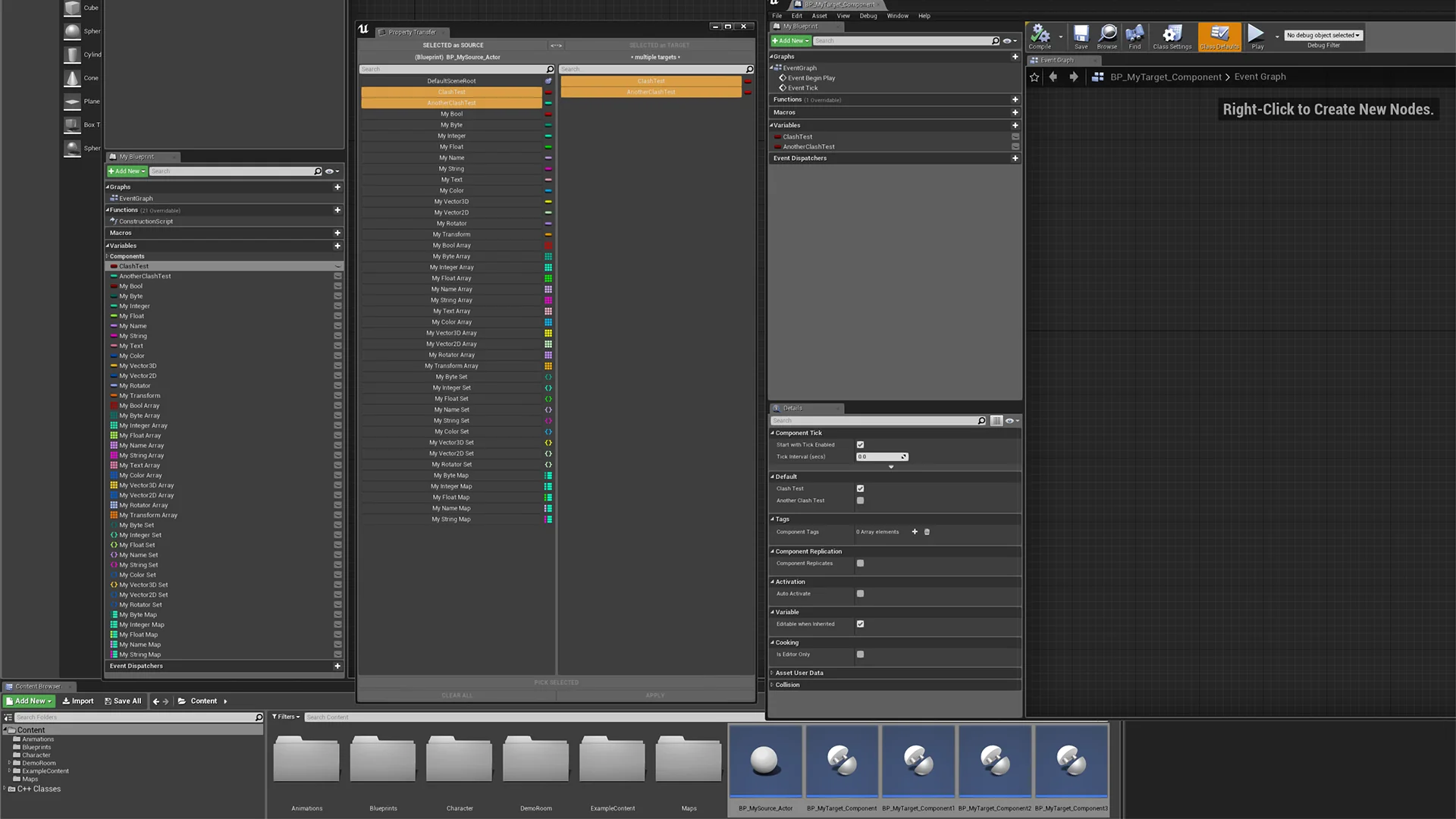
Resource screenshots
1 / 5
Join our channel
Follow 3DCGHUB on Telegram for new resource drops, migration updates, and community notices.
Asset Browser Selection and the Property Transfer Workflow
Managing collections of visual scripting files in Unreal Engine often involves repetitive structural updates, particularly when logic or data structures must be mirrored across diverse assets. The Property Transfer Tool functions directly as an editor plugin to address this manual bottleneck. By operating at the editor environment level, the utility eliminates the need to open individual Blueprint graphs sequentially to recreate common elements. Instead, the workflow centers on selecting target assets within the content management hierarchy.
Targeting assets directly from the Asset Browser establishes a streamlined operational pipeline. Users highlight any number of Blueprints simultaneously in the browser pane, defining the destination group for the operation in a single action. Because the plugin processes selections at the asset container level, it sidesteps the repetitive task of navigating between individual Blueprint editor windows. This operational approach bridges top-level project organization with underlying visual scripting logic, allowing updates to propagate through large asset directories efficiently.
Handling multiple files in a unified batch process also mitigates human error. When identical elements must be manually transcribed across multiple Blueprints, inconsistencies in naming, scope, or parameter configuration can easily arise. By managing the transfer across any selected volume of Blueprints simultaneously, the plugin establishes an accurate, uniform distribution of scripted logic throughout the chosen asset files.
Batch Transfer of Blueprint Property Definitions
Variables define the internal data state of Blueprint actors and objects, establishing everything from numeric measurements to asset references. The Property Transfer Tool specifically extracts and distributes these Blueprint properties (variables) across the selected target files. Rather than recreating each variable definition by hand, configuring data types, and setting initial designations in every separate asset, the transfer mechanism pushes the complete variable schema across the chosen selection.
Replicating properties across multiple Blueprints is particularly valuable when structuring projects that share core data schemas across unrelated class branches. In standard engine architecture, sharing variables without standard class inheritance often requires manually rebuilding the variable list inside each individual asset or constructing auxiliary data structures. Through batch transfer, identical variable names, types, and properties are established directly across all highlighted Blueprints, ensuring data parity across the designated set.
Consistency in property configuration is critical when working with complex systems that query specific variable names across dynamic actors. If a subsystem expects a particular property structure across dozens of interacting assets, batch-migrating those properties guarantees that typos or misaligned variable types do not enter the project. The plugin enforces structural alignment by replicating the designated properties across every target asset chosen in the Asset Browser.
Migrating Blueprint Functions and Macros Across Assets
Beyond variable storage, visual scripting architecture relies heavily on procedural logic structures. The Property Transfer Tool manages the batch migration of both Blueprint functions and macros, allowing full execution graphs to move directly between assets. Functions carry distinct signature layouts, input pins, output pins, local variables, and procedural node networks. Through the plugin's batch execution, these functional blocks are duplicated directly into the target Blueprints without requiring manual graph-level copying and pasting.
Macros provide reusable node patterns that collapse repetitive execution sequences into compact nodes with flexible pin arrangements. Because macros can support multiple input and output execution paths, they are frequently created to streamline complex conditional trees or recurring loops. Migrating macros across an entire batch of Blueprints ensures that project-wide operational patterns are instantly accessible within the graph editors of all recipient assets.
Distributing functions and macros together with variables ensures that procedural logic remains fully intact upon transfer. When a function relies on specific variable types or calls particular macro helpers, migrating these elements in tandem ensures that the resulting Blueprint scripts possess the internal references necessary to compile cleanly. This synchronized migration preserves the structural integrity of the transferred visual scripting logic.
Editor Automation for Simulation and Industrial Tool Implementations
Industrial visualization, engineering tooling, and interactive simulation projects frequently operate under strict data consistency requirements. Unlike traditional entertainment projects where actor logic can vary widely, industrial digital twins and simulation environments often demand dozens or hundreds of distinct Blueprint actors representing specific machinery, hardware components, or monitoring points. Each of these distinct actors must maintain identical telemetry variables, data-reading functions, and status-checking macros to interface with the larger simulation framework.
Maintaining such large asset volumes manually introduces substantial development overhead. A single omitted telemetry property or an out-of-date macro in a machinery Blueprint can disrupt simulation feeds or reporting pipelines. Utilizing the automation capabilities of the Property Transfer Tool allows simulation teams to batch-update entire directories of specialized actors directly from the Asset Browser. When simulation specifications change, technical artists and developers can select the target asset groups and deploy the updated properties and functions immediately.
This automated capability directly benefits code refactoring and project maintenance. In technical projects where inheritance hierarchies must remain flat or modular, batch-applying common functions, macros, and properties avoids the over-complication of object-oriented trees. The tool allows developers to inject standard functional blocks across any arbitrary collection of Blueprints, preserving modular design while maintaining complete operational standardization across the project's visual code base.
 Physics
 Physics
 Physics