"1f00f67f9253451b"{"id":"15182","slug":"collision-disabler","title":"Collision Disabler","category":"Physics","engine":"4.26 - 4.27,5.0 - 5.6","assetVersion":"Engine version: 4.26 - 4.27,5.0 - 5.6","engineVersion":"Asset Version:1.4 - 1.9","tag":"Physics","accent":"blue","visual":"mech","summary":"The Collision Disabler plugin provides a streamlined way to manage physical interactions in Unreal Engine. It allows users to disable collisions between specific object pairs at runtime without complex coding.","platform":"Unreal Engine","publishedAt":"2026-03-12T08:13:02.000Z","updatedAt":"2026-04-19T15:44:52.000Z","sourceNotes":[],"fileContents":[],"compatibility":["Unreal Engine","Engine version: 4.26 - 4.27,5.0 - 5.6","Asset Version: 1.4 - 1.9"],"featuredImage":{"alt":"Collision Disabler","src":"https://3dcghub.com/wp-content/uploads/2026/03/9a374294-bc50-4b01-bb85-ccc936e9efce.webp"},"hasDownloadLink":true,"downloads":0,"terms":[{"taxonomy":"category","slug":"physics-tools-and-plugins","name":"Physics"},{"taxonomy":"post_tag","slug":"blueprint","name":"Blueprint"},{"taxonomy":"post_tag","slug":"collision-management","name":"Collision Management"},{"taxonomy":"post_tag","slug":"plugins","name":"Plugins"},{"taxonomy":"post_tag","slug":"tools","name":"Tools"},{"taxonomy":"post_tag","slug":"unreal-engine-5","name":"Unreal Engine 5"},{"taxonomy":"post_tag","slug":"utilities","name":"Utilities"}],"galleryImages":[{"src":"https://3dcghub.com/wp-content/uploads/2026/03/cb93735425b6_371f3dd4-e28b-4e88-b2a8-6de2564c1654.webp","alt":"Collision Disabler"},{"src":"https://3dcghub.com/wp-content/uploads/2026/03/bebb62ff9ef9_255cb29d-932d-437c-a9cc-51489f321cbd.webp","alt":"Collision Disabler"},{"src":"https://3dcghub.com/wp-content/uploads/2026/03/e4da92af16e5_b1d19cf3-843a-4edd-a9a1-94f54c26548f.webp","alt":"Collision Disabler"},{"src":"https://3dcghub.com/wp-content/uploads/2026/03/6f6b322e354f_d5f11f3d-4a22-49b8-9395-d57bde0320db.webp","alt":"Collision Disabler"},{"src":"https://3dcghub.com/wp-content/uploads/2026/03/577fa6460ce2_b4d0daa4-bb2d-4e77-8815-957e7f2d3dce.webp","alt":"Collision Disabler"}],"accessPanel":{"kind":"resource","title":"Access this resource","eyebrow":"Free Download","message":"Log in or create a free account to start your download.","fileName":"Collision Disabler 4.26 - 5.6;V1.4 - 1.9.7z","safetyNote":"All resources are 100% manually reviewed to eliminate all risks.","actionLabel":"Download Free","resourceType":"Resource archive"},"contentHtml":"\u003ch2\u003eManaging Physical Interactions\u003c/h2\u003e\n\u003cp\u003eCollision Disabler is a specialized plugin designed to turn off collisions between indicated pairs of physical objects during runtime. This tool offers a unique solution for developers working with Unreal Engine physics simulations. Consequently, users gain more control over how individual assets interact within their project environments. By targeting specific object pairs, the developer can refine the behavior of physical actors without affecting entire groups.\u003c/p\u003e\n\n\u003ch2\u003eLimitations of Native Unreal Engine Methods\u003c/h2\u003e\n\u003cp\u003eUnreal Engine typically provides several ways to manage object interactions. However, these native methods often come with specific limitations that can hinder complex workflows. Understanding these differences is essential for choosing the right tool for your project.\u003c/p\u003e\n\n\u003cul\u003e\n \u003cli\u003e\u003cstrong\u003eCollision Channels:\u003c/strong\u003e This method allows for switching off collisions between broad groups of objects. Unfortunately, it does not support disabling interactions between specific, individual objects.\u003c/li\u003e\n \u003cli\u003e\u003cstrong\u003eIgnore Actor When Moving:\u003c/strong\u003e This setting tells a component to ignore collisions with specific actors during movement. However, this method will not work for active physics simulations.\u003c/li\u003e\n \u003cli\u003e\u003cstrong\u003eContact Modification:\u003c/strong\u003e This advanced technique involves modifying the properties of generated contact points. While effective, it usually requires deep knowledge of PhysX and expertise in C++ coding.\u003c/li\u003e\n\u003c/ul\u003e\n\n\u003ch2\u003eA Simplified Workflow for Physics Simulation\u003c/h2\u003e\n\u003cp\u003eCollision Disabler utilizes the contact modification method to achieve its results. Nevertheless, it removes the technical barriers usually associated with manual coding. It provides a very simple and convenient way to disable collisions between objects using physics simulation. Therefore, developers can focus on their creative vision rather than writing complex backend scripts. Using the Collision Disabler ensures that these interactions are handled efficiently during runtime.\u003c/p\u003e\n\n\u003cp\u003eBy using this plugin, you can precisely define which object pairs should ignore each other. This functionality is essential for projects that require high-level physics management. Furthermore, the tool simplifies what would otherwise be a highly technical task. It serves as a bridge for those who need the power of contact modification without the C++ overhead.\u003c/p\u003e\n\n\u003ch2\u003eBest Fit\u003c/h2\u003e\n\u003cp\u003eIn practice, the Collision Disabler plugin bridges the gap between group-based collision channels and complex C++ modifications. It offers a streamlined approach for managing specific object interactions in Unreal Engine. Whether you are refining a simulation or optimizing physics, this tool provides a convenient solution for modern developers. It remains a practical choice for anyone needing precise control over runtime physical collisions.\u003c/p\u003e\n\n\u003ch2\u003eExplore Similar Assets\u003c/h2\u003e\n\u003cul\u003e\n\u003cli\u003e\u003ca href=\"https://3dcghub.com/dynamic-real-water/\" title=\"Dynamic Real Water\"\u003eDynamic Real Water\u003c/a\u003e\u003c/li\u003e\n\u003cli\u003e\u003ca href=\"https://3dcghub.com/modular-medieval-environment-medieval-castle-medieval-houses-medieval-church/\" title=\"Modular Medieval Environment (Medieval Castle, Medieval Houses, Medieval Church)\"\u003eModular Medieval Environment (Medieval Castle, Medieval Houses, Medieval Church)\u003c/a\u003e\u003c/li\u003e\n\u003cli\u003e\u003ca href=\"https://3dcghub.com/grave-of-the-serpent-king/\" title=\"Grave Of The Serpent King\"\u003eGrave Of The Serpent King\u003c/a\u003e\u003c/li\u003e\n\u003cli\u003e\u003ca href=\"https://3dcghub.com/hoverbike-system/\" title=\"Hoverbike System\"\u003eHoverbike System\u003c/a\u003e\u003c/li\u003e\n\u003cli\u003e\u003ca href=\"https://3dcghub.com/wooden-bridges-optimized/\" title=\"Wooden Bridges Optimized\"\u003eWooden Bridges Optimized\u003c/a\u003e\u003c/li\u003e\n\u003c/ul\u003e","contentTextLength":2963,"navigation":{"current":2637,"total":3222,"previous":{"id":"15191","slug":"rescatter","title":"ReScatter","category":"Physics","platform":"Unreal Engine","updatedAt":"2026-04-19T15:44:52.000Z"},"next":{"id":"15291","slug":"physical-rope","title":"Physical Rope","category":"Procedural Systems","platform":"Unreal Engine","updatedAt":"2026-04-19T15:44:51.000Z"}},"relatedResources":[{"id":"15191","slug":"rescatter","title":"ReScatter","category":"Physics","engine":"5.6 - 5.7","assetVersion":"Engine version: 5.6 - 5.7","engineVersion":"Asset Version:1.0 - 1.1","tag":"Physics","accent":"blue","visual":"audio","summary":"ReScatter 1.0 provides a modern interface and physics-driven workflow for placing objects in Unreal Engine. It allows for precise scattering using volumes, splines, and customizable presets.","platform":"Unreal Engine","publishedAt":"2026-03-12T08:15:25.000Z","updatedAt":"2026-04-19T15:44:52.000Z","sourceNotes":[],"fileContents":[],"compatibility":["Unreal Engine","Engine version: 5.6 - 5.7","Asset Version: 1.0 - 1.1"],"featuredImage":{"alt":"ReScatter","src":"https://3dcghub.com/wp-content/uploads/2026/03/4818e7bb-0a27-44d4-a1d5-c1f0b5dff9fa.webp"},"hasDownloadLink":true,"downloads":0},{"id":"14675","slug":"twitch-integrator","title":"Twitch Integrator","category":"Engine Tools","engine":"4.26","assetVersion":"Engine version: 4.26","engineVersion":"Asset Version:1.5","tag":"Engine Tools","accent":"blue","visual":"animation","summary":"Twitch Integrator simplifies the process of connecting your project to Twitch. By using a node-based system, the developer ensures that every feature is accessible and easy to implement.","platform":"Unreal Engine","publishedAt":"2026-03-11T18:55:42.000Z","updatedAt":"2026-04-19T15:45:42.000Z","sourceNotes":[],"fileContents":[],"compatibility":["Unreal Engine","Engine version: 4.26","Asset Version: 1.5"],"featuredImage":{"alt":"Twitch Integrator","src":"https://3dcghub.com/wp-content/uploads/2026/03/6048ee5d-050a-4bc6-8ac8-da25d8c93c16.webp"},"hasDownloadLink":true,"downloads":0},{"id":"13982","slug":"externaltextureplugin","title":"ExternalTexturePlugin","category":"Engine Tools","engine":"5.0 - 5.8","assetVersion":"Asset Version:1.0.1 - 1.0.2","engineVersion":"Engine version: 5.0 - 5.8","tag":"Engine Tools","accent":"blue","visual":"luts","summary":"The ExternalTexturePlugin provides a seamless way to integrate local and network-based images into your project at runtime using Blueprints. It supports standard formats like JPG, PNG, TGA, and BMP.","platform":"Unreal Engine","publishedAt":"2026-03-11T10:54:44.000Z","updatedAt":"2026-09-29T09:03:01.541Z","sourceNotes":[],"fileContents":[],"compatibility":["Unreal Engine","Asset Version:1.0.1 - 1.0.2","Engine version: 5.0 - 5.8"],"featuredImage":{"alt":"ExternalTexturePlugin","src":"https://3dcghub.com/wp-content/uploads/2026/03/cf5764e9-fff8-49cf-b24b-274e326c864f.webp"},"hasDownloadLink":true,"downloads":1}]}
Physics
Collision Disabler
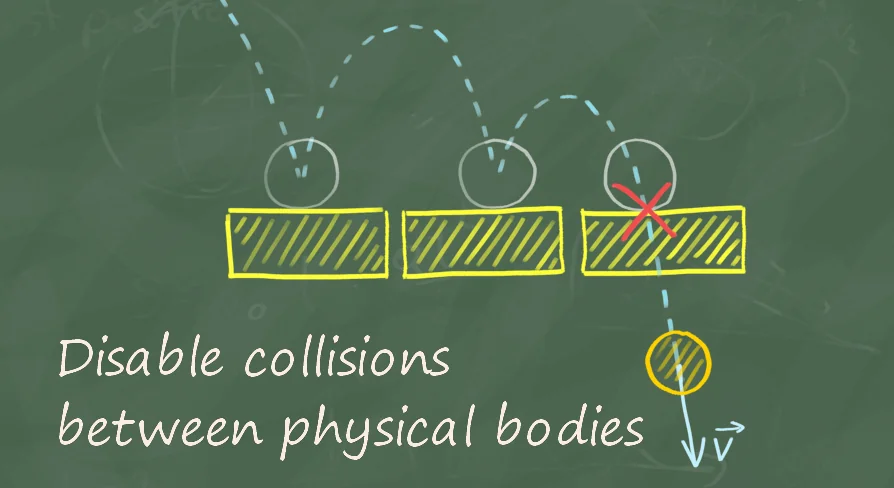
The Collision Disabler plugin provides a streamlined way to manage physical interactions in Unreal Engine. It allows users to disable collisions between specific object pairs at runtime without complex coding.
Collision Disabler is a specialized plugin designed to turn off collisions between indicated pairs of physical objects during runtime. This tool offers a unique solution for developers working with Unreal Engine physics simulations. Consequently, users gain more control over how individual assets interact within their project environments. By targeting specific object pairs, the developer can refine the behavior of physical actors without affecting entire groups.
Limitations of Native Unreal Engine Methods
Unreal Engine typically provides several ways to manage object interactions. However, these native methods often come with specific limitations that can hinder complex workflows. Understanding these differences is essential for choosing the right tool for your project.
Collision Channels: This method allows for switching off collisions between broad groups of objects. Unfortunately, it does not support disabling interactions between specific, individual objects.
Ignore Actor When Moving: This setting tells a component to ignore collisions with specific actors during movement. However, this method will not work for active physics simulations.
Contact Modification: This advanced technique involves modifying the properties of generated contact points. While effective, it usually requires deep knowledge of PhysX and expertise in C++ coding.
A Simplified Workflow for Physics Simulation
Collision Disabler utilizes the contact modification method to achieve its results. Nevertheless, it removes the technical barriers usually associated with manual coding. It provides a very simple and convenient way to disable collisions between objects using physics simulation. Therefore, developers can focus on their creative vision rather than writing complex backend scripts. Using the Collision Disabler ensures that these interactions are handled efficiently during runtime.
By using this plugin, you can precisely define which object pairs should ignore each other. This functionality is essential for projects that require high-level physics management. Furthermore, the tool simplifies what would otherwise be a highly technical task. It serves as a bridge for those who need the power of contact modification without the C++ overhead.
Best Fit
In practice, the Collision Disabler plugin bridges the gap between group-based collision channels and complex C++ modifications. It offers a streamlined approach for managing specific object interactions in Unreal Engine. Whether you are refining a simulation or optimizing physics, this tool provides a convenient solution for modern developers. It remains a practical choice for anyone needing precise control over runtime physical collisions.
 Physics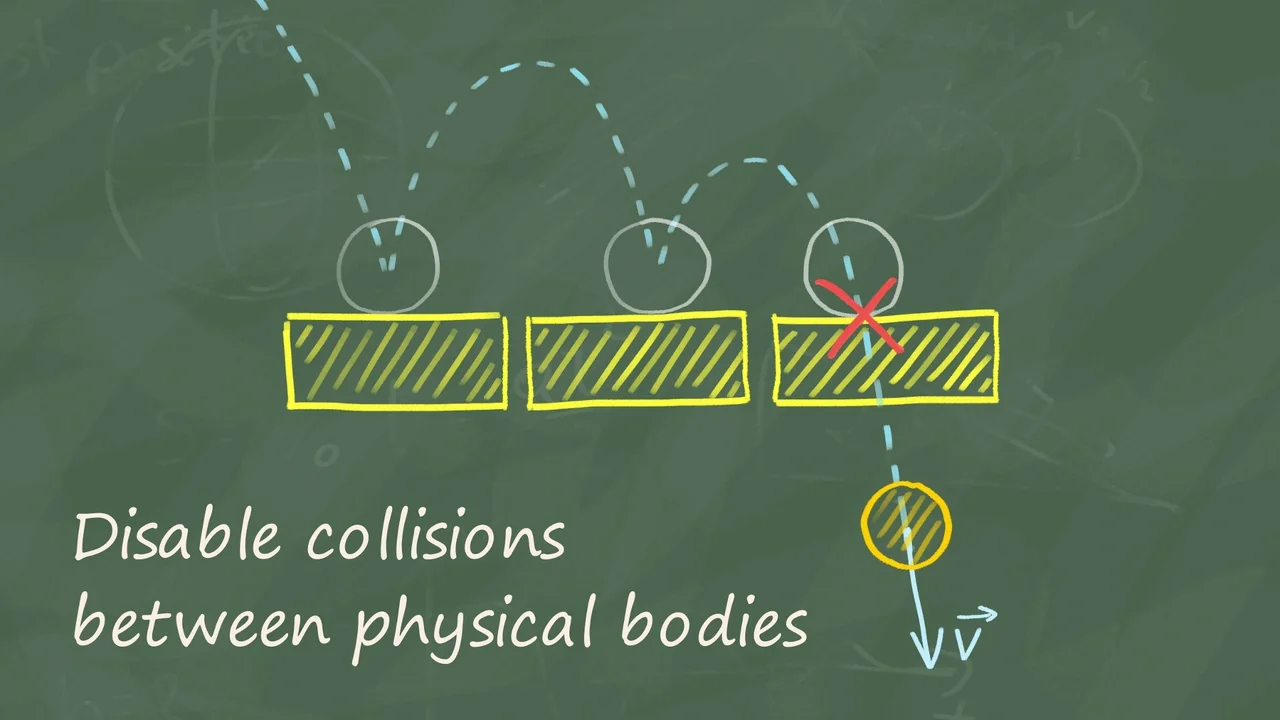
 Physics
 Engine Tools
 Engine Tools