"0341a2901a4ae9aa"{"id":"15191","slug":"rescatter","title":"ReScatter","category":"Physics","engine":"5.6 - 5.7","assetVersion":"Engine version: 5.6 - 5.7","engineVersion":"Asset Version:1.0 - 1.1","tag":"Physics","accent":"blue","visual":"audio","summary":"ReScatter 1.0 provides a modern interface and physics-driven workflow for placing objects in Unreal Engine. It allows for precise scattering using volumes, splines, and customizable presets.","platform":"Unreal Engine","publishedAt":"2026-03-12T08:15:25.000Z","updatedAt":"2026-04-19T15:44:52.000Z","sourceNotes":[],"fileContents":[],"compatibility":["Unreal Engine","Engine version: 5.6 - 5.7","Asset Version: 1.0 - 1.1"],"featuredImage":{"alt":"ReScatter","src":"https://3dcghub.com/wp-content/uploads/2026/03/4818e7bb-0a27-44d4-a1d5-c1f0b5dff9fa.webp"},"hasDownloadLink":true,"downloads":0,"terms":[{"taxonomy":"category","slug":"physics-tools-and-plugins","name":"Physics"},{"taxonomy":"post_tag","slug":"environment","name":"Environment"},{"taxonomy":"post_tag","slug":"game-systems","name":"Game Systems"},{"taxonomy":"post_tag","slug":"prop","name":"Prop"},{"taxonomy":"post_tag","slug":"tools","name":"Tools"},{"taxonomy":"post_tag","slug":"ui","name":"UI"},{"taxonomy":"post_tag","slug":"unreal-engine-5","name":"Unreal Engine 5"}],"galleryImages":[{"src":"https://3dcghub.com/wp-content/uploads/2026/03/1bf59934e8ad_bfd467db-8e23-4c1f-b64a-26512a8606c9.webp","alt":"ReScatter"},{"src":"https://3dcghub.com/wp-content/uploads/2026/03/95c1847e3aa0_0a4c4176-006a-4ae4-9d89-215198b981a3.webp","alt":"ReScatter"},{"src":"https://3dcghub.com/wp-content/uploads/2026/03/82addc013aba_06eaca8c-2713-4457-b9a7-7e69cdab86e5.webp","alt":"ReScatter"},{"src":"https://3dcghub.com/wp-content/uploads/2026/03/8d56e02ed4a3_b095d2f3-6ca3-489c-aa40-7715b40c2f56.webp","alt":"ReScatter"},{"src":"https://3dcghub.com/wp-content/uploads/2026/03/aa2cb67d02b7_396ac544-7af5-49a7-97a1-3a1c210790c7.webp","alt":"ReScatter"},{"src":"https://3dcghub.com/wp-content/uploads/2026/03/80e1f3c1b628_8d38dfae-b46b-4fcb-81e0-2f13f783ab3c.webp","alt":"ReScatter"}],"accessPanel":{"kind":"resource","title":"Access this resource","eyebrow":"Free Download","message":"Log in or create a free account to start your download.","fileName":"ReScatter 5.6-5.7,v1.0-1.1.7z","safetyNote":"All resources are 100% manually reviewed to eliminate all risks.","actionLabel":"Download Free","resourceType":"Resource archive"},"contentHtml":"\u003ch2\u003eIntroduction to ReScatter\u003c/h2\u003e\n\u003cp\u003eReScatter is a powerful and modern tool designed to simplify the process of arranging objects within a game environment. Building on the success of the developer's previous tool, Physical Layout, this new version incorporates significant improvements. Since the original tool was downloaded over 200,000 times, the creator utilized that feedback to build a more stable experience. Consequently, ReScatter 1.0 offers a robust solution for developers who need to place assets naturally and efficiently.\u003c/p\u003e\n\n\u003ch2\u003eAdvanced Physics and Modern UI\u003c/h2\u003e\n\u003cp\u003eThe tool is built using the new Unreal interactive UI framework, which provides a sleek and professional appearance. Moreover, it leverages Chaos Physics to handle complex object interactions. This technology allows assets to drop, fall, and stack realistically within the map environment. Because the simulation is physics-based, the resulting arrangements look organic rather than manually placed. However, unlike earlier versions, this tool does not change the state of your objects while you are using it. This ensures that your project data remains clean and predictable throughout the entire set-dressing process.\u003c/p\u003e\n\n\u003ch2\u003eFlexible Scattering Options\u003c/h2\u003e\n\u003cp\u003eReScatter provides several methods for distributing meshes across a level. For example, you can scatter objects within specific shape volumes such as spheres, cubes, or circles. This feature is ideal for filling designated areas with props, rocks, or debris. Additionally, the tool supports scattering along spline curves. This allows for precise placement along custom paths, which is incredibly useful for creating natural trails or organized boundaries. Therefore, users have complete control over the density and spatial boundaries of their asset placement.\u003c/p\u003e\n\n\u003ch2\u003eWorkflow Efficiency and Presets\u003c/h2\u003e\n\u003cp\u003eTo help speed up the environment design process, the developer included a comprehensive preset system. You can save your specific brush settings and reference meshes as a preset for later use. This ensures that you can maintain consistency across different sections of your map. Furthermore, the tool fully supports the native Unreal Undo and Redo system. If a physics simulation does not produce the desired result, you can quickly revert the changes. This makes the experimentation process much safer and more productive for the artist.\u003c/p\u003e\n\n\u003ch2\u003eClosing Notes\u003c/h2\u003e\n\u003cp\u003eIn practice, ReScatter 1.0 is a significant upgrade for environment artists working in Unreal Engine. It combines a modern UI with the power of Chaos Physics to deliver a reliable scattering workflow. By offering volume-based placement, spline support, and a robust preset system, it addresses the needs of professional creators. Whether you are stacking small props or populating large areas, this tool provides the stability and flexibility required for high-quality level design.\u003c/p\u003e\n\n\u003ch2\u003eRelated Resources Worth Checking\u003c/h2\u003e\n\u003cul\u003e\n\u003cli\u003e\u003ca href=\"https://3dcghub.com/extile-plus-ultimate-non-tiling-material-toolkit-for-unreal-engine-environments/\" title=\"EXTILE PLUS -Ultimate Non-Tiling Material Toolkit for Unreal Engine Environments\"\u003eEXTILE PLUS -Ultimate Non-Tiling Material Toolkit for Unreal Engine Environments\u003c/a\u003e\u003c/li\u003e\n\u003cli\u003e\u003ca href=\"https://3dcghub.com/ultimate-template-unrealengine-2d-dialogue-inventory-system-save/\" title=\"ULTIMATE Template UnrealEngine || 2D + Dialogue + Inventory system + Save | |\"\u003eULTIMATE Template UnrealEngine || 2D + Dialogue + Inventory system + Save | |\u003c/a\u003e\u003c/li\u003e\n\u003cli\u003e\u003ca href=\"https://3dcghub.com/zxing-for-unreal/\" title=\"ZXing For Unreal\"\u003eZXing For Unreal\u003c/a\u003e\u003c/li\u003e\n\u003cli\u003e\u003ca href=\"https://3dcghub.com/daz-to-unreal/\" title=\"Daz To Unreal\"\u003eDaz To Unreal\u003c/a\u003e\u003c/li\u003e\n\u003cli\u003e\u003ca href=\"https://3dcghub.com/blueprint-generator-ai-kibibyte-labs-engine-assistant/\" title=\"Blueprint Generator Ai – Kibibyte Labs (Engine Assistant)\"\u003eBlueprint Generator Ai – Kibibyte Labs (Engine Assistant)\u003c/a\u003e\u003c/li\u003e\n\u003c/ul\u003e\n\n\u003ch2\u003eAsset Gallery\u003c/h2\u003e","contentTextLength":3149,"navigation":{"current":3435,"total":4017,"previous":{"id":"15201","slug":"altermesh-geometry-nodes-in-unreal","title":"AlterMesh - Geometry Nodes in Unreal","category":"Procedural Systems","platform":"Unreal Engine","updatedAt":"2026-04-19T15:44:52.000Z"},"next":{"id":"15182","slug":"collision-disabler","title":"Collision Disabler","category":"Physics","platform":"Unreal Engine","updatedAt":"2026-04-19T15:44:52.000Z"}},"relatedResources":[{"id":"15092","slug":"tile-based-minimap","title":"Tile Based Minimap","category":"Gameplay Features","engine":"5.3 - 5.5","assetVersion":"Asset Version: 1.2.2 - 2.1.1","engineVersion":"Engine Version: 5.3 - 5.5","tag":"Gameplay Features","accent":"blue","visual":"mech","summary":"The Tile Based Minimap system provides a robust solution for creating tiled in-game maps using pre-rendered level images. It features GPS-style routing, multi-grid support, and full Blueprint extensibility.","platform":"Unreal Engine","publishedAt":"2026-03-12T07:51:23.000Z","updatedAt":"2026-10-08T12:57:55.645Z","sourceNotes":[],"fileContents":[],"compatibility":["Unreal Engine","Asset Version: 1.2.2 - 2.1.1","Engine Version: 5.3 - 5.5"],"featuredImage":{"alt":"Tile Based Minimap","src":"https://3dcghub.com/wp-content/uploads/2026/03/768cc7d5-0ca5-439b-b02a-f4807a2c39bd.webp"},"hasDownloadLink":true,"downloads":5},{"id":"14147","slug":"make-modular-skeletal-mesh","title":"Make Modular Skeletal Mesh","category":"Engine Tools","engine":"5.3 - 5.4","assetVersion":"Engine version: 5.3 - 5.4","engineVersion":"5.3","tag":"Engine Tools","accent":"blue","visual":"mech","summary":"Enhance your asset creation process with the Make Modular Skeletal Mesh subsystem. This tool enables developers to modify and combine skeletal mesh parts directly within the UE editor.","platform":"Unreal Engine","publishedAt":"2026-03-11T16:00:04.000Z","updatedAt":"2026-04-19T15:45:52.000Z","sourceNotes":[],"fileContents":[],"compatibility":["Unreal Engine","Engine version: 5.3 - 5.4"],"featuredImage":{"alt":"Make Modular Skeletal Mesh","src":"https://3dcghub.com/wp-content/uploads/2026/03/8090ef9f-f5d3-428e-940c-ad1f4ed77720.webp"},"hasDownloadLink":true,"downloads":1},{"id":"13913","slug":"easy-multi-save","title":"Easy Multi Save","category":"Engine Tools","engine":"1.10 - 1.74","assetVersion":"Engine version: 4.25 - 5.7","engineVersion":"Asset Version:1.10 - 1.74","tag":"Engine Tools","accent":"blue","visual":"mech","summary":"Easy Multi Save provides a robust, streamlined solution for managing game data in Unreal Engine, supporting everything from simple variables to complex World Partition levels.","platform":"Unreal Engine","publishedAt":"2026-03-11T10:40:22.000Z","updatedAt":"2026-07-18T09:48:15.051Z","sourceNotes":[],"fileContents":[],"compatibility":["Unreal Engine","Engine version: 4.25 - 5.7","Asset Version:1.10 - 1.74"],"featuredImage":{"alt":"Easy Multi Save","src":"https://3dcghub.com/wp-content/uploads/2026/03/fab7f07b-78c6-4508-a4df-9cb7d78f90e0.webp"},"hasDownloadLink":true,"downloads":2}]}
Physics
ReScatter
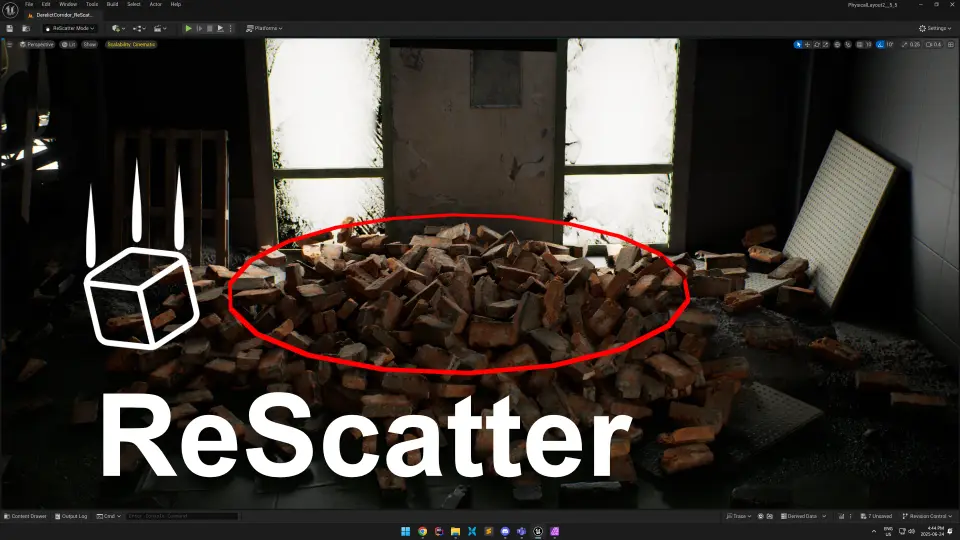
ReScatter 1.0 provides a modern interface and physics-driven workflow for placing objects in Unreal Engine. It allows for precise scattering using volumes, splines, and customizable presets.
ReScatter is a powerful and modern tool designed to simplify the process of arranging objects within a game environment. Building on the success of the developer's previous tool, Physical Layout, this new version incorporates significant improvements. Since the original tool was downloaded over 200,000 times, the creator utilized that feedback to build a more stable experience. Consequently, ReScatter 1.0 offers a robust solution for developers who need to place assets naturally and efficiently.
Advanced Physics and Modern UI
The tool is built using the new Unreal interactive UI framework, which provides a sleek and professional appearance. Moreover, it leverages Chaos Physics to handle complex object interactions. This technology allows assets to drop, fall, and stack realistically within the map environment. Because the simulation is physics-based, the resulting arrangements look organic rather than manually placed. However, unlike earlier versions, this tool does not change the state of your objects while you are using it. This ensures that your project data remains clean and predictable throughout the entire set-dressing process.
Flexible Scattering Options
ReScatter provides several methods for distributing meshes across a level. For example, you can scatter objects within specific shape volumes such as spheres, cubes, or circles. This feature is ideal for filling designated areas with props, rocks, or debris. Additionally, the tool supports scattering along spline curves. This allows for precise placement along custom paths, which is incredibly useful for creating natural trails or organized boundaries. Therefore, users have complete control over the density and spatial boundaries of their asset placement.
Workflow Efficiency and Presets
To help speed up the environment design process, the developer included a comprehensive preset system. You can save your specific brush settings and reference meshes as a preset for later use. This ensures that you can maintain consistency across different sections of your map. Furthermore, the tool fully supports the native Unreal Undo and Redo system. If a physics simulation does not produce the desired result, you can quickly revert the changes. This makes the experimentation process much safer and more productive for the artist.
Closing Notes
In practice, ReScatter 1.0 is a significant upgrade for environment artists working in Unreal Engine. It combines a modern UI with the power of Chaos Physics to deliver a reliable scattering workflow. By offering volume-based placement, spline support, and a robust preset system, it addresses the needs of professional creators. Whether you are stacking small props or populating large areas, this tool provides the stability and flexibility required for high-quality level design.
 Physics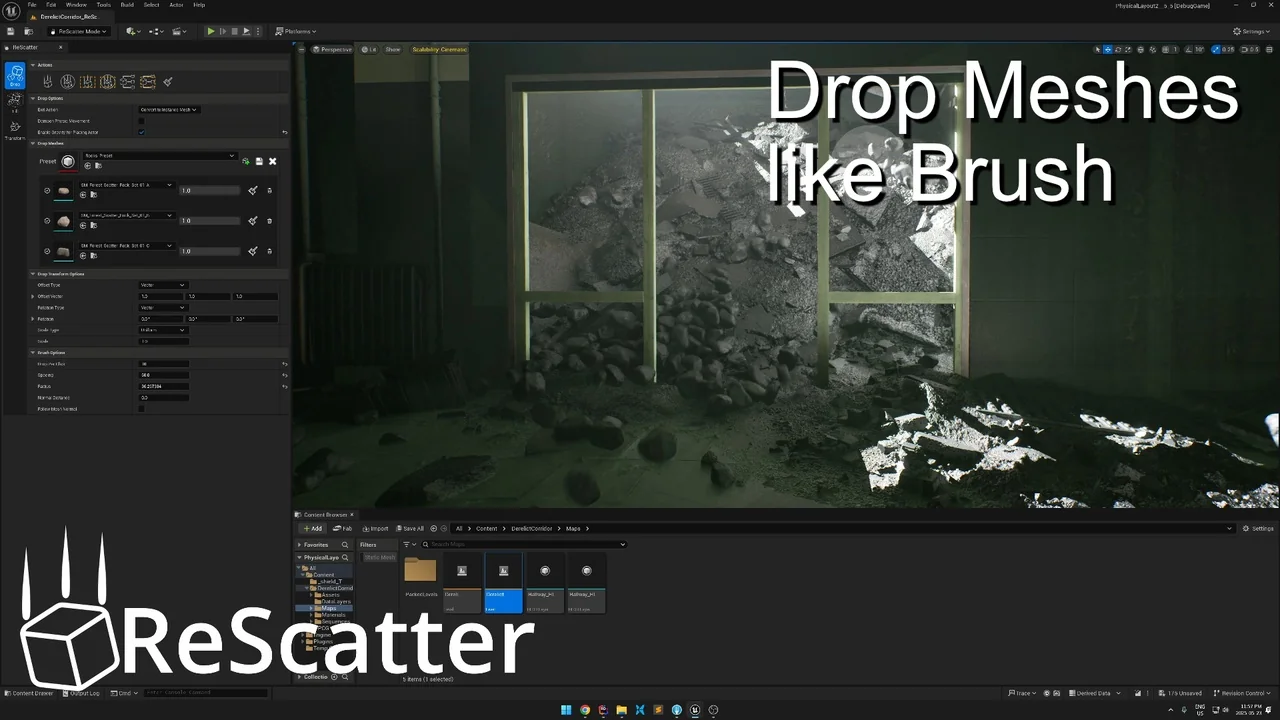
 Gameplay Features
 Engine Tools
 Engine Tools