"a19e0535960bd083"{"id":"15201","slug":"altermesh-geometry-nodes-in-unreal","title":"AlterMesh - Geometry Nodes in Unreal","category":"Procedural Systems","engine":"5.1 - 5.4","assetVersion":"Engine version: 5.1 - 5.4","engineVersion":"5.1","tag":"Procedural Systems","accent":"blue","visual":"character","summary":"AlterMesh - Geometry Nodes in Unreal creates a bridge between Blender and Unreal Engine. It preserves your procedural parameters and enables a fast, non-destructive workflow for developers.","platform":"Unreal Engine","publishedAt":"2026-03-12T08:18:26.000Z","updatedAt":"2026-04-19T15:44:52.000Z","sourceNotes":[],"fileContents":[],"compatibility":["Unreal Engine","Engine version: 5.1 - 5.4"],"featuredImage":{"alt":"AlterMesh - Geometry Nodes in Unreal","src":"https://3dcghub.com/wp-content/uploads/2026/03/17aadbb1-2099-420a-9e10-b257f950f029.webp"},"hasDownloadLink":true,"downloads":1,"terms":[{"taxonomy":"category","slug":"procedural-systems-tools-and-plugins","name":"Procedural Systems"},{"taxonomy":"post_tag","slug":"blender","name":"Blender"},{"taxonomy":"post_tag","slug":"geometry-nodes","name":"Geometry Nodes"},{"taxonomy":"post_tag","slug":"non-destructive-workflow","name":"Non-destructive Workflow"},{"taxonomy":"post_tag","slug":"procedural","name":"Procedural"},{"taxonomy":"post_tag","slug":"tools","name":"Tools"},{"taxonomy":"post_tag","slug":"unreal-engine-5","name":"Unreal Engine 5"}],"galleryImages":[{"src":"https://3dcghub.com/wp-content/uploads/2026/03/eeb32adcdee9_78536519-b26d-49fc-bdbf-4c1a1c5e1c6e.webp","alt":"AlterMesh - Geometry Nodes in Unreal"},{"src":"https://3dcghub.com/wp-content/uploads/2026/03/310870a64301_19a737fd-c6ca-4f45-b198-d3c8c8e09baa.webp","alt":"AlterMesh - Geometry Nodes in Unreal"},{"src":"https://3dcghub.com/wp-content/uploads/2026/03/5a0a9c25d6d5_5b42aefd-a4bf-4d32-b484-b65a0876b4a5.webp","alt":"AlterMesh - Geometry Nodes in Unreal"},{"src":"https://3dcghub.com/wp-content/uploads/2026/03/f4ed978ff584_9a44b2b1-7bac-4462-92a8-61cd9ce8e65b.webp","alt":"AlterMesh - Geometry Nodes in Unreal"},{"src":"https://3dcghub.com/wp-content/uploads/2026/03/657dc419ba04_3c53ffc7-b210-4429-ad5a-1d94e793929a.webp","alt":"AlterMesh - Geometry Nodes in Unreal"},{"src":"https://3dcghub.com/wp-content/uploads/2026/03/af1771d56c50_3c903177-5c3a-40b9-a04f-5551493b2fa8.webp","alt":"AlterMesh - Geometry Nodes in Unreal"},{"src":"https://3dcghub.com/wp-content/uploads/2026/03/a127d7936f23_323c61b8-d2f6-4a2d-bbb2-b45f0f55f6c0.webp","alt":"AlterMesh - Geometry Nodes in Unreal"}],"accessPanel":{"kind":"resource","title":"Access this resource","eyebrow":"Free Download","message":"Log in or create a free account to start your download.","fileName":"AlterMesh — Geometry Nodes in Unreal 5.1 - 5.4.7z","safetyNote":"All resources are 100% manually reviewed to eliminate all risks.","actionLabel":"Download Free","resourceType":"Resource archive"},"contentHtml":"AlterMesh - Geometry Nodes in Unreal\n\u003cp\u003e\u003cstrong\u003eAlterMesh - Geometry Nodes in Unreal\u003c/strong\u003e provides a powerful bridge for developers looking to leverage their Blender expertise within the Unreal Engine environment. This tool helps developers use procedural power directly. Consequently, the integration between these platforms becomes much smoother. Users can now enjoy the malleability that Geometry Nodes offer without leaving their primary game engine.\u003c/p\u003e\n\n\u003ch2\u003eEnhanced Integration and Parameter Preservation\u003c/h2\u003e\n\u003cp\u003eOne of the primary benefits of this tool is its ability to promote deep integration between Blender and Unreal Engine. It works by preserving your specific Geometry Nodes parameters during the transition. Therefore, you do not lose the intricate control established during the initial modeling phase. Moreover, the tool ensures that the procedural nature of your work remains intact throughout the process.\u003c/p\u003e\n\n\u003cp\u003eBy maintaining these parameters, the developer ensures that the assets remain flexible. You can adjust your designs based on the needs of the project. This preservation is a key feature for those who rely on complex procedural setups. Consequently, the transition between software packages feels natural and efficient.\u003c/p\u003e\n\n\u003ch2\u003eA Fast and Non-Destructive Workflow\u003c/h2\u003e\n\u003cp\u003eThe creator designed AlterMesh - Geometry Nodes in Unreal to support a fast and non-destructive workflow. This approach is essential for modern development. Because the workflow is non-destructive, you can make changes without rebuilding assets from scratch. Furthermore, this flexibility allows for rapid iteration during the design process.\u003c/p\u003e\n\n\u003cul\u003e\n \u003cli\u003eMaintain editable files originally built within Blender.\u003c/li\u003e\n \u003cli\u003eAdjust Geometry Nodes parameters directly.\u003c/li\u003e\n \u003cli\u003eReduce manual rework across different software packages.\u003c/li\u003e\n \u003cli\u003eStreamline the asset pipeline for better efficiency.\u003c/li\u003e\n\u003c/ul\u003e\n\n\u003cp\u003eA non-destructive system means your original data stays safe. You can experiment with different node configurations easily. Therefore, the creative process becomes much more fluid. This speed is vital for meeting tight project deadlines.\u003c/p\u003e\n\n\u003ch2\u003eSave Time and Retain Editability\u003c/h2\u003e\n\u003cp\u003eEfficiency is a core advantage when using AlterMesh - Geometry Nodes in Unreal. By retaining your editable files, you save significant time. You no longer need to spend hours on re-importing or re-configuring assets. Additionally, the malleability of the nodes ensures that your creative vision is never compromised. Consequently, developers can focus more on the creative aspects of their projects.\u003c/p\u003e\n\n\u003cp\u003eRetaining editability means your workflow remains open. You can go back and tweak settings at any time. This capability provides a safety net for complex builds. Moreover, it encourages a more experimental approach to scene construction.\u003c/p\u003e\n\n\u003ch2\u003eFinal Take\u003c/h2\u003e\n\u003cp\u003eThe clearest takeaway is that AlterMesh - Geometry Nodes in Unreal is a vital resource for those who want to combine the strengths of Blender and Unreal Engine. It provides a seamless way to utilize procedural tools while maintaining a high level of editability. By adopting this non-destructive workflow, creators can significantly enhance their productivity and project quality. This tool represents a major step forward for integrated asset development.\u003c/p\u003e\n\n\u003ch2\u003eExplore Similar Assets\u003c/h2\u003e\n\u003cul\u003e\n\u003cli\u003e\u003ca href=\"https://3dcghub.com/extile-plus-ultimate-non-tiling-material-toolkit-for-unreal-engine-environments/\" title=\"EXTILE PLUS -Ultimate Non-Tiling Material Toolkit for Unreal Engine Environments\"\u003eEXTILE PLUS -Ultimate Non-Tiling Material Toolkit for Unreal Engine Environments\u003c/a\u003e\u003c/li\u003e\n\u003cli\u003e\u003ca href=\"https://3dcghub.com/ultimate-template-unrealengine-2d-dialogue-inventory-system-save/\" title=\"ULTIMATE Template UnrealEngine || 2D + Dialogue + Inventory system + Save | |\"\u003eULTIMATE Template UnrealEngine || 2D + Dialogue + Inventory system + Save | |\u003c/a\u003e\u003c/li\u003e\n\u003cli\u003e\u003ca href=\"https://3dcghub.com/zxing-for-unreal/\" title=\"ZXing For Unreal\"\u003eZXing For Unreal\u003c/a\u003e\u003c/li\u003e\n\u003cli\u003e\u003ca href=\"https://3dcghub.com/daz-to-unreal/\" title=\"Daz To Unreal\"\u003eDaz To Unreal\u003c/a\u003e\u003c/li\u003e\n\u003cli\u003e\u003ca href=\"https://3dcghub.com/blueprint-generator-ai-kibibyte-labs-engine-assistant/\" title=\"Blueprint Generator Ai – Kibibyte Labs (Engine Assistant)\"\u003eBlueprint Generator Ai – Kibibyte Labs (Engine Assistant)\u003c/a\u003e\u003c/li\u003e\n\u003c/ul\u003e\n\n\u003ch2\u003eAsset Gallery\u003c/h2\u003e","contentTextLength":3482,"navigation":{"current":3442,"total":4026,"previous":{"id":"15225","slug":"crazy-ivy-realistic-ivy-generator-vine-plugin-grow-procedural-plants-in-editor","title":"Crazy Ivy Realistic Ivy Generator Vine Plugin - Grow Procedural Plants in Editor","category":"Procedural Systems","platform":"Unreal Engine","updatedAt":"2026-04-19T15:44:52.000Z"},"next":{"id":"15191","slug":"rescatter","title":"ReScatter","category":"Physics","platform":"Unreal Engine","updatedAt":"2026-04-19T15:44:52.000Z"}},"relatedResources":[{"id":"15252","slug":"dungeon-architect","title":"Dungeon Architect","category":"Procedural Systems","engine":"5.5 - 5.6","assetVersion":"Asset Version:2.32.5 - 2.38","engineVersion":"Engine version: 5.5 - 5.6","tag":"Procedural Systems","accent":"blue","visual":"luts","summary":"Dungeon Architect provides a robust toolkit for creating procedural environments in real-time. With its advanced GPU voxel engine and graph-based theming, developers can build complex, organic levels with ease.","platform":"Unreal Engine","publishedAt":"2026-03-12T08:23:35.000Z","updatedAt":"2026-08-25T10:55:56.623Z","sourceNotes":[],"fileContents":[],"compatibility":["Unreal Engine","Asset Version:2.32.5 - 2.38","Engine version: 5.5 - 5.6"],"featuredImage":{"alt":"Dungeon Architect","src":"https://3dcghub.com/wp-content/uploads/2026/03/56b94668-2038-4a71-8c96-3275193c17ff.webp"},"hasDownloadLink":true,"downloads":4},{"id":"15315","slug":"procedural-nature-generator","title":"Procedural Nature Generator","category":"Procedural Systems","engine":"5.3","assetVersion":"Engine version: 5.3","engineVersion":"4.26","tag":"Procedural Systems","accent":"blue","visual":"character","summary":"The Procedural Nature Generator is a powerful editor plugin for creating dense natural environments. It allows developers to populate landscapes with thousands of actors in seconds using custom assets.","platform":"Unreal Engine","publishedAt":"2026-03-12T08:35:35.000Z","updatedAt":"2026-04-19T15:44:50.000Z","sourceNotes":[],"fileContents":[],"compatibility":["Unreal Engine","Engine version: 5.3"],"featuredImage":{"alt":"Procedural Nature Generator","src":"https://3dcghub.com/wp-content/uploads/2026/03/9983a12a-a0ea-4b90-aef5-8d43cf058002.webp"},"hasDownloadLink":true,"downloads":1},{"id":"15339","slug":"procedural-terrain-generator-v2","title":"Procedural Terrain Generator v2","category":"Procedural Systems","engine":"5.3","assetVersion":"Engine version: 5.3","engineVersion":"4.23","tag":"Procedural Systems","accent":"blue","visual":"city","summary":"The Procedural Terrain Generator v2 is a powerful editor code plugin designed to streamline the creation of diverse terrain shapes and automated asset placement.","platform":"Unreal Engine","publishedAt":"2026-03-12T08:39:51.000Z","updatedAt":"2026-04-19T15:44:49.000Z","sourceNotes":[],"fileContents":[],"compatibility":["Unreal Engine","Engine version: 5.3"],"featuredImage":{"alt":"Procedural Terrain Generator v2","src":"https://3dcghub.com/wp-content/uploads/2026/03/a5389939-d617-4bdf-90f5-16c080d32b2d.webp"},"hasDownloadLink":true,"downloads":1}]}
Procedural Systems
AlterMesh - Geometry Nodes in Unreal
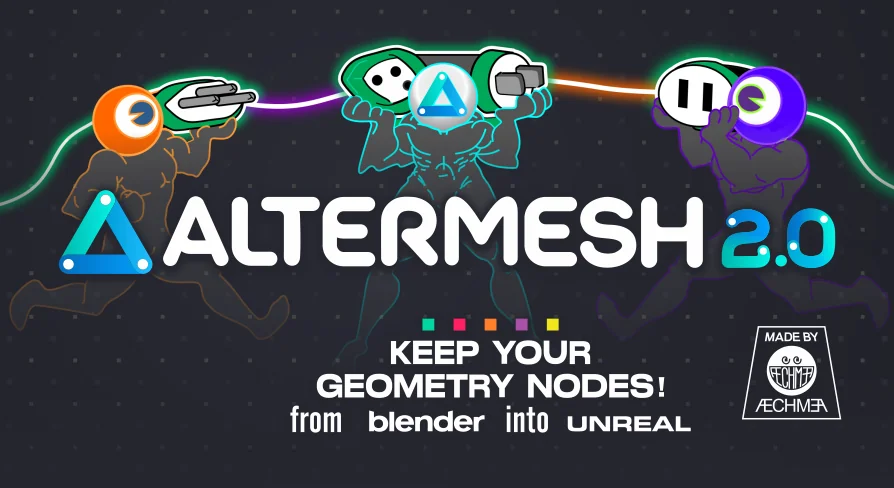
AlterMesh - Geometry Nodes in Unreal creates a bridge between Blender and Unreal Engine. It preserves your procedural parameters and enables a fast, non-destructive workflow for developers.
AlterMesh - Geometry Nodes in Unreal provides a powerful bridge for developers looking to leverage their Blender expertise within the Unreal Engine environment. This tool helps developers use procedural power directly. Consequently, the integration between these platforms becomes much smoother. Users can now enjoy the malleability that Geometry Nodes offer without leaving their primary game engine.
Enhanced Integration and Parameter Preservation
One of the primary benefits of this tool is its ability to promote deep integration between Blender and Unreal Engine. It works by preserving your specific Geometry Nodes parameters during the transition. Therefore, you do not lose the intricate control established during the initial modeling phase. Moreover, the tool ensures that the procedural nature of your work remains intact throughout the process.
By maintaining these parameters, the developer ensures that the assets remain flexible. You can adjust your designs based on the needs of the project. This preservation is a key feature for those who rely on complex procedural setups. Consequently, the transition between software packages feels natural and efficient.
A Fast and Non-Destructive Workflow
The creator designed AlterMesh - Geometry Nodes in Unreal to support a fast and non-destructive workflow. This approach is essential for modern development. Because the workflow is non-destructive, you can make changes without rebuilding assets from scratch. Furthermore, this flexibility allows for rapid iteration during the design process.
Maintain editable files originally built within Blender.
Adjust Geometry Nodes parameters directly.
Reduce manual rework across different software packages.
Streamline the asset pipeline for better efficiency.
A non-destructive system means your original data stays safe. You can experiment with different node configurations easily. Therefore, the creative process becomes much more fluid. This speed is vital for meeting tight project deadlines.
Save Time and Retain Editability
Efficiency is a core advantage when using AlterMesh - Geometry Nodes in Unreal. By retaining your editable files, you save significant time. You no longer need to spend hours on re-importing or re-configuring assets. Additionally, the malleability of the nodes ensures that your creative vision is never compromised. Consequently, developers can focus more on the creative aspects of their projects.
Retaining editability means your workflow remains open. You can go back and tweak settings at any time. This capability provides a safety net for complex builds. Moreover, it encourages a more experimental approach to scene construction.
Final Take
The clearest takeaway is that AlterMesh - Geometry Nodes in Unreal is a vital resource for those who want to combine the strengths of Blender and Unreal Engine. It provides a seamless way to utilize procedural tools while maintaining a high level of editability. By adopting this non-destructive workflow, creators can significantly enhance their productivity and project quality. This tool represents a major step forward for integrated asset development.
 Procedural Systems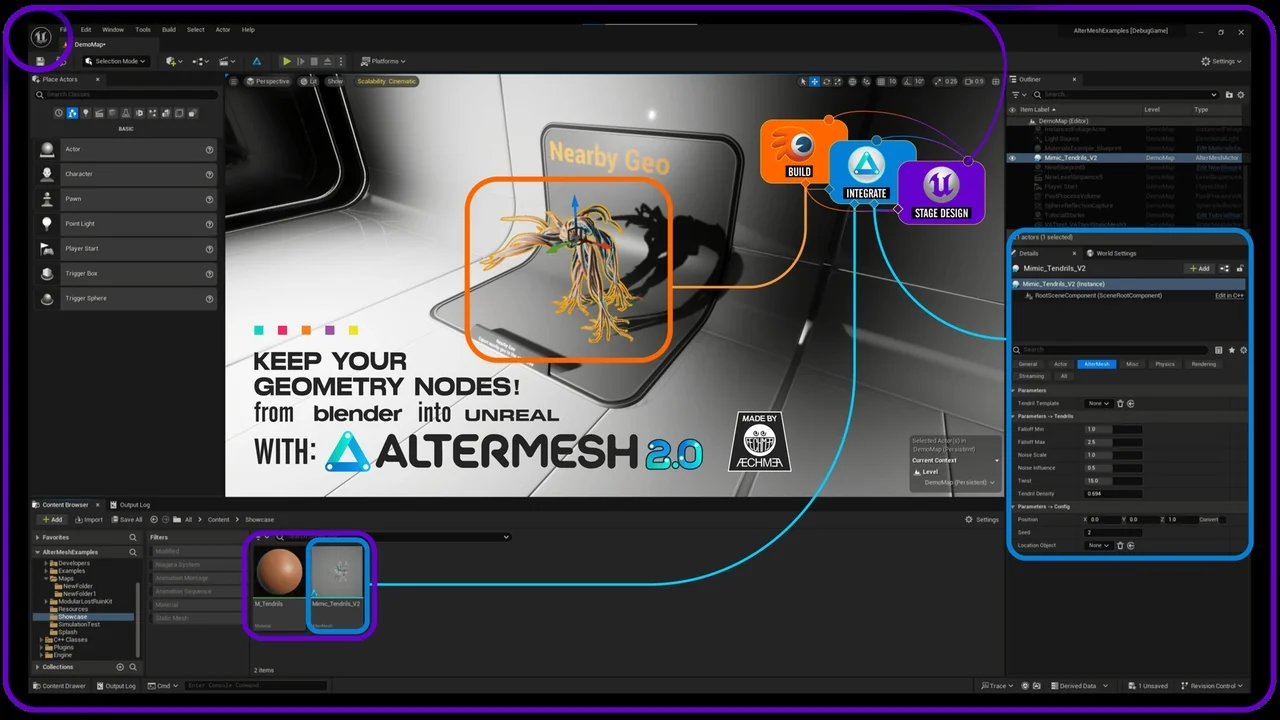
 Procedural Systems
 Procedural Systems
 Procedural Systems