"148d1066ed74e216"{"id":"1002938","slug":"skills-tree-system","title":"Skills Tree System","category":"Engine Tools","engine":"4.26","assetVersion":"Asset Version: 1.3","engineVersion":"Engine Version: 4.26","tag":"Engine Tools","accent":"blue","visual":"mech","summary":"Explore the Skills Tree System plugin, featuring Blueprint-extensible base classes, 256 categories, unlock components, save states, and debugging tools.","platform":"Unreal Engine","indexPolicy":"index","publishedAt":"2026-11-21T23:22:07.225Z","updatedAt":"2026-11-21T23:22:07.225Z","sourceNotes":[],"fileContents":[],"compatibility":["Unreal Engine","Asset Version: 1.3","Engine Version: 4.26"],"featuredImage":{"alt":"Skills Tree System","src":"/wp-content/uploads/published/2026/11/8dd976eb300d-3a9447a0-1126-4625-86fa-190863de17c7-2d63576a72.webp"},"fileSizeBytes":112240,"hasDownloadLink":true,"downloads":0,"terms":[{"taxonomy":"category","slug":"engine-tools-tools-and-plugins","name":"Engine Tools"}],"galleryImages":[{"src":"/wp-content/uploads/published/2026/11/b2304d31952d-e75e70c4-8758-46c6-bdcf-e7d6671085f1-d8ed0cac08.webp","alt":"Skills Tree System"},{"src":"/wp-content/uploads/published/2026/11/0b7146d8d203-381a6c51-85a3-4317-a753-411c63ddd638-e4c32b7b62.webp","alt":"Skills Tree System"},{"src":"/wp-content/uploads/published/2026/11/1adb46566bc1-c8367832-9495-4f6b-a49e-4b49e590be54-d790977619.webp","alt":"Skills Tree System"},{"src":"/wp-content/uploads/published/2026/11/00aa0ebd1692-bb3e3be5-9dfd-4f50-8fe9-29c89209e232-fcba3ffd99.webp","alt":"Skills Tree System"},{"src":"/wp-content/uploads/published/2026/11/3966f625ce2b-adb3b61c-29f0-4d5e-9c29-495ec9ff4172-164c569424.webp","alt":"Skills Tree System"}],"accessPanel":{"kind":"resource","title":"Get this resource","safetyNote":"Resources are manually reviewed before listing to improve quality and reduce obvious risks.","fileName":"Skills Tree System.7z","resourceType":"Resource archive","versions":[]},"contentHtml":"\u003cp\u003eCharacter progression frameworks require a clean separation between data management, ability execution, and unlocking requirements. The Skills Tree System plugin organizes these demands through a dedicated set of components, modular actor classes, and Blueprint hooks. At the core of the toolset is an architectural division between the high-level manager that tracks overall progression and individual skill instances that handle execution rules, statistical scaling, and prerequisite checks.\u003c/p\u003e\u003ch2\u003eCore Architecture of the Skills Tree Component\u003c/h2\u003e\u003cp\u003eManaging multiple progression paths across a character profile demands a unified controller. Within this framework, the central role belongs to the Skills Tree Component. This actor component functions as the primary hub, handling the registration, queries, and state management of every individual skill available to an actor or character.\u003c/p\u003e\u003cp\u003eInstead of scattering skill references throughout general player controller or character scripts, the Skills Tree Component isolates progression logic. It acts as the operational bridge between individual skill instances and the wider game instance. By consolidating the active and inactive skill nodes under a single component, the system allows project logic to interface directly with skill states without requiring custom reference tables inside character Blueprints. The component coordinates data across sub-components, tracks whether specific actions are currently unlocked or locked, and directs state information directly into the persistent storage subsystems.\u003c/p\u003e\u003ch2\u003eThe Base Skill Class and Blueprint Overrides\u003c/h2\u003e\u003cp\u003eEvery individual ability in the tree derives from a fundamental base Skill class. This class is built explicitly for Blueprint modification, giving developers the ability to build distinct spell, combat, or passive actions visually without needing to alter native code libraries. Customizing behaviors relies on dedicated event hooks specifically set up for Blueprint overriding.\u003c/p\u003e\u003cp\u003ePrimary execution is driven through the Execute Skill function. When a player triggers an ability or the tree activates a node, Execute Skill handles the initial payload, whether that involves applying gameplay effects, spawning actors, or running custom logic graphs. For actions that do not execute instantaneously, the class provides the Casting Finished function. This event fires precisely when an active channeling or preparation window completes, allowing clean separation between an ability's warm-up cycle and its terminal outcome.\u003c/p\u003e\u003cp\u003eAlongside operational functions, the base Skill class encapsulates core identity properties. Each skill entry stores a designated display name, descriptive text, and organizational tags. The system accommodates broad categorization schemes, providing native support for up to 256 different categories. This capacity allows complex skill trees to partition actions into distinct combat trees, profession branches, elemental schools, or craft proficiencies without running into index limits.\u003c/p\u003e\u003ch2\u003eStatistical Scaling and Operational Skill Categories\u003c/h2\u003e\u003cp\u003eProgression systems rely heavily on numeric growth, which is addressed here via two distinct layers of statistical data: skill stats and level stats tables. Every individual skill maintains base stats that define its static attributes, while level-dependent growth is routed through dedicated level stats tables. These tables define the exact balance adjustments assigned to a skill across every individual level, ensuring that numeric changes—such as resource costs, damage outputs, duration scalings, or cooldown times—can be scaled across multiple tiers without duplicating node graphs.\u003c/p\u003e\u003cp\u003eTo support different combat and gameplay applications, the framework divides all skills into four explicit functional categories:\u003c/p\u003e\u003cul\u003e\u003cli\u003e\u003cstrong\u003eInstant Skills:\u003c/strong\u003e Abilities that fire their logic immediately upon execution, running the primary event graph without delaying the character or requiring a timing channel.\u003c/li\u003e\u003cli\u003e\u003cstrong\u003eCasting Skills:\u003c/strong\u003e Actions that rely on an intermediate execution window, utilizing the Casting Finished function to apply effects once the designated casting duration finishes successfully.\u003c/li\u003e\u003cli\u003e\u003cstrong\u003ePassive Skills:\u003c/strong\u003e Persistent capabilities that remain inactive in terms of manual execution triggers, instead conferring their benefits continually once the skill is active.\u003c/li\u003e\u003cli\u003e\u003cstrong\u003ePassive Looping Skills:\u003c/strong\u003e Continuous abilities that cycle their underlying evaluation logic at regular intervals, supporting periodic regeneration, aura pulses, or ticking status interactions.\u003c/li\u003e\u003c/ul\u003e\u003cp\u003eBy defining these four behavioral pathways at the base level, the system ensures that gameplay logic remains organized according to how an ability operates over time, avoiding messy custom timers in generic character scripts.\u003c/p\u003e\u003ch2\u003eCriteria Validation via the Skill Unlock Component\u003c/h2\u003e\u003cp\u003eDecoupling an ability's execution logic from its prerequisite conditions is essential for maintaining flexible talent trees. In this plugin, progression requirements are handled by a dedicated Skill Unlock Component attached directly to every Skill instance. Rather than relying on a monolithic progression manager to evaluate branching trees, each skill node is responsible for evaluating its own unlock requirements.\u003c/p\u003e\u003cp\u003eThe Skill Unlock Component evaluates player criteria to determine whether a skill is ready to be purchased, leveled up, or unlocked. Because the logic resides in a distinct component on each skill, designers can tailor conditions uniquely per node. Whether an ability requires prerequisite node investments, specific character attributes, or external progression milestones, the evaluation logic is contained locally. Once the conditions set within the component are satisfied, it signals the parent skill and the central management component to update the node's availability, unlocking the ability for direct use or further tier progression.\u003c/p\u003e\u003ch2\u003ePersistence and Error Handling in the Skills Tree System\u003c/h2\u003e\u003cp\u003eTracking player progression across play sessions is supported directly through integrated Save and Load functionality. The persistence workflow records the operational state of the tree, preserving unlocked nodes, current levels, and assigned progress data. When reloading a saved state, the management layer restores the character's skill tree to its exact prior condition, allowing progression graphs to seamlessly survive level transitions, game restarts, and world reloads.\u003c/p\u003e\u003cp\u003eTo accelerate project setup and debugging, the plugin includes a custom warning system. Configuration oversights—such as missing level stats tables, misconfigured category assignments, or invalid component relationships—can often be difficult to pinpoint in expansive progression graphs. The built-in diagnostic system monitors node configurations, detects setup faults, and alerts the developer when an issue arises. In addition to notifying the user that a configuration error has occurred, the diagnostic utility prompts the developer with an actionable suggestion on how to resolve the misconfiguration, significantly reducing troubleshooting time during node and tree construction.\u003c/p\u003e\n\n\u003ch2\u003eExplore Similar Assets\u003c/h2\u003e\n\u003cul\u003e\n\u003cli\u003e\u003ca href=\"https://3dcghub.com/simple-tree-generator/\" rel=\"noopener noreferrer\"\u003eSimple Tree Generator\u003c/a\u003e\u003c/li\u003e\n\u003cli\u003e\u003ca href=\"https://3dcghub.com/modern-rpg-skill-tree/\" rel=\"noopener noreferrer\"\u003eModern RPG Skill Tree\u003c/a\u003e\u003c/li\u003e\n\u003cli\u003e\u003ca href=\"https://3dcghub.com/hex-tree-skill-perk-tech/\" rel=\"noopener noreferrer\"\u003eHEX TREE (Skill, Perk, Tech)\u003c/a\u003e\u003c/li\u003e\n\u003cli\u003e\u003ca href=\"https://3dcghub.com/athena-ai-a-utility-ai-framework-v2/\" rel=\"noopener noreferrer\"\u003eAthena AI: A Utility AI Framework - V2\u003c/a\u003e\u003c/li\u003e\n\u003cli\u003e\u003ca href=\"https://3dcghub.com/broken-and-burned-trees-pack/\" rel=\"noopener noreferrer\"\u003eBroken and Burned Trees Pack\u003c/a\u003e\u003c/li\u003e\n\u003c/ul\u003e","contentTextLength":7228,"navigation":{"current":34,"total":4890,"previous":{"id":"1002939","slug":"speech-to-life","title":"Speech To Life","category":"Engine Tools","platform":"Unreal Engine","updatedAt":"2026-11-21T23:25:07.979Z"},"next":{"id":"1002937","slug":"realtime-archviz-configurator-lite","title":"Realtime Archviz Configurator Lite","category":"Engine Tools","platform":"Unreal Engine","updatedAt":"2026-11-21T23:21:28.021Z"}},"relatedResources":[{"id":"1002944","slug":"tech-tree-editor-designer","title":"Tech Tree Editor Designer","category":"Engine Tools","engine":"4.26 - 5.3","assetVersion":"Asset Version:1.0 - 1.1","engineVersion":"Engine Version: 4.26 - 5.3","tag":"Engine Tools","accent":"blue","visual":"mech","summary":"Examine the Tech Tree Editor Designer plugin for Unreal Engine, featuring custom widget graphs, node styling, UMG integration, and save game support.","platform":"Unreal Engine","indexPolicy":"index","publishedAt":"2026-11-21T23:33:51.788Z","updatedAt":"2026-11-21T23:33:51.788Z","sourceNotes":[],"fileContents":[],"compatibility":["Unreal Engine","Asset Version:1.0 - 1.1","Engine Version: 4.26 - 5.3"],"featuredImage":{"alt":"Tech Tree Editor Designer","src":"/wp-content/uploads/published/2026/11/572624edf18a-135a1d7a-1228-48a2-9ae2-004c514e9afd-ab7c7312b4.webp"},"fileSizeBytes":49873916,"hasDownloadLink":true,"downloads":0},{"id":"14610","slug":"simple-tree-generator","title":"Simple Tree Generator","category":"Engine Tools","engine":"5.2 - 5.4, 5.6 - 5.8","assetVersion":"Asset Version: 1.1","engineVersion":"Engine Version: 5.2 - 5.4, 5.6 - 5.8","tag":"Engine Tools","accent":"blue","visual":"audio","summary":"Simple Tree Generator is a powerful tool designed specifically for Unreal Engine 5. It enables developers to procedurally create diverse trees and bushes with just a few clicks.","platform":"Unreal Engine","indexPolicy":"noindex","publishedAt":"2026-03-11T18:36:43.000Z","updatedAt":"2026-11-22T07:01:17.249Z","sourceNotes":[],"fileContents":[],"compatibility":["Unreal Engine","Asset Version: 1.1","Engine Version: 5.2 - 5.4, 5.6 - 5.8"],"featuredImage":{"alt":"Simple Tree Generator","src":"https://3dcghub.com/wp-content/uploads/2026/03/4e3b784d-7198-46b5-a343-a73957e40875.webp"},"fileSizeBytes":103605153,"hasDownloadLink":true,"downloads":0},{"id":"1000383","slug":"modern-rpg-skill-tree","title":"Modern RPG Skill Tree","category":"Game Mechanics","engine":"5.0+","assetVersion":"","engineVersion":"Engine Version: 5.0+","tag":"Game Mechanics","accent":"blue","visual":"mech","summary":"A Blueprint-based UI framework featuring animated slots, a dynamic connecting system, and 30 ready-made abilities for cyberpunk or survival RPGs.","platform":"Unreal Engine","indexPolicy":"index","publishedAt":"2026-07-07T08:11:54.174Z","updatedAt":"2026-07-07T08:11:54.174Z","sourceNotes":[],"fileContents":[],"compatibility":["Unreal Engine","Engine Version: 5.0+"],"featuredImage":{"alt":"Modern RPG Skill Tree","src":"/wp-content/uploads/published/2026/07/33db49ae92a4-307a7e31-ece5-4b7f-96d6-82a3752f1f24-40104f2744.webp"},"fileSizeBytes":805515906,"hasDownloadLink":true,"downloads":0}]}[{"id":4225,"sourceId":4225,"taxonomyId":4225,"taxonomy":"category","slug":"asset-library","name":"Asset Library","parentId":null,"count":4744,"hasChildren":true,"href":"/","seoTitle":"Free Game Assets Library | 3DCGHUB","seoDescription":"Browse free Unreal Engine, Unity, Blender assets and game development tutorials on 3DCGHUB with previews, compatibility notes, and secure downloads.","sitemapEnabled":true,"children":[{"id":4227,"sourceId":4227,"taxonomyId":4227,"taxonomy":"category","slug":"blender-add-ons-plugins","name":"Blender Add-ons \u0026 Plugins","parentId":4225,"count":10,"hasChildren":false,"href":"/category/blender-add-ons-plugins/","seoTitle":"Free Blender Add-ons \u0026 Plugins | 3DCGHUB","seoDescription":"Browse free Blender Add-ons \u0026 Plugins tools for Blender on 3DCGHUB: curated downloads with preview images, compatibility notes and secure download access.","sitemapEnabled":true},{"id":514,"sourceId":514,"taxonomyId":514,"taxonomy":"category","slug":"unity-2","name":"Unity","parentId":4225,"count":453,"hasChildren":true,"href":"/category/unity-2/","seoTitle":"Free Unity Assets | 3DCGHUB","seoDescription":"Browse free Unity resources on 3DCGHUB: curated downloads with preview images, compatibility notes and secure download access.","sitemapEnabled":true,"children":[{"id":523,"sourceId":523,"taxonomyId":523,"taxonomy":"category","slug":"2d","name":"2D","parentId":514,"count":1,"hasChildren":true,"href":"/category/2d/","seoTitle":"Free Unity 2D | 3DCGHUB","seoDescription":"Browse free 2D assets for Unity on 3DCGHUB: curated downloads with preview images, compatibility notes and secure download access.","sitemapEnabled":true},{"id":515,"sourceId":515,"taxonomyId":515,"taxonomy":"category","slug":"3d-unity-2","name":"3D","parentId":514,"count":162,"hasChildren":true,"href":"/category/3d-unity-2/","seoTitle":"Free Unity 3D Assets | 3DCGHUB","seoDescription":"Browse free 3D assets for Unity on 3DCGHUB: curated downloads with preview images, compatibility notes and secure download access.","sitemapEnabled":true},{"id":565,"sourceId":565,"taxonomyId":565,"taxonomy":"category","slug":"add-ons","name":"Add-Ons","parentId":514,"count":2,"hasChildren":false,"href":"/category/add-ons/","seoTitle":"Free Unity Add-Ons | 3DCGHUB","seoDescription":"Browse free Add-Ons assets for Unity on 3DCGHUB: curated downloads with preview images, compatibility notes and secure download access.","sitemapEnabled":true},{"id":529,"sourceId":529,"taxonomyId":529,"taxonomy":"category","slug":"audio-unity-2","name":"Audio","parentId":514,"count":1,"hasChildren":true,"href":"/category/audio-unity-2/","seoTitle":"Free Unity Audio | 3DCGHUB","seoDescription":"Browse free Audio for Unity on 3DCGHUB: curated downloads with preview images, compatibility notes and secure download access.","sitemapEnabled":true},{"id":557,"sourceId":557,"taxonomyId":557,"taxonomy":"category","slug":"templates","name":"Templates","parentId":514,"count":36,"hasChildren":true,"href":"/category/templates/","seoTitle":"Free Unity Templates | 3DCGHUB","seoDescription":"Browse free Unity project templates on 3DCGHUB. Starter kits with previews, compatibility notes, and secure download access.","sitemapEnabled":true},{"id":533,"sourceId":533,"taxonomyId":533,"taxonomy":"category","slug":"tools-unity-2","name":"Tools","parentId":514,"count":0,"hasChildren":true,"href":"/category/tools-unity-2/","sitemapEnabled":true},{"id":554,"sourceId":554,"taxonomyId":554,"taxonomy":"category","slug":"vfx-unity-2","name":"VFX","parentId":514,"count":4,"hasChildren":true,"href":"/category/vfx-unity-2/","seoTitle":"Free Unity VFX | 3DCGHUB","seoDescription":"Browse free VFX for Unity on 3DCGHUB: curated downloads with preview images, compatibility notes and secure download access.","sitemapEnabled":true}]},{"id":511,"sourceId":511,"taxonomyId":511,"taxonomy":"category","slug":"unreal-engine-2","name":"Unreal Engine","parentId":4225,"count":4282,"hasChildren":true,"href":"/category/unreal-engine-2/","seoTitle":"Free Unreal Engine Assets | 3DCGHUB","seoDescription":"Browse free Unreal Engine resources on 3DCGHUB: curated downloads with preview images, compatibility notes and secure download access.","sitemapEnabled":true,"children":[{"id":54,"sourceId":54,"taxonomyId":54,"taxonomy":"category","slug":"3d","name":"3D","parentId":511,"count":2428,"hasChildren":true,"href":"/category/3d/","seoTitle":"Free Unreal Engine 3D | 3DCGHUB","seoDescription":"Browse free 3D assets for Unreal Engine on 3DCGHUB: curated downloads with preview images, compatibility notes and secure download access.","sitemapEnabled":true},{"id":441,"sourceId":441,"taxonomyId":441,"taxonomy":"category","slug":"animations","name":"Animations","parentId":511,"count":245,"hasChildren":true,"href":"/category/animations/","seoTitle":"Free Unreal Engine Animations | 3DCGHUB","seoDescription":"Browse free Animations for Unreal Engine on 3DCGHUB: curated downloads with preview images, compatibility notes and secure download access.","sitemapEnabled":true},{"id":446,"sourceId":446,"taxonomyId":446,"taxonomy":"category","slug":"audio","name":"Audio","parentId":511,"count":63,"hasChildren":true,"href":"/category/audio/","seoTitle":"Free Unreal Engine Audio Resources | 3DCGHUB","seoDescription":"Browse free Unreal Engine audio resources including sound effects, voices, dialogue, and ambient sounds. Curated free downloads on 3DCGHUB.","sitemapEnabled":true},{"id":466,"sourceId":466,"taxonomyId":466,"taxonomy":"category","slug":"game-systems","name":"Game Systems","parentId":511,"count":356,"hasChildren":true,"href":"/category/game-systems/","seoTitle":"Free Unreal Engine Game Systems | 3DCGHUB","seoDescription":"Browse free Game Systems tools for Unreal Engine on 3DCGHUB: curated downloads with preview images, compatibility notes and secure download access.","sitemapEnabled":true},{"id":478,"sourceId":478,"taxonomyId":478,"taxonomy":"category","slug":"game-templates","name":"Game Templates","parentId":511,"count":150,"hasChildren":true,"href":"/category/game-templates/","seoTitle":"Free Unreal Engine Game Templates | 3DCGHUB","seoDescription":"Browse free Game Templates for Unreal Engine on 3DCGHUB: curated downloads with preview images, compatibility notes and secure download access.","sitemapEnabled":true},{"id":432,"sourceId":432,"taxonomyId":432,"taxonomy":"category","slug":"hdri","name":"HDRI","parentId":511,"count":6,"hasChildren":true,"href":"/category/hdri/","seoTitle":"Free Unreal Engine HDRI | 3DCGHUB","seoDescription":"Browse free Unreal Engine HDRI skies and lighting maps on 3DCGHUB. Environment lighting with previews and secure downloads.","sitemapEnabled":true},{"id":228,"sourceId":228,"taxonomyId":228,"taxonomy":"category","slug":"material-and-textures","name":"Material \u0026 Textures","parentId":511,"count":172,"hasChildren":true,"href":"/category/material-and-textures/","seoTitle":"Free Unreal Engine Material \u0026 Textures | 3DCGHUB","seoDescription":"Browse free Material \u0026 Textures for Unreal Engine on 3DCGHUB: curated downloads with preview images, compatibility notes and secure download access.","sitemapEnabled":true},{"id":298,"sourceId":298,"taxonomyId":298,"taxonomy":"category","slug":"sprites-and-flipbooks","name":"Sprites \u0026 Flipbooks","parentId":511,"count":17,"hasChildren":true,"href":"/category/sprites-and-flipbooks/","seoTitle":"Free Unreal Engine Sprites \u0026 Flipbooks | 3DCGHUB","seoDescription":"Browse free Sprites \u0026 Flipbooks assets for Unreal Engine on 3DCGHUB: curated downloads with preview images, compatibility notes and secure download access.","sitemapEnabled":true},{"id":489,"sourceId":489,"taxonomyId":489,"taxonomy":"category","slug":"tools-and-plugins","name":"Tools \u0026 Plugins","parentId":511,"count":390,"hasChildren":true,"href":"/category/tools-and-plugins/","seoTitle":"Free Unreal Engine Tools \u0026 Plugins | 3DCGHUB","seoDescription":"Browse free Tools \u0026 Plugins for Unreal Engine on 3DCGHUB: curated downloads with preview images, compatibility notes and secure download access.","sitemapEnabled":true},{"id":459,"sourceId":459,"taxonomyId":459,"taxonomy":"category","slug":"ui","name":"UI","parentId":511,"count":43,"hasChildren":true,"href":"/category/ui/","seoTitle":"Free Unreal Engine UI | 3DCGHUB","seoDescription":"Browse free UI for Unreal Engine on 3DCGHUB: curated downloads with preview images, compatibility notes and secure download access.","sitemapEnabled":true},{"id":450,"sourceId":450,"taxonomyId":450,"taxonomy":"category","slug":"vfx","name":"VFX","parentId":511,"count":412,"hasChildren":true,"href":"/category/vfx/","seoTitle":"Free Unreal Engine VFX | 3DCGHUB","seoDescription":"Browse free VFX for Unreal Engine on 3DCGHUB: curated downloads with preview images, compatibility notes and secure download access.","sitemapEnabled":true}]}]},{"id":4222,"sourceId":4222,"taxonomyId":4222,"taxonomy":"category","slug":"tutorial-library","name":"Tutorial Library","parentId":null,"count":117,"hasChildren":false,"href":"/tutorials/","seoTitle":"Free Game Development Tutorial Library | 3DCGHUB","seoDescription":"Browse free game development tutorials for Unreal Engine, Unity, Blender, and more on 3DCGHUB with practical workflows and secure downloads.","sitemapEnabled":true}]
Resource screenshots
1 / 5
Join our channel
Follow 3DCGHUB on Telegram for new resource drops, migration updates, and community notices.
Resources are manually reviewed before listing to improve quality and reduce obvious risks.
No account required
Engine Tools
Skills Tree System
Explore the Skills Tree System plugin, featuring Blueprint-extensible base classes, 256 categories, unlock components, save states, and debugging tools.
Character progression frameworks require a clean separation between data management, ability execution, and unlocking requirements. The Skills Tree System plugin organizes these demands through a dedicated set of components, modular actor classes, and Blueprint hooks. At the core of the toolset is an architectural division between the high-level manager that tracks overall progression and individual skill instances that handle execution rules, statistical scaling, and prerequisite checks.
Core Architecture of the Skills Tree Component
Managing multiple progression paths across a character profile demands a unified controller. Within this framework, the central role belongs to the Skills Tree Component. This actor component functions as the primary hub, handling the registration, queries, and state management of every individual skill available to an actor or character.
Instead of scattering skill references throughout general player controller or character scripts, the Skills Tree Component isolates progression logic. It acts as the operational bridge between individual skill instances and the wider game instance. By consolidating the active and inactive skill nodes under a single component, the system allows project logic to interface directly with skill states without requiring custom reference tables inside character Blueprints. The component coordinates data across sub-components, tracks whether specific actions are currently unlocked or locked, and directs state information directly into the persistent storage subsystems.
The Base Skill Class and Blueprint Overrides
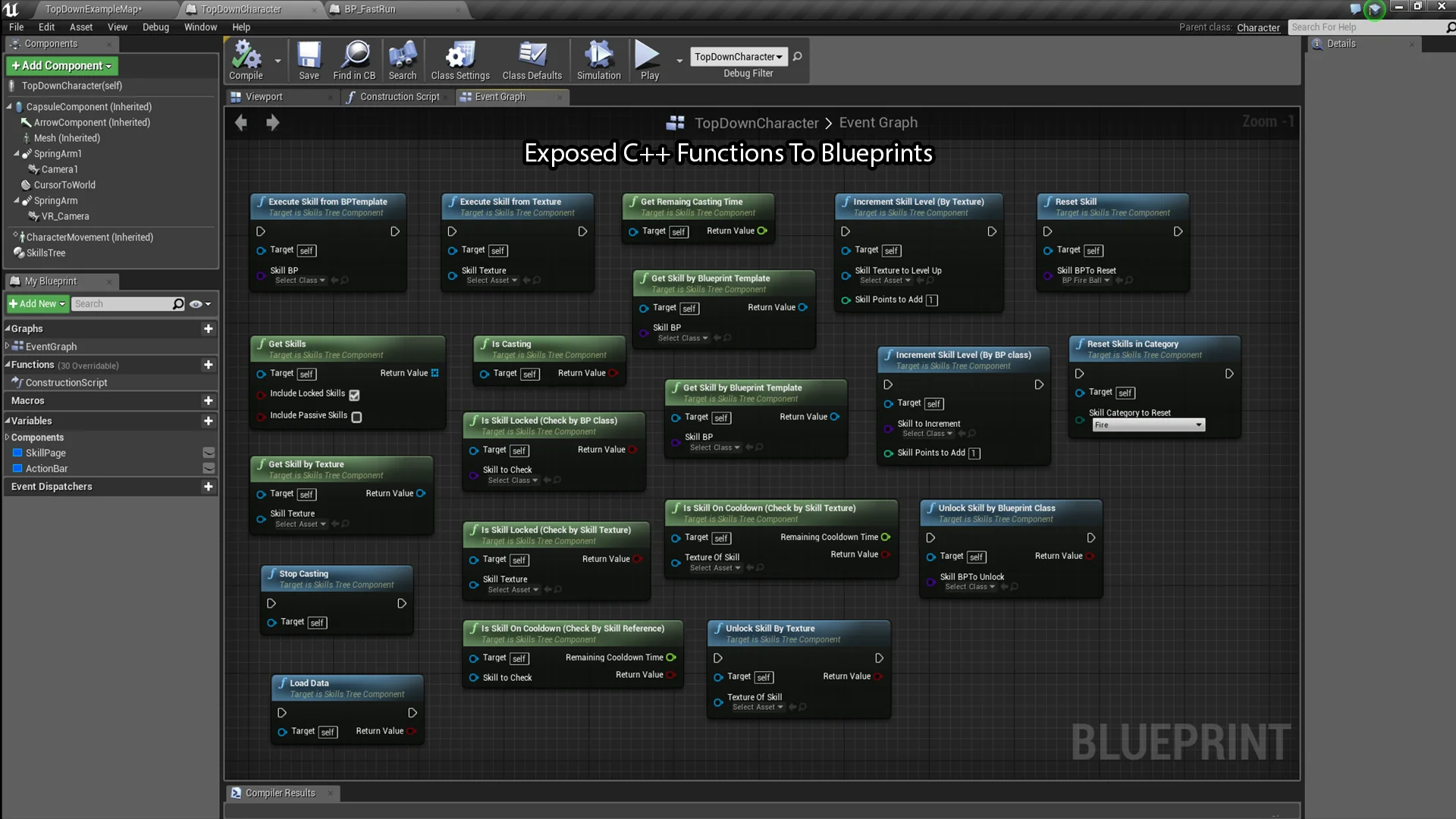
Every individual ability in the tree derives from a fundamental base Skill class. This class is built explicitly for Blueprint modification, giving developers the ability to build distinct spell, combat, or passive actions visually without needing to alter native code libraries. Customizing behaviors relies on dedicated event hooks specifically set up for Blueprint overriding.
Primary execution is driven through the Execute Skill function. When a player triggers an ability or the tree activates a node, Execute Skill handles the initial payload, whether that involves applying gameplay effects, spawning actors, or running custom logic graphs. For actions that do not execute instantaneously, the class provides the Casting Finished function. This event fires precisely when an active channeling or preparation window completes, allowing clean separation between an ability's warm-up cycle and its terminal outcome.
Alongside operational functions, the base Skill class encapsulates core identity properties. Each skill entry stores a designated display name, descriptive text, and organizational tags. The system accommodates broad categorization schemes, providing native support for up to 256 different categories. This capacity allows complex skill trees to partition actions into distinct combat trees, profession branches, elemental schools, or craft proficiencies without running into index limits.
Statistical Scaling and Operational Skill Categories
Progression systems rely heavily on numeric growth, which is addressed here via two distinct layers of statistical data: skill stats and level stats tables. Every individual skill maintains base stats that define its static attributes, while level-dependent growth is routed through dedicated level stats tables. These tables define the exact balance adjustments assigned to a skill across every individual level, ensuring that numeric changes—such as resource costs, damage outputs, duration scalings, or cooldown times—can be scaled across multiple tiers without duplicating node graphs.
To support different combat and gameplay applications, the framework divides all skills into four explicit functional categories:
Instant Skills: Abilities that fire their logic immediately upon execution, running the primary event graph without delaying the character or requiring a timing channel.
Casting Skills: Actions that rely on an intermediate execution window, utilizing the Casting Finished function to apply effects once the designated casting duration finishes successfully.
Passive Skills: Persistent capabilities that remain inactive in terms of manual execution triggers, instead conferring their benefits continually once the skill is active.
Passive Looping Skills: Continuous abilities that cycle their underlying evaluation logic at regular intervals, supporting periodic regeneration, aura pulses, or ticking status interactions.
By defining these four behavioral pathways at the base level, the system ensures that gameplay logic remains organized according to how an ability operates over time, avoiding messy custom timers in generic character scripts.
Criteria Validation via the Skill Unlock Component
Decoupling an ability's execution logic from its prerequisite conditions is essential for maintaining flexible talent trees. In this plugin, progression requirements are handled by a dedicated Skill Unlock Component attached directly to every Skill instance. Rather than relying on a monolithic progression manager to evaluate branching trees, each skill node is responsible for evaluating its own unlock requirements.
The Skill Unlock Component evaluates player criteria to determine whether a skill is ready to be purchased, leveled up, or unlocked. Because the logic resides in a distinct component on each skill, designers can tailor conditions uniquely per node. Whether an ability requires prerequisite node investments, specific character attributes, or external progression milestones, the evaluation logic is contained locally. Once the conditions set within the component are satisfied, it signals the parent skill and the central management component to update the node's availability, unlocking the ability for direct use or further tier progression.
Persistence and Error Handling in the Skills Tree System
Tracking player progression across play sessions is supported directly through integrated Save and Load functionality. The persistence workflow records the operational state of the tree, preserving unlocked nodes, current levels, and assigned progress data. When reloading a saved state, the management layer restores the character's skill tree to its exact prior condition, allowing progression graphs to seamlessly survive level transitions, game restarts, and world reloads.
To accelerate project setup and debugging, the plugin includes a custom warning system. Configuration oversights—such as missing level stats tables, misconfigured category assignments, or invalid component relationships—can often be difficult to pinpoint in expansive progression graphs. The built-in diagnostic system monitors node configurations, detects setup faults, and alerts the developer when an issue arises. In addition to notifying the user that a configuration error has occurred, the diagnostic utility prompts the developer with an actionable suggestion on how to resolve the misconfiguration, significantly reducing troubleshooting time during node and tree construction.
 Engine Tools
 Engine Tools
 Game Mechanics