"148d1066ed74e216"{"id":"1002944","slug":"tech-tree-editor-designer","title":"Tech Tree Editor Designer","category":"Engine Tools","engine":"4.26 - 5.3","assetVersion":"Asset Version:1.0 - 1.1","engineVersion":"Engine Version: 4.26 - 5.3","tag":"Engine Tools","accent":"blue","visual":"mech","summary":"Examine the Tech Tree Editor Designer plugin for Unreal Engine, featuring custom widget graphs, node styling, UMG integration, and save game support.","platform":"Unreal Engine","indexPolicy":"index","publishedAt":"2026-11-21T23:33:51.788Z","updatedAt":"2026-11-21T23:33:51.788Z","sourceNotes":[],"fileContents":[],"compatibility":["Unreal Engine","Asset Version:1.0 - 1.1","Engine Version: 4.26 - 5.3"],"featuredImage":{"alt":"Tech Tree Editor Designer","src":"/wp-content/uploads/published/2026/11/572624edf18a-135a1d7a-1228-48a2-9ae2-004c514e9afd-ab7c7312b4.webp"},"fileSizeBytes":49873916,"hasDownloadLink":true,"downloads":0,"terms":[{"taxonomy":"category","slug":"engine-tools-tools-and-plugins","name":"Engine Tools"}],"galleryImages":[{"src":"/wp-content/uploads/published/2026/11/ea18a46129a9-81bead1b-16f3-4b77-b694-41ebdccd6e59-a6ab4b9ea6.webp","alt":"Tech Tree Editor Designer"},{"src":"/wp-content/uploads/published/2026/11/e3cfb22ba340-ae243c93-2def-4b64-96e5-5d2cd76b931d-ac80ae7664.webp","alt":"Tech Tree Editor Designer"},{"src":"/wp-content/uploads/published/2026/11/034b4b9004fc-4018c0c4-f21f-4faf-b932-67479d1370e9-1ff168caa1.webp","alt":"Tech Tree Editor Designer"},{"src":"/wp-content/uploads/published/2026/11/c618781075ef-bcd1e9d3-17d9-48da-b877-d05bd4ab7494-b7cf53f4da.webp","alt":"Tech Tree Editor Designer"},{"src":"/wp-content/uploads/published/2026/11/7b12f4760314-d01b06d0-a863-47d3-8387-2149b78ae7d6-4f61fea271.webp","alt":"Tech Tree Editor Designer"}],"accessPanel":{"kind":"resource","title":"Get this resource","safetyNote":"Resources are manually reviewed before listing to improve quality and reduce obvious risks.","fileName":"Tech Tree Editor Designer.7z","resourceType":"Resource archive","versions":[]},"contentHtml":"\u003cp\u003eComplex progression systems require tools that bridge the gap between abstract gameplay data and player-facing user interfaces. Building technology branches, crafting paths, or ability matrices often leaves teams wrestling with clunky menus or manually wired UI boards that break when new options are added. Tech Tree Editor Designer addresses this challenge by embedding a dedicated widget graph editor directly into Unreal Engine, enabling developers to lay out, style, and execute tree-based progression logic through a familiar visual interface.\u003c/p\u003e \u003ch2\u003eConstructing Progression in the Tech Tree Editor\u003c/h2\u003e\n\u003cp\u003eAuthoring technology paths relies on a graph editor extension that matches the visual conventions of native Unreal Engine tooling. Developers working inside the graph work with familiar controls, placing nodes freely across the canvas to define how skills or technologies branch outward. New nodes can be placed anywhere in the workspace to construct sprawling progression webs, linear tier ladders, or interconnected multi-discipline research trees.\u003c/p\u003e \u003cp\u003eNode properties remain easily accessible by selecting individual nodes inside the canvas. Once a node is active, its specific parameters can be configured immediately without shifting context. The extension handles both layout positioning and logical relationships simultaneously, allowing the physical position of nodes on the graph to dictate how research paths flow visually on screen.\u003c/p\u003e \u003cp\u003eStyling options extend directly into the graph canvas. Developers can adjust the layout style to fit the visual identity of their project by changing background treatments, connecting line visuals, directional arrows, and node widgets. These adjustments ensure that the authoring environment provides a clear reflection of the final user experience while assets are still being drafted.\u003c/p\u003e \u003ch2\u003eStruct Customization and Data Flexibility in Tech Tree Designer\u003c/h2\u003e\n\u003cp\u003eGameplay frameworks rarely share identical requirements for character skills or research milestones. A survival crafting title might track material costs, power requirements, and research station tiers, while a role-playing game might track attribute prerequisites, character classes, and cooldown modifiers. Tech Tree Designer supports this variance by providing architectural flexibility at the data layer.\u003c/p\u003e \u003cp\u003eProjects can define entirely custom skill structs to hold the specific data payloads required by their underlying game systems. Alternatively, teams with existing codebases can wire the tool directly to data structs that are already established in their gameplay logic. This eliminates the need to conform an ongoing project to a rigid, hardcoded data schema.\u003c/p\u003e \u003cp\u003eThe editor makes use of a specialized Skill Tree Asset type built specifically for in-game deployment. By consolidating progression definitions into dedicated project assets, teams keep technology data cleanly organized in the Content Browser alongside other core gameplay definitions, streamlining asset management across teams of programmers and interface designers.\u003c/p\u003e \u003ch2\u003eIn-Game Rendering Across Slate and UMG Interfaces\u003c/h2\u003e\n\u003cp\u003eTranslating node configurations into a live user interface is achieved through deep runtime support across both Slate and UMG. The tool prepares widgets for instant use at runtime, outputting elements that can be placed anywhere inside an active game interface, from full-screen research hubs to compact skill overlays in a player menu.\u003c/p\u003e \u003cp\u003eTo control the presentation, developers can create custom UMG widgets derived from a dedicated base widget provided by the plugin. This special parent widget supplies the foundational logic needed to render the tree while leaving visual styling open to artist modification. Custom widgets derived from this base can define unique frame graphics, button behaviors, hover states, audio triggers, and animation sequences tailored to the game's art direction.\u003c/p\u003e \u003cp\u003eBecause rendering works across both Slate and UMG, integration into existing UI hierarchies remains straightforward. The rendered tree acts as a modular interface component that slots directly into existing canvases, overlays, or widget switchers without demanding bespoke viewport setups or custom rendering pipelines.\u003c/p\u003e \u003ch2\u003eBlueprint Workflows and SaveGame Persistence\u003c/h2\u003e\n\u003cp\u003eManaging player progression during active play depends on accessible gameplay hooks. Tech Tree Editor Designer exposes every necessary function for operating and interacting with skill trees directly to Blueprints. Visual scripting teams can query node states, process unlock attempts, check prerequisites, and update interface widgets entirely within standard Blueprint graphs.\u003c/p\u003e \u003cp\u003eHandling progression states across sessions is often an engineering bottleneck when building intricate skill trees. This tool streamlines state tracking by connecting directly to the standard Unreal Engine Save Game framework. Developers can save and load the active state of a tech or skill tree using standard Unreal Save Game objects without writing specialized serialization routines or custom file-writing logic.\u003c/p\u003e \u003cp\u003eThis native compatibility ensures that unlocked nodes, in-progress research, and current progression branches persist across game reloads, level transitions, and session restarts seamlessly, integrating smoothly into existing single-player and campaign save architectures.\u003c/p\u003e \u003ch2\u003eProduction Utility Across Unreal Engine 4.27 and Unreal Engine 5\u003c/h2\u003e\n\u003cp\u003eSupporting development workflows across project cycles, example projects are available for both Unreal Engine 4.27 and Unreal Engine 5. This dual-version coverage accommodates long-running titles maintained on legacy branches as well as new projects leveraging recent engine builds.\u003c/p\u003e \u003cp\u003ePractical implementation of the plugin has been demonstrated in real-world production environments, serving as the technology tree framework for the Astro Colony Demo. In that project, the tool handles expansive technological development branches required for automated colony progression, showcasing its capability to govern complex, multi-tiered requirements in an active gameplay scenario.\u003c/p\u003e \u003cp\u003eBy unifying editor-side graph authoring, customizable data structures, flexible UMG rendering, Blueprint accessibility, and native save support, the tool provides a complete pipeline for any developer seeking to implement structured, visual skill and technology trees.\u003c/p\u003e\n\n\u003ch2\u003eContinue Browsing Similar Packs\u003c/h2\u003e\n\u003cul\u003e\n\u003cli\u003e\u003ca href=\"https://3dcghub.com/skills-tree-system/\" rel=\"noopener noreferrer\"\u003eSkills Tree System\u003c/a\u003e\u003c/li\u003e\n\u003cli\u003e\u003ca href=\"https://3dcghub.com/simple-tree-generator/\" rel=\"noopener noreferrer\"\u003eSimple Tree Generator\u003c/a\u003e\u003c/li\u003e\n\u003cli\u003e\u003ca href=\"https://3dcghub.com/demonstrating-animation-blueprints-and-ai-for-gameplay-designers/\" rel=\"noopener noreferrer\"\u003eDemonstrating Animation Blueprints and AI for Gameplay Designers\u003c/a\u003e\u003c/li\u003e\n\u003cli\u003e\u003ca href=\"https://3dcghub.com/hex-tree-skill-perk-tech/\" rel=\"noopener noreferrer\"\u003eHEX TREE (Skill, Perk, Tech)\u003c/a\u003e\u003c/li\u003e\n\u003cli\u003e\u003ca href=\"https://3dcghub.com/logic-driver-pro-blueprint-editor-for-dialogue-quest-combat-and-fsm-systems/\" rel=\"noopener noreferrer\"\u003eLogic Driver Pro - Blueprint Editor for Dialogue, Quest, Combat \u0026amp; FSM Systems\u003c/a\u003e\u003c/li\u003e\n\u003c/ul\u003e","contentTextLength":6564,"navigation":{"current":28,"total":4890,"previous":{"id":"1002945","slug":"websocket-client-for-unreal-engine","title":"WebSocket Client for Unreal Engine","category":"Network \u0026 Multiplayer","platform":"Unreal Engine","updatedAt":"2026-11-21T23:34:24.400Z"},"next":{"id":"1002943","slug":"modular-fps-hands","title":"Modular FPS Hands","category":"Gameplay Features","platform":"Unreal Engine","updatedAt":"2026-11-21T23:30:57.151Z"}},"relatedResources":[{"id":"1002938","slug":"skills-tree-system","title":"Skills Tree System","category":"Engine Tools","engine":"4.26","assetVersion":"Asset Version: 1.3","engineVersion":"Engine Version: 4.26","tag":"Engine Tools","accent":"blue","visual":"mech","summary":"Explore the Skills Tree System plugin, featuring Blueprint-extensible base classes, 256 categories, unlock components, save states, and debugging tools.","platform":"Unreal Engine","indexPolicy":"index","publishedAt":"2026-11-21T23:22:07.225Z","updatedAt":"2026-11-21T23:22:07.225Z","sourceNotes":[],"fileContents":[],"compatibility":["Unreal Engine","Asset Version: 1.3","Engine Version: 4.26"],"featuredImage":{"alt":"Skills Tree System","src":"/wp-content/uploads/published/2026/11/8dd976eb300d-3a9447a0-1126-4625-86fa-190863de17c7-2d63576a72.webp"},"fileSizeBytes":112240,"hasDownloadLink":true,"downloads":0},{"id":"14610","slug":"simple-tree-generator","title":"Simple Tree Generator","category":"Engine Tools","engine":"5.2 - 5.4, 5.6 - 5.8","assetVersion":"Asset Version: 1.1","engineVersion":"Engine Version: 5.2 - 5.4, 5.6 - 5.8","tag":"Engine Tools","accent":"blue","visual":"audio","summary":"Simple Tree Generator is a powerful tool designed specifically for Unreal Engine 5. It enables developers to procedurally create diverse trees and bushes with just a few clicks.","platform":"Unreal Engine","indexPolicy":"noindex","publishedAt":"2026-03-11T18:36:43.000Z","updatedAt":"2026-11-22T07:01:17.249Z","sourceNotes":[],"fileContents":[],"compatibility":["Unreal Engine","Asset Version: 1.1","Engine Version: 5.2 - 5.4, 5.6 - 5.8"],"featuredImage":{"alt":"Simple Tree Generator","src":"https://3dcghub.com/wp-content/uploads/2026/03/4e3b784d-7198-46b5-a343-a73957e40875.webp"},"fileSizeBytes":103605153,"hasDownloadLink":true,"downloads":0},{"id":"1001231","slug":"demonstrating-animation-blueprints-and-ai-for-gameplay-designers","title":"Demonstrating Animation Blueprints and AI for Gameplay Designers","category":"Action-Adventure","engine":"5.0+","assetVersion":"","engineVersion":"Engine Version: 5.0+","tag":"Action-Adventure","accent":"blue","visual":"animation","summary":"Explore the connection between Animation Blueprints, behavior trees, montages, and basic enemy character AI for gameplay designers.","platform":"Unreal Engine","indexPolicy":"index","publishedAt":"2026-09-21T03:35:26.508Z","updatedAt":"2026-09-21T03:35:26.508Z","sourceNotes":[],"fileContents":[],"compatibility":["Unreal Engine","Engine Version: 5.0+"],"featuredImage":{"alt":"Demonstrating Animation Blueprints and AI for Gameplay Designers","src":"/wp-content/uploads/published/2026/09/17ead882c717-6d1822dd-94f6-42cb-bab3-18f794094846-660798aead.webp"},"fileSizeBytes":7669398400,"hasDownloadLink":true,"downloads":0}]}[{"id":4225,"sourceId":4225,"taxonomyId":4225,"taxonomy":"category","slug":"asset-library","name":"Asset Library","parentId":null,"count":4744,"hasChildren":true,"href":"/","seoTitle":"Free Game Assets Library | 3DCGHUB","seoDescription":"Browse free Unreal Engine, Unity, Blender assets and game development tutorials on 3DCGHUB with previews, compatibility notes, and secure downloads.","sitemapEnabled":true,"children":[{"id":4227,"sourceId":4227,"taxonomyId":4227,"taxonomy":"category","slug":"blender-add-ons-plugins","name":"Blender Add-ons \u0026 Plugins","parentId":4225,"count":10,"hasChildren":false,"href":"/category/blender-add-ons-plugins/","seoTitle":"Free Blender Add-ons \u0026 Plugins | 3DCGHUB","seoDescription":"Browse free Blender Add-ons \u0026 Plugins tools for Blender on 3DCGHUB: curated downloads with preview images, compatibility notes and secure download access.","sitemapEnabled":true},{"id":514,"sourceId":514,"taxonomyId":514,"taxonomy":"category","slug":"unity-2","name":"Unity","parentId":4225,"count":453,"hasChildren":true,"href":"/category/unity-2/","seoTitle":"Free Unity Assets | 3DCGHUB","seoDescription":"Browse free Unity resources on 3DCGHUB: curated downloads with preview images, compatibility notes and secure download access.","sitemapEnabled":true,"children":[{"id":523,"sourceId":523,"taxonomyId":523,"taxonomy":"category","slug":"2d","name":"2D","parentId":514,"count":1,"hasChildren":true,"href":"/category/2d/","seoTitle":"Free Unity 2D | 3DCGHUB","seoDescription":"Browse free 2D assets for Unity on 3DCGHUB: curated downloads with preview images, compatibility notes and secure download access.","sitemapEnabled":true},{"id":515,"sourceId":515,"taxonomyId":515,"taxonomy":"category","slug":"3d-unity-2","name":"3D","parentId":514,"count":162,"hasChildren":true,"href":"/category/3d-unity-2/","seoTitle":"Free Unity 3D Assets | 3DCGHUB","seoDescription":"Browse free 3D assets for Unity on 3DCGHUB: curated downloads with preview images, compatibility notes and secure download access.","sitemapEnabled":true},{"id":565,"sourceId":565,"taxonomyId":565,"taxonomy":"category","slug":"add-ons","name":"Add-Ons","parentId":514,"count":2,"hasChildren":false,"href":"/category/add-ons/","seoTitle":"Free Unity Add-Ons | 3DCGHUB","seoDescription":"Browse free Add-Ons assets for Unity on 3DCGHUB: curated downloads with preview images, compatibility notes and secure download access.","sitemapEnabled":true},{"id":529,"sourceId":529,"taxonomyId":529,"taxonomy":"category","slug":"audio-unity-2","name":"Audio","parentId":514,"count":1,"hasChildren":true,"href":"/category/audio-unity-2/","seoTitle":"Free Unity Audio | 3DCGHUB","seoDescription":"Browse free Audio for Unity on 3DCGHUB: curated downloads with preview images, compatibility notes and secure download access.","sitemapEnabled":true},{"id":557,"sourceId":557,"taxonomyId":557,"taxonomy":"category","slug":"templates","name":"Templates","parentId":514,"count":36,"hasChildren":true,"href":"/category/templates/","seoTitle":"Free Unity Templates | 3DCGHUB","seoDescription":"Browse free Unity project templates on 3DCGHUB. Starter kits with previews, compatibility notes, and secure download access.","sitemapEnabled":true},{"id":533,"sourceId":533,"taxonomyId":533,"taxonomy":"category","slug":"tools-unity-2","name":"Tools","parentId":514,"count":0,"hasChildren":true,"href":"/category/tools-unity-2/","sitemapEnabled":true},{"id":554,"sourceId":554,"taxonomyId":554,"taxonomy":"category","slug":"vfx-unity-2","name":"VFX","parentId":514,"count":4,"hasChildren":true,"href":"/category/vfx-unity-2/","seoTitle":"Free Unity VFX | 3DCGHUB","seoDescription":"Browse free VFX for Unity on 3DCGHUB: curated downloads with preview images, compatibility notes and secure download access.","sitemapEnabled":true}]},{"id":511,"sourceId":511,"taxonomyId":511,"taxonomy":"category","slug":"unreal-engine-2","name":"Unreal Engine","parentId":4225,"count":4282,"hasChildren":true,"href":"/category/unreal-engine-2/","seoTitle":"Free Unreal Engine Assets | 3DCGHUB","seoDescription":"Browse free Unreal Engine resources on 3DCGHUB: curated downloads with preview images, compatibility notes and secure download access.","sitemapEnabled":true,"children":[{"id":54,"sourceId":54,"taxonomyId":54,"taxonomy":"category","slug":"3d","name":"3D","parentId":511,"count":2428,"hasChildren":true,"href":"/category/3d/","seoTitle":"Free Unreal Engine 3D | 3DCGHUB","seoDescription":"Browse free 3D assets for Unreal Engine on 3DCGHUB: curated downloads with preview images, compatibility notes and secure download access.","sitemapEnabled":true},{"id":441,"sourceId":441,"taxonomyId":441,"taxonomy":"category","slug":"animations","name":"Animations","parentId":511,"count":245,"hasChildren":true,"href":"/category/animations/","seoTitle":"Free Unreal Engine Animations | 3DCGHUB","seoDescription":"Browse free Animations for Unreal Engine on 3DCGHUB: curated downloads with preview images, compatibility notes and secure download access.","sitemapEnabled":true},{"id":446,"sourceId":446,"taxonomyId":446,"taxonomy":"category","slug":"audio","name":"Audio","parentId":511,"count":63,"hasChildren":true,"href":"/category/audio/","seoTitle":"Free Unreal Engine Audio Resources | 3DCGHUB","seoDescription":"Browse free Unreal Engine audio resources including sound effects, voices, dialogue, and ambient sounds. Curated free downloads on 3DCGHUB.","sitemapEnabled":true},{"id":466,"sourceId":466,"taxonomyId":466,"taxonomy":"category","slug":"game-systems","name":"Game Systems","parentId":511,"count":356,"hasChildren":true,"href":"/category/game-systems/","seoTitle":"Free Unreal Engine Game Systems | 3DCGHUB","seoDescription":"Browse free Game Systems tools for Unreal Engine on 3DCGHUB: curated downloads with preview images, compatibility notes and secure download access.","sitemapEnabled":true},{"id":478,"sourceId":478,"taxonomyId":478,"taxonomy":"category","slug":"game-templates","name":"Game Templates","parentId":511,"count":150,"hasChildren":true,"href":"/category/game-templates/","seoTitle":"Free Unreal Engine Game Templates | 3DCGHUB","seoDescription":"Browse free Game Templates for Unreal Engine on 3DCGHUB: curated downloads with preview images, compatibility notes and secure download access.","sitemapEnabled":true},{"id":432,"sourceId":432,"taxonomyId":432,"taxonomy":"category","slug":"hdri","name":"HDRI","parentId":511,"count":6,"hasChildren":true,"href":"/category/hdri/","seoTitle":"Free Unreal Engine HDRI | 3DCGHUB","seoDescription":"Browse free Unreal Engine HDRI skies and lighting maps on 3DCGHUB. Environment lighting with previews and secure downloads.","sitemapEnabled":true},{"id":228,"sourceId":228,"taxonomyId":228,"taxonomy":"category","slug":"material-and-textures","name":"Material \u0026 Textures","parentId":511,"count":172,"hasChildren":true,"href":"/category/material-and-textures/","seoTitle":"Free Unreal Engine Material \u0026 Textures | 3DCGHUB","seoDescription":"Browse free Material \u0026 Textures for Unreal Engine on 3DCGHUB: curated downloads with preview images, compatibility notes and secure download access.","sitemapEnabled":true},{"id":298,"sourceId":298,"taxonomyId":298,"taxonomy":"category","slug":"sprites-and-flipbooks","name":"Sprites \u0026 Flipbooks","parentId":511,"count":17,"hasChildren":true,"href":"/category/sprites-and-flipbooks/","seoTitle":"Free Unreal Engine Sprites \u0026 Flipbooks | 3DCGHUB","seoDescription":"Browse free Sprites \u0026 Flipbooks assets for Unreal Engine on 3DCGHUB: curated downloads with preview images, compatibility notes and secure download access.","sitemapEnabled":true},{"id":489,"sourceId":489,"taxonomyId":489,"taxonomy":"category","slug":"tools-and-plugins","name":"Tools \u0026 Plugins","parentId":511,"count":390,"hasChildren":true,"href":"/category/tools-and-plugins/","seoTitle":"Free Unreal Engine Tools \u0026 Plugins | 3DCGHUB","seoDescription":"Browse free Tools \u0026 Plugins for Unreal Engine on 3DCGHUB: curated downloads with preview images, compatibility notes and secure download access.","sitemapEnabled":true},{"id":459,"sourceId":459,"taxonomyId":459,"taxonomy":"category","slug":"ui","name":"UI","parentId":511,"count":43,"hasChildren":true,"href":"/category/ui/","seoTitle":"Free Unreal Engine UI | 3DCGHUB","seoDescription":"Browse free UI for Unreal Engine on 3DCGHUB: curated downloads with preview images, compatibility notes and secure download access.","sitemapEnabled":true},{"id":450,"sourceId":450,"taxonomyId":450,"taxonomy":"category","slug":"vfx","name":"VFX","parentId":511,"count":412,"hasChildren":true,"href":"/category/vfx/","seoTitle":"Free Unreal Engine VFX | 3DCGHUB","seoDescription":"Browse free VFX for Unreal Engine on 3DCGHUB: curated downloads with preview images, compatibility notes and secure download access.","sitemapEnabled":true}]}]},{"id":4222,"sourceId":4222,"taxonomyId":4222,"taxonomy":"category","slug":"tutorial-library","name":"Tutorial Library","parentId":null,"count":117,"hasChildren":false,"href":"/tutorials/","seoTitle":"Free Game Development Tutorial Library | 3DCGHUB","seoDescription":"Browse free game development tutorials for Unreal Engine, Unity, Blender, and more on 3DCGHUB with practical workflows and secure downloads.","sitemapEnabled":true}]
Resource screenshots
1 / 5
Join our channel
Follow 3DCGHUB on Telegram for new resource drops, migration updates, and community notices.
Complex progression systems require tools that bridge the gap between abstract gameplay data and player-facing user interfaces. Building technology branches, crafting paths, or ability matrices often leaves teams wrestling with clunky menus or manually wired UI boards that break when new options are added. Tech Tree Editor Designer addresses this challenge by embedding a dedicated widget graph editor directly into Unreal Engine, enabling developers to lay out, style, and execute tree-based progression logic through a familiar visual interface.
Constructing Progression in the Tech Tree Editor
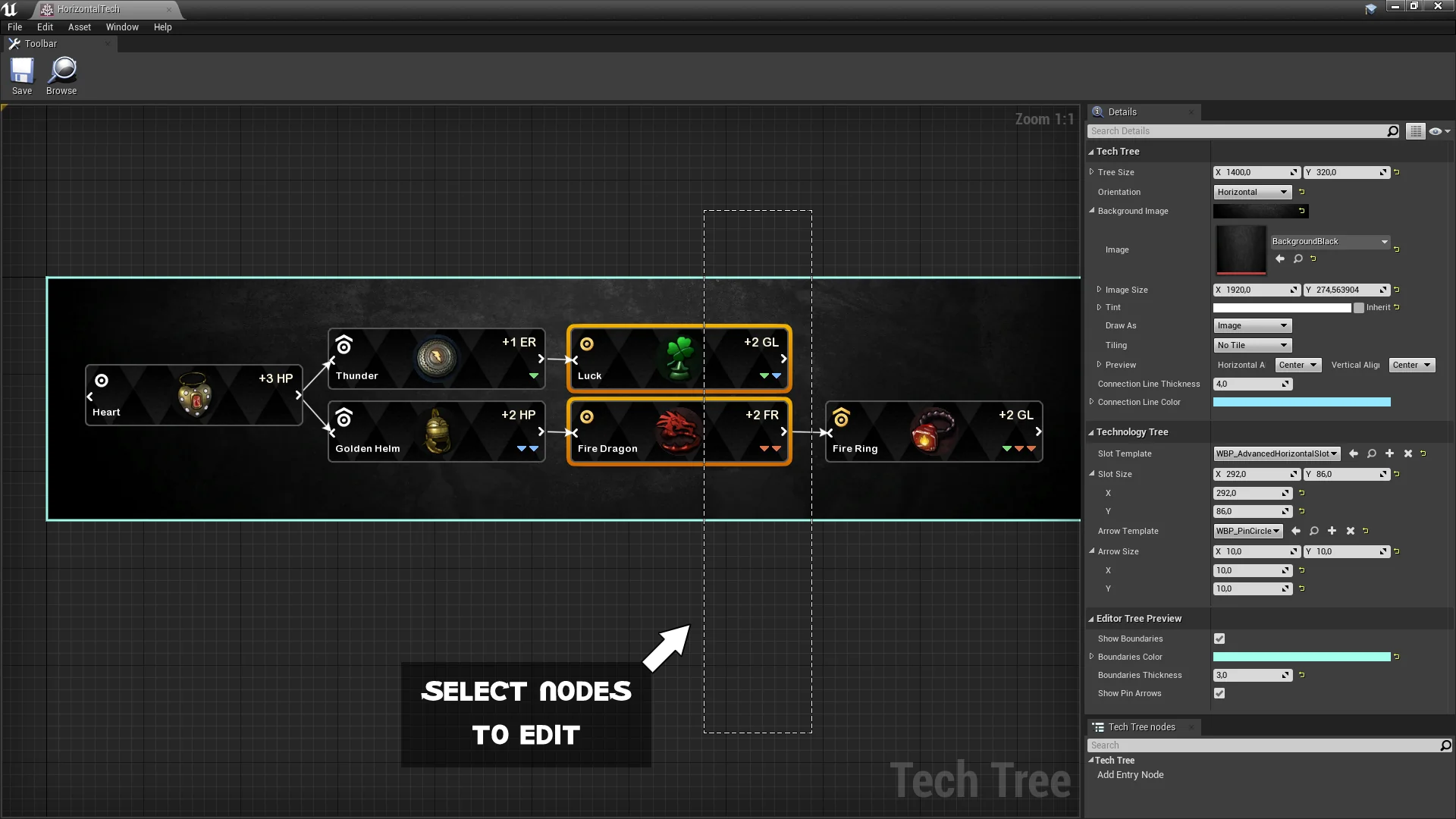
Authoring technology paths relies on a graph editor extension that matches the visual conventions of native Unreal Engine tooling. Developers working inside the graph work with familiar controls, placing nodes freely across the canvas to define how skills or technologies branch outward. New nodes can be placed anywhere in the workspace to construct sprawling progression webs, linear tier ladders, or interconnected multi-discipline research trees.
Node properties remain easily accessible by selecting individual nodes inside the canvas. Once a node is active, its specific parameters can be configured immediately without shifting context. The extension handles both layout positioning and logical relationships simultaneously, allowing the physical position of nodes on the graph to dictate how research paths flow visually on screen.
Styling options extend directly into the graph canvas. Developers can adjust the layout style to fit the visual identity of their project by changing background treatments, connecting line visuals, directional arrows, and node widgets. These adjustments ensure that the authoring environment provides a clear reflection of the final user experience while assets are still being drafted.
Struct Customization and Data Flexibility in Tech Tree Designer
Gameplay frameworks rarely share identical requirements for character skills or research milestones. A survival crafting title might track material costs, power requirements, and research station tiers, while a role-playing game might track attribute prerequisites, character classes, and cooldown modifiers. Tech Tree Designer supports this variance by providing architectural flexibility at the data layer.
Projects can define entirely custom skill structs to hold the specific data payloads required by their underlying game systems. Alternatively, teams with existing codebases can wire the tool directly to data structs that are already established in their gameplay logic. This eliminates the need to conform an ongoing project to a rigid, hardcoded data schema.
The editor makes use of a specialized Skill Tree Asset type built specifically for in-game deployment. By consolidating progression definitions into dedicated project assets, teams keep technology data cleanly organized in the Content Browser alongside other core gameplay definitions, streamlining asset management across teams of programmers and interface designers.
In-Game Rendering Across Slate and UMG Interfaces
Translating node configurations into a live user interface is achieved through deep runtime support across both Slate and UMG. The tool prepares widgets for instant use at runtime, outputting elements that can be placed anywhere inside an active game interface, from full-screen research hubs to compact skill overlays in a player menu.
To control the presentation, developers can create custom UMG widgets derived from a dedicated base widget provided by the plugin. This special parent widget supplies the foundational logic needed to render the tree while leaving visual styling open to artist modification. Custom widgets derived from this base can define unique frame graphics, button behaviors, hover states, audio triggers, and animation sequences tailored to the game's art direction.
Because rendering works across both Slate and UMG, integration into existing UI hierarchies remains straightforward. The rendered tree acts as a modular interface component that slots directly into existing canvases, overlays, or widget switchers without demanding bespoke viewport setups or custom rendering pipelines.
Blueprint Workflows and SaveGame Persistence
Managing player progression during active play depends on accessible gameplay hooks. Tech Tree Editor Designer exposes every necessary function for operating and interacting with skill trees directly to Blueprints. Visual scripting teams can query node states, process unlock attempts, check prerequisites, and update interface widgets entirely within standard Blueprint graphs.
Handling progression states across sessions is often an engineering bottleneck when building intricate skill trees. This tool streamlines state tracking by connecting directly to the standard Unreal Engine Save Game framework. Developers can save and load the active state of a tech or skill tree using standard Unreal Save Game objects without writing specialized serialization routines or custom file-writing logic.
This native compatibility ensures that unlocked nodes, in-progress research, and current progression branches persist across game reloads, level transitions, and session restarts seamlessly, integrating smoothly into existing single-player and campaign save architectures.
Production Utility Across Unreal Engine 4.27 and Unreal Engine 5
Supporting development workflows across project cycles, example projects are available for both Unreal Engine 4.27 and Unreal Engine 5. This dual-version coverage accommodates long-running titles maintained on legacy branches as well as new projects leveraging recent engine builds.
Practical implementation of the plugin has been demonstrated in real-world production environments, serving as the technology tree framework for the Astro Colony Demo. In that project, the tool handles expansive technological development branches required for automated colony progression, showcasing its capability to govern complex, multi-tiered requirements in an active gameplay scenario.
By unifying editor-side graph authoring, customizable data structures, flexible UMG rendering, Blueprint accessibility, and native save support, the tool provides a complete pipeline for any developer seeking to implement structured, visual skill and technology trees.
 Engine Tools
 Engine Tools
 Action-Adventure