"148d1066ed74e216"{"id":"1002943","slug":"modular-fps-hands","title":"Modular FPS Hands","category":"Gameplay Features","engine":"4.22+,5.0+","assetVersion":"","engineVersion":"Engine Version: 4.22+,5.0+","tag":"Gameplay Features","accent":"blue","visual":"mech","summary":"Detailed look at Modular FPS Hands for Unreal Engine 5, featuring 93 Blueprint variables, modular clothing, procedural camo, and wear parameters.","platform":"Unreal Engine","indexPolicy":"index","publishedAt":"2026-11-21T23:30:57.151Z","updatedAt":"2026-11-21T23:30:57.151Z","sourceNotes":[],"fileContents":[],"compatibility":["Unreal Engine","Engine Version: 4.22+,5.0+"],"featuredImage":{"alt":"Modular FPS Hands","src":"/wp-content/uploads/published/2026/11/8f0569beb22a-de642fed-2efa-4338-a34a-1f85d3e324ac-0c0d0b474d.webp"},"fileSizeBytes":3722392902,"hasDownloadLink":true,"downloads":0,"terms":[{"taxonomy":"category","slug":"gameplay-features","name":"Gameplay Features"}],"galleryImages":[{"src":"/wp-content/uploads/published/2026/11/5d811f9b5d0e-edbafa8a-b2db-4907-b70d-41b970818fd9-1768bc3890.webp","alt":"Modular FPS Hands"},{"src":"/wp-content/uploads/published/2026/11/f4337f91cfed-edc5c3aa-41e8-4cdf-9fbe-99b09d400965-7f82f0bd7d.webp","alt":"Modular FPS Hands"},{"src":"/wp-content/uploads/published/2026/11/0ea4e71cc38d-2163ed15-07db-4c34-83b7-7ba1a9b0a7da-7859d2a819.webp","alt":"Modular FPS Hands"},{"src":"/wp-content/uploads/published/2026/11/4f41ceacc787-d57f935a-88be-491c-abe4-c2e8532f2685-efb5d7bf0c.webp","alt":"Modular FPS Hands"},{"src":"/wp-content/uploads/published/2026/11/90d01862118f-33e2e96e-91a6-4495-9f6d-a902aa1b0c87-5485cf806a.webp","alt":"Modular FPS Hands"},{"src":"/wp-content/uploads/published/2026/11/93bd19a9c440-5cc29651-4a04-488d-b17e-7488bd1cbad0-5ea554e0b7.webp","alt":"Modular FPS Hands"},{"src":"/wp-content/uploads/published/2026/11/d3e45f19d2a9-d29fd1d0-f848-48a5-81b5-4bc5543e1ecf-98318af1b0.webp","alt":"Modular FPS Hands"},{"src":"/wp-content/uploads/published/2026/11/0c59111d49b7-5fc79fbe-3762-49e3-b1a5-020ae7bf9e6f-045d5aa666.webp","alt":"Modular FPS Hands"},{"src":"/wp-content/uploads/published/2026/11/cdcf2c7bfe1a-fcf87e59-dc60-43a6-a535-65d31f126af5-eab53027e8.webp","alt":"Modular FPS Hands"},{"src":"/wp-content/uploads/published/2026/11/2d0f38641a27-a416fca6-2a8d-45a3-bd39-2a65de59ca12-1998b65a31.webp","alt":"Modular FPS Hands"}],"accessPanel":{"kind":"resource","title":"Get this resource","safetyNote":"Resources are manually reviewed before listing to improve quality and reduce obvious risks.","fileName":"Content.7z","resourceType":"Resource archive","versions":[]},"contentHtml":"\u003ch2\u003eModular Mesh Breakdowns: Shirts, Gloves, and Accessories\u003c/h2\u003e\u003cp\u003eModular FPS Hands supplies a dedicated first-person character kit engineered around three interchangeable body slots: shirts, gloves, and accessories. The asset collection delivers 20 clothing models, 46 glove variations, and 11 distinct accessories. These pieces can be mixed and matched across different mesh and material assignments, allowing developers to configure distinct visual loadouts for military operators, security personnel, or survival combatants without altering the underlying character rig.\u003c/p\u003e\u003cp\u003eSeparating the arms into independent slots creates significant geometric flexibility. A project can pair heavy tactical sleeves with lightweight fingerless gloves, roll sleeves up, or swap between insulated cold-weather mitts and standard combat gloves while maintaining consistent joint placement. The 11 accessory meshes provide supplementary visual details such as wrist-mounted gear, tactical watches, or protective bands that fit cleanly over or alongside the clothing models. Because the shirt, glove, and accessory segments swap independently, the library supports thousands of unique base mesh permutations directly out of the box.\u003c/p\u003e\u003ch2\u003eProcedural Shading, Camouflage, and Surface Wear Controls\u003c/h2\u003e\u003cp\u003eVisual variety extends beyond raw geometry through a procedural material pipeline that governs fabric patterns, environmental grime, and physical trauma. The material setup includes fully customizable camouflage alongside fine-grained controls for overall color, hue, and contrast. Instead of relying on static, baked camo textures that look repetitive across an entire squad, teams can tune camouflage distributions and color channels to match specific theater environments, from arid desert schemes to dense woodland and urban concrete palettes.\u003c/p\u003e\u003cp\u003eWeathering and operational wear are broken down into specific material parameters rather than flattened textures. Developers have direct access to dirt settings, mud levels, edge wear adjustments, and general worn effects. Edge wear specifically highlights fabric stress points, glove seams, and hard accessory corners where friction naturally strips away surface finish. Mud and dirt layers can be intensified to reflect prolonged crawl movements or damp field conditions, giving the player hands an appearance that directly reflects the surrounding level environment.\u003c/p\u003e\u003cp\u003eUnderneath the gear, exposed skin surfaces include adjustable skin color parameters and integrated wound effects. These parameters make it possible to shift skin tones across diverse character casts and introduce visible cuts, abrasions, or combat injuries on visible fingers, knuckles, and wrists. For team identification and national alignment, the material system includes 31 distinct national flags that can be selected and displayed on compatible gear surfaces.\u003c/p\u003e\u003ch2\u003eConfiguring the Hands Blueprint Component\u003c/h2\u003e\u003cp\u003eAt the center of the system sits a specialized Modular Hands Blueprint Component that houses 93 configurable variables. This extensive parameter array consolidates mesh references, material instances, color adjustments, flag selections, and wear intensities into a single, organized logic unit. Instead of writing custom Blueprint scripts to propagate material parameters across separate skeletal mesh components, developers can manage the entire visual presentation through these built-in variables.\u003c/p\u003e\u003cp\u003eImplementation inside Unreal Engine projects follows two primary integration routes: adding the component directly onto an existing character actor, or inheriting the character directly from the provided base class. Teams with established player pawn classes can attach the component, link it to their existing input or inventory events, and drive the 93 exposed variables through gameplay logic. This setup allows games to alter wear levels dynamically during a match, swap gloves when equipping specialized equipment, or update national flag insignias when a player customizes their profile in a pre-match lobby.\u003c/p\u003e\u003ch2\u003eEpic Skeleton Compatibility and Unreal Engine 5 Setup\u003c/h2\u003e\u003cp\u003eThe system is constructed specifically for Unreal Engine 5 and maintains full compatibility with animations authored on the Epic Skeleton. First-person weapon interactions, reloads, melee strikes, and idle cycles built for standard Epic rigs can be assigned directly to these arms without requiring extensive manual bone remapping. For studios utilizing custom skeletal proportions, the meshes support retargeting workflows, enabling clean animation transfer between unique first-person rigs and the modular hand meshes.\u003c/p\u003e\u003cp\u003eBecause first-person perspectives place hands extremely close to the camera, consistent weighting and clean skinning around the wrists, fingers, and forearm twists are critical. The clothing and glove assets conform to the underlying skeletal deformation during complex two-handed weapon grips, sprint cycles, and item manipulations. Combined with UE5's modern rendering capabilities, the layered materials, normal details, and procedural wear parameters maintain their definition even under close scrutiny during high-detail inspection animations.\u003c/p\u003e\u003ch2\u003eFirst-Person Shooter Contexts and Tactical Variations\u003c/h2\u003e\u003cp\u003eThe asset package is tuned for realistic military shooters, tactical action titles, and survival-driven first-person games where equipment fidelity directly impacts immersion. In tactical multiplayer shooters, the 31 national flags combined with distinct shirt, glove, and camouflage combinations enable clear faction distinctions between opposing teams or individual squad roles. Heavy breachers can be dressed in thick gloves and reinforced sleeves, while recon operators can sport lighter fabrics and specialized wrist accessories.\u003c/p\u003e\u003cp\u003eIn single-player campaigns or hardcore survival titles, the material controls for mud, dirt, and wounds serve practical narrative functions. As a character takes damage or navigates harsh terrain, the exposed Blueprint variables allow developers to script progressive physical degradation directly onto the player's hands. The blend of substantial model counts, procedural texturing flexibility, and native component architecture makes Modular FPS Hands an adaptable framework for projects requiring diverse, high-fidelity first-person arm presentation.\u003c/p\u003e\n\n\u003ch2\u003eExplore Similar Assets\u003c/h2\u003e\n\u003cul\u003e\n\u003cli\u003e\u003ca href=\"https://3dcghub.com/functional-fps-equipment/\" rel=\"noopener noreferrer\"\u003eFunctional FPS Equipment\u003c/a\u003e\u003c/li\u003e\n\u003cli\u003e\u003ca href=\"https://3dcghub.com/gasp-basic-template-for-fps-with-spatial-inventory/\" rel=\"noopener noreferrer\"\u003eGASP: Basic Template for FPS with Spatial Inventory\u003c/a\u003e\u003c/li\u003e\n\u003cli\u003e\u003ca href=\"https://3dcghub.com/universal-shooting-game-template-and-framework/\" rel=\"noopener noreferrer\"\u003eUniversal Shooting Game Template and Framework\u003c/a\u003e\u003c/li\u003e\n\u003cli\u003e\u003ca href=\"https://3dcghub.com/fps-pistol-single/\" rel=\"noopener noreferrer\"\u003eFPS Pistol (Single)\u003c/a\u003e\u003c/li\u003e\n\u003cli\u003e\u003ca href=\"https://3dcghub.com/fps-pistol-and-knife-animations/\" rel=\"noopener noreferrer\"\u003eFPS Pistol And Knife Animations\u003c/a\u003e\u003c/li\u003e\n\u003c/ul\u003e","contentTextLength":6472,"navigation":{"current":29,"total":4890,"previous":{"id":"1002944","slug":"tech-tree-editor-designer","title":"Tech Tree Editor Designer","category":"Engine Tools","platform":"Unreal Engine","updatedAt":"2026-11-21T23:33:51.788Z"},"next":{"id":"1002942","slug":"open-icon","title":"Open Icon","category":"Engine Tools","platform":"Unreal Engine","updatedAt":"2026-11-21T23:30:01.472Z"}},"relatedResources":[{"id":"1000830","slug":"functional-fps-equipment","title":"Functional FPS Equipment","category":"Gameplay Features","engine":"5.4+","assetVersion":"","engineVersion":"Engine Version: 5.4+","tag":"Gameplay Features","accent":"blue","visual":"mech","summary":"Animated, rigged first-person equipment including camcorder, wristwatch, PDA, smartphone, and cellphone for Unreal Engine projects. 4 skeletal meshes with examp","platform":"Unreal Engine","indexPolicy":"index","publishedAt":"2026-08-03T12:13:42.864Z","updatedAt":"2026-08-03T12:13:42.864Z","sourceNotes":[],"fileContents":[],"compatibility":["Unreal Engine","Engine Version: 5.4+"],"featuredImage":{"alt":"Functional FPS Equipment","src":"/wp-content/uploads/published/2026/08/86fd5dc839bb-dc5607a3-31cf-4ab8-9143-a9d6ce13c694-39bc21f32d.webp"},"fileSizeBytes":207627157,"hasDownloadLink":true,"downloads":0},{"id":"27714","slug":"gasp-basic-template-for-fps-with-spatial-inventory","title":"GASP: Basic Template for FPS with Spatial Inventory","category":"Gameplay Features","engine":"5.5+","assetVersion":"Engine version: 5.5+","engineVersion":"","tag":"Gameplay Features","accent":"blue","visual":"audio","summary":"GASP: Basic Template for FPS with Spatial Inventory combines a spatial inventory system, a basic weapon system, and GASP content in one FPS-focused package. Its main draw is a configurable inventory layout where item size and shape affect how gear is arrang...","platform":"Unreal Engine","indexPolicy":"index","publishedAt":"2026-04-28T15:48:38.000Z","updatedAt":"2026-04-28T15:48:40.000Z","sourceNotes":[],"fileContents":[],"compatibility":["Unreal Engine","Engine version: 5.5+"],"featuredImage":{"alt":"GASP: Basic Template for FPS with Spatial Inventory","src":"https://3dcghub.com/wp-content/uploads/2026/04/d5a9310af048_7c263bb3-7b8e-48cc-a0b6-b062efafc7d1.webp"},"fileSizeBytes":276549672,"hasDownloadLink":true,"downloads":0},{"id":"11176","slug":"universal-shooting-game-template-and-framework","title":"Universal Shooting Game Template and Framework","category":"Gameplay Features","engine":"5.1+","assetVersion":"Engine version: 5.1+","engineVersion":"5.1","tag":"Gameplay Features","accent":"blue","visual":"character","summary":"A comprehensive, blueprint-only framework designed for creating shooting games with independent modules and multiplayer support. It features integrated AI, weapon systems, and character customization tools.","platform":"Unreal Engine","indexPolicy":"noindex","publishedAt":"2026-03-03T17:04:56.000Z","updatedAt":"2026-04-19T15:48:15.000Z","sourceNotes":[],"fileContents":[],"compatibility":["Unreal Engine","Engine version: 5.1+"],"featuredImage":{"alt":"Universal Shooting Game Template and Framework","src":"https://3dcghub.com/wp-content/uploads/2026/03/809586c9-06d5-4b25-8d10-adc2975bbd96.webp"},"fileSizeBytes":907111133,"hasDownloadLink":true,"downloads":0}]}[{"id":4225,"sourceId":4225,"taxonomyId":4225,"taxonomy":"category","slug":"asset-library","name":"Asset Library","parentId":null,"count":4744,"hasChildren":true,"href":"/","seoTitle":"Free Game Assets Library | 3DCGHUB","seoDescription":"Browse free Unreal Engine, Unity, Blender assets and game development tutorials on 3DCGHUB with previews, compatibility notes, and secure downloads.","sitemapEnabled":true,"children":[{"id":4227,"sourceId":4227,"taxonomyId":4227,"taxonomy":"category","slug":"blender-add-ons-plugins","name":"Blender Add-ons \u0026 Plugins","parentId":4225,"count":10,"hasChildren":false,"href":"/category/blender-add-ons-plugins/","seoTitle":"Free Blender Add-ons \u0026 Plugins | 3DCGHUB","seoDescription":"Browse free Blender Add-ons \u0026 Plugins tools for Blender on 3DCGHUB: curated downloads with preview images, compatibility notes and secure download access.","sitemapEnabled":true},{"id":514,"sourceId":514,"taxonomyId":514,"taxonomy":"category","slug":"unity-2","name":"Unity","parentId":4225,"count":453,"hasChildren":true,"href":"/category/unity-2/","seoTitle":"Free Unity Assets | 3DCGHUB","seoDescription":"Browse free Unity resources on 3DCGHUB: curated downloads with preview images, compatibility notes and secure download access.","sitemapEnabled":true,"children":[{"id":523,"sourceId":523,"taxonomyId":523,"taxonomy":"category","slug":"2d","name":"2D","parentId":514,"count":1,"hasChildren":true,"href":"/category/2d/","seoTitle":"Free Unity 2D | 3DCGHUB","seoDescription":"Browse free 2D assets for Unity on 3DCGHUB: curated downloads with preview images, compatibility notes and secure download access.","sitemapEnabled":true},{"id":515,"sourceId":515,"taxonomyId":515,"taxonomy":"category","slug":"3d-unity-2","name":"3D","parentId":514,"count":162,"hasChildren":true,"href":"/category/3d-unity-2/","seoTitle":"Free Unity 3D Assets | 3DCGHUB","seoDescription":"Browse free 3D assets for Unity on 3DCGHUB: curated downloads with preview images, compatibility notes and secure download access.","sitemapEnabled":true},{"id":565,"sourceId":565,"taxonomyId":565,"taxonomy":"category","slug":"add-ons","name":"Add-Ons","parentId":514,"count":2,"hasChildren":false,"href":"/category/add-ons/","seoTitle":"Free Unity Add-Ons | 3DCGHUB","seoDescription":"Browse free Add-Ons assets for Unity on 3DCGHUB: curated downloads with preview images, compatibility notes and secure download access.","sitemapEnabled":true},{"id":529,"sourceId":529,"taxonomyId":529,"taxonomy":"category","slug":"audio-unity-2","name":"Audio","parentId":514,"count":1,"hasChildren":true,"href":"/category/audio-unity-2/","seoTitle":"Free Unity Audio | 3DCGHUB","seoDescription":"Browse free Audio for Unity on 3DCGHUB: curated downloads with preview images, compatibility notes and secure download access.","sitemapEnabled":true},{"id":557,"sourceId":557,"taxonomyId":557,"taxonomy":"category","slug":"templates","name":"Templates","parentId":514,"count":36,"hasChildren":true,"href":"/category/templates/","seoTitle":"Free Unity Templates | 3DCGHUB","seoDescription":"Browse free Unity project templates on 3DCGHUB. Starter kits with previews, compatibility notes, and secure download access.","sitemapEnabled":true},{"id":533,"sourceId":533,"taxonomyId":533,"taxonomy":"category","slug":"tools-unity-2","name":"Tools","parentId":514,"count":0,"hasChildren":true,"href":"/category/tools-unity-2/","sitemapEnabled":true},{"id":554,"sourceId":554,"taxonomyId":554,"taxonomy":"category","slug":"vfx-unity-2","name":"VFX","parentId":514,"count":4,"hasChildren":true,"href":"/category/vfx-unity-2/","seoTitle":"Free Unity VFX | 3DCGHUB","seoDescription":"Browse free VFX for Unity on 3DCGHUB: curated downloads with preview images, compatibility notes and secure download access.","sitemapEnabled":true}]},{"id":511,"sourceId":511,"taxonomyId":511,"taxonomy":"category","slug":"unreal-engine-2","name":"Unreal Engine","parentId":4225,"count":4282,"hasChildren":true,"href":"/category/unreal-engine-2/","seoTitle":"Free Unreal Engine Assets | 3DCGHUB","seoDescription":"Browse free Unreal Engine resources on 3DCGHUB: curated downloads with preview images, compatibility notes and secure download access.","sitemapEnabled":true,"children":[{"id":54,"sourceId":54,"taxonomyId":54,"taxonomy":"category","slug":"3d","name":"3D","parentId":511,"count":2428,"hasChildren":true,"href":"/category/3d/","seoTitle":"Free Unreal Engine 3D | 3DCGHUB","seoDescription":"Browse free 3D assets for Unreal Engine on 3DCGHUB: curated downloads with preview images, compatibility notes and secure download access.","sitemapEnabled":true},{"id":441,"sourceId":441,"taxonomyId":441,"taxonomy":"category","slug":"animations","name":"Animations","parentId":511,"count":245,"hasChildren":true,"href":"/category/animations/","seoTitle":"Free Unreal Engine Animations | 3DCGHUB","seoDescription":"Browse free Animations for Unreal Engine on 3DCGHUB: curated downloads with preview images, compatibility notes and secure download access.","sitemapEnabled":true},{"id":446,"sourceId":446,"taxonomyId":446,"taxonomy":"category","slug":"audio","name":"Audio","parentId":511,"count":63,"hasChildren":true,"href":"/category/audio/","seoTitle":"Free Unreal Engine Audio Resources | 3DCGHUB","seoDescription":"Browse free Unreal Engine audio resources including sound effects, voices, dialogue, and ambient sounds. Curated free downloads on 3DCGHUB.","sitemapEnabled":true},{"id":466,"sourceId":466,"taxonomyId":466,"taxonomy":"category","slug":"game-systems","name":"Game Systems","parentId":511,"count":356,"hasChildren":true,"href":"/category/game-systems/","seoTitle":"Free Unreal Engine Game Systems | 3DCGHUB","seoDescription":"Browse free Game Systems tools for Unreal Engine on 3DCGHUB: curated downloads with preview images, compatibility notes and secure download access.","sitemapEnabled":true},{"id":478,"sourceId":478,"taxonomyId":478,"taxonomy":"category","slug":"game-templates","name":"Game Templates","parentId":511,"count":150,"hasChildren":true,"href":"/category/game-templates/","seoTitle":"Free Unreal Engine Game Templates | 3DCGHUB","seoDescription":"Browse free Game Templates for Unreal Engine on 3DCGHUB: curated downloads with preview images, compatibility notes and secure download access.","sitemapEnabled":true},{"id":432,"sourceId":432,"taxonomyId":432,"taxonomy":"category","slug":"hdri","name":"HDRI","parentId":511,"count":6,"hasChildren":true,"href":"/category/hdri/","seoTitle":"Free Unreal Engine HDRI | 3DCGHUB","seoDescription":"Browse free Unreal Engine HDRI skies and lighting maps on 3DCGHUB. Environment lighting with previews and secure downloads.","sitemapEnabled":true},{"id":228,"sourceId":228,"taxonomyId":228,"taxonomy":"category","slug":"material-and-textures","name":"Material \u0026 Textures","parentId":511,"count":172,"hasChildren":true,"href":"/category/material-and-textures/","seoTitle":"Free Unreal Engine Material \u0026 Textures | 3DCGHUB","seoDescription":"Browse free Material \u0026 Textures for Unreal Engine on 3DCGHUB: curated downloads with preview images, compatibility notes and secure download access.","sitemapEnabled":true},{"id":298,"sourceId":298,"taxonomyId":298,"taxonomy":"category","slug":"sprites-and-flipbooks","name":"Sprites \u0026 Flipbooks","parentId":511,"count":17,"hasChildren":true,"href":"/category/sprites-and-flipbooks/","seoTitle":"Free Unreal Engine Sprites \u0026 Flipbooks | 3DCGHUB","seoDescription":"Browse free Sprites \u0026 Flipbooks assets for Unreal Engine on 3DCGHUB: curated downloads with preview images, compatibility notes and secure download access.","sitemapEnabled":true},{"id":489,"sourceId":489,"taxonomyId":489,"taxonomy":"category","slug":"tools-and-plugins","name":"Tools \u0026 Plugins","parentId":511,"count":390,"hasChildren":true,"href":"/category/tools-and-plugins/","seoTitle":"Free Unreal Engine Tools \u0026 Plugins | 3DCGHUB","seoDescription":"Browse free Tools \u0026 Plugins for Unreal Engine on 3DCGHUB: curated downloads with preview images, compatibility notes and secure download access.","sitemapEnabled":true},{"id":459,"sourceId":459,"taxonomyId":459,"taxonomy":"category","slug":"ui","name":"UI","parentId":511,"count":43,"hasChildren":true,"href":"/category/ui/","seoTitle":"Free Unreal Engine UI | 3DCGHUB","seoDescription":"Browse free UI for Unreal Engine on 3DCGHUB: curated downloads with preview images, compatibility notes and secure download access.","sitemapEnabled":true},{"id":450,"sourceId":450,"taxonomyId":450,"taxonomy":"category","slug":"vfx","name":"VFX","parentId":511,"count":412,"hasChildren":true,"href":"/category/vfx/","seoTitle":"Free Unreal Engine VFX | 3DCGHUB","seoDescription":"Browse free VFX for Unreal Engine on 3DCGHUB: curated downloads with preview images, compatibility notes and secure download access.","sitemapEnabled":true}]}]},{"id":4222,"sourceId":4222,"taxonomyId":4222,"taxonomy":"category","slug":"tutorial-library","name":"Tutorial Library","parentId":null,"count":117,"hasChildren":false,"href":"/tutorials/","seoTitle":"Free Game Development Tutorial Library | 3DCGHUB","seoDescription":"Browse free game development tutorials for Unreal Engine, Unity, Blender, and more on 3DCGHUB with practical workflows and secure downloads.","sitemapEnabled":true}]
Resource screenshots
1 / 10
Join our channel
Follow 3DCGHUB on Telegram for new resource drops, migration updates, and community notices.
Modular Mesh Breakdowns: Shirts, Gloves, and Accessories
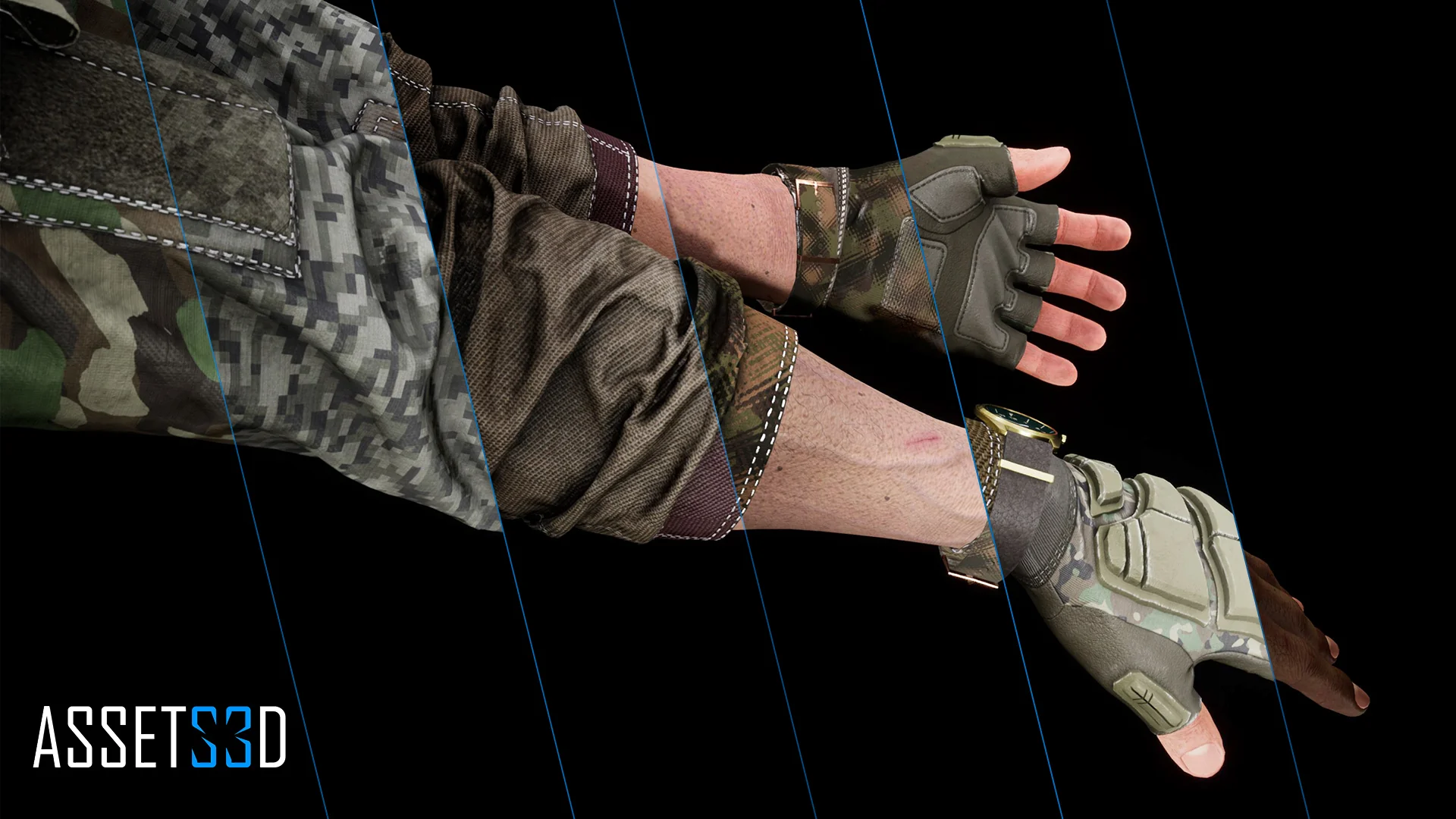
Modular FPS Hands supplies a dedicated first-person character kit engineered around three interchangeable body slots: shirts, gloves, and accessories. The asset collection delivers 20 clothing models, 46 glove variations, and 11 distinct accessories. These pieces can be mixed and matched across different mesh and material assignments, allowing developers to configure distinct visual loadouts for military operators, security personnel, or survival combatants without altering the underlying character rig.
Separating the arms into independent slots creates significant geometric flexibility. A project can pair heavy tactical sleeves with lightweight fingerless gloves, roll sleeves up, or swap between insulated cold-weather mitts and standard combat gloves while maintaining consistent joint placement. The 11 accessory meshes provide supplementary visual details such as wrist-mounted gear, tactical watches, or protective bands that fit cleanly over or alongside the clothing models. Because the shirt, glove, and accessory segments swap independently, the library supports thousands of unique base mesh permutations directly out of the box.
Procedural Shading, Camouflage, and Surface Wear Controls
Visual variety extends beyond raw geometry through a procedural material pipeline that governs fabric patterns, environmental grime, and physical trauma. The material setup includes fully customizable camouflage alongside fine-grained controls for overall color, hue, and contrast. Instead of relying on static, baked camo textures that look repetitive across an entire squad, teams can tune camouflage distributions and color channels to match specific theater environments, from arid desert schemes to dense woodland and urban concrete palettes.
Weathering and operational wear are broken down into specific material parameters rather than flattened textures. Developers have direct access to dirt settings, mud levels, edge wear adjustments, and general worn effects. Edge wear specifically highlights fabric stress points, glove seams, and hard accessory corners where friction naturally strips away surface finish. Mud and dirt layers can be intensified to reflect prolonged crawl movements or damp field conditions, giving the player hands an appearance that directly reflects the surrounding level environment.
Underneath the gear, exposed skin surfaces include adjustable skin color parameters and integrated wound effects. These parameters make it possible to shift skin tones across diverse character casts and introduce visible cuts, abrasions, or combat injuries on visible fingers, knuckles, and wrists. For team identification and national alignment, the material system includes 31 distinct national flags that can be selected and displayed on compatible gear surfaces.
Configuring the Hands Blueprint Component
At the center of the system sits a specialized Modular Hands Blueprint Component that houses 93 configurable variables. This extensive parameter array consolidates mesh references, material instances, color adjustments, flag selections, and wear intensities into a single, organized logic unit. Instead of writing custom Blueprint scripts to propagate material parameters across separate skeletal mesh components, developers can manage the entire visual presentation through these built-in variables.
Implementation inside Unreal Engine projects follows two primary integration routes: adding the component directly onto an existing character actor, or inheriting the character directly from the provided base class. Teams with established player pawn classes can attach the component, link it to their existing input or inventory events, and drive the 93 exposed variables through gameplay logic. This setup allows games to alter wear levels dynamically during a match, swap gloves when equipping specialized equipment, or update national flag insignias when a player customizes their profile in a pre-match lobby.
Epic Skeleton Compatibility and Unreal Engine 5 Setup
The system is constructed specifically for Unreal Engine 5 and maintains full compatibility with animations authored on the Epic Skeleton. First-person weapon interactions, reloads, melee strikes, and idle cycles built for standard Epic rigs can be assigned directly to these arms without requiring extensive manual bone remapping. For studios utilizing custom skeletal proportions, the meshes support retargeting workflows, enabling clean animation transfer between unique first-person rigs and the modular hand meshes.
Because first-person perspectives place hands extremely close to the camera, consistent weighting and clean skinning around the wrists, fingers, and forearm twists are critical. The clothing and glove assets conform to the underlying skeletal deformation during complex two-handed weapon grips, sprint cycles, and item manipulations. Combined with UE5's modern rendering capabilities, the layered materials, normal details, and procedural wear parameters maintain their definition even under close scrutiny during high-detail inspection animations.
First-Person Shooter Contexts and Tactical Variations
The asset package is tuned for realistic military shooters, tactical action titles, and survival-driven first-person games where equipment fidelity directly impacts immersion. In tactical multiplayer shooters, the 31 national flags combined with distinct shirt, glove, and camouflage combinations enable clear faction distinctions between opposing teams or individual squad roles. Heavy breachers can be dressed in thick gloves and reinforced sleeves, while recon operators can sport lighter fabrics and specialized wrist accessories.
In single-player campaigns or hardcore survival titles, the material controls for mud, dirt, and wounds serve practical narrative functions. As a character takes damage or navigates harsh terrain, the exposed Blueprint variables allow developers to script progressive physical degradation directly onto the player's hands. The blend of substantial model counts, procedural texturing flexibility, and native component architecture makes Modular FPS Hands an adaptable framework for projects requiring diverse, high-fidelity first-person arm presentation.
 Gameplay Features
 Gameplay Features
 Gameplay Features