"148d1066ed74e216"{"id":"1002942","slug":"open-icon","title":"Open Icon","category":"Engine Tools","engine":"4.27","assetVersion":"Asset Version: 1.2","engineVersion":"Engine Version: 4.27","tag":"Engine Tools","accent":"blue","visual":"mech","summary":"Streamline Unreal Engine widget design using Open Icon to access, search, and assign open-source font glyphs and textures directly within the editor.","platform":"Unreal Engine","indexPolicy":"index","publishedAt":"2026-11-21T23:30:01.472Z","updatedAt":"2026-11-21T23:30:01.472Z","sourceNotes":[],"fileContents":[],"compatibility":["Unreal Engine","Asset Version: 1.2","Engine Version: 4.27"],"featuredImage":{"alt":"Open Icon","src":"/wp-content/uploads/published/2026/11/4e6c500847fb-b0fe6b5b-2f06-48b7-9898-5aec8b837295-326d4b53e0.webp"},"fileSizeBytes":799516,"hasDownloadLink":true,"downloads":0,"terms":[{"taxonomy":"category","slug":"engine-tools-tools-and-plugins","name":"Engine Tools"}],"galleryImages":[{"src":"/wp-content/uploads/published/2026/11/89f26daad7d2-4f2974a1-a1cf-41d4-bb31-0b57fa629b0b-04a4daa2a2.webp","alt":"Open Icon"},{"src":"/wp-content/uploads/published/2026/11/59888ed8a6a6-031dddfa-f15d-4f86-8279-4be70de0e1cd-dfad5eafdb.webp","alt":"Open Icon"},{"src":"/wp-content/uploads/published/2026/11/2c2863b26e15-733407eb-1e55-45c8-9750-8ee24c6f875d-a3f5f4592d.webp","alt":"Open Icon"},{"src":"/wp-content/uploads/published/2026/11/18e563dce308-0c2d2f65-4b6f-445b-999b-0b56f6aec0df-204c232830.webp","alt":"Open Icon"},{"src":"/wp-content/uploads/published/2026/11/c3c8a50af395-8c9bde49-6974-4074-afe1-546544d712cc-e2eb49cf33.webp","alt":"Open Icon"},{"src":"/wp-content/uploads/published/2026/11/067a77e595d2-dd74201d-4ee0-4c21-8eba-bcfdc77478f3-2d1c044612.webp","alt":"Open Icon"},{"src":"/wp-content/uploads/published/2026/11/eb69e7374e6c-f9752abd-44f8-4e96-8524-a0c9d3ab1ce3-e8b4bb7759.webp","alt":"Open Icon"},{"src":"/wp-content/uploads/published/2026/11/8f0281f4c4cb-5ceb9a1c-f5a6-4d2f-9c0a-5cdb97208389-fb4c682aeb.webp","alt":"Open Icon"},{"src":"/wp-content/uploads/published/2026/11/fd76173e01cc-1a089e2e-1128-4afd-a263-fc6aca6c6168-75fbf8df6d.webp","alt":"Open Icon"}],"accessPanel":{"kind":"resource","title":"Get this resource","safetyNote":"Resources are manually reviewed before listing to improve quality and reduce obvious risks.","fileName":"Open Icon.7z","resourceType":"Resource archive","versions":[]},"contentHtml":"\u003ch2\u003eEliminating UI Friction with Open Icon in Unreal Engine\u003c/h2\u003e\u003cp\u003eConstructing clean user interfaces inside game engines often requires dozens, if not hundreds, of small, functional symbols. In web application development, designers and programmers routinely rely on comprehensive open-source icon sets to rapidly assemble interfaces, navigation bars, and status displays. Bringing that same streamlined workflow into Unreal Engine 4 historically introduced friction. Developers looking to implement these ubiquitous open-source icons previously faced two inefficient workflows.\u003c/p\u003e\u003cp\u003eThe first common method required locating individual vector or raster assets on external websites, downloading each graphic as an isolated PNG file, and manually importing those textures into the content browser. This approach quickly produced cluttered asset folders, inflated project file counts, and complicated scaling management across different screen resolutions. The second approach relied on downloading raw font files, importing them into the engine, and displaying them via text blocks. While this preserved vector-like font scaling, it forced designers to hunt down specific Unicode hex values from external documentation, copy those codes manually, and paste them into string fields inside the editor.\u003c/p\u003e\u003cp\u003eOpen Icon directly resolves this gap in functionality. Built specifically for Unreal Engine user widgets, the plugin embeds open-source iconography into the engine interface, allowing creators to interact with large symbol sets through dedicated editor panels rather than manual file operations or character mapping.\u003c/p\u003e\u003ch2\u003eNavigating the Open Icon Gallery and Blueprint Workflow\u003c/h2\u003e\u003cp\u003eWorking with interface graphics becomes far more direct when assets can be configured straight from the widget hierarchy. With Open Icon, placing a symbol onto a canvas or inside a container widget does not demand external texture management. Instead, users can select an icon directly through the details panel by clicking on the desired visual representation. This inline selection drastically cuts down the iteration time needed to test different button layouts, inventory indicators, or menu prompts.\u003c/p\u003e\u003cp\u003eFor dynamic user interface scenarios—such as changing an equipment slot graphic, updating an audio status symbol, or altering control prompts on the fly—the system provides a dedicated gallery window. Within this gallery, developers can browse the entire collection of symbols visually without leaving the editor viewport. The integrated search utility allows users to query symbols by name, instantly filtering hundreds of potential icons down to the precise shape required.\u003c/p\u003e\u003cp\u003eOnce a target symbol is located in the gallery, the plugin facilitates logic integration by allowing users to copy the specific icon ID. Through multiple copy modes, developers can grab the precise string or identifier format needed for their graph networks. These copied IDs can be passed into Blueprint nodes at runtime, granting full control over dynamic icon swapping in response to gameplay triggers, player inputs, or menu navigation states.\u003c/p\u003e\u003ch2\u003eIntegrated Symbol Libraries from Font Awesome to Kenney Icons\u003c/h2\u003e\u003cp\u003eThe core strength of the tool lies in its native inclusion of several standard open-source iconography repositories. Rather than restricting projects to a single visual style, the plugin bundles a diverse assortment of icon libraries suited for functional software menus, audio suites, and interactive games.\u003c/p\u003e\u003cul\u003e\u003cli\u003e\u003cstrong\u003eFont Awesome:\u003c/strong\u003e One of the most ubiquitous web icon libraries, offering standard navigation symbols, general-purpose interface glyphs, social indicators, and common operational markers.\u003c/li\u003e\u003cli\u003e\u003cstrong\u003eMaterial Design:\u003c/strong\u003e Clean, minimalist symbols following modern interface conventions, ideal for modern operating system aesthetics, HUD elements, mobile game menus, and utility applications.\u003c/li\u003e\u003cli\u003e\u003cstrong\u003eFork Awesome:\u003c/strong\u003e A community-driven continuation of classic font-based iconography, supplying a broad array of utility marks and software tools.\u003c/li\u003e\u003cli\u003e\u003cstrong\u003eFont Audio:\u003c/strong\u003e A specialized repository containing symbols explicitly crafted for audio engineering, music production, and playback controls, including faders, dials, transport commands, and waveform glyphs.\u003c/li\u003e\u003cli\u003e\u003cstrong\u003eKenney Icons:\u003c/strong\u003e Designed with game development at the forefront, this set includes controller face buttons, directional d-pads, keyboard keys, and platformer-friendly interface graphics.\u003c/li\u003e\u003cli\u003e\u003cstrong\u003eNerd Fonts:\u003c/strong\u003e Added to expand developer-centric glyphs, incorporating extensive collections of development tools, programming marks, and terminal-inspired icons.\u003c/li\u003e\u003c/ul\u003e\u003cp\u003eBy housing these distinct repositories under a single unified selection interface, projects can share a coherent visual language or pull specialized markers for specific subsystems without needing separate import pipelines for each library.\u003c/p\u003e\u003ch2\u003eRasterizing Glyphs: Converting Font Icons to Native Textures\u003c/h2\u003e\u003cp\u003eWhile handling icons as font-based glyphs offers benefits in file size and vector scalability, standard game development pipelines sometimes require conventional 2D textures. Certain material shaders, image brushes, dynamic material instances, and post-processing setups interact more predictably with standard texture assets than with font renderer characters.\u003c/p\u003e\u003cp\u003eTo accommodate these technical needs, the system includes built-in conversion functionality. Although the icons begin as text-based font representations, developers can convert any selected icon directly into a normal texture inside the project. This capability bridges the gap between lightweight font systems and standard texture-driven UI components. When an interface element requires custom material graph effects, specialized masking, or texture-specific rendering passes, the glyph can be converted instantly, avoiding the need to open external vector editing software or texture export tools.\u003c/p\u003e\u003ch2\u003eImporting Custom Icon Packs and Expanding Font Support\u003c/h2\u003e\u003cp\u003eStandard web sets cover many foundational needs, but commercial titles and unique projects frequently require proprietary branding, game-specific hieroglyphs, or studio-wide icon libraries. To prevent developers from being locked into the bundled selections, the tool supports custom icon library packs.\u003c/p\u003e\u003cp\u003eTeams can take any font-based icon pack and integrate it into the existing project workflow alongside the pre-packaged repositories. Whether integrating a third-party open-source collection not bundled by default or authoring a completely bespoke font file containing original vector graphics from scratch, the custom pipeline treats user-generated sets with the same search, details panel selection, and Blueprint ID integration as the default libraries.\u003c/p\u003e\u003cp\u003eThis extensibility ensures that as a project grows from early greybox interface prototyping into final visual polish, the development pipeline remains identical. Prototyping can begin using accessible standard sets like Kenney Icons or Material Design, and later transition smoothly to custom studio fonts without altering the underlying widget structures or dynamic Blueprint logic.\u003c/p\u003e\n\n\u003ch2\u003eMore From The Same Workflow\u003c/h2\u003e\n\u003cul\u003e\n\u003cli\u003e\u003ca href=\"https://3dcghub.com/roadmap-navigation/\" rel=\"noopener noreferrer\"\u003eRoadmap Navigation\u003c/a\u003e\u003c/li\u003e\n\u003cli\u003e\u003ca href=\"https://3dcghub.com/good-fx-ui-icon-trail/\" rel=\"noopener noreferrer\"\u003eGood FX : UI Icon Trail\u003c/a\u003e\u003c/li\u003e\n\u003cli\u003e\u003ca href=\"https://3dcghub.com/dreamscape-stylized-environment-mountains-stylized-nature-open-world-fantasy/\" rel=\"noopener noreferrer\"\u003eDreamscape: Stylized Environment Mountains - Stylized Nature Open World Fantasy\u003c/a\u003e\u003c/li\u003e\n\u003cli\u003e\u003ca href=\"https://3dcghub.com/dreamscape-stylized-environment-tower-stylized-nature-open-world-fantasy/\" rel=\"noopener noreferrer\"\u003eDreamscape: Stylized Environment Tower - Stylized Nature Open World Fantasy\u003c/a\u003e\u003c/li\u003e\n\u003cli\u003e\u003ca href=\"https://3dcghub.com/ultimate-open-world/\" rel=\"noopener noreferrer\"\u003eUltimate Open World\u003c/a\u003e\u003c/li\u003e\n\u003c/ul\u003e","contentTextLength":7231,"navigation":{"current":30,"total":4890,"previous":{"id":"1002943","slug":"modular-fps-hands","title":"Modular FPS Hands","category":"Gameplay Features","platform":"Unreal Engine","updatedAt":"2026-11-21T23:30:57.151Z"},"next":{"id":"1002941","slug":"ultimate-blueprint-pack","title":"Ultimate Blueprint Pack","category":"Gameplay Features","platform":"Unreal Engine","updatedAt":"2026-11-21T23:29:10.906Z"}},"relatedResources":[{"id":"14499","slug":"roadmap-navigation","title":"Roadmap Navigation","category":"Engine Tools","engine":"4.26 - 5.8","assetVersion":"Version:1.1.1 - 1.1.5","engineVersion":"Engine version: 4.26 - 5.8","tag":"Engine Tools","accent":"blue","visual":"mech","summary":"Roadmap Navigation is a specialized multi-threaded tool built for pathfinding in expansive environments. It operates on a custom grid system independent of standard engine navigation.","platform":"Unreal Engine","indexPolicy":"noindex","publishedAt":"2026-03-11T18:15:43.000Z","updatedAt":"2026-09-30T02:26:26.897Z","sourceNotes":[],"fileContents":[],"compatibility":["Unreal Engine","Version:1.1.1 - 1.1.5","Engine version: 4.26 - 5.8"],"featuredImage":{"alt":"Roadmap Navigation","src":"https://3dcghub.com/wp-content/uploads/2026/03/51fb9767-8e64-4a39-8425-f983478affcb.webp"},"fileSizeBytes":153275971,"hasDownloadLink":true,"downloads":0},{"id":"1000834","slug":"good-fx-ui-icon-trail","title":"Good FX : UI Icon Trail","category":"Shaders","engine":"4.26+,5.0+","assetVersion":"","engineVersion":"Engine Version: 4.26+,5.0+","tag":"Shaders","accent":"blue","visual":"mech","summary":"A material-driven UI effect pack with over 20 icon animation presets, customizable parameters, and support for desktop, mobile, and VR platforms.","platform":"Unreal Engine","indexPolicy":"index","publishedAt":"2026-08-03T13:13:06.882Z","updatedAt":"2026-08-03T13:13:06.882Z","sourceNotes":[],"fileContents":[],"compatibility":["Unreal Engine","Engine Version: 4.26+,5.0+"],"featuredImage":{"alt":"Good FX : UI Icon Trail","src":"/wp-content/uploads/published/2026/08/500483cbcab3-0644eb9a-2271-4184-a014-a7e6abb267e1-c0b2531ae5.webp"},"fileSizeBytes":3512541,"hasDownloadLink":true,"downloads":0},{"id":"8149","slug":"dreamscape-stylized-environment-mountains-stylized-nature-open-world-fantasy","title":"Dreamscape: Stylized Environment Mountains - Stylized Nature Open World Fantasy","category":"Forest \u0026 Jungle","engine":"4.26+,5.0+","assetVersion":"Engine version: 4.26+,5.0+","engineVersion":"","tag":"Forest \u0026 Jungle","accent":"blue","visual":"city","summary":"Build breathtaking fantasy landscapes with this comprehensive asset pack. It features over 100 high-quality meshes, advanced landscape materials, and optimization for large-scale open worlds.","platform":"Unreal Engine","indexPolicy":"noindex","publishedAt":"2026-02-22T17:21:58.000Z","updatedAt":"2026-04-19T15:55:33.000Z","sourceNotes":[],"fileContents":[],"compatibility":["Unreal Engine","Engine version: 4.26+,5.0+"],"featuredImage":{"alt":"Dreamscape: Stylized Environment Mountains - Stylized Nature Open World Fantasy","src":"https://3dcghub.com/wp-content/uploads/2026/02/842ea2e1-6a34-4688-89a4-e472777aa173.webp"},"fileSizeBytes":1632546784,"hasDownloadLink":true,"downloads":2}]}[{"id":4225,"sourceId":4225,"taxonomyId":4225,"taxonomy":"category","slug":"asset-library","name":"Asset Library","parentId":null,"count":4744,"hasChildren":true,"href":"/","seoTitle":"Free Game Assets Library | 3DCGHUB","seoDescription":"Browse free Unreal Engine, Unity, Blender assets and game development tutorials on 3DCGHUB with previews, compatibility notes, and secure downloads.","sitemapEnabled":true,"children":[{"id":4227,"sourceId":4227,"taxonomyId":4227,"taxonomy":"category","slug":"blender-add-ons-plugins","name":"Blender Add-ons \u0026 Plugins","parentId":4225,"count":10,"hasChildren":false,"href":"/category/blender-add-ons-plugins/","seoTitle":"Free Blender Add-ons \u0026 Plugins | 3DCGHUB","seoDescription":"Browse free Blender Add-ons \u0026 Plugins tools for Blender on 3DCGHUB: curated downloads with preview images, compatibility notes and secure download access.","sitemapEnabled":true},{"id":514,"sourceId":514,"taxonomyId":514,"taxonomy":"category","slug":"unity-2","name":"Unity","parentId":4225,"count":453,"hasChildren":true,"href":"/category/unity-2/","seoTitle":"Free Unity Assets | 3DCGHUB","seoDescription":"Browse free Unity resources on 3DCGHUB: curated downloads with preview images, compatibility notes and secure download access.","sitemapEnabled":true,"children":[{"id":523,"sourceId":523,"taxonomyId":523,"taxonomy":"category","slug":"2d","name":"2D","parentId":514,"count":1,"hasChildren":true,"href":"/category/2d/","seoTitle":"Free Unity 2D | 3DCGHUB","seoDescription":"Browse free 2D assets for Unity on 3DCGHUB: curated downloads with preview images, compatibility notes and secure download access.","sitemapEnabled":true},{"id":515,"sourceId":515,"taxonomyId":515,"taxonomy":"category","slug":"3d-unity-2","name":"3D","parentId":514,"count":162,"hasChildren":true,"href":"/category/3d-unity-2/","seoTitle":"Free Unity 3D Assets | 3DCGHUB","seoDescription":"Browse free 3D assets for Unity on 3DCGHUB: curated downloads with preview images, compatibility notes and secure download access.","sitemapEnabled":true},{"id":565,"sourceId":565,"taxonomyId":565,"taxonomy":"category","slug":"add-ons","name":"Add-Ons","parentId":514,"count":2,"hasChildren":false,"href":"/category/add-ons/","seoTitle":"Free Unity Add-Ons | 3DCGHUB","seoDescription":"Browse free Add-Ons assets for Unity on 3DCGHUB: curated downloads with preview images, compatibility notes and secure download access.","sitemapEnabled":true},{"id":529,"sourceId":529,"taxonomyId":529,"taxonomy":"category","slug":"audio-unity-2","name":"Audio","parentId":514,"count":1,"hasChildren":true,"href":"/category/audio-unity-2/","seoTitle":"Free Unity Audio | 3DCGHUB","seoDescription":"Browse free Audio for Unity on 3DCGHUB: curated downloads with preview images, compatibility notes and secure download access.","sitemapEnabled":true},{"id":557,"sourceId":557,"taxonomyId":557,"taxonomy":"category","slug":"templates","name":"Templates","parentId":514,"count":36,"hasChildren":true,"href":"/category/templates/","seoTitle":"Free Unity Templates | 3DCGHUB","seoDescription":"Browse free Unity project templates on 3DCGHUB. Starter kits with previews, compatibility notes, and secure download access.","sitemapEnabled":true},{"id":533,"sourceId":533,"taxonomyId":533,"taxonomy":"category","slug":"tools-unity-2","name":"Tools","parentId":514,"count":0,"hasChildren":true,"href":"/category/tools-unity-2/","sitemapEnabled":true},{"id":554,"sourceId":554,"taxonomyId":554,"taxonomy":"category","slug":"vfx-unity-2","name":"VFX","parentId":514,"count":4,"hasChildren":true,"href":"/category/vfx-unity-2/","seoTitle":"Free Unity VFX | 3DCGHUB","seoDescription":"Browse free VFX for Unity on 3DCGHUB: curated downloads with preview images, compatibility notes and secure download access.","sitemapEnabled":true}]},{"id":511,"sourceId":511,"taxonomyId":511,"taxonomy":"category","slug":"unreal-engine-2","name":"Unreal Engine","parentId":4225,"count":4282,"hasChildren":true,"href":"/category/unreal-engine-2/","seoTitle":"Free Unreal Engine Assets | 3DCGHUB","seoDescription":"Browse free Unreal Engine resources on 3DCGHUB: curated downloads with preview images, compatibility notes and secure download access.","sitemapEnabled":true,"children":[{"id":54,"sourceId":54,"taxonomyId":54,"taxonomy":"category","slug":"3d","name":"3D","parentId":511,"count":2428,"hasChildren":true,"href":"/category/3d/","seoTitle":"Free Unreal Engine 3D | 3DCGHUB","seoDescription":"Browse free 3D assets for Unreal Engine on 3DCGHUB: curated downloads with preview images, compatibility notes and secure download access.","sitemapEnabled":true},{"id":441,"sourceId":441,"taxonomyId":441,"taxonomy":"category","slug":"animations","name":"Animations","parentId":511,"count":245,"hasChildren":true,"href":"/category/animations/","seoTitle":"Free Unreal Engine Animations | 3DCGHUB","seoDescription":"Browse free Animations for Unreal Engine on 3DCGHUB: curated downloads with preview images, compatibility notes and secure download access.","sitemapEnabled":true},{"id":446,"sourceId":446,"taxonomyId":446,"taxonomy":"category","slug":"audio","name":"Audio","parentId":511,"count":63,"hasChildren":true,"href":"/category/audio/","seoTitle":"Free Unreal Engine Audio Resources | 3DCGHUB","seoDescription":"Browse free Unreal Engine audio resources including sound effects, voices, dialogue, and ambient sounds. Curated free downloads on 3DCGHUB.","sitemapEnabled":true},{"id":466,"sourceId":466,"taxonomyId":466,"taxonomy":"category","slug":"game-systems","name":"Game Systems","parentId":511,"count":356,"hasChildren":true,"href":"/category/game-systems/","seoTitle":"Free Unreal Engine Game Systems | 3DCGHUB","seoDescription":"Browse free Game Systems tools for Unreal Engine on 3DCGHUB: curated downloads with preview images, compatibility notes and secure download access.","sitemapEnabled":true},{"id":478,"sourceId":478,"taxonomyId":478,"taxonomy":"category","slug":"game-templates","name":"Game Templates","parentId":511,"count":150,"hasChildren":true,"href":"/category/game-templates/","seoTitle":"Free Unreal Engine Game Templates | 3DCGHUB","seoDescription":"Browse free Game Templates for Unreal Engine on 3DCGHUB: curated downloads with preview images, compatibility notes and secure download access.","sitemapEnabled":true},{"id":432,"sourceId":432,"taxonomyId":432,"taxonomy":"category","slug":"hdri","name":"HDRI","parentId":511,"count":6,"hasChildren":true,"href":"/category/hdri/","seoTitle":"Free Unreal Engine HDRI | 3DCGHUB","seoDescription":"Browse free Unreal Engine HDRI skies and lighting maps on 3DCGHUB. Environment lighting with previews and secure downloads.","sitemapEnabled":true},{"id":228,"sourceId":228,"taxonomyId":228,"taxonomy":"category","slug":"material-and-textures","name":"Material \u0026 Textures","parentId":511,"count":172,"hasChildren":true,"href":"/category/material-and-textures/","seoTitle":"Free Unreal Engine Material \u0026 Textures | 3DCGHUB","seoDescription":"Browse free Material \u0026 Textures for Unreal Engine on 3DCGHUB: curated downloads with preview images, compatibility notes and secure download access.","sitemapEnabled":true},{"id":298,"sourceId":298,"taxonomyId":298,"taxonomy":"category","slug":"sprites-and-flipbooks","name":"Sprites \u0026 Flipbooks","parentId":511,"count":17,"hasChildren":true,"href":"/category/sprites-and-flipbooks/","seoTitle":"Free Unreal Engine Sprites \u0026 Flipbooks | 3DCGHUB","seoDescription":"Browse free Sprites \u0026 Flipbooks assets for Unreal Engine on 3DCGHUB: curated downloads with preview images, compatibility notes and secure download access.","sitemapEnabled":true},{"id":489,"sourceId":489,"taxonomyId":489,"taxonomy":"category","slug":"tools-and-plugins","name":"Tools \u0026 Plugins","parentId":511,"count":390,"hasChildren":true,"href":"/category/tools-and-plugins/","seoTitle":"Free Unreal Engine Tools \u0026 Plugins | 3DCGHUB","seoDescription":"Browse free Tools \u0026 Plugins for Unreal Engine on 3DCGHUB: curated downloads with preview images, compatibility notes and secure download access.","sitemapEnabled":true},{"id":459,"sourceId":459,"taxonomyId":459,"taxonomy":"category","slug":"ui","name":"UI","parentId":511,"count":43,"hasChildren":true,"href":"/category/ui/","seoTitle":"Free Unreal Engine UI | 3DCGHUB","seoDescription":"Browse free UI for Unreal Engine on 3DCGHUB: curated downloads with preview images, compatibility notes and secure download access.","sitemapEnabled":true},{"id":450,"sourceId":450,"taxonomyId":450,"taxonomy":"category","slug":"vfx","name":"VFX","parentId":511,"count":412,"hasChildren":true,"href":"/category/vfx/","seoTitle":"Free Unreal Engine VFX | 3DCGHUB","seoDescription":"Browse free VFX for Unreal Engine on 3DCGHUB: curated downloads with preview images, compatibility notes and secure download access.","sitemapEnabled":true}]}]},{"id":4222,"sourceId":4222,"taxonomyId":4222,"taxonomy":"category","slug":"tutorial-library","name":"Tutorial Library","parentId":null,"count":117,"hasChildren":false,"href":"/tutorials/","seoTitle":"Free Game Development Tutorial Library | 3DCGHUB","seoDescription":"Browse free game development tutorials for Unreal Engine, Unity, Blender, and more on 3DCGHUB with practical workflows and secure downloads.","sitemapEnabled":true}]
Resource screenshots
1 / 9
Join our channel
Follow 3DCGHUB on Telegram for new resource drops, migration updates, and community notices.
Eliminating UI Friction with Open Icon in Unreal Engine
Constructing clean user interfaces inside game engines often requires dozens, if not hundreds, of small, functional symbols. In web application development, designers and programmers routinely rely on comprehensive open-source icon sets to rapidly assemble interfaces, navigation bars, and status displays. Bringing that same streamlined workflow into Unreal Engine 4 historically introduced friction. Developers looking to implement these ubiquitous open-source icons previously faced two inefficient workflows.
The first common method required locating individual vector or raster assets on external websites, downloading each graphic as an isolated PNG file, and manually importing those textures into the content browser. This approach quickly produced cluttered asset folders, inflated project file counts, and complicated scaling management across different screen resolutions. The second approach relied on downloading raw font files, importing them into the engine, and displaying them via text blocks. While this preserved vector-like font scaling, it forced designers to hunt down specific Unicode hex values from external documentation, copy those codes manually, and paste them into string fields inside the editor.
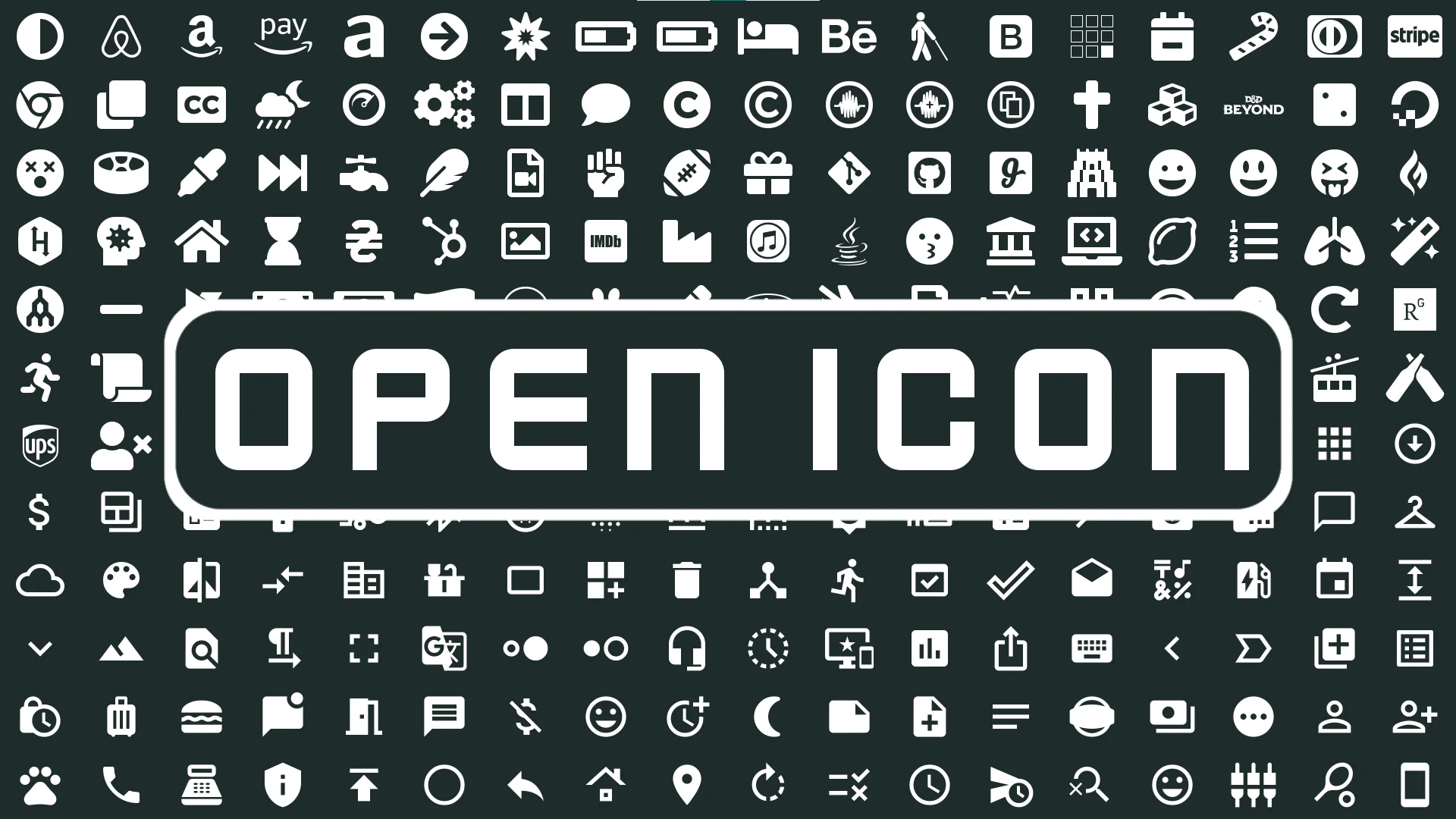
Open Icon directly resolves this gap in functionality. Built specifically for Unreal Engine user widgets, the plugin embeds open-source iconography into the engine interface, allowing creators to interact with large symbol sets through dedicated editor panels rather than manual file operations or character mapping.
Navigating the Open Icon Gallery and Blueprint Workflow
Working with interface graphics becomes far more direct when assets can be configured straight from the widget hierarchy. With Open Icon, placing a symbol onto a canvas or inside a container widget does not demand external texture management. Instead, users can select an icon directly through the details panel by clicking on the desired visual representation. This inline selection drastically cuts down the iteration time needed to test different button layouts, inventory indicators, or menu prompts.
For dynamic user interface scenarios—such as changing an equipment slot graphic, updating an audio status symbol, or altering control prompts on the fly—the system provides a dedicated gallery window. Within this gallery, developers can browse the entire collection of symbols visually without leaving the editor viewport. The integrated search utility allows users to query symbols by name, instantly filtering hundreds of potential icons down to the precise shape required.
Once a target symbol is located in the gallery, the plugin facilitates logic integration by allowing users to copy the specific icon ID. Through multiple copy modes, developers can grab the precise string or identifier format needed for their graph networks. These copied IDs can be passed into Blueprint nodes at runtime, granting full control over dynamic icon swapping in response to gameplay triggers, player inputs, or menu navigation states.
Integrated Symbol Libraries from Font Awesome to Kenney Icons
The core strength of the tool lies in its native inclusion of several standard open-source iconography repositories. Rather than restricting projects to a single visual style, the plugin bundles a diverse assortment of icon libraries suited for functional software menus, audio suites, and interactive games.
Font Awesome: One of the most ubiquitous web icon libraries, offering standard navigation symbols, general-purpose interface glyphs, social indicators, and common operational markers.
Material Design: Clean, minimalist symbols following modern interface conventions, ideal for modern operating system aesthetics, HUD elements, mobile game menus, and utility applications.
Fork Awesome: A community-driven continuation of classic font-based iconography, supplying a broad array of utility marks and software tools.
Font Audio: A specialized repository containing symbols explicitly crafted for audio engineering, music production, and playback controls, including faders, dials, transport commands, and waveform glyphs.
Kenney Icons: Designed with game development at the forefront, this set includes controller face buttons, directional d-pads, keyboard keys, and platformer-friendly interface graphics.
Nerd Fonts: Added to expand developer-centric glyphs, incorporating extensive collections of development tools, programming marks, and terminal-inspired icons.
By housing these distinct repositories under a single unified selection interface, projects can share a coherent visual language or pull specialized markers for specific subsystems without needing separate import pipelines for each library.
Rasterizing Glyphs: Converting Font Icons to Native Textures
While handling icons as font-based glyphs offers benefits in file size and vector scalability, standard game development pipelines sometimes require conventional 2D textures. Certain material shaders, image brushes, dynamic material instances, and post-processing setups interact more predictably with standard texture assets than with font renderer characters.
To accommodate these technical needs, the system includes built-in conversion functionality. Although the icons begin as text-based font representations, developers can convert any selected icon directly into a normal texture inside the project. This capability bridges the gap between lightweight font systems and standard texture-driven UI components. When an interface element requires custom material graph effects, specialized masking, or texture-specific rendering passes, the glyph can be converted instantly, avoiding the need to open external vector editing software or texture export tools.
Importing Custom Icon Packs and Expanding Font Support
Standard web sets cover many foundational needs, but commercial titles and unique projects frequently require proprietary branding, game-specific hieroglyphs, or studio-wide icon libraries. To prevent developers from being locked into the bundled selections, the tool supports custom icon library packs.
Teams can take any font-based icon pack and integrate it into the existing project workflow alongside the pre-packaged repositories. Whether integrating a third-party open-source collection not bundled by default or authoring a completely bespoke font file containing original vector graphics from scratch, the custom pipeline treats user-generated sets with the same search, details panel selection, and Blueprint ID integration as the default libraries.
This extensibility ensures that as a project grows from early greybox interface prototyping into final visual polish, the development pipeline remains identical. Prototyping can begin using accessible standard sets like Kenney Icons or Material Design, and later transition smoothly to custom studio fonts without altering the underlying widget structures or dynamic Blueprint logic.
 Engine Tools
 Shaders
 Forest & Jungle