"6f9bd6df1f44a86f"{"id":"1000834","slug":"good-fx-ui-icon-trail","title":"Good FX : UI Icon Trail","category":"Shaders","engine":"4.26+,5.0+","assetVersion":"","engineVersion":"Engine Version: 4.26+,5.0+","tag":"Shaders","accent":"blue","visual":"mech","summary":"A material-driven UI effect pack with over 20 icon animation presets, customizable parameters, and support for desktop, mobile, and VR platforms.","platform":"Unreal Engine","indexPolicy":"index","publishedAt":"2026-08-03T13:13:06.882Z","updatedAt":"2026-08-03T13:13:06.882Z","sourceNotes":[],"fileContents":[],"compatibility":["Unreal Engine","Engine Version: 4.26+,5.0+"],"featuredImage":{"alt":"Good FX : UI Icon Trail","src":"/wp-content/uploads/published/2026/08/500483cbcab3-0644eb9a-2271-4184-a014-a7e6abb267e1-c0b2531ae5.webp"},"hasDownloadLink":true,"downloads":0,"terms":[{"taxonomy":"category","slug":"shaders","name":"Shaders"}],"galleryImages":[{"src":"/wp-content/uploads/published/2026/08/b20ea8d8229d-666764fe-c11e-4037-8562-b47785fdfbd7-4ff54b5ee1.webp","alt":"Good FX : UI Icon Trail"},{"src":"/wp-content/uploads/published/2026/08/b15c46b7e670-acd7458a-1193-447a-bafa-1e528e17144a-f4a3a44667.webp","alt":"Good FX : UI Icon Trail"},{"src":"/wp-content/uploads/published/2026/08/e8693f6c4492-efe3aa2e-fb0a-4841-9567-7502b24bfaf4-7e98b70b07.webp","alt":"Good FX : UI Icon Trail"},{"src":"/wp-content/uploads/published/2026/08/92217f051ee6-e1dfe51b-b902-4774-9a88-a6a9fa6ccbc7-45bdb9acb6.webp","alt":"Good FX : UI Icon Trail"},{"src":"/wp-content/uploads/published/2026/08/1648adb31034-43ceccea-df7b-4879-ad35-c44015d6cafb-481f9017a1.webp","alt":"Good FX : UI Icon Trail"},{"src":"/wp-content/uploads/published/2026/08/8f193cd244ca-f9d4bd65-8e9e-457f-80d0-ee56a5aeb0cf-ea028f087b.webp","alt":"Good FX : UI Icon Trail"},{"src":"/wp-content/uploads/published/2026/08/37c2d8c2f051-0fec1896-ffed-4959-98fa-d9df7f5eef0f-5a775bbaaf.webp","alt":"Good FX : UI Icon Trail"},{"src":"/wp-content/uploads/published/2026/08/cacd04c9ecff-7d1bd1be-f672-4103-b103-f5c1737d6ab0-0de8841af8.webp","alt":"Good FX : UI Icon Trail"},{"src":"/wp-content/uploads/published/2026/08/3e2b584fac6a-0a305040-60da-47a4-845e-bcc352962408-19f28aef16.webp","alt":"Good FX : UI Icon Trail"},{"src":"/wp-content/uploads/published/2026/08/7ab26953343d-e1f20656-a931-4d2b-837b-63517afe9f5d-6413d8c7bb.webp","alt":"Good FX : UI Icon Trail"}],"accessPanel":{"kind":"resource","title":"Download this resource","eyebrow":"Free Download","message":"Log in or create a free account to start your download.","fileName":"Content.7z","safetyNote":"Resources are manually reviewed before listing to improve quality and reduce obvious risks.","actionLabel":"Download Free","resourceType":"Resource archive"},"contentHtml":"\u003cp\u003eDropping an icon into a game interface rarely feels dynamic on its own. \u003cem\u003eGood FX: UI Icon Trail\u003c/em\u003e changes that by layering Material animation effects directly onto the icons players interact with most. Whether an inventory slot needs a subtle shimmer or a menu button demands a sweeping trail of light, the pack applies those visual cues through a Material-driven workflow rather than hand-animating every frame.\u003c/p\u003e\n\n\u003cp\u003eThe pack is based on speed of implementation. It is quick and easy to use, which points to a setup where the heavy lifting happens inside the Material System rather than through complex Blueprint logic. A developer selects an effect, assigns it to a Widget icon, and adjusts the look without rebuilding the Widget from scratch. That makes it practical for both rapid prototyping and final polish.\u003c/p\u003e\n\n\u003ch2\u003e\u003cem\u003eGood FX: UI Icon Trail\u003c/em\u003e Presets and Customization\u003c/h2\u003e\n\u003cp\u003eAt the core of the pack are over 20 icon effect presets. These are not static textures; they are animation effects applied through Materials, which means the motion can be tied to timing and interaction rather than locked into a pre-rendered loop. The presence of a user guide video alongside the final asset Materials suggests that the workflow is visual and demonstrable, not just a collection of files left for the user to reverse-engineer.\u003c/p\u003e\n\n\u003cp\u003eCustomizable parameters give the presets real utility beyond drag-and-drop usage. A preset might arrive looking a certain way, but the ability to tweak parameters means the same effect can serve a calm inventory menu and a high-energy combat Heads-Up Display (HUD) without duplicating assets. This flexibility matters for projects where art direction evolves or where multiple UI contexts share a single visual language but need different intensities.\u003c/p\u003e\n\n\u003ch3\u003eShape Support for Different Icon Layouts\u003c/h3\u003e\n\u003cp\u003eIcons in modern game UIs are rarely uniform. The pack explicitly supports box, circle, and chamfer shape icons, covering the 3 most common geometric forms found in interface design. Box shapes suit grid inventories and tiled menus. Circle shapes fit radial wheels, skill nodes, and portrait frames. Chamfer shapes bridge the gap, offering softened corners that feel less rigid than pure squares but more structured than circles.\u003c/p\u003e\n\n\u003cp\u003eBy building the effects to respect these 3 shapes, the pack avoids the common problem where an effect looks correct on one icon type but breaks or distorts on another. A trail effect that works beautifully on a circular cooldown indicator might clip awkwardly on a square button. Here, the shape support is a declared feature, not an afterthought.\u003c/p\u003e\n\n\u003ch2\u003eSequence Textures and Visual Layering\u003c/h2\u003e\n\u003cp\u003eThe pack features the inclusion of unused sequence textures. In a Material animation context, sequence textures are flipbook-style images or animated texture sheets that drive motion over time. The fact that some remain unused suggests the pack provides more raw material than is strictly assigned to presets, leaving room for developers to build custom variations or extend existing effects without generating new texture assets from scratch.\u003c/p\u003e\n\n\u003cp\u003eThis ties back to the customizable parameters. The presets use the textures to achieve their look, but the unused assets imply that the Material setup can accept additional texture inputs or that creators can swap sequences to alter the animation pattern without leaving the intended workflow.\u003c/p\u003e\n\n\u003ch3\u003eDesktop, Mobile, and VR Platform Coverage\u003c/h3\u003e\n\u003cp\u003ePerformance targets vary wildly across platforms. \u003cem\u003eGood FX: UI Icon Trail\u003c/em\u003e explicitly supports desktop, mobile, and Virtual Reality (VR). That range is significant. Desktop UI effects can afford more visual complexity. Mobile demands leaner calculations to protect frame rates and battery life. VR adds the constraint of stereoscopic rendering, where jittery or poorly timed UI effects can cause visual discomfort.\u003c/p\u003e\n\n\u003cp\u003eSupporting all 3 suggests the Material effects are optimized enough to run within the tighter budgets of mobile and VR while still scaling up on desktop. For a project targeting multiple platforms, this reduces the need to maintain separate UI effect pipelines or strip features down for weaker hardware.\u003c/p\u003e\n\n\u003ch2\u003eWhere \u003cem\u003eGood FX: UI Icon Trail\u003c/em\u003e Fits a Project\u003c/h2\u003e\n\u003cp\u003eThe tag set—\u003cem\u003eIcon\u003c/em\u003e, \u003cem\u003eWidget\u003c/em\u003e, \u003cem\u003eGUI\u003c/em\u003e, \u003cem\u003eGood\u003c/em\u003e, \u003cem\u003eShader\u003c/em\u003e, \u003cem\u003eEffect\u003c/em\u003e, \u003cem\u003eVisualEffect\u003c/em\u003e, \u003cem\u003eUser\u003c/em\u003e, \u003cem\u003eHUD\u003c/em\u003e, \u003cem\u003eInterface\u003c/em\u003e—places the pack squarely inside user interface work. It is not a general-purpose particle system or an environment effect. It exists to make UI elements feel responsive and alive. Projects with heavy menu systems, inventory screens, skill trees, or heads-up displays will find the most immediate value.\u003c/p\u003e\n\n\u003cp\u003eShipping a game with a polished HUD often requires visual feedback that is both consistent and cheap to iterate on. A Material-based approach keeps the effect within the UI layer, avoiding the overhead of spawning separate particle Actors every time a button highlights or a cooldown finishes. For teams working on fast-moving interfaces, that efficiency compounds across hundreds of icons and interactions.\u003c/p\u003e\n\n\u003cp\u003eThe compatibility note with \u003cem\u003eGood FX: Impact\u003c/em\u003e suggests the pack can sit alongside other effect systems focused on different visual targets, allowing a project to assemble a broader effect toolkit without jumping between unrelated workflows. Teams already building toward \u003cem\u003eGood FX: Impact\u003c/em\u003e can treat \u003cem\u003eGood FX: UI Icon Trail\u003c/em\u003e as the interface layer of that same visual language.\u003c/p\u003e\n\n\u003cp\u003eThe strongest takeaway is straightforward: if a project relies on interactive icons across desktop, mobile, or VR and needs Material-driven animation without per-icon hand tuning, this pack covers that gap with presets, shape awareness, and cross-platform support built into the workflow.\u003c/p\u003e\n\n\u003ch2\u003eRelated Resources Worth Checking\u003c/h2\u003e\n\u003cul\u003e\n\u003cli\u003e\u003ca href=\"https://3dcghub.com/hologram-display-pack/\" rel=\"noopener noreferrer\"\u003eHOLOGRAM DISPLAY Pack\u003c/a\u003e\u003c/li\u003e\n\u003cli\u003eHyper Mesh to Icon Creator v4\u003c/li\u003e\n\u003cli\u003e\u003ca href=\"https://3dcghub.com/abstract-fx-meshes/\" rel=\"noopener noreferrer\"\u003eAbstract FX: Meshes\u003c/a\u003e\u003c/li\u003e\n\u003cli\u003e\u003ca href=\"https://3dcghub.com/wall-fx-pack/\" rel=\"noopener noreferrer\"\u003eWall FX pack\u003c/a\u003e\u003c/li\u003e\n\u003cli\u003e\u003ca href=\"https://3dcghub.com/cyberpunk-fx-pack/\" rel=\"noopener noreferrer\"\u003eCyberpunk FX Pack\u003c/a\u003e\u003c/li\u003e\n\u003c/ul\u003e","contentTextLength":5755,"navigation":{"current":1529,"total":4218,"previous":{"id":"1000835","slug":"good-fx-wing","title":"Good FX : WING","category":"Spells \u0026 Combat","platform":"Unreal Engine","updatedAt":"2026-08-03T13:18:23.397Z"},"next":{"id":"1000833","slug":"glass-mirrors-windows","title":"Glass Mirrors Windows","category":"Buildings \u0026 Architecture","platform":"Unreal Engine","updatedAt":"2026-08-03T13:08:49.613Z"}},"relatedResources":[{"id":"15902","slug":"hologram-display-pack","title":"HOLOGRAM DISPLAY Pack","category":"Shaders","engine":"4.26+,5.0+","assetVersion":"Engine version: 4.26+,5.0+","engineVersion":"4.20","tag":"Shaders","accent":"blue","visual":"audio","summary":"Enhance your project with the HOLOGRAM DISPLAY Pack, featuring over 27 materials and 170 UI elements. This comprehensive set includes interactive blueprints and various display models for professional results.","platform":"Unreal Engine","indexPolicy":"index","publishedAt":"2026-03-12T13:26:50.000Z","updatedAt":"2026-04-19T15:44:39.000Z","sourceNotes":[],"fileContents":[],"compatibility":["Unreal Engine","Engine version: 4.26+,5.0+"],"featuredImage":{"alt":"HOLOGRAM DISPLAY Pack","src":"https://3dcghub.com/wp-content/uploads/2026/03/91c14bed-ee41-46b7-a0f5-12cb8e0e1e75.webp"},"hasDownloadLink":true,"downloads":0},{"id":"16992","slug":"abstract-fx-meshes","title":"Abstract FX: Meshes","category":"Variety","engine":"5.0+","assetVersion":"Engine version: 5.0+","engineVersion":"4.26","tag":"Variety","accent":"blue","visual":"character","summary":"Enhance your projects with Abstract FX: Meshes, a collection of 15 unique visual effects. Designed for Niagara, these optimized loops are perfect for cinematic backgrounds and menu visuals.","platform":"Unreal Engine","indexPolicy":"index","publishedAt":"2026-03-13T13:21:08.000Z","updatedAt":"2026-04-19T15:43:39.000Z","sourceNotes":[],"fileContents":[],"compatibility":["Unreal Engine","Engine version: 5.0+"],"featuredImage":{"alt":"Abstract FX: Meshes","src":"https://3dcghub.com/wp-content/uploads/2026/03/ce24b8e0-b450-4e99-9b44-d2c03972bd4d.webp"},"hasDownloadLink":true,"downloads":0},{"id":"1002163","slug":"radial-scan-fx","title":"Radial Scan FX","category":"Shaders","engine":"4.26+,5.0+","assetVersion":"","engineVersion":"Engine Version: 4.26+,5.0+","tag":"Shaders","accent":"blue","visual":"mech","summary":"Explore Radial Scan FX, a deferred decal scanning ring shader and Blueprint system for creating stylized radar waves, highlights, and game mechanics.","platform":"Unreal Engine","indexPolicy":"index","publishedAt":"2026-10-29T10:06:40.826Z","updatedAt":"2026-10-29T10:06:40.826Z","sourceNotes":[],"fileContents":[],"compatibility":["Unreal Engine","Engine Version: 4.26+,5.0+"],"featuredImage":{"alt":"Radial Scan FX","src":"/wp-content/uploads/published/2026/10/181dc30eab4f-dceaeb46-6faa-443c-a199-22723c634e68-2d72e0850e.webp"},"hasDownloadLink":true,"downloads":0}]}
Shaders
Good FX : UI Icon Trail
A material-driven UI effect pack with over 20 icon animation presets, customizable parameters, and support for desktop, mobile, and VR platforms.
Category:Unreal Engine,ShadersPlatform: Unreal EngineEngine Version: 4.26+,5.0+Published: Aug 3, 2026
Shaders
Resource overview
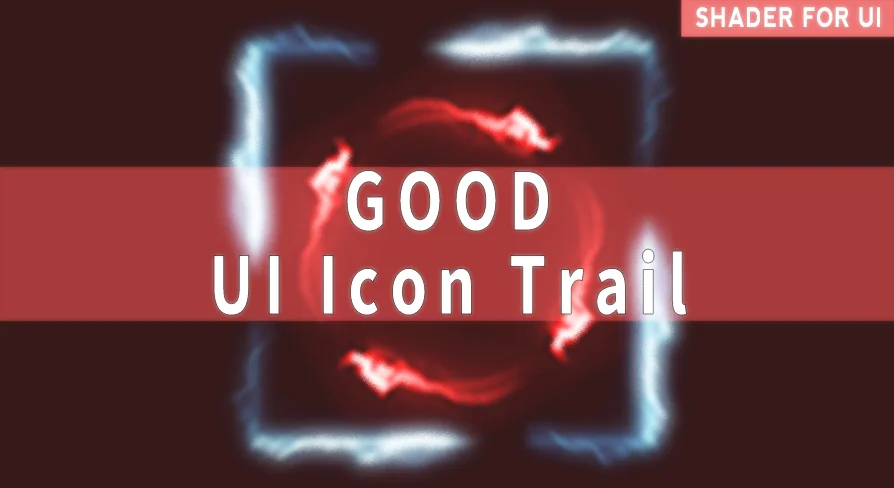
Dropping an icon into a game interface rarely feels dynamic on its own. Good FX: UI Icon Trail changes that by layering Material animation effects directly onto the icons players interact with most. Whether an inventory slot needs a subtle shimmer or a menu button demands a sweeping trail of light, the pack applies those visual cues through a Material-driven workflow rather than hand-animating every frame.
The pack is based on speed of implementation. It is quick and easy to use, which points to a setup where the heavy lifting happens inside the Material System rather than through complex Blueprint logic. A developer selects an effect, assigns it to a Widget icon, and adjusts the look without rebuilding the Widget from scratch. That makes it practical for both rapid prototyping and final polish.
Good FX: UI Icon Trail Presets and Customization
At the core of the pack are over 20 icon effect presets. These are not static textures; they are animation effects applied through Materials, which means the motion can be tied to timing and interaction rather than locked into a pre-rendered loop. The presence of a user guide video alongside the final asset Materials suggests that the workflow is visual and demonstrable, not just a collection of files left for the user to reverse-engineer.
Customizable parameters give the presets real utility beyond drag-and-drop usage. A preset might arrive looking a certain way, but the ability to tweak parameters means the same effect can serve a calm inventory menu and a high-energy combat Heads-Up Display (HUD) without duplicating assets. This flexibility matters for projects where art direction evolves or where multiple UI contexts share a single visual language but need different intensities.
Shape Support for Different Icon Layouts
Icons in modern game UIs are rarely uniform. The pack explicitly supports box, circle, and chamfer shape icons, covering the 3 most common geometric forms found in interface design. Box shapes suit grid inventories and tiled menus. Circle shapes fit radial wheels, skill nodes, and portrait frames. Chamfer shapes bridge the gap, offering softened corners that feel less rigid than pure squares but more structured than circles.
By building the effects to respect these 3 shapes, the pack avoids the common problem where an effect looks correct on one icon type but breaks or distorts on another. A trail effect that works beautifully on a circular cooldown indicator might clip awkwardly on a square button. Here, the shape support is a declared feature, not an afterthought.
Sequence Textures and Visual Layering
The pack features the inclusion of unused sequence textures. In a Material animation context, sequence textures are flipbook-style images or animated texture sheets that drive motion over time. The fact that some remain unused suggests the pack provides more raw material than is strictly assigned to presets, leaving room for developers to build custom variations or extend existing effects without generating new texture assets from scratch.
This ties back to the customizable parameters. The presets use the textures to achieve their look, but the unused assets imply that the Material setup can accept additional texture inputs or that creators can swap sequences to alter the animation pattern without leaving the intended workflow.
Desktop, Mobile, and VR Platform Coverage
Performance targets vary wildly across platforms. Good FX: UI Icon Trail explicitly supports desktop, mobile, and Virtual Reality (VR). That range is significant. Desktop UI effects can afford more visual complexity. Mobile demands leaner calculations to protect frame rates and battery life. VR adds the constraint of stereoscopic rendering, where jittery or poorly timed UI effects can cause visual discomfort.
Supporting all 3 suggests the Material effects are optimized enough to run within the tighter budgets of mobile and VR while still scaling up on desktop. For a project targeting multiple platforms, this reduces the need to maintain separate UI effect pipelines or strip features down for weaker hardware.
Where Good FX: UI Icon Trail Fits a Project
The tag set—Icon, Widget, GUI, Good, Shader, Effect, VisualEffect, User, HUD, Interface—places the pack squarely inside user interface work. It is not a general-purpose particle system or an environment effect. It exists to make UI elements feel responsive and alive. Projects with heavy menu systems, inventory screens, skill trees, or heads-up displays will find the most immediate value.
Shipping a game with a polished HUD often requires visual feedback that is both consistent and cheap to iterate on. A Material-based approach keeps the effect within the UI layer, avoiding the overhead of spawning separate particle Actors every time a button highlights or a cooldown finishes. For teams working on fast-moving interfaces, that efficiency compounds across hundreds of icons and interactions.
The compatibility note with Good FX: Impact suggests the pack can sit alongside other effect systems focused on different visual targets, allowing a project to assemble a broader effect toolkit without jumping between unrelated workflows. Teams already building toward Good FX: Impact can treat Good FX: UI Icon Trail as the interface layer of that same visual language.
The strongest takeaway is straightforward: if a project relies on interactive icons across desktop, mobile, or VR and needs Material-driven animation without per-icon hand tuning, this pack covers that gap with presets, shape awareness, and cross-platform support built into the workflow.
 Shaders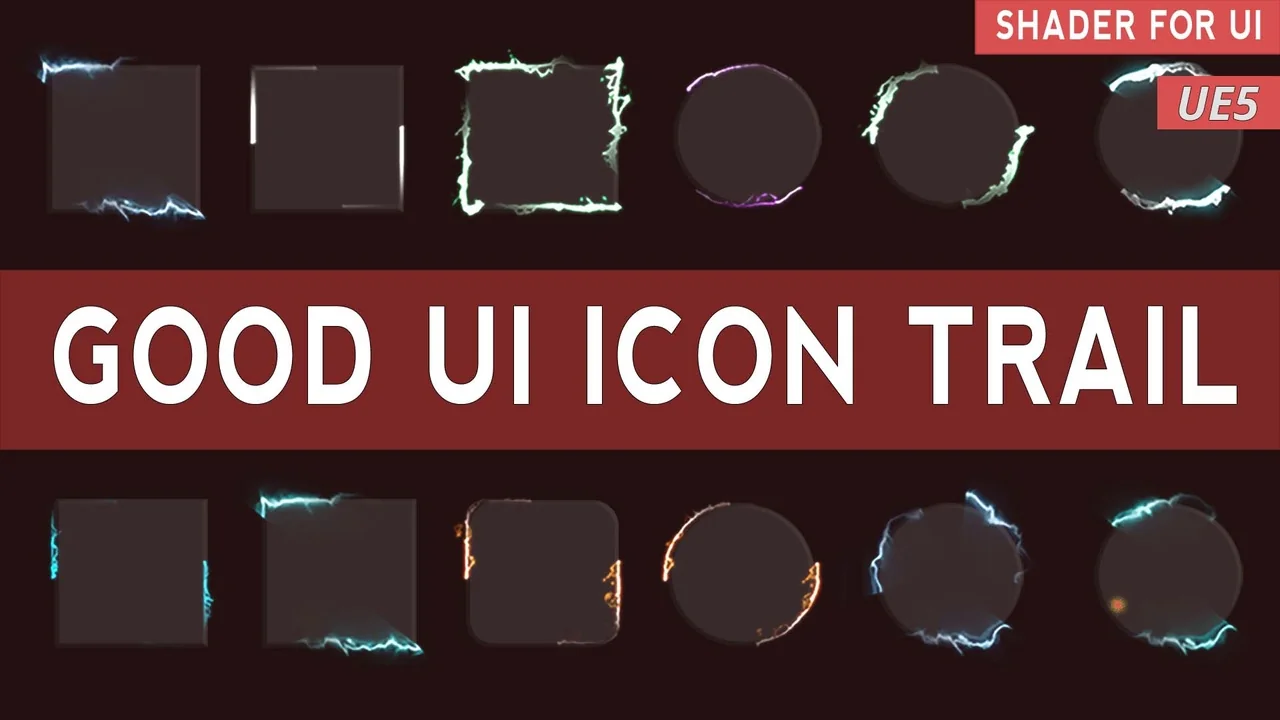
 Shaders
 Variety
 Shaders