"6f9bd6df1f44a86f"{"id":"1000835","slug":"good-fx-wing","title":"Good FX : WING","category":"Spells \u0026 Combat","engine":"4.26+,5.0+","assetVersion":"","engineVersion":"Engine Version: 4.26+,5.0+","tag":"Spells \u0026 Combat","accent":"blue","visual":"mech","summary":"Good FX: WING delivers 8 wing shapes with 10+ elements, Niagara-based particle effects, color customization, and parameters for game flight visuals.","platform":"Unreal Engine","indexPolicy":"index","publishedAt":"2026-08-03T13:18:23.397Z","updatedAt":"2026-08-03T13:18:23.397Z","sourceNotes":[],"fileContents":[],"compatibility":["Unreal Engine","Engine Version: 4.26+,5.0+"],"featuredImage":{"alt":"Good FX : WING","src":"/wp-content/uploads/published/2026/08/b04d28ea74d2-0b20209b-294d-40b2-bdaa-117f0a8279f3-299cecd207.webp"},"hasDownloadLink":true,"downloads":1,"terms":[{"taxonomy":"category","slug":"spells-and-combat","name":"Spells \u0026 Combat"}],"galleryImages":[{"src":"/wp-content/uploads/published/2026/08/bd043fc48912-54d593e7-2712-4e65-9c56-00c407f2aba7-8ed3c9fa78.webp","alt":"Good FX : WING"},{"src":"/wp-content/uploads/published/2026/08/7cbb5d065c81-3b7dc378-5a1d-43ca-a2a7-883d0f413673-d5e5e417a1.webp","alt":"Good FX : WING"},{"src":"/wp-content/uploads/published/2026/08/aa085b6507d4-1f8bf074-06cb-4fcc-b52c-5896117caa64-d0ad3422e5.webp","alt":"Good FX : WING"},{"src":"/wp-content/uploads/published/2026/08/bcbb6961c670-9308c328-1a65-40d9-b7d7-438b0c468e53-a8406e7fd3.webp","alt":"Good FX : WING"},{"src":"/wp-content/uploads/published/2026/08/3af4d155d69b-bff551ac-56e6-4a7c-9aa4-a51a1864c9da-0fe1d6f2be.webp","alt":"Good FX : WING"},{"src":"/wp-content/uploads/published/2026/08/492b62719bd5-df6fb183-56ea-4bb5-b6d6-a95c234d57d2-d79542c96f.webp","alt":"Good FX : WING"},{"src":"/wp-content/uploads/published/2026/08/2f01c5ac123a-d3a9557b-6b37-46b7-ad61-2dcac97e0059-1c739100c4.webp","alt":"Good FX : WING"},{"src":"/wp-content/uploads/published/2026/08/68a778b3d869-54683da4-1cab-4c37-80e8-c3cd1c24d43b-e4a04020bc.webp","alt":"Good FX : WING"},{"src":"/wp-content/uploads/published/2026/08/7e0f8b4cb041-dafdf86b-8070-4c3b-93e8-11c9a840f33d-05fc4101dc.webp","alt":"Good FX : WING"},{"src":"/wp-content/uploads/published/2026/08/5bbce4a8f12b-8d9b0c1d-786c-4f53-82d2-5ca364cda1f8-494386f62a.webp","alt":"Good FX : WING"}],"accessPanel":{"kind":"resource","title":"Download this resource","eyebrow":"Free Download","message":"Log in or create a free account to start your download.","fileName":"Content.7z","safetyNote":"Resources are manually reviewed before listing to improve quality and reduce obvious risks.","actionLabel":"Download Free","resourceType":"Resource archive"},"contentHtml":"\u003cp\u003eWinged characters in flight scenes rely on particle systems to sell speed, divinity, and motion. \u003cem\u003eGood FX: WING\u003c/em\u003e approaches that need with a structured set of Niagara-driven visual effects based on 8 distinct wing shapes, each paired with more than 10 element variations. This gives a library that covers a range of stylized flight moments without requiring teams to build wing particle behavior from scratch.\u003c/p\u003e\n\n\u003ch2\u003eWhat \u003cem\u003eGood FX: WING\u003c/em\u003e Brings Into a Scene\u003c/h2\u003e\n\u003cp\u003eThe package centers on wing game effects, meaning the particle behavior is tied to the visual language of flight. Tags attached to the asset—\u003cem\u003eNiagara\u003c/em\u003e, \u003cem\u003eVisualEffect\u003c/em\u003e, \u003cem\u003eFly\u003c/em\u003e, \u003cem\u003eWing\u003c/em\u003e, \u003cem\u003eParticle\u003c/em\u003e, and \u003cem\u003eHoly\u003c/em\u003e—point to a collection suited for characters or entities in motion. The \u003cem\u003eHoly\u003c/em\u003e tag in particular suggests effects that lean toward radiant or divine wing aesthetics, where light trails and glowing emissive elements suit angelic or celestial characters.\u003c/p\u003e\n\n\u003cp\u003eEach effect is delivered as a Mesh and Material combination rather than a pure sprite setup. That decision matters because mesh-based particles retain form during close-up camera passes, and Material integration means artists can push or pull visual traits across the surface of the wing itself, not just in the trailing particles. The inclusion of a \u003ccode\u003eDemo.exe\u003c/code\u003e file allows teams to run a standalone preview of the effects before integrating anything into an editor, which is useful for evaluating motion timing and silhouette readability outside of a project build.\u003c/p\u003e\n\n\u003ch2\u003e8 Shapes and Their Element Variations\u003c/h2\u003e\n\u003cp\u003eThe structure of \u003cem\u003eGood FX: WING\u003c/em\u003e is built on a shape-and-element matrix. There are 8 base wing shapes, and each shape supports more than 10 element variations. This means the package does not simply hand over 8 static effects with minor tweaks. Instead, each shape can manifest through different particle elements, giving teams room to find the right visual density, trail behavior, and emission pattern for a given character or scene.\u003c/p\u003e\n\n\u003cp\u003eFor an action game where a boss character enters with a wing burst, a heavier element set on a broad shape might sell the impact. For a healer or support character, a lighter element on a more delicate shape could work better. The range across 8 shapes means the package is not locked into one wing archetype.\u003c/p\u003e\n\n\u003ch3\u003eNiagara as the Delivery System\u003c/h3\u003e\n\u003cp\u003eThe \u003cem\u003eFly\u003c/em\u003e and \u003cem\u003eWing\u003c/em\u003e tags, combined with the \u003cem\u003eNiagara\u003c/em\u003e tag, confirm that the effects rely on Unreal Engine’s Niagara Particle System. This positions \u003cem\u003eGood FX: WING\u003c/em\u003e as a toolset for developers already working within Unreal who need production-ready wing visuals rather than raw particle graphs they have to wire themselves. Artists can drop the effects into existing Niagara Systems or use them as standalone components attached to characters.\u003c/p\u003e\n\n\u003ch2\u003eColor Customization and Parameter Control\u003c/h2\u003e\n\u003cp\u003eBeyond the prebuilt shapes and elements, the package exposes 2 layers of artist control. The first is easy color customization. Wing effects often need to match a character’s palette or a faction theme, and the ability to shift color directly on the Material means teams can adapt a single effect across multiple characters without opening the Particle Graph.\u003c/p\u003e\n\n\u003cp\u003eThe second layer is customizable parameters. This gives Technical Artists control over traits that shift how the effect behaves during gameplay. A wing effect on a sprint ability might need faster emission or shorter duration than the same effect used in an idle floating state. Parameters allow those adjustments without duplicating the entire effect or rebuilding the system.\u003c/p\u003e\n\n\u003ch2\u003eWhere \u003cem\u003eGood FX: WING\u003c/em\u003e Fits in Development\u003c/h2\u003e\n\u003cp\u003eFor teams building combat or traversal systems where winged states are part of character kits—a fly ability, a transformation sequence, a boss phase change—\u003cem\u003eGood FX: WING\u003c/em\u003e provides the particle coverage to execute those moments. The combination of Mesh and Material delivery means the effects hold up in cinematic moments as well as in gameplay, where camera distance can shift rapidly.\u003c/p\u003e\n\n\u003cp\u003eThe package also ships with a user guide and a video, both of which sit alongside the \u003ccode\u003eDemo.exe\u003c/code\u003e executable. This documentation chain allows artists to evaluate setup steps before touching the editor, which is particularly useful in mid-sized teams where a Technical Artist sets up the effect and a gameplay implementer integrates it.\u003c/p\u003e\n\n\u003cp\u003eEditor notes indicate compatibility with \u003cem\u003eGood FX: Impact\u003c/em\u003e, meaning teams already using that package can integrate \u003cem\u003eGood FX: WING\u003c/em\u003e without friction. The 2 packages appear to share structural conventions—Mesh-plus-Material delivery, parameter exposure, and Niagara-based construction—which makes them viable as companion sets in a project that needs both impact bursts and wing flight visuals.\u003c/p\u003e\n\n\u003ch2\u003ePractical Takeaway for Evaluation\u003c/h2\u003e\n\u003cp\u003e\u003cem\u003eGood FX: WING\u003c/em\u003e is aimed at Unreal Engine developers working with Niagara who need ready-to-use wing particle effects with enough variation and customization to serve multiple characters. The shape-and-element matrix, combined with color and parameter control, means the package can cover everything from subtle hover effects to dramatic boss entrance bursts without requiring teams to author wing particles manually. Running \u003ccode\u003eDemo.exe\u003c/code\u003e first is the fastest way to assess whether the included shapes and elements fit the visual tone of the target project before committing to integration.\u003c/p\u003e\n\n\u003ch2\u003eRelated Resources Worth Checking\u003c/h2\u003e\n\u003cul\u003e\n\u003cli\u003e\u003ca href=\"https://3dcghub.com/rotor-downwash-fx-vdb/\" rel=\"noopener noreferrer\"\u003eRotor Downwash FX VDB\u003c/a\u003e\u003c/li\u003e\n\u003cli\u003e\u003ca href=\"https://3dcghub.com/rocket-attack-fx/\" rel=\"noopener noreferrer\"\u003eRocket Attack FX\u003c/a\u003e\u003c/li\u003e\n\u003cli\u003e\u003ca href=\"https://3dcghub.com/shield-fx-responsive/\" rel=\"noopener noreferrer\"\u003eShield FX Responsive\u003c/a\u003e\u003c/li\u003e\n\u003cli\u003e\u003ca href=\"https://3dcghub.com/portal-fx/\" rel=\"noopener noreferrer\"\u003ePortal FX\u003c/a\u003e\u003c/li\u003e\n\u003cli\u003e\u003ca href=\"https://3dcghub.com/good-fx-ui-icon-trail/\" rel=\"noopener noreferrer\"\u003eGood FX : UI Icon Trail\u003c/a\u003e\u003c/li\u003e\n\u003c/ul\u003e","contentTextLength":5386,"navigation":{"current":1528,"total":4218,"previous":{"id":"1000836","slug":"gore","title":"GORE","category":"Sound Effects","platform":"Unreal Engine","updatedAt":"2026-08-03T13:24:05.980Z"},"next":{"id":"1000834","slug":"good-fx-ui-icon-trail","title":"Good FX : UI Icon Trail","category":"Shaders","platform":"Unreal Engine","updatedAt":"2026-08-03T13:13:06.882Z"}},"relatedResources":[{"id":"16649","slug":"rotor-downwash-fx-vdb","title":"Rotor Downwash FX VDB","category":"Spells \u0026 Combat","engine":"5.4+","assetVersion":"Engine version: 5.4+","engineVersion":"5.3","tag":"Spells \u0026 Combat","accent":"blue","visual":"city","summary":"Improve the realism of your flight simulations with the Rotor Downwash FX VDB pack. This collection features ten specialized effects designed to simulate the intense wind and dust displacement caused by rotors.","platform":"Unreal Engine","indexPolicy":"index","publishedAt":"2026-03-12T17:45:18.000Z","updatedAt":"2026-04-19T15:43:44.000Z","sourceNotes":[],"fileContents":[],"compatibility":["Unreal Engine","Engine version: 5.4+"],"featuredImage":{"alt":"Rotor Downwash FX VDB","src":"https://3dcghub.com/wp-content/uploads/2026/03/9e7df733-1668-42e2-957a-be321482d1fb.webp"},"hasDownloadLink":true,"downloads":1},{"id":"1001885","slug":"hack-and-slash-fx","title":"Hack And Slash FX","category":"Spells \u0026 Combat","engine":"4.26+,5.0+","assetVersion":"","engineVersion":"Engine Version: 4.26+,5.0+","tag":"Spells \u0026 Combat","accent":"blue","visual":"mech","summary":"Integrate mesh-based combat visual effects with Hack And Slash FX, featuring ten Niagara slash and impact pairs designed for fantasy and realistic melee setups.","platform":"Unreal Engine","indexPolicy":"index","publishedAt":"2026-10-22T11:24:42.997Z","updatedAt":"2026-10-22T11:24:42.997Z","sourceNotes":[],"fileContents":[],"compatibility":["Unreal Engine","Engine Version: 4.26+,5.0+"],"featuredImage":{"alt":"Hack And Slash FX","src":"/wp-content/uploads/published/2026/10/1b6735a6b815-16be94c5-be60-4929-beec-24afcda0c6be-487766d01d.webp"},"hasDownloadLink":true,"downloads":1},{"id":"1001860","slug":"advanced-magic-fx-13","title":"Advanced Magic FX 13","category":"Spells \u0026 Combat","engine":"4.26+,5.0+","assetVersion":"","engineVersion":"Engine Version: 4.26+,5.0+","tag":"Spells \u0026 Combat","accent":"blue","visual":"mech","summary":"Implement Advanced Magic FX 13 across Niagara and Cascade workflows, featuring elemental storms, cutter and stab impacts, healing visual effects, and particle L","platform":"Unreal Engine","indexPolicy":"index","publishedAt":"2026-10-22T10:53:40.573Z","updatedAt":"2026-10-22T10:53:40.573Z","sourceNotes":[],"fileContents":[],"compatibility":["Unreal Engine","Engine Version: 4.26+,5.0+"],"featuredImage":{"alt":"Advanced Magic FX 13","src":"/wp-content/uploads/published/2026/10/56f53f668171-7291f32c-6b8b-40c3-bb89-0b6787685c87-2017c52e2f.webp"},"hasDownloadLink":true,"downloads":1}]}
Spells & Combat
Good FX : WING
Good FX: WING delivers 8 wing shapes with 10+ elements, Niagara-based particle effects, color customization, and parameters for game flight visuals.
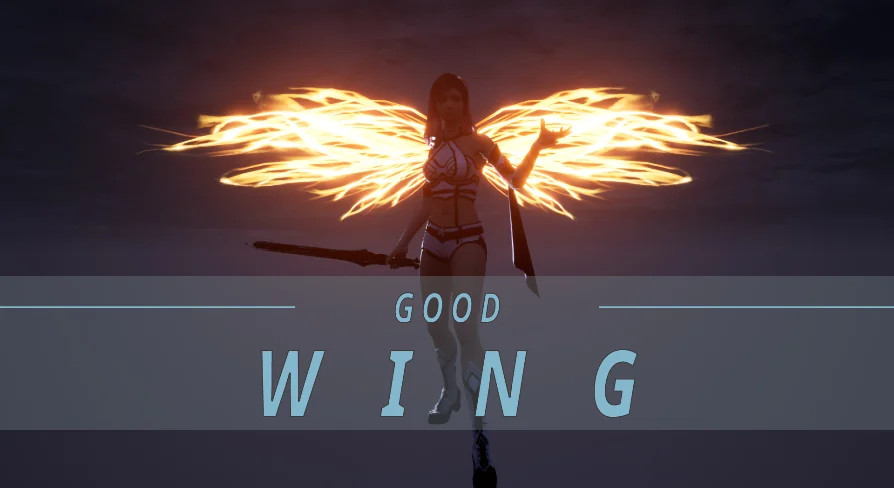
Winged characters in flight scenes rely on particle systems to sell speed, divinity, and motion. Good FX: WING approaches that need with a structured set of Niagara-driven visual effects based on 8 distinct wing shapes, each paired with more than 10 element variations. This gives a library that covers a range of stylized flight moments without requiring teams to build wing particle behavior from scratch.
What Good FX: WING Brings Into a Scene
The package centers on wing game effects, meaning the particle behavior is tied to the visual language of flight. Tags attached to the asset—Niagara, VisualEffect, Fly, Wing, Particle, and Holy—point to a collection suited for characters or entities in motion. The Holy tag in particular suggests effects that lean toward radiant or divine wing aesthetics, where light trails and glowing emissive elements suit angelic or celestial characters.
Each effect is delivered as a Mesh and Material combination rather than a pure sprite setup. That decision matters because mesh-based particles retain form during close-up camera passes, and Material integration means artists can push or pull visual traits across the surface of the wing itself, not just in the trailing particles. The inclusion of a Demo.exe file allows teams to run a standalone preview of the effects before integrating anything into an editor, which is useful for evaluating motion timing and silhouette readability outside of a project build.
8 Shapes and Their Element Variations
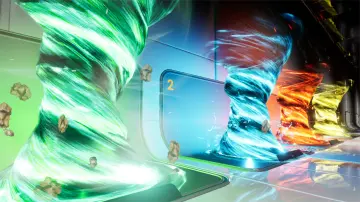
The structure of Good FX: WING is built on a shape-and-element matrix. There are 8 base wing shapes, and each shape supports more than 10 element variations. This means the package does not simply hand over 8 static effects with minor tweaks. Instead, each shape can manifest through different particle elements, giving teams room to find the right visual density, trail behavior, and emission pattern for a given character or scene.
For an action game where a boss character enters with a wing burst, a heavier element set on a broad shape might sell the impact. For a healer or support character, a lighter element on a more delicate shape could work better. The range across 8 shapes means the package is not locked into one wing archetype.
Niagara as the Delivery System
The Fly and Wing tags, combined with the Niagara tag, confirm that the effects rely on Unreal Engine’s Niagara Particle System. This positions Good FX: WING as a toolset for developers already working within Unreal who need production-ready wing visuals rather than raw particle graphs they have to wire themselves. Artists can drop the effects into existing Niagara Systems or use them as standalone components attached to characters.
Color Customization and Parameter Control
Beyond the prebuilt shapes and elements, the package exposes 2 layers of artist control. The first is easy color customization. Wing effects often need to match a character’s palette or a faction theme, and the ability to shift color directly on the Material means teams can adapt a single effect across multiple characters without opening the Particle Graph.
The second layer is customizable parameters. This gives Technical Artists control over traits that shift how the effect behaves during gameplay. A wing effect on a sprint ability might need faster emission or shorter duration than the same effect used in an idle floating state. Parameters allow those adjustments without duplicating the entire effect or rebuilding the system.
Where Good FX: WING Fits in Development
For teams building combat or traversal systems where winged states are part of character kits—a fly ability, a transformation sequence, a boss phase change—Good FX: WING provides the particle coverage to execute those moments. The combination of Mesh and Material delivery means the effects hold up in cinematic moments as well as in gameplay, where camera distance can shift rapidly.
The package also ships with a user guide and a video, both of which sit alongside the Demo.exe executable. This documentation chain allows artists to evaluate setup steps before touching the editor, which is particularly useful in mid-sized teams where a Technical Artist sets up the effect and a gameplay implementer integrates it.
Editor notes indicate compatibility with Good FX: Impact, meaning teams already using that package can integrate Good FX: WING without friction. The 2 packages appear to share structural conventions—Mesh-plus-Material delivery, parameter exposure, and Niagara-based construction—which makes them viable as companion sets in a project that needs both impact bursts and wing flight visuals.
Practical Takeaway for Evaluation
Good FX: WING is aimed at Unreal Engine developers working with Niagara who need ready-to-use wing particle effects with enough variation and customization to serve multiple characters. The shape-and-element matrix, combined with color and parameter control, means the package can cover everything from subtle hover effects to dramatic boss entrance bursts without requiring teams to author wing particles manually. Running Demo.exe first is the fastest way to assess whether the included shapes and elements fit the visual tone of the target project before committing to integration.
 Spells & Combat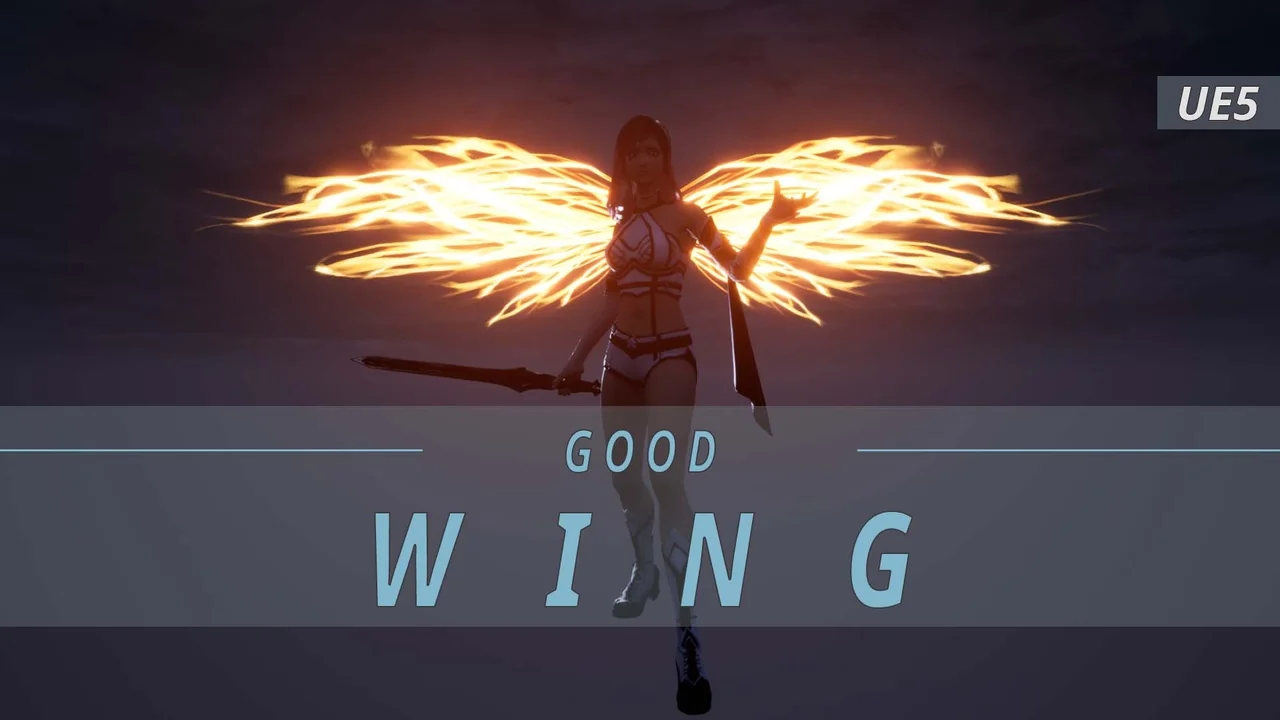
 Spells & Combat
 Spells & Combat
 Spells & Combat