"a338a1d501976271"{"id":"1000022","slug":"rocket-attack-fx","title":"Rocket Attack FX","category":"Spells \u0026 Combat","engine":"4.27,5.0+","assetVersion":"","engineVersion":"4.27,5.0+","tag":"Spells \u0026 Combat","accent":"blue","visual":"mech","summary":"Rocket Attack FX brings together 18 Rocket and Missile Niagara effects, demo gameplay, and customizable user parameters for handheld and vehicle attacks.","platform":"Unreal Engine","publishedAt":"2026-05-20T09:54:08.803Z","updatedAt":"2026-05-20T09:54:08.803Z","sourceNotes":[],"fileContents":[],"compatibility":["Unreal Engine","Engine version: 4.27,5.0+"],"featuredImage":{"alt":"Rocket Attack FX","src":"/wp-content/uploads/published/2026/05/dab9f547c293-a010ccb2-09b8-4389-b01f-5eafa731f5c4-6c42ce416a.webp"},"hasDownloadLink":true,"downloads":0,"terms":[{"taxonomy":"category","slug":"spells-and-combat","name":"Spells \u0026 Combat"}],"galleryImages":[{"src":"/wp-content/uploads/published/2026/05/bd31f85bb269-6aaf544a-277f-4bde-9e65-a92b86fc275a-6deb49281a.webp","alt":"Rocket Attack FX"},{"src":"/wp-content/uploads/published/2026/05/454d8c9fc7e8-a2ba205b-c80e-451a-8d07-8b84d784e0a3-47b70913c5.webp","alt":"Rocket Attack FX"},{"src":"/wp-content/uploads/published/2026/05/6d0ae1339900-3dc40aa0-f835-4eb0-a786-8e5767cdc038-3242a813d9.webp","alt":"Rocket Attack FX"},{"src":"/wp-content/uploads/published/2026/05/925241fbb14c-0ce858ae-ced5-4d24-9219-7682af99200e-90b2a90ae9.webp","alt":"Rocket Attack FX"},{"src":"/wp-content/uploads/published/2026/05/be1ae7c63cda-b7a1310f-44b4-4785-bf2a-842d460a5f7a-2deab92dee.webp","alt":"Rocket Attack FX"},{"src":"/wp-content/uploads/published/2026/05/5a91401df41d-f8f038b7-914a-41ff-a85c-a3ad72b63d80-45ee3f1d4b.webp","alt":"Rocket Attack FX"},{"src":"/wp-content/uploads/published/2026/05/77532acb9ce2-a996f1ca-314f-4b45-8626-5c82033059a4-a83d42c3cf.webp","alt":"Rocket Attack FX"},{"src":"/wp-content/uploads/published/2026/05/3dbf5b846bbb-735bf491-dfbd-4a89-92dc-578d67fe60c2-a7a67f2873.webp","alt":"Rocket Attack FX"},{"src":"/wp-content/uploads/published/2026/05/0f63ab1c3f9c-ff16769e-9fd7-424f-823d-971ba67923df-6082e441d7.webp","alt":"Rocket Attack FX"},{"src":"/wp-content/uploads/published/2026/05/df21eb062440-efcc791a-f1a3-4a16-b76d-551a55c203f4-b02f9c48a0.webp","alt":"Rocket Attack FX"}],"accessPanel":{"kind":"resource","title":"Access this resource","eyebrow":"Free Download","message":"Log in or create a free account to start your download.","fileName":"Content.7z","safetyNote":"Resources are manually reviewed before listing to improve quality and reduce obvious risks.","actionLabel":"Download Free","resourceType":"Resource archive"},"contentHtml":"\u003cp\u003eProjects that feature rocket launchers, missiles, military vehicles, or aircraft attacks often need more than one visual effect to feel complete. A firing sequence does not begin and end with a single blast. It needs launch energy, exhaust, flight visuals, impact, and even the lingering aftermath on the ground. Rocket Attack FX addresses that full chain with a set of 18 Rocket and Missile Niagara effects split between handheld launchers and military vehicles.\u003c/p\u003e\n\u003cp\u003eThe package includes 9 effects for handheld launchers and 9 for military vehicles, giving it a clear place in scenes where weapon scale and launch context matter. Instead of treating rockets and missiles as one generic category, it separates the effects around practical combat setups, which makes it easier to match a launcher carried by a character or a heavier system mounted on a vehicle.\u003c/p\u003e \u003ch2\u003eHandheld launchers and military vehicles in the same Rocket Attack FX set\u003c/h2\u003e\n\u003cp\u003eThe most immediate use for Rocket Attack FX is in projects that move between infantry combat and vehicle combat. With 18 Niagara effects in total, the set is divided evenly: 9 for handheld launchers and 9 for military vehicles. That structure gives the collection a practical workflow. Teams working on different attack scenarios can pull from the same package while still keeping effects aligned with the type of weapon platform being shown.\u003c/p\u003e\n\u003cp\u003eThat split also helps when staging action across different distances. Handheld launcher moments usually need readable launch feedback close to the player or camera, while military vehicle attacks can demand a larger and more forceful visual presence. The package does not flatten those situations into one shared solution. It presents separate effect groups, which is especially useful when a project mixes soldier-driven combat with armored or aerial engagements.\u003c/p\u003e\n\u003cp\u003eThe tags connected to the set point in the same direction: vehicle, army, explosion, rocket launcher, missile, weapon, military, aircraft, fire, and particle. Those terms place the pack naturally in combat-heavy scenes where rockets and missiles are not just occasional props but recurring action elements.\u003c/p\u003e \u003ch2\u003eEach part of the firing process, from Back Exhaust to Aftermath\u003c/h2\u003e\n\u003cp\u003eOne of the strongest practical details here is that there is an effect for each part of the process when firing a rocket launcher. That makes Rocket Attack FX useful as a sequence-based package rather than a loose set of unrelated bursts and trails. A rocket attack reads better when every stage has a visual identity, and this collection lays out those stages directly.\u003c/p\u003e\n\u003cp\u003eThe named effects include \u003cstrong\u003eBack Exhaust\u003c/strong\u003e, \u003cstrong\u003eFumes\u003c/strong\u003e, \u003cstrong\u003eRocket\u003c/strong\u003e, \u003cstrong\u003eMissile\u003c/strong\u003e, \u003cstrong\u003eExplosion\u003c/strong\u003e, \u003cstrong\u003eAftermath\u003c/strong\u003e, \u003cstrong\u003eCannon Blast\u003c/strong\u003e, \u003cstrong\u003eBarrage\u003c/strong\u003e, and \u003cstrong\u003eCountered\u003c/strong\u003e. Each one speaks to a specific event or state in the attack flow.\u003c/p\u003e\n\u003cp\u003e\u003cstrong\u003eRocket\u003c/strong\u003e Is the main effect emitted from the rocket, while \u003cstrong\u003eMissile\u003c/strong\u003e Is the main effect emitted from the missile. That distinction matters in projects where both ammunition types appear and need separate visual treatment. A generic trail can make weapons feel interchangeable; dedicated emitted effects help preserve their identity in motion.\u003c/p\u003e\n\u003cp\u003e\u003cstrong\u003eBack Exhaust\u003c/strong\u003e And \u003cstrong\u003eFumes\u003c/strong\u003e Support the launch phase and immediate output around the weapon system. These are the parts that make a launch feel pressurized and physically present rather than weightless. \u003cstrong\u003eCannon Blast\u003c/strong\u003e Adds another forceful event in the firing chain, giving the set a wider range of launch-related visual punctuation.\u003c/p\u003e\n\u003cp\u003e\u003cstrong\u003eExplosion\u003c/strong\u003e Covers impact, while \u003cstrong\u003eAftermath\u003c/strong\u003e Extends the moment beyond the initial detonation. The aftermath effect is described as fiery smoke left on the ground after the explosion, which gives impact scenes a lingering result instead of a hard visual stop. In gameplay, cinematics, or showcase scenes, that kind of continuation can make the environment feel affected by the strike rather than instantly reset.\u003c/p\u003e\n\u003cp\u003e\u003cstrong\u003eBarrage\u003c/strong\u003e Is an alternative red fire effect for heat-seeking missiles and similar cases. That makes it one of the more specialized entries in the package, useful when a projectile needs a different color character or a more distinct attack mood. \u003cstrong\u003eCountered\u003c/strong\u003e Covers another important gameplay state: a missile or rocket that self-detonates or is taken out mid-flight by the enemy. Many combat sequences need that interruption state, and it is often missing from effect sets that only focus on ideal launch-to-impact behavior.\u003c/p\u003e \u003ch2\u003eThe playable demo map shows Rocket Attack FX as gameplay, not isolated particles\u003c/h2\u003e\n\u003cp\u003eRocket Attack FX includes a playable demo map with example gameplay to show off all the effects. That detail changes how the package can be approached during setup. Instead of only viewing the effects as disconnected assets, users can inspect them in a playable context where the launch process, motion, and result can be seen together.\u003c/p\u003e\n\u003cp\u003eFor implementation, a demo map helps clarify timing and visual relationships between the effects. A trail alone can look complete when previewed in isolation, but once combined with launch exhaust, explosion, and ground aftermath, it becomes part of a larger sequence. The example gameplay gives a direct way to understand how the different pieces can be arranged across an attack event.\u003c/p\u003e\n\u003cp\u003eThis matters most for teams building combat prototypes or refining weapon feedback. A playable example can act as a reference point while integrating the effects into a broader game loop. It also helps creators who want to compare handheld launcher behavior against military vehicle behavior without having to construct every test case from scratch.\u003c/p\u003e \u003ch2\u003eMissile, Rocket, and the mesh support inside the pack\u003c/h2\u003e\n\u003cp\u003eThe package includes 2 Rocket meshes and 2 Missile meshes. That is a small but important implementation detail because the visual identity of a projectile is not carried by particle effects alone. Having dedicated rocket and missile meshes in the set helps complete the attack presentation and keeps the projectile body aligned with the emitted effects.\u003c/p\u003e\n\u003cp\u003eBecause the pack names both rocket and missile effects separately, the inclusion of 2 rocket meshes and 2 missile meshes fits the same practical structure. It supports scenes where different projectile types need to be shown, launched, and followed in flight. This is especially relevant when a camera tracks the projectile long enough for the mesh itself to be visible rather than implied.\u003c/p\u003e\n\u003cp\u003eThe mesh count is specific and limited, which gives a clearer sense of what the package is focused on: not a huge projectile library, but a focused set of visual effects backed by a compact selection of corresponding rocket and missile models. That keeps the attention on the attack sequence rather than turning the pack into a general-purpose weapons collection.\u003c/p\u003e \u003ch2\u003eUser Parameters for customization across weapon scenarios\u003c/h2\u003e\n\u003cp\u003eRocket Attack FX includes User Parameters for customization. That detail gives the package flexibility when adapting effects to different launchers, vehicles, or scene moods without changing the fundamental effect set. In practice, customization is valuable when the same core effect needs to fit more than one combat context.\u003c/p\u003e\n\u003cp\u003eFor example, a project may shift between infantry action, armored assaults, and aircraft-based attacks. The package is already tagged toward those military and vehicle-oriented situations, and user parameters make the effect set easier to tune inside that range. The key point is not a long list of named controls, since none are specified, but the fact that the collection is not locked to one fixed presentation.\u003c/p\u003e\n\u003cp\u003eThat makes the pack more workable for creators who want consistency across a weapon family while still needing variations. A heat-seeking missile using the red-fire Barrage effect, a handheld launch sequence using Back Exhaust and Fumes, and a vehicle strike ending in Explosion plus Aftermath all fit within the same broader system.\u003c/p\u003e \u003ch2\u003eWho benefits most from Rocket Attack FX\u003c/h2\u003e\n\u003cp\u003eRocket Attack FX is most useful for creators building weapon sequences rather than single isolated moments. Its strength comes from coverage across the firing process: launch, flight, interruption, impact, and lingering ground result. The even split between handheld launchers and military vehicles makes it especially relevant for military action scenes that move between infantry and larger combat platforms.\u003c/p\u003e\n\u003cp\u003eThe playable demo map helps with setup, the included rocket and missile meshes support projectile presentation, and the user parameters give room for customization. For anyone needing Rocket and Missile Niagara effects that can carry a scene from the initial blast to the fiery smoke left after impact, this package stays focused on that job.\u003c/p\u003e\n\n\u003ch2\u003eExplore Similar Assets\u003c/h2\u003e\n\u003cul\u003e\n\u003cli\u003e\u003ca href=\"https://3dcghub.com/rocket-thruster-exhaust-fx/\" title=\"Rocket Thruster Exhaust FX\"\u003eRocket Thruster Exhaust FX\u003c/a\u003e\u003c/li\u003e\n\u003cli\u003e\u003ca href=\"https://3dcghub.com/rotor-downwash-fx-vdb/\" title=\"Rotor Downwash FX VDB\"\u003eRotor Downwash FX VDB\u003c/a\u003e\u003c/li\u003e\n\u003cli\u003e\u003ca href=\"https://3dcghub.com/magic-kit-01/\" title=\"Magic Kit 01\"\u003eMagic Kit 01\u003c/a\u003e\u003c/li\u003e\n\u003cli\u003e\u003ca href=\"https://3dcghub.com/shield-fx-responsive/\" title=\"Shield FX Responsive\"\u003eShield FX Responsive\u003c/a\u003e\u003c/li\u003e\n\u003cli\u003e\u003ca href=\"https://3dcghub.com/portal-fx/\" title=\"Portal FX\"\u003ePortal FX\u003c/a\u003e\u003c/li\u003e\n\u003c/ul\u003e","contentTextLength":8737,"navigation":{"current":1454,"total":3338,"previous":{"id":"1000023","slug":"signage-vol-1-town-and-city-nanite-and-low-poly","title":"Signage VOL.1 - Town and City (Nanite and Low Poly)","category":"Tools, Objects \u0026 Decor","platform":"Unreal Engine","updatedAt":"2026-05-20T10:04:31.664Z"},"next":{"id":"1000019","slug":"post-apocalyptic-signs-vol-2","title":"Post Apocalyptic Signs - VOL 2","category":"Buildings \u0026 Architecture","platform":"Unreal Engine","updatedAt":"2026-05-20T08:56:10.607Z"}},"relatedResources":[{"id":"15649","slug":"rocket-thruster-exhaust-fx","title":"Rocket Thruster Exhaust FX","category":"Fire \u0026 Explosions","engine":"4.27,5.0+","assetVersion":"Engine version: 4.27,5.0+","engineVersion":"4.27","tag":"Fire \u0026 Explosions","accent":"blue","visual":"character","summary":"Enhance your vehicle projects with Rocket Thruster Exhaust FX. This pack features 12 optimized Niagara systems, including plumes and afterburners, designed for seamless movement and deep customization.","platform":"Unreal Engine","publishedAt":"2026-03-12T12:22:50.000Z","updatedAt":"2026-04-19T15:44:42.000Z","sourceNotes":[],"fileContents":[],"compatibility":["Unreal Engine","Engine version: 4.27,5.0+"],"featuredImage":{"alt":"Rocket Thruster Exhaust FX","src":"https://3dcghub.com/wp-content/uploads/2026/03/e62f9742-4ecd-40a9-bb6f-0fd53f7ef6d4.webp"},"hasDownloadLink":true,"downloads":1},{"id":"16649","slug":"rotor-downwash-fx-vdb","title":"Rotor Downwash FX VDB","category":"Spells \u0026 Combat","engine":"5.4+","assetVersion":"Engine version: 5.4+","engineVersion":"5.3","tag":"Spells \u0026 Combat","accent":"blue","visual":"city","summary":"Improve the realism of your flight simulations with the Rotor Downwash FX VDB pack. This collection features ten specialized effects designed to simulate the intense wind and dust displacement caused by rotors.","platform":"Unreal Engine","publishedAt":"2026-03-12T17:45:18.000Z","updatedAt":"2026-04-19T15:43:44.000Z","sourceNotes":[],"fileContents":[],"compatibility":["Unreal Engine","Engine version: 5.4+"],"featuredImage":{"alt":"Rotor Downwash FX VDB","src":"https://3dcghub.com/wp-content/uploads/2026/03/9e7df733-1668-42e2-957a-be321482d1fb.webp"},"hasDownloadLink":true,"downloads":1},{"id":"1000893","slug":"stylized-swordslinger-skill-set-niagara-vfx","title":"Stylized Swordslinger Skill Set (Niagara Vfx)","category":"Spells \u0026 Combat","engine":"4.26+,5.0+","assetVersion":"","engineVersion":"Engine Version: 4.26+,5.0+","tag":"Spells \u0026 Combat","accent":"blue","visual":"mech","summary":"A Niagara VFX pack with 20 total effects for stylized sword combat: low and high level attacks, buffs, auras, hits, and trails. Built for anime-inspired swordsl","platform":"Unreal Engine","publishedAt":"2026-08-06T04:40:43.645Z","updatedAt":"2026-08-06T04:40:43.645Z","sourceNotes":[],"fileContents":[],"compatibility":["Unreal Engine","Engine Version: 4.26+,5.0+"],"featuredImage":{"alt":"Stylized Swordslinger Skill Set (Niagara Vfx)","src":"/wp-content/uploads/published/2026/08/2d97056246fe-6f85de2b-2b7d-4a74-b031-2e2c06d9adae-ee9baed368.webp"},"hasDownloadLink":true,"downloads":10}]}
Spells & Combat
Rocket Attack FX
Rocket Attack FX brings together 18 Rocket and Missile Niagara effects, demo gameplay, and customizable user parameters for handheld and vehicle attacks.
Projects that feature rocket launchers, missiles, military vehicles, or aircraft attacks often need more than one visual effect to feel complete. A firing sequence does not begin and end with a single blast. It needs launch energy, exhaust, flight visuals, impact, and even the lingering aftermath on the ground. Rocket Attack FX addresses that full chain with a set of 18 Rocket and Missile Niagara effects split between handheld launchers and military vehicles.
The package includes 9 effects for handheld launchers and 9 for military vehicles, giving it a clear place in scenes where weapon scale and launch context matter. Instead of treating rockets and missiles as one generic category, it separates the effects around practical combat setups, which makes it easier to match a launcher carried by a character or a heavier system mounted on a vehicle.
Handheld launchers and military vehicles in the same Rocket Attack FX set
The most immediate use for Rocket Attack FX is in projects that move between infantry combat and vehicle combat. With 18 Niagara effects in total, the set is divided evenly: 9 for handheld launchers and 9 for military vehicles. That structure gives the collection a practical workflow. Teams working on different attack scenarios can pull from the same package while still keeping effects aligned with the type of weapon platform being shown.
That split also helps when staging action across different distances. Handheld launcher moments usually need readable launch feedback close to the player or camera, while military vehicle attacks can demand a larger and more forceful visual presence. The package does not flatten those situations into one shared solution. It presents separate effect groups, which is especially useful when a project mixes soldier-driven combat with armored or aerial engagements.
The tags connected to the set point in the same direction: vehicle, army, explosion, rocket launcher, missile, weapon, military, aircraft, fire, and particle. Those terms place the pack naturally in combat-heavy scenes where rockets and missiles are not just occasional props but recurring action elements.
Each part of the firing process, from Back Exhaust to Aftermath
One of the strongest practical details here is that there is an effect for each part of the process when firing a rocket launcher. That makes Rocket Attack FX useful as a sequence-based package rather than a loose set of unrelated bursts and trails. A rocket attack reads better when every stage has a visual identity, and this collection lays out those stages directly.
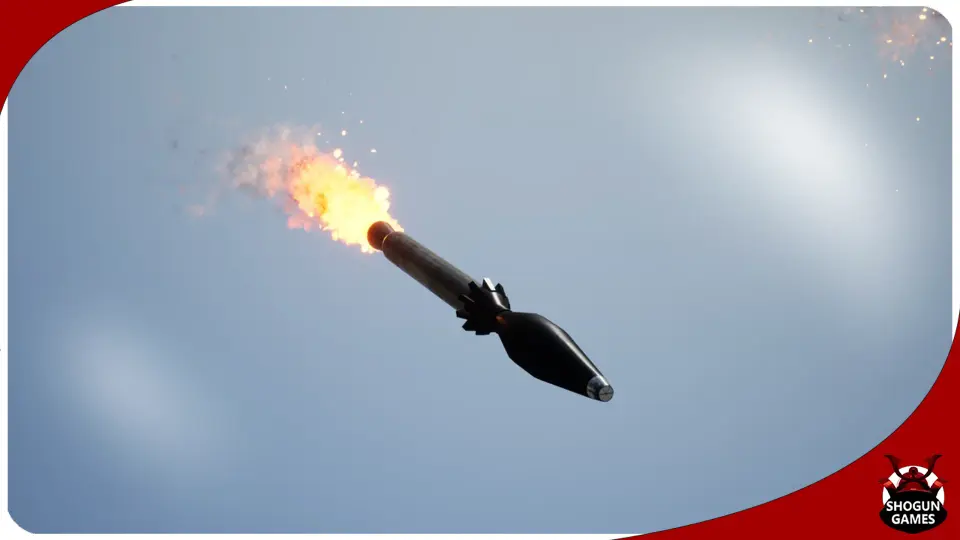
The named effects include Back Exhaust, Fumes, Rocket, Missile, Explosion, Aftermath, Cannon Blast, Barrage, and Countered. Each one speaks to a specific event or state in the attack flow.
Rocket Is the main effect emitted from the rocket, while Missile Is the main effect emitted from the missile. That distinction matters in projects where both ammunition types appear and need separate visual treatment. A generic trail can make weapons feel interchangeable; dedicated emitted effects help preserve their identity in motion.
Back Exhaust And Fumes Support the launch phase and immediate output around the weapon system. These are the parts that make a launch feel pressurized and physically present rather than weightless. Cannon Blast Adds another forceful event in the firing chain, giving the set a wider range of launch-related visual punctuation.
Explosion Covers impact, while Aftermath Extends the moment beyond the initial detonation. The aftermath effect is described as fiery smoke left on the ground after the explosion, which gives impact scenes a lingering result instead of a hard visual stop. In gameplay, cinematics, or showcase scenes, that kind of continuation can make the environment feel affected by the strike rather than instantly reset.
Barrage Is an alternative red fire effect for heat-seeking missiles and similar cases. That makes it one of the more specialized entries in the package, useful when a projectile needs a different color character or a more distinct attack mood. Countered Covers another important gameplay state: a missile or rocket that self-detonates or is taken out mid-flight by the enemy. Many combat sequences need that interruption state, and it is often missing from effect sets that only focus on ideal launch-to-impact behavior.
The playable demo map shows Rocket Attack FX as gameplay, not isolated particles
Rocket Attack FX includes a playable demo map with example gameplay to show off all the effects. That detail changes how the package can be approached during setup. Instead of only viewing the effects as disconnected assets, users can inspect them in a playable context where the launch process, motion, and result can be seen together.
For implementation, a demo map helps clarify timing and visual relationships between the effects. A trail alone can look complete when previewed in isolation, but once combined with launch exhaust, explosion, and ground aftermath, it becomes part of a larger sequence. The example gameplay gives a direct way to understand how the different pieces can be arranged across an attack event.
This matters most for teams building combat prototypes or refining weapon feedback. A playable example can act as a reference point while integrating the effects into a broader game loop. It also helps creators who want to compare handheld launcher behavior against military vehicle behavior without having to construct every test case from scratch.
Missile, Rocket, and the mesh support inside the pack
The package includes 2 Rocket meshes and 2 Missile meshes. That is a small but important implementation detail because the visual identity of a projectile is not carried by particle effects alone. Having dedicated rocket and missile meshes in the set helps complete the attack presentation and keeps the projectile body aligned with the emitted effects.
Because the pack names both rocket and missile effects separately, the inclusion of 2 rocket meshes and 2 missile meshes fits the same practical structure. It supports scenes where different projectile types need to be shown, launched, and followed in flight. This is especially relevant when a camera tracks the projectile long enough for the mesh itself to be visible rather than implied.
The mesh count is specific and limited, which gives a clearer sense of what the package is focused on: not a huge projectile library, but a focused set of visual effects backed by a compact selection of corresponding rocket and missile models. That keeps the attention on the attack sequence rather than turning the pack into a general-purpose weapons collection.
User Parameters for customization across weapon scenarios
Rocket Attack FX includes User Parameters for customization. That detail gives the package flexibility when adapting effects to different launchers, vehicles, or scene moods without changing the fundamental effect set. In practice, customization is valuable when the same core effect needs to fit more than one combat context.
For example, a project may shift between infantry action, armored assaults, and aircraft-based attacks. The package is already tagged toward those military and vehicle-oriented situations, and user parameters make the effect set easier to tune inside that range. The key point is not a long list of named controls, since none are specified, but the fact that the collection is not locked to one fixed presentation.
That makes the pack more workable for creators who want consistency across a weapon family while still needing variations. A heat-seeking missile using the red-fire Barrage effect, a handheld launch sequence using Back Exhaust and Fumes, and a vehicle strike ending in Explosion plus Aftermath all fit within the same broader system.
Who benefits most from Rocket Attack FX
Rocket Attack FX is most useful for creators building weapon sequences rather than single isolated moments. Its strength comes from coverage across the firing process: launch, flight, interruption, impact, and lingering ground result. The even split between handheld launchers and military vehicles makes it especially relevant for military action scenes that move between infantry and larger combat platforms.
The playable demo map helps with setup, the included rocket and missile meshes support projectile presentation, and the user parameters give room for customization. For anyone needing Rocket and Missile Niagara effects that can carry a scene from the initial blast to the fiery smoke left after impact, this package stays focused on that job.
 Spells & Combat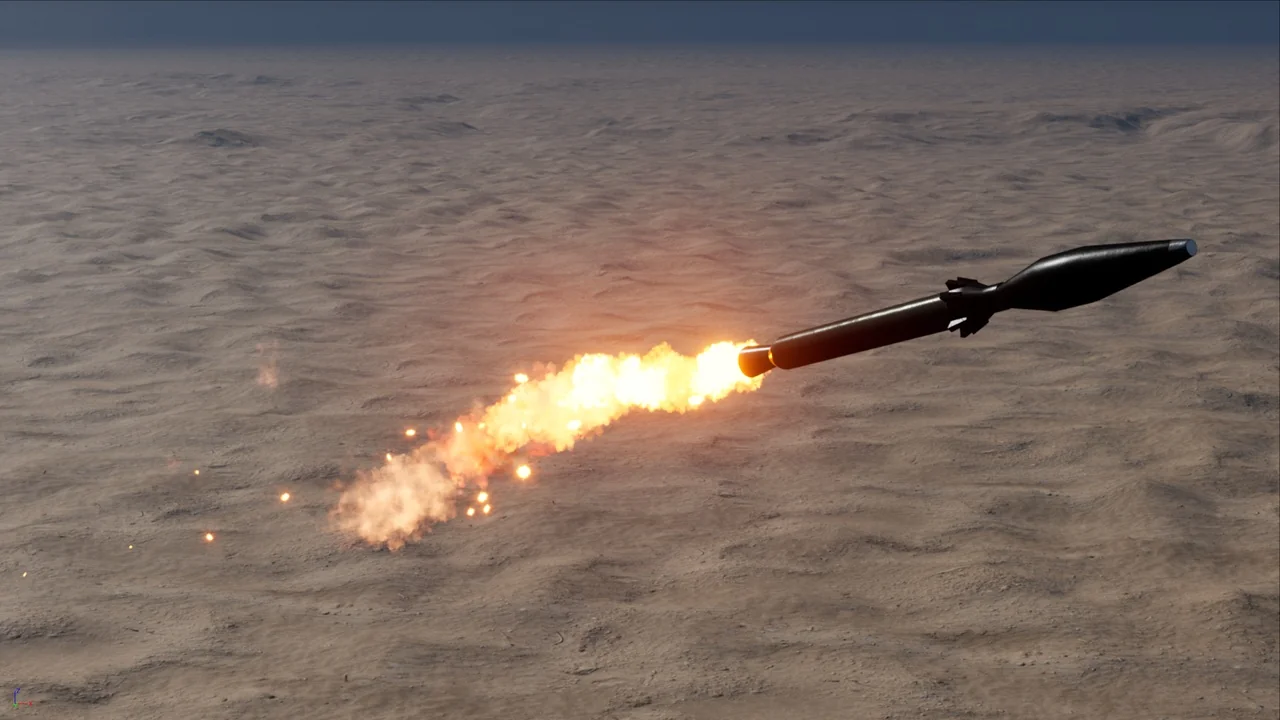
 Fire & Explosions
 Spells & Combat
 Spells & Combat