"efaa631e936fd3ee"{"id":"1002163","slug":"radial-scan-fx","title":"Radial Scan FX","category":"Shaders","engine":"4.26+,5.0+","assetVersion":"","engineVersion":"Engine Version: 4.26+,5.0+","tag":"Shaders","accent":"blue","visual":"mech","summary":"Explore Radial Scan FX, a deferred decal scanning ring shader and Blueprint system for creating stylized radar waves, highlights, and game mechanics.","platform":"Unreal Engine","publishedAt":"2026-10-29T10:06:40.826Z","updatedAt":"2026-10-29T10:06:40.826Z","sourceNotes":[],"fileContents":[],"compatibility":["Unreal Engine","Engine Version: 4.26+,5.0+"],"featuredImage":{"alt":"Radial Scan FX","src":"/wp-content/uploads/published/2026/10/181dc30eab4f-dceaeb46-6faa-443c-a199-22723c634e68-2d72e0850e.webp"},"hasDownloadLink":true,"downloads":0,"terms":[{"taxonomy":"category","slug":"shaders","name":"Shaders"}],"galleryImages":[{"src":"/wp-content/uploads/published/2026/10/68b6e686a8a3-f47f7fe6-26ed-4f74-a71c-bdfdc16ea57e-f3f89ee1de.webp","alt":"Radial Scan FX"},{"src":"/wp-content/uploads/published/2026/10/11ea45f7a2ec-a498cd5d-bd09-4baa-ac74-472216a3ff67-878e291baf.webp","alt":"Radial Scan FX"},{"src":"/wp-content/uploads/published/2026/10/ab11d11c0342-4feae999-7f79-46d1-b953-e8cdc07e91ea-d66a753923.webp","alt":"Radial Scan FX"},{"src":"/wp-content/uploads/published/2026/10/58e56aed9c19-c4434117-6fa3-4180-9915-8e894f5c7e6c-3138580e9a.webp","alt":"Radial Scan FX"}],"accessPanel":{"kind":"resource","title":"Download this resource","eyebrow":"Free Download","message":"Log in or create a free account to start your download.","fileName":"Content.7z","safetyNote":"Resources are manually reviewed before listing to improve quality and reduce obvious risks.","actionLabel":"Download Free","resourceType":"Resource archive"},"contentHtml":"\u003ch2\u003eStylized Detection Rings Through Deferred Decals\u003c/h2\u003e\n\u003cp\u003eExploration sequences, pulse radars, and treasure-hunting loops frequently rely on expanding wave visuals that drape cleanly over complex world geometry. Radial Scan FX addresses this by projecting a scanning ring shader into the environment using deferred decals. Because the visual passes are handled via deferred projection rather than spawning heavy volumetric geometry or dense particle meshes, multiple scan rings can overlap and propagate through a scene simultaneously without driving down rendering performance.\u003c/p\u003e\n\u003cp\u003eFor the projection to register correctly across the level, static and skeletal meshes must have their decal reception flag intact. Ensuring that Receives Decals is enabled across target environment assets allows the expanding ring to wash over terrain, walls, props, and floors uniformly. When stacked together, these projected rings create readable spatial pulses suitable for environment pings, sonar effects, and stylized discovery systems.\u003c/p\u003e \u003ch2\u003eSpawning Logic: BP_RadialScanComponent and BP_RadialScanActor\u003c/h2\u003e\n\u003cp\u003eIntegrating the scanning ring into gameplay code or player interactions is split across two distinct Blueprint implementations, depending on whether the pulse should tether to an existing entity or exist as an independent world event.\u003c/p\u003e\n\u003cp\u003eAttaching \u003ccode\u003eBP_RadialScanComponent\u003c/code\u003e Directly to an actor allows the scan to originate from players, vehicles, or interactive terminals. Calling the \u003ccode\u003eSpawn Radial Scan Effect\u003c/code\u003e Function triggers the wave outwards from that actor. The component houses the controls governing the mechanical life cycle of the pulse, allowing developers to define how the wave initiates, the trajectory and speed at which it moves, and how it fades out as it reaches maximum range.\u003c/p\u003e\n\u003cp\u003eWhen an independent world pulse is needed—such as an automated sonar buoy, an environmental trap, or a stationary treasure marker—the \u003ccode\u003eBP_RadialScanActor\u003c/code\u003e Can be dropped straight into the scene. Firing the \u003ccode\u003eBegin Radial Scan\u003c/code\u003e Function executes the wave sequence. Once the scan reaches the end of its life cycle, this standalone actor self-terminates, freeing up resources automatically without requiring manual destruction logic in level Blueprints.\u003c/p\u003e \u003ch2\u003eMaterial Instance Layering and In-Editor Preview Workflows\u003c/h2\u003e\n\u003cp\u003eWhile the Blueprints govern expansion speed, movement paths, and lifespan, the artistic character of the ring is configured inside the material instance. The shader structure treats visual rings as distinct layers, allowing complex multi-band scans to be built within a single material setup. For example, one layer can be tuned to render a sharp, bright leading edge, while a secondary layer running alongside it generates the visual mask for highlighting objects within the wave radius.\u003c/p\u003e\n\u003cp\u003eTesting material adjustments does not require constantly launching a Play-In-Editor session. Developers can drag the material instance directly from the content browser into the viewport, which instantly spawns a decal actor. Scaling this decal up to encompass a wide slice of the level provides an immediate testing canvas. By manually sliding the \u003ccode\u003eDistance\u003c/code\u003e Parameter inside the material instance, artists can preview how the scan renders at varying propagation radiuses, fine-tuning edge thickness, color intensities, and band spacing in real time.\u003c/p\u003e\n\u003cp\u003eTemplate setups are pre-configured on the sample character pawn included in the package. Checking the components list on this pawn reveals a configured \u003ccode\u003eBP_RadialScanComponent\u003c/code\u003e. Swapping out the assigned material instances or modifying exposed parameters directly on this component provides an active reference point for how different pulse profiles behave in motion.\u003c/p\u003e \u003ch2\u003eConfiguring Custom Depth Stencils for Object Highlights\u003c/h2\u003e\n\u003cp\u003eBeyond displaying a moving surface decal, Radial Scan FX supports object highlighting so that interactive items, objectives, or loot pop visually as the wave passes through them. This mechanic relies on stencil comparisons and requires specific project and mesh rendering configurations to function.\u003c/p\u003e\n\u003cp\u003eThe project-level Custom Depth-Stencil Pass setting must be switched to Enabled with Stencil. Any mesh intended to reveal a highlight must have Custom Depth enabled in its rendering properties, and its stencil value must match the exact numerical stencil value defined within the radial scan material instance. When the ring crosses a mesh with a matching stencil index, the highlight layer illuminates the silhouette or surface.\u003c/p\u003e\n\u003cp\u003eHighlight functionality is demonstrated in specific showcase configurations. Example setups 2 and 3 are wired to display the stencil highlight effect, whereas other bundled configurations showcase pure decal wavefronts without object masking. Checking the stencil parity between the mesh and the material instance is the key troubleshooting step whenever a target asset fails to illuminate during a pulse.\u003c/p\u003e \u003ch2\u003eImplementation Scope and Project Fit\u003c/h2\u003e\n\u003cp\u003eBecause the visual and mechanical components are decoupled into material layers and Blueprint controls, Radial Scan FX can act as the backbone for custom detection mechanics. The system accommodates gameplay features like treasure detectors, sonar navigation systems, sci-fi hazard radars, and stylized investigation pulses, while retaining compatibility with Fog Gradients.\u003c/p\u003e\n\u003cp\u003eTeams building stylized adventure games, exploratory action titles, or puzzle games where hidden elements must be uncovered through spatial sweeps benefit most from this setup. The combination of lightweight deferred decal projection, automated cleanup actors, and built-in stencil masks provides a complete toolkit for world-space scanning effects without incurring heavy rendering overhead.\u003c/p\u003e\n\n\u003ch2\u003eExplore Similar Assets\u003c/h2\u003e\n\u003cul\u003e\n\u003cli\u003e\u003ca href=\"https://3dcghub.com/cyberpunk-fx-pack-2-neon-panels-and-screens/\" title=\"Cyberpunk FX Pack 2 - Neon Panels and Screens\"\u003eCyberpunk FX Pack 2 - Neon Panels and Screens\u003c/a\u003e\u003c/li\u003e\n\u003cli\u003e\u003ca href=\"https://3dcghub.com/good-fx-ui-icon-trail/\" title=\"Good FX : UI Icon Trail\"\u003eGood FX : UI Icon Trail\u003c/a\u003e\u003c/li\u003e\n\u003cli\u003e\u003ca href=\"https://3dcghub.com/cyberpunk-fx-pack/\" title=\"Cyberpunk FX Pack\"\u003eCyberpunk FX Pack\u003c/a\u003e\u003c/li\u003e\n\u003cli\u003e\u003ca href=\"https://3dcghub.com/wall-fx-pack/\" title=\"Wall FX pack\"\u003eWall FX pack\u003c/a\u003e\u003c/li\u003e\n\u003cli\u003e\u003ca href=\"https://3dcghub.com/art-of-shader-distortion-and-glitches/\" title=\"Art Of Shader - Distortion And Glitches\"\u003eArt Of Shader - Distortion And Glitches\u003c/a\u003e\u003c/li\u003e\n\u003c/ul\u003e","contentTextLength":5837,"navigation":{"current":121,"total":4209,"previous":{"id":"1002164","slug":"rain-and-wind-loops","title":"Rain and Wind Loops","category":"Sound Effects","platform":"Unreal Engine","updatedAt":"2026-10-29T10:07:16.853Z"},"next":{"id":"1002162","slug":"radar-system-with-minimap","title":"Radar System with Minimap","category":"Gameplay Features","platform":"Unreal Engine","updatedAt":"2026-10-29T10:06:01.181Z"}},"relatedResources":[{"id":"1001644","slug":"cyberpunk-fx-pack-2-neon-panels-and-screens","title":"Cyberpunk FX Pack 2 - Neon Panels and Screens","category":"Shaders","engine":"4.20+,5.0+","assetVersion":"","engineVersion":"Engine Version: 4.20+,5.0+","tag":"Shaders","accent":"blue","visual":"mech","summary":"Implement deformable neon signs, parallax 3D effect textures, hologram screens, and hologram globes from Cyberpunk FX Pack 2 into custom environments.","platform":"Unreal Engine","publishedAt":"2026-10-13T02:28:20.229Z","updatedAt":"2026-10-13T02:28:20.229Z","sourceNotes":[],"fileContents":[],"compatibility":["Unreal Engine","Engine Version: 4.20+,5.0+"],"featuredImage":{"alt":"Cyberpunk FX Pack 2 - Neon Panels and Screens","src":"/wp-content/uploads/published/2026/10/420306a50bfd-06b12c54-c578-4a0e-9f69-4f4069add9a2-0df00049ea.webp"},"hasDownloadLink":true,"downloads":0},{"id":"1000834","slug":"good-fx-ui-icon-trail","title":"Good FX : UI Icon Trail","category":"Shaders","engine":"4.26+,5.0+","assetVersion":"","engineVersion":"Engine Version: 4.26+,5.0+","tag":"Shaders","accent":"blue","visual":"mech","summary":"A material-driven UI effect pack with over 20 icon animation presets, customizable parameters, and support for desktop, mobile, and VR platforms.","platform":"Unreal Engine","publishedAt":"2026-08-03T13:13:06.882Z","updatedAt":"2026-08-03T13:13:06.882Z","sourceNotes":[],"fileContents":[],"compatibility":["Unreal Engine","Engine Version: 4.26+,5.0+"],"featuredImage":{"alt":"Good FX : UI Icon Trail","src":"/wp-content/uploads/published/2026/08/500483cbcab3-0644eb9a-2271-4184-a014-a7e6abb267e1-c0b2531ae5.webp"},"hasDownloadLink":true,"downloads":0},{"id":"15803","slug":"cyberpunk-fx-pack","title":"Cyberpunk FX Pack","category":"Shaders","engine":"4.26+,5.0+","assetVersion":"Engine version: 4.26+,5.0+","engineVersion":"4.16","tag":"Shaders","accent":"blue","visual":"city","summary":"Enhance your game environments with the Cyberpunk FX Pack, featuring over 70 shaders and 15 mesh effects. This collection is optimized for high performance using vertex animations, making it ideal for futuristic bars and digital presentations.","platform":"Unreal Engine","publishedAt":"2026-03-12T13:10:40.000Z","updatedAt":"2026-04-19T15:44:40.000Z","sourceNotes":[],"fileContents":[],"compatibility":["Unreal Engine","Engine version: 4.26+,5.0+"],"featuredImage":{"alt":"Cyberpunk FX Pack","src":"https://3dcghub.com/wp-content/uploads/2026/03/108e257d-721c-4afc-be8e-0016bd1a1d59.webp"},"hasDownloadLink":true,"downloads":1}]}
Shaders
Radial Scan FX
Explore Radial Scan FX, a deferred decal scanning ring shader and Blueprint system for creating stylized radar waves, highlights, and game mechanics.
Category:Unreal Engine,ShadersPlatform: Unreal EngineEngine Version: 4.26+,5.0+Published: Oct 29, 2026
Shaders
Resource overview
Stylized Detection Rings Through Deferred Decals
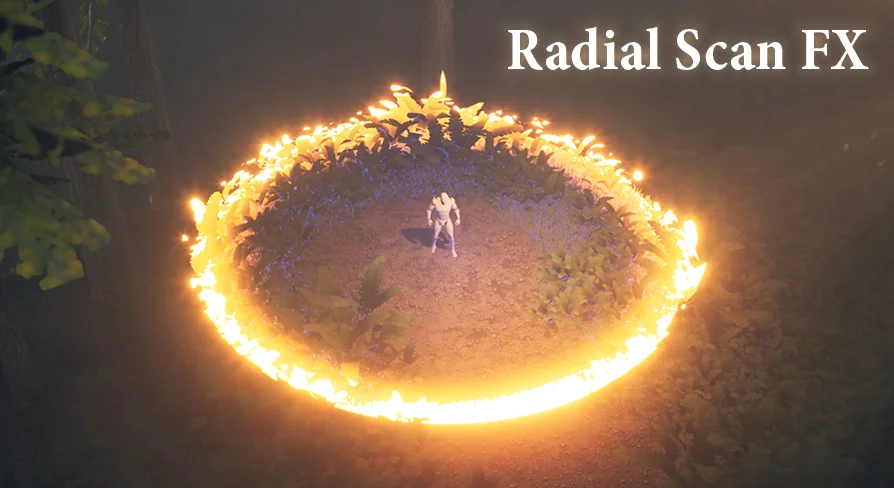
Exploration sequences, pulse radars, and treasure-hunting loops frequently rely on expanding wave visuals that drape cleanly over complex world geometry. Radial Scan FX addresses this by projecting a scanning ring shader into the environment using deferred decals. Because the visual passes are handled via deferred projection rather than spawning heavy volumetric geometry or dense particle meshes, multiple scan rings can overlap and propagate through a scene simultaneously without driving down rendering performance.
For the projection to register correctly across the level, static and skeletal meshes must have their decal reception flag intact. Ensuring that Receives Decals is enabled across target environment assets allows the expanding ring to wash over terrain, walls, props, and floors uniformly. When stacked together, these projected rings create readable spatial pulses suitable for environment pings, sonar effects, and stylized discovery systems.
Spawning Logic: BP_RadialScanComponent and BP_RadialScanActor
Integrating the scanning ring into gameplay code or player interactions is split across two distinct Blueprint implementations, depending on whether the pulse should tether to an existing entity or exist as an independent world event.
Attaching BP_RadialScanComponent Directly to an actor allows the scan to originate from players, vehicles, or interactive terminals. Calling the Spawn Radial Scan Effect Function triggers the wave outwards from that actor. The component houses the controls governing the mechanical life cycle of the pulse, allowing developers to define how the wave initiates, the trajectory and speed at which it moves, and how it fades out as it reaches maximum range.
When an independent world pulse is needed—such as an automated sonar buoy, an environmental trap, or a stationary treasure marker—the BP_RadialScanActor Can be dropped straight into the scene. Firing the Begin Radial Scan Function executes the wave sequence. Once the scan reaches the end of its life cycle, this standalone actor self-terminates, freeing up resources automatically without requiring manual destruction logic in level Blueprints.
Material Instance Layering and In-Editor Preview Workflows
While the Blueprints govern expansion speed, movement paths, and lifespan, the artistic character of the ring is configured inside the material instance. The shader structure treats visual rings as distinct layers, allowing complex multi-band scans to be built within a single material setup. For example, one layer can be tuned to render a sharp, bright leading edge, while a secondary layer running alongside it generates the visual mask for highlighting objects within the wave radius.
Testing material adjustments does not require constantly launching a Play-In-Editor session. Developers can drag the material instance directly from the content browser into the viewport, which instantly spawns a decal actor. Scaling this decal up to encompass a wide slice of the level provides an immediate testing canvas. By manually sliding the Distance Parameter inside the material instance, artists can preview how the scan renders at varying propagation radiuses, fine-tuning edge thickness, color intensities, and band spacing in real time.
Template setups are pre-configured on the sample character pawn included in the package. Checking the components list on this pawn reveals a configured BP_RadialScanComponent. Swapping out the assigned material instances or modifying exposed parameters directly on this component provides an active reference point for how different pulse profiles behave in motion.
Configuring Custom Depth Stencils for Object Highlights
Beyond displaying a moving surface decal, Radial Scan FX supports object highlighting so that interactive items, objectives, or loot pop visually as the wave passes through them. This mechanic relies on stencil comparisons and requires specific project and mesh rendering configurations to function.
The project-level Custom Depth-Stencil Pass setting must be switched to Enabled with Stencil. Any mesh intended to reveal a highlight must have Custom Depth enabled in its rendering properties, and its stencil value must match the exact numerical stencil value defined within the radial scan material instance. When the ring crosses a mesh with a matching stencil index, the highlight layer illuminates the silhouette or surface.
Highlight functionality is demonstrated in specific showcase configurations. Example setups 2 and 3 are wired to display the stencil highlight effect, whereas other bundled configurations showcase pure decal wavefronts without object masking. Checking the stencil parity between the mesh and the material instance is the key troubleshooting step whenever a target asset fails to illuminate during a pulse.
Implementation Scope and Project Fit
Because the visual and mechanical components are decoupled into material layers and Blueprint controls, Radial Scan FX can act as the backbone for custom detection mechanics. The system accommodates gameplay features like treasure detectors, sonar navigation systems, sci-fi hazard radars, and stylized investigation pulses, while retaining compatibility with Fog Gradients.
Teams building stylized adventure games, exploratory action titles, or puzzle games where hidden elements must be uncovered through spatial sweeps benefit most from this setup. The combination of lightweight deferred decal projection, automated cleanup actors, and built-in stencil masks provides a complete toolkit for world-space scanning effects without incurring heavy rendering overhead.
 Shaders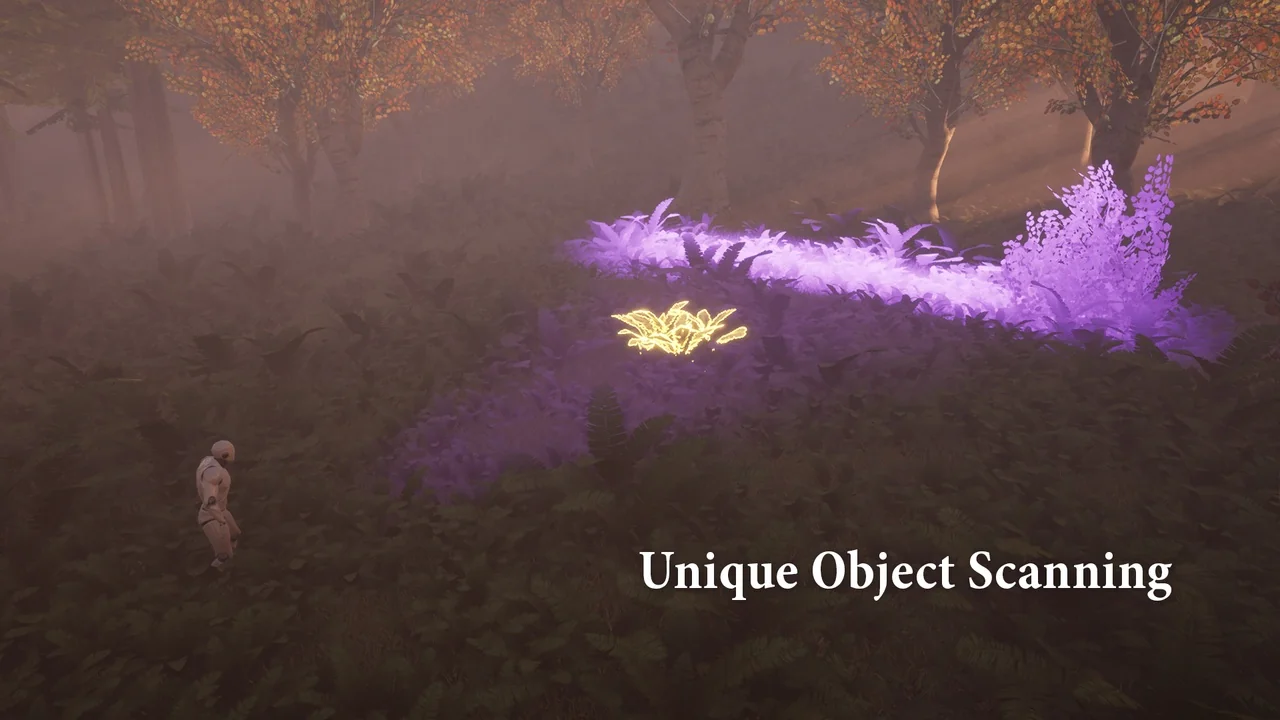
 Shaders
 Shaders
 Shaders