"efaa631e936fd3ee"{"id":"1002162","slug":"radar-system-with-minimap","title":"Radar System with Minimap","category":"Gameplay Features","engine":"5.0+","assetVersion":"","engineVersion":"Engine Version: 5.0+","tag":"Gameplay Features","accent":"blue","visual":"mech","summary":"A configurable radar and minimap UI for Unreal Engine projects, featuring HLSL radar arcs, POI scene capture filtering, and dynamic distance markers.","platform":"Unreal Engine","publishedAt":"2026-10-29T10:06:01.181Z","updatedAt":"2026-10-29T10:06:01.181Z","sourceNotes":[],"fileContents":[],"compatibility":["Unreal Engine","Engine Version: 5.0+"],"featuredImage":{"alt":"Radar System with Minimap","src":"/wp-content/uploads/published/2026/10/b9b8808d8f4f-7a937fcd-bd67-47ed-ab29-fe692af506db-b8804ad024.webp"},"hasDownloadLink":true,"downloads":0,"terms":[{"taxonomy":"category","slug":"gameplay-features","name":"Gameplay Features"}],"galleryImages":[{"src":"/wp-content/uploads/published/2026/10/d2d070b3d4de-9078725a-eeae-4d38-97a3-1085a36eba8a-239667322c.webp","alt":"Radar System with Minimap"},{"src":"/wp-content/uploads/published/2026/10/6f326c158753-a7578e16-9da9-4810-9578-1cf20c7ac335-d8bc5f983b.webp","alt":"Radar System with Minimap"},{"src":"/wp-content/uploads/published/2026/10/25f80c897463-0b16595b-0ca5-4424-a5ad-12e8de9b5397-25121a1537.webp","alt":"Radar System with Minimap"},{"src":"/wp-content/uploads/published/2026/10/659c46ae5dbe-1ecd0720-02ae-4e05-8516-9eb429fca7db-74599733d4.webp","alt":"Radar System with Minimap"}],"accessPanel":{"kind":"resource","title":"Download this resource","eyebrow":"Free Download","message":"Log in or create a free account to start your download.","fileName":"Content.7z","safetyNote":"Resources are manually reviewed before listing to improve quality and reduce obvious risks.","actionLabel":"Download Free","resourceType":"Resource archive"},"contentHtml":"\u003ch2\u003eCustomizing Radar Arcs with HLSL Materials\u003c/h2\u003e\n\u003cp\u003eRadar System with Minimap provides developers with a configurable visual interface engineered for spatial navigation in Unreal Engine games. Central to the presentation of the radar display is a dedicated HLSL material that governs the generation and movement of radar sweeps. By relying on custom HLSL code rather than purely pre-rendered sprite animations, the radar arc can be adjusted directly within the Unreal Engine material pipeline. This shader-based workflow allows developers to modify sweeping angles, scan frequency, edge fade, and arc dimensions to match project aesthetics, ranging from high-tech sci-fi scanners to retro tactical displays.\u003c/p\u003e\n\u003cp\u003eBecause the radar visualizer is powered through an HLSL material, runtime parameters can be passed into the shader to react to gameplay states. Scan intervals can accelerate when players enter combat or narrow into directional cones to simulate focused detection sweeps. The material handles radial sweep math cleanly, preventing visual stretching or pixelation across varied UI viewport resolutions while preserving predictable performance during sustained rendering.\u003c/p\u003e \u003ch2\u003eTarget Tracking and Scene Capture Actor Filtering\u003c/h2\u003e\n\u003cp\u003eA primary challenge when constructing minimap interfaces in Unreal Engine is managing the overhead associated with render-to-texture operations. Traditional minimap setups often employ an unconstrained Scene Capture 2D component that captures entire levels, duplicating rendering costs by drawing terrain, static meshes, and ambient geometry twice. This package addresses rendering load by limiting the scene capture strictly to point-of-interest actors.\u003c/p\u003e\n\u003cp\u003eBy restricting scene capture capture passes solely to designated target actors, the engine skips rendering non-essential background geometry into the minimap buffer. Hostiles, navigational waypoints, mission objectives, and interactive entities can be tracked in local space without forcing the capture system to re-render surrounding static architecture. In addition to selective actor passes, the system maintains compatibility with Dynamic Mesh Occluder setups, enabling proper spatial occlusion logic when objects move behind barriers or travel across complex multi-layered environments.\u003c/p\u003e \u003ch2\u003eMarker Customization, Distance Readouts, and Text Styling\u003c/h2\u003e\n\u003cp\u003eRepresenting situational awareness accurately requires distinct visual hierarchies on screen. Radar System with Minimap includes an integrated marker system that allows full control over marker textures, individual marker color tints, and variable icon sizing. Enemies can be styled with distinct warning colors and aggressive symbols, while neutral points of interest, friendly units, or secondary objectives receive unique iconography and subdued tones.\u003c/p\u003e\n\u003cp\u003eAlong with icon imagery, markers support text fields that populate directly alongside the UI indicator. One of the central readouts included in the system is dynamic actor distance. As tracked targets move closer to or farther from the player, the text component automatically computes and displays the real-time distance separation. This gives players immediate tactical feedback on how quickly threats are approaching or how far away navigation targets remain, all integrated into a unified UI widget structure without requiring separate calculation passes outside the radar pipeline.\u003c/p\u003e \u003ch2\u003eMarker Destruction and Lifecycle Cleanup\u003c/h2\u003e\n\u003cp\u003eDynamic games require constant addition and removal of tracked targets. When an enemy unit is eliminated, an objective completed, or an actor despawned from the level, navigation interfaces must clear obsolete indicators to prevent UI clutter and visual desync. The package features a supplied marker-destruction mechanism specifically configured to handle marker removal safely at runtime.\u003c/p\u003e\n\u003cp\u003eThe destruction mechanism monitors tracked entities and dissolves or clears the associated marker widget once the actor is invalidated or destroyed in the scene. This built-in cleanup process prevents stale target data from lingering on the edge of the radar circle or within the minimap viewport. By handling the destruction pipeline within the system's native logic, developers do not need to construct custom garbage collection routines to synchronize widget destruction with gameplay events like enemy deaths or mission zone transitions.\u003c/p\u003e \u003ch2\u003eSingle-Player and Multiplayer Blueprint Architecture\u003c/h2\u003e\n\u003cp\u003eBuilt with Blueprint integration, the radar and minimap framework fits into both single-player campaigns and networked multiplayer games. In single-player scenarios, the system binds directly to local player controllers, camera perspectives, and world objectives to provide reliable navigation feedback. Within multiplayer sessions, the underlying architecture supports tracking remote player pawns, squad mates, and networked points of interest without interfering with client-side UI rendering.\u003c/p\u003e\n\u003cp\u003eThe configuration options enable teams to adjust radar range, blip scaling, and marker behaviors to match different gameplay tempos. Fast-paced shooters can deploy tight, responsive radar sweeps with prominent distance indicators, while open-world exploration projects can utilize wider minimap views driven by navigational markers and mission locations. With its combination of HLSL shader arcs, filtered scene captures, marker customization options, and native cleanup handling, the system provides a comprehensive Blueprint-ready foundation for Unreal Engine navigation interfaces.\u003c/p\u003e\n\n\u003ch2\u003eMore From The Same Workflow\u003c/h2\u003e\n\u003cul\u003e\n\u003cli\u003e\u003ca href=\"https://3dcghub.com/tile-based-minimap/\" title=\"Tile Based Minimap\"\u003eTile Based Minimap\u003c/a\u003e\u003c/li\u003e\n\u003cli\u003e\u003ca href=\"https://3dcghub.com/easy-map-and-navigation-system/\" title=\"Easy Map and Navigation System\"\u003eEasy Map and Navigation System\u003c/a\u003e\u003c/li\u003e\n\u003cli\u003e\u003ca href=\"https://3dcghub.com/gameplay-ability-system-gas-fully-optimized-game-ready/\" title=\"Gameplay Ability System ( GAS ), Fully Optimized, Game-Ready\"\u003eGameplay Ability System ( GAS ), Fully Optimized, Game-Ready\u003c/a\u003e\u003c/li\u003e\n\u003cli\u003e\u003ca href=\"https://3dcghub.com/first-person-horror-game-starter-kit-with-a-i/\" title=\"First Person Horror Game Starter Kit (With A.I.)\"\u003eFirst Person Horror Game Starter Kit (With A.I.)\u003c/a\u003e\u003c/li\u003e\n\u003cli\u003e\u003ca href=\"https://3dcghub.com/gui-with-multiplayer/\" title=\"GUI with Multiplayer\"\u003eGUI with Multiplayer\u003c/a\u003e\u003c/li\u003e\n\u003c/ul\u003e","contentTextLength":5683,"navigation":{"current":122,"total":4209,"previous":{"id":"1002163","slug":"radial-scan-fx","title":"Radial Scan FX","category":"Shaders","platform":"Unreal Engine","updatedAt":"2026-10-29T10:06:40.826Z"},"next":{"id":"1002161","slug":"racing-game-starter-kit","title":"Racing Game Starter Kit","category":"Racing","platform":"Unreal Engine","updatedAt":"2026-10-29T10:05:28.621Z"}},"relatedResources":[{"id":"15092","slug":"tile-based-minimap","title":"Tile Based Minimap","category":"Gameplay Features","engine":"5.3 - 5.5","assetVersion":"Asset Version: 1.2.2 - 2.1.1","engineVersion":"Engine Version: 5.3 - 5.5","tag":"Gameplay Features","accent":"blue","visual":"mech","summary":"The Tile Based Minimap system provides a robust solution for creating tiled in-game maps using pre-rendered level images. It features GPS-style routing, multi-grid support, and full Blueprint extensibility.","platform":"Unreal Engine","publishedAt":"2026-03-12T07:51:23.000Z","updatedAt":"2026-10-08T12:57:55.645Z","sourceNotes":[],"fileContents":[],"compatibility":["Unreal Engine","Asset Version: 1.2.2 - 2.1.1","Engine Version: 5.3 - 5.5"],"featuredImage":{"alt":"Tile Based Minimap","src":"https://3dcghub.com/wp-content/uploads/2026/03/768cc7d5-0ca5-439b-b02a-f4807a2c39bd.webp"},"hasDownloadLink":true,"downloads":5},{"id":"1002005","slug":"easy-map-and-navigation-system","title":"Easy Map and Navigation System","category":"Gameplay Features","engine":"5.0+","assetVersion":"","engineVersion":"Engine Version: 5.0+","tag":"Gameplay Features","accent":"blue","visual":"mech","summary":"Explore the Easy Map and Navigation System, featuring a compass minimap with AI tracking, path display, rough terrain 3D pointers, and full worldmap tools.","platform":"Unreal Engine","publishedAt":"2026-10-26T12:23:06.080Z","updatedAt":"2026-10-26T12:23:06.080Z","sourceNotes":[],"fileContents":[],"compatibility":["Unreal Engine","Engine Version: 5.0+"],"featuredImage":{"alt":"Easy Map and Navigation System","src":"/wp-content/uploads/published/2026/10/280c293cab36-c2a58787-289a-4148-bba7-cc35f43f4275-931fe92c6f.webp"},"hasDownloadLink":true,"downloads":1},{"id":"1002036","slug":"gameplay-ability-system-gas-fully-optimized-game-ready","title":"Gameplay Ability System ( GAS ), Fully Optimized, Game-Ready","category":"Gameplay Features","engine":"5.0+","assetVersion":"","engineVersion":"Engine Version: 5.0+","tag":"Gameplay Features","accent":"blue","visual":"mech","summary":"Explore an optimized, game-ready Gameplay Ability System Blueprint framework built with interfaces and event timers for smooth performance across genres.","platform":"Unreal Engine","publishedAt":"2026-10-26T13:58:26.755Z","updatedAt":"2026-10-26T13:58:26.755Z","sourceNotes":[],"fileContents":[],"compatibility":["Unreal Engine","Engine Version: 5.0+"],"featuredImage":{"alt":"Gameplay Ability System ( GAS ), Fully Optimized, Game-Ready","src":"/wp-content/uploads/published/2026/10/fb66f2b25878-f007a6d0-9fd0-4bbf-8cb6-249f97833b71-4bb764b479.webp"},"hasDownloadLink":true,"downloads":0}]}
Gameplay Features
Radar System with Minimap
A configurable radar and minimap UI for Unreal Engine projects, featuring HLSL radar arcs, POI scene capture filtering, and dynamic distance markers.
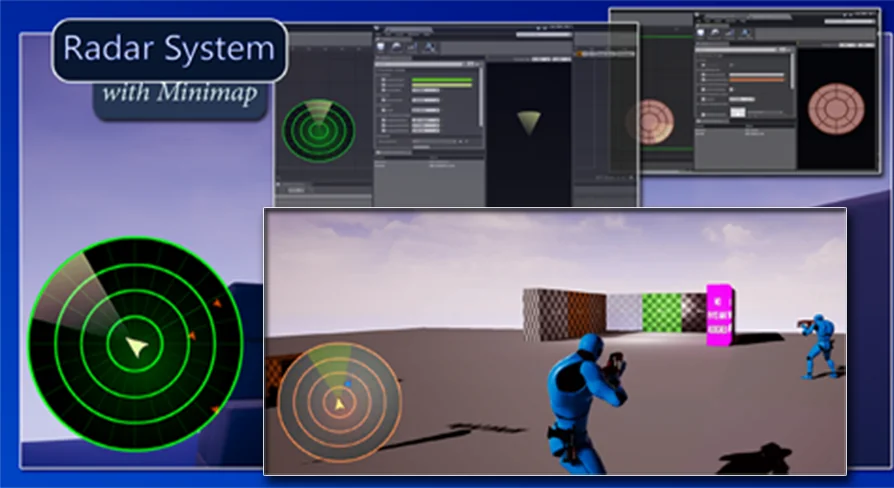
Radar System with Minimap provides developers with a configurable visual interface engineered for spatial navigation in Unreal Engine games. Central to the presentation of the radar display is a dedicated HLSL material that governs the generation and movement of radar sweeps. By relying on custom HLSL code rather than purely pre-rendered sprite animations, the radar arc can be adjusted directly within the Unreal Engine material pipeline. This shader-based workflow allows developers to modify sweeping angles, scan frequency, edge fade, and arc dimensions to match project aesthetics, ranging from high-tech sci-fi scanners to retro tactical displays.
Because the radar visualizer is powered through an HLSL material, runtime parameters can be passed into the shader to react to gameplay states. Scan intervals can accelerate when players enter combat or narrow into directional cones to simulate focused detection sweeps. The material handles radial sweep math cleanly, preventing visual stretching or pixelation across varied UI viewport resolutions while preserving predictable performance during sustained rendering.
Target Tracking and Scene Capture Actor Filtering
A primary challenge when constructing minimap interfaces in Unreal Engine is managing the overhead associated with render-to-texture operations. Traditional minimap setups often employ an unconstrained Scene Capture 2D component that captures entire levels, duplicating rendering costs by drawing terrain, static meshes, and ambient geometry twice. This package addresses rendering load by limiting the scene capture strictly to point-of-interest actors.
By restricting scene capture capture passes solely to designated target actors, the engine skips rendering non-essential background geometry into the minimap buffer. Hostiles, navigational waypoints, mission objectives, and interactive entities can be tracked in local space without forcing the capture system to re-render surrounding static architecture. In addition to selective actor passes, the system maintains compatibility with Dynamic Mesh Occluder setups, enabling proper spatial occlusion logic when objects move behind barriers or travel across complex multi-layered environments.
Marker Customization, Distance Readouts, and Text Styling
Representing situational awareness accurately requires distinct visual hierarchies on screen. Radar System with Minimap includes an integrated marker system that allows full control over marker textures, individual marker color tints, and variable icon sizing. Enemies can be styled with distinct warning colors and aggressive symbols, while neutral points of interest, friendly units, or secondary objectives receive unique iconography and subdued tones.
Along with icon imagery, markers support text fields that populate directly alongside the UI indicator. One of the central readouts included in the system is dynamic actor distance. As tracked targets move closer to or farther from the player, the text component automatically computes and displays the real-time distance separation. This gives players immediate tactical feedback on how quickly threats are approaching or how far away navigation targets remain, all integrated into a unified UI widget structure without requiring separate calculation passes outside the radar pipeline.
Marker Destruction and Lifecycle Cleanup
Dynamic games require constant addition and removal of tracked targets. When an enemy unit is eliminated, an objective completed, or an actor despawned from the level, navigation interfaces must clear obsolete indicators to prevent UI clutter and visual desync. The package features a supplied marker-destruction mechanism specifically configured to handle marker removal safely at runtime.
The destruction mechanism monitors tracked entities and dissolves or clears the associated marker widget once the actor is invalidated or destroyed in the scene. This built-in cleanup process prevents stale target data from lingering on the edge of the radar circle or within the minimap viewport. By handling the destruction pipeline within the system's native logic, developers do not need to construct custom garbage collection routines to synchronize widget destruction with gameplay events like enemy deaths or mission zone transitions.
Single-Player and Multiplayer Blueprint Architecture
Built with Blueprint integration, the radar and minimap framework fits into both single-player campaigns and networked multiplayer games. In single-player scenarios, the system binds directly to local player controllers, camera perspectives, and world objectives to provide reliable navigation feedback. Within multiplayer sessions, the underlying architecture supports tracking remote player pawns, squad mates, and networked points of interest without interfering with client-side UI rendering.
The configuration options enable teams to adjust radar range, blip scaling, and marker behaviors to match different gameplay tempos. Fast-paced shooters can deploy tight, responsive radar sweeps with prominent distance indicators, while open-world exploration projects can utilize wider minimap views driven by navigational markers and mission locations. With its combination of HLSL shader arcs, filtered scene captures, marker customization options, and native cleanup handling, the system provides a comprehensive Blueprint-ready foundation for Unreal Engine navigation interfaces.
 Gameplay Features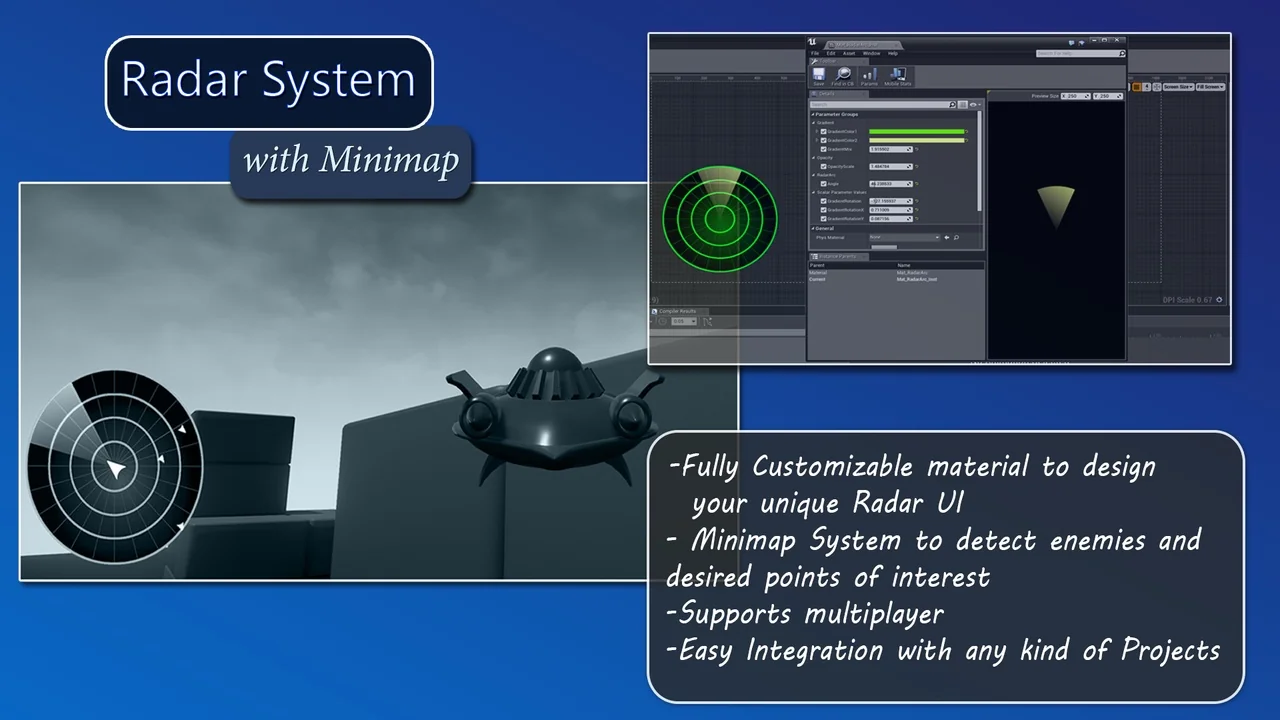
 Gameplay Features
 Gameplay Features
 Gameplay Features