"a19e0535960bd083"{"id":"1002026","slug":"first-person-horror-game-starter-kit-with-a-i","title":"First Person Horror Game Starter Kit (With A.I.)","category":"Gameplay Features","engine":"5.0+","assetVersion":"","engineVersion":"Engine Version: 5.0+","tag":"Gameplay Features","accent":"blue","visual":"mech","summary":"Explore the First Person Horror Game Starter Kit (With A.I.) for Unreal Engine, covering Blueprint integration, A.I. Logic, interface setups, and lighting.","platform":"Unreal Engine","publishedAt":"2026-10-26T13:02:29.097Z","updatedAt":"2026-10-26T13:02:29.097Z","sourceNotes":[],"fileContents":[],"compatibility":["Unreal Engine","Engine Version: 5.0+"],"featuredImage":{"alt":"First Person Horror Game Starter Kit (With A.I.)","src":"/wp-content/uploads/published/2026/10/557fdea92a0c-5b01d09b-2c46-4aae-ae81-be176bb38fc4-e24ca6b00d.webp"},"hasDownloadLink":true,"downloads":0,"terms":[{"taxonomy":"category","slug":"gameplay-features","name":"Gameplay Features"}],"galleryImages":[{"src":"/wp-content/uploads/published/2026/10/946eaa2a2bb3-80bf955d-cd10-4f45-977a-fd84de8f54b7-6777f7f0c7.webp","alt":"First Person Horror Game Starter Kit (With A.I.)"},{"src":"/wp-content/uploads/published/2026/10/d7c50df004da-283488a4-a53c-4b32-b95a-d98bd42ba790-4b199a5485.webp","alt":"First Person Horror Game Starter Kit (With A.I.)"},{"src":"/wp-content/uploads/published/2026/10/3dd954f74a70-7ae3ef9d-3836-4916-8a74-e55cc3b6adda-3fea6e5f21.webp","alt":"First Person Horror Game Starter Kit (With A.I.)"},{"src":"/wp-content/uploads/published/2026/10/ce8cb161a167-1b8444da-4d5a-47c2-9e84-2e78ae5aba90-ec0e8d1b8d.webp","alt":"First Person Horror Game Starter Kit (With A.I.)"},{"src":"/wp-content/uploads/published/2026/10/1843aefe00c5-b25942c9-706c-4995-a8bc-c746ea622856-9b70f0d4eb.webp","alt":"First Person Horror Game Starter Kit (With A.I.)"},{"src":"/wp-content/uploads/published/2026/10/8a46eb4d999d-3004810b-4a6f-4ac2-b709-f63756a92d09-3a43490f46.webp","alt":"First Person Horror Game Starter Kit (With A.I.)"},{"src":"/wp-content/uploads/published/2026/10/84bb530bf341-dc546a52-be7e-4096-9e69-a7ffdbdb7a21-dfe9cd6945.webp","alt":"First Person Horror Game Starter Kit (With A.I.)"},{"src":"/wp-content/uploads/published/2026/10/3d6f04d7259e-3ffbc60f-97cb-485f-81b3-0b4dd39b3461-c8f468f5a7.webp","alt":"First Person Horror Game Starter Kit (With A.I.)"},{"src":"/wp-content/uploads/published/2026/10/bdbaf3024940-b598ef58-04eb-4582-9388-16335c65449f-39c4cb1e1d.webp","alt":"First Person Horror Game Starter Kit (With A.I.)"}],"accessPanel":{"kind":"resource","title":"Download this resource","eyebrow":"Free Download","message":"Log in or create a free account to start your download.","fileName":"First Person Horror Game Starter Kit (With A.I.).7z","safetyNote":"Resources are manually reviewed before listing to improve quality and reduce obvious risks.","actionLabel":"Download Free","resourceType":"Resource archive"},"contentHtml":"\u003ch2\u003eFirst-Person Perspective and Core Horror Mechanics\u003c/h2\u003e\n\u003cp\u003eNavigating a confined, dimly lit corridor from an intimate viewpoint forms the backbone of modern suspense titles. In a first-person configuration, player immersion relies heavily on how spatial awareness, movement limitations, and visual focus interact with the surrounding world. The First Person Horror Game Starter Kit (With A.I.) establishes this exact foundation, setting up the player pawn to interact cleanly with environmental geometry, spatial audio cues, and claustrophobic spaces right out of the box.\u003c/p\u003e\n\u003cp\u003eBecause horror titles depend on calibrated pacing rather than high-speed traversal, the initial movement systems and player controls dictate the overall tone. The first-person vantage point limits peripheral awareness, ensuring that sound cues, sudden silhouette shifts, and unexpected encounters carry maximum psychological weight. Setting up a dedicated player controller tailored specifically for horror saves substantial initial scaffolding time, allowing developers to immediately focus on scene design, level pacing, and atmospheric scripting.\u003c/p\u003e \u003ch2\u003eUnreal Engine Blueprint Systems and Architecture\u003c/h2\u003e\n\u003cp\u003eThe kit is built directly on Unreal Engine's visual scripting framework, organizing foundational mechanics through interconnected Blueprints. For beginner to intermediate creators, untangling how disparate engine features talk to one another can present a steep learning curve. This package exposes those relationships directly, demonstrating how input events, state changes, and event dispatches coordinate without relying on opaque, buried code routines.\u003c/p\u003e\n\u003cp\u003eWithin this Blueprint structure, developers can trace how player actions trigger corresponding reactions across the scene. A door interaction, an environmental trigger, or a sudden loss of stamina communicates across the underlying gameplay framework. By inspecting and dissecting these pre-configured nodes, creators gain a transparent view into event-driven design patterns in Unreal Engine. This architecture acts as both a practical jumpstart for prototypes and an exploratory sandbox for learning production-ready system communication.\u003c/p\u003e \u003ch2\u003eStructuring A.I. Behaviors for Tension and Threat\u003c/h2\u003e\n\u003cp\u003eA horror title without a credible opposing force struggles to maintain stakes. The inclusion of integrated artificial intelligence gives the kit an active gameplay adversary capable of responding to the player's presence. Rather than functioning as a static obstacle, an active threat roams the navigation space, interprets spatial signals, and alters its state based on proximity and line-of-sight checks.\u003c/p\u003e\n\u003cp\u003eUnreal Engine governs artificial intelligence through a mixture of navigation meshes, perception components, and decision trees. In this starter kit, the A.I. Structure demonstrates how basic sensory inputs—such as spotting the player character or reacting to movement—translate into pursuit, investigation, or stalking routines. Studying how the A.I. Pawn communicates with the player pawn highlights how threat states elevate gameplay tension. This gives intermediate users a distinct base to implement custom patrol routes, specialized attack ranges, or search patterns that fit unique enemy character models.\u003c/p\u003e \u003ch2\u003eInterface Integration and On-Screen Player Systems\u003c/h2\u003e\n\u003cp\u003eClear, responsive user interface systems are crucial for maintaining narrative pacing and player comprehension. The starter kit incorporates interface elements that bridge on-screen HUD elements with behind-the-scenes Blueprint variables. Whether managing inventory tracking, health or sanity feedback, interaction prompts, or pause structures, user interfaces in Unreal Engine require careful data binding to prevent performance overhead.\u003c/p\u003e\n\u003cp\u003eBy observing how the interface reads data from the player character, developers can evaluate clean UI communication patterns. When an interactive object enters the player's view, the system triggers targeted HUD prompts that instruct the user on context-sensitive inputs. Inspecting these interface widgets reveals how Unreal Engine handles event dispatchers and dynamic UI updates, showing intermediate developers how to style menus, alerts, and feedback text without breaking player immersion.\u003c/p\u003e \u003ch2\u003eAdapting the Starter Kit Through Project-Specific Tweaks\u003c/h2\u003e\n\u003cp\u003eNo two horror projects share the exact same mechanical requirements. A psychological mystery may prioritize subtle environmental investigation and quiet narrative clues, whereas a survival-focused experience demands aggressive enemy encounters, resource starvation, and relentless pursuit. The starter kit is intentionally constructed as a baseline that invites modification.\u003c/p\u003e\n\u003cp\u003eBecause the mechanics are accessible through Blueprints, tweaking foundational variables—such as movement velocity, field of view, interaction range, detection cones, or A.I. Movement speeds—can be accomplished rapidly. Users can peel back existing mechanics, rewire interaction hooks, or introduce new conditions without having to rearchitect core controller logic. This flexibility ensures that while the kit handles initial system scaffolding, the ultimate character and pace of the game remain entirely within the developer's creative control.\u003c/p\u003e \u003ch2\u003eAtmospheric Lighting Workflows with the IES Texture Mega Pack\u003c/h2\u003e\n\u003cp\u003eLight and darkness define horror level design. An unlit corner only generates fear if the illuminated areas feel grounded, photometrically accurate, and visually compelling. To complement the functional mechanics established by the starter kit, scene environments benefit greatly from real-world illumination profiles such as those found in the IES Texture Mega Pack (100 IES Textures).\u003c/p\u003e\n\u003cp\u003eIES textures project exact real-world light emission patterns onto static meshes and architectural features, eliminating the artificial uniformity of default point and spot lights. When paired with the starter kit's first-person perspective, authentic photometric light falloff accentuates wall textures, sharpens shadow boundaries, and generates realistic ambient contrast. Implementing IES profiles across flashlight beams, swinging ceiling fixtures, or flickering emergency lamps turns simple starter-kit test chambers into dread-inducing spaces that amplify both the tension of the A.I. Encounter and the detail of the surrounding world.\u003c/p\u003e\n\n\u003ch2\u003eContinue Browsing Similar Packs\u003c/h2\u003e\n\u003cul\u003e\n\u003cli\u003e\u003ca href=\"https://3dcghub.com/advanced-framework-vr-mobile-desktop/\" title=\"Advanced Framework - VR, Mobile \u0026amp; Desktop\"\u003eAdvanced Framework - VR, Mobile \u0026amp; Desktop\u003c/a\u003e\u003c/li\u003e\n\u003cli\u003e\u003ca href=\"https://3dcghub.com/character-interaction/\" title=\"Character Interaction\"\u003eCharacter Interaction\u003c/a\u003e\u003c/li\u003e\n\u003cli\u003e\u003ca href=\"https://3dcghub.com/functional-fps-equipment/\" title=\"Functional FPS Equipment\"\u003eFunctional FPS Equipment\u003c/a\u003e\u003c/li\u003e\n\u003cli\u003e\u003ca href=\"https://3dcghub.com/dismemberment-kit-v2/\" title=\"Dismemberment Kit V2\"\u003eDismemberment Kit V2\u003c/a\u003e\u003c/li\u003e\n\u003cli\u003e\u003ca href=\"https://3dcghub.com/projectile-arcs/\" title=\"Projectile Arcs\"\u003eProjectile Arcs\u003c/a\u003e\u003c/li\u003e\n\u003c/ul\u003e","contentTextLength":6452,"navigation":{"current":65,"total":4026,"previous":{"id":"1002027","slug":"fitness-hall-sports-equipment","title":"Fitness hall - sports equipment","category":"Interior","platform":"Unreal Engine","updatedAt":"2026-10-26T13:03:08.441Z"},"next":{"id":"1002025","slug":"first-person-hammer","title":"First Person Hammer","category":"Combat","platform":"Unreal Engine","updatedAt":"2026-10-26T13:01:37.930Z"}},"relatedResources":[{"id":"28394","slug":"advanced-framework-vr-mobile-desktop","title":"Advanced Framework - VR, Mobile \u0026 Desktop","category":"Gameplay Features","engine":"5.0+","assetVersion":"Engine version: 5.0+","engineVersion":"","tag":"Gameplay Features","accent":"blue","visual":"luts","summary":"Advanced Framework is a production-ready foundation for VR, desktop, and mobile applications. It combines first-person control setups, interaction systems, multiplayer replication, navigation modes, and adaptable UI tools in one package.","platform":"Unreal Engine","publishedAt":"2026-05-12T09:33:53.000Z","updatedAt":"2026-05-12T09:33:54.000Z","sourceNotes":[],"fileContents":[],"compatibility":["Unreal Engine","Engine version: 5.0+"],"featuredImage":{"alt":"Advanced Framework - VR, Mobile \u0026 Desktop","src":"https://3dcghub.com/wp-content/uploads/2026/05/98ecd66b1773_1af6d69e-fbe1-435d-abdf-cc772ef3b31f.webp"},"hasDownloadLink":true,"downloads":0},{"id":"1001049","slug":"character-interaction","title":"Character Interaction","category":"Gameplay Features","engine":"5.3+","assetVersion":"","engineVersion":"Engine Version: 5.3+","tag":"Gameplay Features","accent":"blue","visual":"character","summary":"Blueprint-based character interaction system for UE5 with IK, first-person support, weapon switcher, vehicles, AI enemies, and close combat. Includes CI Add-on","platform":"Unreal Engine","publishedAt":"2026-08-27T16:20:39.102Z","updatedAt":"2026-08-27T16:20:39.102Z","sourceNotes":[],"fileContents":[],"compatibility":["Unreal Engine","Engine Version: 5.3+"],"featuredImage":{"alt":"Character Interaction","src":"/wp-content/uploads/published/2026/08/c04328b89794-30343517-c1fe-4277-9c93-7f18419493c9-612ecb684f.webp"},"hasDownloadLink":true,"downloads":3},{"id":"1000830","slug":"functional-fps-equipment","title":"Functional FPS Equipment","category":"Gameplay Features","engine":"5.4+","assetVersion":"","engineVersion":"Engine Version: 5.4+","tag":"Gameplay Features","accent":"blue","visual":"mech","summary":"Animated, rigged first-person equipment including camcorder, wristwatch, PDA, smartphone, and cellphone for Unreal Engine projects. 4 skeletal meshes with examp","platform":"Unreal Engine","publishedAt":"2026-08-03T12:13:42.864Z","updatedAt":"2026-08-03T12:13:42.864Z","sourceNotes":[],"fileContents":[],"compatibility":["Unreal Engine","Engine Version: 5.4+"],"featuredImage":{"alt":"Functional FPS Equipment","src":"/wp-content/uploads/published/2026/08/86fd5dc839bb-dc5607a3-31cf-4ab8-9143-a9d6ce13c694-39bc21f32d.webp"},"hasDownloadLink":true,"downloads":0}]}
Gameplay Features
First Person Horror Game Starter Kit (With A.I.)
Explore the First Person Horror Game Starter Kit (With A.I.) for Unreal Engine, covering Blueprint integration, A.I. Logic, interface setups, and lighting.
First-Person Perspective and Core Horror Mechanics
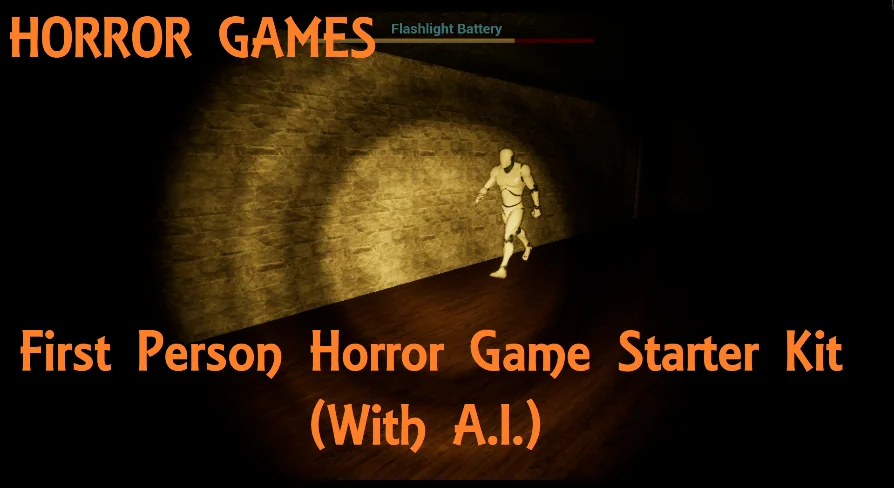
Navigating a confined, dimly lit corridor from an intimate viewpoint forms the backbone of modern suspense titles. In a first-person configuration, player immersion relies heavily on how spatial awareness, movement limitations, and visual focus interact with the surrounding world. The First Person Horror Game Starter Kit (With A.I.) establishes this exact foundation, setting up the player pawn to interact cleanly with environmental geometry, spatial audio cues, and claustrophobic spaces right out of the box.
Because horror titles depend on calibrated pacing rather than high-speed traversal, the initial movement systems and player controls dictate the overall tone. The first-person vantage point limits peripheral awareness, ensuring that sound cues, sudden silhouette shifts, and unexpected encounters carry maximum psychological weight. Setting up a dedicated player controller tailored specifically for horror saves substantial initial scaffolding time, allowing developers to immediately focus on scene design, level pacing, and atmospheric scripting.
Unreal Engine Blueprint Systems and Architecture
The kit is built directly on Unreal Engine's visual scripting framework, organizing foundational mechanics through interconnected Blueprints. For beginner to intermediate creators, untangling how disparate engine features talk to one another can present a steep learning curve. This package exposes those relationships directly, demonstrating how input events, state changes, and event dispatches coordinate without relying on opaque, buried code routines.
Within this Blueprint structure, developers can trace how player actions trigger corresponding reactions across the scene. A door interaction, an environmental trigger, or a sudden loss of stamina communicates across the underlying gameplay framework. By inspecting and dissecting these pre-configured nodes, creators gain a transparent view into event-driven design patterns in Unreal Engine. This architecture acts as both a practical jumpstart for prototypes and an exploratory sandbox for learning production-ready system communication.
Structuring A.I. Behaviors for Tension and Threat
A horror title without a credible opposing force struggles to maintain stakes. The inclusion of integrated artificial intelligence gives the kit an active gameplay adversary capable of responding to the player's presence. Rather than functioning as a static obstacle, an active threat roams the navigation space, interprets spatial signals, and alters its state based on proximity and line-of-sight checks.
Unreal Engine governs artificial intelligence through a mixture of navigation meshes, perception components, and decision trees. In this starter kit, the A.I. Structure demonstrates how basic sensory inputs—such as spotting the player character or reacting to movement—translate into pursuit, investigation, or stalking routines. Studying how the A.I. Pawn communicates with the player pawn highlights how threat states elevate gameplay tension. This gives intermediate users a distinct base to implement custom patrol routes, specialized attack ranges, or search patterns that fit unique enemy character models.
Interface Integration and On-Screen Player Systems
Clear, responsive user interface systems are crucial for maintaining narrative pacing and player comprehension. The starter kit incorporates interface elements that bridge on-screen HUD elements with behind-the-scenes Blueprint variables. Whether managing inventory tracking, health or sanity feedback, interaction prompts, or pause structures, user interfaces in Unreal Engine require careful data binding to prevent performance overhead.
By observing how the interface reads data from the player character, developers can evaluate clean UI communication patterns. When an interactive object enters the player's view, the system triggers targeted HUD prompts that instruct the user on context-sensitive inputs. Inspecting these interface widgets reveals how Unreal Engine handles event dispatchers and dynamic UI updates, showing intermediate developers how to style menus, alerts, and feedback text without breaking player immersion.
Adapting the Starter Kit Through Project-Specific Tweaks
No two horror projects share the exact same mechanical requirements. A psychological mystery may prioritize subtle environmental investigation and quiet narrative clues, whereas a survival-focused experience demands aggressive enemy encounters, resource starvation, and relentless pursuit. The starter kit is intentionally constructed as a baseline that invites modification.
Because the mechanics are accessible through Blueprints, tweaking foundational variables—such as movement velocity, field of view, interaction range, detection cones, or A.I. Movement speeds—can be accomplished rapidly. Users can peel back existing mechanics, rewire interaction hooks, or introduce new conditions without having to rearchitect core controller logic. This flexibility ensures that while the kit handles initial system scaffolding, the ultimate character and pace of the game remain entirely within the developer's creative control.
Atmospheric Lighting Workflows with the IES Texture Mega Pack
Light and darkness define horror level design. An unlit corner only generates fear if the illuminated areas feel grounded, photometrically accurate, and visually compelling. To complement the functional mechanics established by the starter kit, scene environments benefit greatly from real-world illumination profiles such as those found in the IES Texture Mega Pack (100 IES Textures).
IES textures project exact real-world light emission patterns onto static meshes and architectural features, eliminating the artificial uniformity of default point and spot lights. When paired with the starter kit's first-person perspective, authentic photometric light falloff accentuates wall textures, sharpens shadow boundaries, and generates realistic ambient contrast. Implementing IES profiles across flashlight beams, swinging ceiling fixtures, or flickering emergency lamps turns simple starter-kit test chambers into dread-inducing spaces that amplify both the tension of the A.I. Encounter and the detail of the surrounding world.
 Gameplay Features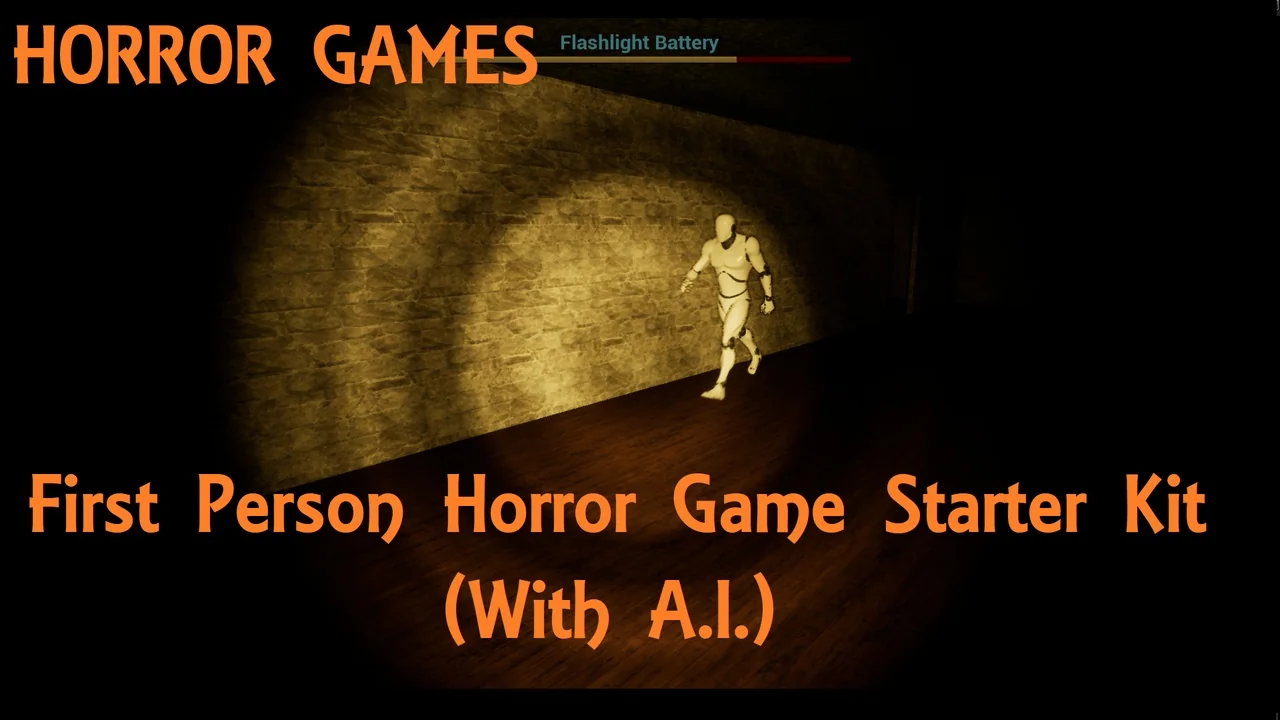
 Gameplay Features
 Gameplay Features
 Gameplay Features