"ddd0e3fb95b0aec2"{"id":"1000395","slug":"projectile-arcs","title":"Projectile Arcs","category":"Gameplay Features","engine":"4.26+,5.0+","assetVersion":"","engineVersion":"Engine Version: 4.26+,5.0+","tag":"Gameplay Features","accent":"blue","visual":"mech","summary":"A streamlined Unreal Engine 4 Blueprint system for visualizing clean, stylish projectile paths in first-person shooters and 3D platformers.","platform":"Unreal Engine","publishedAt":"2026-07-07T15:19:03.056Z","updatedAt":"2026-07-07T15:19:03.056Z","sourceNotes":[],"fileContents":[],"compatibility":["Unreal Engine","Engine Version: 4.26+,5.0+"],"featuredImage":{"alt":"Projectile Arcs","src":"/wp-content/uploads/published/2026/07/831cff6494b2-bcb2d954-ac38-427a-a62f-f0787f8f0a75-1b2c4ab8eb.webp"},"hasDownloadLink":true,"downloads":0,"terms":[{"taxonomy":"category","slug":"gameplay-features","name":"Gameplay Features"}],"galleryImages":[{"src":"/wp-content/uploads/published/2026/07/e476dc7a2578-63f2e841-7e8a-4b1e-aaf4-2ddeebc225a9-c6f788fce4.webp","alt":"Projectile Arcs"},{"src":"/wp-content/uploads/published/2026/07/57499265ad64-30df7e24-9529-4594-854f-ad2e6f847825-d5128dcbf6.webp","alt":"Projectile Arcs"},{"src":"/wp-content/uploads/published/2026/07/9b03d1bc9f0b-c1c33113-e0d9-4ef2-a431-dc5e767dbe79-b935766497.webp","alt":"Projectile Arcs"},{"src":"/wp-content/uploads/published/2026/07/36e4b3ccc59f-327bc2ef-edf8-444f-ad6d-fb81867be120-88d0aa7470.webp","alt":"Projectile Arcs"},{"src":"/wp-content/uploads/published/2026/07/632ec1aa4451-2a9ec64c-c87f-4c9a-ae67-d34c0be2986b-9f44fe254a.webp","alt":"Projectile Arcs"}],"accessPanel":{"kind":"resource","title":"Download this resource","eyebrow":"Free Download","message":"Log in or create a free account to start your download.","fileName":"Content.7z","safetyNote":"Resources are manually reviewed before listing to improve quality and reduce obvious risks.","actionLabel":"Download Free","resourceType":"Resource archive"},"contentHtml":"\u003ch2\u003eTelegraphing Trajectories in Shooters and Platformers\u003c/h2\u003e\n\u003cp\u003eWhether developing a high-paced first-person shooter or a precision-based 3D platformer, telegraphing the exact landing spot of an object is a critical gameplay mechanic. When players equip a grenade or prepare to throw a flashbang, they rely on visual path information to accurately judge the distance, height, and trajectory of their throw. Projectile Arcs is a modular system designed specifically to handle this visualization process within Unreal Engine 4. By generating clean, stylish paths, the system removes the guesswork from aiming mechanics.\u003c/p\u003e\n\u003cp\u003eThe toolset allows developers to implement arc displays that show exactly where a thrown object will land before the action is executed. This direct visual feedback dramatically improves the overall end-user experience, ensuring that players do not feel cheated by unpredictable physics or blind throws. Because the tool integrates seamlessly with both first-person and third-person camera perspectives, developers can utilize the same underlying logic whether a character is tossing a flashbang down a narrow corridor or launching a projectile across a wide-open platforming stage.\u003c/p\u003e\n\u003ch2\u003eVisual Scripting and Daisy-Chained Macros\u003c/h2\u003e\n\u003cp\u003eMaintaining an organized workspace is crucial when programming complex player abilities. From a visual scripting perspective, the workflow behind Projectile Arcs is highly streamlined to prevent node clutter. The system operates on a straightforward two-step process: developers use one node to initially create the arc in the game world, and another node to dynamically update its position as the player aims.\u003c/p\u003e\n\u003cp\u003eTo keep the Blueprint event graph organized, the system utilizes specialized macros. These macros allow developers to \"daisy chain\" events together in a linear, readable sequence. This approach encapsulates the complex trajectory mathematics, keeping the visual scripting environment clean even when updating various required parts of the arc simultaneously. Furthermore, the barrier to entry for utilizing this logic is quite low. Extensive proficiency with Blueprints is not strictly necessary to get the mechanic functioning. As long as a developer can provide a valid start point—such as the player's hand or weapon muzzle—and an endpoint, the system handles the intermediate rendering and logic automatically.\u003c/p\u003e\n\u003ch2\u003eUtilizing UE4 Native Projectile Mechanics\u003c/h2\u003e\n\u003cp\u003eRather than forcing developers to build custom physics simulations from scratch, the underlying architecture of Projectile Arcs is built directly upon the native projectile systems already included in UE4. This ensures that the visual arc perfectly mirrors the actual flight path the engine's physics system will eventually calculate. By leveraging these native mechanics, the asset cuts out the heavy, time-consuming setup typically required to display an accurate projectile path.\u003c/p\u003e\n\u003cp\u003eThe system also makes use of Niagara, Unreal Engine's advanced particle system framework. The inclusion of Niagara ensures that the drawn paths are not only mathematically accurate but visually striking. Developers can modify the look of the arc to fit their project's aesthetic, creating stylish trajectories that blend smoothly with the game's existing visual effects.\u003c/p\u003e\n\u003ch2\u003eLocal Rendering and Trajectory Limitations\u003c/h2\u003e\n\u003cp\u003eWhen implementing aiming mechanics in multiplayer environments, rendering overhead and network traffic are common concerns. Projectile Arcs approaches this by defaulting to a local-only rendering setup. In the vast majority of gameplay scenarios, the predictive arc is only relevant to the local user executing the action. Broadcasting a purely visual aiming aid to all connected clients consumes unnecessary bandwidth, so built-in network support is intentionally excluded to keep the system lightweight and performant. If a specific project dictates that other players must see the aiming arc in real-time, custom networking logic would need to be implemented.\u003c/p\u003e\n\u003cp\u003eAlso, the current iteration of the system focuses purely on the initial flight path and does not calculate predicted bounces. The arc visualizes the trajectory from the starting throw point directly to the first point of impact. While bounce prediction is not handled natively by the current nodes, the system effectively manages the primary trajectory visualization required for standard grenade tosses and platforming projectiles.\u003c/p\u003e\n\u003ch2\u003eThe Rigged Robot Companion\u003c/h2\u003e\n\u003cp\u003eBeyond the core trajectory visualization tools, the package includes a supplementary character asset to help test these mechanics. Developers receive an adorable robot model designed to be dropped directly into a project. This asset is not simply a static mesh; the robot comes fully rigged and animated. \u003c/p\u003e\n\u003cp\u003eHaving a rigged and animated character included alongside the arc logic allows developers to immediately test how throwing animations and projectile paths align with a moving character model. It serves as a ready-to-use testing dummy for aiming mechanics, providing an immediate visual reference for how the start and endpoints interact with a character's skeletal hierarchy in both shooter and platformer environments.\u003c/p\u003e\n\n\u003ch2\u003eContinue Browsing Similar Packs\u003c/h2\u003e\n\u003cul\u003e\n\u003cli\u003e\u003ca href=\"https://3dcghub.com/multiplayer-xp-system/\" title=\"Multiplayer XP System\"\u003eMultiplayer XP System\u003c/a\u003e\u003c/li\u003e\n\u003cli\u003e\u003ca href=\"https://3dcghub.com/advanced-scope/\" title=\"Advanced Scope\"\u003eAdvanced Scope\u003c/a\u003e\u003c/li\u003e\n\u003cli\u003e\u003ca href=\"https://3dcghub.com/dynamic-flight-with-blueprints/\" title=\"Dynamic Flight with Blueprints\"\u003eDynamic Flight with Blueprints\u003c/a\u003e\u003c/li\u003e\n\u003cli\u003e\u003ca href=\"https://3dcghub.com/npc-ai-queuing-system/\" title=\"NPC AI Queuing System\"\u003eNPC AI Queuing System\u003c/a\u003e\u003c/li\u003e\n\u003cli\u003e\u003ca href=\"https://3dcghub.com/path-tracer-toolkit/\" title=\"Path Tracer Toolkit\"\u003ePath Tracer Toolkit\u003c/a\u003e\u003c/li\u003e\n\u003c/ul\u003e","contentTextLength":5287,"navigation":{"current":1255,"total":3511,"previous":{"id":"1000396","slug":"realistic-crocodile","title":"Realistic Crocodile","category":"Characters \u0026 Creatures","platform":"Unreal Engine","updatedAt":"2026-07-07T15:23:45.665Z"},"next":{"id":"1000394","slug":"procedural-forest","title":"Procedural Forest","category":"Forest \u0026 Jungle","platform":"Unreal Engine","updatedAt":"2026-07-07T15:13:16.744Z"}},"relatedResources":[{"id":"1000935","slug":"advanced-lock-on-system","title":"Advanced Lock-on System","category":"Gameplay Features","engine":"5.1+","assetVersion":"","engineVersion":"Engine Version: 5.1+","tag":"Gameplay Features","accent":"blue","visual":"mech","summary":"Shooter toolkit with Tracking, Lock-on, and Prediction Systems. Targets any Actor, displays markers and info, supports auto aim and homing projectiles.","platform":"Unreal Engine","publishedAt":"2026-08-10T02:44:44.426Z","updatedAt":"2026-08-10T02:44:44.426Z","sourceNotes":[],"fileContents":[],"compatibility":["Unreal Engine","Engine Version: 5.1+"],"featuredImage":{"alt":"Advanced Lock-on System","src":"/wp-content/uploads/published/2026/08/a65d18b23b10-defd2078-21d1-4fb9-b55a-97cf5a676530-0a400ee090.webp"},"hasDownloadLink":true,"downloads":0},{"id":"1000922","slug":"open-world-ai-multiplayer-spawn-system","title":"Open World AI Multiplayer Spawn System","category":"Gameplay Features","engine":"4.26+,5.0+","assetVersion":"","engineVersion":"Engine Version: 4.26+,5.0+","tag":"Gameplay Features","accent":"blue","visual":"mech","summary":"A server-side Blueprint spawn system for open-world multiplayer games, with roaming, stationary, and path AI, friendly or zombie variants.","platform":"Unreal Engine","publishedAt":"2026-08-08T05:05:40.195Z","updatedAt":"2026-08-08T05:05:40.195Z","sourceNotes":[],"fileContents":[],"compatibility":["Unreal Engine","Engine Version: 4.26+,5.0+"],"featuredImage":{"alt":"Open World AI Multiplayer Spawn System","src":"/wp-content/uploads/published/2026/08/c4917032d21c-cb7e3ead-ba0b-445c-8608-4fe8a4722c7e-d50d7d81fc.webp"},"hasDownloadLink":true,"downloads":1},{"id":"1000854","slug":"multiplayer-traps-pack","title":"Multiplayer Traps Pack","category":"Gameplay Features","engine":"4.26+,5.0+","assetVersion":"","engineVersion":"Engine Version: 4.26+,5.0+","tag":"Gameplay Features","accent":"blue","visual":"mech","summary":"Blueprint multiplayer traps: spike plates, spinning saws, flamethrowers, swinging maces. Animation-free, no event tick, per-trap settings, mesh-swappable.","platform":"Unreal Engine","publishedAt":"2026-08-04T16:58:03.710Z","updatedAt":"2026-08-04T16:58:03.710Z","sourceNotes":[],"fileContents":[],"compatibility":["Unreal Engine","Engine Version: 4.26+,5.0+"],"featuredImage":{"alt":"Multiplayer Traps Pack","src":"/wp-content/uploads/published/2026/08/baa4c8cf0c46-aa3aeac9-d975-4dac-a312-19c77e90c7e5-c3127b0699.webp"},"hasDownloadLink":true,"downloads":3}]}
Gameplay Features
Projectile Arcs
A streamlined Unreal Engine 4 Blueprint system for visualizing clean, stylish projectile paths in first-person shooters and 3D platformers.
Telegraphing Trajectories in Shooters and Platformers
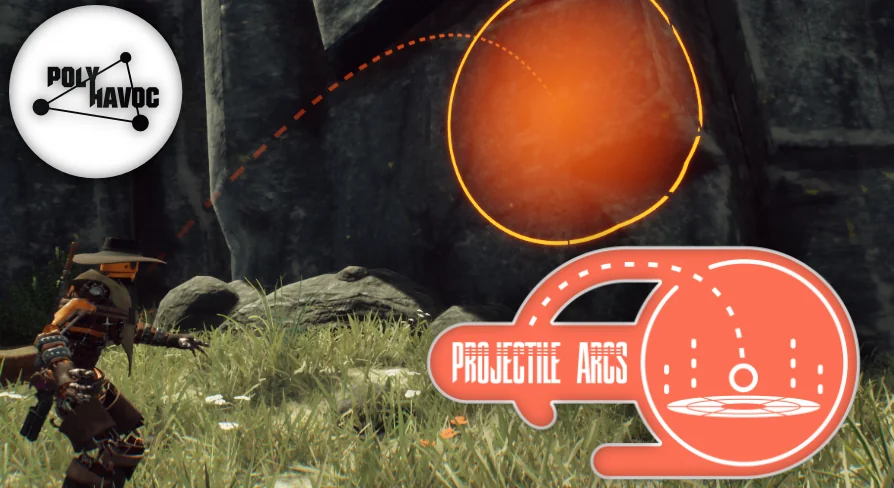
Whether developing a high-paced first-person shooter or a precision-based 3D platformer, telegraphing the exact landing spot of an object is a critical gameplay mechanic. When players equip a grenade or prepare to throw a flashbang, they rely on visual path information to accurately judge the distance, height, and trajectory of their throw. Projectile Arcs is a modular system designed specifically to handle this visualization process within Unreal Engine 4. By generating clean, stylish paths, the system removes the guesswork from aiming mechanics.
The toolset allows developers to implement arc displays that show exactly where a thrown object will land before the action is executed. This direct visual feedback dramatically improves the overall end-user experience, ensuring that players do not feel cheated by unpredictable physics or blind throws. Because the tool integrates seamlessly with both first-person and third-person camera perspectives, developers can utilize the same underlying logic whether a character is tossing a flashbang down a narrow corridor or launching a projectile across a wide-open platforming stage.
Visual Scripting and Daisy-Chained Macros
Maintaining an organized workspace is crucial when programming complex player abilities. From a visual scripting perspective, the workflow behind Projectile Arcs is highly streamlined to prevent node clutter. The system operates on a straightforward two-step process: developers use one node to initially create the arc in the game world, and another node to dynamically update its position as the player aims.
To keep the Blueprint event graph organized, the system utilizes specialized macros. These macros allow developers to "daisy chain" events together in a linear, readable sequence. This approach encapsulates the complex trajectory mathematics, keeping the visual scripting environment clean even when updating various required parts of the arc simultaneously. Furthermore, the barrier to entry for utilizing this logic is quite low. Extensive proficiency with Blueprints is not strictly necessary to get the mechanic functioning. As long as a developer can provide a valid start point—such as the player's hand or weapon muzzle—and an endpoint, the system handles the intermediate rendering and logic automatically.
Utilizing UE4 Native Projectile Mechanics
Rather than forcing developers to build custom physics simulations from scratch, the underlying architecture of Projectile Arcs is built directly upon the native projectile systems already included in UE4. This ensures that the visual arc perfectly mirrors the actual flight path the engine's physics system will eventually calculate. By leveraging these native mechanics, the asset cuts out the heavy, time-consuming setup typically required to display an accurate projectile path.
The system also makes use of Niagara, Unreal Engine's advanced particle system framework. The inclusion of Niagara ensures that the drawn paths are not only mathematically accurate but visually striking. Developers can modify the look of the arc to fit their project's aesthetic, creating stylish trajectories that blend smoothly with the game's existing visual effects.
Local Rendering and Trajectory Limitations
When implementing aiming mechanics in multiplayer environments, rendering overhead and network traffic are common concerns. Projectile Arcs approaches this by defaulting to a local-only rendering setup. In the vast majority of gameplay scenarios, the predictive arc is only relevant to the local user executing the action. Broadcasting a purely visual aiming aid to all connected clients consumes unnecessary bandwidth, so built-in network support is intentionally excluded to keep the system lightweight and performant. If a specific project dictates that other players must see the aiming arc in real-time, custom networking logic would need to be implemented.
Also, the current iteration of the system focuses purely on the initial flight path and does not calculate predicted bounces. The arc visualizes the trajectory from the starting throw point directly to the first point of impact. While bounce prediction is not handled natively by the current nodes, the system effectively manages the primary trajectory visualization required for standard grenade tosses and platforming projectiles.
The Rigged Robot Companion
Beyond the core trajectory visualization tools, the package includes a supplementary character asset to help test these mechanics. Developers receive an adorable robot model designed to be dropped directly into a project. This asset is not simply a static mesh; the robot comes fully rigged and animated.
Having a rigged and animated character included alongside the arc logic allows developers to immediately test how throwing animations and projectile paths align with a moving character model. It serves as a ready-to-use testing dummy for aiming mechanics, providing an immediate visual reference for how the start and endpoints interact with a character's skeletal hierarchy in both shooter and platformer environments.
 Gameplay Features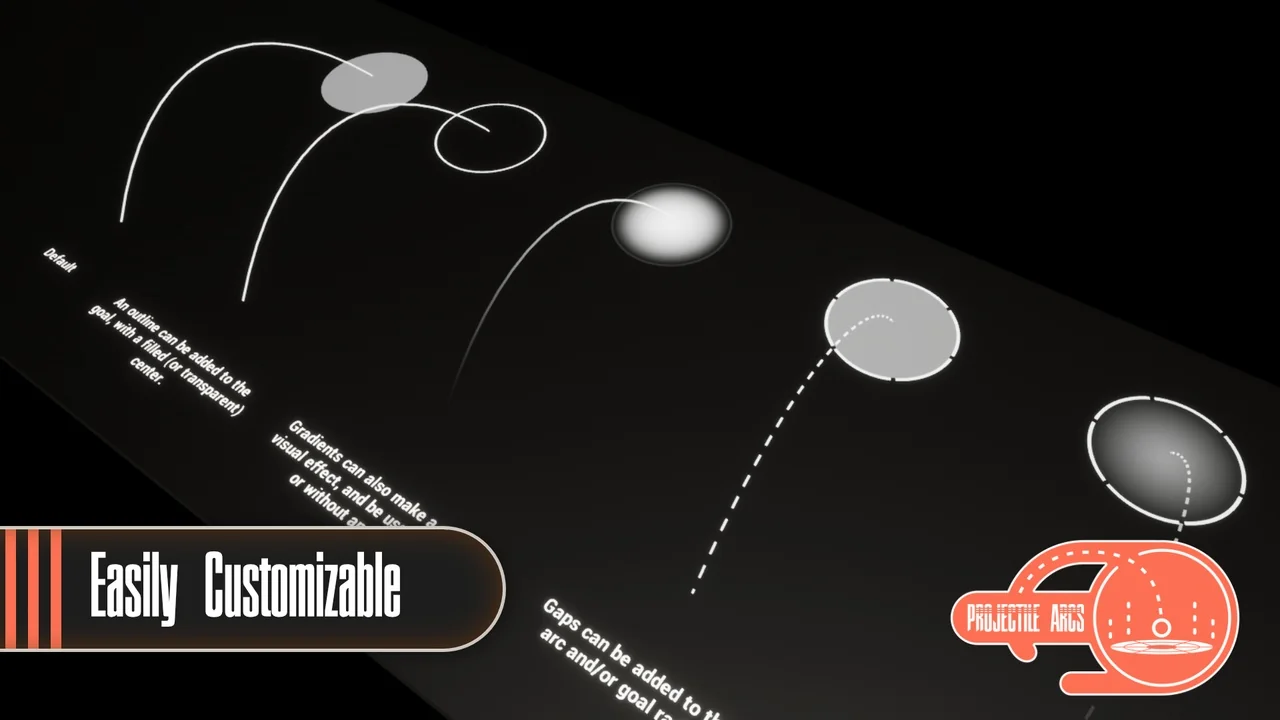
 Gameplay Features
 Gameplay Features
 Gameplay Features