"c14ff6bd758dadb1"{"id":"1000083","slug":"npc-ai-queuing-system","title":"NPC AI Queuing System","category":"Gameplay Features","engine":"Engine Version: 4.26+,5.0+","assetVersion":"Engine Version: 4.26+,5.0+","engineVersion":"","tag":"Gameplay Features","accent":"blue","visual":"mech","summary":"A Blueprint-based NPC queuing system for smooth pedestrian behavior, spline routes, behavior tree logic, debug tools, and quick scene setup.","platform":"Unreal Engine","publishedAt":"2026-06-05T16:06:07.049Z","updatedAt":"2026-06-05T16:06:07.049Z","sourceNotes":[],"fileContents":[],"compatibility":["Unreal Engine","Engine Version: 4.26+,5.0+"],"featuredImage":{"alt":"NPC AI Queuing System","src":"/wp-content/uploads/published/2026/06/2fce6ebe6d61-050ebb3a-f89b-44e9-8982-9b4b5c0267ab-85fbd54aad.webp"},"hasDownloadLink":true,"downloads":0,"terms":[{"taxonomy":"category","slug":"gameplay-features","name":"Gameplay Features"}],"galleryImages":[{"src":"/wp-content/uploads/published/2026/06/eaf594db5698-d48bad1f-b2d5-41e7-89a6-cf1539fcd6f5-f0ce553e88.webp","alt":"NPC AI Queuing System"},{"src":"/wp-content/uploads/published/2026/06/c24c4814575b-b290a03e-07ee-4c99-b35f-3db72010da75-caecd11efd.webp","alt":"NPC AI Queuing System"},{"src":"/wp-content/uploads/published/2026/06/ee3c3e9a1a7c-60113ace-7df7-41bb-9405-04f4fc2db2ff-f1c02dda4f.webp","alt":"NPC AI Queuing System"},{"src":"/wp-content/uploads/published/2026/06/5694696105fb-b8981b22-a0e7-402e-a706-9af662e03d2a-3eeec71ce9.webp","alt":"NPC AI Queuing System"},{"src":"/wp-content/uploads/published/2026/06/9e34675eea60-db291389-945d-451c-82c4-ebae71544e77-20418a91d1.webp","alt":"NPC AI Queuing System"}],"accessPanel":{"kind":"resource","title":"Access this resource","eyebrow":"Free Download","message":"Log in or create a free account to start your download.","fileName":"NPC AI Queuing System.7z","safetyNote":"Resources are manually reviewed before listing to improve quality and reduce obvious risks.","actionLabel":"Download Free","resourceType":"Resource archive"},"contentHtml":"\u003cp\u003eBusy scenes often need small moments of order to feel convincing. A shop line, a checkpoint, a waiting area, or any gameplay space where characters need to stand in sequence can quickly look stiff if the movement is not handled well. NPC AI Queuing System is aimed at that exact situation, giving developers a way to add pedestrians, NPCs, or AI characters that queue with smoother and more vivid behavior.\u003c/p\u003e\n\u003cp\u003eThat makes it useful in two different directions at once. A queue can become part of the gameplay, where character order and movement matter directly, or it can sit in the background as ambient pedestrian behavior that gives a location more life. The same core setup supports both uses: characters line up, react to the queue state, and advance when the front of the line changes.\u003c/p\u003e \u003ch2\u003eWhere NPC AI Queuing System fits into a scene\u003c/h2\u003e\n\u003cp\u003eThe strongest identity of this pack is not just that it creates a line of NPCs, but that it treats queuing as a readable behavior. Instead of characters simply occupying fixed positions, the queue is structured so that when the NPC at the front leaves, every NPC behind automatically moves forward to the new position. That one detail gives the line a natural sense of flow.\u003c/p\u003e\n\u003cp\u003eIn a gameplay setting, that behavior can help make waiting lines feel active rather than frozen. If the queue is tied to a point of interaction, the visible forward movement of the remaining NPCs helps communicate that the state has changed. In a background scene, the same motion keeps pedestrians from feeling like decoration placed in static slots. The queue progresses, and the environment feels more inhabited because of it.\u003c/p\u003e\n\u003cp\u003eThe pack is clearly meant for developers who want these characters to read as pedestrians with smooth behavior, whether they are central to the player's actions or simply part of the atmosphere.\u003c/p\u003e \u003ch2\u003eBehavior tree logic and Blueprint setup\u003c/h2\u003e\n\u003cp\u003eThe system is done entirely with Blueprints, and the Blueprints have been commented and properly arranged. For teams or individual developers who want to understand how the queue works instead of treating it like a black box, that matters. Commented and organized Blueprint logic can make a practical difference during setup, testing, and modification, especially when the goal is to fold a queue into an existing project rather than leave it isolated as a demo feature.\u003c/p\u003e\n\u003cp\u003eThe NPC queuing behavior is based on behavior tree, blackboard, tasks, and services. That gives the system a clear AI structure for handling queue actions and state changes. Rather than being framed as a simple animated effect, the queue is handled through familiar gameplay AI components. For developers already working with NPC behavior systems, that makes the pack easier to place mentally within a larger gameplay setup.\u003c/p\u003e\n\u003cp\u003eQuick setup and ease of use are part of the pack's appeal as well. The material provided around the system includes a video demo, a Windows demo, and documentation with tutorials and release notes, all noted for version 2.1. The presence of those materials supports the idea that the pack is meant to be learned, tested, and implemented rather than merely dropped in without context.\u003c/p\u003e \u003ch2\u003eSpline-based Queuing Route for shaping the line\u003c/h2\u003e\n\u003cp\u003eOne of the more flexible parts of the system is its spline-based queuing route. This allows developers to control queue curves instead of limiting a line to a rigid straight arrangement. In practice, that opens the door to queues that follow the shape of a hallway, wind around barriers, or sit more naturally within an environment layout.\u003c/p\u003e\n\u003cp\u003eThe route is not only spline-based, but also customizable through parameters. The interval distance between two adjacent NPCs can be adjusted, which helps determine how tightly or loosely the line reads. That spacing can change the tone of a scene: a compact line can feel crowded and busy, while a wider one can feel calmer and more orderly.\u003c/p\u003e\n\u003cp\u003eThe system also allows control over whether NPCs stand at spline points. That option adds another layer of placement control, making the queue more adaptable to different scene requirements. A developer is not locked into one interpretation of how characters should occupy the route. The queue can be shaped to match the environment and the intended behavior style.\u003c/p\u003e\n\u003cp\u003eThis is where the pack becomes useful creatively. The queue is not just a line mechanic; it can be staged. The curve of the route, the gaps between characters, and the way they settle into positions all affect how a waiting group reads on screen. For projects that rely on environmental storytelling or believable public spaces, those details help turn a simple system into scene-building support.\u003c/p\u003e \u003ch2\u003eReading NPC states through materials and debug tools\u003c/h2\u003e\n\u003cp\u003eState readability is handled visually by assigning different materials to NPCs in different behavior states, using green and red. That is a straightforward detail, but it serves an important role during setup and testing. When character behavior changes, the system gives a quick visual signal instead of leaving the developer to infer state only through movement.\u003c/p\u003e\n\u003cp\u003eThat visual distinction pairs naturally with the built-in debug system. The debug tools are presented as a way to help developers learn the system and develop with it. For a behavior-driven pack, that is especially useful. Queues involve position updates, state changes, route logic, and AI behavior working together, so a built-in debugging layer can make it easier to inspect what is happening as the line changes.\u003c/p\u003e\n\u003cp\u003eThe combination of debug support and color-based material feedback suggests a pack that is not only functional in the finished scene, but also conscious of the development process. It gives users help in understanding what the NPCs are doing and why. That can shorten the gap between importing the system and adapting it to a project's own scene logic.\u003c/p\u003e \u003ch2\u003eFrom background pedestrians to gameplay queues\u003c/h2\u003e\n\u003cp\u003eThe pack covers a useful middle ground between environmental behavior and direct game interaction. On one side, it can populate a scene with background pedestrians who behave in a more lively and structured way than static crowd placement. On the other, it can support gameplay spaces where a queue itself is part of what the player observes or navigates.\u003c/p\u003e\n\u003cp\u003eBecause the queue advances automatically when the front NPC leaves, the behavior has a built-in sense of progression. That can help a line feel active over time, even if the developer is using it simply to animate a public space. It can also reinforce game logic in moments where sequence matters and the player needs to read changes in the line clearly.\u003c/p\u003e\n\u003cp\u003eThe use of behavior tree, blackboard, tasks, and services gives the queue a system-driven foundation, while the spline route and spacing controls shape how it appears in the world. That balance between logic and presentation is what makes the pack practical. It is not only about NPC movement, and not only about layout. It connects the two.\u003c/p\u003e \u003ch2\u003eWho NPC AI Queuing System serves best\u003c/h2\u003e\n\u003cp\u003eNPC AI Queuing System is most useful for developers who need orderly pedestrian behavior that still feels alive. Its Blueprint-based setup, commented organization, and built-in debug support make it approachable for implementation and learning, while the behavior tree structure and spline route controls give it enough flexibility to fit different scene layouts.\u003c/p\u003e\n\u003cp\u003eFor projects that need waiting lines as part of gameplay or as background pedestrian behavior, the pack focuses on the practical details that sell the effect: visible state changes, adjustable spacing, route shaping, and automatic forward movement when the front of the queue clears. That makes it a strong fit for anyone building scenes where a believable line of NPCs needs to do more than stand still.\u003c/p\u003e\n\n\u003ch2\u003eContinue Browsing Similar Packs\u003c/h2\u003e\n\u003cul\u003e\n\u003cli\u003e\u003ca href=\"https://3dcghub.com/smart-ai/\" title=\"Smart AI\"\u003eSmart AI\u003c/a\u003e\u003c/li\u003e\n\u003cli\u003e\u003ca href=\"https://3dcghub.com/dynamic-ai-system/\" title=\"Dynamic AI System\"\u003eDynamic AI System\u003c/a\u003e\u003c/li\u003e\n\u003cli\u003e\u003ca href=\"https://3dcghub.com/npc-eyes-sight-system-pro-accurate-npc-vision-with-light-shadow-body-points/\" title=\"NPC Eyes Sight System PRO – Accurate NPC Vision with Light, Shadow, Body Points\"\u003eNPC Eyes Sight System PRO – Accurate NPC Vision with Light, Shadow, Body Points\u003c/a\u003e\u003c/li\u003e\n\u003cli\u003e\u003ca href=\"https://3dcghub.com/universal-shooting-game-template-and-framework/\" title=\"Universal Shooting Game Template and Framework\"\u003eUniversal Shooting Game Template and Framework\u003c/a\u003e\u003c/li\u003e\n\u003cli\u003e\u003ca href=\"https://3dcghub.com/cinematic-cutscene-system/\" title=\"Cinematic Cutscene System\"\u003eCinematic Cutscene System\u003c/a\u003e\u003c/li\u003e\n\u003c/ul\u003e","contentTextLength":7955,"navigation":{"current":1779,"total":3719,"previous":{"id":"1000084","slug":"ocean-monster-fish-pack-part-2-underwater-creatures-fish-low-poly-11","title":"Ocean Monster Fish Pack - Part 2 - Underwater Creatures - Fish low poly - #11","category":"Creatures \u0026 Monsters","platform":"Unreal Engine","updatedAt":"2026-06-05T16:10:19.047Z"},"next":{"id":"1000082","slug":"music-star-studio","title":"Music Star Studio","category":"Interior","platform":"Unreal Engine","updatedAt":"2026-06-05T15:54:44.401Z"}},"relatedResources":[{"id":"11105","slug":"smart-ai","title":"Smart AI","category":"Gameplay Features","engine":"4.27,5.0+","assetVersion":"Engine version: 4.27,5.0+","engineVersion":"4.26","tag":"Gameplay Features","accent":"blue","visual":"city","summary":"Enhance your project with Smart AI, a versatile system offering 15 unique behaviors and full multiplayer support. It includes melee and ranged combat, specialized AI types, and advanced optimization tools.","platform":"Unreal Engine","publishedAt":"2026-03-03T16:56:50.000Z","updatedAt":"2026-04-19T15:49:49.000Z","sourceNotes":[],"fileContents":[],"compatibility":["Unreal Engine","Engine version: 4.27,5.0+"],"featuredImage":{"alt":"Smart AI","src":"https://3dcghub.com/wp-content/uploads/2026/03/3e6175a6-1ad0-4a6a-aa6a-a60785237185.webp"},"hasDownloadLink":true,"downloads":1},{"id":"1001463","slug":"npc-queue-system","title":"NPC Queue system","category":"Gameplay Features","engine":"5.8+","assetVersion":"","engineVersion":"Engine Version: 5.8+","tag":"Gameplay Features","accent":"blue","visual":"mech","summary":"Implement organized crowd lines and tycoon waiting systems with the spline-driven NPC Queue system for smart AI pedestrian management.","platform":"Unreal Engine","publishedAt":"2026-10-08T07:53:54.377Z","updatedAt":"2026-10-08T07:53:54.377Z","sourceNotes":[],"fileContents":[],"compatibility":["Unreal Engine","Engine Version: 5.8+"],"featuredImage":{"alt":"NPC Queue system","src":"/wp-content/uploads/published/2026/10/f1164b0c9d94-d3857132-70c7-4190-9237-ae36d28b474a-2f82d8c864.webp"},"hasDownloadLink":true,"downloads":0},{"id":"1000262","slug":"daily-life-ai","title":"Daily Life AI","category":"Animations","engine":"4.26+,5.0+","assetVersion":"","engineVersion":"Engine Version: 4.26+,5.0+","tag":"Animations","accent":"blue","visual":"animation","summary":"An implementation guide to Daily Life AI, detailing its day/night cycle, behavior tree structure, hunger system, and drag-and-drop NPC routines.","platform":"Unreal Engine","publishedAt":"2026-06-30T23:06:12.448Z","updatedAt":"2026-06-30T23:06:12.448Z","sourceNotes":[],"fileContents":[],"compatibility":["Unreal Engine","Engine Version: 4.26+,5.0+"],"featuredImage":{"alt":"Daily Life AI","src":"/wp-content/uploads/published/2026/06/e147817c5ccf-a6a6198d-7c5a-4d60-bd9f-d08e7df2d365-79bd7785fd.webp"},"hasDownloadLink":true,"downloads":1}]}
Gameplay Features
NPC AI Queuing System
A Blueprint-based NPC queuing system for smooth pedestrian behavior, spline routes, behavior tree logic, debug tools, and quick scene setup.
Busy scenes often need small moments of order to feel convincing. A shop line, a checkpoint, a waiting area, or any gameplay space where characters need to stand in sequence can quickly look stiff if the movement is not handled well. NPC AI Queuing System is aimed at that exact situation, giving developers a way to add pedestrians, NPCs, or AI characters that queue with smoother and more vivid behavior.
That makes it useful in two different directions at once. A queue can become part of the gameplay, where character order and movement matter directly, or it can sit in the background as ambient pedestrian behavior that gives a location more life. The same core setup supports both uses: characters line up, react to the queue state, and advance when the front of the line changes.
Where NPC AI Queuing System fits into a scene
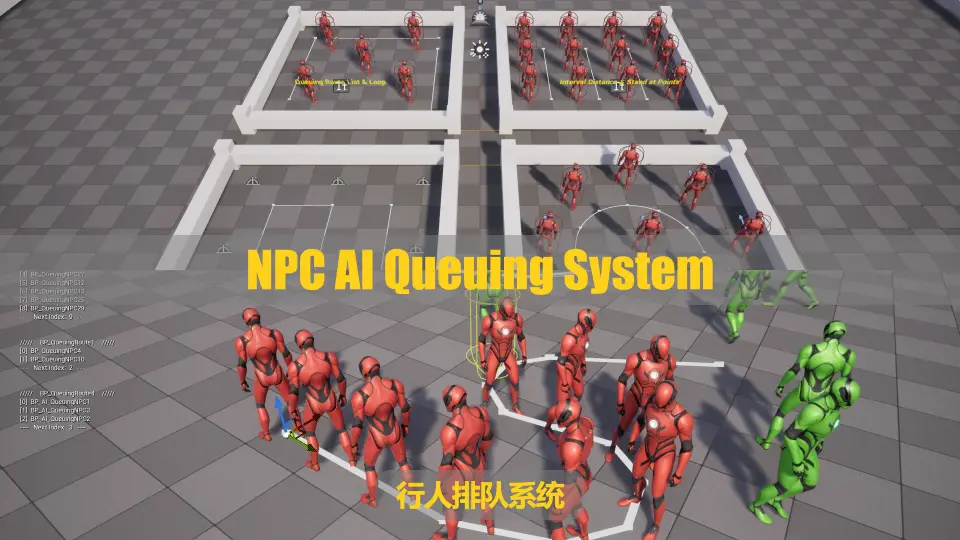
The strongest identity of this pack is not just that it creates a line of NPCs, but that it treats queuing as a readable behavior. Instead of characters simply occupying fixed positions, the queue is structured so that when the NPC at the front leaves, every NPC behind automatically moves forward to the new position. That one detail gives the line a natural sense of flow.
In a gameplay setting, that behavior can help make waiting lines feel active rather than frozen. If the queue is tied to a point of interaction, the visible forward movement of the remaining NPCs helps communicate that the state has changed. In a background scene, the same motion keeps pedestrians from feeling like decoration placed in static slots. The queue progresses, and the environment feels more inhabited because of it.
The pack is clearly meant for developers who want these characters to read as pedestrians with smooth behavior, whether they are central to the player's actions or simply part of the atmosphere.
Behavior tree logic and Blueprint setup
The system is done entirely with Blueprints, and the Blueprints have been commented and properly arranged. For teams or individual developers who want to understand how the queue works instead of treating it like a black box, that matters. Commented and organized Blueprint logic can make a practical difference during setup, testing, and modification, especially when the goal is to fold a queue into an existing project rather than leave it isolated as a demo feature.
The NPC queuing behavior is based on behavior tree, blackboard, tasks, and services. That gives the system a clear AI structure for handling queue actions and state changes. Rather than being framed as a simple animated effect, the queue is handled through familiar gameplay AI components. For developers already working with NPC behavior systems, that makes the pack easier to place mentally within a larger gameplay setup.
Quick setup and ease of use are part of the pack's appeal as well. The material provided around the system includes a video demo, a Windows demo, and documentation with tutorials and release notes, all noted for version 2.1. The presence of those materials supports the idea that the pack is meant to be learned, tested, and implemented rather than merely dropped in without context.
Spline-based Queuing Route for shaping the line
One of the more flexible parts of the system is its spline-based queuing route. This allows developers to control queue curves instead of limiting a line to a rigid straight arrangement. In practice, that opens the door to queues that follow the shape of a hallway, wind around barriers, or sit more naturally within an environment layout.
The route is not only spline-based, but also customizable through parameters. The interval distance between two adjacent NPCs can be adjusted, which helps determine how tightly or loosely the line reads. That spacing can change the tone of a scene: a compact line can feel crowded and busy, while a wider one can feel calmer and more orderly.
The system also allows control over whether NPCs stand at spline points. That option adds another layer of placement control, making the queue more adaptable to different scene requirements. A developer is not locked into one interpretation of how characters should occupy the route. The queue can be shaped to match the environment and the intended behavior style.
This is where the pack becomes useful creatively. The queue is not just a line mechanic; it can be staged. The curve of the route, the gaps between characters, and the way they settle into positions all affect how a waiting group reads on screen. For projects that rely on environmental storytelling or believable public spaces, those details help turn a simple system into scene-building support.
Reading NPC states through materials and debug tools
State readability is handled visually by assigning different materials to NPCs in different behavior states, using green and red. That is a straightforward detail, but it serves an important role during setup and testing. When character behavior changes, the system gives a quick visual signal instead of leaving the developer to infer state only through movement.
That visual distinction pairs naturally with the built-in debug system. The debug tools are presented as a way to help developers learn the system and develop with it. For a behavior-driven pack, that is especially useful. Queues involve position updates, state changes, route logic, and AI behavior working together, so a built-in debugging layer can make it easier to inspect what is happening as the line changes.
The combination of debug support and color-based material feedback suggests a pack that is not only functional in the finished scene, but also conscious of the development process. It gives users help in understanding what the NPCs are doing and why. That can shorten the gap between importing the system and adapting it to a project's own scene logic.
From background pedestrians to gameplay queues
The pack covers a useful middle ground between environmental behavior and direct game interaction. On one side, it can populate a scene with background pedestrians who behave in a more lively and structured way than static crowd placement. On the other, it can support gameplay spaces where a queue itself is part of what the player observes or navigates.
Because the queue advances automatically when the front NPC leaves, the behavior has a built-in sense of progression. That can help a line feel active over time, even if the developer is using it simply to animate a public space. It can also reinforce game logic in moments where sequence matters and the player needs to read changes in the line clearly.
The use of behavior tree, blackboard, tasks, and services gives the queue a system-driven foundation, while the spline route and spacing controls shape how it appears in the world. That balance between logic and presentation is what makes the pack practical. It is not only about NPC movement, and not only about layout. It connects the two.
Who NPC AI Queuing System serves best
NPC AI Queuing System is most useful for developers who need orderly pedestrian behavior that still feels alive. Its Blueprint-based setup, commented organization, and built-in debug support make it approachable for implementation and learning, while the behavior tree structure and spline route controls give it enough flexibility to fit different scene layouts.
For projects that need waiting lines as part of gameplay or as background pedestrian behavior, the pack focuses on the practical details that sell the effect: visible state changes, adjustable spacing, route shaping, and automatic forward movement when the front of the queue clears. That makes it a strong fit for anyone building scenes where a believable line of NPCs needs to do more than stand still.
 Gameplay Features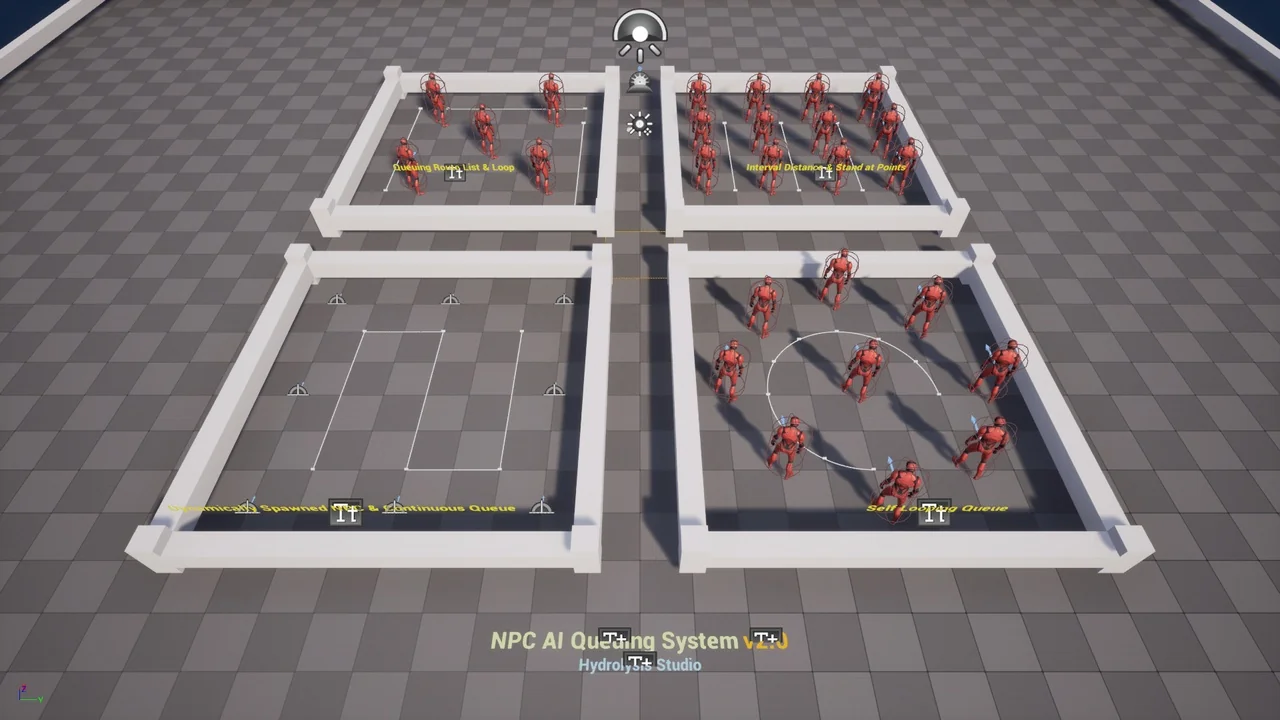
 Gameplay Features
 Gameplay Features
 Animations