"a19e0535960bd083"{"id":"1002025","slug":"first-person-hammer","title":"First Person Hammer","category":"Combat","engine":"4.26+,5.0+","assetVersion":"","engineVersion":"Engine Version: 4.26+,5.0+","tag":"Combat","accent":"blue","visual":"mech","summary":"Implement the First Person Hammer animation set with 44 hand-keyed motions on the Unreal Epic Skeleton, camera head-bone binding, and custom mesh setup.","platform":"Unreal Engine","publishedAt":"2026-10-26T13:01:37.930Z","updatedAt":"2026-10-26T13:01:37.930Z","sourceNotes":[],"fileContents":[],"compatibility":["Unreal Engine","Engine Version: 4.26+,5.0+"],"featuredImage":{"alt":"First Person Hammer","src":"/wp-content/uploads/published/2026/10/2f0f9966c752-2759c3d6-4fe6-44ad-a5be-1249ab81d136-96df62adce.webp"},"hasDownloadLink":true,"downloads":0,"terms":[{"taxonomy":"category","slug":"combat","name":"Combat"}],"galleryImages":[{"src":"/wp-content/uploads/published/2026/10/044abe9f4866-11ccc18d-c8bb-4833-bc87-0bed0c4b6118-ac50d7f007.webp","alt":"First Person Hammer"},{"src":"/wp-content/uploads/published/2026/10/f37d34a4f190-e1033aad-f505-46ce-9ac3-1f37607f8be8-42b503bc37.webp","alt":"First Person Hammer"},{"src":"/wp-content/uploads/published/2026/10/5e12ca151d1f-ad679c4c-ab1e-411f-8f9a-263d22d3f9de-01ddfa9f23.webp","alt":"First Person Hammer"},{"src":"/wp-content/uploads/published/2026/10/9bc7a435b4a2-288e34bf-376f-4d39-bd91-8b53f3495af7-95e778715f.webp","alt":"First Person Hammer"},{"src":"/wp-content/uploads/published/2026/10/67084a74a420-09d3246c-3f91-4af8-ae12-80ab4629aa1b-fbb5c8c0e8.webp","alt":"First Person Hammer"}],"accessPanel":{"kind":"resource","title":"Download this resource","eyebrow":"Free Download","message":"Log in or create a free account to start your download.","fileName":"Content.7z","safetyNote":"Resources are manually reviewed before listing to improve quality and reduce obvious risks.","actionLabel":"Download Free","resourceType":"Resource archive"},"contentHtml":"\u003ch2\u003eCamera View Positioning and Head Bone Motion\u003c/h2\u003e\n\u003cp\u003eFirst-person melee weapon swings often feel disconnected when view movement does not react to the physical momentum of character limbs.\u003c/p\u003e\n\u003cp\u003eFirst Person Hammer links weapon impact directly to viewport movement through dedicated head-bone tracks. Every animation contains motion keyed directly on the head bone of the skeleton. Fastening the player camera directly to this head bone allows the viewport to inherit all physical reaction data, translating weapon recoil and the impact shakes generated during each strike directly to the screen. Developers remain free to place the camera at whichever offset or vantage point produces their desired view, giving full control over weapon framing while preserving the per-hit camera shakes built into the animations.\u003c/p\u003e \u003ch2\u003eRigging with the Unreal Epic Skeleton and 44 Hand-Keyed Animations\u003c/h2\u003e\n\u003cp\u003eThe collection supplies 44 distinct melee animations, with every sequence hand-keyed on the Unreal Epic Skeleton.\u003c/p\u003e\n\u003cp\u003eHand-keying the full range of 44 motions guarantees that attacks, blocks, and recovery steps convey deliberate physical weight suitable for close-range survival combat. Because the skeletal structure corresponds to the Unreal Epic Skeleton, the entire motion library integrates cleanly with standard character pipelines without the need for bespoke bone retargeting or non-standard joint additions. The animation data applies directly to compliant rigs, driving consistent weapon paths across swings, impacts, and character motion while keeping technical overhead predictable across implementation phases.\u003c/p\u003e \u003ch2\u003eRight Hand Attachment and the Reference Hammer Mesh\u003c/h2\u003e\n\u003cp\u003eThe included hammer asset serves as a functional placeholder rather than permanent production geometry.\u003c/p\u003e\n\u003cp\u003eThe asset structure enables creators to bring in custom weapon models, position them using the reference mesh as a template, and bind the new geometry to the right hand of the character skeleton. The reference hammer is explicitly a low-quality mesh intended to demonstrate spatial orientation, rotation angles, and grip positioning. While developers are free to retain this reference mesh directly in final shipping scenes if low-detail geometry suits their visual style, the workflow expects artists to import their own unique hammer or melee axe mesh, align it against the provided placeholder, and attach it to the right hand socket for combat interactions.\u003c/p\u003e \u003ch2\u003eFirst-Person Combat Constraints Versus Third-Person Setups\u003c/h2\u003e\n\u003cp\u003eThese animations are strictly authored for first-person viewing angles and are not suitable for third-person cameras.\u003c/p\u003e\n\u003cp\u003eFirst-person melee motions rely on deliberate visual adjustments, specific depth illusions, and camera-relative limb placements that appear natural only when seen through an eye-level viewport. Transferring these 44 animations to a third-person camera breaks down the visual presentation, exposing non-aligned skeletal poses and torso positions that exist solely to service the first-person perspective. The asset restricts its motion design entirely to first-person survival and action camera setups, avoiding the full-body mechanical compromises required when building two distinct camera systems from a single animation file.\u003c/p\u003e \u003ch2\u003eMelee Weapon Systems and First Person Katana Compatibility\u003c/h2\u003e\n\u003cp\u003eClose-quarters combat systems in survival titles frequently require parallel animation packages to support diverse weapon types.\u003c/p\u003e\n\u003cp\u003eFirst Person Hammer integrates alongside First Person katana, establishing a shared structural foundation for projects handling both blunt implements and bladed weapon types. By maintaining consistent skeletal expectations across both packages, developers can interchange right-hand weapon meshes while preserving identical camera attachment logic on the head bone. This compatibility ensures that combat systems can cycle between blunt hammer strikes and edged katana attacks within the same first-person perspective, standardizing camera shake behaviors and grip socket setups across multiple survival weapon classes.\u003c/p\u003e\n\n\u003ch2\u003eRelated Resources Worth Checking\u003c/h2\u003e\n\u003cul\u003e\n\u003cli\u003e\u003ca href=\"https://3dcghub.com/sword-and-shield-first-person-animation-set/\" title=\"Sword and Shield First Person Animation Set\"\u003eSword and Shield First Person Animation Set\u003c/a\u003e\u003c/li\u003e\n\u003cli\u003e\u003ca href=\"https://3dcghub.com/first-person-baseball-bat/\" title=\"First Person baseball bat\"\u003eFirst Person baseball bat\u003c/a\u003e\u003c/li\u003e\n\u003cli\u003e\u003ca href=\"https://3dcghub.com/first-person-knife/\" title=\"First Person Knife\"\u003eFirst Person Knife\u003c/a\u003e\u003c/li\u003e\n\u003cli\u003e\u003ca href=\"https://3dcghub.com/ak-rifle-character-animation-pack-first-third-person/\" title=\"AK Rifle Character Animation Pack First \u0026amp; Third Person\"\u003eAK Rifle Character Animation Pack First \u0026amp; Third Person\u003c/a\u003e\u003c/li\u003e\n\u003cli\u003e\u003ca href=\"https://3dcghub.com/fps-animations-pistol-tactical-shield/\" title=\"FPS ANIMATIONS PISTOL (TACTICAL SHIELD)\"\u003eFPS ANIMATIONS PISTOL (TACTICAL SHIELD)\u003c/a\u003e\u003c/li\u003e\n\u003c/ul\u003e","contentTextLength":4241,"navigation":{"current":66,"total":4026,"previous":{"id":"1002026","slug":"first-person-horror-game-starter-kit-with-a-i","title":"First Person Horror Game Starter Kit (With A.I.)","category":"Gameplay Features","platform":"Unreal Engine","updatedAt":"2026-10-26T13:02:29.097Z"},"next":{"id":"1002024","slug":"fighting-animset-pro","title":"Fighting Animset Pro","category":"Combat","platform":"Unreal Engine","updatedAt":"2026-10-26T13:01:07.233Z"}},"relatedResources":[{"id":"1002046","slug":"hammer-animation-set","title":"Hammer Animation Set","category":"Combat","engine":"4.26+,5.0+","assetVersion":"","engineVersion":"Engine Version: 4.26+,5.0+","tag":"Combat","accent":"blue","visual":"animation","summary":"Explore the Hammer Animation Set, offering 49 hand-crafted third-person animations with root motion and in-place variations for heavy two-handed combat.","platform":"Unreal Engine","publishedAt":"2026-10-26T14:57:48.907Z","updatedAt":"2026-10-26T14:57:48.907Z","sourceNotes":[],"fileContents":[],"compatibility":["Unreal Engine","Engine Version: 4.26+,5.0+"],"featuredImage":{"alt":"Hammer Animation Set","src":"/wp-content/uploads/published/2026/10/b788d012ba99-a32dc10b-a1bb-42ab-b614-a6075ef87397-3a3774f110.webp"},"hasDownloadLink":true,"downloads":0},{"id":"1001913","slug":"sword-and-shield-first-person-animation-set","title":"Sword and Shield First Person Animation Set","category":"Combat","engine":"4.26+,5.0+","assetVersion":"","engineVersion":"Engine Version: 4.26+,5.0+","tag":"Combat","accent":"blue","visual":"animation","summary":"A close look at the Sword and Shield First Person Animation Set, featuring 35 hand-crafted clips, modular charge attacks, and defensive locomotion.","platform":"Unreal Engine","publishedAt":"2026-10-22T11:50:36.771Z","updatedAt":"2026-10-22T11:50:36.771Z","sourceNotes":[],"fileContents":[],"compatibility":["Unreal Engine","Engine Version: 4.26+,5.0+"],"featuredImage":{"alt":"Sword and Shield First Person Animation Set","src":"/wp-content/uploads/published/2026/10/f838d1a1c71a-874d2a17-a7a4-44aa-9ddf-2aa1be62959c-178e214512.webp"},"hasDownloadLink":true,"downloads":0},{"id":"1000367","slug":"first-person-baseball-bat","title":"First Person baseball bat","category":"Combat","engine":"4.26+,5.0+","assetVersion":"","engineVersion":"Engine Version: 4.26+,5.0+","tag":"Combat","accent":"blue","visual":"mech","summary":"A collection of 43 hand-keyed first-person melee animations built on the Unreal Engine 4 and 5 Epic Skeleton, featuring integrated head-bone camera shakes.","platform":"Unreal Engine","publishedAt":"2026-07-06T08:25:58.586Z","updatedAt":"2026-07-06T08:25:58.586Z","sourceNotes":[],"fileContents":[],"compatibility":["Unreal Engine","Engine Version: 4.26+,5.0+"],"featuredImage":{"alt":"First Person baseball bat","src":"/wp-content/uploads/published/2026/07/d769b372cc69-9e224cf6-bbe6-4a10-9f99-27edb1009e43-ffdfdd3742.webp"},"hasDownloadLink":true,"downloads":3}]}
Combat
First Person Hammer
Implement the First Person Hammer animation set with 44 hand-keyed motions on the Unreal Epic Skeleton, camera head-bone binding, and custom mesh setup.
Category:Unreal Engine,CombatPlatform: Unreal EngineEngine Version: 4.26+,5.0+Published: Oct 26, 2026
Combat
Resource overview
Camera View Positioning and Head Bone Motion
First-person melee weapon swings often feel disconnected when view movement does not react to the physical momentum of character limbs.
First Person Hammer links weapon impact directly to viewport movement through dedicated head-bone tracks. Every animation contains motion keyed directly on the head bone of the skeleton. Fastening the player camera directly to this head bone allows the viewport to inherit all physical reaction data, translating weapon recoil and the impact shakes generated during each strike directly to the screen. Developers remain free to place the camera at whichever offset or vantage point produces their desired view, giving full control over weapon framing while preserving the per-hit camera shakes built into the animations.
Rigging with the Unreal Epic Skeleton and 44 Hand-Keyed Animations
The collection supplies 44 distinct melee animations, with every sequence hand-keyed on the Unreal Epic Skeleton.
Hand-keying the full range of 44 motions guarantees that attacks, blocks, and recovery steps convey deliberate physical weight suitable for close-range survival combat. Because the skeletal structure corresponds to the Unreal Epic Skeleton, the entire motion library integrates cleanly with standard character pipelines without the need for bespoke bone retargeting or non-standard joint additions. The animation data applies directly to compliant rigs, driving consistent weapon paths across swings, impacts, and character motion while keeping technical overhead predictable across implementation phases.
Right Hand Attachment and the Reference Hammer Mesh
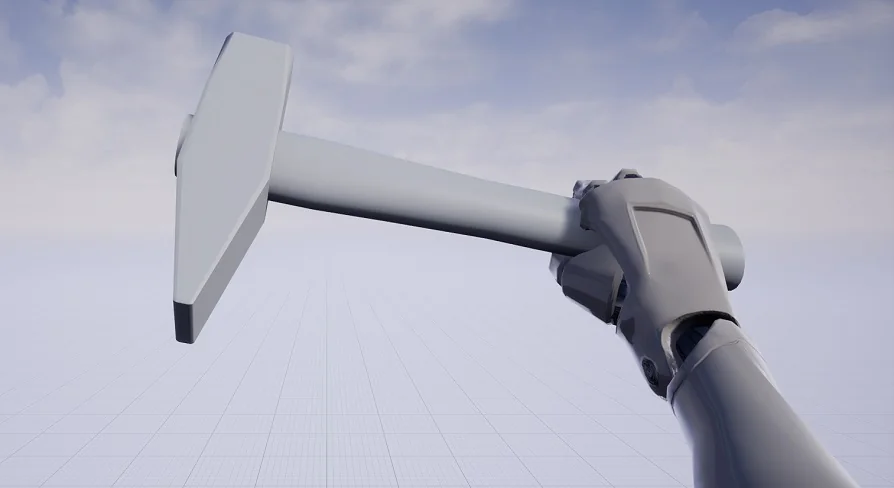
The included hammer asset serves as a functional placeholder rather than permanent production geometry.
The asset structure enables creators to bring in custom weapon models, position them using the reference mesh as a template, and bind the new geometry to the right hand of the character skeleton. The reference hammer is explicitly a low-quality mesh intended to demonstrate spatial orientation, rotation angles, and grip positioning. While developers are free to retain this reference mesh directly in final shipping scenes if low-detail geometry suits their visual style, the workflow expects artists to import their own unique hammer or melee axe mesh, align it against the provided placeholder, and attach it to the right hand socket for combat interactions.
First-Person Combat Constraints Versus Third-Person Setups
These animations are strictly authored for first-person viewing angles and are not suitable for third-person cameras.
First-person melee motions rely on deliberate visual adjustments, specific depth illusions, and camera-relative limb placements that appear natural only when seen through an eye-level viewport. Transferring these 44 animations to a third-person camera breaks down the visual presentation, exposing non-aligned skeletal poses and torso positions that exist solely to service the first-person perspective. The asset restricts its motion design entirely to first-person survival and action camera setups, avoiding the full-body mechanical compromises required when building two distinct camera systems from a single animation file.
Melee Weapon Systems and First Person Katana Compatibility
Close-quarters combat systems in survival titles frequently require parallel animation packages to support diverse weapon types.
First Person Hammer integrates alongside First Person katana, establishing a shared structural foundation for projects handling both blunt implements and bladed weapon types. By maintaining consistent skeletal expectations across both packages, developers can interchange right-hand weapon meshes while preserving identical camera attachment logic on the head bone. This compatibility ensures that combat systems can cycle between blunt hammer strikes and edged katana attacks within the same first-person perspective, standardizing camera shake behaviors and grip socket setups across multiple survival weapon classes.
 Combat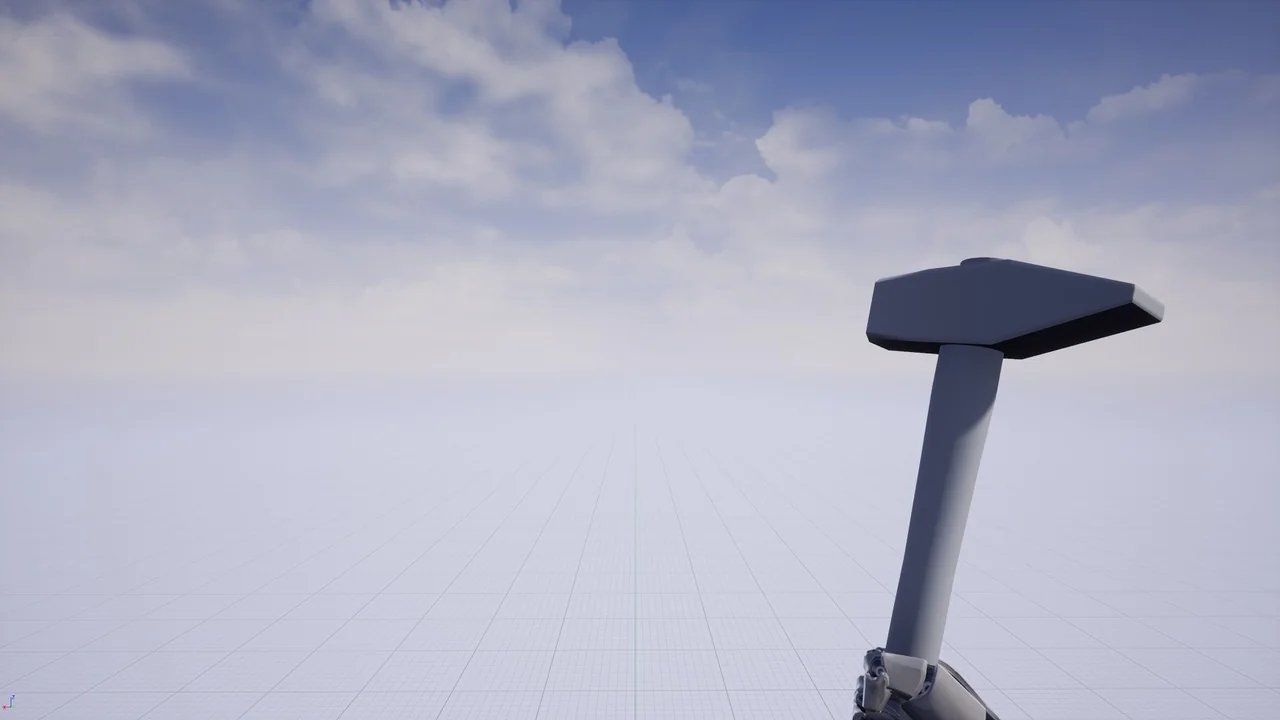
 Combat
 Combat
 Combat